Repository navigation
Craft Conductor settings
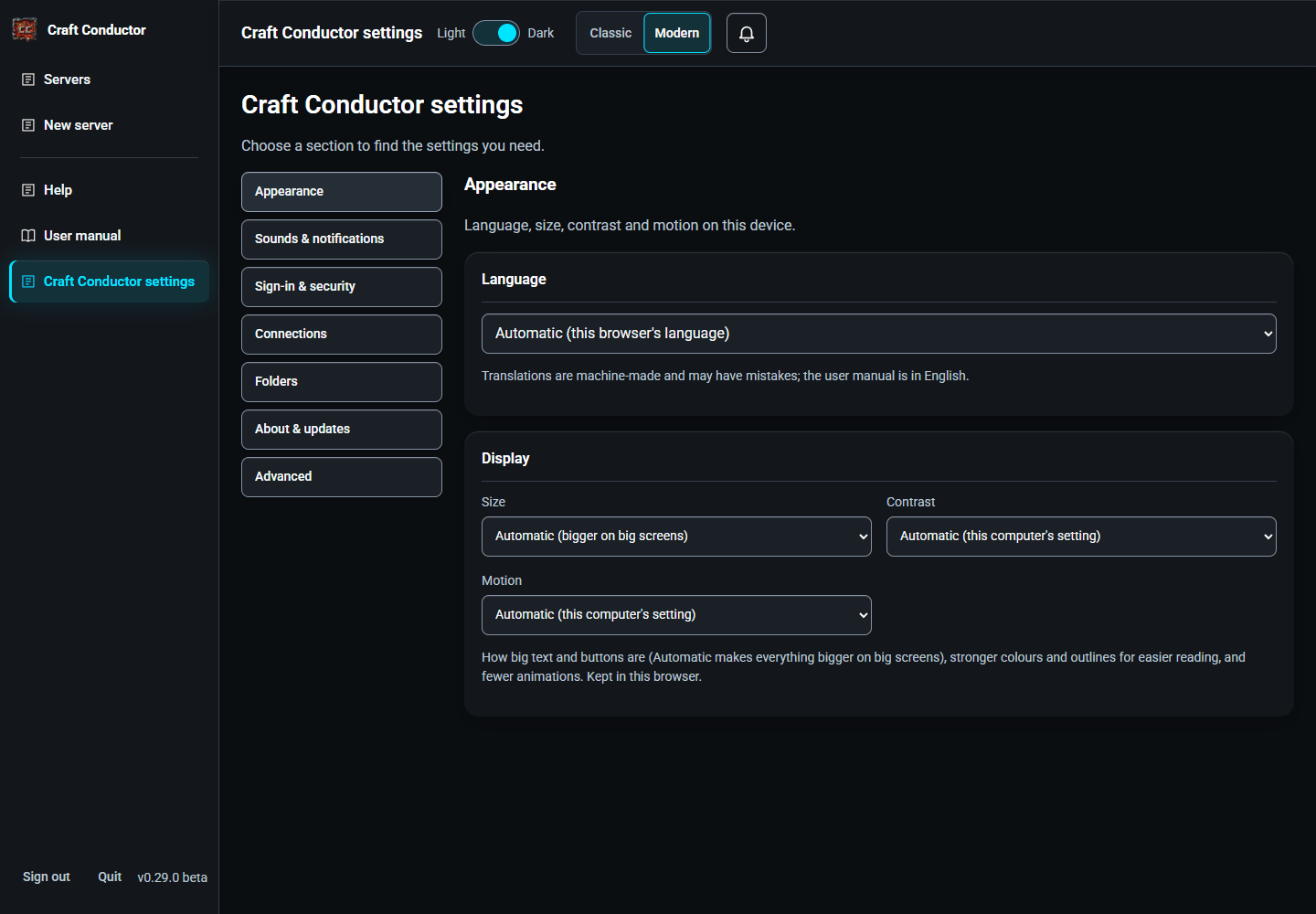
Choose a section from the menu: Appearance (Language and Display), Sounds & notifications (Sounds, Notifications and Warnings), Sign-in & security, Connections (Remote access & phones, Phone app, Sharing with friends, CurseForge, Discord and Mod conflicts), Folders (Where files are kept, Mods downloaded by hand), About & updates, or Advanced (Safety rules). Switching sections preserves what you typed. Settings that need saving have a Save button.



- Sign-in: change your password or PIN. There's always one.
- People: invite people to help, each with their own sign-in and what they may do on each server (see People and what they may do).
- Remote access & phones: see above.
-
Advanced → Safety rules: Craft Conductor keeps some rules on for everyone. If you know the risk and want to take it, tick one to switch it off: Other devices and tunnels may sign in with a PIN or a password that isn't strong (never the default PASSWORD), Tailscale may put the control panel on the internet, for anyone (Funnel), Resetting the password on this computer doesn't need the code from the file, No limit on wrong passwords and codes, and You choose the port friends use from outside, even 25565 (then each server's Friends page has Choose the port yourself under Open a port on my router). Ticking asks first, only works in a browser on the server's own computer, and shows a warning to dismiss with I understand; unticking works from anywhere. While one is off, the top of every page says so. Power users can list them in
craft-conductor.tomlinstead ([web] accept_risks, see the Configuration page of the wiki); those can't be unticked here. Two rules can't be switched off: a request through a tunnel never counts as on this computer, and the programs Craft Conductor downloads are always checked. - Sharing with friends: the friends' port and your public address, Friends outside your home for each server (playit.gg, a port on your router, or only at home), and Router: open the ports on your router by itself (UPnP).
- CurseForge: the downloads of Craft Conductor come with Craft Conductor's own CurseForge API key, so CurseForge works without one of your own. If you prefer your own (free, from console.curseforge.com), enter it here; it's used instead.
-
Discord: add a bot to post invites to a channel. Live status message: pick a Discord server and channel, and Keep a status message there: one message that always shows whether each server is online, how many are playing and its Minecraft version (and your public address, if set). Craft Conductor edits it as things change and says when Craft Conductor is closed; Stop ends it. The bot never reads the channel.
-
Whitelist through Discord: friends type
/whitelistand their Minecraft name in your Discord server (with several Minecraft servers, they pick one too). Only they see the answer. Pick what happens: Ask me first puts them on the Players page to Allow or Ignore (and tells you, like any request to join), or Let them in straight away adds them to the whitelist at once, optionally only members with a role you pick (others are asked for instead). Turn on starts it; the card shows whether Craft Conductor is listening. It works while Craft Conductor is open. If/whitelistdoesn't show up in Discord, add the bot again with Add it to another Discord server (bots added before Craft Conductor 0.18 lack the permission for commands) and restart Discord. The bot still never reads messages: Discord only sends it the command.
-
Whitelist through Discord: friends type
- Notifications: Notify me in this browser shows a notification when a server stops unexpectedly, an update is ready, someone joins (off by default) or something Craft Conductor was doing fails, while Craft Conductor's tab is in the background. The browser asks first. It works when the address is localhost (or HTTPS). Each notification shown also goes in the bell (see Messages).
-
Display: kept in this browser.
- Size: how big text and buttons are: Automatic (bigger on big screens), Smaller, Normal, Larger or Largest.
- Contrast: High contrast gives black or white backgrounds, stronger text, borders on every button, underlined links and a thick outline around what the keyboard is on. Automatic turns it on when your computer asks for more contrast.
- Motion: Less motion stops the animations (sliding panes, the spinning and drifting). Automatic follows your computer's "reduce motion" setting.
- Language: Craft Conductor's pages in English, Español, Português, Français, Deutsch, हिन्दी, 中文, Tiếng Việt, العربية (right to left) or 한국어. Automatic follows your browser's language. The choice is kept in this browser; the buttons, menus and short messages are translated by machine (so they may have mistakes), and this manual stays in English.
- Sounds: short sounds when you press a button (a soft click; rising notes for Start, Save and Install; falling notes for Stop and Delete), when something goes wrong, and a chime while Craft Conductor is open when a server finishes starting or a friend asks to join. They're on at Quiet at first: Volume (Off, Quiet, Normal), and a tick for each kind of sound. On an Android phone, Vibrate on button presses buzzes too (iPhones don't let web apps vibrate; on an iPhone the silent switch keeps them quiet). Kept on this device: each phone and computer has its own choice. Moving around with the keyboard never makes a sound, and a sound is never the only sign something happened.
-
Fingerprint or face sign-in: sign in with this device's fingerprint, face or screen lock (a passkey) instead of typing the password. On the device, sign in with the password, then press Add fingerprint or face sign-in on this device; next time the sign-in page shows Sign in with fingerprint or face. It needs a secure address (on a phone, the Tailscale one; see The phone app) or
localhoston the server's computer, and it only works at the address where it was added. Each one is listed with Remove; choosing a new password removes yours (the people you invited keep theirs, under Your account). You need your own password first. Not available when the password is set incraft-conductor.toml. - Mod conflicts: Share mod conflicts anonymously (off until you switch it on). When Find which mods break it finds a mod that doesn't work, Craft Conductor sends only the mod loader, the Minecraft version and the ids of the mods involved to Craft Conductor's relay, nothing about you or your server. Once three different people report the same conflict, it's on the shared list, and the Mods page warns anyone who has those mods together (everyone gets the warnings, whether they share or not). The list is fetched at most once a day.
-
Folders → Where files are kept: Servers, Backups and Exports, each with where it is and Change… (the folder browser; New folder… makes one). Craft Conductor moves what's there to the new folder, after saying what it moves and how much: on the same drive the folders are just renamed; to another drive each file is copied, the copy read back and compared with the original (SHA-256), and only then is the original deleted. If a copy goes wrong, or Craft Conductor is stopped halfway, nothing is lost: everything stays (or is put back) where it was, and the next start says so. The servers concerned must be stopped first (it says which), and they can't start until the move is done. Keep them in each server's folder puts backups back inside each server's folder. A server whose
craft-conductor.tomlnames a backups folder of its own keeps it. The new folder must be new or empty, and can't be inside another of the three (or hold one), inside Craft Conductor's own folder or the folder its program is in, one of the computer's own folders (C:\, Windows, Program Files,/,/usr...), on the network or on a removable drive (a USB stick or a memory card); each refusal says why. A folder that OneDrive, Dropbox or Google Drive syncs is fine for backups and exports; for servers you're warned first (a running world would sync all day, and files locked while they sync can stop a server from saving). On the computer itself, 📂 Servers folder (and the others) open them. Withcraft-conductor run(one server in its own folder) or in Docker (everything in its/datavolume), the folders can't be changed, and the card says why. - Folders → Mods downloaded by hand: where Craft Conductor looks for the CurseForge mods you download by hand: this computer's Downloads folder (or that it can't see one), and each folder you chose with Always look here, with Forget to stop looking there. The owner's only.
- Warnings: how many warnings you've hidden with "Don't ask me again", and Show all warnings again.
-
About Craft Conductor: the version, Check for Craft Conductor updates, the Craft Conductor folder, the notice and open-source licenses. Craft Conductor also checks by itself: when a new version is out, a message shows the version you have and the new one, with a link to what's new, and offers Update now or Later.
- Update now closes the message at once and shows Updating Craft Conductor…, with the step it's on (preparing, downloading with a progress bar when the size is known, verifying, installing, restarting). Craft Conductor installs the update, stops your servers cleanly (with a 1-minute warning if players are online) and restarts on the new version; the servers that were running start again once the new version is running properly. Pressing it more than once, or from another browser, starts nothing more. This same browser tab waits, shows Restarting Craft Conductor… while the control panel is away, and reloads itself into the new version as soon as that version answers (no new tab opens); then you sign in again. Craft Conductor never says it's updated until the new version is really running.
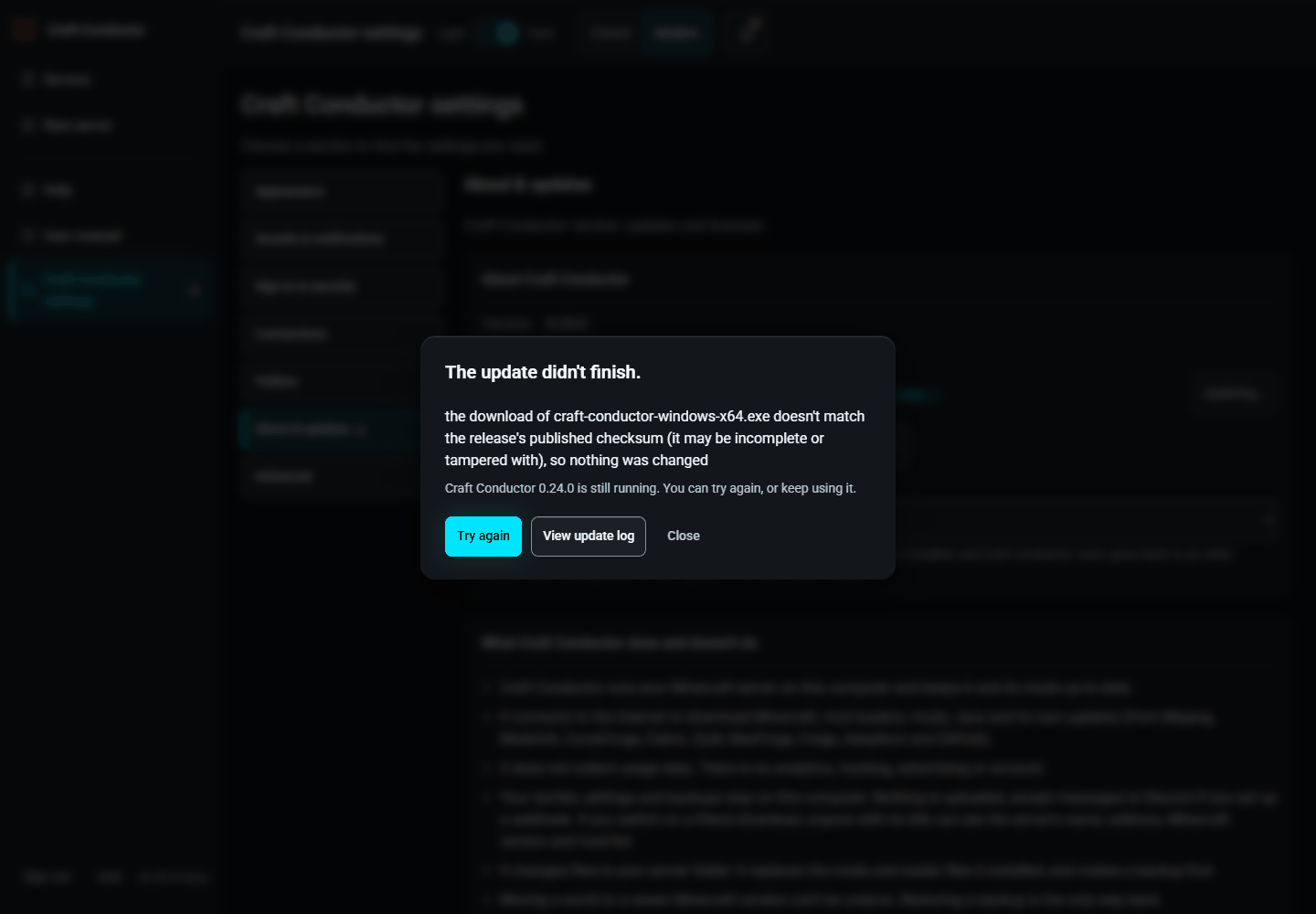
- If an update doesn't work, the old version comes back. Before replacing anything, Craft Conductor keeps the version you have. After installing, it starts the new one once to check that it runs; if it doesn't, the old one is put back at once and keeps running, and the screen says so with Try again. After the restart a small watcher (run from the old version) gives the new one three minutes to say it's up, and a few seconds to stay up; if it doesn't, the watcher stops it, puts the old version back and starts it again. This page then reloads by itself into the old version and tells you: "The update to Craft Conductor X didn't work, so Craft Conductor Y is back." If the old version can't be put back, the message says so, with Retry connection, View update log and Restart Craft Conductor manually.
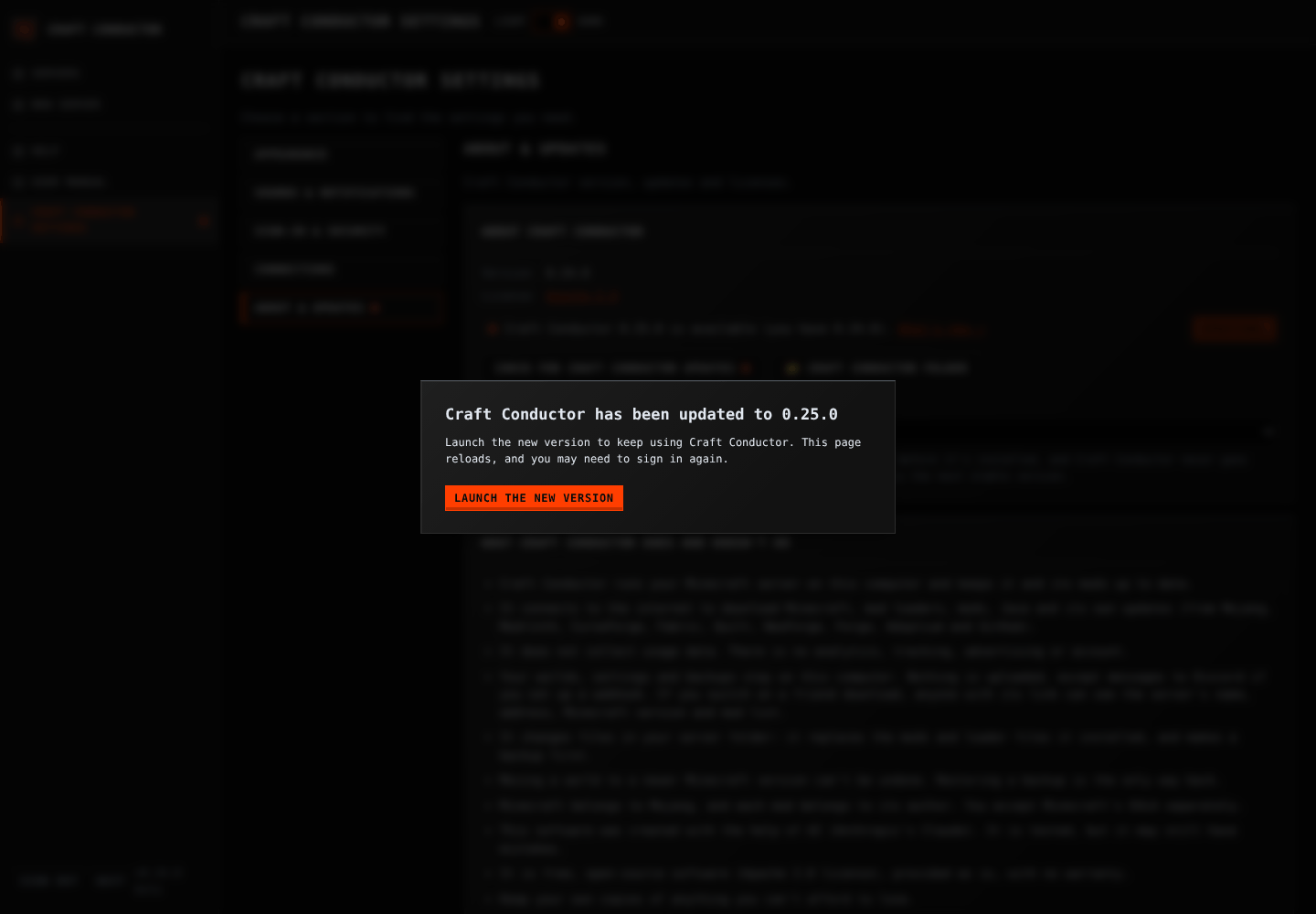
- Other browsers and computers. Only the browser that pressed Update now reloads by itself. Every other page that has Craft Conductor open says the update is under way, and when the new version is running it asks Launch the new version: the page reloads only when you press it (the browser's own notification says the same when its tab is in the background and Notifications are on). If the update didn't work, they're told that too, once.
- Phones. Phones with notifications on (Craft Conductor settings → Connections → Phone app, Updates) are told when an update is available, when Craft Conductor was updated, and when an update didn't work. Updating is only done in the control panel: tapping the notification opens it.
- Later stops the message from appearing by itself until Craft Conductor is restarted. It doesn't hide the update: a small red dot stays on Craft Conductor settings, on About & updates and on Check for Craft Conductor updates, and About Craft Conductor says which version is waiting, with an Update now button. Check for Craft Conductor updates offers the update again at once, even after Later. The dots go away when Craft Conductor is updated, or a new check finds nothing newer.
- Updates: Stable versions only (recommended), the default, or Beta versions too (early, less tested): betas come out before a version is released, for people who like to try things first.
- Every update is downloaded completely and checked against the checksum published with it (the release's
SHA256SUMS.txt) before anything is replaced. If it doesn't match (a damaged, cut-short or tampered download), nothing changes and the version you have keeps running. Craft Conductor never installs an older version than the one you have, so after leaving beta, the next update is the next stable version.
- The Light / Dark slider switches the whole app between themes and remembers your choice. On desktop it is in the top bar; on phones and tablets it is inside the hamburger navigation menu at the top left. Escape or tapping outside closes the menu.
- Panels, dialogs, settings, mods, backups and the invite pages share the Industrial Silver, Obsidian and Magma theme, with square edges, raised widgets and a recessed console.
Everything in Craft Conductor works with the keyboard and a screen reader (NVDA, JAWS, VoiceOver, TalkBack, Narrator).
- Tab and Shift+Tab move between buttons, links and fields; Enter or Space presses a button. A clear outline shows where you are.
- The first Tab on a page reaches Skip to main content, which jumps past the menu. After you pick a page in the menu, the keyboard starts at the top of that page, and the browser tab's title names the page and the server.
- A window that opens (a question, Check my setup, a mod's config files…) keeps Tab inside it until it closes. Escape closes it (the same as its Close or Cancel button), and the keyboard goes back to where you were.
- In the config file editor, Tab indents. To leave the editor, press Escape, then Tab. Ctrl+S saves.
- On the map preview, the arrow keys move the map, and + and - zoom.
- Messages (Saved, errors, a server starting or stopping) are read out by screen readers as they appear.
← People and what they may do · Troubleshooting →
This page is the user manual that comes with Craft Conductor (Help → User manual in the app). It's made from manual.md: change it there, not here.