Repository navigation
Java
Each Minecraft version needs a particular Java. Craft Conductor finds or downloads the right one, and the Java page says which one this server runs on and why.
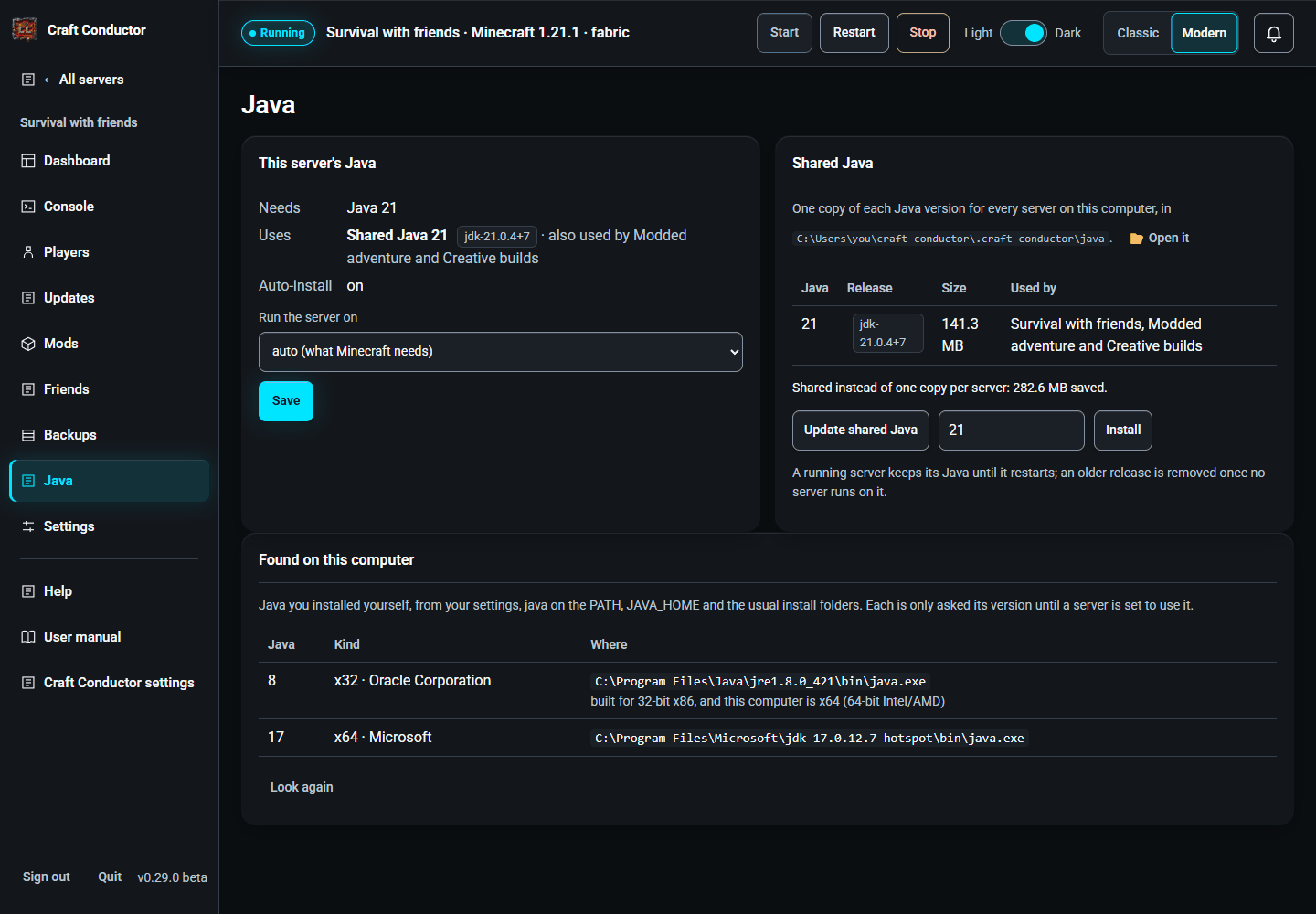
- This server's Java shows what Minecraft needs and what the server Uses: Shared Java 21 (with the other servers that use it, for example "also used by Survival and Creative"), Your own Java at a folder on this computer, or Nothing yet with what will be downloaded at the next start (Download Java 21 now gets it straight away). Run the server on forces a version if a modpack needs one; "auto" follows Minecraft.
-
Shared Java: Java that Craft Conductor downloads (Eclipse Temurin) goes into one folder for every server on this computer, so two servers that need Java 21 share one copy, downloaded once. The table shows each version's size and which servers use it, and how much sharing saves. Update shared Java gets new patch releases: they go in next to the old ones, and each server moves to the new one at its next start. A running server keeps the Java it started with until it restarts, and an older release is removed once no server runs on it. Remove deletes a version no server uses. On Windows, Java can't run from a folder named with letters outside your Windows language's (Japanese letters on an English Windows, say, as in your user folder): when Craft Conductor's folder has such letters, the Java it downloads goes in
C:\ProgramData\craft-conductor-java-<your account's id>instead, a folder only your account can open. If that can't be made (another account made a folder of that name), it says so before downloading, and a Java you install yourself (from adoptium.net) is found and used instead. -
Java already on your computer is used first. Before downloading, Craft Conductor looks for Java you installed yourself (from Eclipse Adoptium, Microsoft, Oracle or your Linux distribution, in the usual folders,
javaon the PATH andJAVA_HOME). Each one is only asked its version (run with-version) to see what it is and what kind of computer it's built for: on an Apple silicon Mac, an Intel build doesn't count. One that is exactly the version needed is used, and written into the server's settings so the choice stays fixed. Found on this computer lists them, with Use this one; Look again after installing another. - A newer Java is only used when you say so. If only a newer Java is here (say Java 25 for a Minecraft that asks for 21), the page offers Use Java 25: most servers run fine on a newer Java, but some loaders and older mods break on one, so it asks first. Choose "auto" to go back.
- Craft Conductor never changes your computer's own Java, or another server's choice. Use the shared Java instead switches a server from your own Java back to the shared one.
- On Windows, the first start on a new Java release can bring back Windows' "allow Java?" question, because the new release is a new program to Windows: answer Allow, or use Check my setup → Let them through Windows Firewall.
-
In Docker, the shared Java lives in
/data, so it survives image updates; Java on the computer running Docker isn't used inside the container. -
Servers from before version 0.23 kept their own copy of Java in their
.craft-conductor/javafolder. That copy isn't used any more, and the Java page points it out with its size: delete the folder by hand to free the space.
This page is the user manual that comes with Craft Conductor (Help → User manual in the app). It's made from manual.md: change it there, not here.