Repository navigation
Sticker Chart Card
📖 The TaskMate docs have moved to tempus2016.github.io/taskmate. This wiki is no longer updated; read this page on the new site.
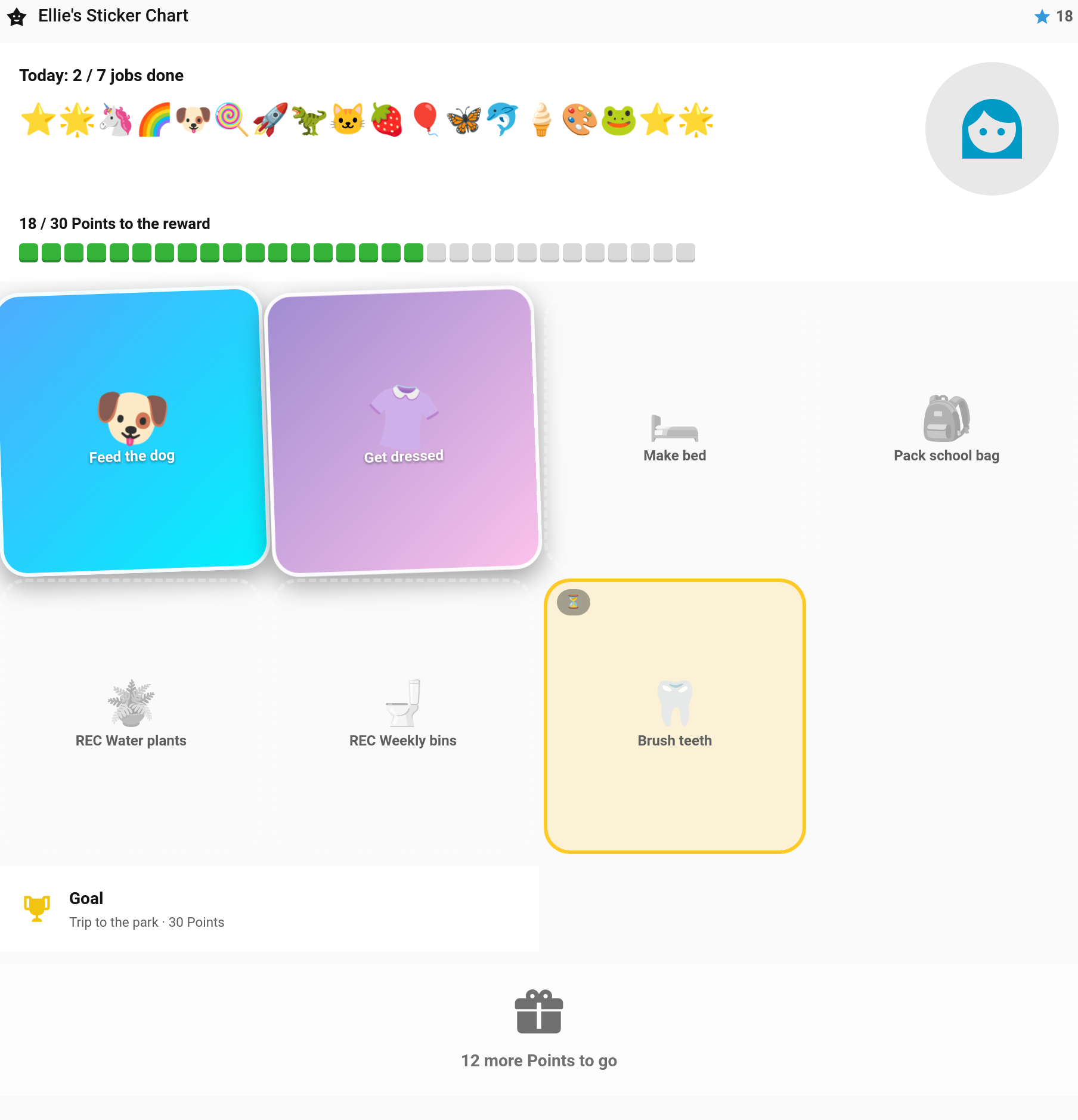
The fridge-door sticker chart, on a dashboard. Each of today's jobs is a big sticker for your child to tap, every point they've saved shows as a sticker of its own, and a row of blocks fills up towards the reward they're saving for. It's made for young children and a wall tablet: there's almost nothing to read, and every job is one tap.
New in v6.4.0 — contributed by @cad861
Edit dashboard → + Add Card → TaskMate Sticker Chart
type: custom:taskmate-sticker-chart-card
entity: sensor.taskmate_overview
child_id: a8c8376a            # optional — leave out for every child, side by side
The card is meant to fill a view, so it works best in a Panel view or a wide section. Without child_id you get one column per child, side by side.
At the top
- Today: 3 / 7 jobs done — how far through the day they are
-
A sticker for every point towards the goal (the row stops growing once the goal is reached). The stickers cycle through stars, unicorns, rockets, dinosaurs and more, so a long row never looks the same. Past 40 stickers the row is summarised with a count such as
+10 - Their face — the child's photo, or their avatar icon
- Blocks towards the goal — "18 / 30 Points to the reward", with a block lighting up for each point. For big rewards each block stands for several points, and a note under the row says how many
The jobs
One tile per job due today, across every time of day at once:
| Tile | Meaning |
|---|---|
| Grey, dashed | Still to do |
| Bright colour, tilted | Done |
| Amber, with ⏳ | Done, waiting for a grown-up to approve |
| Amber stripe filling up | Started — a chore that can be done several times a day, part-way through |
| 📷 in the corner | Needs a photo, so it has to be finished on the child card |
Each tile picks its picture from the chore: the chore's picture if it has one, an emoji at the start of its name (🦷 Brush teeth) if not, and otherwise a sticker matched from the name — teeth, bed, shoes, homework, the dog and so on.
At the bottom
The reward they're saving for, and a Claim button once they have enough. Claiming needs two taps, so a passing hand can't spend their points, and the claim goes to you for approval like any other.
- Tap a tile to mark the job done. It goes through TaskMate exactly as the child card does: the chore's button entity is pressed if it has one, so your automations still fire. The chore's completion sound plays and a celebration pops up, with a bigger one when the last job of the day is done.
- Press and hold a done tile to take it back. Only a parent can undo a job, so on a child's login the card says so instead.
- Jobs that need approval show as waiting until you approve them.
Some jobs can't be finished from a tile and are left off, or sent to the child card:
- Photo proof jobs show 📷 and say to finish them on the child card
- Open-ended chores aren't shown — the child needs to describe what they did
- Rotation chores show only for the child whose turn it is
Set goal: week (What the stickers count towards → This week's jobs in the editor) and the blocks count the week rather than the reward. The stickers and blocks then show the points earned since Monday, out of every point the week's jobs could give, and a full row reads PERFECT WEEK! The reward and the Claim button stay as they are.
| Option | Default | Description |
|---|---|---|
entity |
— |
Required. sensor.taskmate_overview
|
child_id |
all children | One child's chart. Leave out for every child, side by side |
reward_id |
automatic | The reward to save for. Automatic aims at the cheapest reward the child can't afford yet |
goal |
reward |
reward or week — what the stickers and blocks count towards |
title |
"{name}'s Sticker Chart" | Heading above each chart |
columns |
4 |
Job tiles per row, 2–6 |
show_today |
true |
Show the "Today: x / y jobs done" line |
show_claim |
true |
Show the Claim button |
allow_undo |
true |
Press and hold a sticker to take it back (parents only) |
sound |
true |
Play the chore's completion sound |
show_adults |
false |
Include adult profiles when no child_id is set. The editor shows this switch once your family has an adult |
card_design |
global | See Card Design Styles |
In YAML only:
| Option | Default | Description |
|---|---|---|
celebrate |
true |
false turns off the pop-up and confetti |
default_sound |
coin |
Sound for chores that don't set their own |
undo_sound |
undo |
Sound when a sticker is taken back |
type: custom:taskmate-sticker-chart-card
entity: sensor.taskmate_overview
child_id: a8c8376a
reward_id: 9f2c41d0
goal: week
columns: 5The card ticks jobs as whoever is signed in. If a tablet's account isn't allowed to act for a child, the card says so and explains the fix: link the child to that account, or add the account as a parent. See Parent Access.
- Logging Past Jobs — the same sticker chart, for a day that has gone
- Dashboard Cards — every TaskMate card
- Rewards — what the stickers save towards
- Kiosk Mode — another card made for a wall tablet
- Pre-Reader Mode — the child card for children who can't read yet