Release Notes
All releases: https://github.com/abbas0444/nexus_theme/releases
Graphite Dark in graphite. Its sidebar was solid royal blue, the largest block of colour on the Desk in a theme meant to be quiet charcoal. It is now graphite and flat, with a deep blue active item that ties it to the blue buttons and links; the login panel follows. If you had retuned its sidebar yourself, your choice is kept.
One look from the sign-in screen to the Desk. The login page's panel is now painted in the colour a theme is known by: its sidebar colour when the theme has a Solid or Gradient sidebar, otherwise its accent, with a glow of the button colour beside the Sign In button. Before, it followed the accent alone, so a theme like Cyberpunk Neon (magenta on the Desk, cyan links) signed people in on a teal panel.
Cyberpunk Neon, calmer. The sidebar is a deep violet gradient instead of full magenta with a wave, the active item a muted magenta that matches the buttons, and the links stay cyan: dark base, neon accents.
Readable "switched-on" buttons. The Filters button (and any other light-primary button) is a wash of the accent with the theme's own text colour, instead of a gray block with an accent-coloured count.
Upgrading
bench update                      # or: cd apps/nexus_theme && git pull
bench --site yoursite.com migrate
bench build --app nexus_theme
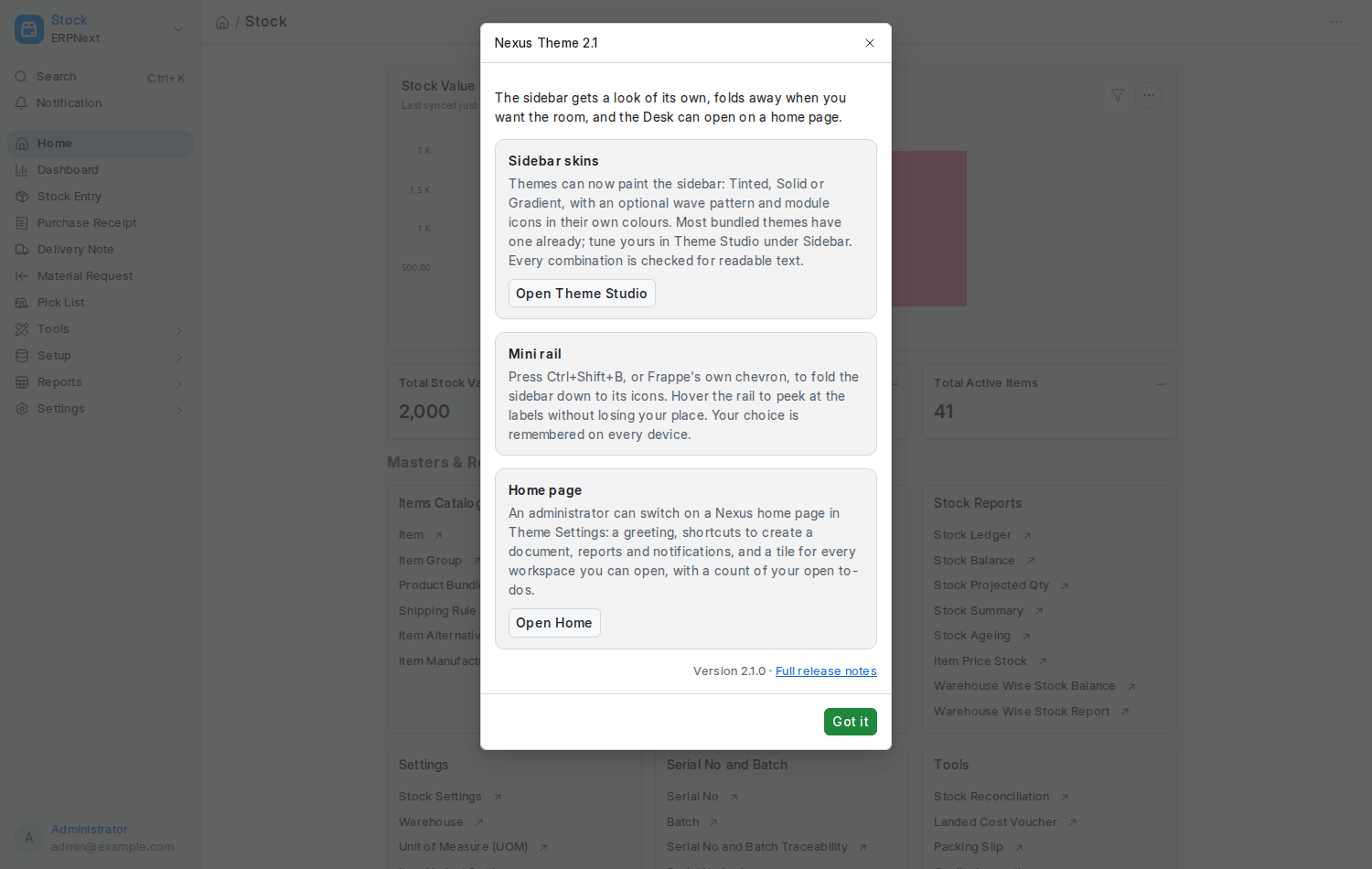
bench restartNew: sidebar skins. A theme can paint the sidebar Tinted, Solid or Gradient, with an optional wave pattern and module icons in their own colours. Most bundled themes come with one; tune yours in Theme Studio under Sidebar. Every combination is contrast-checked. See Sidebar Skins.
New: the mini rail. Ctrl+Shift+B, Frappe's chevron or Ctrl+/ fold the sidebar to its icons; hover to peek at the labels without the page moving. Remembered per person. See Mini Rail.
New: an optional home page. A greeting, shortcuts and a tile for every workspace you can open, with a count of your open to-dos. Switch it on in Theme Settings. See Home Page.
Upgrading
bench update                      # or: cd apps/nexus_theme && git pull
bench --site yoursite.com migrate
bench build --app nexus_theme
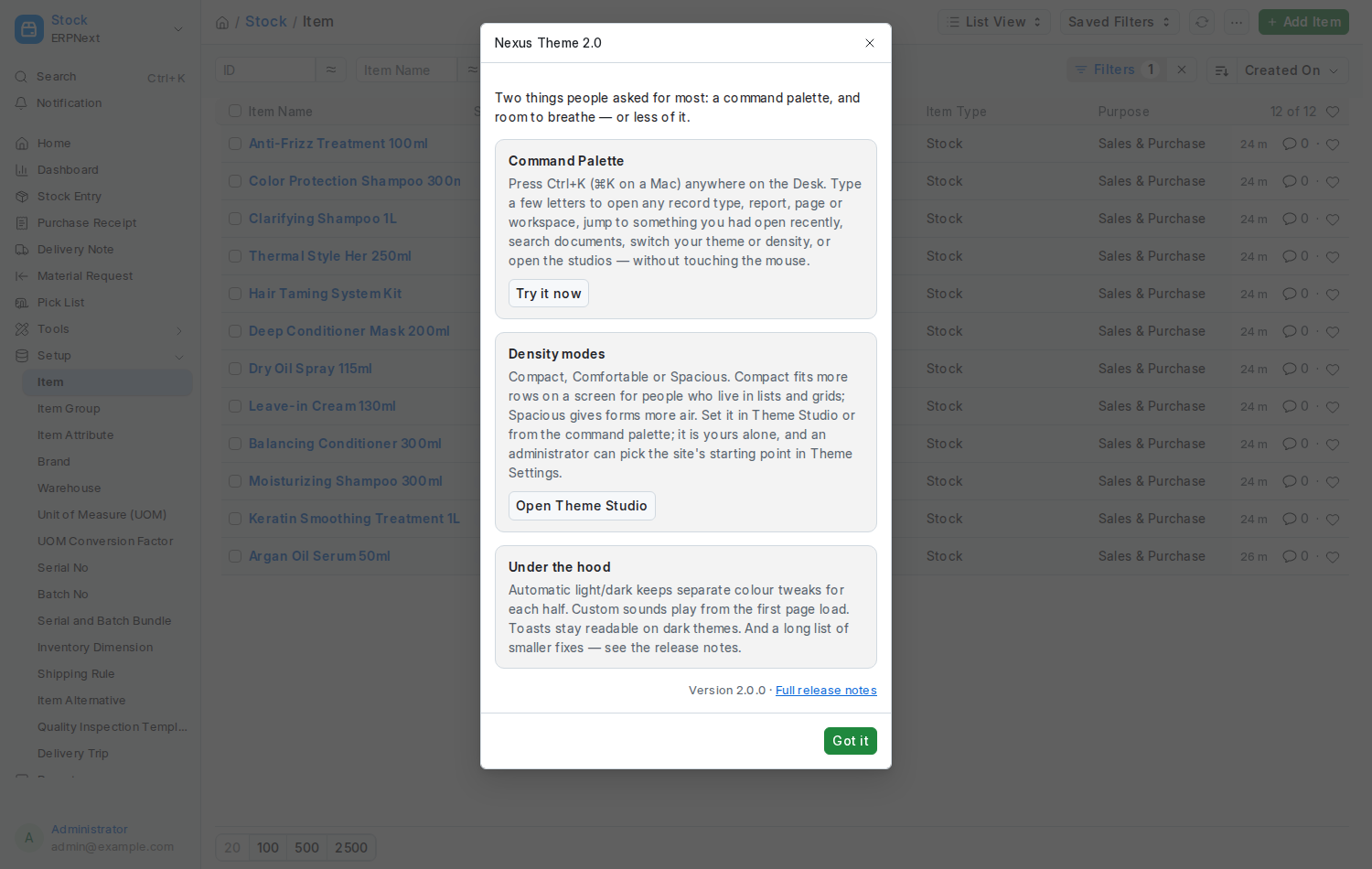
bench restartNew: the Command Palette. Press Ctrl+K (⌘K on a Mac) or Ctrl+Shift+P anywhere on the Desk. Open any record type, report, page or workspace, jump back to something you had open, search documents, switch your theme or density, mute sounds, open the studios — without the mouse. On Frappe 16 the shortcut used to focus the search bar; Ctrl+G still opens global search. See Command Palette.
New: Density modes. Compact, Comfortable or Spacious under the preview in Theme Studio, or from the palette. Vertical spacing only, independent of the theme, per person, with a site default in Theme Settings. Comfortable is exactly the old spacing, so nothing changes until someone chooses. See Density.
New: a "What's new" card, shown once per person after an upgrade to a release that has something to say, with a button to each new feature. It never comes back for patch releases, and can be reopened from the palette.
Fixes, all from a full review of the app
- Nobody can create or change another person's theme or sound preference through the REST API, and a row planted that way before the fix can be saved over by its rightful user.
- A Theme User cannot mark a theme as bundled, share it when sharing is off, or read other people's private themes through the API.
- Two people may give their themes the same name; importing never overwrites a theme you already have.
- Automatic light/dark keeps separate colour overrides for each half, applying a theme while it is on replaces the half it belongs to, and Theme Studio opens on the overrides already saved instead of wiping them.
- A dark palette applied over a light theme now switches the Desk's polarity with it.
- Custom sounds play from the first page load; the notification (bell) sound plays; Default, Clear and Reset no longer silence an event until reload; the login chime plays once per sign-in; turning Allow User Sounds off no longer mutes Frappe's own sounds.
- Toast messages are readable on dark themes; the sidebar's active item is styled on Frappe 16; the login page works right-to-left.
- The Permission Inspector no longer removes a rule's other rights when its last basic right is unticked, refuses to orphan field-level rules, reports own-only and shared access honestly, and clears caches after the save commits.
- The Theme Studio and Sound Studio dialogs are removed from the page when closed; the navbar logo shows on Frappe 16; the avatar-menu entries appear on every visit to the desktop; the theme cache is per person.
- Private files chosen as favicon or logo are skipped on the login page (guests cannot load them) with a warning in Theme Settings.
Upgrading
bench update                      # or: cd apps/nexus_theme && git pull
bench --site yoursite.com migrate
bench build --app nexus_theme
bench restart- The sign-in screen has its own Login Brand Name and Login Brand Logo in Theme Settings, so it no longer has to borrow the site's app name.
- Theme Studio has a View Login button: it opens a preview of the sign-in screen in the theme you have selected, so you no longer have to sign out to see it.
New: an optional login page. /login can now be a two-column sign-in screen painted in the site's theme, with your logo, a headline, up to six points and an optional figure on a coloured panel. Switch it on under Theme Settings → Login Page; it is off by default, and unticking the box brings Frappe's own page straight back. Password sign-in, forgot password, sign-up, email-link login, social logins, LDAP and two-factor all keep working, because the page loads Frappe's own login script. See Login Page.
Fixes
- The Permission Inspector page now lives at
/app/nexus-permission-inspector. Frappe 16 ships its own single-document form called Permission Inspector, and the Desk sent/app/permission-inspectorto that form instead of the Nexus Theme page. The workspace shortcut, sidebar and documentation point at the new address, and a patch removes the old page record on existing sites. - In the inspector, typing a name in the person box now lists matching people, and picking one no longer clears the view.
Upgrading
bench update                      # or: cd apps/nexus_theme && git pull
bench --site yoursite.com migrate
bench restart
The restart matters here: Frappe keeps the Desk's module sidebar in the web server's memory, so without it the sidebar keeps the old link.
First public release.
- Theme Studio: 17 bundled themes, a live editor with basic and advanced controls, 8 curated palettes, a generator that builds an accessible theme from one brand colour, automatic light and dark pairing, sharing, export and import, and WCAG contrast checks on every save.
- Sound Studio: 11 Desk events, 3 synthesised presets each, your own uploads, per-event volume and a master switch.
- Permission Inspector: a plain-language view of what any person or role can do across every record type, the reason behind each permission, and safe editing through Frappe's own Custom DocPerm records.
- Theme Settings: site default theme, apply to login and website, allowed themes, custom themes and sharing switches, navbar logo, favicon, login background and a master switch for sounds.