Repository navigation
2.3.102 Satellite Harbor
Handle:
harbor
Interface: CLI, no published port
Harbor Framework is Laude Institute's agent evaluation framework from the creators of Terminal-Bench. It runs tasks, agents and verifiers in container environments, including local Docker. Its former laude-institute/harbor repository redirects to harbor-framework/harbor.
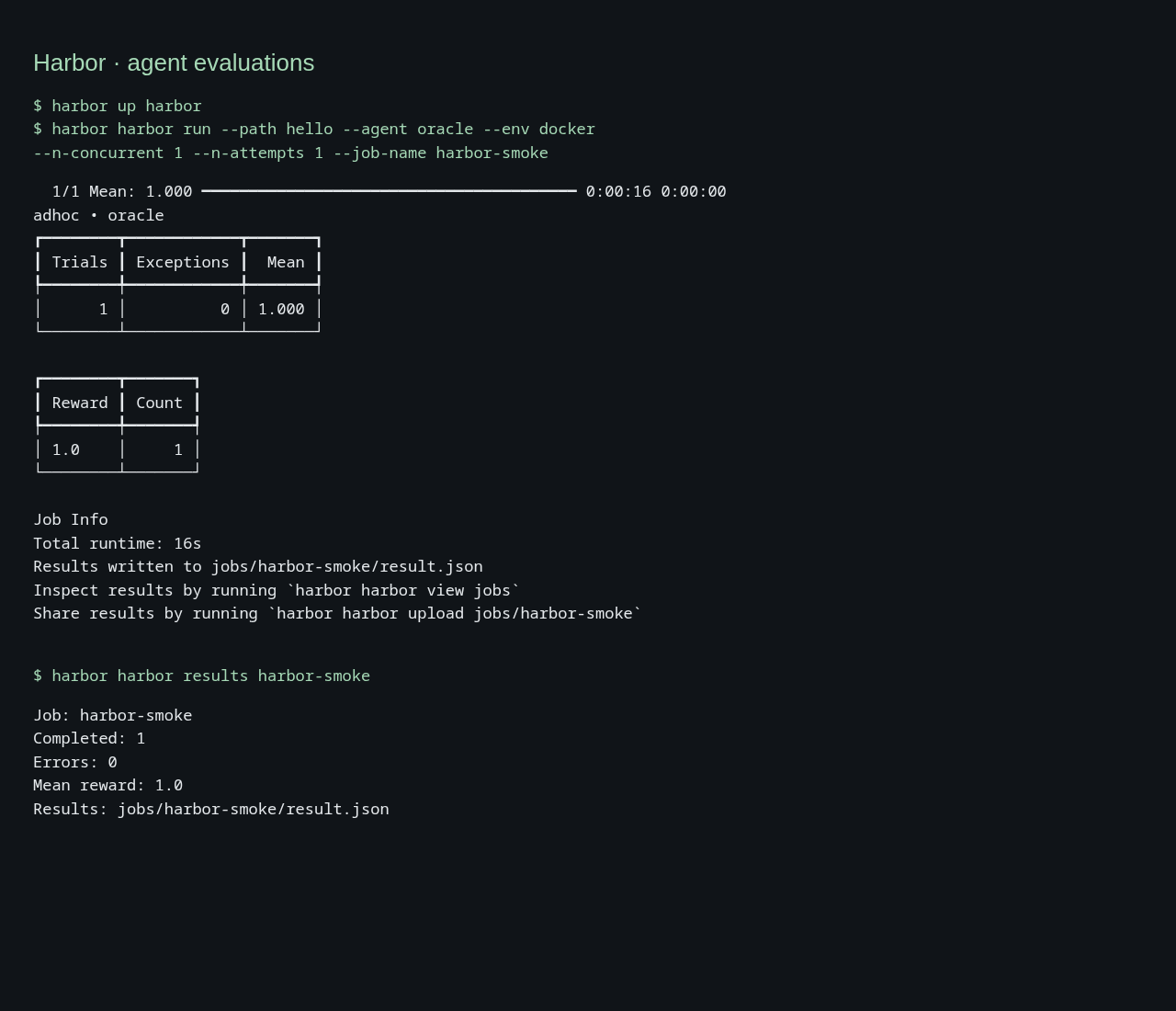
The service is named harbor. The first harbor in these commands is the toolkit. The second selects the evaluation framework:
harbor up harbor
harbor harbor --help
harbor harbor run --path hello --agent oracle --job-name smoke
harbor harbor results smoke
No extra alias, host framework installation or standalone launcher is needed. Existing named Promptfoo evaluations and the built-in Harbor Bench service are unchanged.
This service uses your local Docker daemon through /var/run/docker.sock. On Linux, configure its socket group:
harbor config set HARBOR_HARBOR_DOCKER_GID "$(stat -c %g /var/run/docker.sock)"For a socket owned by group ID 0, keep the default. Create the workspace as your host user, build and start:
mkdir -p "$(harbor home)/services/harbor/data"
harbor build harbor
harbor up harbor
harbor harbor --help
harbor harbor run --help
harbor harbor --version
up keeps an idle runner available for harbor exec harbor and harbor shell harbor. Each harbor harbor invocation runs a temporary container with the same workspace and removes it on exit. It also works without starting the idle runner first. There is no published web server or --open action.
The included task asks an agent to write a greeting. The upstream oracle agent executes the bundled solution and the verifier checks the resulting file. This validates setup, execution, verification and result persistence. It measures framework operation rather than model quality. It uses no model, API key or cloud provider.
cp -R "$(harbor home)/services/harbor/example" \
  "$(harbor home)/services/harbor/data/hello"
harbor harbor run --path hello --agent oracle --env docker \
  --n-concurrent 1 --n-attempts 1 --job-name hello-oracle
harbor harbor results hello-oracle
Expect one completed trial, zero errors and reward 1.0. Results, verifier logs and configuration appear under services/harbor/data/jobs/hello-oracle/. Use a fresh job name for each run. With a custom workspace, copy the task there instead.
To evaluate a model, replace oracle with an upstream agent and supply that agent's model and endpoint settings. Credentials can be configured in harbor env harbor; they are passed to the runner. Agent-specific options and environment forwarding are documented by harbor harbor run --help. Paid providers are optional.
harbor harbor dataset list
harbor harbor job --help
harbor harbor task --help
Keep local tasks, configs and results inside the mounted workspace. Absolute paths outside it exist only on the host unless separately mounted. Dataset downloads and job outputs use the workspace by default. Tasks create separate Docker containers and networks, so these do not automatically join the toolkit's harbor-network or inherit backend service names.
harbor harbor results hello-oracleresults reads jobs/<name>/result.json from the workspace and prints completed trials, errors and mean reward. A job is a named evaluation run. Reading results makes no model or hosted-service call. An unknown job reports an error and exits with status 2. This small integration command supplements the framework's own subcommands. Help and follow-up hints use harbor harbor so they can be pasted into the host shell.
The upstream view subcommand starts a server inside the container and needs an explicit port mapping and --host 0.0.0.0 for browser access. Use results for the CLI workflow.
Set these with harbor config:
| Variable | Default | Purpose |
|---|---|---|
HARBOR_HARBOR_VERSION |
0.24.0 |
Upstream PyPI package version. Rebuild after changing it. |
HARBOR_HARBOR_WORKSPACE |
${HARBOR_HOME_VOLUME}/services/harbor/data |
Absolute workspace path, identical on host and runner. Create it as your host user. |
HARBOR_HARBOR_DOCKER_GID |
0 |
Supplementary group for access to the host Docker socket. |
For example:
harbor config set HARBOR_HARBOR_WORKSPACE /absolute/path/to/evals
mkdir -p /absolute/path/to/evals
harbor up harbor
The runner uses Harbor's host user and group IDs. Its home is the workspace, so tasks, results, downloaded datasets and the upstream cache persist there. Upstream telemetry is disabled with HARBOR_TELEMETRY=0.
- The workspace is mounted at the same absolute path in the runner and on the host. The framework asks the host daemon to bind job log directories into task containers, so translating it to
/appwould break verification and results. -
/var/run/docker.sockgrants control over the host Docker daemon. Only run trusted tasks and agents on a host whose Docker access you intend to grant. - The workspace uses a shared SELinux label (
:z). The runner disables its own SELinux label isolation to access the Docker socket on Fedora. Upstream task log mounts also use shared labels. - The build installs Git, Python, Docker CLI, Docker Compose and the pinned
harborpackage. No privileged Docker-in-Docker daemon or paid sandbox is required.
-
Socket permission denied: set
HARBOR_HARBOR_DOCKER_GIDusing the Linux command above, then recreate the runner withharbor up harbor. - Workspace permission denied: create the workspace as your host user before the first run. If Docker already created a root-owned directory, correct its ownership before retrying.
- Missing reward or empty result directories: ensure the workspace is an absolute path and matches on both sides of the mount. Keep results inside it.
-
Docker unavailable: Docker Engine or Docker Desktop must be running, with its socket exposed at
/var/run/docker.sock. -
Duplicate job name: choose another
--job-namerather than overwriting an existing run.
harbor logs harbor --no-follow
harbor down harbor
The idle runner has no application logs. Evaluation output appears in the invoking terminal and workspace job logs. Stopping the runner retains jobs and task inputs. Interrupted evaluations may leave upstream task containers for inspection or cleanup.