Repository navigation
2.3.103 Satellite Rummage
Handle:
rummage
URL: http://localhost:35100
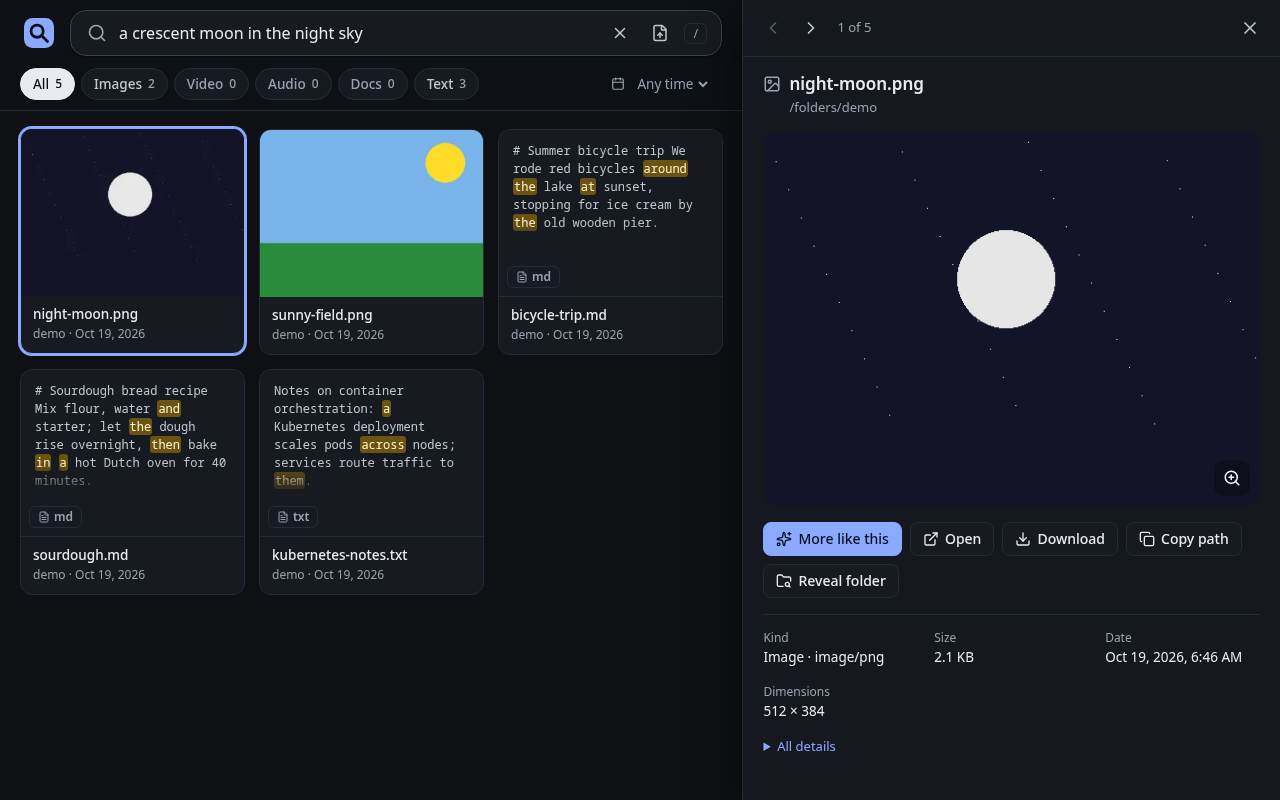
rummage is local multimodal semantic search for your files. One program serves a web UI and an HTTP API, watches the folders you choose, and indexes text, images, PDFs, audio and video with Google DeepMind's EmbeddingGemma 2 running on llama.cpp. Search by words, or drop an image, audio or text file on the page to find similar ones.
# Point rummage at the folder you want to search (mounted read-only)
harbor config set rummage.folders ~/Pictures

harbor pull rummage
harbor up rummage --open
The host folder from rummage.folders is mounted read-only at /folders. rummage does not index anything until you add a folder: on first run the web UI opens the folders drawer, where you can browse to /folders (or any sub-folder) and add it. The same from the CLI:
harbor exec rummage rummage folders add /folders
harbor exec rummage rummage status
Indexing runs in the background and follows changes to the files. The EmbeddingGemma 2 model files (about 830 MB at the default Q8_0) download into the workspace on the first start; searches answer with a not_ready error until the model has loaded.
Harbor picks the image to match the detected capability:
| Capability | Image | Devices |
|---|---|---|
| none | ghcr.io/av/rummage:<version>-cpu |
|
nvidia |
ghcr.io/av/rummage:<version>-cuda |
NVIDIA GPU reservation (needs the NVIDIA Container Toolkit) |
rocm |
ghcr.io/av/rummage:<version>-vulkan (or -rocm) |
/dev/kfd, /dev/dri
|
On AMD the Vulkan build is the default because it measured faster than ROCm for EmbeddingGemma 2 on a Radeon 8060S. Switch to the ROCm build with:
harbor config set rummage.amd_backend rocm
harbor restart rummage
The container runs as your host user, so it needs access to /dev/dri/renderD*. If those device nodes are not world-accessible on your system (ls -l /dev/dri) and harbor exec rummage rummage doctor finds no GPU, give the container the host's render group:
harbor config set rummage.gpu_group $(getent group render | cut -d: -f3)Every GPU build falls back to the CPU, with a warning, when it finds no GPU. harbor exec rummage rummage doctor shows the backend, GPUs, model files and ffmpeg it found.
Following options can be set via harbor config:
# Host port for the web UI and the API
HARBOR_RUMMAGE_HOST_PORT=35100

# Image repository and version; the tag is <version>-<backend>
HARBOR_RUMMAGE_IMAGE="ghcr.io/av/rummage"
HARBOR_RUMMAGE_VERSION="latest"

# Holds data/: config, index, thumbnails and model files (mounted at /data)
HARBOR_RUMMAGE_WORKSPACE="./services/rummage"

# Host folder mounted read-only at /folders, for rummage to index
HARBOR_RUMMAGE_FOLDERS="./services/rummage/folders"

# Image used with the rocm capability: "vulkan" or "rocm"
HARBOR_RUMMAGE_AMD_BACKEND="vulkan"

# Container group for GPU device access with the rocm capability:
# a group name from the image or a numeric host gid
HARBOR_RUMMAGE_GPU_GROUP="video"
rummage's own settings (model quant, vector size, thumbnail size, skipped directories and so on) are in the web UI settings and in /data/config/rummage/config.toml, or can be overridden with RUMMAGE_* environment variables through harbor env, for example:
# Require a bearer token for the API and the UI
harbor env rummage RUMMAGE_AUTH_TOKEN <long-random-token>
# Use smaller vectors
harbor env rummage RUMMAGE_DIM 256
Setting RUMMAGE_FOLDERS this way fixes the folder list to that variable and disables adding folders from the UI. See the config reference for every key.
rummage serves the files it has indexed (previews, downloads) to anyone who can reach its port. Set RUMMAGE_AUTH_TOKEN before exposing it beyond your machine.
-
${HARBOR_RUMMAGE_WORKSPACE}/dataat/data: config, the index (rummage.db), thumbnails, previews and model files. Arummage-initcontainer creates it owned by your host user before rummage starts, and rummage runs as your host user. -
${HARBOR_RUMMAGE_FOLDERS}at/folders, read-only: the files to index. To search several unrelated folders, point it at a common parent and add the sub-folders you want.
Everything the UI does goes through /api/v1; the OpenAPI page is at http://localhost:35100/api/docs.
curl -s -X POST http://localhost:35100/api/v1/search \
  -H 'content-type: application/json' \
-d '{"query": "red bicycle by a lake", "limit": 5}'harbor logs rummage
harbor exec rummage rummage doctor
harbor exec rummage rummage status --errors- No results: check that a folder is added (
rummage folders ls) and that indexing finished (rummage status). - Running on the CPU on an AMD or NVIDIA machine: check
harbor exec rummage rummage doctor, and see GPU for the device group.