Repository navigation
Album details
Open an album from your current browse view. Use the breadcrumb or Back to return with your previous filters and position.
Album pages keep the cover aligned with the title and group genres and tags in one compact row. Click the release year to browse that year in your collection. + Tag opens tag management; partial and archived assignments remain visible. Use stars to rate the album in iBroadcast and the heart for a local Tagcast favourite. Clear removes an existing star rating. Choose ⋯ → Move to trash…, select tracks and review them before confirming. See trash and duplicates. The clickable breadcrumb follows where you opened the album, such as Workspace / Tags / Emusic / album. Return to that context with its filters, order, page and scroll position; direct album links fall back to Albums.
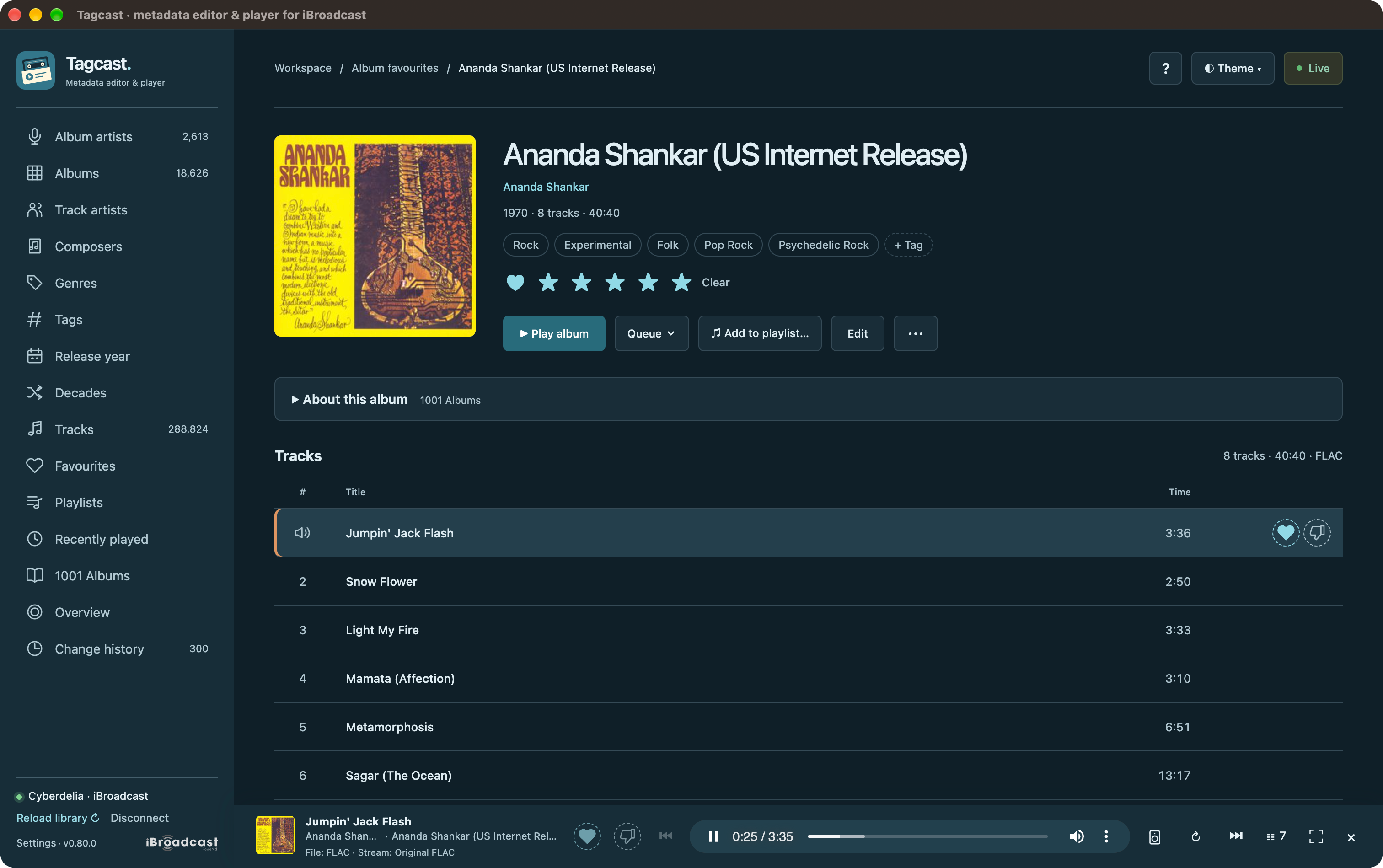
0.80.0 album page: genre chips and + Tag sit above the playback/editing actions. The highlighted row and speaker identify the playing track. Select a screenshot to open the full-size image.
Since 0.85.0: Shuffle album adds a separate button beside Play album, queuing this album's tracks in random order. Both playback actions replace the current queue. Optional Gapless playback applies only to Play album in normal album order.
Album cards and list rows have a small Play button beside the compact + menu. Play starts the complete album/set and replaces the queue without opening another page. The + menu keeps its queue actions. Play random album remains available in All albums and discovery groups; cleanup filters and manual album selections hide it.
Since 1.1.0: use ⋯ → Download album… to save separate local audio copies. See album downloads for the reviewed workflow, quality choices and ibfetch companion. Playback and the iBroadcast library stay unchanged.
Album tracklists keep ordinary tracks on one line. A second line shows distinct performers, composer credits, assigned tags or a file-format exception; the album artist is not repeated as a track performer. The heading reports the track count, known duration and most common stored format. Different formats get an amber label; ties list all known formats, and incomplete format data is identified as known files. These labels describe stored metadata, not the stream's bitrate or audio quality.
On mobile, the cover fills the available width, followed by the album title, album artist, metadata and controls. Desktop keeps the cover alongside this information.
The playing row uses a speaker instead of its number and a subtle background. On a mouse, hovering or focusing a row reveals Play, track tags, queue and empty heart controls. A filled favourite heart stays visible. Touch devices always show actions. Cleanup mode retains upload advice, individual format labels and checkboxes.
Open an album, then double-click its cover to open a lightbox, or focus the cover button and press Enter. Close with Escape, the ×, or a click outside the image view. Covers in grids and lists open their album immediately. The compact player's cover opens Now playing immediately.
The viewer contains the full image without cropping. Larger iBroadcast artwork loads only when you open it; if unavailable, Tagcast falls back to the existing cover. Playback, the queue and browser history stay unchanged.
- Open Settings → Album information.
- Enable Show album information from TheAudioDB, then save Settings.
- Open an album and expand About this album · TheAudioDB to read the available English background text and follow its source link.
This option is off by default and independent of artist biographies and 1001 Albums. Enabling it does not scan your collection or fetch any text by itself. Visiting an album first checks the local cache; only missing or expired information is fetched in the background. Only the stored primary album artist and full album title are sent to TheAudioDB, without credentials or track lists. Album controls and playback stay available while text loads or if a lookup fails.
One exact artist/title match is required, allowing differences in case and spacing while preserving accents, punctuation, numbered volumes and edition/version text. Uncertain matches are left unresolved; some albums have no English description. Check the source link, since names alone cannot prove the identity of a release.
Since 1.1.0: recognised edition suffixes can be omitted in one second lookup when the full title finds nothing. Examples include (Expanded Edition), (Mono Edition), (20th Anniversary Deluxe Edition) and (2011 Remastered Version). The stored title stays unchanged. Unknown subtitles, live/remix distinctions and numbered volumes remain significant; ambiguous matches stay unresolved.
1001 Albums texts take priority even when Settings → Discovery → 1001 Albums is off. The setting controls the discovery page/shortcut, not album background texts. Opening an album checks only its own identity against the local reference; a unique exact artist/title match or an active manual link can supply its text without any previous analysis. It does not scan the library, change counts or read/write the full analysis report. Tagcast shows only that local text, retaining its Wikipedia attribution and license links. It does not read or request TheAudioDB text for that album. Tagcast waits for the local identity/text check before choosing a source; it never starts a 1001 Albums analysis automatically. Albums without an available unambiguous reference text can still use TheAudioDB.
If the album exists on TheAudioDB but has no English description, Tagcast explains that the album was found and provides its source link. This is distinct from a missing match. A previous Mambo! by Yma Sumac lookup matched the title including its exclamation mark but returned no English background text. Provider content can change.
Public text is stored in album-information.sqlite3 in Tagcast's settings folder.
Available text is reused for 30 days before checking again when the album is
revisited. Missing or ambiguous results are remembered for one day. The cache
holds at most 5,000 records / 20 MiB of content, plus SQLite overhead. Turning
the option off stops lookups and retains the cache. A multi-disc album makes
one lookup for its displayed identity.
Cached text stays visible while refreshing. After a provider failure, Try again at … shows when a manual retry becomes available; Tagcast does not retry by itself. Expanding the text adds no history entry, and Back preserves the panel's open/closed state within the current page session. Nothing is written to iBroadcast. This uses the free API and does not add a Premium key.
For edits, see metadata, Various Artists compilations, artwork, lyrics or tags.