Repository navigation
Editor Community
Open Tools → Community to follow issues, contributions and the official wiki without leaving Arkline Editor. It reads GitHub data; it does not turn the selected repository into a local code checkout.
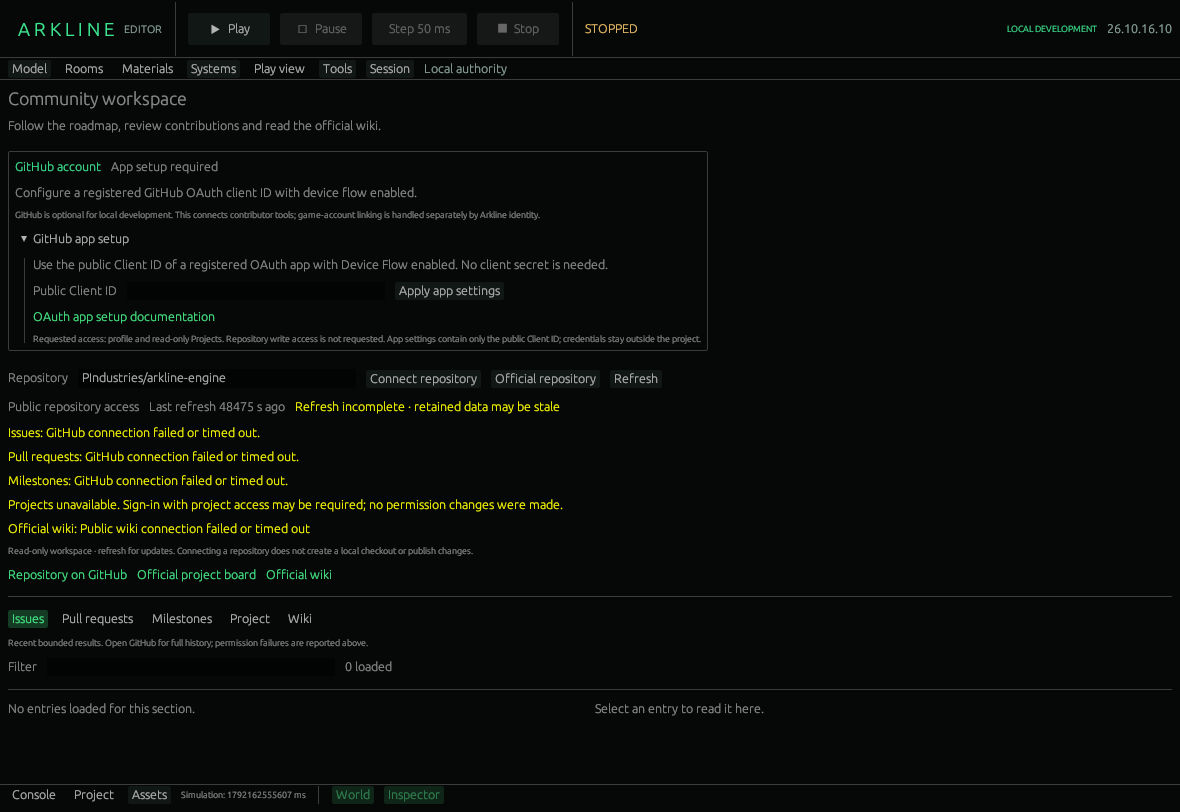
Community workspace with a failed refresh and stale-data warning.
-
Repository accepts an
owner/repositoryname. Connect repository selects it; Official repository returns to Arkline's repository. - Refresh requests a new bounded set of results. The page reports freshness, loading errors and retained stale data.
- Issues, Pull requests, Milestones, Project and Wiki select a list. Filter narrows titles in the loaded list.
- Select an entry to read its text and labels. Open on GitHub opens its full page.
- Wiki always reads the official Arkline wiki, regardless of repository selection. The embedded reader is text-only; remote images appear on GitHub.
- Open Community and choose Official repository.
- Press Refresh and check the reported result or error.
- Open Issues, filter by a topic and select an entry.
- Use Open on GitHub for the complete discussion.
- Open Wiki to read a guide; open it on GitHub for screenshots.
An empty or incomplete list does not establish that the repository has no work. Results are bounded and refreshed manually rather than streamed live.
Public repository reading works without signing in. Sign in with GitHub starts device authorization when an OAuth app is configured. Copy code and Open GitHub to approve take you through GitHub's approval; the editor displays expiry and provides Cancel sign-in. Sign out clears editor access.
GitHub app setup accepts a registered app's public Client ID through Apply app settings. App registration and Device Flow configuration happen outside the editor. No client secret is required. The requested access is profile and read-only Projects; organization policy can still restrict it.
The public Client ID is saved as app configuration. Credentials use the operating-system credential store, outside project documents; a storage failure can leave session-only access with an explicit status. Contributor credentials never become game credentials.
The workspace does not fork, commit, open pull requests or publish wiki changes. Repository selection and refreshing do not save game-world changes. Permission failures and network timeouts need to remain visible, including during account changes.
Contributor sign-in and lifecycle acceptance are tracked in #48; useful editor/community workflows in #45. Official game-account onboarding remains separate in #9.