Repository navigation
Editor Hull Surface
Use Materials → Hull surface to give the Pioneer coloured regions, patterned finishes and glow. The graph controls how its hull looks at different positions on the ship; it does not reshape the model.
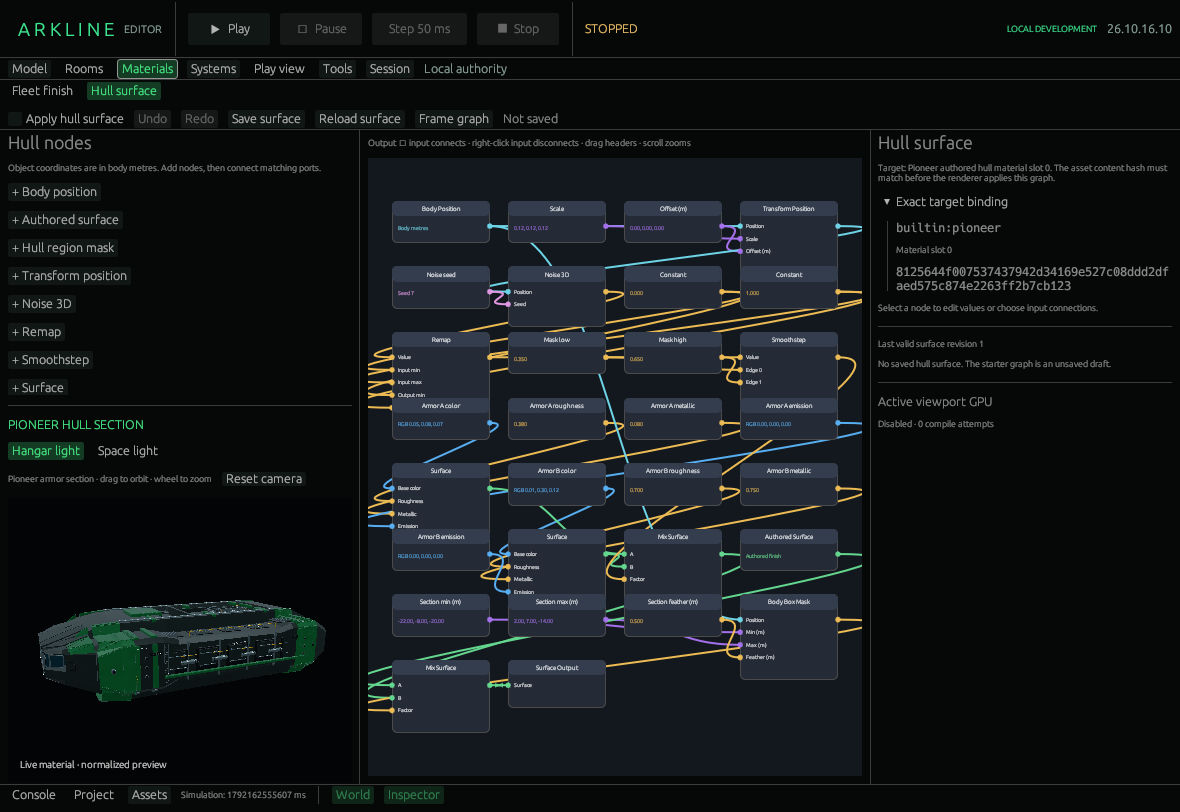
Hull Surface graph. GPU preview is disabled in this capture.
The left library adds operations; the centre holds the graph. Select a node to edit values and connections in the right inspector.
| Library operation | Effect |
|---|---|
| Body position | Supplies object coordinates in body metres, before ship placement and origin shifts. |
| Authored surface | Supplies original base color, roughness, metallic and emission before fleet tint/grain. Use it outside a mask to preserve source appearance. |
| Hull region mask | Makes a body-space box mask from Position, Min, Max and Feather. Min must be below Max on every axis. Positive Feather blends inward; the mask is zero outside. The node title is Body Box Mask. |
| Transform position | Multiplies Position by XYZ Scale, then adds Offset. Smaller scales make larger pattern features. |
| Noise 3D | Evaluates seeded spatial value noise. The seed is persisted; there is no animated time input. |
| Remap | Maps a scalar’s input interval to an output interval. Input limits must differ. |
| Smoothstep | Makes a smooth 0–1 mask between increasing Edge 0 and Edge 1. |
| Surface | Bundles linear base color, roughness, metallic and linear emission color. |
| Blend surfaces | Blends two surface bundles using a 0–1 Factor. Its node title is Mix Surface. |
| Surface Output | Sends the connected surface to the bound material slot when Apply is enabled. The single output cannot be deleted. |
Named inputs adds Scalar, Vector 3, Linear color or Seed parameters. The inspector edits their shared name and typed value: XYZ components, RGB picker/numeric channels, scalar or deterministic seed. Reuse input creates another Parameter node referencing the same value; editing it updates every reference. Existing Constant nodes expose their typed values too.
Click an output then a matching input, or use the inspector’s input menu. Right-click an input to disconnect it. Type mismatches and cycles are rejected. Drag headers to move nodes, empty space to pan, scroll to zoom and Frame graph to fit. Deleting a node disconnects its consumers. Undo/Redo includes edits and layout.
- Choose Restore hull section starter.
- Select a named color or mask parameter and edit it in the inspector.
- Enable Apply hull surface. Inspect the preview with Hangar light / Space light; Reset camera restores its view.
- Check Active viewport GPU, then Save surface when the graph is valid.
Exact target binding shows the asset ID, SHA256 and material slot 0. The hash must match. Apply starts off on project open; disabling it restores the existing finish path. Saving does not enable Apply.
These controls are verified against the development version; a successful GPU render still needs confirmation in Active viewport GPU.
Assets/Pioneer.surface.json stores the graph and canvas layout. Save records the submitted snapshot; later edits stay unsaved. Reload is undoable and preserves intervening edits. Failed reads lock Save until a successful Reload or explicit replacement permission. That permission alone writes nothing.
Limits are 64 nodes and 128 KiB. Incomplete drafts remain editable, retain the last valid surface and cannot be saved. GPU compilation is separate: the inspector reports requested/applied revisions, compile attempts and diagnostics. Each viewport retains its last linked program on failure. Disabled or zero attempts is not evidence of successful rendering.
There is no image sampling, UV authoring, normal mapping, decals or shader-text editing. Material assignments and appearance acceptance remain under #41 and #45.
Arkline Editor · Development version · Fleet finish · Pinned surface guide