Repository navigation
Editor Materials
Choose Materials → Fleet finish to preview a shared ship palette. For spatial patterns on a particular Pioneer hull section, see Hull surface. These source-verified controls describe the development version.
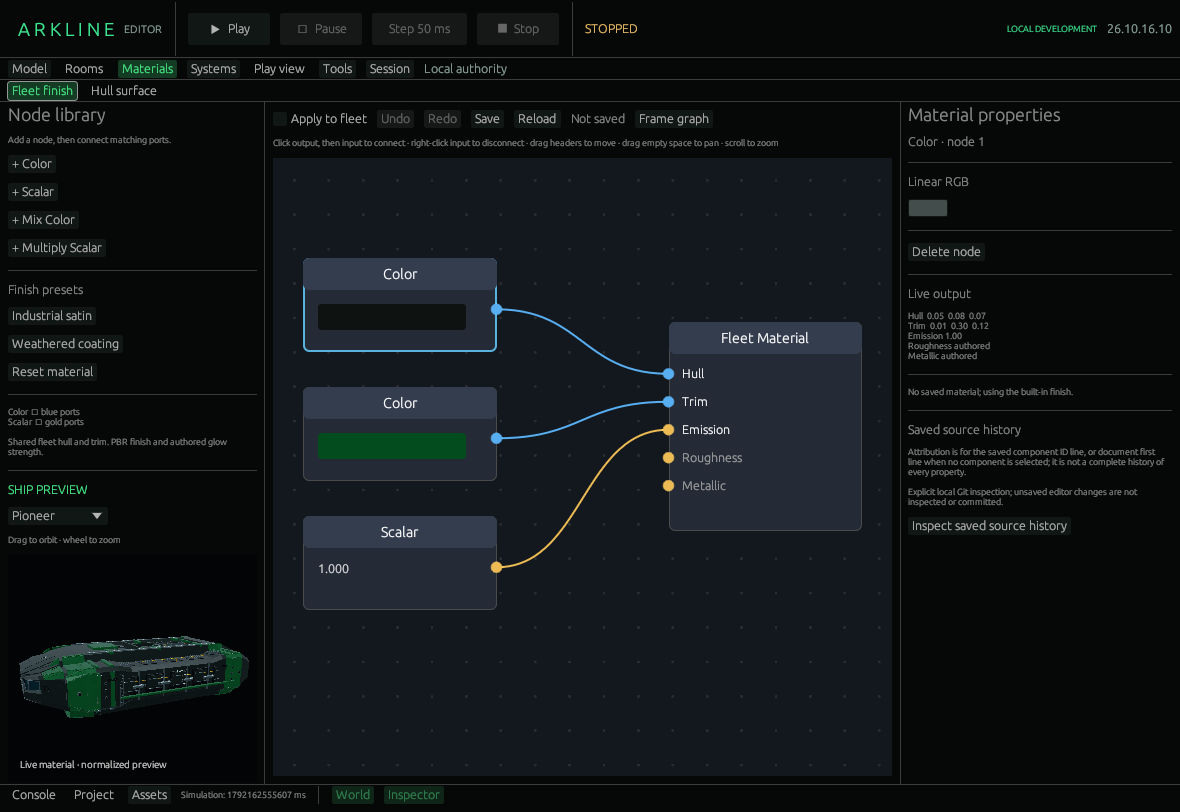
Fleet Finish graph and Pioneer material preview.
The left library supplies nodes; the centre holds the graph and the right Material properties inspector. Choose a ship class for the single-model preview. Drag to orbit; scroll to zoom. It is normalized for display, not world scale.
| Node | What it does |
|---|---|
| Color | Supplies an editable linear RGB color. |
| Scalar | Supplies a number: use 0–1 for roughness/metallic and 0–4 for the authored-emission multiplier. |
| Mix Color | Blends A/B using a connected scalar or its Factor slider. Unconnected A/B use black/white. |
| Multiply Scalar | Multiplies two numbers; editable A/B fallbacks supply unconnected inputs. |
| Fleet Material | Receives Hull, Trim, Emission, Roughness and Metallic. Disconnect Roughness/Metallic to retain each source surface’s authored value. |
Click an output, then a matching input: blue ports carry colors and gold ports carry scalars. Right-click an input, or use Disconnect in its inspector, to remove a connection. Drag node headers to move them, drag empty space to pan, scroll to zoom and use Frame graph to fit the canvas. Delete node removes a selected operation; the output remains.
Industrial satin and Weathered coating set finish factors. Reset material restores the default document. Undo/Redo changes the draft. Apply to fleet compares the preview against packaged materials without saving. It affects tagged exterior hull/trim surfaces across the seven classes, not cockpit interiors or station geometry.
- Choose Fleet finish and a ship class.
- Select a Color node connected to Hull and change its RGB value.
- Toggle Apply to fleet to compare, then try Industrial satin.
- Choose Save. Reopen the project or use Reload to check the saved finish.
The file is Assets/Pioneer.material.json. Save records its submitted snapshot; later edits stay unsaved. Reload is undoable and preserves edits made during loading. Failed reads lock Save: repair and Reload, or explicitly allow replacement before saving. Inspect saved source history reads Git attribution for the saved file, not individual properties.
The graph allows 64 nodes and the file 64 KiB. It changes supported finish values, not geometry, engineering materials, textures or arbitrary shader code. The shader retains a minimum roughness of 0.08.
Visual quality (#41) tracks appearance; editor integration (#45) tracks workflow development.
Arkline Editor · Development version · Hull surface · Pinned file-recovery guide