Home
These docs are for ComposeGL 0.6.0. New since 0.5.0: What's new in 0.6.0.
A UI toolkit for games, built on androidx.compose.runtime and nothing else.
Try it in your browser: the showcase — click, type or pick up a pad and go round every widget, layout, animation and effect, live.
You write Text("Score: $score"). It is drawn with OpenGL, through your engine,
inside your game loop — no separate window, no web view, no second thread, no
Android dependency.
Box(Modifier.fillMaxSize()) {
    Panel(Modifier.align(Alignment.BottomStart).padding(28f).width(280f)) {
        Column(verticalArrangement = Arrangement.spacedBy(10f)) {
            Text("HULL")
            Bar(hull, Modifier.fillMaxWidth())
            Row(Modifier.fillMaxWidth(), horizontalArrangement = Arrangement.SpaceBetween) {
                Text("AMMO")
                Text("$ammo")
            }
        }
    }
    Reticle(reticle, Modifier.align(Alignment.Centre))
}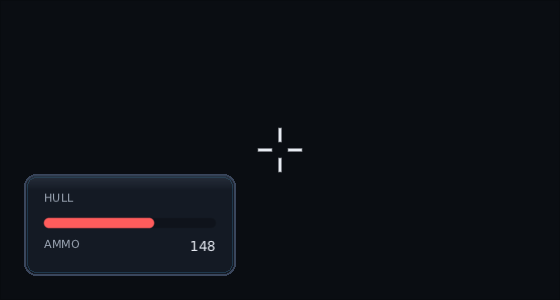
Every picture on this wiki is a photograph of the real toolkit, taken by
./gradlew :composegl-demo:docShots — never a drawing of it.
| Your first screen | a window, a panel and a working button, in about eighty lines |
| Layout |
Column, Row, Box, FlowRow, Grid, lazy lists and grids, weight, and what differs from Compose |
| Modifiers | the full list, and the three rules that are ours |
| Widgets | everything that ships in the toolkit: text, buttons, fields, collapsing headers, splitters, spinners, colour pickers, lists, tables, tooltips |
| Game widgets | the game tier, in composegl-game: bars, reticle, hit markers, damage direction arcs, a low-health vignette, damage numbers, world markers, cooldowns, hotbar, weapon wheel, inventory grid, minimap, compass bar, dialogue, chat, objective tracker, subtitles, skill trees, item cards, particles |
| Animation | clocks, springs, panels that animate in and out, screens that crossfade or slide, and pausing it all to look |
| Skins | one JSON file holds every colour in your game, and hot reloads |
| Input | mouse, keyboard, pad, focus, and giving the world what the interface did not want |
| Saving state | the tab, the scroll position and the half-typed name, still there when a screen comes back |
| Split-screen | local co-op: a HUD per player, and each pad routed to its own player |
| Localisation | strings by language, screens that mirror for Arabic and Hebrew, and Hebrew and English on one line |
| Shaders | blur, outline, dissolve — and your own GLSL bound to any widget |
| Backends | LibGDX, raw OpenGL, a browser tab, Android, and writing your own |
| Scene view | a panel with your own 3D scene inside it: a level editor viewport, a model preview, a picture-in-picture camera |
| Render targets | drawing into a texture instead of the window: a panel in the world, or your own 3D scene with a depth buffer |
| KorGE | a screen on a KorGE stage: fonts, skins, input, split-screen, in-world panels, testing, and the limits |
| Kool | a screen as a Kool scene on the desktop and Android: the mouse and touch, Kool textures, a scene view with Kool's GL state kept true, and the limits |
| Testing | a whole interface tested with no window and no GPU, and @Preview composables drawn to PNGs |
| Live previews | every @Preview in a window, compiled and redrawn when you save a file, from composegl-preview
|
| Debugging | floating windows that tune your own values while the game runs and dock to an edge or tab together when there are a few, overlays for layout, focus, overdraw, draw calls, redraws and text, an inspector, a browsable tree of the whole screen, live plots, and a drop-down console for typing commands, from composegl-debug
|
| Custom layouts | writing your own MeasurePolicy when the three are not enough |
- Not Material. No theme to fight, no component library to override. Widgets take their look from a skin file.
-
Not
androidx.compose.ui. Nodp, noModifier.Node, no density. Sizes are floats against a design resolution; the viewport does the rest. - Not tied to an engine. LibGDX and KorGE are optional modules. The core names no engine anywhere, and the build fails if anybody adds one.
Games. A HUD that costs nothing while it is standing still, bars with a damage trail, a crosshair with spread and hit markers, damage numbers and nameplates anchored in the world, pad navigation that works without being wired up, prompts that change the moment somebody picks up a controller, and a text size setting that makes the words bigger without making the whole interface bigger.