Kool
Put a ComposeGL screen in a Kool game. It is a Kool scene like any other: Kool draws it in the order you added it, over the scenes before it, and the mouse reaches it through Kool's own input.
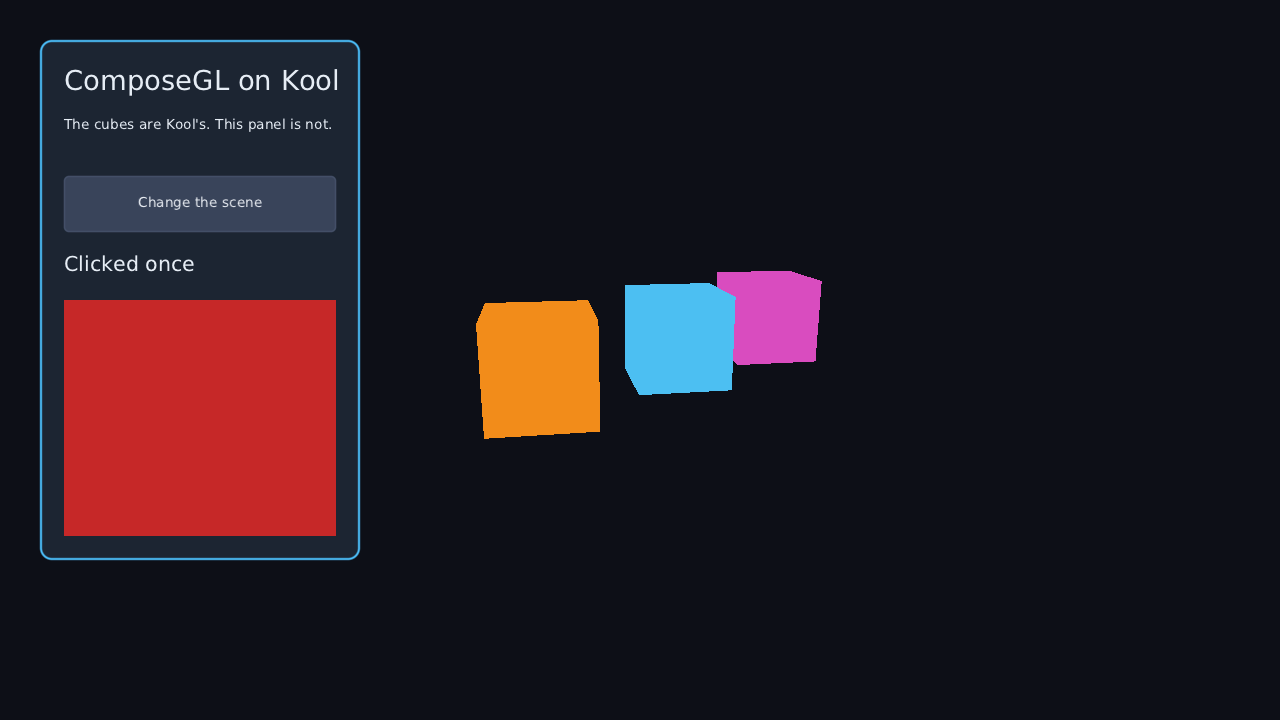
The desktop and Android, pointer only, for now; not the browser. Built on Kool 0.19.0, run on desktop Linux and on an Android emulator. See the limits before you start.
composegl-kool is not in a release yet. Until it is, take the snapshot:
repositories {
    mavenCentral()
    google()   // the Compose runtime reaches for androidx, which lives here
    maven("https://central.sonatype.com/repository/maven-snapshots/")
}

dependencies {
    implementation("dev.wildware.composegl:composegl-kool:0.7.0-SNAPSHOT")
}
The same line on the desktop and on Android: Gradle picks composegl-kool-jvm or
composegl-kool-android for you. It brings composegl-ui, composegl-render and Kool
0.19.0 with it, and on the desktop composegl-lwjgl3 too.
On the desktop Kool's OpenGL is LWJGL, so the GL calls and the fonts are the raw OpenGL
backend's: StbFonts and stb_truetype. On Android Kool draws with OpenGL ES 3 on its own
GLSurfaceView, so the GL calls are android.opengl's and the glyphs are Android's own
text drawing: AndroidFonts. Kool asks for LWJGL 3.3.6; this module moves every
LWJGL module up to the one ComposeGL is built on, which Kool draws correctly on.
import de.fabmax.kool.KoolApplication
import de.fabmax.kool.KoolConfigJvm
import de.fabmax.kool.pipeline.backend.gl.RenderBackendGl
import dev.wildware.composegl.kool.KoolBackend
import dev.wildware.composegl.kool.composeGl
import dev.wildware.composegl.lwjgl3.StbFonts
import dev.wildware.composegl.ui.geometry.Size

fun main() = KoolApplication(KoolConfigJvm(renderBackend = RenderBackendGl)) {
    ctx.addScene(myWorld)

    val fonts = StbFonts().apply { register("default", File("DejaVuSans.ttf").readBytes(), listOf(16, 24)) }
    ctx.composeGl(KoolBackend(fonts), Size(1280f, 720f)) {
        var clicks by remember { mutableStateOf(0) }
        Button("Clicked $clicks", onClick = { clicks++ })
    }
}
OpenGL, not Vulkan. Kool picks Vulkan by itself where it can. ComposeGL draws with
OpenGL, so start Kool with renderBackend = RenderBackendGl; composeGl refuses a Kool
that renders with anything else, and says so.
The design size is fitted into the scene's view by a ScalePolicy, exactly as a
Viewport fits one onto a window on the other backends.
composeGl returns the ComposeGlScene: its Kool scene (to remove it later),
player, the input sink a game hands its own keys or pads to, and onPointerUsed, which
says which clicks the interface took (see below).
close() stops listening to Kool's pointer and lets go of the composition; the backend is
yours to close.
The demo is all of this in one file: ./gradlew :composegl-demo-kool:run.
Set android.useAndroidX=true in the game's gradle.properties. The toolkit brings the
Compose runtime, which is an androidx library, and without that line an Android build does
not resolve.
The same composeGl, on the context Kool makes for your activity. The fonts are an
AndroidFonts, registered from a Typeface:
import android.app.Activity
import android.graphics.Typeface
import android.os.Bundle
import de.fabmax.kool.KoolConfigAndroid
import de.fabmax.kool.KoolSystem
import de.fabmax.kool.platform.KoolContextAndroid
import de.fabmax.kool.createKoolContext
import dev.wildware.composegl.kool.AndroidFonts
import dev.wildware.composegl.kool.KoolBackend
import dev.wildware.composegl.kool.composeGl
import dev.wildware.composegl.ui.geometry.Size

class GameActivity : Activity() {
    override fun onCreate(savedInstanceState: Bundle?) {
        super.onCreate(savedInstanceState)
        val ctx = createKoolContext(KoolConfigAndroid(applicationContext))
        ctx.addScene(myWorld)

        val fonts = AndroidFonts().apply {
            register("default", Typeface.createFromAsset(assets, "fonts/DejaVuSans.ttf"), listOf(16, 24))
        }
        ctx.composeGl(KoolBackend(fonts), Size(1280f, 720f)) { MainMenu() }
        setContentView(ctx.surfaceView)
    }

    override fun onPause() { super.onPause(); KoolSystem.requireContext().let { it as KoolContextAndroid }.onPause() }
    override fun onResume() { super.onResume(); KoolSystem.requireContext().let { it as KoolContextAndroid }.onResume() }
}
Kool on Android always renders with OpenGL ES, so there is no backend to choose. A glyph is drawn the first time a label asks for it; a character the typeface does not have is drawn with the system's font for it, as Android draws any text.
A finger reaches the screen through Kool's own touch listener, as the mouse does on the desktop. Kool 0.19.0 reported no press for a finger that lifted after a single Kool frame when we tested it; a tap held for two frames clicks.
Wrap a Kool texture in KoolTexture and draw it like any picture:
val hero = Assets.loadTexture2d("hero.png").getOrThrow()
Image(KoolTexture(hero), Modifier.size(64f, 64f))
It is drawn with the sampler settings you gave the texture, and a texture Kool has not uploaded yet is uploaded through Kool the first time it is drawn.
The screen draws while Kool renders its scene, on Kool's render thread, into the
framebuffer Kool has bound. Kool remembers the GL state it last set — the program, depth
testing and writing, the depth comparison, culling — and skips setting what it thinks is
already set. So the canvas uses HostState.Restore: it saves what Kool left, and puts all
of it back when the frame ends and around raw. Kool's next scene draws as it would with
no interface at all; the tests check that pixel for pixel with a Kool mesh drawn after a
careless scene.
The toolkit is only ever touched on Kool's render thread. Whether that is also the thread the game updates on depends on Kool's settings:
-
Kool's default on the desktop (
asyncSceneUpdate = true): the game updates on a thread of its own while the frame before renders. -
asyncSceneUpdate = false, and always on Android: update and render take turns on one thread.
Either way the pointer is read where Kool updates and handed to the toolkit at the start of
the next render. Anything a game hands to player itself — keys, typed text, pads — must be
handed over on the render thread too. With asyncSceneUpdate = false a scene's onUpdate
already is; under the default, queue the events and hand them over from the render thread.
A click on a button should not also fire the game's gun. onPointerUsed tells you, once for
each of Kool's pointers in each of Kool's frames, whether the interface used it:
val takenByUi = ConcurrentHashMap.newKeySet<Int>()   // Kool frames whose mouse the interface took

val ui = ctx.composeGl(KoolBackend(fonts), Size(1280f, 720f)) { Hud() }
ui.onPointerUsed = { use ->
    if (use.used && use.pointer == PointerInput.MOUSE_POINTER_ID) takenByUi += use.frame
}- It runs on the render thread, at the start of the interface's render — the only place the answer exists.
-
It comes late. Kool reads the pointer, updates the game, then renders, so the game has
already seen the frame's pointer when the answer arrives.
use.frameisTime.frameCountfrom when Kool read it: match on that, and skip the click a frame later. -
Every pointer, every frame,
usedor not, and once more in the frame a finger lifts or the mouse leaves. - Kool's own
Pointer.isConsumed()stays false: by the time the answer exists, Kool's pointer has moved on.
A SceneView works: its raw block is handed a KoolFrame — Kool's ctx, the
projection and the viewport — with the scene's picture bound.
SceneView(state, Modifier.size(320f, 240f)) {
    clear(Colour.rgb(0x101820))
    raw { frame ->
        frame as KoolFrame
        // Your own OpenGL, on Kool's context, into the picture.
    }
}
Kool draws only through its own passes, so whatever the block draws with is OpenGL behind Kool's back, and Kool's memory cannot be cleared from outside. So unlike KorGE, what the block leaves is not kept: when the block returns, Kool's own state goes back, and Kool is never left believing something that is not true.
The block starts in Kool's state, not the toolkit's. On a context with clip control that
means reversed depth — the depth comparison in force is Kool's reversed one, not LESS. A block that tests depth
sets the comparison it wants; the picture's depth is cleared to 1.
Honest ones:
-
Not the browser. Kool 0.19.0 publishes a Kotlin/JS build for the web and no
WebAssembly one, and ComposeGL in the browser is WebAssembly. Gradle finds no
wasmvariant ofkool-core:0.19.0to build against, so there is no browser target until Kool releases one. - Desktop and Android, tested on Linux and one emulator. Android is tested on an API 35 x86_64 emulator with SwiftShader's OpenGL ES, not on a phone.
-
Pointer only. The mouse and touches are translated. Kool's keys, typed text and pads
are not yet; a game that translates them hands them to
ComposeGlScene.player, on the render thread. - Which clicks the interface took is known a frame late, not in the frame itself; see above.
- No clipboard, soft keyboard, cursor shapes or haptics. They are the toolkit's do-nothing ones.
- OpenGL only. Kool's Vulkan backend is refused.
-
Kool 0.19.0 on Linux asks GLFW for Wayland and does not fall back to X11 when there is
no Wayland display. The demo starts GLFW on X11 first when
WAYLAND_DISPLAYis not set; a game on Linux does the same (seeinitGlfwOnX11in the demo'sMain.kt).
- Backends — the other backends, and how each is a thin wrapper round the same renderer
- Scene view — the scene view in full