Live previews
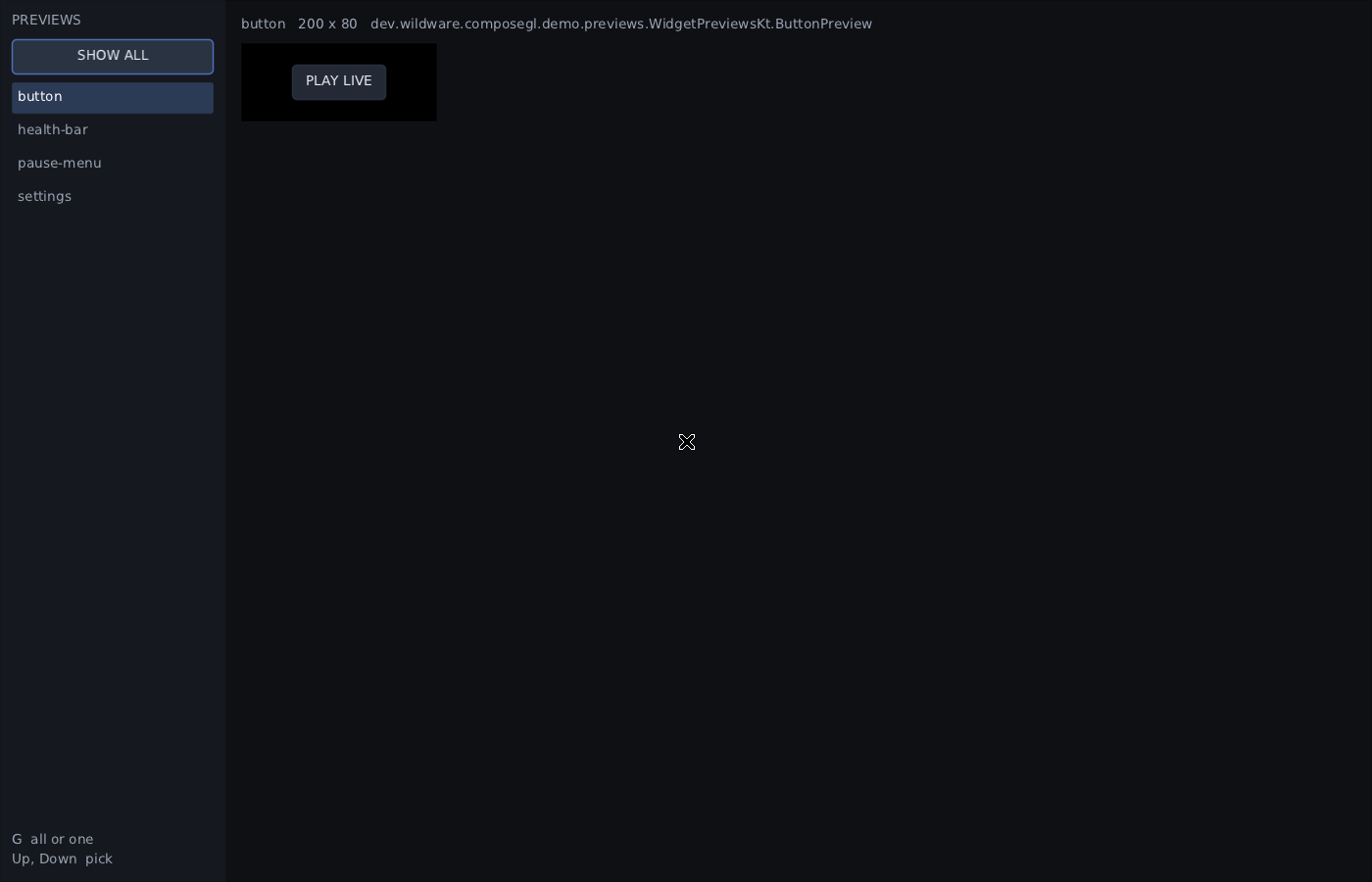
previewLive opens a window with every @Preview in your module in it. Save a
source file and the window compiles the module and redraws the previews from the new
code, in a second or two. No game to launch, no PNG to open.
./gradlew :my-game:previewLiveIt uses the same @Preview functions as renderPreviews, so a preview you look at
here is the picture in the pull request and the screen a test starts from. See
Testing for how to write one.
The window is in its own module, composegl-preview. Put it in a configuration of its
own, not in implementation: it carries Gradle's client and a desktop window, and a
game you ship should carry neither.
The window drives Gradle through the Gradle Tooling API, which Gradle publishes on its own repository rather than on Maven Central, so add that repository too.
// settings.gradle.kts, inside dependencyResolutionManagement { repositories { … } }
maven("https://repo.gradle.org/gradle/libs-releases") {
    content { includeModule("org.gradle", "gradle-tooling-api") }
}
// my-game/build.gradle.kts
val previewLive: Configuration by configurations.creating {
isCanBeConsumed = false
attributes { attribute(Usage.USAGE_ATTRIBUTE, objects.named(Usage.JAVA_RUNTIME)) }
}
dependencies {
previewLive("dev.wildware.composegl:composegl-preview:0.7.0")
}
// What the window asks Gradle to run after a save.
val previewClasses = tasks.register("previewClasses") {
dependsOn(sourceSets["main"].output, sourceSets["main"].runtimeClasspath)
}
tasks.register<JavaExec>("previewLive") {
mainClass.set("dev.wildware.composegl.preview.PreviewLiveKt")
dependsOn(previewClasses)
val main = sourceSets["main"]
// Everything except your own classes. The window loads those itself, and loads them again
// after every compile.
classpath = previewLive + (main.runtimeClasspath - main.output)
val classes = main.output.classesDirs
val resources = files(main.output.resourcesDir)
val sources = files(main.allSource.srcDirs)
val root = rootDir
val gradleHome = gradle.gradleHomeDir
val task = "${project.path}:previewClasses"
// A change to any of these cannot be reloaded, so the window asks for a restart. Leave out
// the ones your build does not have; a file that is not there is simply not watched.
val buildFiles = files(
"build.gradle.kts",
rootProject.file("build.gradle.kts"),
rootProject.file("settings.gradle.kts"),
rootProject.file("gradle/libs.versions.toml"),
rootProject.file("gradle.properties"),
)
val font = layout.projectDirectory.file("src/main/resources/fonts/MyFont.ttf")
argumentProviders.add(CommandLineArgumentProvider {
listOf(
"--classes", classes.asPath,
"--resources", resources.asPath,
"--sources", sources.asPath,
"--project-dir", root.path,
"--task", task,
"--gradle-home", gradleHome?.path.orEmpty(),
"--build-file", buildFiles.asPath,
"--font", "default=${font.asFile.path}",
)
})
}composegl-preview is new in 0.7.0. composegl-demo/build.gradle.kts registers the
same task, so ./gradlew :composegl-demo:previewLive shows the example's previews.
| Argument | |
|---|---|
--classes, --resources
|
your compiled classes and resources: what gets reloaded |
--sources |
your source folders. Saving a file in one starts a compile |
--font family=file.ttf |
a font, loaded once. Repeat it for each family your previews use. @12,16 bakes only those sizes. The default skin's text is the family default
|
--project-dir, --task
|
the build to compile with, and the task to run. Leave them out to watch the output instead |
--gradle-home |
the Gradle to compile with, so nothing is downloaded. Left out, the build's wrapper is used |
--build-file |
files that need a restart when they change: build scripts, the version catalogue, gradle.properties, and buildSrc if you have one |
--package com.game.menus |
only previews in that package or below it |
Paths in --classes, --resources, --sources and --build-file are lists, split
the way a classpath is.
- The list down the left has every preview by name. Click one to show it on its own at its own size, shrunk if the window is smaller. Up and Down move the selection, in either view.
- SHOW ALL, or G, shows every preview at once as tiles. Click a tile to show it on its own.
- The banner across the top says when something needs fixing. See When something goes wrong.
What you picked, whether you are looking at one preview or all of them, and the window's size and place all stay put when the previews reload.
Think of the window as two layers. The bottom layer is loaded once, when the window opens. The top layer is thrown away and loaded fresh after every compile.
| Layer | What is in it | When a file changes |
|---|---|---|
| Kept | the JDK, the Compose runtime, composegl, and your module's libraries — including other modules of your own build — plus the fonts and the OpenGL context | the window says restart the preview and stops reloading |
| Reloaded | your module's own classes and resources | compiled and redrawn |
A change the window cannot swap in is never run half-way. When a build file changes,
or a compile rebuilds one of the library jars the window loaded at the start, the banner
says "restart the preview" and nothing reloads until you do. Close the window and run
previewLive again.
A change in another module of your build is noticed the next time your module compiles: that compile rebuilds the other module's jar, and the window asks for a restart.
What a preview remembered — a remember, a scroll position — starts again on each
reload.
| What happened | What the window does |
|---|---|
| Compiling | a line under the banner says so while Gradle runs |
| The compile failed | the last previews that worked stay on screen, and the banner shows the compiler's first error with its file and line. The next compile that works clears it |
| A preview throws | only its own tile shows the exception. The other previews keep drawing |
| The build compiled but cannot be loaded — a preview with arguments, two previews with one name | the last previews that worked stay on screen, and the banner says why |
| A preview was renamed or deleted | the selection moves to the first preview, and a line under the banner says which one went |
| A preview hangs | after five seconds with no frame, the terminal you ran previewLive from names the preview it was drawing, so you know what to fix before you restart. That includes a preview that hangs as the window first opens. If the frame does finish, the window says how long it took |
| Gradle cannot be reached | the window watches the compiled classes folder instead, and says to run ./gradlew -t :my-game:previewClasses in another terminal to keep it filled. It reloads each time that compile finishes |
Leave out --project-dir and --task, or let the window find Gradle unreachable, and
it stops compiling for you. The window says what to run: ./gradlew -t and the task you
passed, or ./gradlew -t classes if you passed none. With the snippet above that is:
./gradlew -t :my-game:previewClassesEach time that finishes, the window reloads. While the last compile Gradle ran for the window is failing, output written by anything else does not clear the banner.
The window is built from parts that need no window, in dev.wildware.composegl.preview:
ReloadableModule |
your compiled output, loaded in a fresh class loader on each load(), with previews found by the same Previews.find renderPreviews uses |
PreviewSession |
every preview composed, the selection, and the reload() that disposes the old compositions before loading the new classes |
LiveReloader |
one poll() of the files: compile, reload, report an error, or ask for a restart. poll { event -> } hands each event over as it happens |
GradleCompiler |
a ModuleCompiler that runs tasks through the Tooling API |
HangWatchdog |
notices when no frame has finished, on a clock you give it |
PreviewReloadTest and PreviewLeakTest in composegl-preview load two builds of a
preview and prove the old class loader is freed after each reload.