Your first screen
By the end of this page you will have a window with a panel in it, a bit of text, and a button that counts how many times you clicked it.
It is about eighty lines of code, and most of them are opening the window.
This page assumes you have written Compose before —
@Composable,remember,mutableStateOf, recomposition. If any of that is new, half an hour with Thinking in Compose and State and Jetpack Compose will cover everything this page leans on.
The same runtime you already know — androidx.compose.runtime, unchanged — with
everything above it replaced. Our own applier, layout, widgets, renderer and input,
built for games.
So Text("Score: $score") behaves exactly as it does in Compose UI. What is
different is where it ends up: drawn with OpenGL, through your engine, inside your
game loop. No separate window, no web view, no second thread, no Android
dependency.
What you will not find, because none of it came with us: dp, Material,
Modifier.Node, LaunchedEffect's Android plumbing, or any of androidx.compose.ui.
The names that survive mean what they always meant.
ComposeGL runs on top of Compose's runtime, so you need the Compose compiler plugin as well as the library:
// build.gradle.kts
plugins {
    kotlin("jvm") version "2.4.20"
    id("org.jetbrains.kotlin.plugin.compose") version "2.4.20"
}

repositories {
    mavenCentral()
    google()   // the Compose runtime reaches for androidx, which lives here and not on Central
}

dependencies {
    implementation("dev.wildware.composegl:composegl-ui:0.6.0")
    // One backend. This one draws through LibGDX.
    implementation("dev.wildware.composegl:composegl-gdx:0.6.0")

    // LibGDX's desktop window, and the native code it and its FreeType fonts need.
    implementation("com.badlogicgames.gdx:gdx-backend-lwjgl3:1.14.2")
    runtimeOnly("com.badlogicgames.gdx:gdx-platform:1.14.2:natives-desktop")
    runtimeOnly("com.badlogicgames.gdx:gdx-freetype-platform:1.14.2:natives-desktop")
}
Backends. A backend is the piece that turns "draw a rounded box here" into actual OpenGL calls. There are four:
composegl-gdx(LibGDX),composegl-lwjgl3(raw OpenGL, desktop only),composegl-webgl(a browser tab) andcomposegl-korge(KorGE). Pick the one your game already uses. Nothing in your interface code changes if you swap. See Backends.
Make one of these when your game starts:
val ui = UiRenderer(host, canvas)…and call it once a frame, after your game has drawn its own world:
ui.render(viewport, System.nanoTime())That is the whole loop. It returns false when nothing on screen changed, so a
menu that is just sitting there costs you almost nothing.
Input goes in a hook rather than in the loop, because working out what the mouse is over means knowing where everything is — so it cannot happen until after the layout:
ui.onLaidOut = { millis -> input.frame(millis) }Four things, and you can call them yourself if you want to put something between them:
host.frame(System.nanoTime())          // 1. did anything change?
MeasurePass().run(host.root, viewport) // 2. how big is everything, and where?
canvas.begin(viewport)
DrawPass(canvas).draw(host.root)       // 3. draw it
canvas.end()                           // 4. hand it to the GPU
An analogy: frame is asking "has anybody changed their mind?", measure is laying the furniture out in the room, and draw is taking the photograph.
Five, once a pad or the arrow keys can drive your screen: focus has to be kept
pointing at something that is still there. Hand the manager over and the renderer
does it, in the right place — after the layout, before onLaidOut:
ui.focus = focusThe first two of those steps, plus the focus refresh, are also one call —
host.settle(viewport, focus, nanos) — which is what a test that never draws
uses. See Testing.
If your game draws into the same canvas as the interface — a 2D game putting its board under its HUD, say — you do not need to write it out. Hand the drawing over instead, and it happens inside the canvas's frame, under everything:
ui.drawBehind = { canvas -> board.draw(canvas) }A 3D game normally has nothing to put there: its world goes to OpenGL directly, before the canvas's frame is even open.
Keep the DrawPass if you write it out yourself — it holds the canvas and nothing
else, so making a new one every frame is waste. The MeasurePass has to be new
each time: the object itself is how each node knows which pass it was measured in.
Two files. First, the interface — this one is pure ComposeGL and knows nothing about LibGDX, windows, or OpenGL:
// Hello.kt
import androidx.compose.runtime.*
import dev.wildware.composegl.ui.layout.*
import dev.wildware.composegl.ui.modifier.*
import dev.wildware.composegl.ui.widget.*

@Composable
fun Hello() {
    var clicks by remember { mutableStateOf(0) }

    Box(Modifier.fillMaxSize(), contentAlignment = Alignment.Centre) {
        Panel(Modifier.width(280f)) {
            Column(verticalArrangement = Arrangement.spacedBy(12f)) {
                Text("HELLO")
                Text("Clicked $clicks times")
                Button("CLICK ME", onClick = { clicks++ })
            }
        }
    }
}
That is the part you will spend your time in. clicks++ is the only thing that
ever "updates the label".
Second, the plumbing — the window, the fonts, and the four lines from above:
// Main.kt
import com.badlogic.gdx.*
import com.badlogic.gdx.backends.lwjgl3.*
import com.badlogic.gdx.graphics.GL20
import com.badlogic.gdx.graphics.g2d.SpriteBatch
import dev.wildware.composegl.gdx.*
import dev.wildware.composegl.ui.geometry.Size
import dev.wildware.composegl.ui.host.UiHost
import dev.wildware.composegl.ui.host.UiRenderer
import dev.wildware.composegl.ui.input.PointerRouter
import dev.wildware.composegl.ui.layout.*
import dev.wildware.composegl.ui.widget.ProvideFonts

class HelloGame : ApplicationAdapter() {

    private lateinit var fonts: GdxFonts
    private lateinit var sprites: SpriteBatch
    private lateinit var canvas: GdxCanvas
    private lateinit var host: UiHost
    private lateinit var ui: UiRenderer

    private var viewport = Viewport.oneToOne(Size(1280f, 720f))

    override fun create() {
        // Fonts are the one thing the toolkit cannot invent. "default" is the
        // name the default skin asks for, and 16 is the size it asks for.
        fonts = GdxFonts()
        fonts.registerTrueType("default", Gdx.files.internal("DejaVuSans.ttf"), listOf(13, 16, 20))

        // The canvas draws text from the fonts' pages, so panels and labels share one texture.
        sprites = SpriteBatch()
        canvas = GdxCanvas(sprites, fonts)

        host = UiHost()
        host.setContent { ProvideFonts(fonts) { Hello() } }

        // Mouse in. The router works out which widget is under the pointer and
        // what counts as a click; you do not.
        val router = PointerRouter(host.root)
        Gdx.input.inputProcessor = GdxPointerInput(router, { viewport })

        // Last, because it needs the host and the canvas.
        ui = UiRenderer(host, canvas)
    }

    override fun render() {
        viewport = Viewport(
            design = Size(1280f, 720f),
            physical = Size(Gdx.graphics.backBufferWidth.toFloat(), Gdx.graphics.backBufferHeight.toFloat()),
            policy = ScalePolicy.Fit,
        )

        Gdx.gl.glClearColor(0.03f, 0.04f, 0.05f, 1f)
        Gdx.gl.glClear(GL20.GL_COLOR_BUFFER_BIT)
        ui.render(viewport, System.nanoTime())
    }

    override fun dispose() {
        host.dispose()
        canvas.dispose()
        sprites.dispose()
        fonts.dispose()
    }
}

fun main() {
    Lwjgl3Application(HelloGame(), Lwjgl3ApplicationConfiguration().apply {
        setTitle("Hello")
        setWindowedMode(1280, 720)
    })
}
Run it. You get a dark window with a panel in the middle and a button that counts:
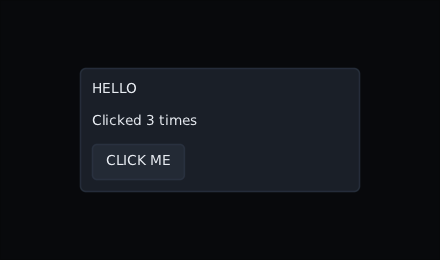
You did not write a skin, and it still looks like something. That is Skin.Default,
the neutral dark skin that ships with the toolkit. Replacing it is its own page.
You wrote 1280x720 once, and then used Modifier.width(280f) as if the window
were always that size. It is not — the player can resize it, and a phone is a
different shape entirely.
Viewport is the fix. You design against one fixed size, and it scales:
Viewport(
    design = Size(1280f, 720f),   // the size you pretend you have
    physical = Size(1920f, 1080f), // the size you actually have
    policy = ScalePolicy.Fit,      // scale up, keep the shape, letterbox the rest
)
So 280f means "280 wide on a 1280-wide screen", everywhere, forever. No density
buckets, no dp, no per-device layout.
Three layouts do almost everything:
Column { Text("one"); Text("two") }   // stacked downwards
Row { Text("one"); Text("two") }      // side by side
Box { Text("on top of each other") }  // piled up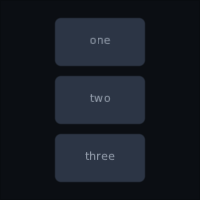

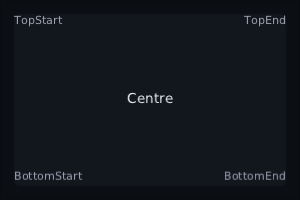
Spacing and alignment are arguments, not spacer widgets:
Row(
    horizontalArrangement = Arrangement.SpaceBetween, // push them to the edges
    verticalAlignment = VerticalAlignment.Centre,
) {
    Text("AMMO")
    Text("148")
}
And Modifier is the chain of things done to a widget — size, padding, where it
sits, what happens when you click it:
Panel(
    Modifier
        .align(Alignment.BottomStart)   // where in the parent
        .padding(left = 28f, bottom = 28f)
        .width(280f)
) { … }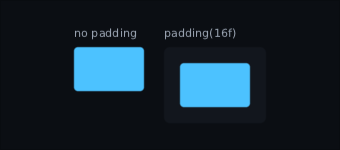
Order matters where you would expect it to. padding(8f).background(Colour.Blue)
paints the blue inside the padding; background(Colour.Blue).padding(8f) paints it
across the whole widget and puts the padding inside.
remember, mutableStateOf, derivedStateOf, snapshotFlow — all of it is the
real androidx.compose.runtime, behaving exactly as it does everywhere else.
The one thing worth saying, because games get it wrong: put the state on the object your game already owns, rather than copying values into the interface each frame.
class Player {
    var health by mutableStateOf(100)
    var ammo by mutableStateOf(148)
}

@Composable
fun Hud(player: Player) {
    Text("HP ${player.health}")
}
Now player.health -= 10 from your combat code redraws that one label. Nothing
else on the screen is touched, and host.frame(...) keeps returning false on the
frames where nothing changed.
The trap is the other way round:
@Composable
fun Hud(player: Player) {
    Text("HP ${player.healthThisFrame}")  // ❌ a plain field: nothing recomposes
}- Layout — Column, Row, Box, weights, and how measuring actually works
- Skins — making it look like your game instead of like the default
- Input — keyboard, gamepad, focus, and giving the world what the interface did not want
- Game widgets — health bars, crosshairs, damage numbers, world-anchored markers
- Shaders — blur, outline, dissolve, and binding your own GLSL to a widget