Testing
The toolkit runs with no window, no GPU and no engine, which means your interface can be tested the way the rest of your game is: fast, in CI, with no screenshots and no flakiness.
val host = UiHost()
host.setContent { ProvideFonts(MonospaceFontProvider()) { Hud(state) } }

host.frame(clock)                                        // recompose
MeasurePass().run(host.root, Constraints.atMost(1280f, 720f))   // lay out
DrawPass(canvas).draw(host.root)                         // draw
MonospaceFontProvider is not a real font, and that is the point: every character
is exactly 0.6 of the text size, so an expected width in a test can be worked out
on paper. A test asserting a button is 84 wide should be asserting the layout rule,
not the shape of a letter in a typeface.
Half the questions are about geometry and nothing else: which button is to the right of which, where a pointer landed, what got drawn where. None of those need a composition, and building one to ask them is three steps in a fixed order — compose leaf layouts carrying offset and size modifiers, run frames until they settle, run a measure pass. Leave the last one out and the contents are right while every rectangle is still zero, so the test quietly asserts about a screen where nothing is anywhere.
TestTree puts a named rectangle where you say, straight away:
val screen = TestTree()
screen.row("cut", "copy", "paste", modifier = Modifier.focusable())

val focus = FocusManager(screen.root)
focus.focusOn(screen["cut"])
focus.moveFocus(FocusDirection.Right)

assertEquals("copy", focus.focused?.name)
row lays them out left to right — 40 wide, 10 apart, so copy starts at 50 — and
column does the same downwards. box puts one anywhere, including inside another
with parent =; screen["cut"] finds it again; remove takes it away the way a
recomposition would. Nothing here draws, measures or behaves: it is rectangles with
names.
The modifier you pass is for what a node is — focusable, clickable, a pointer
handler, a background. It may not say where a node is or how big: offset, size,
fillMaxWidth and padding are refused with a message, because the fixture writes
its own into the same chain and two offsets add up rather than one winning. Where and
how big is what the arguments are for.
The toolkit's own focus, pointer, key and pad tests are written on it, which is what keeps its shape honest.
Each box also writes down the offset and size that would produce the rectangle it
was given, so a real measure pass leaves everything where you put it:
screen.layOut() // Constraints.Unbounded by default, and that mattersThe default is deliberately not the root's own size. A root nobody has measured is 0
by 0, a size modifier is clamped into the constraints it is offered, and every
rectangle in the tree would come back as nothing at all — the exact zero tree this
exists to prevent. layOut checks afterwards and fails rather than hand you one: a
tree where nothing is left with area on both axes is a tree nothing can be drawn in,
hit in or focused in.
TestTree names nodes you built by hand. For a real screen, tag the widget with the
modifier it already takes and find it from the host's root:
Button("PLAY", onClick = ::play, modifier = Modifier.testTag("play"))

host.root.find("play").boundsInRoot      // exactly one, or it fails
host.root.findAll("slot")                // every one, top of the tree first
host.root.findOrNull("banner")           // null once a recomposition took it away
host.root.find("inventory").find("slot") // a tag that repeats, inside one part
A test that asserts on a tag keeps passing when the layout around it moves, which one that asserts on a child index or a golden image does not.
find fails with the tree printed, tags shown as #play, so a misspelt tag says what
was there. It also fails when two nodes share the tag rather than guess which you meant.
The tag goes on whichever node the widget hands its modifier to — for a button, the button. It changes nothing about layout, drawing or input, and it is a data class, so a still screen stays free.
uiTest composes a screen and hands back something to poke it with. You click, type and
press pad buttons by tag, and check what the screen shows:
uiTest { NewGame() }.use { ui ->
    ui.click("name")
    ui.type("Ada")
    ui.assertText("name", "Ada")

    ui.pad(GamepadButton.DpadDown)
    ui.pad(GamepadButton.South)
    ui.assertFocused("options")
}
It is wired the way a game wires input: the pointer router, then the key router before
key navigation (so a field keeps the arrow keys it needs), then the pad's cursor before the pad navigator. The
content gets the backend's fonts, clipboard and soft keyboard, the input source, and a
back stack, so OnBack and prompts work as they do in a game.
| Call | What it does |
|---|---|
click(tag) · click(tag, PointerButton.Secondary) · press(tag) · dragTo(at) · release() · moveTo(tag) · scroll(tag, delta)
|
the mouse, at the middle of the node; dragTo moves it with the button held |
flick(from, to) |
a fast drag and let go. The others stamp every event at time zero, so nothing measures a speed; this one times its moves, which is what makes a list or a pan-and-zoom plane fling |
key(Key.Tab) · key(Key.Tab, Modifiers.Shift) · keyDown · keyDown(key, repeat = true) · keyUp
|
a key, to the focused widget first |
type("Ada") |
text to the focused widget, one character at a time |
pad(GamepadButton.South) · padDown · padUp · stick(x, y)
|
a pad; stick(x, y, horizontal = RightX, vertical = RightY) for the right stick |
holdStick(x, y, millis) · cursor
|
a pad driving a VirtualCursor: push, wait, let go |
advanceBy(millis) |
game time passing, a frame at a time |
assertFocused · assertText · assertExists · assertDoesNotExist
|
what the screen shows |
node(tag) · texts(tag) · text(tag)
|
the same, to read rather than assert |
render() |
one whole frame into the backend's canvas |
pointerIcon |
the shape the mouse cursor was given, like PointerIcon.Text over a field |
Every action settles the screen afterwards. It runs frames until nothing has changed for three in a row and no animation is playing. So a click that moves a button is followed by a layout, and the next click lands where the button is now. An animation a click starts has finished by the time the next line runs.
Time only passes when the test says. Each settling frame is 1/60 of a second. A wait
that changes nothing until it ends, like a countdown or a held stick's repeat, needs
advanceBy. A screen still changing after five seconds of frames fails, with the tree
printed, instead of hanging the build. That includes an animation that never ends, like
a pulsing low-health bar: stop its clock. Testing animations
has the details, marquees and sprite sheets included.
Text is read off the drawing. assertText draws the node and what is inside it into
a recording and joins the text, one run per line. That is what a player reads: the label
on a button, the lines in a field, or the field's placeholder while it is empty. Text
under a parent faded or shrunk to nothing reads as empty.
Mistakes fail loudly. A misspelt tag prints the tree. Clicking a node with no area, or one off the screen, fails, because a real click there would do nothing and a test checking "nothing happened" would pass for the wrong reason. Typing with nothing focused fails too.
type returns whether every character was taken, so a full field refusing the rest is
something a test can check. Clicks, keys and pad buttons return whether anything used
them.
A game that wraps its sink — ParallaxAware in front of the toolkit, say — wraps the
test's the same way, so every event the test sends passes through it first:
uiTest(input = { ParallaxAware(it, pointer = pointer) }) { Menu(pointer) }Headless by default. Pass a real backend and the same test reads pixels back:
val ui = uiTest(Size(400f, 400f), GdxBackend(fonts)) { Switch() }
ui.click("switch")
ui.render()          // then read the framebuffer
UiTestTest in composegl-ui and UiTestGlTest in composegl-gdx are the worked
examples.
For local co-op, pass each player's screen a viewport from Viewport.splitScreen and
put their input sinks behind one InputRouter. Split-screen shows how.
dump prints the tree, one node per line, with where everything ended up:
println(host.root.dump())
println(ui.dump())                  // from a uiTest, with focus marked
root 0,0 400x300 given 400 x 300
column #buttons 0,0 82.4x88 pad 8 given 0..400 x 0..300
box #show 8,8 66.4x36 pad 14,8,14,8 given 0..384 x 0..284 focused
text 22,16 38.4x20 given 0..356 x 0..268
box #go 8,44 47.2x36 pad 14,8,14,8 given 0..384 x 0..248
text 22,52 19.2x20 given 0..356 x 0..232
It is plain text, so it works where there is no screen: Native, a CI log, a bug report.
| On a line | What it means |
|---|---|
box #show |
the node's name, and its test tag |
8,8 66.4x36 |
left,top and width x height on the screen, where layout put it |
drawn 0,0 50x25 |
where it is really drawn, when a scale makes that differ |
pad 14,8,14,8 |
padding, left, top, right, bottom; one number when all four match |
given 0..384 x 0..284 |
the room its parent offered, width then height: one number if only one size was allowed, ∞ for no limit |
z 1 |
a zIndex lifting it over its siblings, or sinking it under them |
alpha 0.5 · focused · not laid out
|
see-through, has focus, or no layout pass has reached it yet |
"Why is this 40 wide?" is nearly always answered by given. It is what the parent
allowed on the last layout pass, before the node's own size or fill had a say, and it
is also on the node as givenConstraints.
Add the modifier chain with dump(modifiers = true). It goes on a line under each node,
in chain order:
    box #show 8,8 66.4x36  pad 14,8,14,8  given 0..384 x 0..284
        modifier testTag("show") -> interaction -> focusable(initial) -> clickable -> styled -> padding(14,8,14,8)
Numbers are rounded to two places and lose a trailing .0, so a dump is the same on a
JVM and on Native and can be pasted into a test. A failed find or uiTest assertion
prints the dump, so a failing test already says where everything was.
debugTree is still there for the shape alone: names, tags, and boxes inside the parent.
The layout, inspector, overdraw, draw call, focus, redraw and text overlays are in their own
module now, composegl-debug, and on their own page: Debugging.
Moved to Animation. How a test waits for animations is in Testing animations.
A test that only wants to read the tree — what is on the screen, where it is,
what has focus — needs three things to have happened, in one order. settle is
that order, and it is the same one UiRenderer.render uses:
host.settle(Constraints.atMost(1280f, 720f), focus, nanos = clock)There is a Viewport overload too, for a test that cares about a safe area or a
scale. focus is optional; pass it and focus is kept pointing at something real.
Doing it by hand is where two bugs come from, and neither of them looks like a bug:
| Left out | What you get |
|---|---|
| the layout pass | right contents, last frame's rectangles — a click lands where the button used to be |
focus.refresh() |
focus still on a node the recompose removed, so the next direction press has nowhere to move from |
settle publishes state that was written during the previous frame. State
written by a coroutine that resumes during this frame is not published until
the Snapshot.sendApplyNotifications at the top of the next one — so a single
call can leave you looking at a tree that is one step behind.
settle returns whether anything changed, which makes the recipe a loop:
while (host.settle(constraints, focus, nanos = clock)) { clock += 16_666_667L }That is the line to copy. Advance the clock inside it, as above: a loop on a fixed time settles state fine, but an animation asks for a frame at a time that never arrives and the loop never ends.
In a test, count the turns too and fail when they run out:
fun settled(): Int {
    repeat(8) { turn -> if (!host.settle(constraints, focus, nanos = tick())) return turn }
    throw AssertionError("settle still reported a change after 8 turns")
}
A bare while turns a broken settle into a build that hangs until something
reaps it, with no report and no failing test name. Eight turns is far more than a
screen needs.
RecordingCanvas writes down the calls instead of making them:
val canvas = RecordingCanvas()
DrawPass(canvas).draw(host.root)

val bars = canvas.calls.filterIsInstance<DrawCall.Rectangle>()
assertEquals(Colour.rgb(0xE5484D), bars.first().colour)
The calls are a sealed hierarchy — Rectangle, Border, Shadow, Text, Image,
RotatedImage, Fan, Layer, Raw — all data classes, so you can assert on exactly
what you care about. Image and RotatedImage share a Pictured supertype, for a
test that only cares that a picture was drawn.
Three things worth knowing:
canvas.assertBalanced()      // every clip, alpha and blend pushed was popped
val frame = canvas.calls.toList()   // `calls` is a live view — copy it to compare two frames
canvas.blendOf(call)         // the blend mode that call was drawn under
An imbalance means a widget leaked state onto whatever was drawn after it. On a real backend that is a scissor left switched on rather than an exception, so it is worth asserting at the end of any test that draws a tree.
Most games end up with one object that owns the interface: a host, a renderer, a focus manager and a canvas, all in one place. Whether that object can be tested at all comes down to one line — what type it holds the canvas as.
Hold a UiCanvas, or the whole lot as a UiBackend. Never a GdxCanvas.
class Hud(backend: UiBackend) : AutoCloseable {

    private val host = UiHost()
    private val renderer = UiRenderer(host, backend.canvas)
    val focus = FocusManager(host.root).also { renderer.focus = it }

    init { host.setContent { ProvideFonts(backend.fonts) { Screen() } } }

    fun frame(viewport: Viewport, nanos: Long) = renderer.render(viewport, nanos)

    override fun close() = host.dispose()
}
Then the test is a test, with no window, no OpenGL and no engine in it:
val backend = HeadlessBackend()
val hud = Hud(backend)

hud.frame(Viewport.oneToOne(Size(1280f, 720f)), nanos = 0L)

assertEquals(1, backend.canvas.frames, "the hud rendered a frame")
assertEquals("play", hud.focus.focused?.name)
assertEquals(listOf("Play", "Quit"), backend.canvas.texts())
HeadlessBackend is a whole UiBackend with no machine underneath it: a
RecordingCanvas, MonospaceFontProvider, an in-memory clipboard, a recording soft
keyboard and a map of textures. Swap it for Lwjgl3Backend or GdxBackend and the
same class runs on a screen.
canvas.frames is how many frames were opened and closed, so "did it render?" is a
number rather than a guess. begin and end on a recording canvas complain about
exactly what a real canvas complains about — a frame begun twice, a frame ended that
never began, a clip left pushed — so those mistakes fail in a test rather than on a
screen, and the clip inside a frame is the viewport's design area, the same as on a
real backend.
SnakeApp in composegl-demo-snake-core is the worked example: rules, board,
interface, input and the order of a frame, with nothing in it that knows whether it
is running on a desktop, in LibGDX or on a phone. Its launchers make the canvas; it
only ever sees a UiCanvas.
Every backend canvas builds its GPU resources the first time it draws rather than
when it is constructed, so even GdxCanvas() itself no longer needs a live
context to exist. That is a safety net, not the design: a class that names
GdxCanvas still drags LibGDX into every test of your focus, your input routing and
your lifecycle. Name the interface.
(A game that would rather not pay for a mesh and a shader in its first frame calls
canvas.warmUp() on a loading screen, on the thread that holds the context. It is on
UiCanvas, so the call compiles against the interface you were told to hold; a canvas
with nothing to build — the recording one — does nothing.)
Hand it events. There is no window, so nothing is faked:
val focus = FocusManager(host.root)
val pointer = PointerRouter(host.root, focus)

pointer.onPointer(PointerEvent.Press(PointerId(0), Offset(120f, 80f)))
pointer.onPointer(PointerEvent.Release(PointerId(0), Offset(120f, 80f)))

assertEquals(1, clicks)
Layout has to have run first — a click finds a node by where it is, and before the
first MeasurePass nothing is anywhere.
The claim this toolkit is built on is that a screen which is not changing costs nothing. That is a test, not a hope:
repeat(60) {
    wall += 16_000_000L
    assertFalse(host.frame(wall), "frame $it redrew a screen where nothing had changed")
}
host.frame(...) returns whether anything actually changed. A widget that asks for
a frame every frame — an animation that never settles, a state written during
composition — fails this immediately.
And on a JVM you can assert on the garbage:
val before = allocatedBytes()
repeat(20) {
    host.frame(wall)
    MeasurePass().run(host.root, constraints)
    DrawPass(silent).draw(host.root)
}
assertTrue((allocatedBytes() - before) / 20 < 1_536)
FrameCostTest in composegl-ui does exactly this over a twenty-widget HUD. It is
a ratchet: when the number goes down, the bar goes down with it — it has come from
13,247 bytes a frame to 1,178. That test is what caught text being laid out again
on every pass, and the placement block every layout was making per node per frame.
Neither pass allocates per node any more, so what is left is mostly the runtime being asked for a frame it has nothing to do in.
One thing deliberately stays outside that measurement: FocusManager.refresh
builds a fresh list of focusable nodes every call, so passing a focus manager to
settle — or setting UiRenderer.focus — costs an allocation a frame. It is off
by default for that reason, and FrameCostTest does not pass one, so the ratchet
still measures a frame of pure interface.
The recording canvas answers nearly every question without a GPU, and it cannot answer one: whether the pixels are right. A distance field a shade too soft, a scissor a pixel short, a glyph half off its baseline — none of those change a draw call, and all of them are obvious in a picture.
composegl-testing draws a set of scenes through a real backend and compares them
to a checked-in PNG per backend.
./gradlew :composegl-gdx:test
COMPOSEGL_UPDATE_GOLDENS=1 ./gradlew :composegl-gdx:test   # …then look at the diff before committing
The comparison is deliberately tolerant, because two software rasterisers disagree about the last bit of an antialiased edge and a golden that fails on rounding is a golden nobody reads:
ChannelTolerance |
20 — a channel off by less is the rasterisers disagreeing |
MaxDifferingFraction |
1% — how much of a picture may differ |
MaxMeanDifference |
2.0 — catches a shift too small to trip either of the above |
On a failure the actual, the expected and a difference map are written to
build/screenshots, and CI keeps them — so "what does it look like now?" is
answered without anybody rerunning anything.
A missing golden is a failure, not a pass. A test that writes its own expectation the first time it runs can never fail.
Mark a composable with @Preview and a Gradle task draws it to a picture. No demo
to launch, nothing to click to get there.
@Preview(width = 320, height = 200, background = 0xFF08090C)
@Composable
fun PauseMenuPreview() {
    Panel { Button("RESUME", onClick = {}) }
}
xvfb-run -a ./gradlew :composegl-demo:renderPreviews # one PNG per preview, in build/previews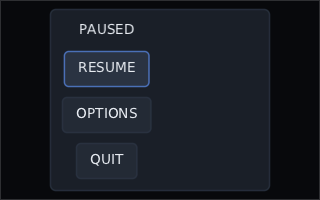
It is drawn by the real renderer (the raw OpenGL backend), through the real skin and fonts. Each preview is drawn off the window into a texture exactly its size, so a 1920 by 1080 screen previews fine. Animations it starts have finished before the picture is taken.
@Preview(…) |
|
|---|---|
width, height
|
the picture, and the screen the content is laid out in. 400 by 200 if left out |
name |
the file, <name>.png. The function's name if left out. menus/pause writes into a menus folder |
background |
0xAARRGGBB behind the content. Opaque black if left out; zero alpha keeps the PNG transparent |
A preview takes no arguments. It can be a top-level function or sit in an object
or a companion object (@JvmStatic or not), and it can be private. Anything else — parameters, not @Composable, inside a
class, two previews with the same name — fails the task with the function named,
rather than quietly leaving a picture out. One preview that throws — a TODO(), or
a screen that never stops animating — is reported and the rest are still drawn,
then the task fails.
In your own module, register the task the way composegl-demo/build.gradle.kts
does. It needs composegl-lwjgl3 on the classpath and at least one font, because
that backend cannot draw anything without its glyph atlas:
tasks.register<JavaExec>("renderPreviews") {
    mainClass.set("dev.wildware.composegl.lwjgl3.preview.RenderPreviewsKt")
    classpath = sourceSets["main"].runtimeClasspath
    args("--classes", sourceSets["main"].output.classesDirs.asPath,
         "--out", layout.buildDirectory.dir("previews").get().asFile.path,
         "--font", "default=src/main/resources/fonts/MyFont.ttf")
}
--font family=file.ttf@12,16 bakes only those sizes; the default skin's text is
the family default. --package com.game.menus only looks there.
The same function is a test. uiTest(preview) composes it at its size, on its
background, so the screen in the picture is the screen a test clicks through — and a
golden can start from it:
val preview = Previews.of(Class.forName("com.game.MenusKt")).single { it.name == "PauseMenuPreview" }
uiTest(preview).use { ui -> ui.click("resume") }
Live, in a window. ./gradlew :your-module:previewLive shows the same previews in a
window and redraws them each time you save a file. See Live previews for the task.
PreviewsTest in composegl-ui, PreviewRendererTest in composegl-lwjgl3 and
PreviewGlTest in composegl-gdx are the worked examples.
Anything random takes a seed, so it can be a golden. ParticleEmitter lives in
composegl-game (import dev.wildware.composegl.game; see Game widgets):
val sparks = ParticleEmitter(capacity = 120, seed = 4L)
sparks.burst(count = 40, x = 60f, y = 60f, style = HitSparks)
repeat(36) { sparks.update(1f / 60f) }
kotlin.random.Random(seed) is the same algorithm on every platform, so that burst
is identical on a JVM, on Kotlin/Native and on a phone. update(delta) is public
for exactly this reason: a test drives the clock rather than waiting for one.
./gradlew buildBeyond the tests, two checks run as part of check:
-
checkDependencyConfinement—composegl-uiresolves against an allow-list of modules. Add a dependency it does not name and the build fails, which is how "no engine in the core" stays true rather than being remembered. -
checkNoEngineTypes— reads the compiled bytecode for references to engine types. Same promise, checked from the other end.