Localisation
Three things a game needs to ship in another language, and all three are here:
- Strings by language — a key goes in, the player's language comes out.
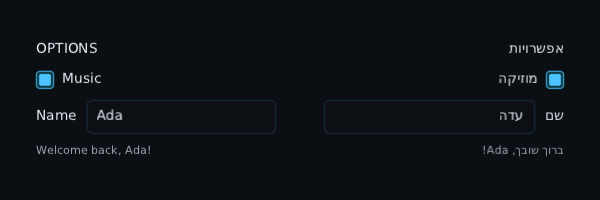
- Mirrored screens — in Arabic or Hebrew the whole screen is the mirror image.
- Mixed-direction text — Hebrew and English on one line, drawn in reading order, with a caret that moves the way the arrow keys point.
val strings = Strings(
    mapOf(
        Locale.English to mapOf("play" to "Play", "hello" to "Hello, {name}"),
        Locale("he") to Strings.parse(hebrewFile.readText()),
    ),
)

ProvideLocale(Locale("he"), strings) {
    Button(stringOf("play"), onClick = ::start)
    Text(pluralOf("lives", lives))
}-
Lookup order:
pt-BR, thenpt, then the fallback locale (English unless you say otherwise). -
A missing key shows as itself —
menu.quiton the button — so it is seen, not blank.strings.missingFrom(locale)lists every untranslated key; assert it is empty in a test. -
Placeholders:
{0},{1}by position,{name}by name.{{is a literal brace. -
Plurals:
lives.zero,lives.one,lives.two,lives.few,lives.many,lives.other, with the count as{0}. Each language picks the form its grammar uses: Arabic's 3 is few and 11 is many; Russian, Ukrainian and Polish use few for 2 to 4 and many for 5 to 20; Russian's 21 is one again. A form your table lacks falls back to other, and azeroform is used for nought in any language. -
File format for
Strings.parse: onekey = valueper line,#comments,\nfor a line break. -
Keys the toolkit looks up itself:
compass.n,compass.neand the rest of the compass points, for CompassBar;dialogue.auto,dialogue.skipanddialogue.logfor the dialogue box's own buttons;chat.sayfor the hint in the chat box's empty input; andinventory.split.half,inventory.split.some,inventory.rotate,inventory.split.title,inventory.split.confirmandinventory.cancelfor the inventory grid's own menu and split prompt; andobjective.progress({0} / {1}),objective.more,objective.fewer,objective.addedandobjective.completedfor the objective tracker's counter, fold row and toasts. One you have not translated keeps its English word rather than showing the key.
Changing the locale — a player picking a language on the options screen — recomposes the screen underneath, so every string and the layout direction change on the next frame.
ProvideLocale sets the layout direction from the language. You can also set it yourself:
ProvideLayoutDirection(LayoutDirection.Rtl) { OptionsScreen() }What mirrors:
| in a right-to-left screen | |
|---|---|
Row, FlowRow
|
the first child is on the right |
Arrangement.Start / End
|
pack to the right / left; SpaceBetween and spacedBy mirror too |
Column, Box, Grid
|
Start alignment hugs the right; a grid's first column is on the right |
Modifier.paddingRelative(start, end) |
start is the right-hand side |
Text, TextField
|
Start-aligned text, and a field's text and placeholder, sit on the right |
LazyRow, sideways ScrollArea, LazyHorizontalGrid
|
start at the right; dragging right, the wheel and the scrollbar scroll on towards the left |
LazyVerticalGrid |
the first column is on the right |
LazyColumn, up-and-down ScrollArea, LazyVerticalGrid, Table
|
the up-and-down scrollbar hangs on the left edge, where the lines end, so it never lies over the first letter of a line; a row narrower than the list starts against the right, and a table keeps the bar's gutter on the left so its columns still line up with its titles |
Slider |
the minimum is on the right; the Left arrow and the pad's left raise the value |
Subtitles |
the band stays in the middle either way, and the words in it read right to left |
What does not mirror, on purpose:
- anything that names a side:
padding(left = …),offset, a picture; -
CompassBar— east is to the right of north wherever the player is from, so a strip that mirrored would slide the wrong way as they turned. Its words are still the language's own; - a custom
Layout— it can readlayoutDirectionin its measure block if it cares; - the order of children, so Tab still goes first to last. The pad and arrow keys move to whatever is on that side of the screen, which is the mirrored neighbour.
Wrap the part that must not flip — a timeline, a map, a media scrubber — in
ProvideLayoutDirection(LayoutDirection.Ltr).
Nothing to switch on. A label with Hebrew or Arabic in it is laid out with the Unicode bidirectional algorithm:
Text("Press שלום to start")   // drawn: Press םולש to start
Text("שלום world.") // drawn: .world םולש — a Hebrew sentence ends on the left- Each paragraph reads the way its first letter does. A paragraph with no letters at all — a score, a time — reads the way the screen does.
- Numbers keep their own order inside right-to-left text.
- Brackets turn to face the right way.
- Styled runs, hover, click and
SelectionContainerselection all find the characters where they are drawn. - An English label with no right-to-left text in it is drawn exactly as before, as one call to the backend.
In a TextField, Left and Right move across the screen: Left in a Hebrew word goes on to the
next letter, which is on the left. Ctrl with an arrow moves by word the way the line reads. Home
and End go to where the line starts and ends in the text.
FontProvider.paragraph(text, style, maxWidth, align, direction) exposes the same layout:
runsOf(line) gives each line's stretches in drawing order, and xOf, boxesOf and indexAt
answer in drawn positions.
- No Arabic shaping. Arabic letters change shape depending on where they are in a word, and no backend here does that yet. Arabic is drawn in the right order but with every letter in its standalone form. Hebrew is not affected.
- Explicit direction controls (U+202A–U+202E, U+2066–U+2069) are ignored.
- Where two runs meet, the caret has one position, not two, so the arrows skip one of the two visual stops there.
- Your font must have the glyphs. DejaVu Sans has Hebrew and Arabic; register it as a fallback if your display font does not.