Scene view
SceneView is a panel with your game's own 3D scene inside it. Use it for a level
editor's viewport, a model spinning in an inventory slot, or a picture-in-picture view
of the world.
It lays out like any other widget. Inside, it draws whatever your renderer draws.
@Composable
fun WeaponPreview(renderer: MyRenderer) {
    val scene = rememberSceneViewState()

    SceneView(scene, Modifier.size(480f, 270f).clip(8f)) {
        clear(Colour.Black)
        raw { frame ->
            GL11.glEnable(GL11.GL_DEPTH_TEST)
            renderer.draw(frame as GlFrame, width, height)
        }
    }

    Button("SPIN", onClick = {
        renderer.turn(15f)
        scene.invalidate()          // draw it again, once, next frame
    })
}SceneView, SceneViewState, rememberSceneViewState and SceneDrawScope are in
dev.wildware.composegl.ui.widget. ScenePass is in dev.wildware.composegl.ui.draw.
To orbit, drag or pick inside it, see Input. For a whole example with a real
renderer in it, see A worked example. To see all three uses running,
see In the showcase.
Think of the scene view as a photo frame. Your renderer takes the photo, the frame holds it, and the interface hangs the frame on the wall.
-
The state owns a picture.
SceneViewStateholds an offscreen picture with a depth buffer, sized to the panel's real pixels. -
Your block fills it, only when asked. The block runs the first time the panel
has a size on the screen, after each
invalidate(), and when the panel's new pixel size has held for a frame. Otherwise it does not run at all. A shelf of eight still previews costs no GPU work. -
It runs before the interface is drawn.
UiRenderer.renderlays the tree out, then renders every dirty scene view, then draws the interface. So the size is always known, and your GL state changes never land in the middle of the interface's batch. AWorldPaneldoes the same for a panel in the world. -
The interface draws the picture as an image. So
clip, rounded corners,alphaand the shader effects all work on it, with no extra code.
A live camera feed calls invalidate() every frame. A still preview calls it when
something changes.
The block is a SceneDrawScope:
width, height
|
the picture's size in real pixels, not design units |
nanos |
the frame's time, from the clock you handed UiRenderer.render
|
clear(colour) |
fills the picture with a colour and its depth buffer with the far plane |
raw { frame -> } |
your frontend's own drawing object, with the picture bound and the viewport covering all of it |
raw hands over the same object UiCanvas.raw does on that frontend: a GlFrame on
LWJGL3, a WebGlFrame in a browser, the SpriteBatch on LibGDX, the RenderContext
on KorGE. Inside it, switch on the depth test and whatever else your scene needs. Round
the block, the toolkit hands your engine its own state and takes its own back afterwards,
as it does round UiCanvas.raw. See Frontends for what each one hands over
and gives back.
The widget interprets nothing. There is no camera, no scene graph and no picking. That is your renderer's job.
val scene = rememberSceneViewState(resolutionScale = 0.5f)invalidate() |
render once more, in the next frame |
resolutionScale |
how many of the panel's pixels to render. 1 is all of them, 0.5 is half each way, stretched to fit. Good for a heavy scene. |
dirty |
true until the next render |
width, height
|
the size last rendered, in pixels. 0 before the first. |
clamped |
true when the last render was cut down to fit the GPU's biggest texture |
draws |
how many times it has rendered |
texture |
the picture, or null before the first render |
release() |
give the picture back to the GPU now. The next frame makes a new one if the panel is still showing. |
rememberSceneViewState keeps the state across recompositions, so a recomposition
does not throw the picture away. Use one state per SceneView.
Pixel size is the panel's content box (inside its padding) times the viewport's scale,
times any Modifier.scale above it, times resolutionScale, rounded up. A GPU's
biggest texture caps it, and width and height say what you really got.
A scene view can take the mouse, the keyboard and the pad, so you can orbit a camera, drag a gizmo or pick an object.
@Composable
fun EditorViewport(renderer: MyRenderer, camera: OrbitCamera) {
    val scene = rememberSceneViewState()
    val grab = remember { Grab() }

    SceneView(
        scene,
        Modifier.fillMaxSize(),
        onPointer = { e ->
            when (e) {
                is PointerEvent.Press -> {
                    grab.at = e.position
                    camera.pick(e.position.x, e.position.y, scene.width, scene.height)
                    true
                }
                is PointerEvent.Move -> if (e.pressed.isEmpty()) false else {
                    camera.orbit(e.position - grab.at)
                    grab.at = e.position
                    scene.invalidate()
                    true
                }
                is PointerEvent.Scroll -> {
                    camera.zoom(e.delta.y)
                    scene.invalidate()
                    true
                }
                else -> false
            }
        },
        onKey = { e ->
            if (e.key == Key.F && e.type == KeyEventType.Down) {
                camera.frameSelection()
                scene.invalidate()
                true
            } else {
                false
            }
        },
        onPad = { e ->
            if (e is GamepadEvent.Axis) {
                camera.fly(e.axis, e.value)
                scene.invalidate()
                true
            } else {
                false
            }
        },
    ) {
        clear(Colour.Black)
        raw { frame -> renderer.draw(frame as GlFrame, width, height) }
    }
}
Where a position is. (0, 0) is the top-left corner of the picture on screen. A
position is in the picture's own pixels: the same units as width and height in the
draw block. So the far corner is (scene.width, scene.height), and a position goes
straight into your renderer's picking maths.
That stays true wherever the panel is: in a scrolled column, in a Splitter pane,
under the viewport's design-to-pixel scaling, inside Modifier.scale, with padding,
with a resolutionScale, or right to left. You never convert anything yourself.
The rules.
return true
|
you used the event. It goes no further. |
return false
|
it carries on to whatever is behind: a click to the card the preview sits on, the wheel to the list it is in, Tab to the next control |
| a press you take | holds the pointer. Moves keep coming after it leaves the panel, with positions below zero or past the size, until the button comes up. |
| a press you take | also puts focus on the panel, so the keyboard follows the click |
Focus. A scene view with any handler is focusable: Tab and the pad's d-pad stop on
it, and the skin draws a ring over it while it has focus. onKey and onPad only hear
events while it has focus. A still preview with no handlers is not a stop, so a shelf
of eight previews is not eight Tab presses.
| parameter | what it does |
|---|---|
onPointer |
pointer events, in the picture's pixels |
onKey |
keys while focused |
onPad |
pad buttons and sticks while focused, before the pad moves focus |
focusable |
on when there is a handler; set it yourself to change that |
initialFocus |
open the screen with focus here |
style |
the skin style drawn over the picture, "sceneview" by default. Its focused state is the ring. |
interaction |
the panel's hover, press and focus, if you draw your own ring |
Focus often arrives on a press that started somewhere else: Tab, the d-pad, a push of the left stick. What ends that press lands on the panel. So that your handler cannot swallow it and leave the pad thinking a direction is still held:
- A key or pad button coming up reaches your handler only if its going down did too.
- The left stick coming back to rest reaches your handler as usual, and you can take it,
but
GamepadNavigatorlets go of the push either way. Without that, a camera that takes every stick event would get focus from a push, and the navigator, never hearing the stick come back, would step focus straight back out and keep stepping. A push out that you take is still yours: focus stays.
One thing to handle yourself: if focus leaves while a key or button your handler took is
still down, its up goes wherever focus went, and onKey or onPad never hears it.
A camera flying while W is held would keep flying. Stop what a held key started when the
panel loses focus, by passing your own interaction and watching isFocused.
The widget still interprets nothing. There is no camera, no gizmo and no picking helper: what a drag or a key means is up to you.
SceneView takes the room it is given and asks for none, so give it a size:
Modifier.size, weight, fillMaxSize inside a Splitter pane, or a debug window.
A panel squeezed to nothing renders nothing and does not throw. It stays dirty, so it renders the moment it has room again.
When the panel's size changes, see what it costs: the picture is stretched while the size is still moving, and remade once it stops. Right to left moves the panel to the other side like any other widget. It does not mirror the picture: a scene is not text.
A picture on the GPU is memory, and making one is slow. The scene view spends both carefully. Think of a photo frame again: you do not print a new photo every time someone nudges the frame, and you take the photo out when you throw the frame away.
Made on first render. The picture is made the first time the panel is laid out with
some room and is on the screen, at the panel's pixels times resolutionScale. A scene
view that is never seen makes nothing. One laid out off the screen, or scrolled out of a
ScrollArea or a lazy list — anything that clips, even well inside the window — does not
render, even when it is dirty; it renders when it comes back.
Stretched while resizing. While the panel's size is still changing, as it does every
frame of a splitter drag, the picture it already has is kept and stretched over the
panel. Once the size holds for one frame, a picture of exactly the new size is made and
rendered. The drag stays smooth and a little soft, and lands sharp. A live scene that
calls invalidate() every frame keeps moving during the drag, drawn into the old
picture at its old size. A new resolutionScale on a panel that is not moving is
remade straight away.
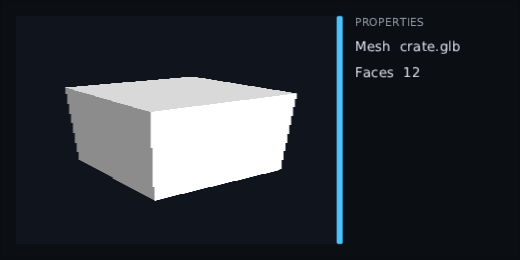
That picture was taken with the bar still moving. The cube is stretched and its edges are stepped: it is the old, narrower picture pulled over the wider pane. One frame after the bar stops, it is drawn again at the new size and is sharp.
Given back when it leaves. When a SceneView leaves the composition, its picture
is given back to the GPU, whoever holds the state. So a LazyColumn of previews frees
each one as its row scrolls away, and makes a new one if the row comes back:
LazyColumn(count = items.size, key = { items[it].id }) { index ->
    val preview = rememberSceneViewState()
    SceneView(preview, Modifier.fillMaxWidth().height(96f)) {
        clear(Colour.Black)
        raw { frame -> models.draw(items[index], frame as GlFrame, width, height) }
    }
}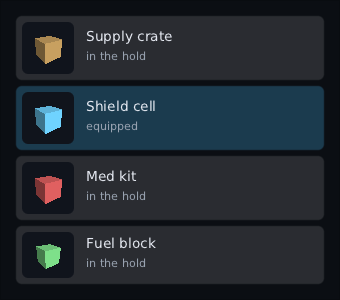
Four previews, four pictures. Each was drawn once; until something marks one dirty, the list costs no more GPU work than four images.
Capped at the GPU's biggest texture. Neither side goes past
UiCanvas.maxSceneSize, which is the device's biggest texture. A panel that would, at
its resolutionScale, is rendered at a smaller scale that fits, keeping its shape,
rather than failing in the middle of a frame. clamped turns true, and the prepass
warns once for that state. The warning goes to ScenePass.warn, which prints by
default; point it at your own log:
ui.scenes.warn = { message -> log.warn(message) }Counted in the frame budget. Each render is timed and counted in the FrameBudget
and listed in its draw-call trace under the scene view's node, with the reason scene.
FrameBudgetOverlay shows a scenes time and a scene renders count, and the frame
time graph includes them. An editor with four viewports redrawing every frame shows
scene renders 4, not a slow frame with no reason. See Debugging.
val budget = FrameBudget(publishEveryMillis = 0)
val ui = UiRenderer(host, canvas, budget)
ui.render(viewport, nanos)
budget.reading.scenes        // how many rendered this frame
budget.reading.sceneMillis // what they cost, averagedMost games never need this. UiRenderer runs the prepass for you.
If you must render scenes between passes of your own, for example after a shadow map the preview shares, switch it off and call it yourself:
val ui = UiRenderer(host, canvas)
ui.renderScenes = false
ui.onLaidOut = { _ ->
    shadows.render()
    ui.scenes.render(viewport, nanos)
}
Two rules. Call scenes.render after layout, because the size comes from layout.
Call it outside the canvas's frame, because a scene binds its own picture. Inside
onLaidOut meets both. Called after render instead, every new picture shows a frame
late.
ScenePass(tree, canvas, budget) is the same pass on its own, for a game that does not
use UiRenderer at all. Leave out budget and nothing is counted.
A SceneView works inside a WorldPanel too: a monitor on a wall showing a security
camera, a spinning ship on a shop terminal. The panel runs the same prepass a screen
does, after its layout and before its frame opens.
That is why the panel opens the frame itself. Hand draw a block that opens the
target's frame and runs what it is given:
val panel = WorldPanel(320f, 180f)
panel.setContent { ShopTerminal(ship) }

// In the game loop:
if (panel.needsRedraw(now)) panel.draw(canvas) { tree -> target.draw(canvas) { tree() } }
Called the old way, inside a frame that is already open, a panel with a dirty scene view fails with an error that says so. A scene cannot be rendered in the middle of a frame.
The cost. A world panel draws only when something in it changed. Marking a scene view dirty counts as a change. So a live scene view, one marked dirty every frame, makes its whole panel redraw every frame: every widget on it, not just the scene. Keep a live panel small, or give the live scene a panel of its own. A still preview costs nothing after its first render, as it does on a screen.
The rest holds as on a screen. One design unit is one pixel of the target, so a scene
view of 120 by 80 gets a 120 by 80 picture. The picture is capped at the GPU's biggest
texture, and panel.warn gets the warning. The scene's nanos is the time you last
passed to needsRedraw. To count the panel's scenes in the frame budget, hand it your
screen's budget, and draw the panel before ui.render so they land in that frame:
panel.budget = ui.budgetOn KorGE, the canvas renders scenes through the frame's RenderContext, so set
canvas.renderContext = ctx around the panel's draw. See KorGE.
The drawing is the shared renderer's, on every frontend. A frontend only hands over its
own drawing object and gets its state back afterwards, the same way it does for
UiCanvas.raw. Think of lending someone your kitchen: they cook in it, and you find
every drawer shut when they leave.
| frontend |
raw hands over |
afterwards |
|---|---|---|
| raw OpenGL (LWJGL3) | GlFrame |
the documented end state (below) |
| a browser tab (WebGL 1 and 2) | WebGlFrame |
the same, or with HostState.Restore your library's own state (below) |
| LibGDX | your SpriteBatch, open on the picture |
the documented end state; the batch closed, its projection and colour as you left them |
| KorGE | the frame's RenderContext, with the picture on its framebuffer stack |
the GL state KorGE left, and KorGE told to forget what it remembers (below) |
| Kool |
KoolFrame: Kool's ctx, the projection and the viewport |
Kool's own GL state back, whatever the block left (below) |
your own RenderCanvas
|
whatever its handOver makes |
whatever its device's HostState says |
"The documented end state" is HostState.Leave: the framebuffer and viewport you had,
scissor off, depth test, culling and stencil test off, blending on with
SRC_ALPHA, ONE_MINUS_SRC_ALPHA, no program, no buffers, texture unit 0 active with
nothing bound. Your block starts in that state too, with the picture bound. A widget
drawn after a careless scene draws exactly as it would with no scene at all; each
frontend's tests check that pixel for pixel on a real GPU.
An engine that remembers GL state (KorGE, three.js) skips setting a value it thinks
is already set. So with HostState.Restore the block starts with the engine's own
state, not the toolkit's, and whatever the engine sets in the block is what it has once
the scene is over. Its memory stays true. Three things are not kept: the framebuffer,
viewport and scissor are the picture's while the block runs and the engine's own again
afterwards. Anything you change behind the engine's back inside the block is kept too,
as if the engine had set it.
For three.js, which remembers its viewport and scissor, call renderer.resetState()
after the frame that rendered a scene. The KorGE frontend does the same for KorGE for
you: it makes KorGE forget what it remembers before and after your block, so KorGE sets
everything it needs the next time it draws, as it does at the start of every frame.
Kool cannot be told to forget, and draws only through its own passes, so anything a
block draws with is behind Kool's back. So the Kool frontend does not keep what the block
leaves: when the block returns, Kool's own state goes back, depth comparison and culled
faces included. The block starts in Kool's state — reversed depth, so not LESS, on a
context with clip control. See Kool.
LibGDX. ModelBatch sets up its own depth test, so it draws straight in:
@Composable
fun ShipPreview(models: ModelBatch, camera: PerspectiveCamera, ship: ModelInstance, environment: Environment) {
    val scene = rememberSceneViewState()

    SceneView(scene, Modifier.size(320f, 240f)) {
        clear(Colour.Black)
        raw { batch ->
            // `batch` is the SpriteBatch you gave the canvas, open on the picture.
            camera.viewportWidth = width.toFloat()
            camera.viewportHeight = height.toFloat()
            camera.update()
            models.begin(camera)
            models.render(ship, environment)
            models.end()
            (batch as SpriteBatch).flush()
        }
    }
}
The batch's projection covers the picture in pixels, y up, like LibGDX's own. A canvas
made without a SpriteBatch refuses raw, in a scene as everywhere else, so give
GdxBackend or GdxCanvas one.
KorGE. The picture is a KorGE framebuffer, with depth and stencil, pushed onto the
render context's framebuffer stack while your block runs. So anything that draws
through the context lands in it: ctx.useBatcher, or a whole container's render:
@Composable
fun MiniMap(world: Container) {
    val scene = rememberSceneViewState()

    SceneView(scene, Modifier.size(200f, 200f).clip(8f)) {
        clear(Colour.Black)
        raw { ctx ->
            world.render(ctx as RenderContext)
        }
    }
}
It comes out the way up KorGE drew it, y down, as KorGE's own render textures do. The
scene is rendered inside a KorGE render, so KorgeCanvas.renderContext must be set for
the frame, as it must be for drawing at all. ComposeGlView sets it for you.
WebGL 1 has only 16-bit depth buffers, and that is what a scene gets there. WebGL 2 gets 24 bits, as desktop GL does.
A canvas says whether it can with UiCanvas.drawsScenes. The one tests use,
RecordingCanvas, can: it writes each render down in scenes, with the size, the
clears and how often raw was asked for, so a test asserts on redraws with no GPU.
ui.render()
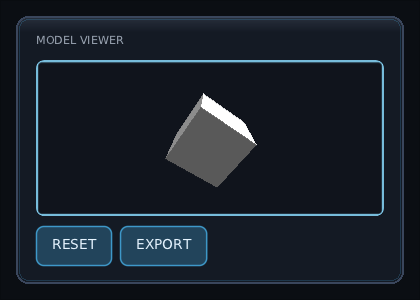
assertEquals(1, (ui.backend.canvas as RecordingCanvas).scenes.size)The examples above call a renderer they do not show. This one is whole: a model you turn
by dragging or with the arrow keys, drawn by plain OpenGL on the LWJGL3 frontend. It is
the code the pictures on this page were taken of, in
composegl-demo/.../demo/scene/ModelViewer.kt.
The widget half:
@Composable
fun ModelViewer(
    cube: Cube,
    modifier: Modifier = Modifier,
    state: SceneViewState = rememberSceneViewState(),
    tint: Colour = Colour.White,
) {
    // Not Compose state: only the draw block reads it, and only when the view is dirty.
    val turn = remember { Turn() }

    SceneView(
        state,
        modifier,
        onPointer = { e ->
            when (e) {
                is PointerEvent.Press -> {
                    turn.grab = e.position
                    true
                }
                is PointerEvent.Move -> if (e.pressed.isEmpty()) false else {
                    // Positions are in the picture's pixels, so half its width is half a turn.
                    turn.yaw += (e.position.x - turn.grab.x) / state.width.coerceAtLeast(1) * 180f
                    turn.pitch += (e.position.y - turn.grab.y) / state.height.coerceAtLeast(1) * 90f
                    turn.grab = e.position
                    state.invalidate()
                    true
                }
                else -> false
            }
        },
        onKey = { e ->
            val by = when (e.key) {
                Key.Left -> -15f
                Key.Right -> 15f
                else -> 0f
            }
            if (by != 0f && e.type == KeyEventType.Down) {
                turn.yaw += by
                state.invalidate()
            }
            by != 0f
        },
    ) {
        clear(Colour.rgb(0x10141C))
        raw { cube.draw(width, height, turn.yaw, turn.pitch, tint) }
    }
}

private class Turn {
    var yaw = 35f
    var pitch = 25f
    var grab = Offset.Zero
}
The renderer half is the game's, not the toolkit's. Cube is one shader and one vertex
buffer; the part that matters is how little it has to do to live in a panel:
class Cube : AutoCloseable {
    fun draw(width: Int, height: Int, yaw: Float, pitch: Float, tint: Colour = Colour.White) {
        if (program == 0) create()             // made on the GL thread, the first time

        GL11.glEnable(GL11.GL_DEPTH_TEST)      // the picture has a depth buffer; turn it on
        GL20.glUseProgram(program)
        // ... a perspective matrix for width / height, the buffer bound, glDrawArrays ...
        GL20.glUseProgram(0)
    }
}
Three things it does not do: bind a framebuffer, set a viewport, or clear. The block is
handed the picture already bound with the viewport over all of it, and clear wipes the
colour and the depth. It does not put the toolkit's state back either; the toolkit does
that after the block.
And using it:
val cube = rememberCube()

Panel(Modifier.fillMaxSize()) {
    Column(Modifier.fillMaxSize(), verticalArrangement = Arrangement.spacedBy(10f)) {
        Text("MODEL VIEWER", style = "label.dim")
        ModelViewer(cube, Modifier.fillMaxWidth().weight(1f).clip(8f))
        Row(horizontalArrangement = Arrangement.spacedBy(8f)) {
            Button("RESET", onClick = {})
            Button("EXPORT", onClick = {})
        }
    }
}
rememberCube() makes the Cube once and closes it when the composition lets it go.
The list of previews above is the same ModelViewer, four times, each with a tint and
Modifier.size(52f).
./gradlew :composegl-demo-showcase:run, then Modules ▸ composegl-ui (Control and 1,
or the pad's Start) and open Scene views. It has all three uses, each looking at the
showcase's own 3D fight:
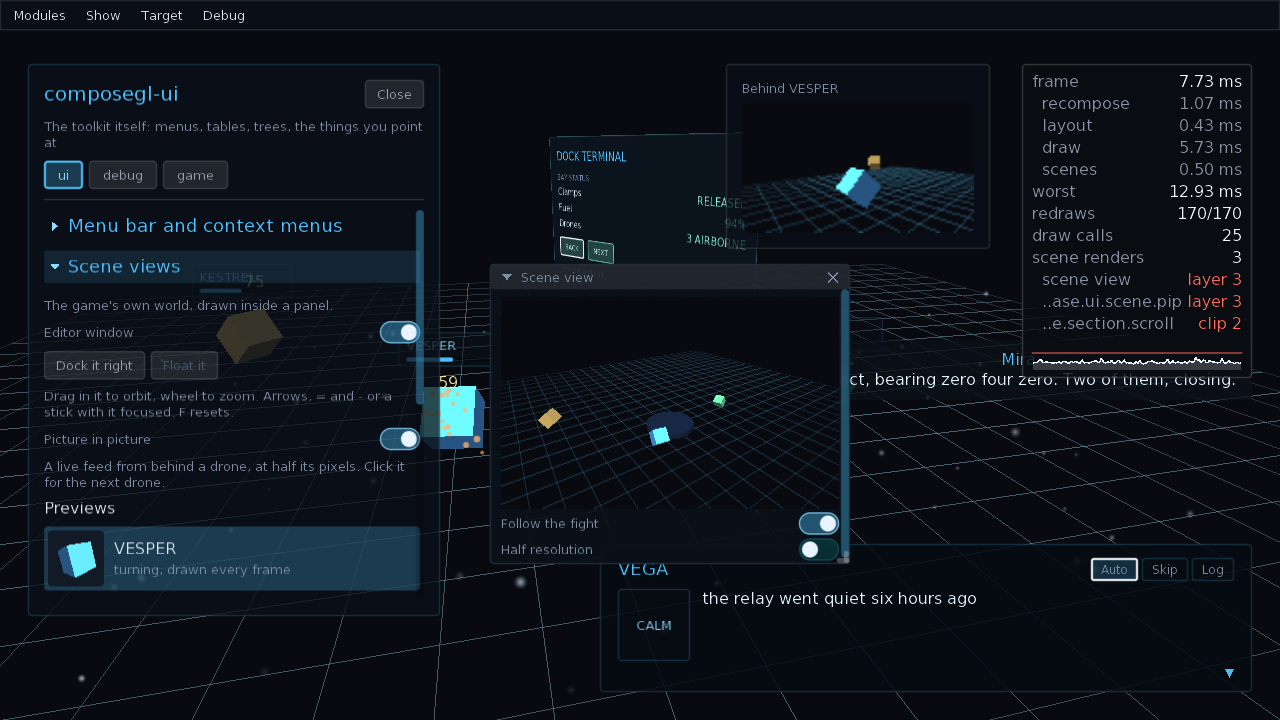
| what it shows | how to drive it | |
|---|---|---|
| Editor window | the whole world, in a debug window you can move, resize, dock and tab. Follow the fight redraws it every frame; switched off, it redraws only when the camera moves. Half resolution sets resolutionScale to 0.5. |
drag to orbit, the wheel to zoom. Focused: the arrows orbit, = and - zoom, F resets. On a pad: either stick orbits, the bumpers zoom, West resets, the d-pad moves focus on. |
| Previews | a drone beside each row of a list. Only the one that is turning is drawn again each frame; the others were drawn once. | click a row, or Tab to it and press Enter, or South on a pad, to set it turning. |
| Picture in picture | a live feed from behind one drone, at resolutionScale = 0.5, over the fight. |
click it, or focus it and press Enter or South, for the next drone. |
The editor window and the picture in picture stay open when the section closes. With the
frame budget on (F3), scene renders counts how many were drawn that frame.
COMPOSEGL_SHOWCASE_VIEWS=1 opens both at startup.
The showcase's interface never touches the scene. It asks for a camera through a small
interface of its own, WorldViews, and the game answers inside the draw block:
SceneView(views.editor, Modifier.fillMaxWidth().aspectRatio(16f / 10f), onPointer = input::pointer, onKey = input::key, onPad = input::pad) {
    clear(SkyColour)
    raw { frame -> world.orbit(frame, width, height, views.yaw, views.pitch, views.distance) }
}
And the game's loop says, once a frame, which views must be drawn again:
if (editorOpen && editorLive) editor.invalidate()
if (pipOpen) pip.invalidate()- No camera, scene graph or picking helper.
- No multisampling yet.
See also Render targets for drawing into a picture by hand.