Animation
Everything that moves, in one place: the clocks it runs on, values that travel instead of jumping, panels that come and go, and the modifiers that shake, scroll and drift.
One rule runs through all of it. An animation that has arrived costs nothing. It stops asking for frames, so a screen full of settled animations redraws exactly as often as a screen with none.
It lives in dev.wildware.composegl.ui.animation.
Every animation runs on a named Clock. Two come with the toolkit:
-
Clock.Uiis the interface's own time. It always runs. A pause menu is drawn on it. -
Clock.Worldis the game's time. Stopping it is what pausing the game means.
Nearly everything that moves takes clock =, and most default to Clock.Ui. The time
itself lives in the host's Clocks, so two screens (or two tests) never share a clock by
accident:
host.clocks.stop(Clock.World)    // the game is paused
host.clocks.start(Clock.World)   // …and carries on from exactly where it stopped
host.clocks.setRunning(Clock.World, !paused)
A stopped clock does not move, so an animation on it resumes from where it froze
rather than jumping to where it would have been. That is how a pause menu fades in
over a world that has stopped. Inside a composable, reach the clocks through
LocalClocks:
@Composable
fun PauseMenu() {
    val clocks = LocalClocks.current
    DisposableEffect(clocks) {
        clocks.stop(Clock.World)                 // the world freezes…
        onDispose { clocks.start(Clock.World) }
    }
    AnimatedVisibility(visible = true, initiallyVisible = false) {   // …and this still fades in, on Clock.Ui
        Panel { … }
    }
}-
Your own clocks.
Clock("cutscene")is a third one. It moves every frame with the others, and can be stopped and started on its own. -
Waiting.
clocks.wait(Clock.World, millis = 500)waits for that clock's own time, not wall time, so a pause half way through leaves half the wait for later. A stopped clock waits forever. -
A different set for part of the tree.
ProvideClocks(replayClocks) { … }puts a subtree, like a replay window, on clocks of its own.
What runs on which clock unless you say otherwise:
Clock.Ui |
Clock.World |
|---|---|
animated values, Animatable, updateTransition
|
Bar's trail |
AnimatedVisibility, Crossfade, AnimatedContent
|
Reticle |
animateContentSize, animatePlacement
|
DamageNumberLayer |
shake, marquee, repeatingClickable, Spinner, IndeterminateBar
|
ParticleLayer |
sprite-sheet animations, Typewriter, Notifications
|
RadialCooldown |
A spring that overshoots for three frames is over before you can see it. Freeze the clocks and step them instead:
host.clocks.debug.pause()            // every animation holds where it is
host.clocks.debug.step(frames = 1)   // the next frame moves them one frame, then they hold again
host.clocks.debug.speed = 0.25f      // or run everything at a quarter speed
host.clocks.debug.resume()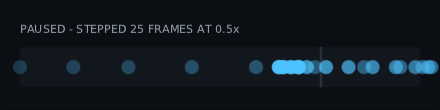
Every call takes a clock too, so the world can be stepped while the pause menu over it
keeps animating: pause(Clock.World), step(frames = 1, clock = Clock.World),
setSpeed(Clock.World, 0.5f). Paused with no clock means every clock, including ones
made later. isPaused, isPaused(clock) and speedOf(clock) read it back.
It is not the game's pause. clocks.stop(Clock.World) is the game pausing; debug
is you looking. The game starting its world again does not undo a debug pause, and a
step does not move a clock the game has stopped.
A step is taken on the next frame, because an animation only moves when a frame
arrives. It is as long as that frame, at the clock's speed. Stepping a running clock
pauses it first. A clock you let go with resume(Clock.Ui) stays let go when you step
everything else. Resuming throws away steps not yet taken.
On keys, for a game running in front of you. ClockDebugKeys is a key handler: F5
freezes and lets go, F6 steps (and keeps stepping while held), F7 and F8 halve and
double the speed between an eighth and real time. Ask it first in your sink:
val debugKeys = ClockDebugKeys(host.clocks)                  // or ClockDebugKeys(host.clocks, Clock.World)
override fun onKey(event: KeyEvent) = debugKeys.onKey(event) || router.onKey(event)
The example has them on: run :composegl-demo:run and press F5.
Write down where a value should be, and it goes there:
val alpha by animateFloatAsState(if (visible) 1f else 0f)
Box(Modifier.alpha(alpha)) { … }

val colour by animateColourAsState(if (hot) Colour.Red else Colour.White)
val at by animateOffsetAsState(target, clock = Clock.World)
val size by animateSizeAsState(wanted, onFinished = { landed() })
Change the target mid-flight and it turns round from where it is, at the speed it was
going. animateAsState(target, vectoriser) does the same for any type you can take apart
into numbers: implement Vectoriser. onFinished is called once when it arrives, and not
when the target changes first.
For a game that wants to drive a movement itself, Animatable is the same thing held in
your hand. animateTo suspends until it arrives, so a sequence is a sequence of lines:
val slide = rememberAnimatable(0f)
LaunchedEffect(open) {
    slide.animateTo(if (open) 1f else 0f, Spring())
}
slide.snapTo(1f) // there now, no movementvalue, target and isRunning are state, so reading them redraws. Cancelling the
coroutine stops it where it is, keeping its speed for whatever animates it next.
| Spec | What it is |
|---|---|
Tween(durationMillis = 200, delayMillis = 0, easing = Easings.EaseOut) |
a fixed time and a curve |
Spring(damping = Spring.NoWobble, stiffness = Spring.Medium, threshold = 0.001f) |
no duration; carries its speed into a new target |
Snap(delayMillis = 0) |
just there — a whole game can turn animation off by swapping one value |
-
Springs are the default for animated values, because a target that changes part way
is simply a new target.
dampingisSpring.NoWobble(1),Gentle(0.75) orBouncy(0.5);stiffnessisSpring.Low,MediumorHigh.thresholdis how close counts as arrived, in the units being animated, so a spring on pixels wants a bigger one. -
Easings for a tween:
Easings.Linear,EaseIn,EaseOut,EaseInOut,Sine,Overshoot,Bounce,Step, orCubicBezier(x1, y1, x2, y2)straight from a design tool. - Specs compare by value, so one written inline does not restart anything when the screen recomposes.
-
animateColourAsStatedefaults to a tween rather than a spring.
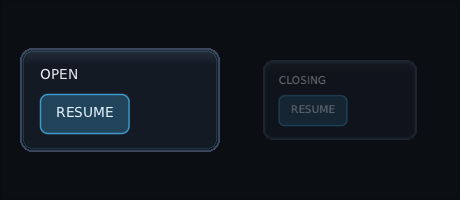
if (open) Menu() takes the menu away the frame open goes false, so there is
nothing left to animate. AnimatedVisibility keeps it on screen until its exit
has played, then takes it away.
AnimatedVisibility(
    visible = open,
    enter = fadeIn() + scaleIn(from = 0.9f),
    exit = fadeOut() + slideOut(Offset(0f, 30f)),
) {
    Panel { … }
}
-
Parts:
fadeIn/fadeOut,scaleIn/scaleOut,slideIn/slideOut, andslideInRelative/slideOutRelative. Join them with+. Each takes its own spec, so a fade can be quick while a scale settles on a spring. -
Slides:
slideInandslideOutare in pixels. TheRelativeones are in the panel's own size:Offset(1f, 0f)is one whole width to the right. - Changing your mind turns round from where it is. Reopen a menu half way out and it comes back without ever leaving the tree.
-
Clocks:
clock = Clock.Worldfreezes a leaving panel while the game is paused. -
Starting hidden: it opens at rest when
visibleis already true. PassinitiallyVisible = falsefor a toast that should animate in when it is added. - Cost: open and still, or closed, it asks for no frames.
- A leaving panel can still be clicked until it is gone. Pass
enabled = opento its buttons if that matters.
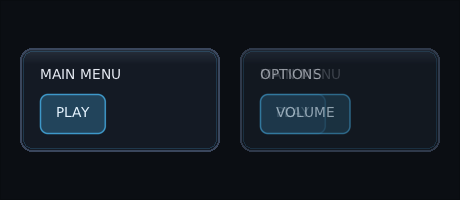
when (page) { … } swaps one screen for the next in a single frame: an instant
cut. Crossfade fades the old screen out while the new one fades in over it.
Crossfade(targetState = page) { page ->
    when (page) {
        Page.Main -> MainMenu()
        Page.Options -> Options()
    }
}
- Each page keeps its own state. A leaving page is handed the value it was showing, so a portrait fading between expressions shows the old face on the way out.
-
What counts as a new page:
contentKey. Key a portrait on its expression and a change to its health redraws it with no fade. - Changing your mind turns round. Go back to a page still fading out and it fades back in, with its state (a counter, a scroll position) intact. Once a page has faded all the way out it is forgotten, so coming back later starts it fresh.
-
Timing:
spec = Tween(300), or a spring.clock = Clock.Worldholds the fade still while the game is paused. -
Layout: pages sit on top of each other, newest on top (a page you go back to
keeps its place underneath). While both are there the
box is as big as the bigger one;
contentAlignmentplaces the smaller one. -
Focus stays on a button in the old page until that page is gone, then moves into
the new page, to its
initialFocusbutton if it has one. - Cost: settled, it is one page at full opacity and asks for no frames.
- A leaving page can still be clicked until it is gone.
- Only a fade. For a slide or a scale, use
AnimatedContentbelow.
Crossfade always fades. AnimatedContent asks you how to get from one page to the
next, each time the page changes, given the page it is leaving and the one it is going to.
Slide left going deeper into a menu and right coming back:
AnimatedContent(
    targetState = page,
    transition = { from, to -> if (to > from) slideLeft() else slideRight() },
) { page -> PageContent(page) }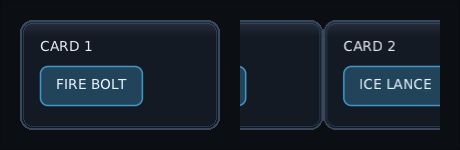
-
Ready-made:
slideLeft(),slideRight(),slideUp()(a score rolling up) andslideDown(). Each slides by the page's own size, so it looks the same on any screen. -
Your own: an enter and an exit, joined with
togetherWith:scaleIn(from = 0.8f) + fadeIn() togetherWith fadeOut(). Any offadeIn,scaleIn,slideIn, andslideInRelative(a slide measured in the page's own size) works here. -
Size: the space is the size of the page being shown. When the new page is bigger or
smaller, the space grows or shrinks to it on a spring, and what is under it moves with it.
.using(Tween(200))picks the timing;.using(null)turns it off, so the space is as big as the biggest page while they change, the wayCrossfadedoes it. -
Cut off at the edge: while pages change, a page is cut off at the edge of the space,
so a card sliding out does not draw over its neighbours. Settled, nothing is cut.
ContentTransform(enter, exit, clip = false)turns that off. - Changing your mind turns round from wherever the slide had got to, with the page's state intact. The transition is asked again for the new change.
-
Everything else is as
Crossfade:contentKey,contentAlignment,clock = Clock.World, focus moving into the new page, clicks reaching a leaving page, and no frames once settled.
A pressed button shrinks and darkens at once. Written as two animate…AsState
calls, those are two separate animations. updateTransition makes them one
movement: they set off on the same frame, turn round together, and the transition
knows when the whole thing is over.
val pressed = updateTransition(interaction.isPressed)
val scale by pressed.animateFloat { if (it) 0.95f else 1f }
val colour by pressed.animateColour { if (it) dark else light }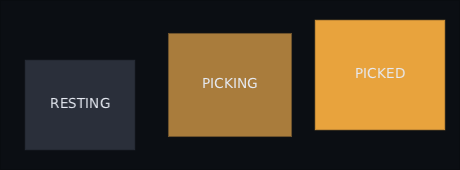
-
Values:
animateFloat,animateColour,animateOffset,animateSize, oranimateValuewith your ownVectoriser. -
Specs per direction: the spec block is told the move being made, so a press
can be quick and the release slow:
animateFloat({ if (false isTransitioningTo true) Tween(60) else Tween(300) }) { … } -
When it is over:
currentStatestays the old state until the slowest value arrives.isRunningis true for the whole movement. - Late values: a value composed part way through starts from the old state's value, and the transition waits for it too.
-
Clocks:
updateTransition(state, clock = Clock.World)freezes every value while the game is paused. - Cost: settled, it asks for no frames.
When what is inside a panel changes size — a quest entry opening, a chat bubble filling
up as the text types in, a tooltip whose text changes — the panel normally snaps to the
new size. animateContentSize makes it travel there instead:
Panel(Modifier.animateContentSize()) {
    Text(quest.title)
    if (expanded) Text(quest.description)
}

Modifier.animateContentSize(Tween(250))                        // a fixed time, not a spring
Modifier.animateContentSize(alignment = Alignment.BottomStart) // a chat log growing upwards
Modifier.animateContentSize(clock = Clock.World)               // stops when the game pauses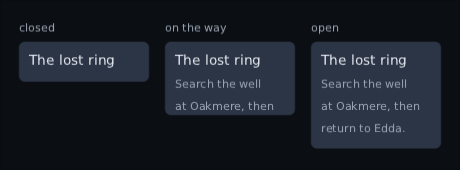
The contents are measured at their new size straight away; the panel is laid out at a size moving from the old one to the new one, and its neighbours move with it. Whatever does not fit yet is cut off at the panel's edge, and cannot be clicked there, until it arrives. Once it has, nothing is cut.
It animates the widget's whole size — padding, background and border too — wherever
it sits in the chain. A widget appearing for the first time takes its size at once,
and a size the chain or the parent fixes has nothing to animate. The default is a
spring, so contents that change again part-way turn it round smoothly. A spec
written inline is fine: specs compare by value, so recomposing does not cost a
redraw. It costs nothing once it has arrived, and a test's settle waits for it.
A collapsing header is this with a title bar on top:
CollapsingHeader grows and shrinks its section the same way.
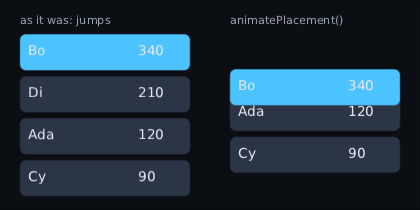
Sort an inventory, reshuffle a leaderboard, take a notification out of the middle of a stack, and every row that moved slides from where it was to where it now belongs instead of jumping:
LazyColumn(count = scores.size, key = { scores[it].id }) { index ->
    ScoreRow(scores[index], Modifier.animatePlacement())
}
The key matters. Without one, a sorted list keeps each row in its place and changes
what it says, so nothing moved. Whatever moves the node counts — a sort, something
inserted above it, a neighbour growing — and the row is put back where it was on the
very frame it moved, so there is no flicker. A new row is not a move and appears where
it lands. A second move mid-slide carries on from where the row got to, at the speed
it was going, which is why the default is a spring; pass any AnimationSpec, and a
clock of Clock.World if the slide should freeze with the game.
The row is really there as it slides: a click, hover and focus find it where it is
drawn. "Where it was" is measured against whatever carries the row about, so only a
real move slides. Scrolling a LazyColumn, LazyRow, lazy grid or ScrollArea is not a move. A
cell that slides inside a row that slides goes along with its row rather than sliding
twice. Anything else that moves as a whole — a window the player drags, a panel flying
in — should say Modifier.placementFrame(), or its rows will trail behind it.
val shake = rememberShake()
Panel(Modifier.shake(shake)) { … }
shake.trigger()                     // wrong password: it jolts and settles on its own
shake.trigger(intensity = 0.3f)     // a lighter knock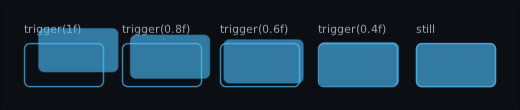
A shake is trauma, the way game cameras do it. Each knock adds to trauma, which
stops at one and drains by itself (decayPerSecond, 1.5 by default, so a full knock is
still in about two thirds of a second). The widget is moved by trauma squared times a
smooth noise, up to maxOffset each way — so half a knock is a quarter of the movement,
and a big shake eases out instead of stopping dead. Mashing a locked door cannot shake
the panel off the screen, because full is full.
It is an offset, so layout does not move: the neighbours stay put and the parent does
not grow. Clicks move with it, as they do with any offset. Put shake before
background to move the whole widget, or after it to rattle the contents inside a frame
that stays still.
It runs on a clock. The default is Clock.Ui, which keeps going under a pause menu; a hit
on the player belongs to Clock.World and freezes with the game:
val hurt = rememberShake(clock = Clock.World, maxOffset = 6f)The wobble comes from the time and a seed, not from randomness, so a shake is the same
every run and a test can say exactly where the widget was. Give two widgets shaking side
by side different seeds, or they move in step. frequency is roughly how many times a
second it changes direction. A still shake costs no frames; stop() puts it straight back.
Text(trackName, Modifier.width(160f).marquee(speed = 30f, delayMillis = 1500))
Text(itemName, Modifier.width(120f).marquee(iterations = 2))       // two trips, then rest
Text(bossName, Modifier.width(200f).marquee(clock = Clock.World))  // stops with the game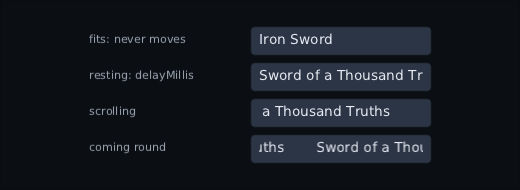
A song title, a player name, an item name in a narrow hotbar tooltip: text too long for its slot scrolls round inside it instead of wrapping or losing its end to an ellipsis.
The contents are measured with no limit on their width, so a label stays on one line,
and the widget keeps the width it was given. It only moves when the contents
overflow. A name that fits sits still, is not cut, stays centred if it was centred,
and costs nothing. One that does not rests for delayMillis, slides left at speed
units a second, and comes round with a copy spacing behind it (32 by default), so the
loop has no seam. It rests again at the start of every trip. Everything is cut to the
widget's box inside its padding.
It runs on a clock — Clock.Ui by default, so it keeps going under a pause menu — and
only the drawing moves: nothing recomposes, layout does not change, and a frame is
asked for only while the contents are actually moving. The rest at the start of each
trip is free. New contents, a new width or a different marquee start again from rest; a
new colour — a title lighting up under the pointer — carries on from where it was.
Where it sits in the chain does not matter. It is for labels: a button inside a marquee is clicked where layout put it, not where it has scrolled to.
Cheap depth. Each layer is offset by a factor times how far a source has moved from rest — the far layer at a small factor, the near one at a bigger one:
val pointer = remember { PointerParallax(centre = Offset(640f, 360f)) }
val stick = remember { StickParallax(reach = Offset(640f, 360f)) }
val sink = ParallaxAware(toolkitSink, pointer = pointer, stick = stick)  // hand this to the backend

Image(sky, Modifier.parallax(pointer, factor = -0.02f).parallax(stick, factor = -0.02f))
Image(hills, Modifier.parallax(pointer, factor = -0.06f).parallax(stick, factor = -0.06f))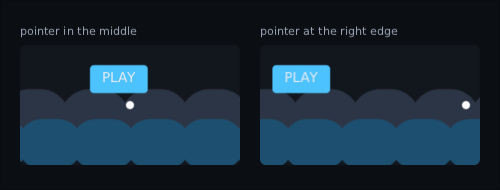
Three sources come with it:
-
PointerParallax(centre)— how far the pointer is fromcentre. Back to rest when the mouse leaves the window or the finger it is following lifts; lifting a second finger leaves it with the first. -
StickParallax(reach)— the right stick by default, since the left one is moving focus. Full tilt is worthreach, so the same factor means the same thing for a stick as for a mouse. Back to rest when the pad that pushed it is unplugged. -
ScrollParallax(scrollState)— how far aScrollArea's rows have moved. Factor one travels with the rows; a half travels at half their speed.
ParallaxAware wraps the sink a backend pushes into so the sources see every event,
including the ones a button uses; the answers are the sink's, unchanged. Anything
else that moves can be a source too: implement ParallaxSource with a
state-backed position.
It is an offset and nothing more, so layout does not move — neighbours keep their
places — while clicks move with the picture. A positive factor follows the source;
a negative one leans away from it. Two on one widget add up. The source is read while
composing, so each move recomposes the composable that wrote the modifier: keep the
layers in a small composable of their own. A still source costs nothing. Give a layer
that fills the screen a margin, or clip its parent, or its edge shows as it drifts.
Parallax has no clock of its own: it follows its source straight away.
val coin = rememberSpriteAnimation(atlas, prefix = "coin_", fps = 12f)   // coin_0, coin_1 … coin_11
AnimatedImage(coin, Modifier.size(32f))

val torch = rememberSpriteAnimation("torch_", fps = 8f, clock = Clock.World)  // the skin's atlas
val boom = rememberSpriteAnimation(explosion, fps = 24f, loop = false)       // a list of frames
AnimatedImage(boom, onFinished = { exploding = false })
boom.restart()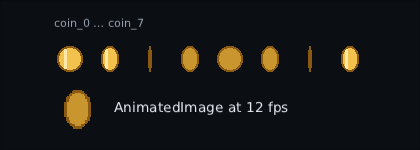
Frames are every region called the prefix followed by a number, played in number
order, so coin_10 comes after coin_9. A prefix that matches nothing stops and
lists what the atlas does hold.
-
It runs on a
Clock. OnClock.Worldit freezes when the game is paused and carries on from the same frame; the defaultClock.Uikeeps a pause menu's spinner turning. - It only redraws when the frame changes. A 12 fps coin costs twelve redraws a second, not sixty, and a finished one-shot costs nothing.
-
The box is the largest frame, so frames a packer trimmed to different sizes do
not make the layout jump.
fitandalignmentplace that box, and every frame is scaled by the same amount inside it, so a trimmed frame does not grow or shrink.
LibGDX's packer strips a trailing _0 into a region's index, so name those
regions back when you build the atlas:
val art = ArtAtlas.of(atlas.regions.associate {
    (if (it.index >= 0) "${it.name}_${it.index}" else it.name) to GdxTexture(it)
})uiTest waits for animations. Every action settles the screen: it runs frames, each
1/60 of a second, until nothing has changed for three in a row and no animation is
playing. So a fade a click starts has finished by the time the next line runs. See
Driving a screen like a player.
advanceBy is time passing. A wait that changes nothing until it ends — a countdown, a
hold before a bar drains — needs ui.advanceBy(millis).
An animation that never ends needs its clock stopped. A pulsing low-health bar would
keep the screen changing, and after five seconds of frames the test fails with the tree
printed rather than hanging. Put it on a clock and stop that clock with
ui.host.clocks.stop(clock): an animation on a stopped clock is not waited for.
-
A
marqueeneeds nothing. It only moves the drawing, never a box, a text or focus, so a frame where it slid along counts as quiet.advanceBymoves it, andassertTextreads a scrolling title once, even while its copy is coming round behind it. - A sprite-sheet loop does. One that changes frame more often than one frame in three never lets the screen settle. Test it on a clock the test stops, or at a lower rate.
Pausing and stepping is the same calls on ui.host.clocks.debug. A frozen clock is
not waited for, so a settle does not hang on it, and a step waiting to be taken is, so
the next line sees the frame it moved. ClockDebugUiTest in composegl-ui walks a
spring's overshoot one F6 at a time.
By hand, without uiTest, advance the time you pass to the host inside the loop, or
an animation waits for a frame that never arrives:
while (host.settle(constraints, focus, nanos = clock)) { clock += 16_666_667L }A seeded shake and a seeded particle burst are the same every run, so both can be
asserted on exactly, or held to a golden image. That a settled screen costs nothing is a
test too: see Testing that nothing happens.