Repository navigation
PT Tools
English · 中文
Two small tools for post-tensioning and structural design: PT Tools (rebar and mesh areas, bars required, a calculator) and SPF2M (tendon profile heights). They are two scripts in the script library: download PT Tools.ahk and / or SPF2M.ahk into the Scripts\ folder, then type pttools or spf2m in the search window (or give the script a custom hotkey). No AutoHotkey installation is needed: ALTRun runs them. Both windows stay on top, remember their position, and save their inputs when closed, in PT Tools.ini / SPF2M.ini next to the script.
Until version 2026.11.16.14 they were built into ALTRun as the system commands PTTools / SPF2M. Inputs saved by the old version aren't carried over, and a custom hotkey with the action PTTools or SPF2M has to be set again to run the script.
In both windows Enter moves to the next field (like Tab) and F1 opens this page.
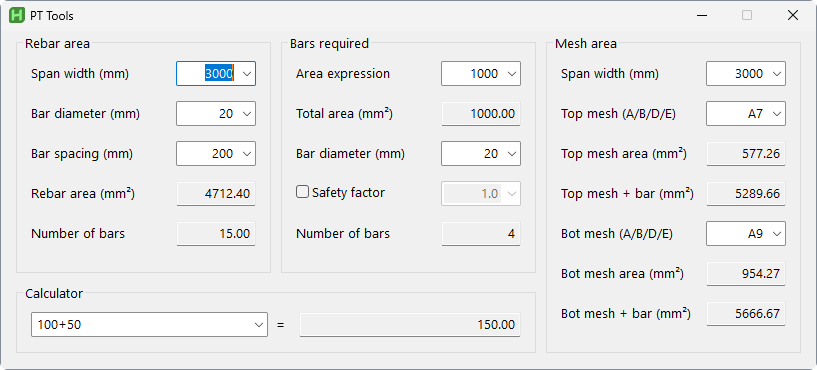
Every input is a combo box: pick a common value from its list or type your own. The first click into a box selects its text, so a new value can just be typed; click again to place the caret. Results update as you type.
| Group | Inputs | Results |
|---|---|---|
| Rebar area | Span width, bar diameter, bar spacing (mm) | Number of bars = span width ÷ spacing (two decimals, the bars per width rather than a whole count); rebar area = number of bars × πd²/4 (mm²) |
| Bars required | Area expression (a number or an expression such as 3500*1.2), bar diameter; optional safety factor (tick the box) |
Total area = the expression's value; number of bars = total area × safety factor ÷ the area of one bar, rounded up |
| Mesh area | Span width (follows Rebar area's span width when that changes, and can be changed on its own), top mesh and bottom mesh marks (A / B / D / E + wire diameter, for example A7) |
Mesh area over the span width: A = wires at 200 mm, B and D = 100 mm, E = 150 mm; "+ bar" = the mesh area plus Rebar area's rebar area |
| Calculator | An expression: numbers, + - * /, ^ (power) and parentheses; the list has examples |
The result, with two decimals |
Lists to pick from: span widths 3000 / 5700 / 6000 / 7200; bar diameters 10 to 40; bar spacings 100 to 1000; areas 3500 to 12000; meshes A6 to E12; safety factors 1.1 / 1.2 / 1.25 / 1.5.
Only the inputs are saved; the results are calculated again each time the window opens.
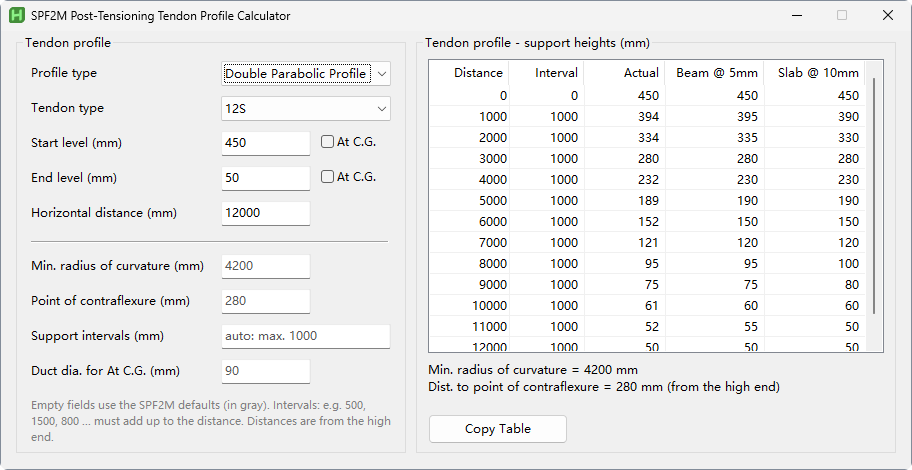
The SPF2M Post-Tensioning Tendon Profile Calculator, calculated directly by the script (no DOSBox needed any more). Pick the profile and the strand type, enter the levels and the horizontal distance, and the table on the right immediately gives the height at every support.
| Input | Notes |
|---|---|
| Profile type | Double parabolic, parabolic-straight-parabolic, parabolic-straight, straight-parabolic |
| Tendon type | Slab, 7S, 12S, 19S, 22S, 31S |
| Start level / end level (mm) | At C.G.: tick it when the level is given at the tendon center; half the duct diameter is subtracted |
| Horizontal distance (mm) | From the high end |
| Min. radius of curvature (mm) | Optional |
| Point of contraflexure (mm) | Optional: when given, the radius is worked back from it, with a warning if it's below the minimum radius |
| Support intervals (mm) | Optional: at most 1000 mm by default, the remainder on the high end side; or write 500, 1500, 800 ..., which must add up to the horizontal distance |
| Duct dia. for At C.G. (mm) | Optional; a value you enter is remembered for each tendon type |
Empty optional fields use SPF2M's defaults, shown in gray:
| Tendon type | Slab | 7S | 12S | 19S | 22S | 31S |
|---|---|---|---|---|---|---|
| Min. radius of curvature (mm) | 5000 | 3200 | 4200 | 5300 | 5700 | 6700 |
| Duct diameter (mm) | 25 | 70 | 90 | 100 | 120 | 130 |
Results: the table starts from the high end (like SPF2M): distance, interval, the actual height, and the height rounded for beams (5 mm) and slabs (10 mm); below it the radius of curvature and the distance to the point of contraflexure. Copy Table copies it all as a table that pastes straight into Excel.
- The results match the original SPF2M.EXE exactly: 139 cases (4 profiles × 6 tendon types, rising / falling, spans that aren't whole meters, custom radius / point of contraflexure / support intervals) were run with the original program in DOSBox, and more than 1,100 values are compared one by one as part of the unit tests
- SPF2M simply quits on some impossible profiles; here you get an explanation instead. When the point of contraflexure is beyond half the span SPF2M shows nothing, and here you get a warning too
- The original SPF2M.EXE and DOSBox are no longer shipped. After upgrading from an old version,
DOSBox.exe,SDL.dll,SDL_net.dll,SPF2M.exeandRun.batinResources\can be deleted