AWS Manager
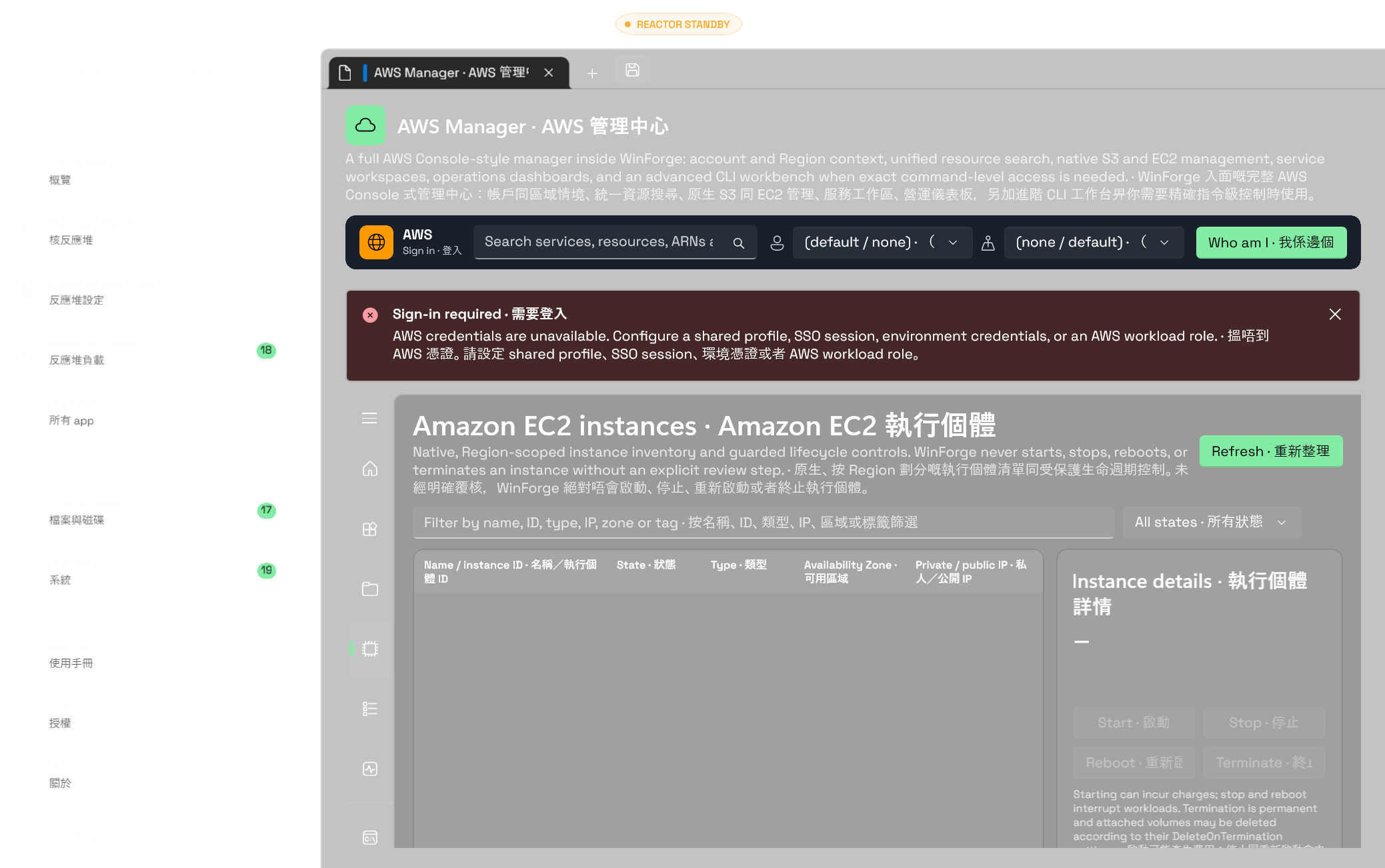
EN — AWS Manager is WinForge's AWS Console-style account workspace. The primary experience is organized around identities, Regions, resources, services, and operations—not around constructing command strings. It combines an in-process AWS SDK for .NET v4 management layer with native S3 and EC2 workspaces, cross-service resource discovery, a searchable service catalog, and an optional advanced AWS CLI workbench.
粵語 — AWS 管理中心係 WinForge 入面嘅 AWS Console 式帳戶工作區。主要介面會圍繞身份、Region、資源、服務同營運工作,而唔係叫你逐條砌指令。佢將 AWS SDK for .NET v4 管理層、原生 S3 同 EC2 工作區、跨服務資源探索、可搜尋服務目錄,同選用嘅進階 AWS CLI 工作台整合埋一齊。
Open in-app: WinForge.exe --page aws
Direct workspaces: WinForge.exe --page s3 · WinForge.exe --page ec2
The profile and Region selectors remain visible across the manager, together with global search and Who am I identity verification. The left navigation separates the work into seven destinations:
Profile 同 Region 選擇器會喺成個管理中心保持可見,亦有全域搜尋同 我係邊個身份驗證。左邊導覽將工作分成七個位置:
| Destination · 位置 | Purpose · 用途 |
|---|---|
| Console home · Console 首頁 | Current identity, selected Region, account summary, resource search, and core services · 目前身份、所選 Region、帳戶摘要、資源搜尋同核心服務 |
| All resources · 所有資源 | Search and inspect cross-service inventory, copy an ARN, or open the owning service · 搜尋同檢視跨服務資源清單、複製 ARN,或者開啟資源所屬服務 |
| S3 storage · S3 儲存 | Purpose-built bucket, object, transfer, permissions, and management controls · 專為儲存桶、物件、傳輸、權限同管理設定而設嘅控制項 |
| EC2 instances · EC2 執行個體 | Region-scoped inventory, instance details, filtering, pagination, and guarded lifecycle actions · 按 Region 劃分嘅清單、執行個體詳情、篩選、分頁同受保護生命週期操作 |
| All services · 所有服務 | Search or filter the service catalog by category and capability · 按分類同功能搜尋或者篩選服務目錄 |
| Operations · 營運管理 | Entry points for deployment, monitoring, security, cost, health, and quota work · 部署、監控、安全、成本、健康同 quota 工作入口 |
| CLI workbench · CLI 工作台 | Optional exact command-level access, kept away from the primary resource workflow · 選用嘅精確指令級入口,同主要資源流程分開 |
Changing profile or Region cancels outstanding account-scoped reads and transfers, clears S3, EC2, resource, and identity state synchronously, and starts a new context generation before rebuilding the managed AWS session. Results from an older generation cannot repopulate the new context. Profile and Region selectors are also locked while a managed mutation is in flight. Permission or service failures are reported in the relevant workspace so one unavailable API does not need to disable the entire manager.
切換 profile 或 Region 時,WinForge 會取消未完成嘅帳戶範圍讀取同傳輸,即時清除 S3、EC2、資源同身份狀態,並喺重建受管理 AWS session 之前開新 context generation。舊 generation 嘅結果唔可以再填返入新情境;受管理變更進行期間,profile 同 Region 選擇器亦會鎖定。權限或者服務錯誤會喺相關工作區顯示,所以一個 API 用唔到,唔需要拖冧成個管理中心。
WinForge ships curated bilingual metadata for 149 AWS CLI services across 15 Console-style categories. At runtime, that catalog is merged with the service IDs reported by the installed AWS CLI. A newer or uncommon CLI service therefore remains searchable even when WinForge does not yet have purpose-written metadata for it.
WinForge 內置 149 個 AWS CLI 服務嘅雙語精選 metadata,分成 15 個 Console 式分類。運行時,目錄會再同已安裝 AWS CLI 回報嘅服務 ID 合併。因此就算係較新或者較少用、WinForge 暫時未有專門 metadata 嘅 CLI 服務,一樣可以搜尋得到。
The UI labels S3 and EC2 as Native managers. Other service cards are explicitly labelled as resource workspaces or resource inventory plus CLI coverage; they do not imply that all 149 services already have bespoke screens. Additional service-specific controls remain an ongoing roadmap item.
介面會將 S3 同 EC2 標示為 原生管理器。其他服務卡會明確標示為資源工作區,或者資源清單加 CLI 覆蓋,唔會暗示 149 個服務已經全部有獨立專用畫面。更多服務專用控制項仍然係持續開發路線圖一部分。
All resources uses AWS Resource Explorer 2 to search indexed resources by free text and AWS query syntax, including service, resource type, Region, ARN, ID, name, and indexed tags. Results expose safe metadata and let you copy the ARN or move to the owning service workspace.
所有資源會用 AWS Resource Explorer 2,透過自由文字同 AWS 查詢語法搜尋已建立索引嘅資源,包括服務、資源類型、Region、ARN、ID、名稱同已建立索引嘅標籤。結果會顯示安全 metadata,亦可以複製 ARN 或者轉去資源所屬服務工作區。
If Resource Explorer is unavailable or is not configured in the selected Region, WinForge can fall back to the Resource Groups Tagging API. The fallback is intentionally labelled because its inventory is narrower: it covers supported resources that are tagged or were previously tagged, and does not prove that an account contains no other resources.
如果所選 Region 嘅 Resource Explorer 用唔到或者未設定,WinForge 可以改用 Resource Groups Tagging API。介面會清楚標示呢個後備來源,因為佢嘅清單範圍較窄:只涵蓋受支援而且有標籤或者曾經有標籤嘅資源,唔可以用嚟證明帳戶冇其他資源。
Resource Explorer setup, index aggregation, IAM visibility, and the selected view still define what a query can see. WinForge does not bypass those AWS boundaries.
Resource Explorer 設定、索引彙總、IAM 可見範圍同所選 view 仍然會決定查詢睇到啲乜;WinForge 唔會繞過呢啲 AWS 邊界。
The managed layer provides generic CRUDL operations—create, read/get, update, delete, and list—through AWS Cloud Control API for supported CloudFormation resource types. Requests use structured models:
受管理層會透過 AWS Cloud Control API,為受支援嘅 CloudFormation 資源類型提供通用 CRUDL 操作,即建立、讀取/取得、更新、刪除同列出。要求會使用結構化 model:
- List and get use a CloudFormation type name, resource identifier, and optional role or type version. · 列出同取得會用 CloudFormation 類型名稱、資源 identifier,同選填 role 或類型版本。
- Create accepts a desired-state JSON object. · 建立會接收 desired-state JSON object。
- Update requires an RFC 6902 JSON Patch array. · 更新必須使用 RFC 6902 JSON Patch array。
- Create, update, and delete return a request token; WinForge can poll the safe operation status until it succeeds, fails, is cancelled, or times out. · 建立、更新同刪除會回傳 request token;WinForge 可以輪詢安全操作狀態,直至成功、失敗、取消或者逾時。
Cloud Control supports many, but not all, AWS resources and properties. Service-specific APIs remain necessary when Cloud Control has no handler or cannot express an operation. The current UI is progressively connecting this generic foundation to richer service workspaces; it is not presented as universal parity with every AWS Console page.
Cloud Control 支援好多、但唔係全部 AWS 資源同屬性。當 Cloud Control 冇 handler 或者表達唔到某項操作時,仍然要用服務專用 API。目前 UI 正逐步將呢個通用基礎接去更豐富嘅服務工作區,唔會聲稱已經同每個 AWS Console 頁面完全對等。
S3 is managed directly in-process through AWS SDK for .NET v4; it does not construct or parse CLI commands. Its three-pane workspace covers:
S3 會直接經 AWS SDK for .NET v4 喺程式內管理,唔會組合或者解析 CLI 指令。三欄工作區包括:
- List, filter, create, and delete buckets; list objects and navigate prefix-based folders. · 列出、篩選、建立同刪除儲存桶;列出物件同瀏覽以 prefix 表達嘅資料夾。
- Upload and download objects with transfer progress and cancellation. Uploads use an atomic S3 no-overwrite precondition by default; if the key already exists, a second exact-key confirmation is required before an explicit overwrite retry. · 上傳同下載物件,有傳輸進度同取消功能。上傳預設使用 S3 原子式禁止覆寫條件;如果 key 已存在,要再次輸入完整 key 確認,先會明確重試覆寫。
- Inspect or change bucket versioning and default encryption, including SSE-S3, SSE-KMS, DSSE-KMS, S3 Bucket Keys, and the bucket-level block on new SSE-C uploads. · 檢視或者更改儲存桶版本控制同預設加密,包括 SSE-S3、SSE-KMS、DSSE-KMS、S3 Bucket Key,同儲存桶級新 SSE-C 上載封鎖。
- Manage all four independent Block Public Access flags, bucket policy JSON, tags, lifecycle rules, and CORS rules. Editors remain disabled when their corresponding AWS read fails, and only explicitly changed sections are written back. · 管理四項獨立 Block Public Access 旗標、儲存桶政策 JSON、標籤、生命週期規則同 CORS 規則。對應 AWS 讀取失敗時編輯器會保持停用,而且只會寫回明確修改過嘅部分。
- Choose Object Lock only when creating a bucket; AWS does not treat it as an ordinary after-creation toggle. · 只可以喺建立儲存桶時選擇 Object Lock;AWS 唔會將佢當成建立後可以隨時切換嘅普通開關。
MFA Delete is deliberately not changed by the session API because it needs an MFA device serial and a fresh one-time code. Version-aware object browsing, access points, replication, Storage Lens, Batch Operations, and every S3 account-level feature are not yet native controls; use the advanced CLI workbench where exact access is required.
Session API 會刻意唔更改 MFA Delete,因為呢項操作需要 MFA 裝置 serial 同最新一次性密碼。版本感知物件瀏覽、access point、replication、Storage Lens、Batch Operations,同所有 S3 帳戶級功能暫時未有原生控制項;需要精確操作時可以用進階 CLI 工作台。
The EC2 workspace uses AWS SDK for .NET v4 directly and is scoped to the selected Region. It provides paginated instance inventory, state filtering, and local filtering by name, instance ID, type, private or public IP, Availability Zone, and tag. Selecting an instance shows its AMI, network placement, addresses, platform and architecture, lifecycle and tenancy, monitoring state, IAM instance profile, key pair, security groups, launch time, and tags.
EC2 工作區會直接使用 AWS SDK for .NET v4,並按所選 Region 劃分。佢提供分頁執行個體清單、狀態篩選,亦可以按名稱、執行個體 ID、類型、私人或公開 IP、Availability Zone 同標籤喺本機篩選。揀選執行個體後,會顯示 AMI、網絡位置、位址、平台同架構、生命週期同 tenancy、監察狀態、IAM instance profile、key pair、保安群組、啟動時間同標籤。
- Start is available only from a stopped state and warns that compute and attached-service charges may resume. · 啟動只會喺已停止狀態提供,並提醒運算同已連接服務可能重新開始收費。
- Stop and Reboot are available only from a running state and require an interruption review. · 停止同重新啟動只會喺運行中狀態提供,並要先覆核服務中斷風險。
-
Terminate is fail-closed for unknown or final states and requires typing the exact instance ID. The confirmation warns that termination protection may reject the request and that volumes can be deleted according to
DeleteOnTermination. · 終止遇到未知或最終狀態會預設拒絕,亦要輸入完整執行個體 ID。確認畫面會提醒終止保護可能拒絕要求,而磁碟區亦可能按DeleteOnTermination一併刪除。
The UI submits only one selected instance action at a time. AWS IAM, instance state, termination protection, and service-side validation remain authoritative; an accepted request reports the transition returned by EC2 and does not claim the workload is already healthy.
介面每次只會提交一個已揀選執行個體操作。AWS IAM、執行個體狀態、終止保護同服務端驗證仍然係最終準則;EC2 接受要求後,WinForge 只會顯示服務回傳嘅狀態轉換,唔會聲稱工作負載已經健康。
The primary manager uses the AWS SDK for .NET v4 credential providers. You select a shared profile name and Region; the SDK resolves the actual credentials from the normal AWS sources, including shared profiles, IAM Identity Center (SSO), environment credentials, credential processes, and workload roles where available.
主要管理中心會用 AWS SDK for .NET v4 憑證 provider。你只需要揀 shared profile 名稱同 Region;SDK 會由正常 AWS 來源解析真正憑證,包括 shared profile、IAM Identity Center(SSO)、環境憑證、credential process,同可用嘅 workload role。
WinForge persists only non-secret context such as the selected profile name, Region, and output preference. The managed session models never accept or return an access key, secret key, session token, or cached SSO token, and safe result envelopes omit raw exception text that might contain credential material. Credentials may still be stored by AWS in its own standard shared credential, configuration, or SSO cache files; WinForge does not copy them into its own settings.
WinForge 只會保存所選 profile 名稱、Region 同輸出偏好等非機密情境。受管理 session model 永遠唔會接收或者回傳 access key、secret key、session token 或已快取 SSO token;安全結果亦唔會帶出可能含有憑證資料嘅原始 exception 文字。憑證仍然可能由 AWS 儲存喺自己嘅標準 shared credential、設定或者 SSO cache 檔案;WinForge 唔會將佢哋複製入自己設定。
The optional profile editor writes directly to the standard AWS shared credentials store through AWS SDK v4, without placing the secret on a child-process command line. The SSO action starts the official interactive AWS sign-in flow. WinForge does not log the entered secret.
CLI 工作台入面嘅選用 profile 編輯器會經 AWS SDK v4 直接寫入標準 AWS shared credentials store,唔會將 secret 放落 child-process 指令列;SSO 動作會啟動官方互動 AWS 登入流程。WinForge 唔會記錄輸入過嘅 secret。
aws.exe is optional for the primary manager and required only for the CLI workbench. This secondary area preserves exact reachability across the installed CLI version:
主要管理中心唔一定要有 aws.exe;只有 CLI 工作台先需要。呢個輔助區保留已安裝 CLI 版本嘅精確操作範圍:
- Run any command without typing the leading
aws; stream output live, stop a running process, and copy, save, or clear the output. · 執行任何指令時唔使打開頭嘅aws;即時串流輸出、停止運行中程序,並可複製、儲存或者清除結果。 - Optionally keep local command history and favorites. History is off by default, and commands detected as containing credential or secret material are not persisted. · 可選擇保留本機指令歷史同收藏。歷史預設關閉;偵測到包含憑證或密鑰資料嘅指令唔會持久化。
- Discover services and operations from CLI help, generate a parameter form from
--generate-cli-skeleton, or switch to raw JSON input. · 由 CLI help 探索服務同操作、用--generate-cli-skeleton產生參數表單,或者改用原始 JSON 輸入。 - Install AWS CLI from the verified
Amazon.AWSCLIwinget package when the workbench is opened and the CLI is missing. · 開啟工作台但未安裝 CLI 時,可以由已核實嘅Amazon.AWSCLIwinget 套件安裝。
The generated command form is a compatibility aid, not a substitute for every service's purpose-built AWS Console UI. CLI availability, command shape, plugins, IAM permissions, and behavior follow the locally installed AWS CLI.
生成指令表單係相容輔助工具,唔係每項服務專用 AWS Console UI 嘅替代品。CLI 可用範圍、指令格式、plugin、IAM 權限同實際行為,都會跟本機已安裝 AWS CLI。
- The selected account identity and Region are visible before resource work; verify them before applying changes. · 開始資源操作之前會顯示所選帳戶身份同 Region;套用變更之前請先核對。
- Account or Region switches clear account-scoped views and cancel stale work before a new identity is applied; selectors remain locked during managed mutations. · 切換帳戶或 Region 時,會喺套用新身份之前清除帳戶範圍畫面並取消過期工作;受管理變更期間選擇器會保持鎖定。
- IAM remains authoritative. Access denied, throttling, unavailable services, and missing configuration are returned as localized, credential-safe errors. · IAM 仍然係最終權限準則。Access denied、throttling、服務用唔到同設定缺失,會用本地化而且唔洩漏憑證嘅錯誤顯示。
- Destructive native actions are guarded in the UI, but a raw CLI command can perform anything the selected identity is allowed to do. Review it before pressing Run. · 原生破壞性操作會喺 UI 加保護,但原始 CLI 指令可以執行所選身份獲准做嘅任何事;撳 執行之前請先覆核。
- Temporary JSON used by advanced CLI forms and Lambda invocation is deleted when the command completes or the module closes; stale WinForge AWS temporary files are cleaned on a later start. · 進階 CLI 表單同 Lambda 呼叫使用嘅暫存 JSON 會喺指令完成或者模組關閉時刪除;遺留嘅 WinForge AWS 暫存檔會喺之後啟動時清理。
- Downloads use a temporary file and do not silently replace an existing destination unless overwrite was explicitly chosen. · 下載會使用暫存檔,除非明確選擇覆寫,否則唔會靜默取代現有目的檔案。
- WinForge is an AWS client, not a policy boundary, backup system, or substitute for AWS Organizations controls, CloudTrail, change review, or tested recovery procedures. · WinForge 係 AWS client,唔係政策邊界、備份系統,亦唔可以取代 AWS Organizations 控制、CloudTrail、變更覆核同經測試還原程序。
The manager is intentionally broader than the former command-browser page, but full AWS Console parity is an ongoing program rather than a single finished screen. Current boundaries include:
管理中心刻意比舊指令瀏覽器廣闊得多,但完整 AWS Console 對等係持續開發計劃,唔係一個畫面就完成。現時界線包括:
- S3 and EC2 are the current native managers; most other service cards use shared resource discovery while dedicated controls are added service by service. · S3 同 EC2 係目前嘅原生管理器;其他大部分服務卡會用共用資源探索,專用控制項會逐項服務加入。
- The Operations cards are navigation launchpads; full live dashboards for monitoring, security, cost, health, and quotas remain under development. · 營運卡目前係導覽入口;監控、安全、成本、健康同 quota 嘅完整即時儀表板仍在開發。
- Resource Explorer, S3 object, and EC2 instance lists expose continuation through Load more. Cross-Region fan-out, multi-account and AWS Organizations aggregation, version/delete-marker browsing, saved resource views, and bulk operations require further UI work. · Resource Explorer、S3 物件同 EC2 執行個體清單可以用 載入更多繼續分頁。跨 Region fan-out、多帳戶同 AWS Organizations 彙總、版本/delete-marker 瀏覽、已儲存資源 view 同批量操作仍需要更多 UI 工作。
- Cloud Control coverage depends on registered handlers and cannot replace service-specific APIs for every feature. · Cloud Control 覆蓋取決於已登記 handler,唔可以為每項功能取代服務專用 API。
- The CLI workbench provides the moving long tail of commands, but rich controls will continue to replace command construction where a structured workflow makes sense. · CLI 工作台會覆蓋不斷變動嘅長尾指令;只要結構化流程合理,豐富控制項會繼續逐步取代砌指令。
- Module-Developer-and-Terminal · 開發者、終端同 CLI 工具
- Screenshot-Workflow · 截圖流程