Module AI Agents
Install, configure and launch terminal AI coding agents — Claude Code, OpenAI Codex, opencode, Pi, OpenClaw and Hermes — all from inside WinForge, one click each. Each agent is a small data record carrying its detection CLI, docs link, optional API-key environment variable, and one or more install methods; the page renders a card per agent with live install detection and a shared Launch in folder · 啟動目錄 picker. Most agents install through npm (Node.js); a few use an official PowerShell installer.
一鍵安裝、設定同啟動終端機 AI 編程代理。每個代理係一筆資料(偵測用 CLI、文件連結、API key 環境變數、安裝方法),畫面為每個代理畫一張卡,自動偵測係咪已安裝,仲有一個共用嘅啟動目錄揀選器。大部分用 npm(Node.js)安裝,少數用官方 PowerShell 安裝器。
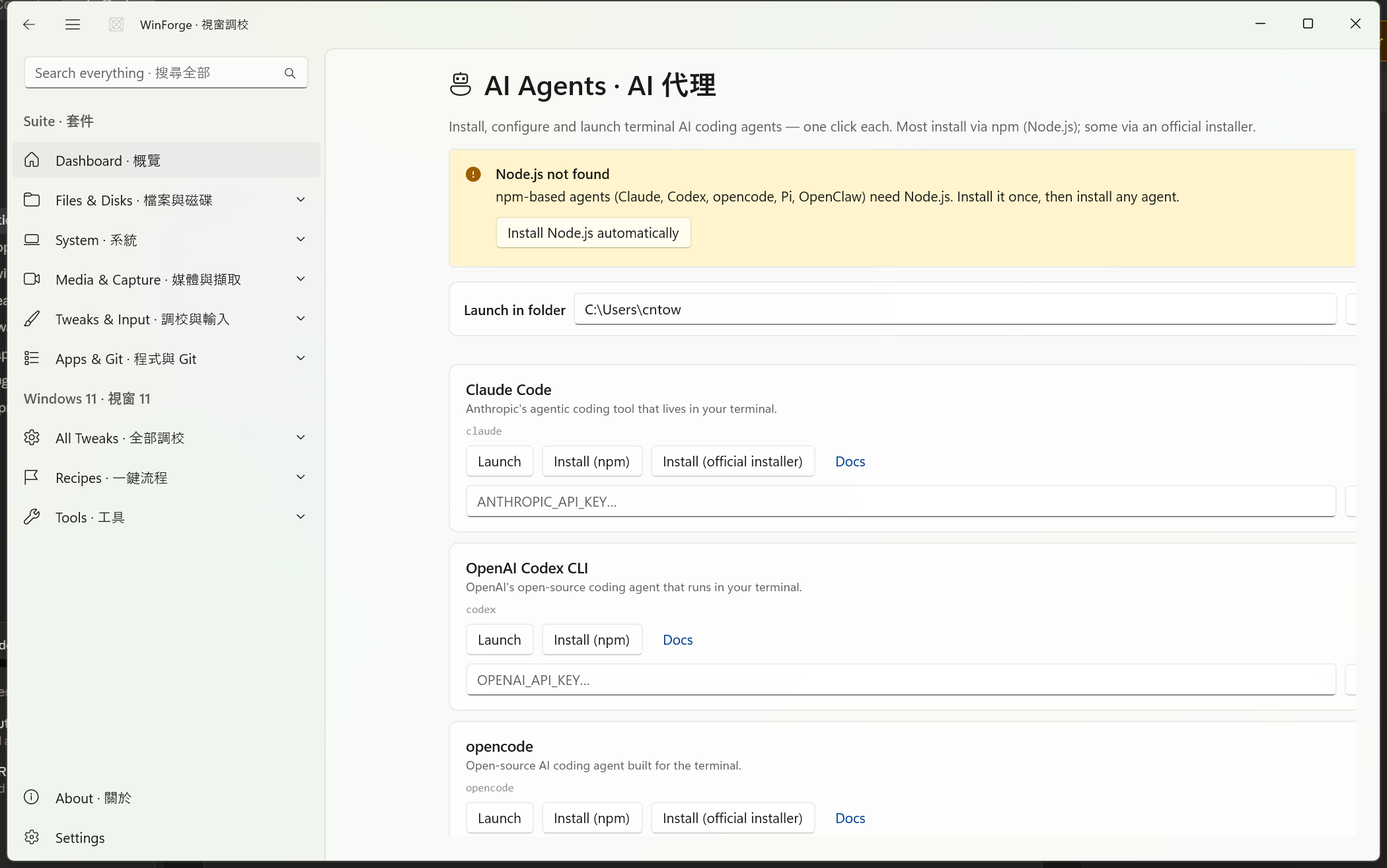
The AI Agents page (Pages/AiAgentsModule.xaml.cs) is backed by Services/AiAgentService.cs. On load it:
- Renders the header and sets the Launch in folder · 啟動目錄 box to your user profile folder (
%USERPROFILE%) by default. - Checks whether Node.js / npm is available and shows a warning bar with a one-click installer if not.
- Builds one agent card per built-in agent, each showing live install status, a Launch · 啟動 button, Install · 安裝 button(s), a Docs · 文件 link, and — where the agent uses one — an API key field.
Everything here is defensive: AiAgentService is written so it "never throws" — detection, launch and key handling all swallow errors and report a friendly result instead of crashing the app.
頁面載入時:設定啟動目錄為你嘅使用者資料夾、檢查有冇 Node.js/npm、再為每個代理畫一張卡(顯示安裝狀態、啟動/安裝按鈕、文件連結,同 API 金鑰欄)。所有偵測同操作都係防禦式寫法,唔會令 app 崩潰。
AiAgentService.All defines exactly six agents. Each carries a detection CLI (the command probed on your PATH and run on launch), a Docs URL, an optional API-key env var, and its install method(s).
| Agent · 代理 | CLI | Install method(s) | API key env · 金鑰環境變數 | Docs |
|---|---|---|---|---|
| Claude Code | claude |
npm · official installer |
ANTHROPIC_API_KEY |
code.claude.com/docs |
| OpenAI Codex CLI | codex |
npm |
OPENAI_API_KEY |
developers.openai.com/codex/cli |
| opencode | opencode |
npm · official installer |
— (none) | opencode.ai/docs |
| Pi coding agent · Pi 編程代理 | pi |
npm |
ANTHROPIC_API_KEY |
pi.dev |
| OpenClaw | openclaw |
npm |
— (none) | docs.openclaw.ai |
| Hermes Agent · Hermes 代理 | hermes |
official installer | — (none) | hermes-agent.nousresearch.com/docs |
Anthropic's agentic coding tool that lives in your terminal — "喺命令列幫你寫同改 code". It is detected and launched via the claude command and reads the ANTHROPIC_API_KEY environment variable. Two install methods are offered:
-
npm —
npm install -g @anthropic-ai/claude-code -
official installer —
irm https://claude.ai/install.ps1 | iex
OpenAI's open-source coding agent. Detected/launched via codex, reads OPENAI_API_KEY. Single install method:
-
npm —
npm install -g @openai/codex
Open-source AI coding agent built for the terminal. Detected/launched via opencode; no API-key field is shown (EnvKey is null — opencode manages its own provider config). Two install methods:
-
npm —
npm install -g opencode-ai -
official installer —
irm https://opencode.ai/install.ps1 | iex
A lightweight terminal coding agent by Mario Zechner (earendil). Detected/launched via pi, reads ANTHROPIC_API_KEY. Single install method:
-
npm —
npm install -g @mariozechner/pi-coding-agent
A personal AI gateway and coding agent. Detected/launched via openclaw; no API-key field (EnvKey is null). Single install method:
-
npm —
npm install -g openclaw
Nous Research's terminal AI agent. Detected/launched via hermes; no API-key field (EnvKey is null). Unlike the others it ships only an official installer, no npm package:
-
official installer —
irm https://hermes-agent.nousresearch.com/install.ps1 | iex
Each card shows Installed · 已安裝 (green) or Not installed · 未安裝 when the page builds. Detection (AiAgentService.IsInstalledAsync) is a two-step probe against the agent's CLI:
- Run
<cli> --version— treated as installed if it exits 0 or produces any output. - If that fails, fall back to
where <cli>— installed if the command resolves to a path (and the output doesn't say "Could not find").
So an agent counts as present if either its version command works or Windows' where finds it on PATH. After any successful install the cards are rebuilt so status flips to Installed without reloading the page.
偵測分兩步:先跑
<cli> --version(有輸出或結束碼 0 就當已裝),唔得就用where <cli>喺 PATH 度搵。安裝成功之後會重建卡片,狀態即時變「已安裝」。
The npm-based agents (Claude, Codex, opencode, Pi, OpenClaw) need Node.js. On load the page runs npm --version; if Node isn't found it shows a warning InfoBar:
Node.js not found · 搵唔到 Node.js — npm-based agents need Node.js. Install it once, then install any agent.
The bar carries an auto-install action button wired to winget package OpenJS.NodeJS.LTS ("Install Node.js automatically · 自動安裝 Node.js"). After install completes the Node check re-runs and the bar disappears once npm is detected. Hermes does not need Node.js because it uses the official installer.
npm 系代理需要 Node.js。冇 Node 時會彈警告,撳一下即用 winget(
OpenJS.NodeJS.LTS)自動裝 Node LTS,裝好後警告自動消失。Hermes 唔需要 Node。
Each install method becomes its own button labelled Install (npm), Install (winget) or Install (official installer) — so an agent with two methods shows two install buttons. The three method builders in AiAgentService map to:
| Method · 方法 | What it runs · 實際執行 |
|---|---|
| npm |
ShellRunner.RunCmd("npm install -g <package>") — global npm install |
| winget |
PackageService.Install("<wingetId>") — winget package install |
| official installer |
ShellRunner.RunPowershell("irm <url>/install.ps1 | iex") — official PowerShell install script |
Note: of the six built-in agents none currently uses the winget method — the helper exists in the service but the shipped agents use npm and/or official installer only.
While an install runs the button is disabled and reads Installing… · 安裝緊…; on success the page rebuilds the cards and shows a Done · 完成 bar, on failure a Failed · 失敗 bar with the error message. The official-installer methods pipe a remote PowerShell script straight to iex (irm … | iex) — convenient, but see the safety note below.
Safety · 安全 The official installer buttons download and run a remote PowerShell script with
irm <url> | iex, and npm install -g runs third-party install scripts globally on your machine. Only install agents you trust, and be aware these commands execute vendor code with your user privileges. Node.js auto-install runs through winget. If anything fails the page surfaces the raw error rather than hiding it.
Agents that declare an EnvKey (Claude Code, Codex and Pi) show a masked PasswordBox plus a Save key · 儲存金鑰 button. The field is pre-filled if a key already exists in your environment.
-
Save writes the value to the User-scope environment variable named by the agent (
Environment.SetEnvironmentVariable(..., EnvironmentVariableTarget.User)) and confirms with "Saved API key. · 已儲存 API 金鑰。". -
Read-back (
GetEnvKey) checks the User scope first, then the current Process environment, so a key you set elsewhere shows up here too. - The keys used are
ANTHROPIC_API_KEY(Claude Code, Pi) andOPENAI_API_KEY(Codex). - opencode, OpenClaw and Hermes declare no env key, so no key field is shown for them — they handle credentials through their own config/login flows.
Keys are stored as standard User environment variables, not in an encrypted vault — so any new terminal you open (including agents launched from this page) inherits them, but they are stored in plain text per Windows' normal env-var mechanism.
有
EnvKey嘅代理(Claude、Codex、Pi)會顯示遮蔽嘅金鑰欄同「儲存金鑰」掣。儲存會寫入「使用者」範圍嘅環境變數;讀取時先睇使用者範圍、再睇行程範圍。opencode/OpenClaw/Hermes 冇金鑰欄,靠各自嘅登入流程。金鑰係普通環境變數(明文),唔係加密保險庫。
The Launch · 啟動 button is enabled only when the agent is Installed. It launches the agent's CLI in your chosen folder using a two-tier strategy (AiAgentService.Launch):
-
Preferred — Windows Terminal. Starts
wt.exewith-d "<dir>" cmd /k <cli>. Thecmd /kwrapper keeps the tab open after the CLI exits so you can read any output. Reports "Launched … in Windows Terminal. · 已喺 Windows 終端機啟動 …". -
Fallback — plain cmd. If
wt.exeis unavailable it startscmd.exe /k <cli>in a normal console window instead.
A single Launch in folder · 啟動目錄 box at the top sets the working directory for all agents. It defaults to your user profile (%USERPROFILE%) and has a Browse… · 瀏覽… button that opens a folder picker (FileDialogs.OpenFolderAsync). The chosen path is validated — Launch only uses it if the directory actually exists, otherwise it launches without a fixed working directory.
啟動掣只有喺「已安裝」時先可以撳。優先用 Windows 終端機(
wt.exe -d "<目錄>" cmd /k <cli>,cmd /k令視窗唔會即收),開唔到就退而用cmd /k。頂部嘅「啟動目錄」適用於所有代理,預設係你嘅使用者資料夾,可以用「瀏覽…」改。
Like the rest of WinForge the page is fully bilingual. The agent name and description are picked per current language via Loc.I.Pick(...), and switching language (Loc.I.LanguageChanged) re-renders the header and rebuilds every card, so install statuses and all labels follow the active language immediately.
- Module-Developer-and-Terminal — broader dev tooling, terminals and shells these agents run inside.
- Home — full module index.
Part of Home · WinForge wiki.
Each control on the live page is numbered on the screenshot below and explained in the legend — what every button, toggle, tab, box and label does, in English and 粵語. Captured from the running app via UI Automation. 下面每個控件都有編號,逐個解釋佢哋嘅功能同標籤意思。

| # | Control | What it is & does · 功能 | Label meaning · 標籤意思 |
|---|---|---|---|
| 1 | Button | App-shell back button. Returns to the previous page / the module list you came from. Not specific to this module. | "Back" — go back · 返回上一頁。 |
| 2 | Button | App-shell hamburger that collapses or expands the left navigation pane. Part of the window frame, not this module. | "Toggle Navigation" — show/hide the side nav · 開關側邊導覽列。 |
| 3 | Search box | Global search box in the app header. Type to filter across the whole app; not scoped to AI Agents alone. | "Search everything · 搜尋全部" — search the whole app. English "Search everything" = 粵語「搜尋全部」(search all). |
| 4 | Button | Appears inside the yellow "Node.js not found" warning bar. Clicking it auto-installs Node.js LTS via winget (OpenJS.NodeJS.LTS), then re-checks; npm-based agents need Node.js first. Only shows when Node is missing. |
"Install Node.js automatically" — one-click install of the Node.js runtime that npm agents depend on · 自動安裝 npm 代理需要嘅 Node.js。 |
| 5 | Edit | Shared "Launch in folder" text box. Holds the working directory every agent's Launch opens into (pre-filled with your user profile folder). You can type or paste a path here. | Empty accessible name; labelled on-screen "Launch in folder · 啟動目錄" — the folder the agent starts in · 代理啟動時所在嘅資料夾。 |
| 6 | Button | "Browse…" next to the work-dir box. Opens a folder picker; the chosen folder's path is written into box 5. | "Browse…" — open a folder picker · 瀏覽… 揀資料夾。 |
| 7 | Button | Per-card Launch button (shown here for Claude Code). Opens a new Windows Terminal tab in the work-dir folder and runs that agent's CLI (e.g. claude); falls back to a cmd window. Disabled until the agent is detected as installed. |
"Launch" — start the agent in a terminal · 啟動(喺終端機開個代理)。 |
| 8 | Button | First install method for this card. Runs npm install -g <package> (here @anthropic-ai/claude-code) to install the agent globally via npm. While running it shows "Installing…". |
"Install (npm)" — install through the npm package manager · 用 npm 安裝。 |
| 9 | Button | Second install method for this card. Runs the vendor's official PowerShell installer (`irm https://claude.ai/install.ps1 | iex`). Some agents only offer this; npm-only agents won't show it. |
| 10 | Link | "Docs" hyperlink. Opens the agent's documentation site in your browser (Claude Code → code.claude.com/docs). | "Docs" — documentation · 文件(說明文檔)。 |
| 11 | Edit | API-key field (a masked password box) on the Claude Code card. Pre-filled if a key already exists. Saved to the ANTHROPIC_API_KEY user environment variable so the agent can authenticate. |
Placeholder "ANTHROPIC_API_KEY…" — the Anthropic API key env var the agent reads · Anthropic 嘅 API 金鑰。 |
| 12 | Button | "Save key" next to the API-key box. Writes the typed key into the User-scope environment variable for that agent, then confirms "Saved API key." | "Save key" — store the API key · 儲存金鑰。 |
| 13 | Edit | Same kind of masked API-key field, on the OpenAI Codex CLI card. Backs the OPENAI_API_KEY user environment variable; it has its own "Save key" button (off-screen to the right). |
Placeholder "OPENAI_API_KEY…" — the OpenAI API key env var Codex reads · OpenAI 嘅 API 金鑰。 |
How to use it · 點用 — If the yellow bar appears, click Install Node.js automatically (4) first, since most agents install through npm. Set Launch in folder (5/6) to the project you want to work in, then on any agent's card click Install (npm) (8) or Install (official installer) (9) and wait for the "Installed" status. Paste your provider key into the agent's API-key box (11/13) and hit Save key (12) so it can authenticate, then press Launch (7) to open that agent in a terminal at your chosen folder. Use Docs (10) whenever you need the agent's own setup or usage guide.