Recipes
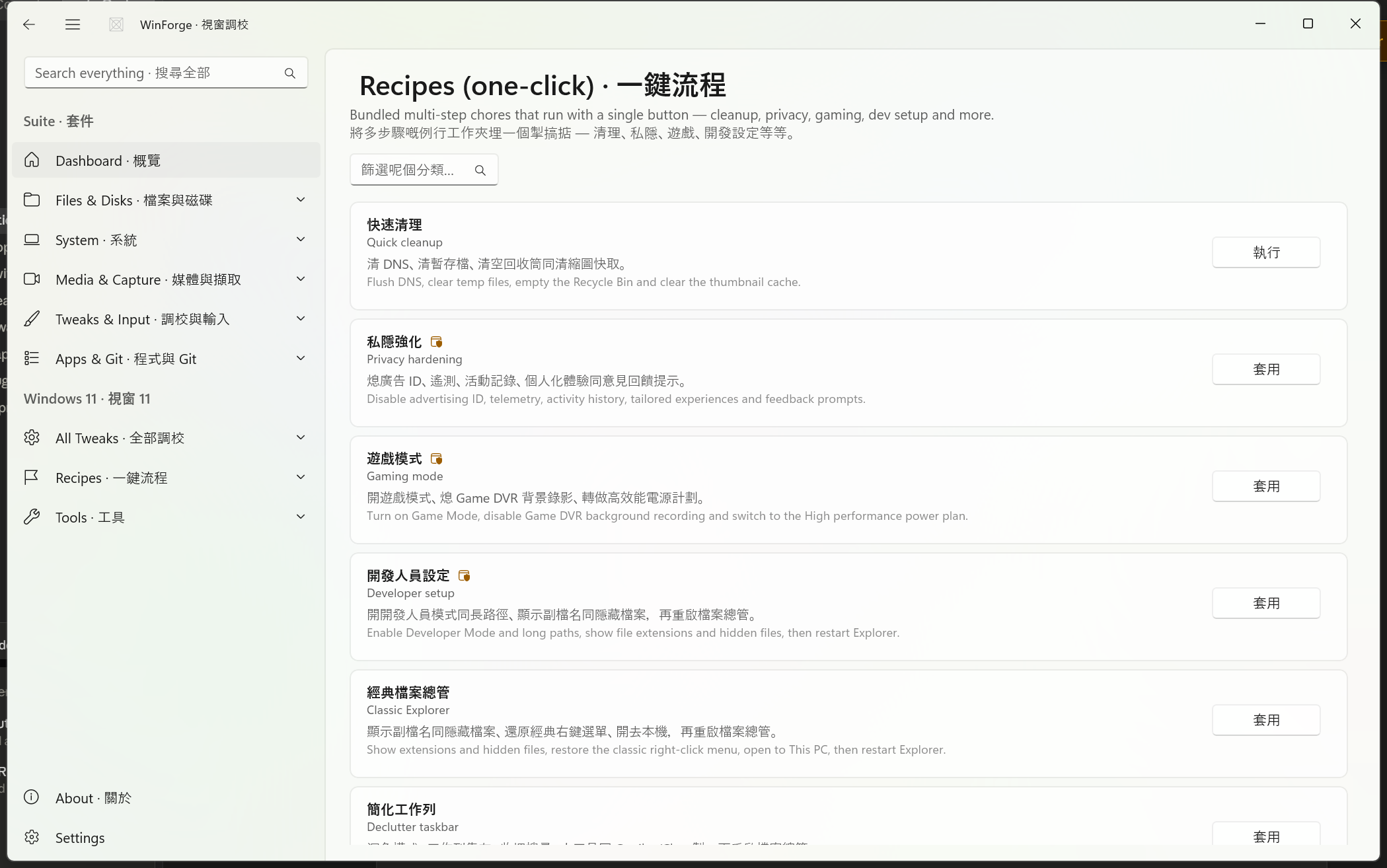
WinForge Recipes bundle the most common multi-step Windows chores into a single button. Each recipe runs several real steps in sequence — registry edits, shell/PowerShell commands, batch tweak toggles — and reports the result of every step (✓ / ✗) with a [i/N] progress marker so you can see exactly what happened. Think of them as curated macros over the same engine that powers individual Windows-Tweaks-Overview.
粵語:一鍵流程將最常見嘅多步驟 Windows 工作包裝成一粒掣。每個流程會逐步執行真實操作(登錄編輯、Shell/PowerShell 指令、批量調校),並逐步回報每一步成功定失敗,仲會顯示
[第幾步/共幾步]進度。
Safety · 安全 Several recipes require administrator rights and some are destructive (they delete files, empty the Recycle Bin, or reset the network stack). Destructive and admin recipes are flagged below. WinForge always reports each step so nothing happens silently — but cleanup steps cannot be undone. When in doubt, run Create a restore point · 建立還原點 first.
A recipe is a TweakDefinition of kind Action, built by the Make(...) helper in Catalog/Recipe.cs. It carries:
-
id — e.g.
recipe.quick-clean - Bilingual title / description — English + 粵語
- Bilingual button label — e.g. Run · 執行, Apply · 套用, Reset · 重置
-
requiresAdmin— whether the action elevates -
destructive— whether it deletes / resets state - An ordered list of steps
Each step is one of four kinds (defined in Catalog/Recipe.cs):
| Helper | What it does | Backed by |
|---|---|---|
Cmd(label, command, admin) |
Runs a cmd.exe command line |
ShellRunner.RunCmd |
Ps(label, script, admin) |
Runs a PowerShell script | ShellRunner.RunPowershell |
Reg(label, action) |
Runs an in-process registry edit |
RegistryHelper (HKCU helper Set(...)) |
Apply(label, source, on) |
Flips a whole batch of TweakDefinition toggles on/off (actions only run when on) |
the tweak catalog |
DisableStartup(label, keywords…) |
Disables startup entries whose name contains any keyword | StartupManager |
When you press the button, Make walks the steps in order, calling each one and appending a line like ✓ [2/4] Flush DNS to a running log. If any step fails, the overall result is "Recipe finished with some failures · 流程做完,但有部分失敗"; otherwise "Recipe complete · 流程完成". The full per-step log is returned as the action's detail text.
A couple of shared constants are reused across recipes:
-
Restart=taskkill /f /im explorer.exe & start explorer.exe— used as the last step wherever Explorer/shell settings change so the new state takes effect immediately. -
Adv=Software\Microsoft\Windows\CurrentVersion\Explorer\Advanced— the HKCU Explorer "Advanced" key behind most File Explorer / taskbar toggles. -
Personalize=Software\Microsoft\Windows\CurrentVersion\Themes\Personalize— the theme/light-dark key.
There are 17 built-in recipes. Below, each subsection lists the exact steps in execution order, the admin/destructive flags, and the real command or registry coordinate behind each step.
Button: Run · 執行 — admin: no — destructive: yes
Flush DNS, clear temp files, empty the Recycle Bin and clear the thumbnail cache. A fast, no-elevation tidy-up of per-user junk.
| # | Step | Operation |
|---|---|---|
| 1 | Flush DNS | ipconfig /flushdns |
| 2 | Clear user temp | del /q /f /s "%TEMP%\*" |
| 3 | Empty Recycle Bin | PowerShell Clear-RecycleBin -Force -ErrorAction SilentlyContinue
|
| 4 | Clear thumbnail cache | PowerShell Remove-Item "$env:LocalAppData\Microsoft\Windows\Explorer\thumbcache_*.db" -Force
|
粵語:清 DNS、清暫存檔、清空回收筒同清縮圖快取。
Button: Apply · 套用 — admin: yes — destructive: no
Disable advertising ID, telemetry, activity history, tailored experiences and feedback prompts. Mixes per-user HKCU edits with machine-wide HKLM policy writes (hence admin).
| # | Step | Operation |
|---|---|---|
| 1 | Advertising ID off | HKCU …\AdvertisingInfo → Enabled = 0
|
| 2 | Tailored experiences off | HKCU …\Privacy → TailoredExperiencesWithDiagnosticDataEnabled = 0
|
| 3 | Feedback frequency 0 | HKCU Software\Microsoft\Siuf\Rules → NumberOfSIUFInPeriod = 0
|
| 4 | Telemetry policy = 0 |
reg add HKLM\SOFTWARE\Policies\Microsoft\Windows\DataCollection /v AllowTelemetry /t REG_DWORD /d 0 /f (admin) |
| 5 | Activity history off |
reg add HKLM\SOFTWARE\Policies\Microsoft\Windows\System /v PublishUserActivities /t REG_DWORD /d 0 /f (admin) |
粵語:熄廣告 ID、遙測、活動記錄、個人化體驗同意見回饋提示。
Button: Apply · 套用 — admin: yes — destructive: no
Turn on Game Mode, disable Game DVR background recording and switch to the High performance power plan.
| # | Step | Operation |
|---|---|---|
| 1 | Game Mode on | HKCU Software\Microsoft\GameBar → AutoGameModeEnabled = 1
|
| 2 | Game DVR off | HKCU System\GameConfigStore → GameDVR_Enabled = 0
|
| 3 | High performance plan |
powercfg /setactive 8c5e7fda-e8bf-4a96-9a85-a6e23a8c635c (admin) |
粵語:開遊戲模式、熄 Game DVR 背景錄影、轉做高效能電源計劃。
Button: Apply · 套用 — admin: yes — destructive: no
Enable Developer Mode and long paths, show file extensions and hidden files, then restart Explorer.
| # | Step | Operation |
|---|---|---|
| 1 | Developer Mode on |
reg add HKLM\…\AppModelUnlock /v AllowDevelopmentWithoutDevLicense /t REG_DWORD /d 1 /f (admin) |
| 2 | Long paths on |
reg add HKLM\SYSTEM\CurrentControlSet\Control\FileSystem /v LongPathsEnabled /t REG_DWORD /d 1 /f (admin) |
| 3 | Show file extensions | HKCU Adv → HideFileExt = 0
|
| 4 | Show hidden files | HKCU Adv → Hidden = 1
|
| 5 | Restart Explorer | taskkill /f /im explorer.exe & start explorer.exe |
粵語:開開發人員模式同長路徑、顯示副檔名同隱藏檔案,再重啟檔案總管。
Button: Apply · 套用 — admin: no — destructive: no
Show extensions and hidden files, restore the classic Windows 10-style right-click menu, open File Explorer to This PC, then restart Explorer. All per-user, no elevation needed.
| # | Step | Operation |
|---|---|---|
| 1 | Show file extensions | HKCU Adv → HideFileExt = 0
|
| 2 | Show hidden files | HKCU Adv → Hidden = 1
|
| 3 | Open to This PC | HKCU Adv → LaunchTo = 1
|
| 4 | Classic context menu | Set default value of HKCU Software\Classes\CLSID\{86ca1aa0-34aa-4e8b-a509-50c905bae2a2}\InprocServer32 to empty |
| 5 | Restart Explorer | taskkill /f /im explorer.exe & start explorer.exe |
粵語:顯示副檔名同隱藏檔案、還原經典右鍵選單、開去本機,再重啟檔案總管。
Button: Apply · 套用 — admin: no — destructive: no
Dark mode, taskbar icons left-aligned, hide Search, Widgets and the Copilot/Chat button, then restart Explorer.
| # | Step | Operation |
|---|---|---|
| 1 | Dark mode | HKCU Personalize → AppsUseLightTheme = 0 and SystemUsesLightTheme = 0
|
| 2 | Taskbar left | HKCU Adv → TaskbarAl = 0
|
| 3 | Hide Search | HKCU …\Search → SearchboxTaskbarMode = 0
|
| 4 | Hide Widgets | HKCU Adv → TaskbarDa = 0
|
| 5 | Hide Copilot/Chat | HKCU Adv → TaskbarMn = 0
|
| 6 | Restart Explorer | taskkill /f /im explorer.exe & start explorer.exe |
粵語:深色模式、工作列靠左、收埋搜尋、小工具同 Copilot/Chat 掣,再重啟檔案總管。
Button: Apply · 套用 — admin: yes — destructive: no
Set visual effects to best performance, remove the Start/Run startup delay and use the High performance power plan.
| # | Step | Operation |
|---|---|---|
| 1 | Visual FX = performance | HKCU …\Explorer\VisualEffects → VisualFXSetting = 2
|
| 2 | No startup delay | HKCU …\Explorer\Serialize → StartupDelayInMSec = 0
|
| 3 | High performance plan |
powercfg /setactive 8c5e7fda-e8bf-4a96-9a85-a6e23a8c635c (admin) |
粵語:視覺效果調做最佳效能、攞走開機延遲、用高效能電源計劃。
Button: Reset · 重置 — admin: yes — destructive: yes
Flush DNS, reset Winsock, reset the TCP/IP stack and clear the ARP cache. Reboot afterwards for the reset to fully take hold.
| # | Step | Operation |
|---|---|---|
| 1 | Flush DNS | ipconfig /flushdns |
| 2 | Reset Winsock |
netsh winsock reset (admin) |
| 3 | Reset TCP/IP |
netsh int ip reset (admin) |
| 4 | Flush ARP |
netsh interface ip delete arpcache (admin) |
粵語:清 DNS、重設 Winsock、重設 TCP/IP、清 ARP 快取。之後請重新開機。
Button: Update · 更新 — admin: yes — destructive: no
Upgrade all apps via winget and open the Microsoft Store updates page.
| # | Step | Operation |
|---|---|---|
| 1 | winget upgrade --all |
winget upgrade --all --include-unknown --accept-source-agreements --accept-package-agreements (admin) |
| 2 | Open Store updates | start ms-windows-store://downloadsandupdates |
粵語:用 winget 更新所有應用程式,再開 Microsoft Store 更新頁。
Button: Check · 檢查 — admin: yes — destructive: no (read-only)
Run an SFC verify-only pass, a DISM CheckHealth and report physical disk health. Diagnostic only — nothing is modified or repaired.
| # | Step | Operation |
|---|---|---|
| 1 | SFC verify-only |
sfc /verifyonly (admin) |
| 2 | DISM CheckHealth |
DISM /Online /Cleanup-Image /CheckHealth (admin) |
| 3 | Disk health | PowerShell Get-PhysicalDisk | Select FriendlyName,MediaType,HealthStatus,OperationalStatus | Format-Table
|
粵語:行 SFC 純驗證、DISM CheckHealth,再報告實體磁碟健康(唯讀)。
Button: Run · 執行 — admin: yes — destructive: yes
Clear the Windows Update cache, run DISM component cleanup, empty the Recycle Bin and clear Prefetch. A heavier, machine-wide reclaim than Quick cleanup.
| # | Step | Operation |
|---|---|---|
| 1 | Clear update cache |
net stop wuauserv & rd /s /q C:\Windows\SoftwareDistribution\Download & net start wuauserv (admin) |
| 2 | DISM component cleanup |
Dism.exe /Online /Cleanup-Image /StartComponentCleanup (admin) |
| 3 | Empty Recycle Bin | PowerShell Clear-RecycleBin -Force -ErrorAction SilentlyContinue
|
| 4 | Clear Prefetch |
del /q /f /s C:\Windows\Prefetch\* (admin) |
粵語:清 Windows Update 快取、做 DISM 元件清理、清空回收筒同清 Prefetch。
Button: Apply · 套用 — admin: yes — destructive: no
Turn the firewall on for all profiles, set SmartScreen to Warn and UAC to its default level.
| # | Step | Operation |
|---|---|---|
| 1 | Firewall on (all profiles) |
netsh advfirewall set allprofiles state on (admin) |
| 2 | SmartScreen = Warn |
reg add HKLM\…\Explorer /v SmartScreenEnabled /t REG_SZ /d Warn /f (admin) |
| 3 | UAC default |
reg add HKLM\…\Policies\System /v ConsentPromptBehaviorAdmin /t REG_DWORD /d 5 /f (admin) |
粵語:所有設定檔開防火牆、SmartScreen 設做警告、UAC 設返預設等級。
Button: Calm it · 靜化 — admin: yes — destructive: no — reversible
Apply every de-annoy toggle in one go — Copilot, Recall, Bing/web search, Search Highlights, lock-screen tips, Settings ads and more — then restart Explorer. This is a batch step: it iterates the whole AnnoyanceTweaks.All() set and flips each toggle on (and runs any action tweaks).
| # | Step | Operation |
|---|---|---|
| 1 | Apply de-annoy toggles |
Apply(AnnoyanceTweaks.All(), on: true) — flips every annoyance toggle on; reports N applied, M failed
|
| 2 | Restart Explorer | taskkill /f /im explorer.exe & start explorer.exe |
粵語:一次過套用晒所有去煩擾開關 — Copilot、Recall、Bing/網上搜尋、搜尋焦點、鎖機畫面提示、設定廣告等等。可還原。
Button: Restore · 還原 — admin: yes — destructive: no
The inverse of Calm Windows: switch the same de-annoy toggles back to their default state, then restart Explorer. Because actions cannot be undone, this step only re-flips the toggles (it passes on: false).
| # | Step | Operation |
|---|---|---|
| 1 | Restore nag toggles |
Apply(AnnoyanceTweaks.All(), on: false) — flips every annoyance toggle back off |
| 2 | Restart Explorer | taskkill /f /im explorer.exe & start explorer.exe |
粵語:還原「靜化 Windows」:將去煩擾開關掣返去預設狀態。
Button: Trim · 清 — admin: no — destructive: yes — reversible in Startup Apps
Disable common non-essential startup entries — updaters and game launchers. Uses DisableStartup to scan StartupManager.List() and disable any currently enabled entry whose name contains one of these keywords (case-insensitive):
update · updater · Steam · Epic · Spotify · Adobe · iTunes · GoogleUpdate · Skype
It reports how many entries it disabled (e.g. Disabled 3 startup item(s) · 停用咗 3 個開機項目). Entries living in HKLM may be skipped silently without admin rights. Anything disabled can be re-enabled from the Startup Apps module.
粵語:停用常見嘅非必要開機項目(更新器同遊戲啟動器)。可以喺開機程式模組還原。
Button: Disable · 停用 — admin: yes — destructive: no
Disable the well-known telemetry scheduled tasks via a single PowerShell loop. It walks a list of task names and disables each one if present:
Microsoft Compatibility Appraiser · ProgramDataUpdater · Consolidator · UsbCeip · Proxy
| # | Step | Operation |
|---|---|---|
| 1 | Disable telemetry tasks | PowerShell loop: Get-ScheduledTask -TaskName $n | Disable-ScheduledTask for each name above (admin) |
粵語:停用啲出晒名嘅遙測排程工作(Compatibility Appraiser、Consolidator、UsbCeip)。
Button: Create · 建立 — admin: yes — destructive: no
Snapshot the system with a restore point named WinForge before you make changes. A good first step before running any of the destructive or system-altering recipes above.
| # | Step | Operation |
|---|---|---|
| 1 | Checkpoint | PowerShell Checkpoint-Computer -Description 'WinForge' -RestorePointType MODIFY_SETTINGS (admin) |
粵語:改嘢之前,幫系統影一個叫 WinForge 嘅還原點。
| Recipe · 流程 | id | Button | Admin | Destructive | Steps |
|---|---|---|---|---|---|
| Quick cleanup · 快速清理 | recipe.quick-clean |
Run · 執行 | – | ⚠ | 4 |
| Privacy hardening · 私隱強化 | recipe.privacy |
Apply · 套用 | ✔ | – | 5 |
| Gaming mode · 遊戲模式 | recipe.gaming |
Apply · 套用 | ✔ | – | 3 |
| Developer setup · 開發人員設定 | recipe.dev |
Apply · 套用 | ✔ | – | 5 |
| Classic Explorer · 經典檔案總管 | recipe.explorer-classic |
Apply · 套用 | – | – | 5 |
| Declutter taskbar · 簡化工作列 | recipe.declutter-taskbar |
Apply · 套用 | – | – | 6 |
| Performance boost · 效能提升 | recipe.perf-boost |
Apply · 套用 | ✔ | – | 3 |
| Network reset · 網絡重置 | recipe.network-reset |
Reset · 重置 | ✔ | ⚠ | 4 |
| Update everything · 全部更新 | recipe.update-all |
Update · 更新 | ✔ | – | 2 |
| System health check · 系統健康檢查 | recipe.health-check |
Check · 檢查 | ✔ | – | 3 |
| Free up space · 釋放空間 | recipe.free-space |
Run · 執行 | ✔ | ⚠ | 4 |
| Security lock-down · 保安加固 | recipe.lock-down |
Apply · 套用 | ✔ | – | 3 |
| Calm Windows · 靜化 Windows | recipe.calm-windows |
Calm it · 靜化 | ✔ | – | 2 (batch) |
| Re-enable nags · 還原提示 | recipe.reenable-nags |
Restore · 還原 | ✔ | – | 2 (batch) |
| Trim startup bloat · 清開機臃腫 | recipe.trim-startup |
Trim · 清 | – | ⚠ | 1 |
| Disable telemetry tasks · 停用遙測排程工作 | recipe.disable-telemetry-tasks |
Disable · 停用 | ✔ | – | 1 |
| Create a restore point · 建立還原點 | recipe.restore-point |
Create · 建立 | ✔ | – | 1 |
⚠ = destructive (deletes files, empties Recycle Bin, resets network, or disables startup entries).
-
Per-step reporting. Every recipe returns a log of
✓/✗lines so you can confirm each operation. A failed step does not abort the rest — the recipe runs to the end and then reports an overall pass/fail. - Reversibility. Toggle-based recipes (e.g. Calm Windows) can be undone by their counterpart (Re-enable Windows nags) or by editing the individual tweaks. Pure actions — file deletes, cleanups, network resets — cannot be undone; pair them with Create a restore point beforehand.
- Admin elevation. Recipes flagged admin elevate the shell steps that need it; in-process HKCU registry edits inside the same recipe still run per-user.
- The same engine as individual tweaks. Recipes are just curated bundles over the WinForge tweak catalog — see Windows-Tweaks-Overview for the underlying registry coordinates, choice sets and commands they reuse.
Part of Home · WinForge wiki.