Bilingual Design
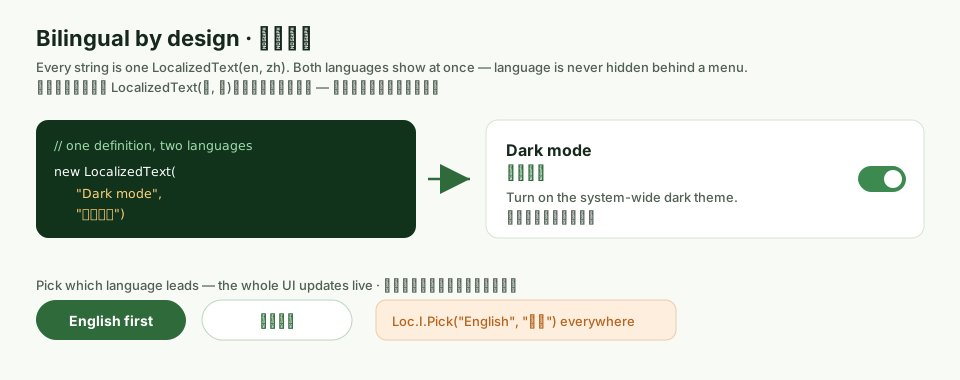
WinForge is bilingual to the core, not as an afterthought. Every user-facing string in the app is a LocalizedText carrying both English and Cantonese (粵語) at once, and the UI shows them together — you never lose one language by choosing the other. The only thing the language toggle decides is which of the two reads as the primary (lead) line.
全個 WinForge 由根做起就係雙語。每段文字都係一個
LocalizedText,同時帶住英文同粵語;介面永遠兩種一齊顯示。揀語言只係決定邊種排前面,唔會「換走」另一種。
The Settings page below is where the lead language lives — a simple Primary language · 主要語言 picker. Notice that even the heading describing the picker is itself bilingual.
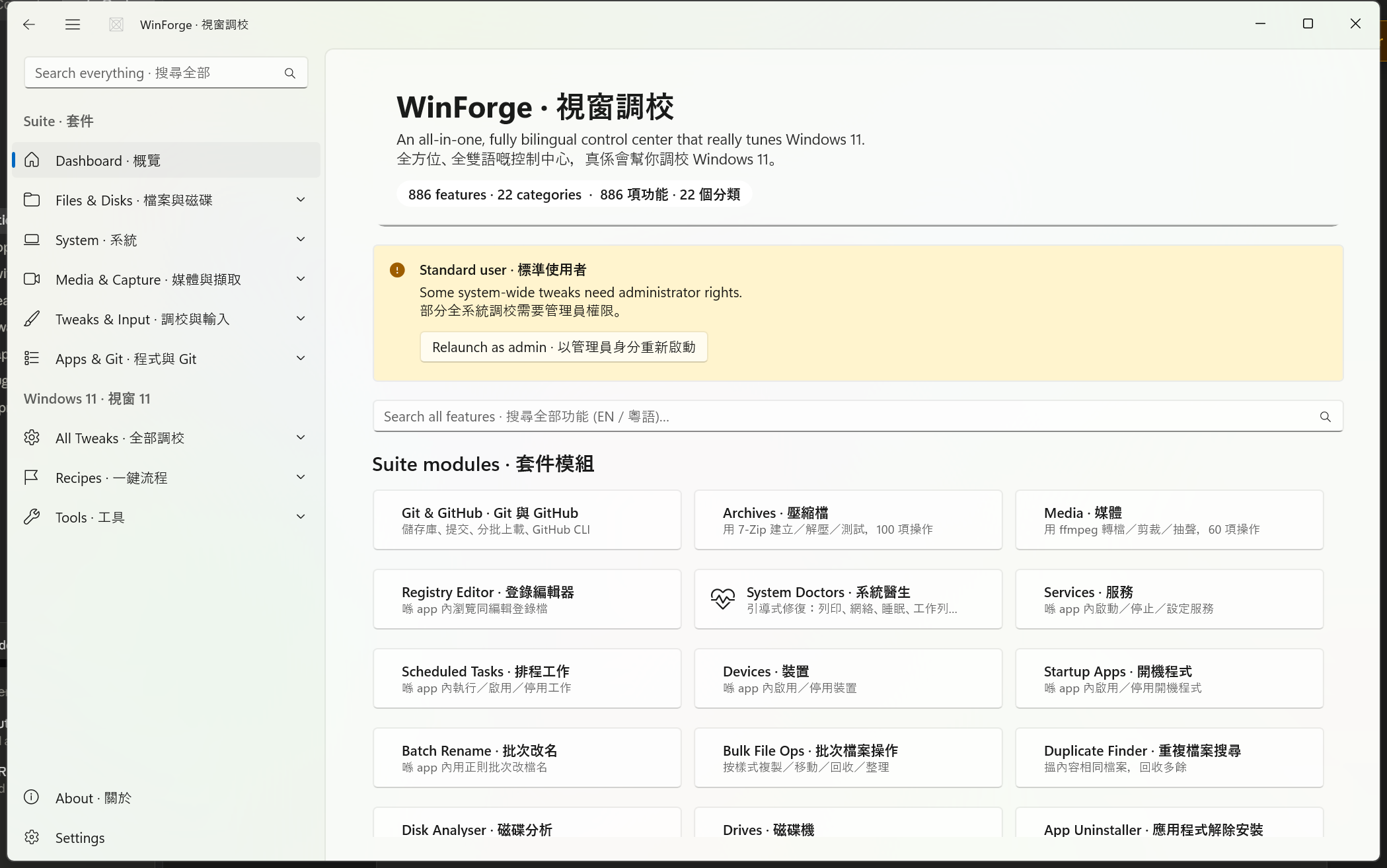
Most apps localise by replacing text: pick a locale, and the other language disappears. WinForge does the opposite. The design contract, stated right in the source, is:
"Both languages are always shown in the UI; this only decides which is 'primary'." —
Services/Loc.cs兩種語言永遠同時顯示喺介面上;呢度只係決定邊個係「主要」。
That contract drives three small but load-bearing types:
| Type | File | Role · 角色 |
|---|---|---|
AppLanguage |
Models/Core.cs |
The two-value enum: English, Cantonese. |
LocalizedText |
Models/Core.cs |
An immutable holder of both strings (En, Zh). |
Loc |
Services/Loc.cs |
The global singleton tracking which language currently leads. |
There is no .resx, no satellite assembly, no per-locale resource lookup. Bilingual text is plain data passed around in code. See Architecture for how this fits the wider data-driven catalog.
LocalizedText is a sealed class that takes both strings at construction and never drops either:
public sealed class LocalizedText
{
    public string En { get; }
    public string Zh { get; }

    public LocalizedText(string en, string zh) { En = en; Zh = zh; }

    public string Get(AppLanguage lang) => lang == AppLanguage.Cantonese ? Zh : En;

    public string Primary   => Get(Services.Loc.I.Language);  // leads
    public string Secondary => Get(Services.Loc.I.Other);     // always shown alongside

    public override string ToString() => $"{En} · {Zh}";
}
Key members:
-
En/Zh— the raw strings. Both are required and immutable. -
Get(AppLanguage)— resolve to one specific language. -
Primary · 主要— the string in whatever the user picked as lead. -
Secondary · 次要— the other language, which aTweakCardrenders directly beneath the primary line so both are visible at once. -
ToString()— joins both with the·middot, e.g.Dark mode · 深色模式. This is what shows up in logs and debug output.
LocalizedText defines an implicit conversion from a (string en, string zh) tuple, so the whole catalog can be written compactly:
public static implicit operator LocalizedText((string en, string zh) t) => new(t.en, t.zh);That means anywhere a LocalizedText is expected, you can write a plain tuple and it just becomes bilingual text:
Title       = ("Dark mode", "深色模式"),
Description = ("Use the dark Windows theme.", "使用深色 Windows 主題。"),
This is why a TweakDefinition reads so cleanly — Title, Description, ActionLabel, choice labels and result messages are all LocalizedText, fed as tuples.
Loc is a process-wide singleton (Loc.I) that holds exactly one piece of state: which AppLanguage is primary. It is not a translation table — it never stores any text. It only answers "which language leads right now?" and notifies the UI when that changes.
public sealed class Loc
{
    public static Loc I { get; } = new();

    public AppLanguage Language { get; set; }   // the primary language
    public AppLanguage Other => ... ;           // the other one
    public bool IsCantonesePrimary => ... ;

    public event EventHandler? LanguageChanged;

    public void Toggle();
    public string Pick(string en, string zh);
}| Member | Meaning · 意思 |
|---|---|
Loc.I |
The global singleton instance. |
Language |
Gets/sets the primary language. Setting it persists and raises LanguageChanged. |
Other |
The secondary language — Cantonese when primary is English, and vice-versa. |
IsCantonesePrimary |
true when 粵語 currently leads. |
Toggle() |
Flip primary between English ⇄ 粵語. |
Pick(en, zh) |
Return the right string for the current primary language — the quick inline helper. |
LanguageChanged |
Event raised after the primary language changes, so pages can rebuild. |
For one-off UI strings that aren't part of a TweakDefinition (button captions, info-bar messages, headings on the Settings page), code calls Loc.I.Pick(...) directly:
public string Pick(string en, string zh)
    => _language == AppLanguage.Cantonese ? zh : en;
Real uses from Pages/SettingsPage.xaml.cs:
var export = new Button { Content = Loc.I.Pick("Export…", "匯出…") };
var import = new Button { Content = Loc.I.Pick("Import…", "匯入…") };

panel.Children.Add(Heading(
    Loc.I.Pick("App theme", "應用程式主題"),
    Loc.I.Pick("Light, dark or follow Windows.", "淺色、深色或者跟 Windows。")));
Pick is the single-line counterpart to LocalizedText. Use LocalizedText when you need to keep both strings around (catalog data, cards that show both); use Pick when you just want one resolved string right now for a transient control.
Note · 留意:
Pickresolves to one language only, so it is for places that don't display both — like a button label. TheTweakCardpath usesLocalizedText.Primary+.Secondaryso both languages appear together. See Architecture.
Because every TweakDefinition carries LocalizedText for its Title, Description, and other labels, a TweakCard can render the leading line and the alternate line one above the other. The pattern is:
-
Primary line ←
text.Primary(the user's lead language, larger/bolder) -
Secondary line ←
text.Secondary(the other language, muted beneath)
So a card for a tweak titled ("Dark mode", "深色模式") shows both "Dark mode" and "深色模式" regardless of which one leads — only their order/emphasis swaps when you toggle. Nothing is ever hidden.
Even fields that exist purely for behaviour are bilingual:
TweakDefinition field |
Type | Notes · 備註 |
|---|---|---|
Title |
LocalizedText |
Card heading, both languages. |
Description |
LocalizedText |
Card subtext, both languages. |
ActionLabel |
LocalizedText? |
Button caption for Action tweaks. |
Choices[].Label |
LocalizedText |
Each TweakChoice option label is bilingual. |
TweakResult.Message |
LocalizedText? |
Even success/failure messages carry both. |
TweakResult exposes bilingual factory helpers so action code stays terse:
public static TweakResult Ok(string en, string zh, string? output = null)
    => new(true, new LocalizedText(en, zh), output);

public static TweakResult Fail(string en, string zh, string? output = null)
    => new(false, new LocalizedText(en, zh), output);
So an operation reports back in both languages too, e.g. TweakResult.Ok("Done.", "完成。").
Because both strings live on every tweak, search matches in either language. TweakDefinition builds a combined haystack from all four text fields plus keywords:
public string SearchHaystack =>
    $"{Title.En} {Title.Zh} {Description.En} {Description.Zh} {string.Join(' ', Keywords)}"
        .ToLowerInvariant();
That means typing "dark" or "深色" both find the same card. Keywords is explicitly documented as accepting both languages ("Extra search keywords (both languages welcome)"), so authors can add cross-language synonyms.
Switching the lead language is instant and persistent — no restart. The flow:
-
User picks a radio in the Primary language · 主要語言 card on the Settings page.
-
The handler sets
Loc.I.Language:radios.SelectionChanged += (_, _) => { if (_suppress) return; Loc.I.Language = radios.SelectedIndex == 0 ? AppLanguage.English : AppLanguage.Cantonese; };
-
Inside the setter,
Loc(a) writes the choice toSettingsStoreso it survives a restart, and (b) raisesLanguageChanged:public AppLanguage Language { get => _language; set { if (_language == value) return; _language = value; SettingsStore.Set("language", value.ToString()); LanguageChanged?.Invoke(this, EventArgs.Empty); } }
-
Pages re-render. Each page subscribes to the event and rebuilds itself. The Settings page itself does exactly this:
public SettingsPage()
{
    InitializeComponent();
    Loaded   += (_, _) => Build();
    Loc.I.LanguageChanged += OnLang;
    Unloaded += (_, _) => Loc.I.LanguageChanged -= OnLang;
}

private void OnLang(object? sender, EventArgs e) => Build();
On rebuild, every
Pick(...)andLocalizedText.Primary/.Secondaryre-evaluates against the new lead language, so the whole UI flips in place. Note the subscription is removed onUnloadedto avoid leaks.
The Settings radio uses a _suppress flag so that programmatically setting SelectedIndex during Build() doesn't re-fire the change handler and loop. It's set around the initial index assignment:
_suppress = true;
var radios = new RadioButtons();
radios.Items.Add("English");
radios.Items.Add("粵語 (Cantonese)");
radios.SelectedIndex = Loc.I.Language == AppLanguage.English ? 0 : 1;
radios.SelectionChanged += (_, _) => { if (_suppress) return; /* … */ };
_suppress = false;The chosen lead language is stored under the "language" key in SettingsStore, and Loc's private constructor reads it back on launch. The default is Cantonese — anything other than the literal "English" resolves to 粵語:
private Loc()
{
    _language = SettingsStore.Get("language", "Cantonese") == "English"
        ? AppLanguage.English
        : AppLanguage.Cantonese;
}
Because the value is just the enum name as a string ("English" / "Cantonese"), it also rides along in Import / export settings · 匯入/匯出設定 on the Settings page, so your lead-language preference travels with a settings backup.
WinForge mixes the two languages in a few consistent ways you'll see throughout the app:
-
The
·middot joiner. Static titles that are baked in (not toggled) show both at once, joined by a middot — e.g. the page title"Settings · 設定", the relaunch button"Relaunch as administrator · 以管理員身分重新啟動", andLocalizedText.ToString()output. -
Lead-aware text via
Pick. Transient labels follow the user's lead language:Pick("Export…", "匯出…"). - Lead-aware text that also shows the other side via cards. Tweak titles/descriptions show both, ordered by lead.
-
粵語-first headings, where natural. The About card counts features bilingually:
Pick($"{TweakCatalog.Count} bilingual features for Windows 11.", $"{TweakCatalog.Count} 項 Windows 11 雙語功能。").
This is why the wiki itself uses bilingual headings like Dark mode · 深色模式 — it mirrors the app's own house style.
For contributors: you almost never construct LocalizedText by hand. Lean on the tuple conversion and the Pick/Ok/Fail helpers:
new TweakDefinition
{
    Id          = "appearance.darkmode",
    Title       = ("Dark mode", "深色模式"),
    Description = ("Switch Windows apps to the dark theme.",
                   "將 Windows 應用程式轉做深色主題。"),
    Kind        = TweakKind.Toggle,
    Keywords    = new[] { "theme", "主題", "night", "夜間" },
    GetIsOn     = () => /* read registry */,
    SetIsOn     = on => /* write registry */,
};
Checklist · 清單:
- Provide both strings for
TitleandDescription(a tuple does it). - If it's an
Action, give a bilingualActionLabeland returnTweakResult.Ok(en, zh)/Fail(en, zh). - If it's a
Choice, label everyTweakChoicewith a bilingualLocalizedText. - Add cross-language
Keywordsso search finds it in either language. - Never call
Pickfor text that a card already shows in both languages — let the card handle primary/secondary.
Safety · 安全 Language is presentation-only — switching the lead language never changes what a tweak does; it only changes which line reads first. The system-changing behaviour lives in
GetIsOn/SetIsOn/RunAsync, not in the text. Tweaks markedRequiresAdmin(HKLM, services,powercfg) orDestructivestill prompt and elevate exactly the same in either language.
Part of Home · WinForge wiki.