Navigation and Search
WinForge is a single window built around a WinUI 3 NavigationView: a collapsible left pane that groups ~50 suite modules, 22 Windows-11 tweak categories, one-click Recipes and Tools, plus a master "Search everything" box that searches every module and every individual tweak at once. The whole window is data-driven — the tweak categories are generated from Windows-Tweaks-Overview at start-up, and a --page <id> command-line flag (with dozens of friendly aliases) deep-links straight to any module. This page documents the pane, the search box, the live search-results page, and the complete alias table.
呢一版講 WinForge 點樣行:左邊嘅導覽窗格(分組摺疊)、頂部嘅總搜尋框(一次過搜全部模組同調校),同埋
--page命令列深層連結(連同所有別名對照表)。

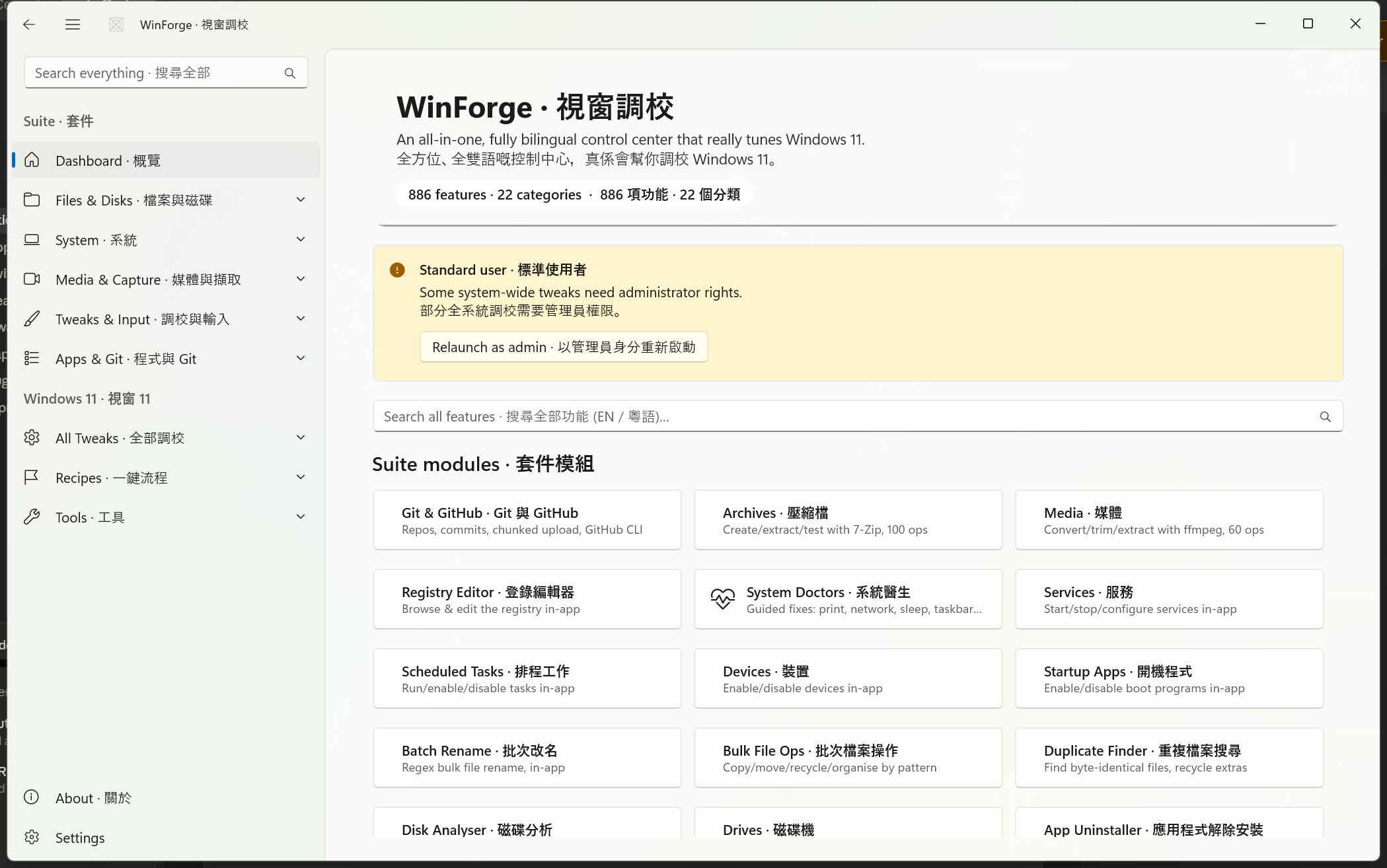
The shell is defined in MainWindow.xaml / MainWindow.xaml.cs. It uses a Mica backdrop and an extended TitleBar, so the navigation pane and content sit under a custom title bar rather than a standard caption.
| Element | Behaviour |
|---|---|
| TitleBar · 標題列 | Custom TitleBar with the app icon; title reads WinForge · 視窗調校. Hosts the pane toggle and the back button. |
| Pane toggle · 窗格開合 | The hamburger in the title bar calls TitleBar_PaneToggleRequested, which flips NavView.IsPaneOpen. (The NavigationView's own toggle is hidden — IsPaneToggleButtonVisible="False" — so the title-bar button is the single control.) |
| Back button · 返回掣 | Appears only when NavFrame.CanGoBack is true; TitleBar_BackRequested calls NavFrame.GoBack(). Content is hosted in a single Frame named NavFrame. |
| F11 — Full screen · 全螢幕 | A keyboard accelerator toggles between Overlapped (windowed, ~82% × ~86% of the work area, centred) and FullScreen. The choice is saved to settings (fullscreen key) and restored next launch. |
| Tray · 系統匣 | Closing the window does not quit — OnAppWindowClosing cancels the close and hides to the tray so background services (clipboard monitor, global hotkeys) keep running. The tray menu offers show / quit. |
The window starts on Dashboard · 概覽 (
NavFrame.Navigate(typeof(DashboardPage))), thenApplyStartPage()redirects if a--page/search:argument was supplied.
The pane is built in two parts: a fixed block of hand-authored XAML for the suite modules, plus three groups (TweaksGroup, RecipesGroup, ToolsGroup) that BuildCategoryMenu() fills at runtime from Categories.All.
A header Suite · 套件 precedes the Dashboard entry, followed by six collapsible suite groups. Each leaf carries a Tag of the form module.<name>, and NavView_SelectionChanged maps that tag to a page type.
| Item | Tag |
|---|---|
| Archives · 壓縮檔 | module.archives |
| Bulk File Ops · 批次檔案操作 | module.bulkops |
| Batch Rename · 批次改名 | module.rename |
| Duplicate Finder · 重複檔案搜尋 | module.duplicates |
| Disk Analyser · 磁碟分析 | module.disk |
| Drives · 磁碟機 | module.drives |
| OneDrive · OneDrive | module.onedrive |
| Item | Tag |
|---|---|
| System Doctors · 系統醫生 | module.doctors |
| Services · 服務 | module.services |
| Scheduled Tasks · 排程工作 | module.tasks |
| Devices · 裝置 | module.devices |
| ViVeTool · 功能旗標 | module.vivetool |
| Registry Editor · 登錄編輯器 | module.regedit |
| Startup Apps · 開機程式 | module.startup |
| Event Viewer · 事件檢視器 | module.events |
| System Monitor · 系統監察 | module.monitor |
| Battery & Thermal · 電池與散熱 | module.battery |
| Connections · 連線 | module.connections |
| Native Utilities · 原生工具 | module.native |
| Environment Variables · 環境變數 | module.envvars |
| Clipboard · 剪貼簿 | module.clipboard |
| Settings & Control Panel · 設定與控制台 | module.settingshub |
| Item | Tag |
|---|---|
| Media · 媒體 | module.media |
| Screen Recorder · 螢幕錄影 | module.recorder |
| Capture Studio · 擷取工作室 | module.capture |
| Volume Mixer · 音量混合器 | module.mixer |
| Color Picker · 螢幕取色 | module.colorpicker |
| Time & Unit Tools · 時間與單位工具 | module.timeunit |
| Item | Tag |
|---|---|
| Hosts Editor · hosts 編輯器 | module.hosts |
| Mouse & Pointer · 滑鼠與指標 | module.mouse |
| Keyboard Remapper · 鍵盤重新對應 | module.keyboard |
| Hotkey & Macro Runner · 熱鍵與巨集 | module.hotkeys |
| Context Menu · 右鍵選單 | module.contextmenu |
| Window Manager · 視窗管理 | module.windows |
| Font Manager · 字型管理 | module.fonts |
| Awake · 保持喚醒 | module.awake |
| PowerToys Extras · PowerToys 額外工具 | module.powertoys |
| Voice & Read-Aloud · 語音朗讀 | module.voice |
| Item | Tag |
|---|---|
| Package Manager · 套件管理 | module.packages |
| Android (ADB) · Android(ADB) | module.adb |
| VPN & Mesh · VPN 與網狀網 | module.vpn |
| Home Assistant · 家居助理 | module.homeassistant |
| Communications · 通訊 | module.comms |
| WSL & VM Launcher · WSL 與 VM 啟動器 | module.wslvm |
| App Uninstaller · 應用程式解除安裝 | module.uninstall |
| Imaging & Game Tools · 燒錄與遊戲工具 | module.imaging |
| Git & GitHub · Git 與 GitHub | module.git |
| AI Agents · AI 代理 | module.aiagents |
| Cloudflare & Tunnel · Cloudflare 與 Tunnel | module.cloudflare |
| Config & Backup · 設定與備份 | module.configbackup |
Two modules — Fastboot / Flasher (
module.fastboot) and Android Emulator (module.emulator) — are reachable by search and by--pagealias but are not given a fixed slot in the pane; they open inside the Android (ADB) area / via deep link.module.fastbootandmodule.emulatorboth resolve throughMapTypeandModuleRegistry.
After a second header Windows 11 · 視窗 11, three top-level groups are populated by BuildCategoryMenu(). It walks Categories.All and files each category under a parent according to its Group field:
"recipes" → RecipesGroup   ("Recipes · 一鍵流程")
"tools"   → ToolsGroup      ("Tools · 工具")
_         → TweaksGroup      ("All Tweaks · 全部調校")
Each child item shows <English> · <粵語> and uses the category's own Segoe Fluent glyph. Its Tag is the category Id, which NavView_SelectionChanged resolves to a CategoryPage (default: branch, looked up via Categories.All.FirstOrDefault(c => c.Id == tag)).
These 17 categories have no Group set, so they land here. See Windows-Tweaks-Overview for what each contains.
| Category | Id |
|---|---|
| Appearance & Personalisation · 外觀與個人化 | appearance |
| File Explorer · 檔案總管 | explorer |
| Taskbar & Start · 工作列與開始功能表 | taskbar |
| Privacy & Telemetry · 私隱與遙測 | privacy |
| Performance & Power · 效能與電源 | performance |
| Network & Internet · 網絡與互聯網 | network |
| Cleanup & Storage · 清理與儲存 | cleanup |
| Security · 安全 | security |
| System & Boot · 系統與開機 | system |
| Apps & Startup · 應用程式與啟動 | apps |
| Power Tools · 進階工具 | powertools |
| Launcher & Elevation · 啟動器與提權 | launcher |
| Maintenance & Diagnostics · 維護與診斷 | maintenance |
| Windows 11 Advanced · Windows 11 進階 | win11pro |
| Debloat & Annoyances · 去煩擾 | annoyances |
| Winaero Tweaks · Winaero 進階調校 | winaero |
| System Information · 系統資訊 | info |
| Category | Id | Group |
|---|---|---|
| Recipes (one-click) · 一鍵流程 | recipes |
recipes |
Bundled multi-step chores that run from a single button — cleanup, privacy, gaming, dev setup and more.
| Category | Id | Group |
|---|---|---|
| Developer & Terminal · 開發與終端機 | devterminal |
tools |
| Browser Control · 瀏覽器控制 | browser |
tools |
| Encryption & Vault · 加密與保險庫 | vault |
tools |
| Network Pro · 網絡進階 | netpro |
tools |
A FooterMenuItems block holds About · 關於 (Tag="about" → AboutPage). IsSettingsVisible="True" adds the standard Settings cog at the very bottom; selecting it (args.IsSettingsSelected) navigates to SettingsPage.
The pane resolves an item by its
Tagrecursively through nested groups and the footer —FindByTagsearchesMenuItemsfirst, thenFooterMenuItems. This is what lets the dashboard tiles and the search-results page jump straight to any leaf, however deeply nested.
The pane carries a master AutoSuggestBox (SearchBox) wired into NavigationView.AutoSuggestBox, with the placeholder Search everything · 搜尋全部 and a Find (magnifier) query icon. It is the single entry point for finding anything in WinForge.
The box searches two indexes at once:
-
Modules / pages · 模組頁面 — every entry in
ModuleRegistry.All(theServices/ModuleRegistry.csregistry). EachModuleInfoexposes aHaystackofEn + Zh + Keywords, lower-cased, andModuleRegistry.Search(q)returns every module whose haystack contains the query. The keyword lists are deliberately rich and bilingual, so e.g.netstat,tcpviewor連線all find Connections;ffmpegfinds Media;qr,二維碼orwin+vfind Clipboard;claude,codexor代理find AI Agents. -
Tweaks / settings · 個別調校 — every
TweakDefinitionin the catalogue, viaTweakCatalog.Search(q). This means an individual registry toggle (e.g. "Show file extensions", "Disable telemetry") is findable by name even though it lives several layers deep inside a category page.
SearchBox_TextChanged (only on real UserInput) builds a combined suggestion list:
- All matching modules, rendered as
En · Zh, then - Up to 6 matching tweaks (
TweakCatalog.Search(q).Take(6)), alsoEn · Zh, - capped at 10 suggestions total.
An empty query clears the suggestions. Picking a suggestion or pressing Enter fires SearchBox_QuerySubmitted, which navigates NavFrame to SearchResultsPage with the query string as its parameter.
Pages/SearchResultsPage.xaml.cs renders results in two live sections; its header reads Search · 搜尋 and its own in-page box placeholder is Search every page and setting… · 搜尋所有頁面同設定….
| Section | Source | Behaviour |
|---|---|---|
| Pages · 頁面 | ModuleRegistry.Search(query) |
Every matching module, shown as a clickable grid. The label reads Pages — N · 頁面 — N. Clicking a tile calls Navigator.GoToModule?.Invoke(m.Tag) to jump to that module. |
| Settings & tweaks · 設定同調校 |
TweakCatalog.Search(query) (max 120) |
Each match is rendered as a live, working TweakCard — so you can flip a toggle or run an action right inside the search results, without first opening its category page. The label reads Settings & tweaks — N (toggle right here) · 設定同調校 — N(喺度直接切換). |
Notes on the results page:
- Tweaks need 2+ characters. With a 1-character query, the tweak section shows the hint "type 2+ letters to search settings · 打 2 個字以上嚟搜尋設定" and renders no cards; the page index still runs.
-
Live re-render on language switch. The page subscribes to
Loc.I.LanguageChanged; switching English ⇄ 粵語 re-renders the labels and re-runs the current query so every result flips language in place. - Empty state. When nothing matches a non-empty query, it shows "No pages or settings match your search. · 冇頁面或者設定符合你嘅搜尋。"
Safety · 安全 — The Settings & tweaks results are not previews: they are the real
TweakCards. Toggling one in the search results applies the change to your system (registry, power, privacy, etc.) exactly as it would inside its category page. Some cards perform admin or destructive actions — read the card text before flipping it. See Windows-Tweaks-Overview for the per-category detail.
WinForge accepts command-line arguments parsed in App.xaml.cs (ParseArgs). The relevant ones for navigation:
| Argument | Meaning |
|---|---|
--page <id> |
Sets the start page. The value is trimmed and lower-cased, then handled by ApplyStartPage(). |
--page search:<query> |
A search:-prefixed value opens SearchResultsPage with <query> pre-filled (the pane selection is cleared first). |
--minimized |
Start hidden in the tray (login-startup mode); background services still run. |
--snapshot / --export-docs <dir>
|
Diagnostic / docs-export flags (not navigation). |
Example:
WinForge.exe --page connections
WinForge.exe --page "search:telemetry"
ApplyStartPage() is a switch over the lower-cased start page. Many friendly aliases map to the same module; an unknown value is matched against a category Id (e.g. --page privacy opens the Privacy category) before finally falling back to the dashboard. The full alias set, exactly as coded:
--page alias(es) |
Target |
|---|---|
git, github
|
Git & GitHub (module.git) |
ai, aiagents, claude, codex
|
AI Agents (module.aiagents) |
cloudflare, tunnel, cloudflared, warp
|
Cloudflare & Tunnel (module.cloudflare) |
archives, archive
|
Archives (module.archives) |
media |
Media (module.media) |
regedit, registry
|
Registry Editor (module.regedit) |
doctors, systemdoctors, doctor
|
System Doctors (module.doctors) |
services |
Services (module.services) |
tasks, scheduledtasks
|
Scheduled Tasks (module.tasks) |
devices |
Devices (module.devices) |
vivetool, vive, featureflags
|
ViVeTool (module.vivetool) |
startup |
Startup Apps (module.startup) |
rename |
Batch Rename (module.rename) |
bulkops, bulk
|
Bulk File Ops (module.bulkops) |
duplicates, dupes
|
Duplicate Finder (module.duplicates) |
disk, diskanalyzer
|
Disk Analyser (module.disk) |
drives |
Drives (module.drives) |
uninstall, apps
|
App Uninstaller (module.uninstall) |
windows, windowmanager
|
Window Manager (module.windows) |
keyboard, remap
|
Keyboard Remapper (module.keyboard) |
hotkeys, hotkey, macro, expander
|
Hotkey & Macro Runner (module.hotkeys) |
hosts |
Hosts Editor (module.hosts) |
mouse |
Mouse & Pointer (module.mouse) |
recorder, record
|
Screen Recorder (module.recorder) |
capture, snip, screenshot
|
Capture Studio (module.capture) |
monitor, sysmon
|
System Monitor (module.monitor) |
connections, netstat, tcp
|
Connections (module.connections) |
events, eventlog, eventviewer
|
Event Viewer (module.events) |
mixer, volume, audio
|
Volume Mixer (module.mixer) |
contextmenu, rightclick
|
Context Menu (module.contextmenu) |
awake |
Awake (module.awake) |
colorpicker, color
|
Color Picker (module.colorpicker) |
envvars, env
|
Environment Variables (module.envvars) |
clipboard, clip
|
Clipboard (module.clipboard) |
packages, winget, install
|
Package Manager (module.packages) |
adb, android
|
Android (ADB) (module.adb) |
fastboot, flasher
|
Fastboot / Flasher (module.fastboot) |
emulator, avd
|
Android Emulator (module.emulator) |
vpn, nordvpn, tailscale
|
VPN & Mesh (module.vpn) |
comms, communications, mail, email, outlook, teams, discord, telegram, slack
|
Communications (module.comms) |
configbackup, backup, config
|
Config & Backup (module.configbackup) |
native, pinvoke, system32
|
Native Utilities (module.native) |
powertoys, extras, ocr, imageresizer
|
PowerToys Extras (module.powertoys) |
wsl, vm, sandbox
|
WSL & VM Launcher (module.wslvm) |
onedrive |
OneDrive (module.onedrive) |
time, timezone, clock, unit
|
Time & Unit Tools (module.timeunit) |
settingshub, controlpanel, mssettings
|
Settings & Control Panel (module.settingshub) |
imaging, rpi, raspberrypi, minecraft
|
Imaging & Game Tools (module.imaging) |
voice, tts, speak
|
Voice & Read-Aloud (module.voice) |
about |
About page (AboutPage) |
settings |
Settings page (SettingsPage) |
dashboard, (empty), (none)
|
Stay on the Dashboard |
| anything else | Matched against a category Id (e.g. privacy, taskbar, winaero, netpro…) → opens that category; otherwise falls back to Dashboard |
Note — A handful of modules present in the pane (e.g. Home Assistant
module.homeassistant, Font Managermodule.fonts, Battery & Thermalmodule.battery) do not have a dedicated--pagealias word inApplyStartPage, but are still reachable through the master search and throughMapTypeif invoked by tag. Categories are always reachable by theirIdthrough the fall-through branch.
Three static hooks in Services/Navigator.cs let any page steer the NavigationView without holding a reference to MainWindow:
| Hook | Used by | Effect |
|---|---|---|
Navigator.GoToModule(tag) |
Dashboard tiles, search results | Selects the matching pane item by Tag (recursively, incl. footer); if not present in the pane, navigates the frame directly via MapType. |
Navigator.GoToCategory(cat) |
Dashboard, --page <categoryId>
|
Selects the corresponding tweak-category item. |
Navigator.GoToSettings() |
various | Navigates to SettingsPage. |
MainWindow.WireNavigator() assigns these at start-up, so the pane stays the single source of truth for what page is showing. For the overall layout of services, pages and the data-driven catalogue, see Architecture.
Part of Home · WinForge wiki.