Module Git and GitHub
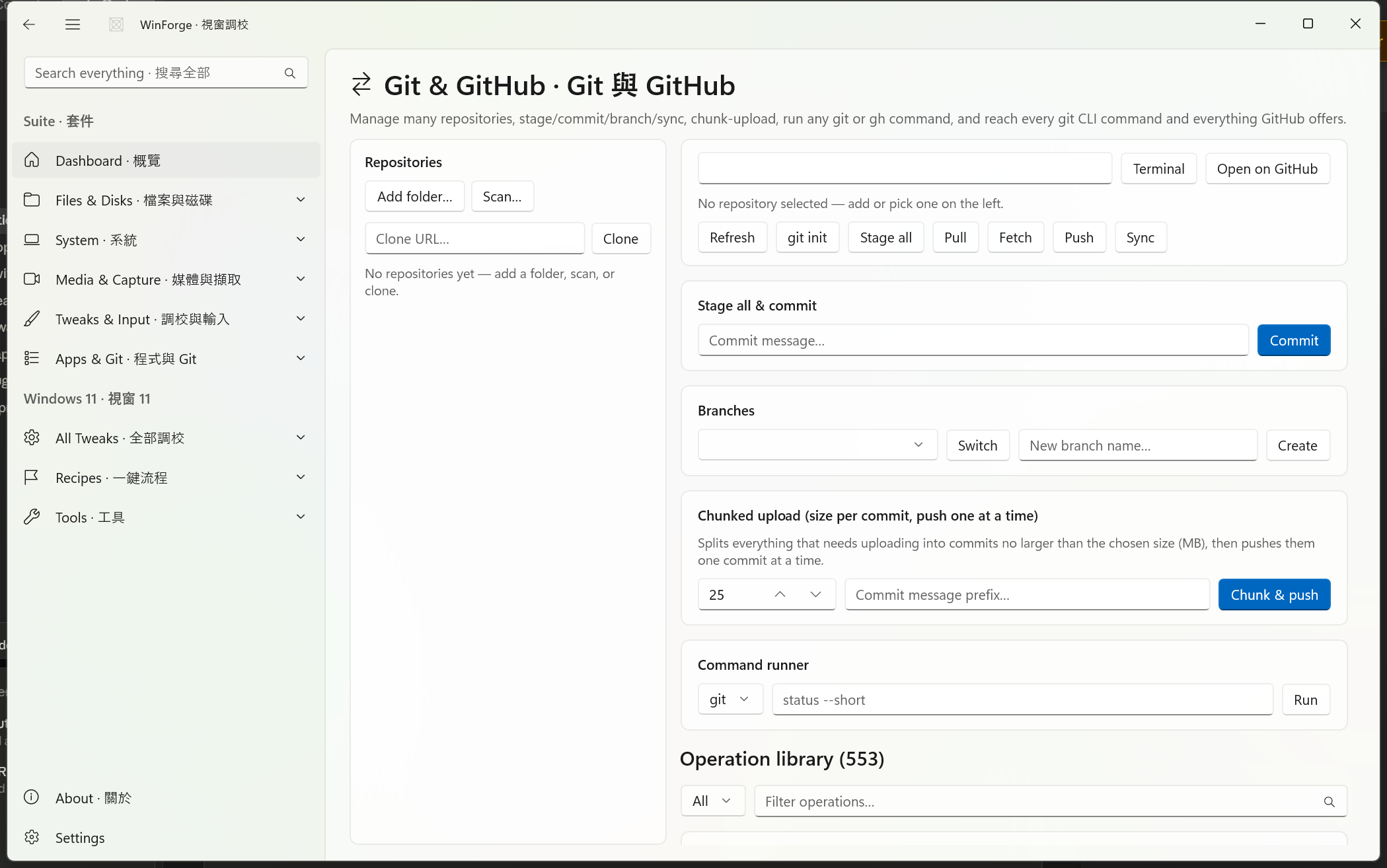
WinForge's Git & GitHub module is a full version-control workbench built right into the control centre. It keeps a saved list of many repositories (add a folder, scan a tree, or clone a URL), gives you one-click stage / commit / branch / sync against the selected repo, ships a chunked uploader that splits a giant working tree into size-capped commits and pushes them one at a time, runs any free-form git or gh command, and exposes a searchable operation library of 553 real operations covering the entire git CLI and everything GitHub offers through gh / gh api.
呢個係一個內置喺控制中心嘅完整版本控制工作枱:管理多個儲存庫、暫存/提交/分支/同步、分批上載、執行任何 git 或 gh 指令,仲覆蓋晒成個 git CLI 同 GitHub 嘅功能(共 553 個操作)。
Safety · 安全 This module runs real
gitandghcommands against your repositories and your GitHub account. Many operations are flagged destructive in the library (red badge) —reset --hard,clean -fdx,push --force-with-lease,push --mirror,branch -D,gh repo delete,gh repo archive, history rewrites, and more. Nothing here needs administrator rights (every operation runsrequiresAdmin: false, un-elevated), but destructive actions can still lose commits, files, branches, or remote state. Read the bilingual description on each card before you click. 呢個模組會喺你嘅儲存庫同 GitHub 帳號上面行真正嘅指令;好多操作標咗「破壞性」(紅色標記),按之前請睇清楚每張卡嘅說明。
The page is implemented by Pages/GitHubModule.xaml.cs, backed by two services and three catalog files:
| Piece · 部件 | File | Role · 角色 |
|---|---|---|
| Page / UI | Pages/GitHubModule.xaml.cs |
Renders the repo list, quick actions, commit/branch panels, chunked-upload card, command runner, and the operation library. |
| Git wrapper | Services/GitService.cs |
Thin wrapper over the git CLI scoped to the active repo; hosts the chunked uploader. |
| Repo list store | Services/RepoStore.cs |
Persistent multi-repository list (add / scan / select / remove), saved as JSON under the git.repos setting. |
| Common ops (111) | Catalog/GitOperations.cs |
91 git.* git ops + 20 git.gh-* GitHub ops — the everyday set. |
| Full git CLI (254) | Catalog/GitCliOperations.cs |
Every remaining git command family as gitx.* ops. |
| Full GitHub (189) | Catalog/GitHubOperations.cs |
The complete gh / gh api surface as gh.* ops. |
| Aggregator | Catalog/GitCatalog.cs |
Merges all three, de-duplicates by Id, and exposes All, GitOnly, GitHubOnly, Count, Search. |
Every operation is a data-driven TweakDefinition built by the GitTweak.Git(...) / GitTweak.Tool(...) factory and rendered by the shared TweakCard — the same card used everywhere else in WinForge. GitTweak.Git runs git <args> in the active repo via GitService.RunRaw; GitTweak.Tool runs another tool (almost always gh) via ShellRunner.RunIn. Both run un-elevated.
See also Module-Developer-and-Terminal for the wider terminal / dev-tools surface, and Home for the full module index.
The left rail holds a persistent, multi-repository list managed by RepoStore. It survives restarts: entries are serialised to JSON and stored under the SettingsStore key git.repos. One repo at a time is the active repo (AppState.CurrentRepoPath), highlighted with a bold name and an accent border.
Each saved entry (RepoEntry) records:
| Field · 欄位 | Meaning · 意思 |
|---|---|
| Path | Absolute folder path (normalised, case-insensitive de-dup). |
| Name | Display name — the folder's leaf name by default. |
| Remote |
origin URL, best-effort parsed from .git/config ([remote "origin"] url = …). |
| Branch | Current branch, best-effort parsed from .git/HEAD (ref: refs/heads/<branch>). |
Each row shows the name on top and path · branch underneath, with a small ✕ remove button (Remove from list · 由清單移除) that drops it from the list without touching the folder. Clicking a row calls RepoStore.Select(path) to make it active and refreshes the panels.
-
Add folder… · 加資料夾… — opens a Win32 COM folder picker (
FileDialogs.OpenFolderAsync, which works even when the app is elevated, unlike the WinRTFolderPicker), adds the chosen folder viaRepoStore.Add, and selects it. -
Scan… · 掃描… — pick a parent folder and WinForge walks it up to 3 levels deep (
RepoStore.ScanFolderAsync(folder, maxDepth: 3)), adding every subdirectory that directly contains a.gitentry (file or directory, so submodules and worktrees count). The scan is a pure filesystem BFS, robust to access-denied directories (it never throws mid-walk), and reports how many new repos it added (Added N repository(ies) from the scan.). -
Clone · 複製 — type a clone URL into the
Clone URL… · 複製網址…box, pick a destination parent folder, and WinForge runsgit clone <url>there, streams the output to the console, then adds and selects the freshly-cloned folder (the destination name is derived from the URL, stripping a trailing.git).
When the active repo isn't yet in the list, RepoStore.RefreshActive() adds it automatically on startup.
Selecting a repo refreshes a status line that runs several git probes through GitService:
-
Is it a repo? —
git rev-parse --is-inside-work-tree. If not, you get a hint to use the git init quick action or pick another folder (This folder is not a git repository…). -
Branch —
git rev-parse --abbrev-ref HEAD. -
Pending changes & size —
git -c core.quotepath=false status --porcelain, with each changed/untracked file's on-disk byte size summed. The header reads e.g.Branch: main · 12 pending change(s) · 4.7 MB.
A console pane at the bottom (auto-shown on first output, capped at the last 20,000 characters) collects the raw stdout/stderr of everything you run.
| Button · 按鈕 | Action · 動作 |
|---|---|
| Terminal · 終端機 | Opens Windows Terminal (wt.exe -d "<repo>") in the repo, falling back to cmd.exe /K cd /d "<repo>". |
| Open on GitHub · 開 GitHub | Runs gh repo view --web to open the repo's GitHub page in your browser. |
A row of one-tap buttons wired directly to GitService:
| Quick action · 快捷 | Command · 指令 |
|---|---|
| Refresh · 重新整理 | Re-reads status / branches (no git command). |
| git init | git init |
| Stage all · 暫存全部 | git add -A |
| Pull · 拉取 | git pull |
| Fetch · 抓取 | git fetch --all --prune |
| Push · 推送 | git push |
| Sync · 同步 |
git pull then git push (combined). |
Type a message into Commit message… · 提交訊息… and hit Commit · 提交. WinForge stages everything (git add -A) then commits (git commit -m "<msg>", with embedded " swapped to ' for safety), echoing the result to the console and clearing the box on success.
The branch panel is populated from git branch --format=%(refname:short), with the current branch pre-selected:
-
Switch · 切換 —
git switch "<selected>"to the branch chosen in the dropdown. -
Create · 建立 — type into
New branch name… · 新分支名…and WinForge runsgit switch -c "<name>", creating and switching in one move.
This is WinForge's signature Git feature, implemented in GitService.ChunkedUpload. It exists for the common pain of pushing a huge backlog of new/changed files to GitHub in one shot: a single giant commit can blow past push limits or time out. Instead, WinForge splits everything that needs uploading into commits no larger than a chosen size (MB), then pushes them one commit at a time.
Controls · 控制項
-
Size per commit (MB) — a numeric box (
ChunkSizeBox); minimum 1 MB. The default fallback is 25 MB if left at zero. -
Commit message prefix… · 提交訊息前綴… — defaults to
WinForge chunked upload. - Chunk & push · 分批推送 — kicks off the run; the button turns into a spinner while it works.
How the algorithm works · 點運作
- List every pending file with its on-disk size via
git status --porcelain. - If the tree is clean, stop early (
Nothing to upload — working tree is clean. · 冇嘢可以上載 — 工作區乾淨。). - Greedily bucket files (largest first) so each bucket's total stays at or below the cap. A single file larger than the cap gets its own bucket — git can't split one file across commits.
- For each bucket, stage it via a temp pathspec file (
git add --pathspec-from-file=…, which safely handles many/long paths), commit it as"<prefix> [i/n]", then push that one commit before moving to the next bucket. - The first push auto-sets upstream when there is none:
git push -u origin <branch>; later pushes are plaingit push.
Live progress is streamed to the console — e.g. Planned 3 commit(s) · 計劃 3 個 commit, [2/3] committed 7 file(s), [2/3] pushed ✓. If an add, commit, or push fails partway, the run stops and reports which commit number failed; commits with nothing staged are skipped.
Safety · 安全 Chunked upload makes real commits and pushes to your remote. Each push is a genuine
git push; once a chunk is pushed it is on the remote. Pick a size that comfortably fits your push limits, and confirm you're on the branch you intend to publish.
A free-form runner for when you want to type the exact command:
- A tool selector (
gitorgh) plus a free-text args field. -
Run · 執行 executes
<tool> <args>inside the active repo viaShellRunner.RunIn(...)(un-elevated), echoing the$ <tool> <args>line and the captured output to the console, then refreshing status. - It refuses to run with no repo selected (
Pick a repository first. · 請先揀儲存庫。).
This is the escape hatch for anything the library doesn't list verbatim, or for commands that need your own arguments.
The big expander at the bottom — labelled Operation library (553) · 操作庫(553) — is a searchable, scoped grid of every Git/GitHub operation, each rendered as a TweakCard you can run with a single click. The count comes straight from GitCatalog.Count (the de-duplicated total).
Scope filter · 範圍篩選 (All · 全部 / Git / GitHub) maps to:
-
Git →
GitCatalog.GitOnly— operations whose Id does not start withgh.orgit.gh-(local git). -
GitHub →
GitCatalog.GitHubOnly— operations whose Id starts withgh.orgit.gh-(everything throughgh/gh api).
Filter operations… · 篩選操作… does a live, bilingual substring search across each op's SearchHaystack (English title + 粵語標題 + keywords), so typing stash, rebase, release, 密鑰, or 分支 all narrow the grid. The list is capped at 400 cards on screen for responsiveness.
| Source file · 來源 | Ops · 操作數 | Id prefix | Surface · 範圍 |
|---|---|---|---|
GitOperations.cs |
111 |
git.* (91) + git.gh-* (20) |
Common everyday git + a curated gh set. |
GitCliOperations.cs |
254 | gitx.* |
The complete remaining git CLI. |
GitHubOperations.cs |
189 | gh.* |
The complete gh / gh api surface. |
| Raw total | 554 | — | — |
| After de-dup by Id | 553 | — | One duplicate (git.tag-list) collapsed; first occurrence wins. |
By scope that resolves to roughly 344 git-only ops and 209 GitHub ops.
The local-git ops (from GitOperations + GitCliOperations) span essentially the whole git toolchain. Representative groups and example commands:
| Group · 分組 | Examples · 例子 |
|---|---|
| Setup / init / clone |
init, init --bare, clone --depth 1, clone --recursive, clone --branch <b>, version, var -l
|
| Config · 設定 |
config --global user.name/user.email, core.autocrlf, init.defaultBranch main, pull.rebase true, alias.st status, config --list --show-origin, config --unset
|
| Inspect · 檢視 |
status --short --branch, log --oneline --graph --decorate --all, log --stat/--patch/--since/--grep, blame, shortlog -sne, describe --tags, reflog, count-objects -vH
|
| Diff · 差異 |
diff, diff --staged, diff --stat/--numstat/--shortstat, diff -w, diff --word-diff, diff --color-words, diff --check, diff main...HEAD, diff-tree
|
| Stage · 暫存 |
add -A, add -u, add --intent-to-add, add --renormalize, restore --staged, rm --cached, mv, update-index --assume-unchanged/--skip-worktree, sparse-checkout (init --cone, set, list, disable) |
| Commit · 提交 |
commit -m, --amend [--no-edit], --allow-empty, --fixup/--squash, --signoff, --no-verify, --gpg-sign, --date, --author, plus notes (notes add/show/list/remove/edit) |
| Undo / reset · 撤銷 |
reset --soft/--mixed/--hard, reset --keep/--merge, reset --hard ORIG_HEAD, restore, checkout -- ., clean -nd/-fd/-fdx/-fX
|
| Branches · 分支 |
branch [-a/-v/-vv/-r], branch --merged/--no-merged/--contains, switch -c, switch -/--detach, checkout --orphan, set/unset upstream, branch -m/-c/-d/-D
|
| Tags · 標籤 |
tag, tag -a/-s, tag -l "v*", tag --points-at HEAD, tag -n, tag -d, push origin <tag>
|
| Sync · 同步 |
fetch [--all --prune/--tags/--depth/--unshallow/--dry-run], pull [--rebase/--ff-only/--no-rebase/--autostash], push [-u/--tags/--all/--mirror/--delete/--prune/--follow-tags/--force-with-lease/--dry-run], remotes (add/-v/show/set-url/rename/remove/prune/get-url) |
| Merge / rebase · 合併/變基 |
merge [--no-ff/--squash/--ff-only/--continue/--abort/-X ours/-X theirs], rebase [main/--onto/--continue/--skip/--autosquash --autostash/--root/--abort], cherry-pick, revert, am, apply, format-patch
|
| Stash · 擱置 |
stash push/pop/apply/list/show [-p/--stat]/drop/clear/branch/create, --keep-index, -u, path-scoped stash |
| Worktrees / submodules · 工作樹/子模組 |
worktree list/add/remove/move/lock/unlock/prune, submodule status/add/update --init --recursive/sync/foreach/deinit/set-url/set-branch/summary
|
| Maintenance / plumbing · 維護 |
gc [--aggressive/--auto], maintenance run/start/stop, repack, prune, pack-refs, commit-graph write, multi-pack-index, fsck, hash-object, write-tree, update-ref, archive, bundle, fast-export
|
| Bisect · 二分搜尋 | bisect start/good/bad/log/reset |
| History rewrite · 改寫歷史 |
filter-branch (flagged discouraged & destructive) |
The GitHub side (from GitHubOperations + the git.gh-* set) drives everything through the GitHub CLI — and where gh has no first-class command, through gh api (which auto-substitutes {owner}/{repo} when run inside a repo):
| Group · 分組 | Examples · 例子 |
|---|---|
| Auth / account · 認證 |
gh auth login --web/logout/refresh/token/setup-git/switch, gh auth status, gh api user, gh api /rate_limit, gh config get git_protocol, gh alias list, gh extension list, gh version
|
| Repo lifecycle · Repo 生命週期 |
gh repo create --public/--private/--template, clone, fork --clone, list [ORG], view [--web/--json], edit --description/--visibility, rename, archive/unarchive, delete, set-default, sync, deploy-keys, license/gitignore list/view
|
| Issues · Issue |
gh issue list [--state all/--assignee @me/--label], view/create/close/reopen/comment/edit/delete/transfer/pin/unpin/lock/unlock/develop/status
|
| Pull requests · PR |
gh pr list/view [--web]/checkout/diff, create --fill/--draft, merge --merge/--squash/--rebase, close/reopen/ready, review --approve/--request-changes/--comment, comment, edit --add-reviewer, checks, status, lock
|
| Actions · 工作流程 |
gh run list/view [--log]/watch/rerun [--failed]/cancel/download, gh workflow list/view/run/enable/disable, gh cache list/delete --all
|
| Releases · 發行 | gh release list/view/create/upload/download/edit/delete/delete-asset |
| Gists · Gist | gh gist list/view/create [--public]/edit/clone/delete/rename |
| Secrets / variables · 密鑰/變數 |
gh secret list/set/delete, gh variable list/set/delete
|
| Labels · 標籤 | gh label list/create/edit/delete/clone |
| Keys · 金鑰 |
gh ssh-key list/add/delete, gh gpg-key list/add/delete
|
| Projects / Codespaces / Org |
gh project list/view/item-list, gh codespace list/create/stop/delete/ssh/ports, gh org list, gh status
|
| Search · 搜尋 | gh search repos/issues/prs --author=@me/code/commits |
| Rulesets · 規則集 | gh ruleset list/view/check |
gh api — repo features |
branches, branch protection, collaborators, teams, hooks, deployments, environments, Pages, traffic (views/clones), topics, languages, tags, contributors, forks, stargazers, subscribers, milestones, commits, community profile, code-/secret-scanning & Dependabot alerts, file contents, compare, latest release, Actions permissions, self-hosted runners |
gh api — account features |
notifications, starred/subscriptions, followers/following, orgs, repos, gists, issues, SSH/GPG keys, plus fun ones: /octocat, /zen, and --method PUT/DELETE user/starred/{owner}/{repo} to star/unstar this repo |
Destructive gh operations — repo delete, repo archive, repo edit --visibility, issue delete/close/transfer/lock, pr merge/close/lock, release delete, secret/variable delete, label delete, ssh-key/gpg-key delete, run rerun/cancel, workflow disable, cache delete --all, gist delete, codespace delete, auth logout, and api … unstar — all carry the destructive badge in the library.
- One repo is "active" at a time. The commit / branch / chunked-upload / runner panels and every library card all run against the selected repo. Click a row in the left rail to switch.
-
The console is your log. Quick actions, the runner, clone, and chunked upload all stream to the same console pane (last 20,000 chars). Library cards report their result through the standard
TweakCardresult UI. -
ghops need the GitHub CLI signed in. Use GitHub auth status / Log in (browser) from the library (or the runner:gh auth login --web) before the GitHub side will work. -
Search is bilingual. The filter matches English, 粵語, and keyword text, so
分支,branch,rebase, and密鑰all find the right cards. -
Mind the placeholders. Library commands that act on a specific target use literal placeholders like
COMMIT_SHA,OWNER/REPO,NAME,KEY_ID, or issue/PR numberN— for those, prefer the command runner so you can supply your own arguments.
Part of Home · WinForge wiki.
Each control on the live page is numbered on the screenshot below and explained in the legend — what every button, toggle, tab, box and label does, in English and 粵語. Captured from the running app via UI Automation. 下面每個控件都有編號,逐個解釋佢哋嘅功能同標籤意思。
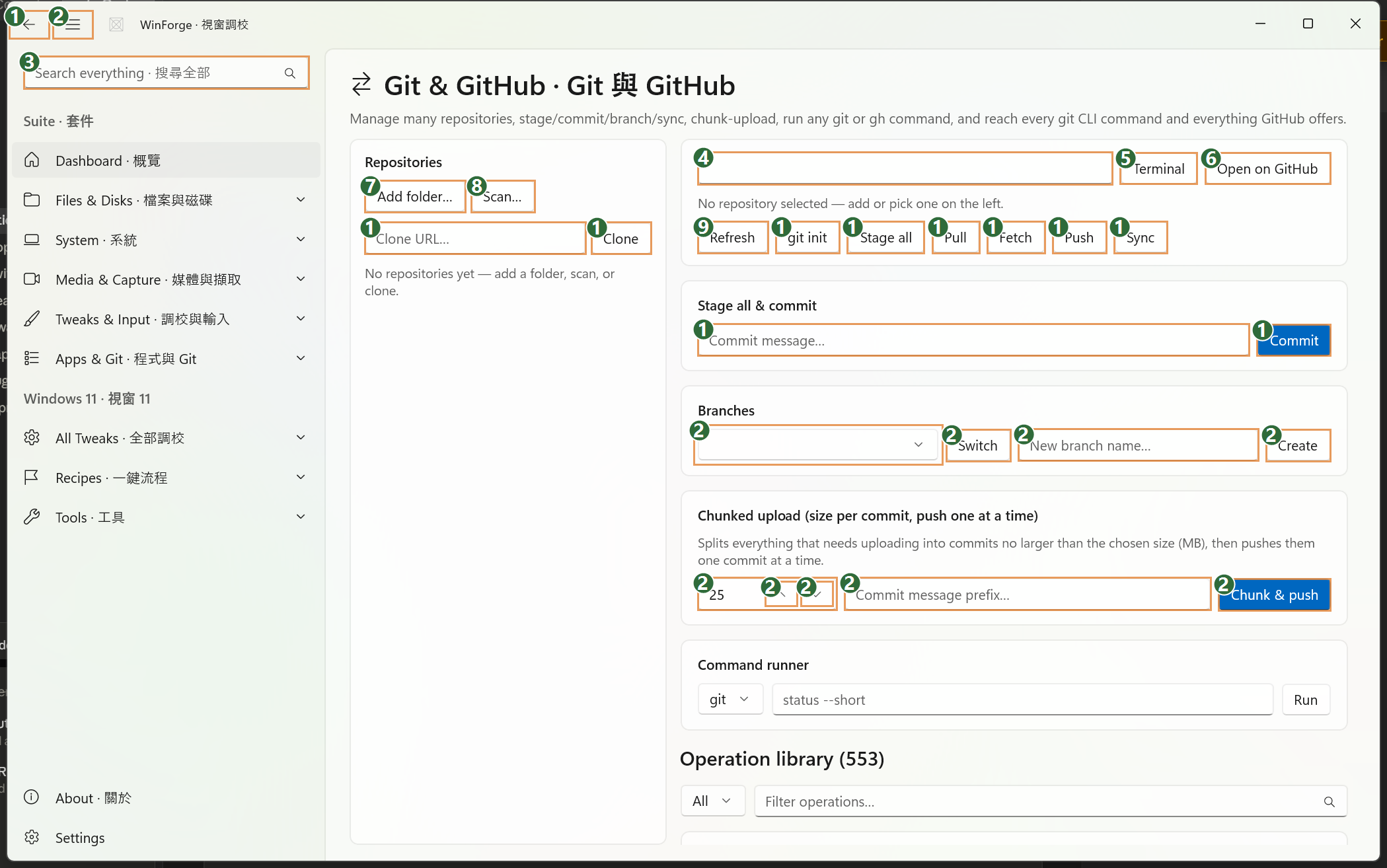
| # | Control | What it is & does · 功能 | Label meaning · 標籤意思 |
|---|---|---|---|
| 1 | Button | Goes back to the previous page in the app's navigation. | "Back" — return to the page you came from. |
| 2 | Button | Collapses or expands the app's left navigation pane. | "Toggle Navigation" — show/hide the side menu. |
| 3 | Search box | App-wide search; type to find any module, tweak or setting across WinForge (not scoped to this page). | "Search everything · 搜尋全部" — 搜尋全部 = search everything. |
| 4 | Edit (read-only path) | Shows the file-system path of the currently active repository. It is filled in by Refresh from AppState.CurrentRepoPath; you don't normally type here. |
No label (icon-only field) — the active repo's folder path. |
| 5 | Button | Opens Windows Terminal (wt.exe) in the active repo's folder; falls back to cmd.exe if Terminal isn't available. |
"Terminal · 終端機" — 終端機 = terminal / command line. |
| 6 | Button | Runs gh repo view --web to open the repository's page on GitHub.com in your browser. |
"Open on GitHub · 開 GitHub" — 開 GitHub = open it on GitHub. |
| 7 | Button | Opens a folder picker; the chosen folder is added to your saved repository list and selected as active. | "Add folder… · 加資料夾…" — 加資料夾 = add a folder. |
| 8 | Button | Opens a folder picker, then recursively scans it (up to 3 levels deep) and adds every git repository it finds to your list. | "Scan… · 掃描…" — 掃描 = scan for repos. |
| 9 | Button | Re-reads the active repo's state (current branch, pending changes, size) and refreshes the branch list. Runs no git command itself. | "Refresh · 重新整理" — 重新整理 = refresh / reload. |
| 10 | Button | Runs git init to turn the selected folder into a new git repository. |
"git init" — initialise a git repo here. |
| 11 | Button | Runs git add -A to stage all current changes. |
"Stage all · 暫存全部" — 暫存全部 = stage everything. |
| 12 | Button | Runs git pull to fetch and merge changes from the remote. |
"Pull · 拉取" — 拉取 = pull down remote changes. |
| 13 | Button | Runs git fetch --all --prune to fetch every remote and clear deleted branches. |
"Fetch · 抓取" — 抓取 = fetch (without merging). |
| 14 | Button | Runs git push to upload your commits to the remote. |
"Push · 推送" — 推送 = push commits up. |
| 15 | Button | Convenience action that runs git pull then git push back to back. |
"Sync · 同步" — 同步 = sync (pull + push). |
| 16 | Edit | Type or paste a repository URL to clone. Clone (#17) then asks where to put it. | "Clone URL… · 複製網址…" — 複製網址 = the URL to clone. |
| 17 | Button | Asks for a destination folder, runs git clone <url> there, then adds and selects the new repo. |
"Clone · 複製" — 複製 = clone the repo. |
| 18 | Edit | Type the commit message here. Commit (#19) stages all changes first, then commits with this text. | "Commit message… · 提交訊息…" — 提交訊息 = the commit message. |
| 19 | Button | Runs git add -A then git commit -m "<your message>", committing all staged work in one click. |
"Commit · 提交" — 提交 = commit. |
| 20 | Dropdown | Lists the repo's local branches; pick one and use Switch (#22) to check it out. Populated by git branch. |
No label (icon-only) — the branch picker. |
| 21 | Edit | Type a name for a new branch; Create (#23) then makes and switches to it. | "New branch name… · 新分支名…" — 新分支名 = name for the new branch. |
| 22 | Button | Runs git switch "<selected branch>" to check out the branch chosen in the dropdown (#20). |
"Switch · 切換" — 切換 = switch/checkout branch. |
| 23 | Button | Runs git switch -c "<name>" to create the branch named in #21 and switch to it. |
"Create · 建立" — 建立 = create branch. |
| 24 | Edit (number box) | Sets the chunk size in MB — the maximum size of each commit the chunked uploader makes. Adjust with #27/#28. | No label (icon-only) — chunk size in MB. |
| 25 | Edit | Optional prefix added to each auto-generated commit message during chunked upload; defaults to "WinForge chunked upload" if left blank. | "Commit message prefix… · 提交訊息前綴…" — 提交訊息前綴 = commit-message prefix. |
| 26 | Button | Runs the chunked uploader: splits everything needing upload into commits no larger than the chunk size (#24) and pushes them one commit at a time, logging progress to the console. | "Chunk & push · 分批推送" — 分批推送 = upload in batches and push. |
| 27 | Button | Increases the chunk-size value in box #24 by one step. | "Increase · 增加" (inferred) — step the MB value up. |
| 28 | Button | Decreases the chunk-size value in box #24 by one step. | "Decrease · 減少" (inferred) — step the MB value down. |
How to use it · 點用 — First get a repository onto the page: click Add folder… (7) or Scan… (8) to register folders already on disk, or paste a URL into Clone URL… (16) and click Clone (17). Pick a repo on the left to make it active, then use the quick-action row — Refresh / git init / Stage all / Pull / Fetch / Push / Sync (9–15) — for everyday git work; for a commit, type a message in #18 and hit Commit (19), which stages everything for you. Manage branches with the dropdown + Switch (20, 22) or by naming and Create-ing a new one (21, 23). When you have a large backlog to upload, set a per-commit size in MB (24, adjusting with 27/28), optionally add a message prefix (25), and click Chunk & push (26) to push it safely in size-bounded batches; Terminal (5) and Open on GitHub (6) drop you into the shell or the repo's web page when you need to go beyond these buttons.