Tweaks Cleanup Security System
This page documents three of WinForge's tweak categories: Cleanup · 清理 (free up disk space and wipe caches), Security · 安全 (UAC, SmartScreen, sign-in, firewall and Defender) and System · 系統 (boot, restore points, clipboard, and low-level Windows behaviour). Every entry here maps to a real TweakDefinition in the catalog — a registry coordinate, a choice set, or a cmd/PowerShell/shell command — and is rendered by the same reusable TweakCard used everywhere else in the app.
每張卡都係真嘅系統操作:清理會真係刪檔,安全會真係改登錄檔或者行 netsh,系統會真係建立還原點或者重開機。請睇清楚每個操作先按。
Safety · 安全 — Many operations on this page permanently delete files, require administrator rights, or reboot the machine. WinForge marks these in the catalog with
destructive: true,requiresAdmin: trueand arestartscope, and the Windows-Tweaks-Overview explains how theTweakCardsurfaces those flags (admin shield, destructive warning, restart badge) before anything runs. Read each row's notes below carefully.
All three categories live under Catalog\ and expose a single All() method returning IEnumerable<TweakDefinition>. The tweaks use a small set of Tweak.* factory helpers:
| Factory · 工廠方法 | What it produces · 產生乜嘢 |
|---|---|
Tweak.RegToggle |
A two-state on/off registry switch with explicit onValue / offValue. |
Tweak.RegChoice |
A multi-option registry value (DWORD or String) rendered as a choice picker. |
Tweak.Cmd |
Runs a classic cmd.exe command line. |
Tweak.Powershell |
Runs a PowerShell one-liner. |
Tweak.Shell |
Launches a shell verb / executable (e.g. wsreset.exe, cleanmgr.exe). |
Common flags carried by each definition:
-
requiresAdmin— elevation needed; the card shows an admin shield · 需要管理員。 -
destructive— irreversible / data-deleting; the card warns first · 不可逆,會先警告。 -
restart—RestartScope.SignOutorRestartScope.Rebootto fully apply · 要登出或重新開機先生效。 -
keywords— bilingual search terms (English + 粵語) feeding WinForge's tweak search.
For the full taxonomy of all 22 categories and the shared card/search behaviour, see Windows-Tweaks-Overview. The sibling tweak pages are Tweaks-Privacy-Performance-Network and Tweaks-Apps-PowerTools-Maintenance.
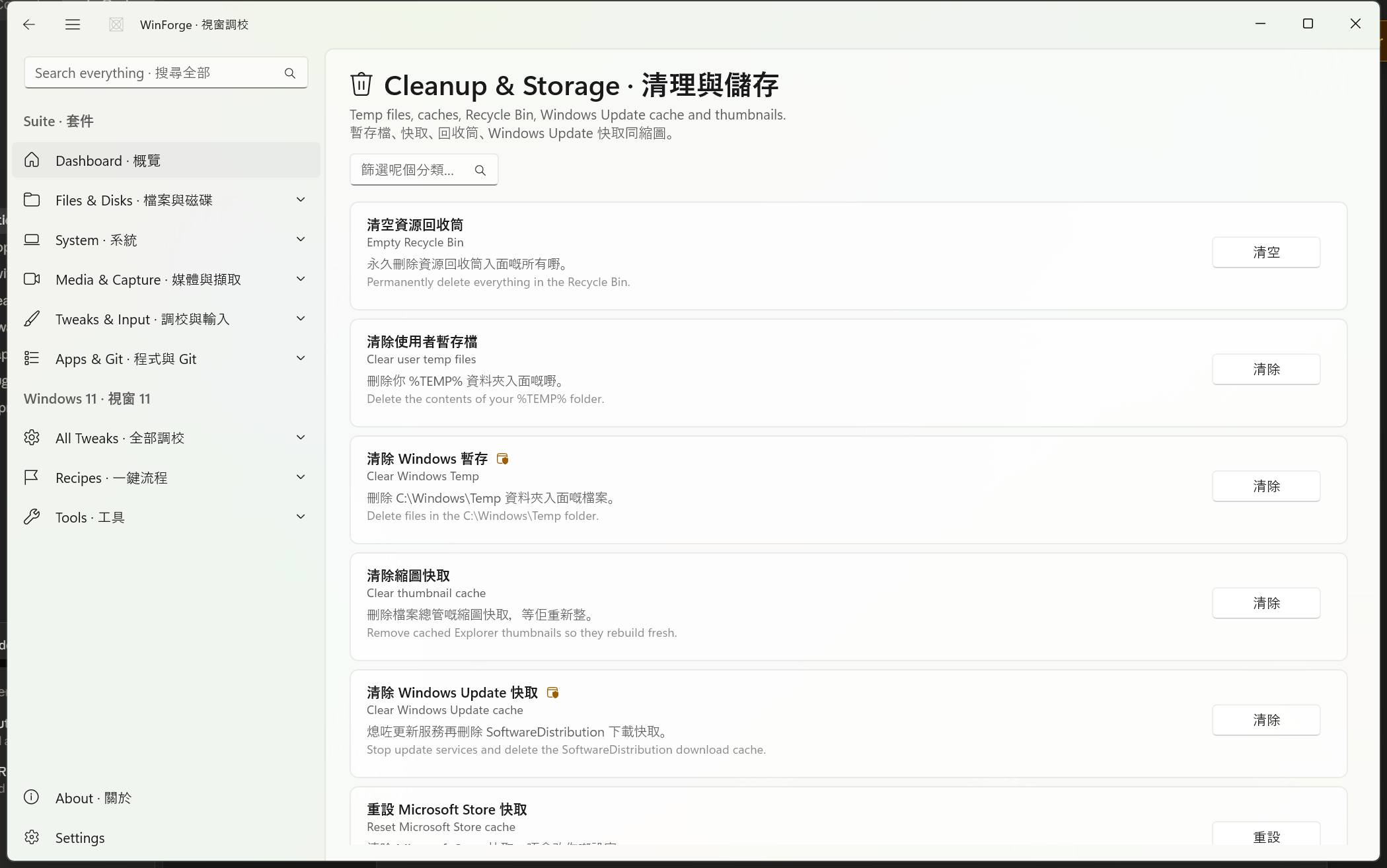
Source: Catalog\CleanupTweaks.cs. These are mostly actions rather than persistent settings — you press the button, the operation runs, and disk space comes back. File-deleting entries are flagged destructive.
Safety · 安全 — The destructive cleanup ops below delete files immediately and permanently. They do not move items to the Recycle Bin (one of them is emptying it). There is no undo. Close work first, and prefer creating a restore point (see the System section) before large cleanups.
| ID | Operation · 操作 | Button | Engine | Admin | Destructive | What it actually does |
|---|---|---|---|---|---|---|
cleanup.recycle-bin |
Empty Recycle Bin · 清空資源回收筒 | Empty · 清空 | PowerShell | — |
Clear-RecycleBin -Force — permanently deletes everything in the bin. |
|
cleanup.user-temp |
Clear user temp files · 清除使用者暫存檔 | Clear · 清除 | cmd | — | Deletes the contents of %TEMP%, including subfolders (del /q /f /s then rd /s /q per dir). |
|
cleanup.windows-temp |
Clear Windows Temp · 清除 Windows 暫存 | Clear · 清除 | cmd | ✔️ |
del /q /f /s C:\Windows\Temp\*. |
|
cleanup.thumbnail-cache |
Clear thumbnail cache · 清除縮圖快取 | Clear · 清除 | PowerShell | — | Removes thumbcache_*.db under %LocalAppData%\Microsoft\Windows\Explorer so Explorer rebuilds thumbnails. |
|
cleanup.windows-update-cache |
Clear Windows Update cache · 清除 Windows Update 快取 | Clear · 清除 | cmd | ✔️ | Stops wuauserv and bits, deletes C:\Windows\SoftwareDistribution\Download, then restarts both services. |
|
cleanup.store-cache |
Reset Microsoft Store cache · 重設 Microsoft Store 快取 | Reset · 重設 | Shell | — | — | Runs wsreset.exe — clears the Store cache without touching your settings. |
cleanup.prefetch |
Clear Prefetch · 清除 Prefetch | Clear · 清除 | cmd | ✔️ |
del /q /f /s C:\Windows\Prefetch\*. |
|
cleanup.disk-cleanup |
Run Disk Cleanup · 執行磁碟清理 | Open · 開啟 | Shell | — | — | Launches the built-in cleanmgr.exe. |
cleanup.delivery-optimization |
Clear delivery optimisation cache · 清除傳遞最佳化快取 | Clear · 清除 | PowerShell | — |
Delete-DeliveryOptimizationCache -Force to free DO cache space. |
|
cleanup.event-logs |
Clear Windows event logs · 清除 Windows 事件記錄 | Clear · 清除 | PowerShell | ✔️ |
wevtutil el | ForEach-Object { wevtutil cl $_ } — wipes all event logs. |
|
cleanup.empty-clipboard |
Empty clipboard · 清空剪貼簿 | Empty · 清空 | cmd | — | — |
echo off | clip clears current clipboard text. |
cleanup.storage-sense |
Open Storage Sense settings · 開啟儲存空間感知設定 | Open · 開啟 | cmd | — | — |
start ms-settings:storagesense to automate ongoing cleanup. |
cleanup.dism-component |
DISM component cleanup · DISM 元件清理 | Run · 執行 | cmd | ✔️ | — |
Dism.exe /Online /Cleanup-Image /StartComponentCleanup — reclaims superseded WinSxS component-store files. |
-
Event logs · 事件記錄 —
cleanup.event-logsiterates every log channel and clears it. This destroys forensic / troubleshooting history. Do not run it right before investigating a problem. -
Update cache · 更新快取 —
cleanup.windows-update-cachebriefly stopswuauserv/bits. A pending update download may need to re-download afterwards; that is expected. -
DISM cleanup · 元件清理 —
cleanup.dism-componentis not marked destructive (it removes only superseded components) but it does require admin and can take a while to run. -
Recycle Bin / temp · 回收筒 / 暫存 — these delete immediately, bypassing the bin. Treat them like a permanent
shred.
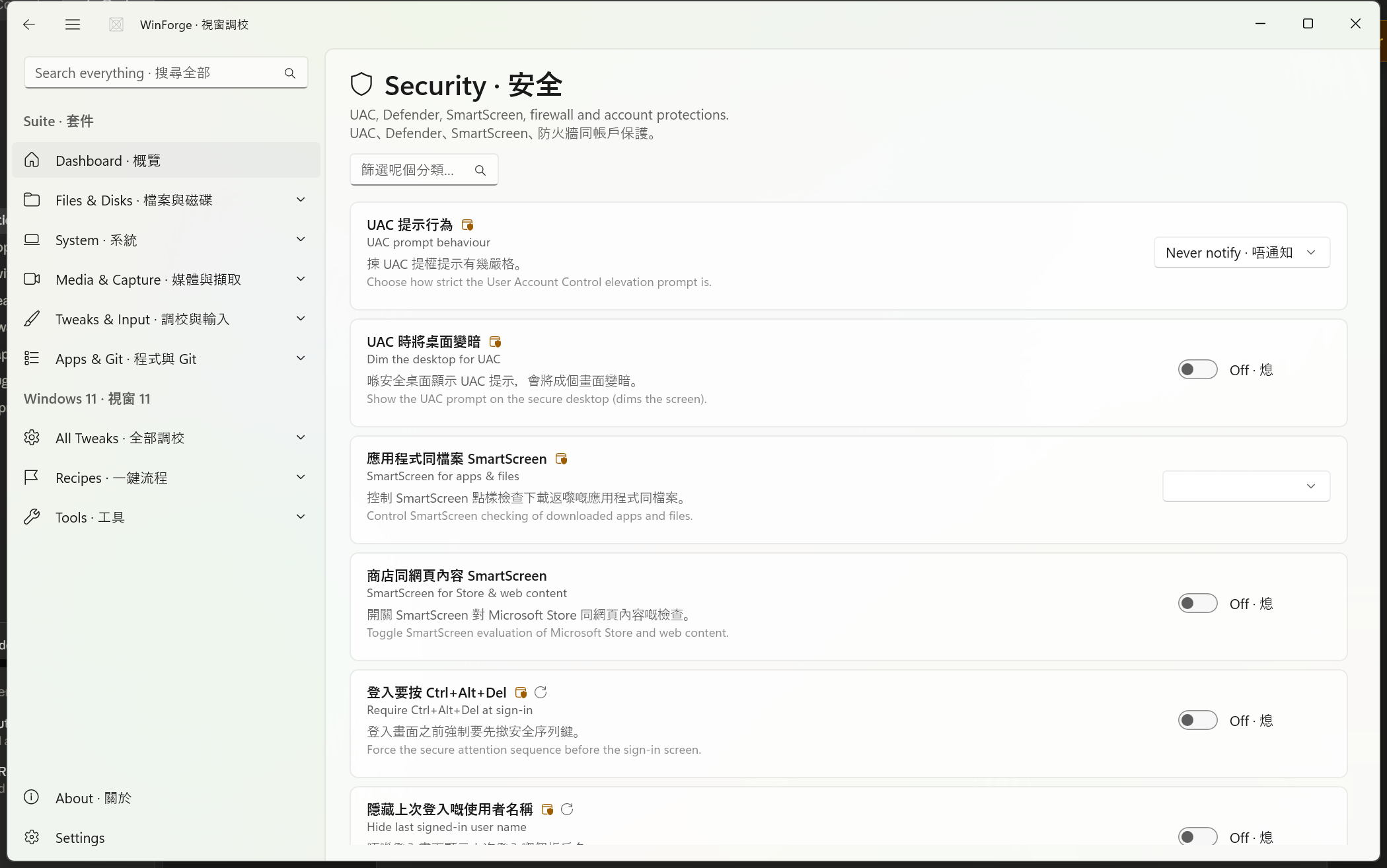
Source: Catalog\SecurityTweaks.cs. This category covers User Account Control, SmartScreen, the sign-in screen, the Windows Firewall, Remote Desktop, BitLocker status and Microsoft Defender helpers.
Design note · 設計取向 — The catalog header is explicit that WinForge never disables Defender real-time protection: Tamper Protection blocks it at the kernel level, so a toggle for it would be a fake/no-op tweak. The Defender entries below are genuine, useful actions (scan, update, exclusion) rather than a false "turn off antivirus" switch. 唔會關閉 Defender 即時保護,因為 Tamper Protection 會阻止,嗰啲只會係假調校。
Safety · 安全 —
security.firewall-offdisables the Windows Firewall on every profile and leaves the PC exposed to the network. The pairedsecurity.firewall-onre-enables it. Only turn the firewall off briefly for a specific diagnostic, then turn it back on.
| ID | Setting · 設定 | Type | Registry · 登錄檔 | Options / Values | Admin |
|---|---|---|---|---|---|
security.uac-prompt |
UAC prompt behaviour · UAC 提示行為 | Choice (DWORD) |
HKLM\SOFTWARE\Microsoft\Windows\CurrentVersion\Policies\System → ConsentPromptBehaviorAdmin
|
Never notify 0 · Default 5 · Always notify 2
|
✔️ |
security.uac-secure-desktop |
Dim the desktop for UAC · UAC 時將桌面變暗 | Toggle | same path → PromptOnSecureDesktop
|
On 1 / Off 0
|
✔️ |
security.smartscreen-apps |
SmartScreen for apps & files · 應用程式同檔案 SmartScreen | Choice (String) |
HKLM\…\CurrentVersion\Explorer → SmartScreenEnabled
|
Warn · Prompt (admin) · Off | ✔️ |
security.smartscreen-edge |
SmartScreen for Store & web content · 商店同網頁內容 SmartScreen | Toggle |
HKCU\Software\Microsoft\Windows\CurrentVersion\AppHost → EnableWebContentEvaluation
|
On 1 / Off 0
|
— |
| ID | Setting · 設定 | Type | Registry · 登錄檔 | On/Off | Admin | Restart |
|---|---|---|---|---|---|---|
security.require-cad |
Require Ctrl+Alt+Del at sign-in · 登入要按 Ctrl+Alt+Del | Toggle |
HKLM\…\Policies\System → DisableCAD
|
On 0 / Off 1 (inverted) |
✔️ | Sign-out · 登出 |
security.hide-last-user |
Hide last signed-in user name · 隱藏上次登入嘅使用者名稱 | Toggle |
HKLM\…\Policies\System → DontDisplayLastUserName
|
On 1 / Off 0
|
✔️ | Sign-out · 登出 |
security.remote-desktop |
Enable Remote Desktop · 開啟遠端桌面 | Toggle |
HKLM\SYSTEM\CurrentControlSet\Control\Terminal Server → fDenyTSConnections
|
On 0 / Off 1 (inverted) |
✔️ | Reboot · 重新開機 |
Note the inverted values: enabling RDP and enabling Ctrl+Alt+Del both write 0 because the underlying value is a deny/disable flag. The card handles this internally — you just toggle "on/off" and WinForge writes the correct raw value.
| ID | Action · 動作 | Button | Engine | Admin | Destructive | Command / verb |
|---|---|---|---|---|---|---|
security.firewall-off |
Turn Windows Firewall off (all profiles) · 熄咗 Windows 防火牆 | Turn off · 熄咗佢 | cmd | ✔️ | netsh advfirewall set allprofiles state off |
|
security.firewall-on |
Turn Windows Firewall on (all profiles) · 開返 Windows 防火牆 | Turn on · 開返佢 | cmd | ✔️ | — | netsh advfirewall set allprofiles state on |
security.open-security-app |
Open Windows Security · 開啟 Windows 安全性 | Open · 開啟 | cmd | — | — | start windowsdefender: |
security.bitlocker-status |
Show BitLocker status · 顯示 BitLocker 狀態 | Check · 查詢 | cmd | ✔️ | — | manage-bde -status |
security.defender-exclude-downloads |
Exclude Downloads from Defender scans · 將 Downloads 排除 | Add · 新增 | PowerShell | ✔️ | — | Add-MpPreference -ExclusionPath "$env:USERPROFILE\Downloads" |
security.defender-quick-scan |
Run a quick Defender scan · 行一次 Defender 快速掃描 | Scan · 掃描 | PowerShell | ✔️ | — | Start-MpScan -ScanType QuickScan |
security.defender-update |
Update Defender definitions · 更新 Defender 病毒定義 | Update · 更新 | PowerShell | ✔️ | — | Update-MpSignature |
-
Exclusion ≠ no protection · 排除唔等於冇保護 —
security.defender-exclude-downloadsonly excludes theDownloadsfolder from scans; it does not weaken protection elsewhere. Use sparingly, since downloads are a common malware vector. -
BitLocker status is read-only · 只係查詢 —
security.bitlocker-statusreports encryption state per drive; it does not encrypt or decrypt anything. - Firewall toggle is global · 全域 — it applies to all profiles (Domain, Private, Public) at once, not just the active one.
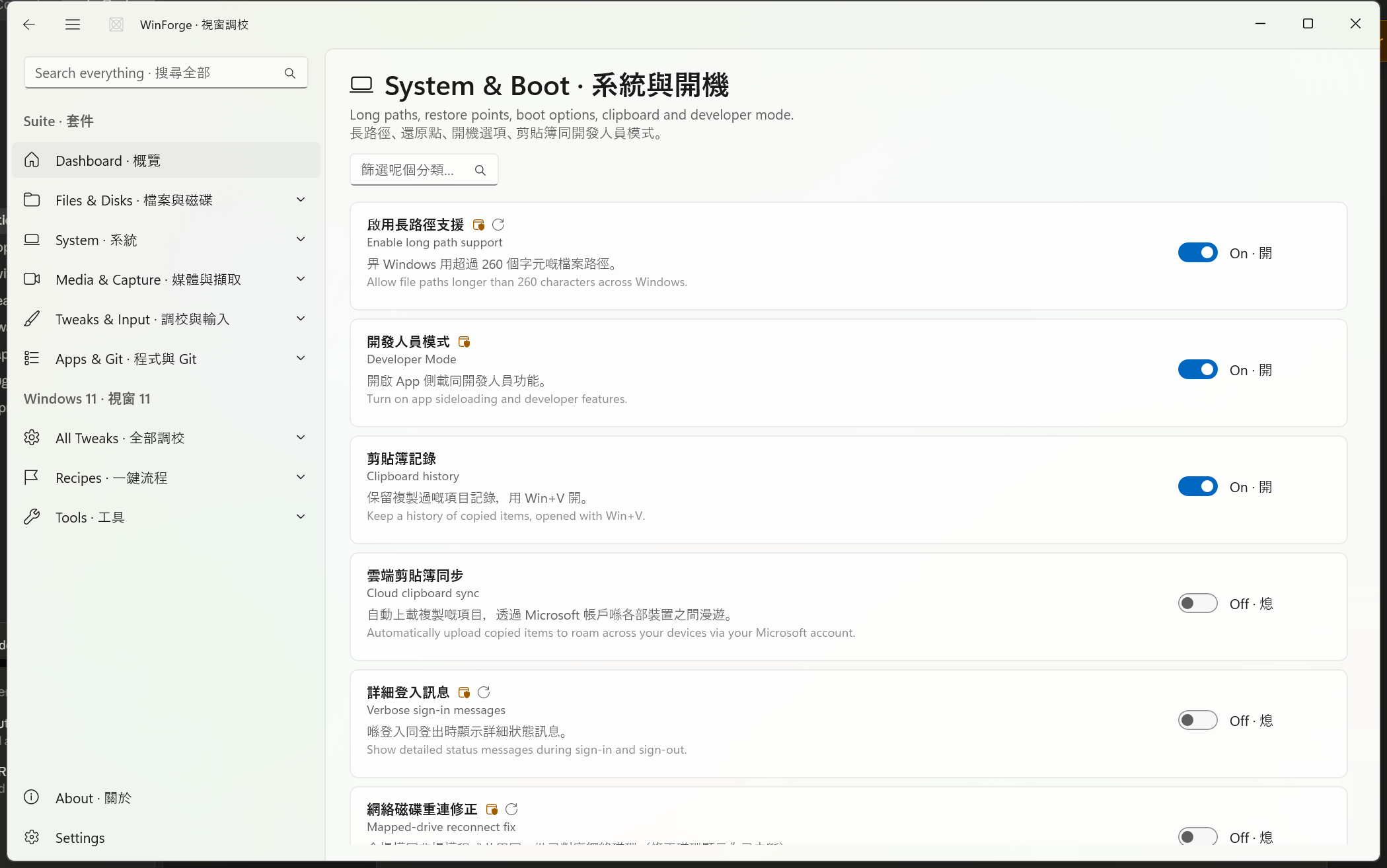
Source: Catalog\SystemTweaks.cs. Low-level Windows and boot behaviour — long paths, Developer Mode, clipboard history & cloud sync, crash/boot handling, restore points and quick launchers. The header notes these use real Windows 11 registry paths and commands throughout.
Safety · 安全 —
system.boot-uefiandsystem.boot-recoveryreboot the machine in ~3 seconds (shutdown /r … /t 3). Save all work before pressing them. They are flaggeddestructiveprecisely because of the unsaved-work risk, not because they damage anything.
| ID | Setting · 設定 | Registry · 登錄檔 → value | On/Off | Admin | Restart |
|---|---|---|---|---|---|
system.long-paths |
Enable long path support · 啟用長路徑支援 |
HKLM\SYSTEM\CurrentControlSet\Control\FileSystem → LongPathsEnabled
|
1 / 0
|
✔️ | Sign-out |
system.developer-mode |
Developer Mode · 開發人員模式 |
HKLM\…\CurrentVersion\AppModelUnlock → AllowDevelopmentWithoutDevLicense
|
1 / 0
|
✔️ | — |
system.clipboard-history |
Clipboard history · 剪貼簿記錄 |
HKCU\Software\Microsoft\Clipboard → EnableClipboardHistory
|
1 / 0
|
— | — |
system.cloud-clipboard |
Cloud clipboard sync · 雲端剪貼簿同步 |
HKCU\Software\Microsoft\Clipboard → CloudClipboardAutomaticUpload
|
1 / 0
|
— | — |
system.verbose-status |
Verbose sign-in messages · 詳細登入訊息 |
HKLM\…\Policies\System → VerboseStatus
|
1 / 0
|
✔️ | Sign-out |
system.linked-connections |
Mapped-drive reconnect fix · 網絡磁碟重連修正 |
HKLM\…\Policies\System → EnableLinkedConnections
|
1 / 0
|
✔️ | Reboot |
system.auto-reboot |
Auto-restart on crash · 當機自動重新開機 |
HKLM\SYSTEM\CurrentControlSet\Control\CrashControl → AutoReboot
|
1 / 0
|
✔️ | Reboot |
-
Long paths · 長路徑 lets Windows use file paths longer than the classic 260-character
MAX_PATHlimit — handy for deepnode_modules, build trees, etc. -
Clipboard history · 剪貼簿記錄 is what
Win+Vopens; cloud clipboard additionally roams copied items across devices via your Microsoft account. -
Mapped-drive reconnect fix · 網絡磁碟重連修正 sets
EnableLinkedConnectionsso elevated and non-elevated apps share the same mapped network drives (fixes drives showing as "disconnected").
| ID | Setting · 設定 | Registry · 登錄檔 → value | Options · 選項 | Admin | Restart |
|---|---|---|---|---|---|
system.numlock-startup |
NumLock at startup · 開機 NumLock |
HKU\.DEFAULT\Control Panel\Keyboard → InitialKeyboardIndicators (String) |
On 2 · Off 0
|
✔️ | Reboot |
system.hung-app-timeout |
Hung app close timeout · 無回應程式關閉等候 |
HKCU\Control Panel\Desktop → HungAppTimeout (String) |
1s 1000 · 3s 3000 · 5s (default) 5000
|
— | Sign-out |
| ID | Action · 動作 | Button | Engine | Admin | Destructive | Command |
|---|---|---|---|---|---|---|
system.restore-point |
Create a restore point · 建立還原點 | Create · 建立 | PowerShell | ✔️ | — | Checkpoint-Computer -Description 'WinForge' -RestorePointType MODIFY_SETTINGS |
system.enable-protection |
Enable System Protection (C:) · 啟用系統保護 (C:) | Enable · 啟用 | PowerShell | ✔️ | — | Enable-ComputerRestore -Drive 'C:\' |
system.god-mode |
Create God Mode folder · 建立 God Mode 資料夾 | Create · 建立 | PowerShell | — | — | Creates GodMode.{ED7BA470-8E54-465E-825C-99712043E01C} on the Desktop |
system.boot-uefi |
Restart to UEFI firmware · 重新開機入 UEFI 韌體 | Restart · 重新開機 | cmd | ✔️ | shutdown /r /fw /t 3 |
|
system.boot-recovery |
Restart to Advanced startup · 重新開機入進階啟動 | Restart · 重新開機 | cmd | ✔️ | shutdown /r /o /t 3 |
|
system.env-vars |
Edit Environment Variables · 編輯環境變數 | Open · 開啟 | cmd | — | — | rundll32.exe sysdm.cpl,EditEnvironmentVariables |
-
Make a restore point first · 先整還原點 —
system.restore-pointandsystem.enable-protectionare the safety net for everything else on this page. Runsystem.enable-protectiononce (System Protection must be on before checkpoints can be created), thensystem.restore-pointbefore any risky change. -
God Mode · 所有設定 —
system.god-modeis the one action here that needs no admin rights; it just drops a special shell-folder shortcut on your Desktop that lists every Control Panel setting. -
Boot actions reboot fast · 重開機好快 — both
boot-uefi(/fw) andboot-recovery(/o) use a 3-second timer. There is no extra confirmation beyond WinForge's destructive-action warning.
| Flag · 旗標 | Meaning · 意思 |
|---|---|
| ✔️ Admin | Requires elevation (requiresAdmin) · 需要管理員權限 |
Deletes data or carries data-loss risk (destructive) · 會刪資料或有資料遺失風險 |
|
| Sign-out / Reboot | Needs a sign-out or restart to fully apply (restart) · 要登出或重新開機先生效 |
For privacy, performance and network tweaks see Tweaks-Privacy-Performance-Network; for app, power-tool and maintenance tweaks see Tweaks-Apps-PowerTools-Maintenance; and for the whole catalog model see Windows-Tweaks-Overview.
Part of Home · WinForge wiki.