Architecture
The canonical .NET 11 / WinUI 3 WinForge application is data-driven: catalog surfaces are TweakDefinition records carrying read/write behavior and bilingual text, rendered as real control rows by ControlRowList. TweakCard has been fully removed. The experimental C++/WinRT rewrite is maintained independently; see Native-Cpp-Rewrite for its new home.
正式 .NET 11 / WinUI 3 WinForge app 係資料驅動:目錄介面由帶住讀/寫行為同雙語文字嘅 TweakDefinition 組成,再由 ControlRowList 畫成真正 control rows。TweakCard 已經完全移除。實驗性 C++/WinRT 重寫由獨立 repo 維護;新位置請睇 Native-Cpp-Rewrite。

This page walks through the layers — Models → Services → Catalog → Controls → Pages — and follows a single tweak from its definition all the way to the moment it changes your system. See also Bilingual-Design for the localisation model, Windows-Tweaks-Overview for the tweak catalog itself, and Navigation-and-Search for how modules are wired into the shell.
WinForge is a single WinUI 3 (Windows App SDK) desktop application written in C# (.NET). There is no client/server split and no plugin host — everything runs in-process. The codebase is organised into a handful of clearly-separated layers:
| Layer · 層 | Folder | Responsibility · 職責 |
|---|---|---|
| Models | Models/ |
Plain data types: bilingual text, the tweak record, categories, results. No Windows API calls. |
| Services | Services/ |
All the "does something real" code: registry, shell/PowerShell, elevation, localisation, system info, plus ~80 feature services that back the modules. |
| Catalog | Catalog/ |
The declarative data: 22 categories and 21 per-category tweak files, aggregated by TweakCatalog. |
| Controls | Controls/ |
Reusable real-control UI, chiefly ControlRowList for catalog-driven definitions. |
| Pages | Pages/ |
Dashboard, category/search/settings pages, and 318 registered module routes. |
| Shell |
App.xaml.cs, MainWindow.xaml.cs
|
App entry point, command-line parsing, the NavigationView, tray, hotkeys. |
| Launcher | launcher/ |
WinForgeLauncher — a separate, non-WinUI supervisor exe that relaunches WinForge.exe if it fail-fasts at startup. It is the second project in WinForge.sln. |
The guiding rule, stated in the source itself: catalog files supply data only (real registry paths/commands + bilingual text); behaviour lives in the Tweak factory. The UI is "a thin renderer over the catalog".
Safety · 安全 — Many tweaks change
HKLM, services, power policy or run elevated commands. Tweaks flag this withRequiresAdminandDestructive; the UI shows an admin badge, asks for confirmation on destructive actions, and offers Relaunch as admin · 以管理員身分重新啟動 when a write fails for lack of elevation. Nothing is changed silently.
Resilient startup · 穩健啟動 — A single bad XAML type reference can fail-fast the whole process before
OnLaunched(a native0xC000027Bstowed exception — the generatedXamlTypeInfoProvidereagerly resolves every XAML-referenced type on the first XAML load), so startup is defended on two fronts. A[ModuleInitializer]inServices/StartupDiagnostics.cslogs early loader faults tocrash.logbeforeMain. And the standaloneWinForgeLauncher(the second project inWinForge.sln) supervisesWinForge.exe, relaunching it up to 5 times — but only when it exits with exactly0xC000027Binside an 8-second early window (≈400 ms between attempts); any other exit, or any exit after 8 s, is passed through unchanged. That retry is for transient fail-fasts only — a deterministic crash (e.g. a missing type) must be fixed at the source, not retried. See Installation-and-Build and FAQ-and-Safety.
Models/ holds pure data with no Windows dependencies. Four types do most of the work.
Every user-facing string is a LocalizedText that always carries both English and Cantonese (Models/Core.cs):
public sealed class LocalizedText
{
    public string En { get; }
    public string Zh { get; }
    public string Primary   => Get(Services.Loc.I.Language); // user's chosen language
    public string Secondary => Get(Services.Loc.I.Other);    // the other one, always shown
}
There is a convenience tuple conversion ((en, zh) implicitly becomes a LocalizedText), so catalog code reads naturally. The split into Primary / Secondary is what lets every card show both languages at once — see Bilingual-Design.
Models/TweakDefinition.cs is the heart of the data-driven design. A TweakDefinition carries its identity, bilingual Title/Description, a TweakKind, metadata flags, and — crucially — its own behaviour as delegates:
| Member · 成員 | Meaning |
|---|---|
Id, Title, Description, Kind
|
Identity + bilingual text + the kind of control surface. |
Category |
Stamped on by the catalog when the tweak is registered. |
RequiresAdmin |
Needs elevation (HKLM, services, powercfg…). Drives the admin badge. |
Destructive |
Irreversible/risky → the UI confirms first. |
Restart |
RestartScope — None / Explorer / SignOut / Reboot — shown after applying. |
Keywords |
Extra search terms (both languages welcome). |
GetIsOn / SetIsOn
|
Toggle behaviour. |
Choices / GetCurrentChoice / SetChoice
|
Choice (one-of-N) behaviour. |
ActionLabel / RunAsync / TabularOutput
|
Action behaviour (async, optional CSV-grid output). |
GetInfo |
Info behaviour (read-only value). |
SearchHaystack |
Concatenated En/Zh/keywords, lower-cased, for search. |
Because the behaviour lives inside each definition, the UI never needs to know what a tweak actually does — it just calls the delegates.
Models/Core.cs defines the four control surfaces — Toggle, Action, Choice, Info — plus RestartScope (None/Explorer/SignOut/Reboot) and TweakChoice(Label, Value) for a single option in a choice tweak.
Models/AppCategory.cs is a small record: Id, bilingual Name and Blurb, a Group ("win11" / "tools" / "recipes") that decides which nav group it lands in, and a Segoe Fluent Glyph.
TweakResult(bool Success, LocalizedText? Message, string? Output) with Ok(…) / Fail(…) factories. Output carries captured stdout/stderr (or CSV for tabular actions) so the card can show it, copy it, or save it.
Services/ is where WinForge touches Windows. It splits into a small set of core services that the data-driven catalog depends on, and ~80 feature services that back the full module pages.
| Service · 服務 | File | What it does |
|---|---|---|
RegistryHelper |
RegistryHelper.cs |
Exception-safe registry read/write over the 64-bit view (RegistryView.Registry64) — GetValue, SetValue, DeleteValue, ValueEquals (with numeric normalisation), plus tree enumeration for the in-app Registry Editor. Hives are RegRoot.HKCU/HKLM/HKCR/HKU. |
ShellRunner |
ShellRunner.cs |
Runs external processes and captures stdout/stderr. Run, RunCmd, RunPowershell (via -EncodedCommand to dodge quoting hell), Capture*, plus CapturePowershellJson that strips BOM/noise and returns clean JSON. Elevated calls go through UAC (Verb = "runas"). |
AdminHelper |
AdminHelper.cs |
IsElevated (cached) and RelaunchElevated() (restarts the exe with runas, returns true if a new elevated instance started). |
Loc |
Loc.cs |
Global language state — a singleton Loc.I. Holds the primary Language, exposes Other, raises LanguageChanged, and has Pick(en, zh). Persisted via SettingsStore; defaults to Cantonese. |
SystemInfo |
SystemInfo.cs |
Cheap, synchronous read-only facts (OS build, CPU, RAM, GPU, disk, uptime) from the registry / environment / P/Invoke / DriveInfo — deliberately no slow WMI on the UI thread. |
SettingsStore |
SettingsStore.cs |
Simple persisted key/value store (theme, language, fullscreen, start-page choice…). |
Navigator |
Navigator.cs |
Static navigation hooks (GoToCategory, GoToSettings, GoToModule) wired up by MainWindow so pages can drive the shell. |
ModuleRegistry |
ModuleRegistry.cs |
The searchable list of every module page (tag + bilingual name + glyph + keywords). |
Services/Tweak.cs is the bridge between data and behaviour. Catalog files never new a TweakDefinition by hand — they call factory helpers that wire up the right delegates:
| Factory method · 工廠方法 | Produces · 產生 |
|---|---|
Tweak.RegToggle(…) |
A toggle backed by one registry value. A null off value deletes the value when switched off; otherwise it writes the off value. |
Tweak.CustomToggle(…) |
A toggle with arbitrary GetIsOn/SetIsOn (e.g. multiple registry values at once). |
Tweak.RegChoice(…) |
A one-of-N choice backed by a single registry value. |
Tweak.Action(…) |
A one-shot async action with a custom body. |
Tweak.Shell(…) |
An action that runs an external process (defaults to a Run · 執行 button). |
Tweak.Cmd(…) |
An action that runs a cmd.exe line. |
Tweak.Powershell(…) |
An action that runs a PowerShell snippet. |
Tweak.Table(…) |
A PowerShell pipeline whose output is rendered as a native grid. It appends ConvertTo-Csv, silences $ProgressPreference, and even rewrites a trailing Format-Table/Format-List into Select-Object so the CSV stays clean. |
Tweak.Info(…) |
A read-only info row with a getter. |
This is the payoff of the data-driven approach: a new registry tweak is often a single line of Tweak.RegToggle(...) with bilingual strings and a real HKCU/HKLM path — no UI, no event handlers.
Beyond the core, Services/ contains ~80 feature services — one or more per module page. A few examples:
-
System / hardware —
SystemMonitor,BatteryThermal,DeviceManager,ServiceManager,TaskSchedulerManager,EventLogService,DriveService,DiskAnalyzer. -
Files —
RenameEngine,BulkFileOps,DuplicateFinder,ArchiveService,FontService. -
Network —
ConnectionsService,HostsService,NordVpnService,TailscaleService,WireGuardService,CloudflareService. -
Dev / mobile —
GitService,AiAgentService,PackageService/PackageManagers,AdbService,FastbootService,EmulatorService,WslVmService,ScrcpyService. -
Productivity —
ClipboardService,HotkeyMacroService,KeyboardRemapper,CaptureService,ScreenRecorder,ColorPickService,AwakeService,VoiceService. -
Infra —
TrayService,CrashLogger,DocsExporter,ConfigBackupService,RepoStore,WallpaperHelper,FileDialogs(Win32 COM dialogs that work even when elevated).
These are what the rich module pages call; they are not part of the TweakDefinition pipeline.
Catalog/ is the declarative data. Two pieces matter most.
Catalog/Categories.cs declares each AppCategory (id, bilingual name + blurb, glyph, group) and an ordered Categories.All array that fixes the display order in the nav pane. Categories fall into three nav groups:
-
win11(default) — Appearance, File Explorer, Taskbar & Start, Privacy, Performance, Network, Cleanup, Security, System & Boot, Apps & Startup, Power Tools, Launcher & Elevation, Maintenance, Windows 11 Advanced, Debloat & Annoyances, Winaero Tweaks, System Information. -
recipes— the one-click Recipes section. -
tools— Developer & Terminal, Browser Control, Encryption & Vault, Network Pro.
Catalog/TweakCatalog.cs lazily builds the full list once and caches it. Each category contributes its own file's tweaks, and Build() stamps the owning AppCategory onto every tweak as it is added:
Add(list, Categories.Appearance, AppearanceTweaks.All());
Add(list, Categories.Explorer,   ExplorerTweaks.All());
Add(list, Categories.Privacy,    PrivacyTweaks.All());
// …21 category files in total…
It then exposes the queries the UI needs:
-
TweakCatalog.All— every tweak (cached). -
ByCategory(category)/CountFor(category)— the per-category list and count. -
Count— the grand total. -
Search(query)— cross-language search overSearchHaystack(matches English, 粵語, and keywords).
Per-category files such as AppearanceTweaks.cs, PrivacyTweaks.cs, NetworkTweaks.cs, CleanupTweaks.cs, Recipes.cs, etc. each expose a static All() that returns IEnumerable<TweakDefinition> built entirely through the Tweak.* factory. (Some module-specific catalogs — GitCatalog, MediaOperations, CloudflareOperations, SettingsHubCatalog — back the rich module pages instead.)
Controls/ControlRowList renders catalog TweakDefinitions through SetTweaks(...) / Clear() using real WinUI controls and one persistent InfoBar. It:
-
Renders bilingual text — title and description show both
PrimaryandSecondary, and re-render live whenLoc.LanguageChangedfires. -
Builds the right control surface from
Kind:-
Toggle → a
ToggleSwitchinitialised fromGetIsOn(), with On · 開 / Off · 熄 labels; toggling callsSetIsOn(...). -
Choice → a
ComboBoxwhose items are"En · Zh", selected fromGetCurrentChoice(); changing callsSetChoice(value). -
Action → a
Buttonlabelled fromActionLabel; clicking awaitsRunAsync(...). -
Info → a selectable
TextBlockwith a refresh button, fed byGetInfo().
-
Toggle → a
-
Shows badges — an admin badge when
RequiresAdmin, and a restart badge whenRestart != None. -
Reports results in an
InfoBar: success ("Done · 完成") or failure ("Failed · 失敗"), and restart guidance keyed offRestartScope(e.g. "Restart Explorer to see the change · 重啟檔案總管就睇到變化" with a one-click Restart Explorer button). - Handles errors gracefully — if a write throws, the toggle/combo is reverted to its real current value and the error is shown; if the cause is missing elevation, a Relaunch as admin button appears.
-
Renders action output — for
TabularOutputactions it parses the CSV (an RFC-4180 parser that handles quoted fields, embedded commas/newlines, and drops trailing CLIXML noise) and draws a native header+grid; otherwise a monospace scrollable pane. Either way the raw text is kept for Copy · 複製 and Save… · 儲存… (the latter via a Win32 COM save dialog that works even when elevated).
Because ControlRowList owns the catalog rendering contract, the look, badges, confirmation flow, result bar, entrance transition, and bilingual behavior stay consistent without reviving the removed card control.
Pages/ holds the shell pages hosted inside MainWindow's NavFrame:
-
DashboardPage— the landing page (tiles that drive the navigator). -
CategoryPage— given anAppCategory, it pullsTweakCatalog.ByCategory(...)and passes the definitions toControlRowList. It also has an in-category filter box that re-queries onSearchHaystack, plus a bilingual header from the category'sName/Blurb. -
SearchResultsPage— renders the global search across modules and tweaks. -
SettingsPage,AboutPage— app settings and about. -
318 registered module routes —
GitHubModule,AiAgentsModule,RegistryEditor,SystemMonitorModule,PackageManagerModule,AndroidAdbModule,CloudflareModule, and many more. Bespoke pages call their feature services directly.
CategoryPage is the clearest illustration of the data-driven model: it contains essentially no per-tweak logic — it just turns catalog entries into cards.
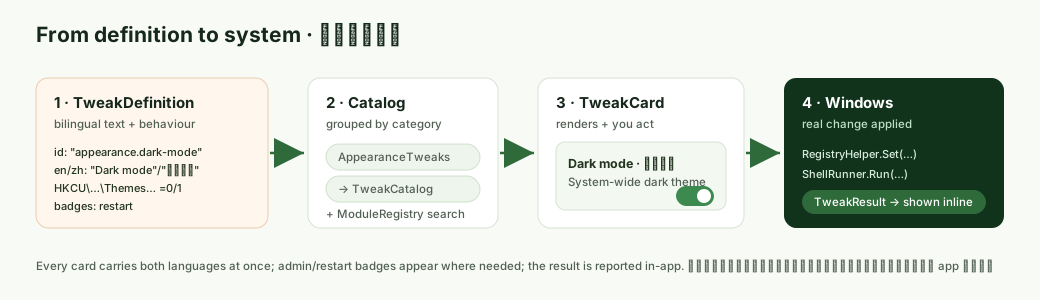
Here is the full journey of a single registry toggle — say, "Show file extensions" — from a line of catalog data to a real change in the registry:
-
Definition (data). In
ExplorerTweaks.cs, a single factory call describes it:Tweak.RegToggle( "explorer.fileext", "Show file extensions", "顯示副檔名", "Always show file name extensions in Explorer.", "喺檔案總管永遠顯示副檔名。", RegRoot.HKCU, @"Software\Microsoft\Windows\CurrentVersion\Explorer\Advanced", "HideFileExt", onValue: 0, offValue: 1, restart: RestartScope.Explorer);
The factory wires
GetIsOntoRegistryHelper.ValueEquals(...)andSetIsOntoRegistryHelper.SetValue/DeleteValue(...). -
Aggregation.
ExplorerTweaks.All()yields this definition;TweakCatalog.Build()adds it to the master list and stampsCategory = Categories.Exploreronto it. -
Navigation. The user clicks File Explorer · 檔案總管 in the nav pane.
MainWindow.NavView_SelectionChangedmatches the category id and doesNavFrame.Navigate(typeof(CategoryPage), cat). -
Rendering.
CategoryPagecallsTweakCatalog.ByCategory(Explorer)and passes the result toControlRowList.SetTweaks(...). -
Building the surface. The control row sees
Kind == Toggle, builds aToggleSwitch, and sets its initial state by invokingGetIsOn()→RegistryHelper.ValueEquals(HKCU, …\Advanced, "HideFileExt", 0). It renders the bilingual title/description and shows a restart badge (becauseRestart == Explorer). -
The user toggles it.
Toggle_ToggledcallsSetIsOn(true), which runsRegistryHelper.SetValue(HKCU, …, "HideFileExt", 0, DWord)against the 64-bit registry view — a real, persistent system change. -
Feedback. The card shows a success
InfoBar— "Applied. Restart Explorer to see the change · 已套用。重啟檔案總管就睇到變化" — with a Restart Explorer · 重啟檔案總管 button that runstaskkill /f /im explorer.exe & start explorer.exe. -
Failure path. Had this been an
HKLMtweak without elevation,SetValuewould throw, the toggle would snap back to its true value viaGetIsOn(), and the error bar would offer Relaunch as admin · 以管理員身分重新啟動, which callsAdminHelper.RelaunchElevated().
For an Action tweak the path is similar but goes RunAsync(ct) → ShellRunner.Run/RunPowershell/RunCmd → captured stdout/stderr returned as a TweakResult, which the card renders as a grid or text pane.
The full module pages (Git, AI Agents, Registry Editor, etc.) are wired into the shell separately from the tweak catalog.
Services/ModuleRegistry.cs lists every module as a ModuleInfo — Tag (e.g. "module.git"), bilingual En/Zh, a Glyph, and a Keywords string folded into a lowercase Haystack. ModuleRegistry.Search(query) powers the search box's module suggestions. This registry is for discovery; it does not itself navigate.
MainWindow.xaml.cs builds and routes the NavigationView:
-
BuildCategoryMenu()turns everyCategories.Allentry into aNavigationViewItem(content"En · Zh",Tag = cat.Id, glyph icon) and nests it under the right collapsible group:RecipesGroup,ToolsGroup, orTweaksGroupbased oncat.Group. -
NavView_SelectionChangedis the router. For amodule.*tag it navigates to the matching page type; for any other tag it looks up the matchingAppCategoryand navigates toCategoryPage; the gear opensSettingsPage. -
MapType(key)is the singlemodule.* → Page typemap (e.g."module.git" → typeof(GitHubModule)), used when navigating to a module that is reachable but not selected in the pane. -
WireNavigator()publishesNavigator.GoToCategory,GoToSettingsandGoToModuleso pages (and the dashboard tiles) can drive navigation without referencingMainWindow. -
FindByTag(...)resolves a nav item byTag, searching nested groups in both the main menu and the footer, soGoToModule("module.x")selects the real pane item (falling back to directNavFrame.Navigateif it isn't in the pane). - The search box (
SearchBox_TextChanged/_QuerySubmitted) blendsModuleRegistry.SearchwithTweakCatalog.Searchfor suggestions and opensSearchResultsPageon submit — see Navigation-and-Search.
App.xaml.cs parses the command line in ParseArgs():
-
--page <id>setsApp.StartPage. After the window loads,MainWindow.ApplyStartPage()maps a large set of friendly aliases to the right destination — e.g.git/github→module.git,ai/claude/codex→module.aiagents,regedit/registry→module.regedit,winget/install→module.packages. A bare category id navigates to thatCategoryPage;search:<query>jumps straight to search results;about/settingsopen those pages. -
--minimizedstarts the app hidden in the tray (used by login startup) while background services keep running. -
--snapshotruns headless, takes one config-backup snapshot, and exits (for the scheduled daily backup). -
--export-docs <dir>runs headless, exports per-feature Markdown viaDocsExporter, and exits.
Background plumbing set up in the MainWindow constructor — the clipboard monitor (ClipboardService.Start), the global hotkey pump (HotkeyMacroService.StartHotkeys), and the tray icon (TrayService.Install) — keeps running even when the window is closed to the tray (OnAppWindowClosing cancels the close and hides instead). Global crash handling (CrashLogger.Install) is installed first of all so a faulting module never takes the whole app down.
-
One control-row contract. Because every catalog tweak is a
TweakDefinitiondrawn byControlRowList, badges, confirmation, results, error recovery, and bilingual rendering are consistent everywhere and written once. -
Data, not code. New tweaks are usually one factory call carrying a real registry path or command plus bilingual text. Behaviour is reused from the
Tweakfactory and core services. - Real changes, safely. Every toggle/action genuinely writes the registry, runs a command, or changes power/network state — but admin and destructive operations are flagged, badged, confirmed, and degrade gracefully when elevation is missing.
-
Bilingual by construction.
LocalizedTextmakes it impossible to add a one-language string in the normal flow; both languages travel together from catalog to screen.
Part of Home · WinForge wiki.