Screenshot Workflow
How every screenshot and annotated tour in this wiki is made · 呢個 wiki 嘅截圖同導覽圖係點整
Every image in this wiki — the page screenshots in shots/ and the numbered Guided
tour images (shots/*-tour.png) — is captured and post-processed by a single tool:
tools/WinForgeShot
(winforge-shot). It drives WinForge through UI Automation and uses PrintWindow
when the desktop compositor supplies a valid client frame; a blank or near-uniform frame is
rejected rather than presented as evidence. It then — in the
same run — can crop, highlight, number steps, add text, and redact personal info.
No second image editor is involved, so any tour can be regenerated from one command.
呢個 wiki 入面每張圖 — shots/ 嘅頁面截圖同有編號嘅逐步導覽圖(shots/*-tour.png)—
都係用同一個工具 winforge-shot 擷取同後製。佢用 UI Automation 驅動 WinForge,並喺 desktop compositor
提供有效 client frame 時用 PrintWindow 擷取;空白或者接近單色 frame 會被拒絕,唔會當成證據。之後喺同一次執行裡面裁切、加強調框、加步驟編號、
加文字、同遮蔽個人資料。唔使第二個編輯器,所以任何導覽圖都可以由一條指令重新整出嚟。
dotnet build tools/WinForgeShot/WinForgeShot.csproj -c Release

# Capture a page by its deep-link alias · 用 deep-link 別名擷取一頁
winforge-shot --page git --wait 15000 --out shots/git.png

# Edit an existing PNG with no app launch · 唔開 app 直接編輯現有 PNG
winforge-shot --open shots/git.png --redact "12%|30%|26%|4%|blur" --out shots/git.png
Coordinates · 座標 — geometry fields are |-separated; each value is pixels
(120) or a percentage of the image dimension (35%). x/width use the width,
y/height the height. Prefer percentages — they survive resolution/DPI changes.
Colours are names (red green cyan amber yellow blue magenta white black) or hex.
幾何欄位用 | 分隔;每個值係像素或百分比。x/寬用闊度,y/高用高度。
建議用百分比,解像度/DPI 變都唔會走位。顏色用名或十六進位。
The Guided tour sections (e.g. Git & GitHub)
overlay a numbered badge on each control and pair it with a bilingual legend table. Build
them with --step for the badges and --text/--highlight/--arrow for call-outs:
逐步導覽會喺每個控件上面疊一個編號徽章,再配雙語說明表。用 --step 出徽章,
--text/--highlight/--arrow 做強調:
winforge-shot --open shots/dashboard.png \
    --highlight "0.5%|3%|16%|4%|red" \
    --step      "17%|5%|1|red" \
    --arrow     "26%|9%|19%|6%|red" \
    --text      "20%|10%|Step 1 — Search any module|white|26|#111" \
    --scale w:1200 --out shots/howto-annotate.png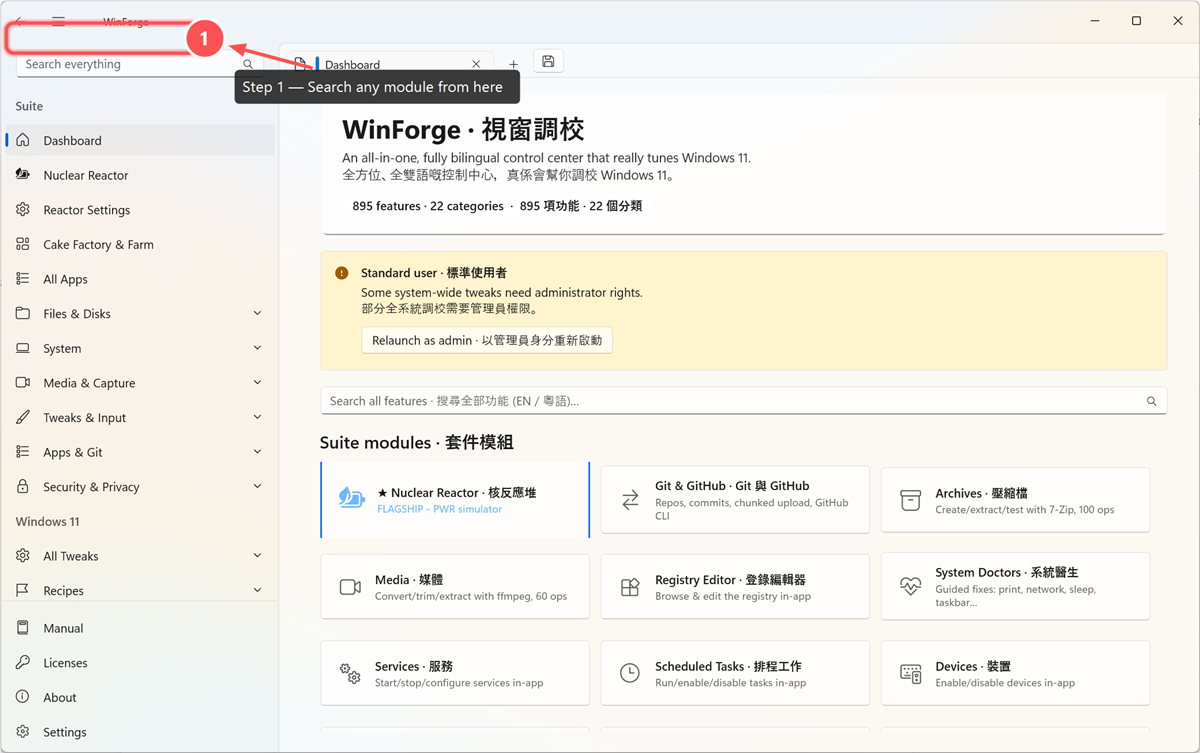
| Action · 動作 | Argument · 參數 | Purpose · 用途 |
|---|---|---|
--step |
x|y|number[|color|diam] |
Numbered badge (used for tour numbering) · 編號徽章 |
--highlight |
x|y|w|h[|color|thick] |
Rounded call-out box + glow · 圓角強調框 |
--box / --ellipse
|
x|y|w|h[|color|thick] |
Plain rectangle / ellipse outline · 方框/橢圓框 |
--arrow |
x1|y1|x2|y2[|color|thick] |
Arrow pointer · 箭嘴 |
--text |
x|y|message[|color|size|bg] |
Label; bg adds a rounded plate · 文字(bg 出底板) |
--crop |
x|y|w|h |
Crop to a region · 裁切 |
--scale |
pct or w:px
|
Resize · 縮放 |
Three modes, all irreversible (the pixels are destroyed): box paints a solid hatched
rectangle (clearest "this was hidden"); blur and pixelate obscure while keeping the
layout legible.
三種模式,全部不可逆:box 畫實心斜紋方塊(最清楚);blur 同 pixelate 遮住但保留版面。
winforge-shot --open shots/dashboard.png \
    --redact "0%|6%|40%|40%|pixelate" \
    --redact "0%|49%|59%|20%|blur" \
    --redact "0%|73%|48%|20%|box" --out demo.png
Always redact or keep off-screen · 一定要遮或者唔好入鏡: Windows usernames, home-folder
paths (C:\Users\<you>\…), repo paths outside WinForge, hostnames, private-network IPs,
account names, emails, API keys, tokens, session cookies, vault item names, SSH profiles,
and real package/source credentials. When in doubt, redact. Best of all, compose the shot
so secrets never appear (e.g. WinForge Vault hides mounted volumes until refresh).
Windows 用戶名、home 路徑、WinForge 以外 repo 路徑、主機名、私網 IP、帳戶名、電郵、 API key、token、session cookie、保險庫項目名、SSH profile、真實憑證 — 唔肯定就遮。最好一開始 就構圖令秘密唔入鏡。
Full flag reference: the tool's README. 完整旗標說明見工具 README。
This workflow documents screenshots for the canonical .NET application. C++/WinRT screenshot tooling, evidence, and blockers moved with the experimental rewrite to codingmachineedge/WinForge-Native; do not use a managed screenshot as native evidence.
呢份流程記錄正式 .NET app 嘅截圖。C++/WinRT 截圖工具、證據同阻礙已經跟實驗性重寫搬去 codingmachineedge/WinForge-Native;唔可以攞受控版截圖當原生證據。