Tweaks Privacy Performance Network
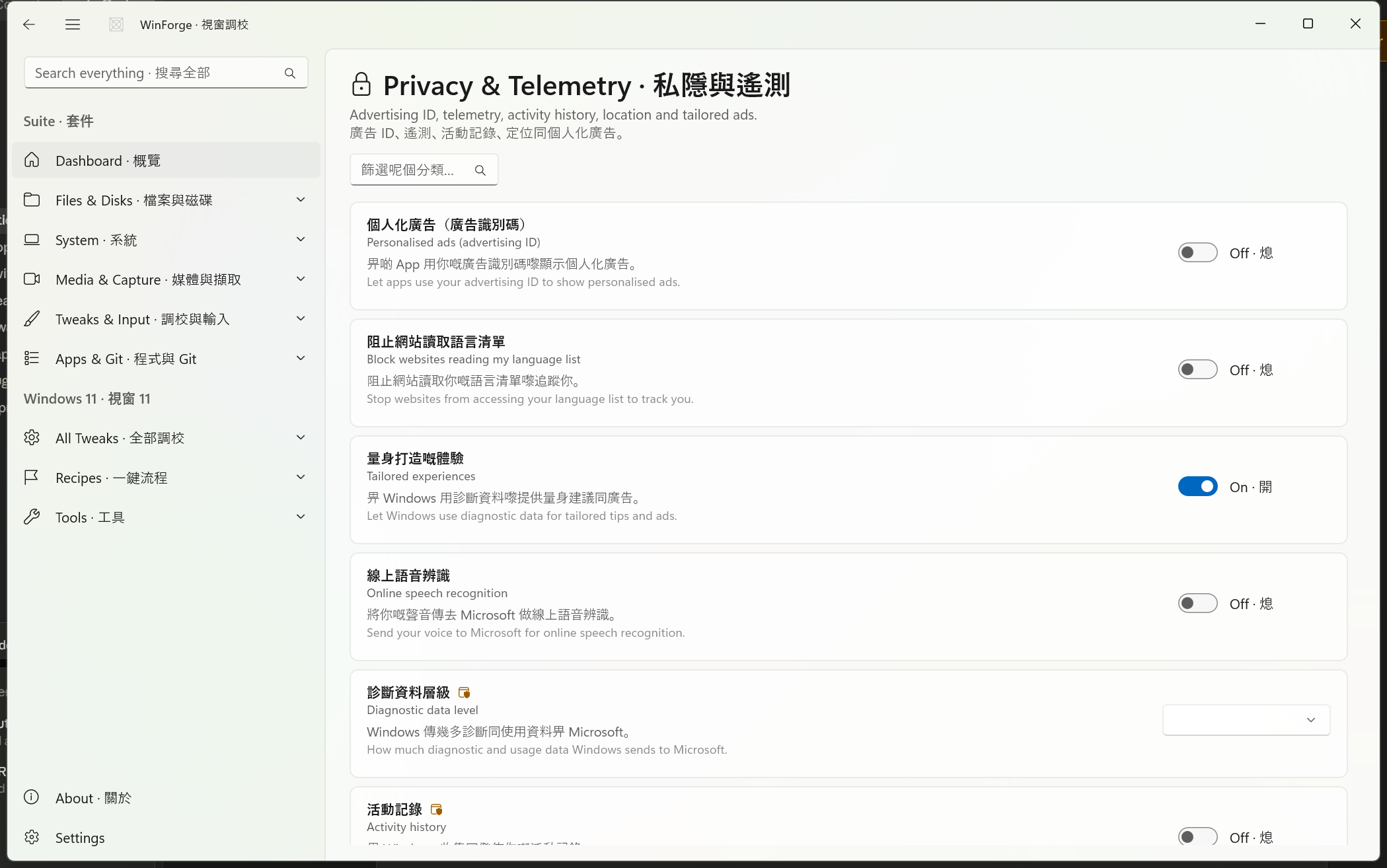
This page documents three of WinForge's tweak catalogues — Privacy & telemetry, Performance & power, and Network & Internet. Every entry here is a real TweakDefinition from the catalogue: a registry coordinate, a choice set, or a cmd/PowerShell action, each with bilingual labels and rendered by a TweakCard. Nothing is cosmetic — flipping a switch writes the registry value, and pressing an action button runs the exact command shown below.
呢頁講 WinForge 三個 tweak 類別:私隱與遙測、效能與電源、網絡與互聯網。每個項目都係 Catalog/ 入面真實嘅 TweakDefinition,登錄檔位置、命令同雙語文字全部直接由原始碼抽出嚟。
Safety · 安全 — Several tweaks on this page touch machine-wide policy (HKLM), the TCP/IP stack, DNS or hibernation. Those are marked Admin · 需要管理員 and run elevated; a few request a reboot · 重新開機 or sign-out · 登出 before they fully take effect. Network reset actions (Winsock / TCP-IP) can drop connectivity until you reboot. Read the effect column before applying.
All three catalogues are static IEnumerable<TweakDefinition> factories under Catalog\:
| Source file | Category | Count | Dominant kind |
|---|---|---|---|
Catalog\PrivacyTweaks.cs |
Privacy & telemetry · 私隱與遙測 | 14 | Registry toggles / choices |
Catalog\PerformanceTweaks.cs |
Performance & power · 效能與電源 | 13 | Registry + powercfg commands |
Catalog\NetworkTweaks.cs |
Network & Internet · 網絡與互聯網 | 15 |
cmd / PowerShell actions |
The tweak helpers used are:
-
Tweak.RegToggle— a binary on/off bound to one registry value (onValue/offValue). AnoffValueofnullmeans "delete the value" when toggled off. -
Tweak.RegChoice— a dropdown of named options each mapping to a registry value (DWord or String). -
Tweak.CustomToggle— a toggle backed by customgetIsOn/setIsOnlambdas that read or write several values at once. -
Tweak.Cmd— a one-shot action button that runs acmd.execommand. -
Tweak.Powershell— a one-shot action button that runs a PowerShell snippet and returns its output.
Flags you'll see referenced: requiresAdmin: true (elevation), restart: RestartScope.Explorer | SignOut | Reboot (what must restart to apply). For the shared model and how cards render, see Windows-Tweaks-Overview.
Source: Catalog\PrivacyTweaks.cs — 14 tweaks. All paths are documented Windows 11 registry locations. Most live in HKCU (per-user) and apply immediately; the policy items (telemetry level, activity history) live in HKLM and are Admin.
Reading the toggles: on means the named behaviour is enabled. For example, turning Personalised ads off writes
Enabled = 0; turning Block websites reading my language list on writes the opt-out value1.
| Tweak · 名稱 | Effect · 作用 | Hive | Key · Value | On / Off |
|---|---|---|---|---|
| Personalised ads (advertising ID) · 個人化廣告(廣告識別碼) | Lets apps use your advertising ID for personalised ads | HKCU |
Software\Microsoft\Windows\CurrentVersion\AdvertisingInfo → Enabled
|
1 / 0 |
| Block websites reading my language list · 阻止網站讀取語言清單 | Opts out of websites accessing your Accept-Language list |
HKCU |
Control Panel\International\User Profile → HttpAcceptLanguageOptOut
|
1 / 0 |
| Tailored experiences · 量身打造嘅體驗 | Windows uses diagnostic data for tailored tips & ads | HKCU |
Software\Microsoft\Windows\CurrentVersion\Privacy → TailoredExperiencesWithDiagnosticDataEnabled
|
1 / 0 |
| Online speech recognition · 線上語音辨識 | Sends your voice to Microsoft for online recognition | HKCU |
Software\Microsoft\Speech_OneCore\Settings\OnlineSpeechPrivacy → HasAccepted
|
1 / 0 |
| Diagnostic data level · 診斷資料層級 | Sets how much telemetry Windows sends (choice) | HKLM Admin |
SOFTWARE\Policies\Microsoft\Windows\DataCollection → AllowTelemetry
|
see choices below |
| Activity history · 活動記錄 | Windows collects & publishes your activity timeline | HKLM Admin |
SOFTWARE\Policies\Microsoft\Windows\System → PublishUserActivities
|
1 / 0 |
| Suggestions in Start · 開始功能表建議 | Suggested content/apps in the Start menu (restarts Explorer) | HKCU |
…\ContentDeliveryManager → SubscribedContent-338388Enabled
|
1 / 0 |
| Windows welcome tips · Windows 歡迎提示 | Soft-landing / welcome experience after updates | HKCU |
…\ContentDeliveryManager → SoftLandingEnabled
|
1 / 0 |
| Tips when using Windows · 使用 Windows 時嘅提示 | Tips, tricks & suggestion notifications | HKCU |
…\ContentDeliveryManager → SubscribedContent-338389Enabled
|
1 / 0 |
| Suggested content in Settings · 設定內嘅建議內容 | Suggested content inside the Settings app | HKCU |
…\ContentDeliveryManager → SubscribedContent-353694Enabled
|
1 / 0 |
| Never ask for feedback · 永不索取意見 | Caps Windows feedback prompts at zero | HKCU |
Software\Microsoft\Siuf\Rules → NumberOfSIUFInPeriod
|
0 / (delete) |
| App launch tracking · App 啟動追蹤 | Tracks app launches to tune Start & search (restarts Explorer) | HKCU |
…\Explorer\Advanced → Start_TrackProgs
|
1 / 0 |
| Location access · 位置存取 | Whether apps on this device may use your location (choice) | HKCU |
…\CapabilityAccessManager\ConsentStore\location → Value
|
Allow / Deny
|
| Inking & typing personalisation · 手寫與輸入個人化 | Builds a personal dictionary from inking/typing (multi-value) | HKCU | several values — see below | custom |
Tweak.RegChoice writing AllowTelemetry (DWord) under the DataCollection policy key. Admin required.
| Option · 選項 | Value |
|---|---|
| Security (Enterprise) · 安全(企業版) | 0 |
| Required · 必要 | 1 |
| Optional · 選用 | 3 |
Note:
AllowTelemetry = 0(Security) is only fully honoured on Enterprise/Education SKUs; on Home/Pro the effective floor is "Required".
Tweak.RegChoice writing the String value Value in the location consent store: Allow · 允許 or Deny · 拒絕.
This one is a Tweak.CustomToggle — it reads and writes four values together rather than a single switch:
-
On (collection enabled) writes
RestrictImplicitInkCollection = 0,RestrictImplicitTextCollection = 0,HarvestContacts = 1,AcceptedPrivacyPolicy = 1. -
Off (collection blocked) writes
RestrictImplicitInkCollection = 1,RestrictImplicitTextCollection = 1,HarvestContacts = 0,AcceptedPrivacyPolicy = 0.
The "is on" check is true only when both RestrictImplicit*Collection values equal 0. Keys touched:
| Value | Path |
|---|---|
RestrictImplicitInkCollection |
Software\Microsoft\InputPersonalization |
RestrictImplicitTextCollection |
Software\Microsoft\InputPersonalization |
HarvestContacts |
Software\Microsoft\InputPersonalization\TrainedDataStore |
AcceptedPrivacyPolicy |
Software\Microsoft\Personalization\Settings |
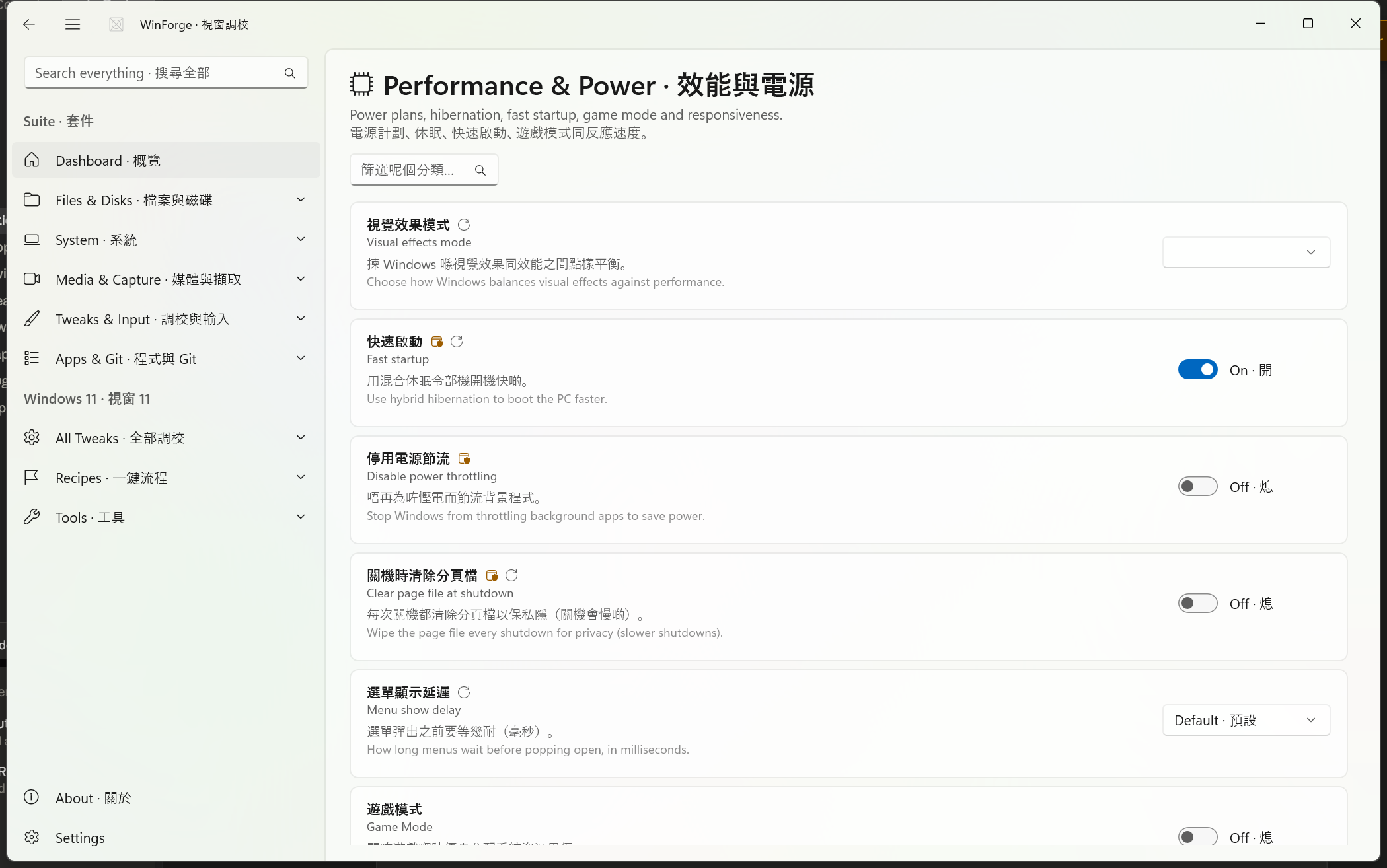
Source: Catalog\PerformanceTweaks.cs — 13 tweaks. A mix of registry toggles/choices and powercfg action buttons. The HKLM items and every powercfg action are Admin; some require a reboot or sign-out.
| Tweak · 名稱 | Effect · 作用 | Hive | Key · Value | On / Off | Restart |
|---|---|---|---|---|---|
| Visual effects mode · 視覺效果模式 | Balance visual effects vs performance (choice) | HKCU |
…\Explorer\VisualEffects → VisualFXSetting
|
see choices | Explorer |
| Fast startup · 快速啟動 | Hybrid hibernation for faster boot | HKLM Admin |
…\Session Manager\Power → HiberbootEnabled
|
1 / 0 | Reboot |
| Disable power throttling · 停用電源節流 | Stops Windows throttling background apps | HKLM Admin |
…\Power\PowerThrottling → PowerThrottlingOff
|
1 / 0 | — |
| Clear page file at shutdown · 關機時清除分頁檔 | Wipes the page file every shutdown (slower shutdowns) | HKLM Admin |
…\Memory Management → ClearPageFileAtShutdown
|
1 / 0 | Reboot |
| Menu show delay · 選單顯示延遲 | Milliseconds before menus open (choice) | HKCU |
Control Panel\Desktop → MenuShowDelay
|
see choices | Sign-out |
| Game Mode · 遊戲模式 | Prioritise resources for a running game | HKCU |
Software\Microsoft\GameBar → AutoGameModeEnabled
|
1 / 0 | — |
| Game DVR background recording · 遊戲 DVR 背景錄製 | Xbox Game DVR background gameplay capture | HKCU |
System\GameConfigStore → GameDVR_Enabled
|
1 / 0 | — |
| No startup app delay · 取消啟動程式延遲 | Launch startup apps instantly at sign-in | HKCU |
…\Explorer\Serialize → StartupDelayInMSec
|
0 / (delete) | Sign-out |
VisualFXSetting (DWord), restarts Explorer:
| Option · 選項 | Value |
|---|---|
| Let Windows choose · 由 Windows 決定 | 0 |
| Best appearance · 最佳外觀 | 1 |
| Best performance · 最佳效能 | 2 |
| Custom · 自訂 | 3 |
MenuShowDelay (String, milliseconds), applies after sign-out:
| Option · 選項 | Value |
|---|---|
| Instant · 即時 | "0" |
| Fast · 快 | "100" |
| Default · 預設 | "400" |
These are Tweak.Cmd action buttons. Every one is Admin. The button label is bilingual (e.g. Add plan · 新增計劃).
Safety · 安全 — Turn off hibernation deletes
hiberfil.systo reclaim disk space and disables sleep-to-disk / Fast startup that depend on it. Add Ultimate Performance plan duplicates a hidden scheme by its well-known GUID; it does not auto-activate.
| Tweak · 名稱 | Action button · 按鈕 | Command run |
|---|---|---|
| Add Ultimate Performance plan · 新增極致效能電源計劃 | Add plan · 新增計劃 | powercfg -duplicatescheme e9a42b02-d5df-448d-aa00-03f14749eb61 |
| Activate High performance plan · 啟用高效能電源計劃 | Activate · 啟用 | powercfg /setactive 8c5e7fda-e8bf-4a96-9a85-a6e23a8c635c |
| Activate Balanced plan · 啟用平衡電源計劃 | Activate · 啟用 | powercfg /setactive 381b4222-f694-41f0-9685-ff5bb260df2e |
| Turn off hibernation · 熄咗休眠 | Turn off · 關閉 | powercfg /hibernate off |
| Turn on hibernation · 開啟休眠 | Turn on · 開啟 | powercfg /hibernate on |

Source: Catalog\NetworkTweaks.cs — 15 tweaks. Unlike the other two pages, these are almost all action buttons (Tweak.Cmd / Tweak.Powershell) for diagnostics and repair rather than persistent toggles. PowerShell snippets return their output back into the app so you can read the result.
Safety · 安全 — Reset Winsock and Reset TCP/IP stack rewrite networking state and require a reboot before connectivity is restored; expect to be offline until you restart. Release IP drops your current DHCP lease. The three Set DNS actions and the cache/stack resets are Admin.
| Tweak · 名稱 | Button · 按鈕 | Command | Admin |
|---|---|---|---|
| Show full IP configuration · 顯示完整 IP 設定 | Show · 顯示 | ipconfig /all |
— |
| Show public IP · 顯示公共 IP | Look up · 查詢 | PS: (Invoke-RestMethod -Uri 'https://api.ipify.org')
|
— |
| Show saved Wi-Fi profiles · 顯示已儲存 Wi-Fi | Show · 顯示 | netsh wlan show profiles |
— |
| Show active connections · 顯示使用中連線 | Show · 顯示 | PS: Get-NetTCPConnection -State Established | Select-Object -First 30 …
|
— |
| Ping test (Cloudflare) · Ping 測試 | Ping · 測試 | ping -n 4 1.1.1.1 |
— |
| Tweak · 名稱 | Button · 按鈕 | Command | Admin / Restart |
|---|---|---|---|
| Flush DNS cache · 清除 DNS 快取 | Flush · 清除 | ipconfig /flushdns |
— |
| Release IP address · 釋放 IP 位址 | Release · 釋放 | ipconfig /release |
— |
| Renew IP address · 更新 IP 位址 | Renew · 更新 | ipconfig /renew |
— |
| Flush ARP cache · 清除 ARP 快取 | Flush · 清除 | netsh interface ip delete arpcache |
Admin |
| Reset Winsock catalog · 重設 Winsock | Reset · 重設 | netsh winsock reset |
Admin · Reboot |
| Reset TCP/IP stack · 重設 TCP/IP | Reset · 重設 | netsh int ip reset |
Admin · Reboot |
Each of these is a Tweak.Powershell action that finds the first physical adapter that is Up (Get-NetAdapter -Physical | Where-Object Status -eq 'Up' | Select-Object -First 1) and changes its DNS servers. All are Admin, and each writes a confirmation line back to the app.
| Tweak · 名稱 | Button · 按鈕 | Servers set |
|---|---|---|
| Set DNS to Cloudflare (1.1.1.1) · 設 DNS 為 Cloudflare | Apply · 套用 |
1.1.1.1, 1.0.0.1
|
| Set DNS to Google (8.8.8.8) · 設 DNS 為 Google | Apply · 套用 |
8.8.8.8, 8.8.4.4
|
| Reset DNS to automatic · DNS 還原自動 | Reset · 還原 | clears manual DNS → back to DHCP (-ResetServerAddresses) |
Because the DNS presets only target the first active physical adapter, machines with multiple live NICs may need the action repeated or DNS set per-adapter elsewhere.
- Toggles that carry
restart: RestartScope.Explorer(Suggestions in Start, App launch tracking, Visual effects mode) restart Windows Explorer so the change shows up without a reboot. - Items with
offValue: null(Never ask for feedback, No startup app delay) delete their registry value when switched off, returning to the Windows default rather than writing a competing value. - The privacy "ContentDeliveryManager" cluster (the
SubscribedContent-*andSoftLandingvalues) is the same family of switches used by the Appearance/Explorer tweaks — see Tweaks-Appearance-Explorer-Taskbar. - For shutdown-time cleanup, Defender/security policy and other system-level repair actions, see Tweaks-Cleanup-Security-System.
- For the data model, search/keyword behaviour, admin elevation and undo semantics shared by all categories, see Windows-Tweaks-Overview.
Part of Home · WinForge wiki.