Tweaks Appearance Explorer Taskbar
This page documents three of WinForge's tweak catalogues: Appearance · 外觀, File Explorer · 檔案總管, and Taskbar & Start · 工作列同開始功能表. Every entry below is a real TweakDefinition from the catalogue source, rendered in-app as a reusable TweakCard, and each one writes a genuine Windows 11 registry value or runs a real shell command. No placeholders — toggling a card actually changes the live system.
呢一頁收錄咗 WinForge 三個調校類別:外觀、檔案總管、工作列同開始功能表。每一項都係真實嘅 Windows 11 登錄檔數值或者 shell 指令,撳一下就真係改到系統。
Safety · 安全 A few entries here write to
HKCUkeys that affect the shell and may trigger an automatic restart ofexplorer.exe, sign-out prompts, or reveal protected system files. The Classic right-click menu tweak deletes aSoftware\Classes\CLSIDsub-key tree, and Restart File Explorer killsexplorer.exeoutright. None of these are destructive to your data, but expect the desktop/taskbar to flicker as the shell reloads. 部分項目會自動重啟explorer.exe或者要登出先生效,亦有項目會顯示受保護嘅系統檔案 — 請小心。
Each catalogue is a static class exposing All(), which returns a list of TweakDefinition objects. The builders used across these three pages are:
| Builder · 建構器 | Behaviour · 行為 |
|---|---|
Tweak.RegToggle |
A simple on/off switch backed by one registry value (onValue / offValue). |
Tweak.RegChoice |
A multi-option picker writing one of several discrete registry values. |
Tweak.CustomToggle |
A toggle with hand-written getIsOn / setIsOn logic (multiple keys, side-effects). |
Tweak.Shell / Tweak.Cmd
|
An action button that launches a process or runs a shell command. |
Most cards carry a restart: scope. The two values seen here are:
-
RestartScope.Explorer— WinForge restarts the Explorer shell so the change is visible immediately. -
RestartScope.SignOut— the change needs a sign-out/sign-in to apply (used forControl Panel\Desktopanimation values).
For the bigger picture of categories, search, and how TweakCard renders these definitions, see Windows-Tweaks-Overview. For the privacy/performance/network counterparts, see Tweaks-Privacy-Performance-Network.
Source: Catalog/AppearanceTweaks.cs. Two shared key constants are used throughout:
-
Advanced=HKCU\Software\Microsoft\Windows\CurrentVersion\Explorer\Advanced -
Personalize=HKCU\Software\Microsoft\Windows\CurrentVersion\Themes\Personalize
| Tweak · 名稱 | What it does · 作用 | Key / value · 登錄檔 |
|---|---|---|
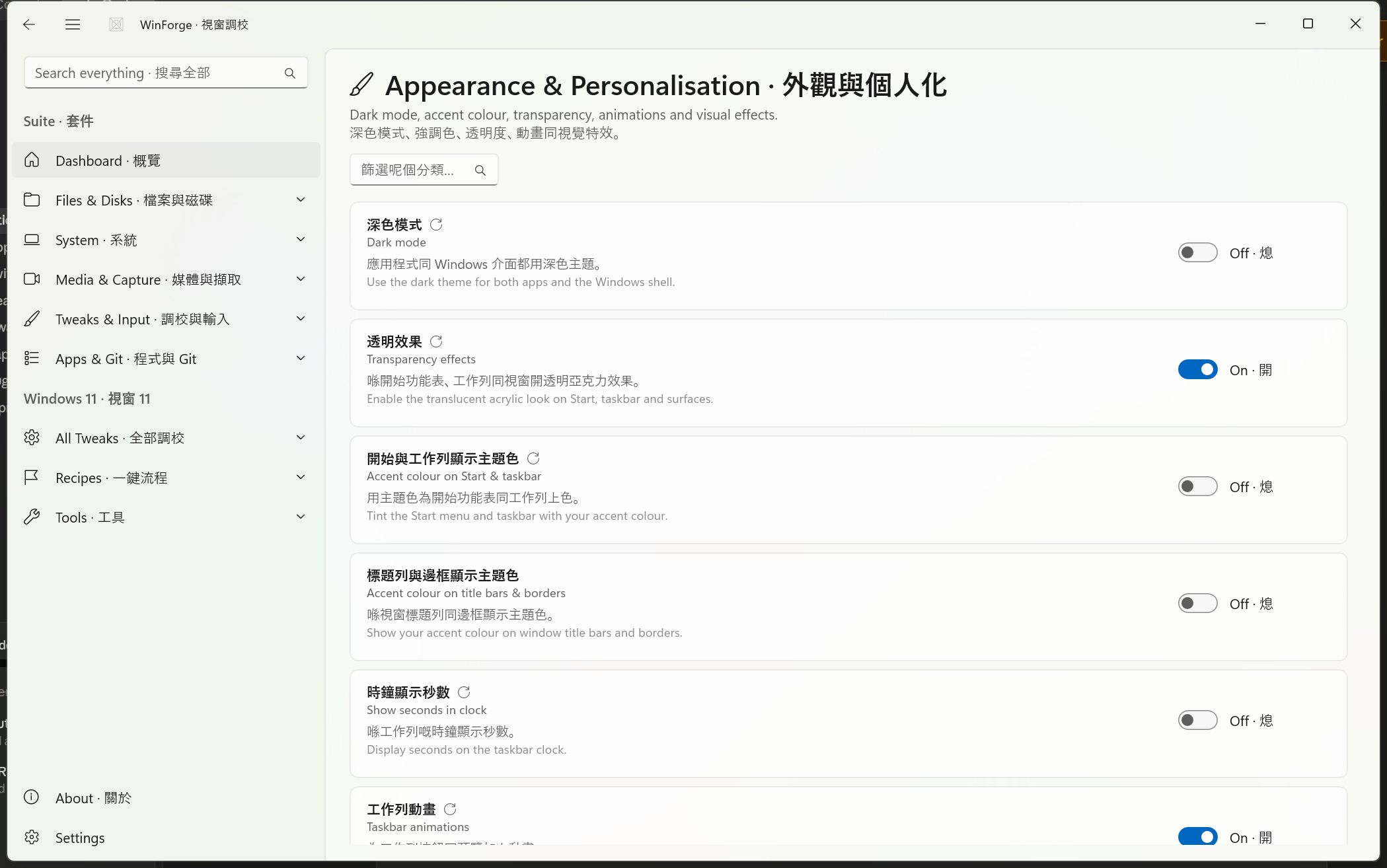
| Dark mode · 深色模式 | Uses the dark theme for both apps and the Windows shell. A CustomToggle — when on it writes 0 to two values; light is 1. |
…\Themes\Personalize → AppsUseLightTheme and SystemUsesLightTheme (DWord). Restart: Explorer. |
| Transparency effects · 透明效果 | Enables the translucent acrylic look on Start, taskbar and surfaces. |
…\Themes\Personalize → EnableTransparency (1/0). Restart: Explorer. |
| Accent colour on Start & taskbar · 開始與工作列顯示主題色 | Tints Start menu and taskbar with your accent colour. |
…\Themes\Personalize → ColorPrevalence (1/0). Restart: Explorer. |
| Accent colour on title bars & borders · 標題列與邊框顯示主題色 | Shows the accent colour on window title bars and borders. |
HKCU\Software\Microsoft\Windows\DWM → ColorPrevalence (1/0). |
| Show seconds in clock · 時鐘顯示秒數 | Displays seconds on the taskbar clock. |
…\Explorer\Advanced → ShowSecondsInSystemClock (1/0). Restart: Explorer. |
| Taskbar animations · 工作列動畫 | Animates taskbar buttons and previews. |
…\Explorer\Advanced → TaskbarAnimations (1/0). Restart: Explorer. |
| Window min/max animations · 視窗縮放動畫 | Animates windows when minimising/maximising. Stored as a string value. |
HKCU\Control Panel\Desktop\WindowMetrics → MinAnimate ("1"/"0", REG_SZ). Restart: SignOut. |
| Snap layout flyout on hover · 懸停顯示貼齊版面 | Shows the snap layouts flyout when hovering the maximise button. |
…\Explorer\Advanced → EnableSnapAssistFlyout (1/0). |
| Translucent selection rectangle · 半透明選取框 | Uses the translucent rubber-band selection box in File Explorer. |
…\Explorer\Advanced → ListviewAlphaSelect (1/0). Restart: Explorer. |
| Drop shadows for icon labels · 圖示標籤陰影 | Adds drop shadows behind desktop icon text. |
…\Explorer\Advanced → ListviewShadow (1/0). Restart: Explorer. |
| Show window contents while dragging · 拖曳時顯示視窗內容 | Shows the whole window (not just an outline) while dragging. String value. |
HKCU\Control Panel\Desktop → DragFullWindows ("1"/"0", REG_SZ). Restart: SignOut. |
| Disable wallpaper JPEG compression · 停用桌布 JPEG 壓縮 | Sets import quality to 100 so Windows stops recompressing JPG wallpapers, then re-applies the current wallpaper so it takes effect immediately. A CustomToggle that deletes the value when turned off. |
HKCU\Control Panel\Desktop → JPEGImportQuality = 100 (DWord). Side-effect: WallpaperHelper.ReapplyCurrentWallpaper(). |
| Tweak · 名稱 | Options · 選項 | Key · 登錄檔 |
|---|---|---|
| Start menu layout · 開始功能表版面 | Default · 預設 (0); More pins · 更多釘選 (1); More recommendations · 更多建議 (2) |
…\Explorer\Advanced → Start_Layout (DWord). Restart: Explorer. |
| Combine taskbar buttons · 合併工作列按鈕 | Always combine, hide labels · 永遠合併、收埋標籤 (0); Combine when taskbar is full · 工作列滿先合併 (1); Never combine · 永遠唔合併 (2) |
…\Explorer\Advanced → TaskbarGlomLevel (DWord). Restart: Explorer. |
| Tweak · 名稱 | What it does · 作用 | Command · 指令 |
|---|---|---|
| Open colour settings · 開啟色彩設定 | Launches the Windows Personalisation → Colours settings page. | explorer.exe ms-settings:colors |
Note · 注意 — The "Combine taskbar buttons" tweak appears in both the Appearance and Taskbar catalogues (same
TaskbarGlomLevelvalue, slightly different labels). They are independent cards but write the identical registry value.
Source: Catalog/ExplorerTweaks.cs. Three shared key constants:
-
ADV=HKCU\Software\Microsoft\Windows\CurrentVersion\Explorer\Advanced -
EXPLORER=HKCU\Software\Microsoft\Windows\CurrentVersion\Explorer -
CABINET=HKCU\Software\Microsoft\Windows\CurrentVersion\Explorer\CabinetState
| Tweak · 名稱 | What it does · 作用 | Key / value · 登錄檔 |
|---|---|---|
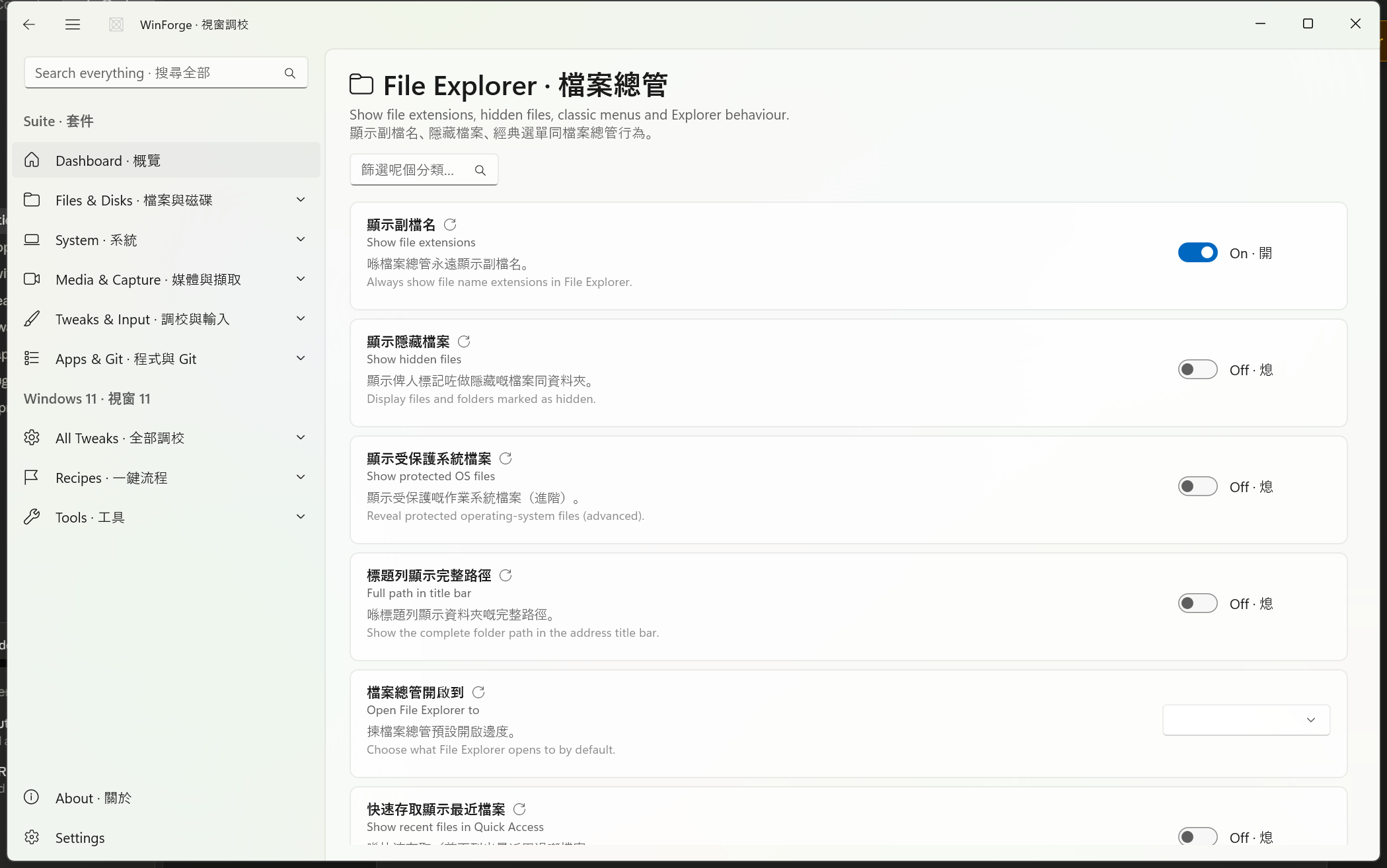
| Show file extensions · 顯示副檔名 | Always show file name extensions. Note the inverted value: on = 0. |
ADV → HideFileExt (on 0 / off 1). Restart: Explorer. |
| Show hidden files · 顯示隱藏檔案 | Displays files/folders marked hidden. |
ADV → Hidden (on 1 / off 2). Restart: Explorer. |
| Show protected OS files · 顯示受保護系統檔案 | Reveals protected operating-system files (advanced). |
ADV → ShowSuperHidden (1/0). Restart: Explorer. |
| Full path in title bar · 標題列顯示完整路徑 | Shows the complete folder path in the address title bar. |
CABINET → FullPath (1/0). Restart: Explorer. |
| Show recent files in Quick Access · 快速存取顯示最近檔案 | Lists recently used files under Quick Access / Home. |
EXPLORER → ShowRecent (1/0). Restart: Explorer. |
| Show frequent folders · 顯示常用資料夾 | Lists frequently used folders under Quick Access / Home. |
EXPLORER → ShowFrequent (1/0). Restart: Explorer. |
| Expand to current folder · 導覽窗格展開至目前資料夾 | Auto-expands the navigation pane to the open folder. |
ADV → NavPaneExpandToCurrentFolder (1/0). Restart: Explorer. |
| Item check boxes · 項目核取方塊 | Shows selection check boxes on files and folders. |
ADV → AutoCheckSelect (1/0). Restart: Explorer. |
| Confirm delete dialog · 刪除確認對話框 | Asks for confirmation before sending files to the Recycle Bin. |
ADV → ConfirmFileDelete (1/0). Restart: Explorer. |
| Launch folder windows in a separate process · 資料夾視窗用獨立程序開啟 | Opens each Explorer window in its own process for stability. |
ADV → SeparateProcess (1/0). Restart: Explorer. |
| Tweak · 名稱 | Options · 選項 | Key · 登錄檔 |
|---|---|---|
| Open File Explorer to · 檔案總管開啟到 | This PC · 本機 (1); Home · 首頁 (2) |
ADV → LaunchTo (DWord). Restart: Explorer. |
| Tweak · 名稱 | What it does · 作用 | Key / command · 登錄檔/指令 |
|---|---|---|
| Classic right-click menu · 經典右鍵選單 | Restores the full Windows 10–style context menu. CustomToggle: "on" detected by key existence; turning off deletes the whole sub-key tree. |
On: create HKCU\Software\Classes\CLSID\{86ca1aa0-34aa-4e8b-a509-50c905bae2a2}\InprocServer32 (default = ""). Off: DeleteSubKeyTree of the CLSID. Restart: Explorer. |
| Restart File Explorer · 重新啟動檔案總管 | Restarts the Explorer shell to apply changes. |
taskkill /f /im explorer.exe & start explorer.exe. Restart: Explorer. |
| Open Folder Options · 開啟資料夾選項 | Opens the classic Folder Options dialog. | rundll32.exe shell32.dll,Options_RunDLL 0 |
Safety · 安全 — Show protected OS files exposes system files that are hidden for a reason; renaming or deleting them can break Windows. The Classic right-click menu toggle removes a registry sub-key tree under
Software\Classes\CLSID; this is the well-known Windows 11 context-menu fix and is safe, but it does require an Explorer restart to take hold.
Source: Catalog/TaskbarTweaks.cs. Shared constant:
-
ADV=HKCU\Software\Microsoft\Windows\CurrentVersion\Explorer\Advanced
| Tweak · 名稱 | Options · 選項 | Key · 登錄檔 |
|---|---|---|
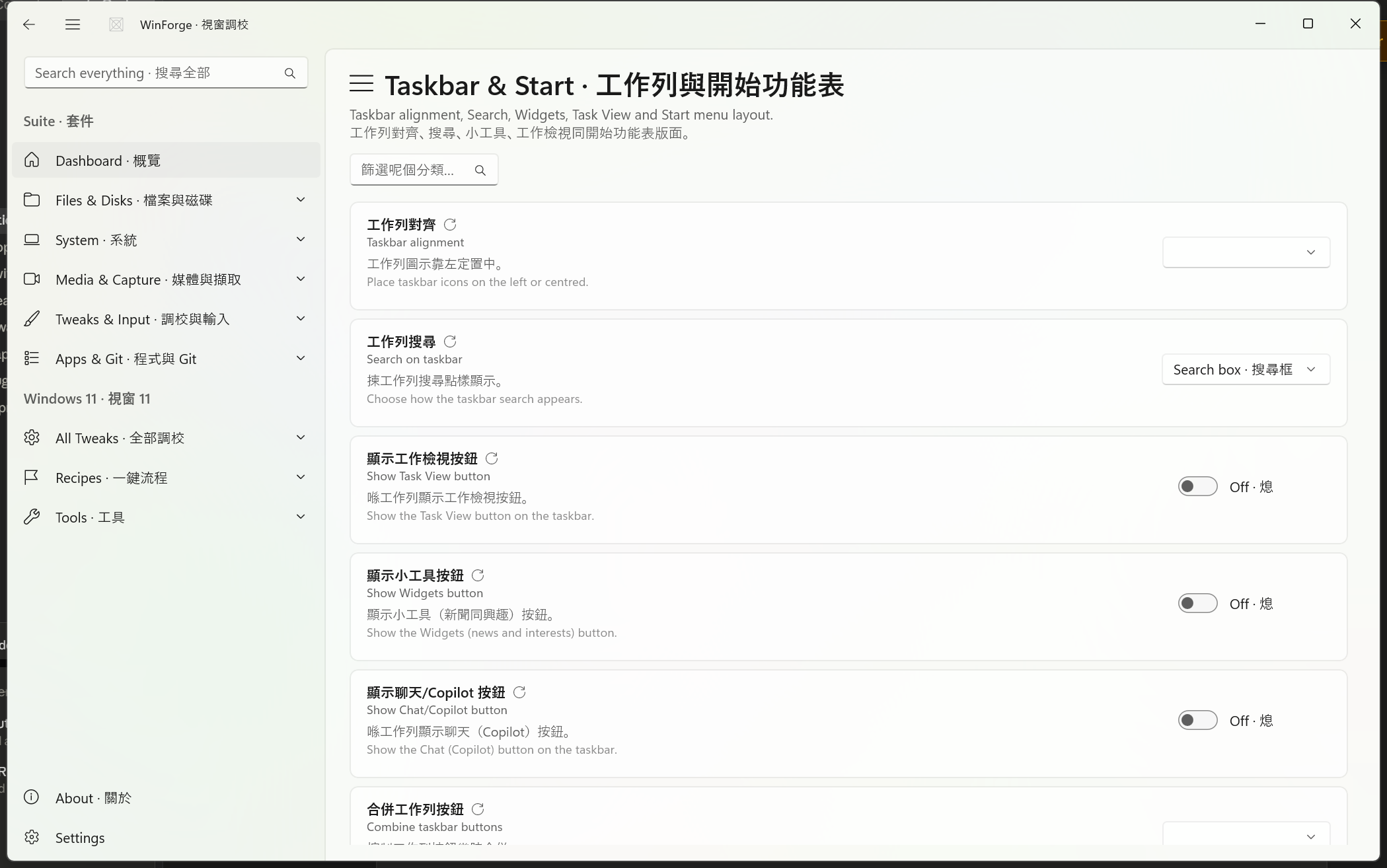
| Taskbar alignment · 工作列對齊 | Left · 靠左 (0); Center · 置中 (1) |
ADV → TaskbarAl (DWord). Restart: Explorer. |
| Search on taskbar · 工作列搜尋 | Hidden · 隱藏 (0); Icon only · 只顯示圖示 (1); Search box · 搜尋框 (2); Icon and label · 圖示同標籤 (3) |
HKCU\Software\Microsoft\Windows\CurrentVersion\Search → SearchboxTaskbarMode (DWord). Restart: Explorer. |
| Combine taskbar buttons · 合併工作列按鈕 | Always combine · 永遠合併 (0); When taskbar is full · 工作列滿先合併 (1); Never · 永不合併 (2) |
ADV → TaskbarGlomLevel (DWord). Restart: Explorer. |
| Tweak · 名稱 | What it does · 作用 | Key / value · 登錄檔 |
|---|---|---|
| Show Task View button · 顯示工作檢視按鈕 | Shows the Task View button on the taskbar. |
ADV → ShowTaskViewButton (1/0). Restart: Explorer. |
| Show Widgets button · 顯示小工具按鈕 | Shows the Widgets (news and interests) button. |
ADV → TaskbarDa (1/0). Restart: Explorer. |
| Show Chat/Copilot button · 顯示聊天/Copilot 按鈕 | Shows the Chat (Copilot) button on the taskbar. |
ADV → TaskbarMn (1/0). Restart: Explorer. |
| Show "End Task" on right-click · 右鍵顯示「結束工作」 | Adds End Task to the taskbar right-click menu. |
HKCU\Software\Microsoft\Windows\CurrentVersion\TaskbarDeveloperSettings → TaskbarEndTask (1/0). Restart: Explorer. |
| Show most used apps in Start · 開始功能表顯示最常用程式 | Lists your most-used apps in the Start menu. |
ADV → Start_TrackProgs (1/0). Restart: Explorer. |
| Show recently added apps in Start · 開始功能表顯示最近新增程式 | Shows newly installed apps in the Start menu. |
ADV → Start_TrackDocs (1/0). Restart: Explorer. |
| Show tips and recommendations in Start · 開始功能表顯示提示同建議 | Shows tips, shortcuts and app recommendations in Start. |
ADV → Start_IrisRecommendations (1/0). Restart: Explorer. |
| Show seconds in system clock · 系統時鐘顯示秒數 | Displays seconds on the taskbar clock (uses more power). |
ADV → ShowSecondsInSystemClock (1/0). Restart: Explorer. |
| Show all system tray icons · 顯示所有系統匣圖示 | Shows every icon in the notification overflow area. Inverted value: on = 0. |
HKCU\Software\Microsoft\Windows\CurrentVersion\Explorer → EnableAutoTray (on 0 / off 1). Restart: Explorer. |
| Show taskbar on all displays · 所有螢幕顯示工作列 | Shows the taskbar on every connected monitor. |
ADV → MMTaskbarEnabled (1/0). Restart: Explorer. |
| Tweak · 名稱 | What it does · 作用 | Command · 指令 |
|---|---|---|
| Open Taskbar settings · 開啟工作列設定 | Opens the Windows taskbar settings page. | start ms-settings:taskbar |
-
Inverted toggles · 反轉嘅開關 — Some "show X" switches are backed by a "hide X" value, so on-state is
0:HideFileExt(Show file extensions),EnableAutoTray(Show all system tray icons). The catalogue handles this by settingonValue/offValueexplicitly. -
String vs DWord · 字串對 DWord — The animation tweaks under
Control Panel\Desktop(MinAnimate,DragFullWindows) store"1"/"0"as REG_SZ strings, not DWords. WinForge passeskind: RegistryValueKind.String. -
Three-value hidden state · 三態隱藏值 — Show hidden files uses Windows' native scheme where on =
1but off =2(not0). -
Side-effecting toggles · 有副作用嘅開關 — Dark mode writes two values at once; Disable wallpaper JPEG compression re-applies the desktop wallpaper via
WallpaperHelper.ReapplyCurrentWallpaper(); Classic right-click menu manipulates an entire CLSID sub-key tree. -
Duplicate
TaskbarGlomLevel— "Combine taskbar buttons" exists in both the Appearance and Taskbar catalogues; both write the same…\Explorer\Advanced\TaskbarGlomLevel.
-
Windows-Tweaks-Overview — the full 22-category tweak system,
TweakDefinition/TweakCardarchitecture, search and restart scopes. - Tweaks-Privacy-Performance-Network — the privacy, performance and network tweak catalogues.
Part of Home · WinForge wiki.