Repository navigation
Arcade
The Arcade module plays arcade games in MAME, the arcade machine emulator, from a folder of MAME's ROM sets: a zip file for each game. It lists them on one of two screens: OSD/OS's own tree, by name, number of players, decade and maker, or the Arcade screen, a cabinet's selection screen with each game's picture, high scores and details, where COIN buys credits and select or START plays. It starts MAME full screen for the game you choose. MAME takes its players from Settings → Controls, so the JAMMA board's two sticks and up to four more pads play as players 1 to 6, and you come back to OSD/OS with Coin and Start together. A game FinalBurn Neo has can play in RetroArch with FinalBurn Neo instead, where its scores go to RetroAchievements' leaderboards and where it can be played online with others (FinalBurn Neo, Online play). This page covers setting it up, the two screens, playing, the players and their buttons, high scores, every setting with its config key, the files the module keeps, and what to do when a game doesn't start.
The module is in modules/arcade (views and manifest) and src/modules/arcade (ArcadeBackend; Mame, what it asks MAME and makes of its answers; Libretro, the same for RetroArch with FinalBurn Neo; and FbneoInstaller, FinalBurn Neo's download). It is off at first: turn it on in Settings → Arcade → Enabled, and Arcade is on the main menu.
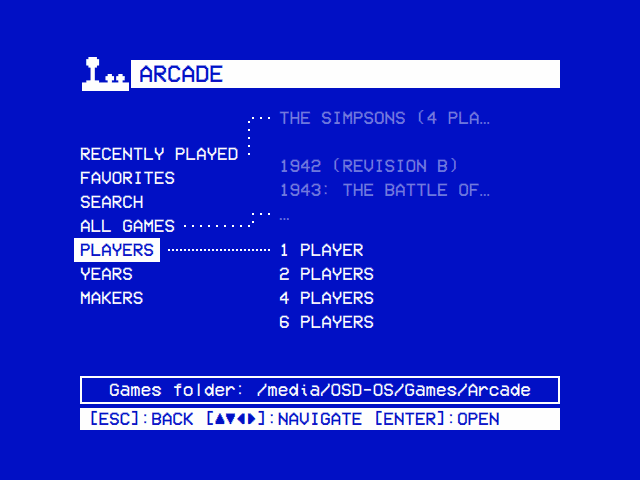
| The games | All Games |
|---|---|
 |
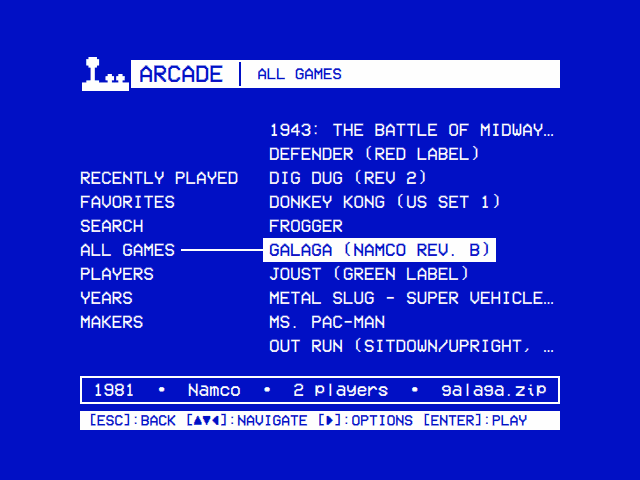 |
| The games by players, decade and maker, from what MAME says of each. | A game's year, maker, players and file under the tree. |
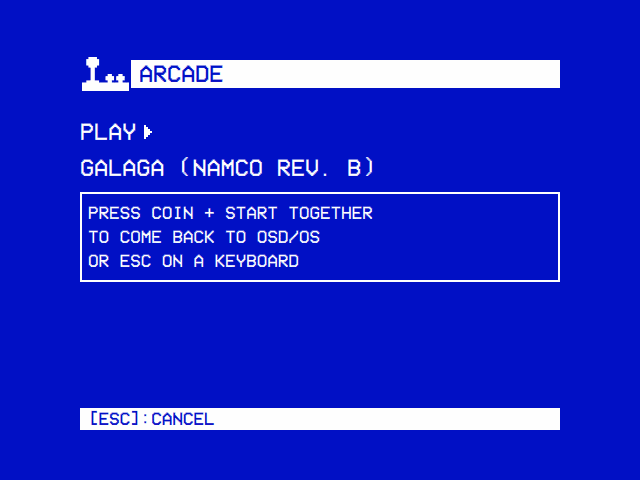
| Playing | A game that couldn't start |
 |
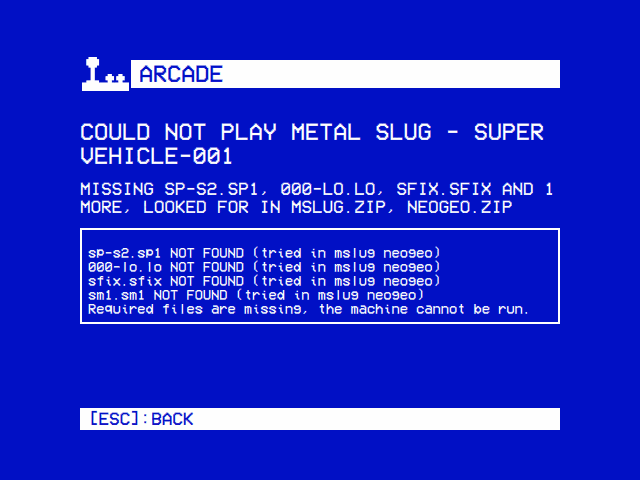 |
| How to come back, in player 1's own buttons, then MAME has the screen. | What the set lacked and where MAME looked: here the Neo-Geo BIOS, neogeo.zip. |
| The Arcade screen | A game started from it |
 |
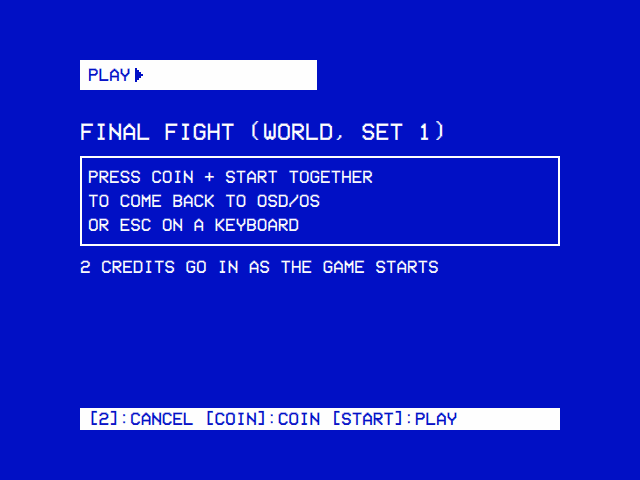 |
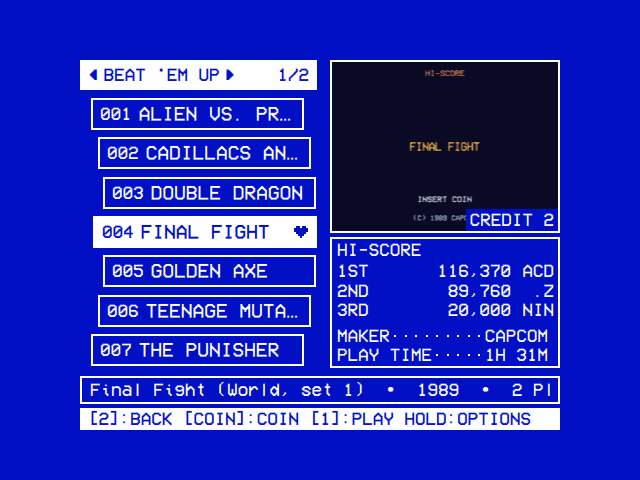
| The games of one filter at a time, here a genre, with the selected one's picture, and under it its high scores, maker and play time, the rest of what it is on the help line. The pictures here are stand-ins. | How to come back, and the credits going in with the game. |
-
MAME. The OSD/OS image has it: Debian's
mamepackage, MAME 0.276 on Raspberry Pi OS (trixie), with its data and plugins (mame-data). Elsewhere, install it:sudo apt install mameon Raspberry Pi OS or Debian,brew install mameon a Mac. A MAME of your own (a newer one, or GroovyMAME for a CRT) goes in the data folder'sbinasbin/mame, where the module looks first, with its own folders (bgfx,plugins,hash…) beside it, or as a link to the program where it is; thenmameon thePATH, then Debian's/usr/games/mame. -
The games. Put the ROM sets in the games folder, one per game, named the way MAME names the game, in lower case:
pacman.zip,galaga.zip,sf2.zip(PACMAN.ZIPis a different name on a drive that tells upper and lower case apart, as Linux's own do; the card's OSD-OS partition doesn't). A set can be a zip, a 7z or a folder of the game's files. BIOS sets, such asneogeo.zipfor Neo-Geo games, go beside them or in abiosfolder there; they aren't listed as games. Samples, the recorded sounds some early games play (Donkey Kong's, Space Invaders'), go in asamplesfolder there, a zip for each game as MAME names it (dkong.zip). The folder is:- on the OSD/OS image,
Games/Arcadeon the card's OSD-OS partition (/media/OSD-OS/Games/Arcade), which a computer opens too: copy the games onto the card there, and films into itsMoviesfolder, so the two stay apart; - elsewhere,
Games/Arcadein the data folder'smediafolder, beside Local Files'Moviesfolder; - or the folder Settings → Arcade → Games Folder names.
The module makes the folder the first time it opens, so it is there to copy into.
- on the OSD/OS image,
-
Sets for this MAME. A ROM set has to match the MAME that plays it: a set made for another version may lack files this one needs, or have a name it doesn't know. The image's MAME is 0.276.
-
Turn it on: Settings → Arcade → Enabled. Arcade is then on the main menu.
-
FinalBurn Neo, for online high scores (optional). The OSD/OS image has it: Debian's RetroArch, and the FinalBurn Neo core with its list of games. Elsewhere, install RetroArch (
sudo apt install retroarchon Raspberry Pi OS or Debian; on a Mac, RetroArch from retroarch.com orbrew install --cask retroarch), then download the core in Settings → Arcade → FinalBurn Neo → Download (FinalBurn Neo).
ROM sets are copyrighted, like the games on them: use the games you are entitled to. MAME itself is free software (GPL-2.0 or later).
Settings → Arcade → Screen chooses how the games are listed, from the next time Arcade opens:
| Screen | What it is |
|---|---|
| Original | OSD/OS's own tree, as the other modules have: Recently Played, Favorites, Search, All Games, and the games by players, decade and maker (below) |
| Arcade (the default) | A cabinet's selection screen: one filter's games at a time, straight, on an arc or on a wheel, with the selected one's picture, high scores and details beside them; ◄ ► go through the filters, COIN buys credits and select or START plays (below) |
Both list the same games from the same folder, share Recently Played and Favorites, and play a game the same way. Start Filter, Menu Filters, List Style, Border, Info Background, Screen Adjustment, Hint Bar and Help Line are the Arcade screen's own settings, so Settings → Arcade shows them only while Screen is Arcade. Its look is Settings' own, as every screen's is: its theme, colors, skin, background, selector effect and transitions.
With Settings → Arcade → Screen on Original, Arcade opens on a tree, which works as Local Files' does (The tree): up and down move, right or select opens a folder, left or back closes it, and back at the top leaves the module.
| Folder | What it holds |
|---|---|
| Online Games | With Online Play on: the games others host in RetroArch's lobby that you have, each with who hosts it, then RetroArch Lobby, every game hosted there (Online play) |
| LAN Games | With LAN Play on: the games hosted on your local network that you have, each with who hosts it (LAN play) |
| Recently Played | The games played last, latest first (up to 30). A game goes on it once MAME has started it: one cancelled before it starts, or that couldn't be started, stays off it |
| Favorites | The games you added with right on a game (below) |
| Search | Asks for words on the on-screen keyboard and lists the games whose name or set has every one of them, as the Arcade screen's Search finds them (below): pac finds Pac-Man and Ms. Pac-Man |
| All Games | Every game, by name |
| Players | 1 Player, 2 Players… up to the most a game takes: the games for that many players at once, as MAME counts them |
| Years |
1980s, 1990s…: the games of each decade, a year MAME isn't sure of (198?, 1982?) in its decade (Year Unknown for those MAME has no year for) |
| Makers | The games by maker: the maker before any licence or partner, so Namco (Midway license) is under Namco and Capcom / Mitchell under Capcom. A game whose maker MAME doesn't know is in none |
| Not Recognized | Shown when there are any: the files MAME has no game of that FinalBurn Neo doesn't play either (FinalBurn Neo), one its list has but kept as a folder of files among them, those whose name can't be a set's (Street Fighter.zip), and on a drive that tells cases apart those not in lower case (PACMAN.ZIP). The line under the tree says which, and what to do |
The line under the tree says what the entry under the cursor is: a game's year, maker, players, how well MAME plays it when it isn't fully (Imperfect in MAME, Not working in MAME) and its file, as 1981 • Namco • 2 players • galaga.zip; on a folder, where the games are. What stands in the way of the list comes first: The games folder can't be read: …, MAME is not installed, MAME could not list the games. With no games at all, the screen says so, with what stands in the way and the folder they go in.
Right on a game opens its options:
| Option | What it does |
|---|---|
| Game Details | What the game is, and its achievements on RetroAchievements, those you have earned and those you haven't (Game Details) |
| Add to Favorites / Remove from Favorites | Puts it on Favorites, or takes it off |
| Engine | Shown for a game both MAME and FinalBurn Neo have, as Engine: Auto (MAME): which emulator plays it. Auto, MAME, unless Online High Scores, Online Play or LAN Play is on, which only FinalBurn Neo has (FinalBurn Neo); MAME; or FinalBurn Neo
|
| Host Online Game | With Online Play on, for a game FinalBurn Neo has: starts it for others to join from RetroArch's lobby (Online play) |
| Host LAN Game | With LAN Play on, for a game FinalBurn Neo has: starts it for others on your local network to join (LAN play) |
| Play at Startup / Don't Play at Startup | Starts it after the boot screen every time OSD/OS starts, as soon as the games folder has been read, ahead of Settings → Start on Module: a cabinet that boots into its game. It goes on Favorites too. There is one for the whole app, as in Local Files: choosing another replaces it. Settings → Arcade → Play at Startup shows it, and chooses it among the favorites too |
With Settings → Arcade → Screen on Arcade, Arcade opens on a cabinet's selection screen, in letters made to be read on a CRT: none smaller than the hint bar's, the games' names larger.
-
The list, on the left: the games of one filter, seven to a page (as many as fit, in an area Screen Adjustment made larger or smaller), each with its number and its title (
Galaga, where MAME's name isGalaga (Namco rev. B)), and a heart on a favorite. They lie as List Style says (below): on an arc unless it is changed. The selected game stands out of the others to the left, and its title, when it is too long for the row, scrolls through; the others are cut short with…. -
The bar over it: the filter, with ◄ ► while there are others, and the page (
1/4); on the wheel of 3D Curved, the game (12/512). A filter's name too long for the bar (Playable Onlinebeside1/7474, a genre's, a publisher's) scrolls through it, as the selected title does. -
The picture, on the right (below), with the credits bought in its corner (
Credit 2). A game with more than one picture shows the next every 4 seconds. -
The box under the picture, a line for each of these that its height has room for (below):
-
Hi-Score: the best three entries of the game's high score table, their rank, score and name, as the High Scores module reads them;
No Scores Yetbefore the game has a table. For a game played in FinalBurn Neo with Online High Scores on and a Web API key given, RA Hi-Score: the top three of its RetroAchievements leaderboard, with their users' names (FinalBurn Neo); a game RetroAchievements has no leaderboard of, and one whose leaderboard is still being read or couldn't be, shows this machine's own table meanwhile (Reading…orNot Reachableonly while there is none). -
Maker, Year, Players and System: what the game is,
?for what MAME doesn't say, and one too long for its line (Data East Corporation) scrolling through it. Its system is the board it ran on: CPS-1, Neo-Geo, NAOMI, Sega System 16B, Namco System 2, Midway T-Unit and about a hundred more; for any other, the name of MAME's driver for it. -
Achievements, for a game RetroAchievements has achievements of, with a Web API key given: those earned of all of them (
7/100) (below). -
Play Time, at the foot of the box: how long the game has been played in OSD/OS (
1H 31M,Never).
-
Hi-Score: the best three entries of the game's high score table, their rank, score and name, as the High Scores module reads them;
-
The help line: the game's full name, as MAME has it, then those of its maker, year, players and system the box has no line for, scrolling through as
Final Fight (World, set 1) • 1989 • 2 Players • CPS-1; on a set under Not Recognized, why it is there and what to do. - The hint bar: the keys.
- The status icons, at the right of the help line (with the help line off, at the right end of the hint bar while the keys still fit beside them): what is on, as at the right end of every title bar (Settings → Status Icons).
Border in Settings → Arcade, ON by default, frames the picture and the box under it; OFF, they stand on their ground alone. Info Background, a slider from TRANSPARENT to SOLID, says how solid that ground is over the background (Settings → Background Effect): at SOLID, the default, none of the background shows through. Hint Bar and Help Line in Settings → Arcade take those two away, on the Arcade screen and its windows (the options, the screen before a game) whatever Settings' own say, each giving its room to one more game on every page and to the box: a line more of the game's details for the hint bar's, two for the help line's. With the help line off, the details the box has no line for aren't shown.
| Key | Pad (the JAMMA board's names) | Keyboard | What it does |
|---|---|---|---|
| ▲ ▼ | Joystick, D-pad | Arrows | The game before or after, from page to page, and round from the last to the first |
| ◄ ► | Joystick, D-pad | Arrows | The filter before or after, staying on the same game where that filter has it |
| COIN | COIN (Back, Select, -) | 5 | Puts a credit in, up to 9: they go in with the next game played |
| Select | Button 1 (A) | Enter | Plays the game, with the credits, as you let it go |
| Select, held | Button 1 (A), held | Enter, held | The game's options, once it has been held most of a second: Play, Game Details, Add to Favorites or Remove from Favorites, Play at Startup (above). Letting it go then plays nothing |
| START | START | Space, 1 | Plays the game, with the credits |
| Back | Button 2 (B) | Esc, Backspace | Leaves Arcade |
COIN and START are MAME's own keys and buttons for them, so the screen works as a cabinet does: coins in, then START (or select). On a pad, COIN is its Back button, which is Back everywhere else in OSD/OS; here the pad's B is Back.
| Straight | Curved | 3D Curved |
|---|---|---|
 |
|
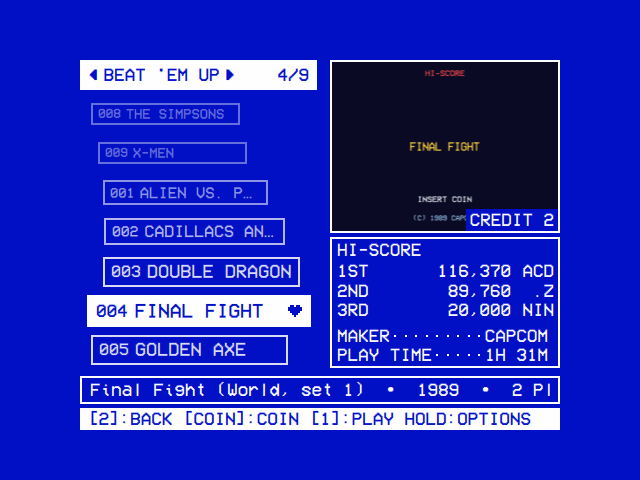 |
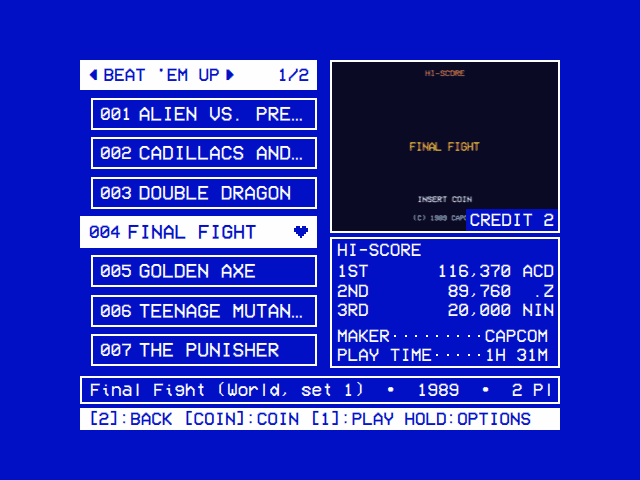
Settings → Arcade → List Style lays the list out:
| List Style | How the games lie |
|---|---|
| Straight | One under another, as wide as the bar over them, a page at a time |
| Curved (the default) | On an arc, the middle of the page furthest out, a page at a time |
| 3D Curved | On a wheel, on Curved's arc. The game you are on is furthest out, and the others go further back the further they are from it, wherever it is: smaller, their left ends on the arc, and fainter, as far back as they go a row further from it than the wheel's ends are from its middle (five rows on a wheel of nine), and nearer each other as they are smaller, as on a wheel. It opens in the middle row, and after a game in the row it was played from; ▲ ▼ move it up and down the rows, and once it reaches the top or bottom row the wheel turns a row at a time. Past the list's last game the wheel goes round to its first, once the filter has a game for every row; fewer games lie from the top row down. The rows going back taking less room, the wheel holds more games than Curved: nine with the hint bar and the help line, where Curved has seven, ten without the hint bar |
The rows going back on the wheel are the screen's only letters smaller than the hint bar's.
The box under the picture has a line every 29 of the screen's 720 lines. Its height decides which lines show, in this order:
- Play Time, against the box's foot: always.
- Hi-Score with the best score, at the top.
- The second and third scores.
-
Maker, Year, Players and System, a line each over the play time, in that order. Ahead of them, for a game RetroAchievements has achievements of and with a Web API key given (FinalBurn Neo), Achievements: those you have earned of all of them,
ACHIEVEMENTS······7/100, or how many there are without an account signed in (…while they are read). Its Game Details list them.
The help line has the details the box has no line for (7/100 Achievements among them).
The table below is for a game without achievements: for one with them, Achievements takes the first detail line and each detail moves one place on, the last with no line left going to the help line. The list has a row for every 54 lines. As OSD/OS lays the screen out, they hold:
| Room | List | Box |
|---|---|---|
| Hint Bar and Help Line on | 7 games | Hi-Score with three scores, Maker, Play Time |
| Hint Bar off | 8 games | Hi-Score with three scores, Maker, Year, Play Time |
| Help Line off | 8 games | Hi-Score with three scores, Maker, Year, Players, Play Time |
| Both off | 9 games | Hi-Score with three scores, Maker, Year, Players, System, Play Time |
Screen Adjustment changes the room (below). The picture is as wide as the column on the right, the column's share of the screen's width; on a screen too short to leave the box its play time under such a picture, the column narrows instead.
On a room, a game someone hosts under Online Games, LAN Games or RetroArch Lobby, there is no picture: the box takes the whole column, from the top of the picture's frame down, and lists what is known of the room, a line each from the top, as many as fit, the rest on the help line (Online play, LAN play). The game's scores and details come back with its picture on any other filter.
![Screen Adjustment: the Arcade screen inside a frame with an arrow beyond each side, ▲ above, ▼ below, ◄ and ► at the sides; the bar reads SCREEN ADJUSTMENT, the help line The frame's sides go to the screen's edges, and the hint bar [2]:DONE [▲▼◄►]:EXPAND [1]:SHRINK HOLD:RESET](https://raw.githubusercontent.com/mehmetraif/OSD-OS/main/docs/screenshots/arcade-screen-adjustment.png)
The Arcade screen is drawn by OSD/OS itself, so it fits any screen. Settings → Arcade → Screen Adjustment fits it to yours, live: it opens the Arcade screen with a frame round everything on it, from the bar and the picture to the hint bar.
- ▲ ▼ ◄ ► move that side of the frame out, a step at a time: the frame's arrows point the way it goes. Out to the screen's edge, a side has no arrow beyond it.
- Select switches between moving the sides out (EXPAND) and in (SHRINK); the hint bar says which. The screen is never made smaller than the list and the picture need.
- Everything follows at once, the letters staying the size a CRT reads. A taller screen holds more games on every page and more lines in the box under the picture (above). A wider one has wider rows, so more of each name shows, and a bigger picture, which leaves the box less room.
- Select held puts the frame back where OSD/OS has it.
- Back keeps it and returns to Settings.
On a CRT, move each side to where the tube's edge cuts the picture off (its overscan), or out over a border the picture doesn't use.
◄ ► go round the filters that have games and that Menu Filters shows (below), in this order:
| Filter | What it holds |
|---|---|
| All Games | Every game, by name. Always there: in a folder with no set MAME or FinalBurn Neo plays, Not Recognized is there in its place |
| Online Games | With Online Play on, while someone hosts one of your games in RetroArch's lobby: each, with who hosts it; the box on the right, in the picture's place, says what the lobby says of it, and select joins it (Online play) |
| LAN Games | With LAN Play on: the games someone on your local network hosts that you have, each with who hosts it; the box on the right, in the picture's place, says what their machine answered with, whether their FinalBurn Neo and RetroArch are yours among it, which the help line says first too, and select joins it. While it lists none, it says why: the network is still being asked, can't be reached, no one there hosts a game you have, or FinalBurn Neo isn't installed (LAN play) |
| RetroArch Lobby | With Online Play on and games in the folder: every game hosted in RetroArch's lobby, of every core, with who hosts it, the box on the right saying what the lobby says of it; there while no one hosts a game, or the lobby can't be reached, to say so (Online play) |
| Favorites | The games put on Favorites, by name |
| Recently Played | The games played last, latest first (up to 30) |
| RetroAchievements | With Online High Scores on RetroAchievements and a Web API key: the games you can earn achievements or a leaderboard's scores in, by name. A game is on it when RetroAchievements has achievements or a leaderboard for its set, as its site lists each set by its MD5 (of the file's name: a clone needs its own), and it plays in FinalBurn Neo, so a game set to MAME in its options leaves it (FinalBurn Neo) |
| Playable Online | With Online Play on and FinalBurn Neo installed: the games you can play with others through RetroArch, by name: those FinalBurn Neo has, which you can host from a game's options or join when someone hosts them. A game set to MAME in its options is on it too, as a game played online always plays in FinalBurn Neo (Online play) |
| A genre (Beat 'em Up, Fighting, Shmup, Run and Gun…) | The games of that genre, by catver.ini (below) |
| 1 Player, 2 Players… | The games for that many players at once |
| 1980s, 1990s… | The games of each decade, Year Unknown last |
| A publisher (Capcom, Namco…) | The games of that maker, as MAME names it (the first, for a game made by two), once turned on in Menu Filters. A company is one publisher whichever of its arms or names made the game: Nintendo for Nintendo of America too, SNK for SNK Playmore, Taito for Taito America Corporation |
| Not Recognized | The files neither MAME nor FinalBurn Neo plays, as under the tree's Not Recognized (above) |
| Search | Last: its own row, then the games its words find, as they are typed (every game while none are), with the keys to type them in the picture's frame (below) |
Settings → Arcade → Hide Hacks and Bootlegs leaves the sets that are a bootleg or a hack of a game, rather than its maker's own release, off every filter and list, on both screens: a set is one when MAME (or FinalBurn Neo's list, for a set MAME doesn't know) says so in the parentheses of its name (Galaga (bootleg), Pac-Man (Midway, speedup hack), Puckman (Japan set 1, Probably Bootleg)) or as its maker (bootleg, bootleg (Playmark), hack). They are hidden, not gone: Favorites and Recently Played keep them for when it is off again, a card that names one still plays it, and the filters' counts are of the games shown.
Settings → Arcade → Start Filter is the one the screen opens on: All Games, with Online Play on RetroArch Lobby, or one of the lists, genres, numbers of players, decades and publishers that Menu Filters shows. One that has no games then (Favorites before any is added), or that Menu Filters no longer shows, opens on All Games. RetroAchievements is waited for while its list of games is read (the first time, and a week on): the screen shows All Games meanwhile and moves to it as the list comes. Back from a game, the screen is on its filter and on the game again.
Search finds a game by its name as it is typed. It is the last filter, and while it is shown the on-screen keyboard stands in the picture's frame, the games found in the list beside it and the selected game's scores and details in the box under it.
- ► from the list goes onto the keys, at the left end of their row; select on Search's own row does too, and so does a letter typed on a keyboard, with that letter. The arrows then move from key to key and select types.
- Each letter narrows the list at once, and the bar says how many games are found. The list holds the games whose name or set has every word typed in it, in any order, capitals, accents and signs aside:
pacmanfinds Pac-Man,fighter streetStreet Fighter II,sf2the set sf2. - The best come first: the games whose name starts with what is typed, its words run together too (
pac manputs Pac-Man before Ms. Pac-Man), or whose set it is; then those with a word starting with its first word; then the rest, each by name. - OK goes down to the first game found, which plays as from any filter. Back returns to the list with the words kept.
- ► pressed on a key at the right end of its row goes on to the next filter, round to All Games, and ◄ on a key at the left end to the filter before Search, as from the list. Holding the arrow stops at the end of the row. Gone past Search from its own row, the screen is on the game it was on before Search, where the next filter has it.
- COIN buys no credit while Search is shown, as the credits aren't shown over the keys, and the hint bar leaves it out.
- Back from a game found, the screen is on it with the same words. The next time Arcade opens, Search has none.
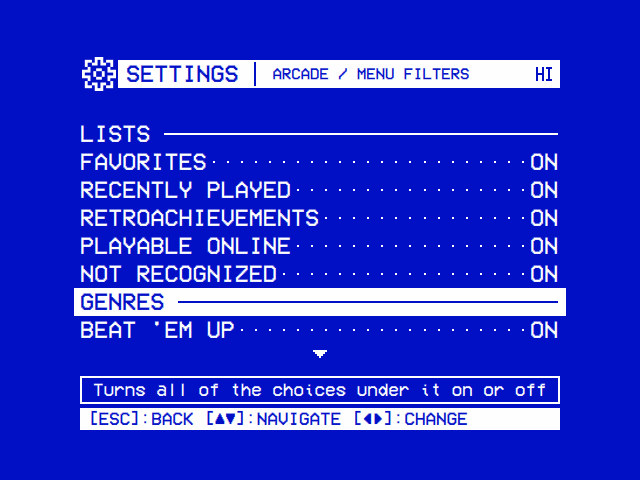
Settings → Arcade → Menu Filters chooses the filters ◄ ► goes round. Its page lists them under five headings, each with the ones the games in the folder have: Lists (Favorites, Recently Played, RetroAchievements, Playable Online, Not Recognized), Genres, Players, Years and Publishers.
- ◄, ► or select on a filter turns it ON or OFF.
- On a heading, they turn every filter under it on at once, or off once they all are on.
- Every filter is on until it is turned off, but a publisher's: a full set of MAME's games has hundreds of makers, so each publisher is off until it is turned on (the Publishers heading turns them all on).
- All Games is always there, so the screen always has a filter. In a folder with no set MAME or FinalBurn Neo plays, Not Recognized takes its place, even when it is turned off here, to say why.
The genres come from catver.ini, the category list for MAME's games that progettosnaps.net keeps (in its Catver.ini pack): a line for each game, such as sf2=Fighter / Versus. Put catver.ini in the games folder, beside the sets, or in arcade in the data folder. A clone without a line of its own takes its parent's genre. A catver.ini made for the same MAME as the sets names the most of them.
With neither, OSD/OS downloads one itself, with a connection, once it has read a games folder with games in it: progettosnaps' latest, from AntoPISA's MAME_SupportFiles on GitHub, into arcade in the data folder, then reads the folder again, and the genre filters appear (turned on in Menu Filters as usual). It comes with no licence, so OSD/OS doesn't ship it: it is downloaded on your machine, for you. A download that fails is tried again an hour later. Until a catver.ini is there, there are no genre filters; the rest of the screen is the same.
A game's genre is the one arcade players know it by, made from its category (its * Mature * mark aside, and a game of logic chips' TTL *: TTL * Driving / Race is Racing):
| Genre | catver.ini's categories | For instance |
|---|---|---|
| Fighting |
Fighter / Versus, Versus Co-op, 3D and the other fighters |
Street Fighter II, Mortal Kombat |
| Beat 'em Up |
Fighter / 2.5D, 2D, Vertical, Field, Scrolling; Platform / Fighter
|
Final Fight, Double Dragon, Kung-Fu Master |
| Shmup |
Shooter / Flying and every Flying …, Gallery, Misc. Vertical, Misc. Horizontal
|
1942, R-Type, Xevious, Galaga |
| Run and Gun |
Platform / Shooter …, Shooter / Walking
|
Metal Slug, Contra, Commando, Ikari Warriors |
| Light Gun | Shooter / Gun |
Operation Wolf |
| Shooter | The other shooters | Asteroids, Robotron: 2084, Cabal |
| Platform | The other platform games: Run Jump, Fighter Scrolling… |
Donkey Kong, Ghosts'n Goblins, Shinobi |
| Racing | Driving / … |
Out Run, Pole Position |
| Any other | Its category up to the /
|
Maze (Pac-Man), Puzzle (Tetris), Sports, Climbing… |
A Start Filter saved under the genres OSD/OS 0.0.9 listed, catver.ini's own, is read as the one it became: genres/Fighter as Fighting, genres/Driving as Racing.
A game's pictures are, in this order:
-
snap/<set>.png(or.jpg) in the games folder:snap/galaga.png, named by the set as MAME names it, the way the picture packs for MAME (progetto-SNAPS' Snapshots) lay them out, your own or downloaded from progetto-SNAPS (below); - those numbered after the set there, by their numbers:
snap/galaga_1.png,snap/galaga_2.jpg…, your own and those downloaded from RetroAchievements (below); - for a clone, its parent's numbered pictures (
snap/puckman_1.pngforpacman), and its parent'ssnap/puckman.pngwhen the clone has no picture of its own; - its title screen,
titles/<set>.pngin the games folder, the way the Titles pack lays them out, your own or downloaded from progetto-SNAPS; a clone's own, else its parent's; - the first snapshot taken of it in MAME (F12 in the game), which MAME keeps in
arcade/snap/<set>/.
With more than one, the Arcade screen shows the next every 4 seconds, cutting straight to it, and the first again whenever the game is chosen. A screenshot fills the frame in the game's own shape, 4:3, as the game itself does, whatever its pixels; a picture of another shape (a box, a flyer) keeps its own, as large as fits, on black. Without any, the frame says No Picture and the file it would be, and, while no pictures can be downloaded for it, why: No Web API Key or Web API Key Refused (below); while every game's pictures are being looked for (Download Pictures), how far that has got (Downloading 120/900). A vertical game's picture (Galaga, 1943) stands upright in the middle of the frame. snap and titles aren't sets: they are never listed as games.
Settings → Arcade → Pictures From says where pictures are downloaded from, as a game is shown and with Download Pictures: RetroAchievements, then progetto-SNAPS (the default: RetroAchievements' first, and progetto-SNAPS' for a game still without any picture), either alone, or Off. Settings → Arcade → Game Pictures says how many games have a picture, whether each source is in use (and that the Web API key is missing or refused), and holds Download Pictures.
With a Web API Key given in Settings → Arcade → RetroAchievements Account (FinalBurn Neo; Online High Scores needn't be on) and a connection, OSD/OS downloads the pictures RetroAchievements has of a game (any it lists, whether or not it has achievements or leaderboards), its title screen, a screenshot in play and its box art, the first time the game is shown on the Arcade screen or its Game Details are opened. They go in the games folder's snap folder, named after the game with the first number free: sf2_1.png, sf2_2.png, sf2_3.png. A file already there is never written over: your own pictures keep their names, and a downloaded one takes the next number no file has. A clone that RetroAchievements counts as the same game as its parent gets the parent's pictures, under the parent's name (puckman_1.png for pacman), which every clone of it shows after its own. What was downloaded of each game is noted beside the pictures, in snap/.retroachievements.json, so a game's pictures are downloaded once into that folder, whichever machine uses it; one that couldn't be is tried again ten minutes later. A picture you don't want can be deleted: it isn't downloaded again. Nothing is downloaded into a folder that can't be written, such as a USB drive's (mounted read-only). RetroAchievements lists some thousands of arcade games, far from all of MAME's: the rest have no pictures there, which is what progetto-SNAPS' are for. When RetroAchievements answers that there were too many requests (it asks a pause of those who read its site), OSD/OS waits as long as it says, a minute unless it says, and asks again; such an answer, or its guard's page, never counts as the key refused.
progetto-SNAPS keeps a screenshot in play and the title screen of nearly every game MAME has, the Snapshots and Titles packs, which ArcadeDB (Arcade Database, by the same community) publishes game by game. For a game with no picture at all, OSD/OS asks ArcadeDB about the set (a clone without pictures of its own gets its parent's), once RetroAchievements has been asked where that is on, and saves what it has as the packs lay them out: the screenshot as snap/<set>.png, the title screen as titles/<set>.png, never over a file there, so the packs themselves can be put in the games folder beside them. What ArcadeDB had of each set is noted in snap/.arcadedb.json, so no set is asked about twice; one it had no pictures of is asked about again two months later, as its pictures follow MAME's releases. A set whose pictures couldn't be downloaded is tried again ten minutes later, and ArcadeDB's answer that there were too many requests is waited out as RetroAchievements' is. OSD/OS sends one request at a time, as the service asks; the pictures are free to use under fair use, their copyright the games' publishers'. No key is needed.
Settings → Arcade → Game Pictures → Download Pictures looks for every game's pictures, as Pictures From allows: once the games have been read and MAME has answered, it goes through the folder by name in the background, a game a second, RetroAchievements' first (the games it has, whose pictures weren't downloaded before), then progetto-SNAPS' for the games still without any picture, twenty sets asked about at a time. The game on screen still comes first, a game being played holds it until it ends, and the Game Pictures page and the picture's frame say how far it has got. A game whose pictures couldn't be had is tried again in a look ten minutes later, up to three looks in a row; a look cut short, by the power going or the app closing, goes on at the next start, once the games have been read (its marker, arcade/pictures-wanted in the data folder, stays until a look ends with every picture had). Read the Games Again starts the same look after MAME has answered.
COIN puts in a credit, up to 9, shown as Credit 2 on the picture. They go in with the next game played, whichever it is: OSD/OS has MAME press player 1's coin once for each, a few seconds after the game starts (5 seconds of the game's own time, past the start-up checks most boards run), as if the coins had been dropped in the cabinet. MAME is given a small script for it (arcade/coins.lua, with -autoboot_script), which puts them in once: a reset of the game (F3 in MAME) doesn't put them in again. The credits are spent once MAME starts, even if the game then stops with an error. A game that is still starting up after 5 seconds may not count them all: insert a coin in the game then.
With no credits, the game starts as it always does, and a coin goes in in the game itself (COIN).
Game Details, in a game's options on either screen (A game's options), opens a page of the game: under its title, a line of what it is (maker, year, players, system and how long it has been played), then its achievements on RetroAchievements.
-
How many:
2 of 3 Earned • 35 of 40 Points, or without a signed-in account,3 Achievements • 40 Points. - The list: those you have earned under Earned, then the rest under Not Earned (all under Achievements without an account), each with its badge, its title and its points. A badge, RetroAchievements' picture of the achievement, is in colour once earned and grey until then (in colour for all without an account).
- The selected one's badge, large, at the right under the title bar.
-
The badges are downloaded the first time they are shown, into the games folder's
snapfolder beside the games' pictures, named so that they are never taken for one:achieve_sf2_12345.png, the game's set and the achievement's number on RetroAchievements (achieve_sf2_12345_lock.pngfor the grey one). Where thesnapfolder can't be written, as on a USB drive, they go inarcade/badgesin the data folder. -
The help line: what the one selected asks for, its points, and the day it was earned (
Earned 2026-03-14 in Hardcore) orNot Earned Yet.
They are read with the account's Web API Key and, for which you have earned, its User (FinalBurn Neo), over HTTPS, and kept five minutes; a game's are read again after it is played. Without them the page says why: No Web API key: Settings, Arcade, RetroAchievements Account, RetroAchievements refused the Web API key, RetroAchievements could not be reached, or RetroAchievements has no achievements for this game. Select plays the game; back goes back to where it was chosen.
The names, years, makers and players, and each game's system, come from MAME (mame -listxml); those of a set MAME doesn't know that FinalBurn Neo has, from FinalBurn Neo's list (FinalBurn Neo). Each time it opens the module reads the folder, in the background so the screen keeps answering however many sets it holds, then asks MAME about the sets it hasn't asked about yet: all of them the first time, a few hundred at a time, then only the sets new in the folder. While it reads and asks, the tree's folders show loading… and the line Reading the games…; Recently Played and Favorites are there at once (on the Arcade screen, the only filters until MAME has answered), and a game played from them meanwhile pauses the asking until it ends. What MAME said is kept in arcade/games.json in the data folder (read as the list first opens), until MAME itself changes (an update, or a MAME of your own): then it is asked about every set again, as it is once after OSD/OS updates from a version that kept less of each game. Until it has answered, what it said before holds, even across a restart: a set only FinalBurn Neo has still plays in it, and one neither has stays under Not Recognized. Settings → Arcade → Read the Games Again does the same by hand, and then, with a Web API key, downloads RetroAchievements' pictures of every game (Pictures from RetroAchievements).
Without MAME the sets are listed by their names, and select says MAME is not installed.
Select on a game in the tree, or select or START on the Arcade screen. MAME then has the screen for as long as the game runs. On the OSD/OS image OSD/OS hands the screen to MAME as it does to a script's takeover (Scripts), and what it showed stays there while MAME starts.
Settings → Arcade → Start Info Screen says what comes before the game:
-
On (the default): a screen saying PLAY ▶ and the game's name, and how to come back. From the tree, the first game after OSD/OS starts waits a second and a half before MAME takes the screen, for how to come back to be read, and the games after it a moment. From the Arcade screen, every game waits three seconds, and the screen says how many credits go in with it (
2 credits go in as the game starts, orNo credit: insert a coin in the game); COIN puts in another, and START or select starts the game at once. Back in that time cancels the game, and keeps the credits. - Off: nothing. The game starts straight from the list, which stays on the screen while MAME starts.
Coming back: press Coin and Start together on any player's controller, or Esc on a keyboard. The screen names them as player 1's controller does: COIN + START on the JAMMA board's sticks, BACK + START on an Xbox pad, SELECT + START on a PlayStation one, - + + on a Nintendo one, or the pad's own Coin and Start where its Arcade Buttons put them elsewhere (in a game played online, its Back and Start). This is MAME's own way out (its UI Cancel input), so MAME closes the game properly and saves its high scores, its NVRAM and its settings on the way. Back in OSD/OS the list is where you left it, on the game, and the game's play time has the time it ran added to it (and a new high score is on the Arcade screen).
While MAME runs:
- Every key and button reaches MAME and OSD/OS alike, as both read the controllers; OSD/OS keeps them to itself, so nothing happens in the menus behind the game.
- No screen saver comes up.
- The menu music is off.
- MAME's own menu is Tab on a keyboard, or the controller's guide button: MODE (the service button) on the JAMMA board.
A game that couldn't start, or that MAME ended with an error, shows what went wrong and MAME's last lines, with Start Info Screen off too; back returns to the list (Troubleshooting).
MAME's players are the ones Settings → Controls → Players sets (Controls): player 1's controller is MAME's joystick 1, player 2's joystick 2, up to player 6. Before each game the module writes them into a controller file for MAME (arcade/ctrlr/osdos.cfg, given to MAME as -ctrlr osdos), each controller named by its SDL GUID (MAME's mapdevice), so the numbers hold whatever order the controllers were plugged in.
With MAME's own defaults, each joystick works its player's controls:
| On the controller | In MAME, for that player |
|---|---|
| Joystick or D-pad | The joystick |
| Buttons 1 to 6 (A, B, X, Y, LB, RB on a pad) | Buttons 1 to 6 |
| Coin (Back, Select) | Coin |
| Start | Start |
On the JAMMA board that is the cabinet's own layout for both players, with the kick harness's buttons 4 to 6. Change a game's buttons in MAME's menu (Tab → Input Settings); MAME keeps them in arcade/cfg. The Arcade screen takes Coin and Start as MAME does: Coin a credit, Start the game (The Arcade screen).
Arcade Buttons. A pad's own page in Settings → Controls says which of its buttons is each of a cabinet's, Button 1 to 8, Coin and Start, from a layout (Fighting 6, Neo Geo 4) or one by one (Controls → Arcade Buttons). A player whose pad has them plays every game with them, in MAME, and in FinalBurn Neo off line: the controller file gives that player's buttons 1 to 8, coin and start the pad's inputs (<port type="P1_BUTTON1"> and on, with MAME's keys for them beside, for players 1 to 4), and that player's Coin and Start leave the game. A Coin or a Start the pad turns out not to have is its own Back or Start, or the other's own where the other of the two has its own. Under Default, the pad's, MAME numbers a pad's buttons its own way, as in the table above. What is changed in MAME's menu still comes before them: Input Settings → Input Assignments (general) for every game (arcade/cfg/default.cfg), and a game's own for that game.
Two pads of the same model have the same GUID, so MAME can't tell them apart: the lower-numbered player of the two has its number, and the other takes the place MAME's own order gives it. The JAMMA board's two sticks are told apart. Keyboards play too, with MAME's keys (5 coin, 1 start, the arrows and Ctrl, Alt, Space for player 1).
Six-player games, such as X-Men (6 Players), take six controllers: the JAMMA board's two sticks and four pads over USB or Bluetooth (Settings → Controls lists all six players, each to be given a pad).
With Save High Scores on (the default), MAME runs with its hiscore plugin, which keeps the high score tables of the games that forget them when they are switched off, as most early ones do: each in arcade/hiscore/<game>.hi in the data folder, for the games its hiscore.dat knows (the one in MAME's plugins). Games that keep their own scores in NVRAM keep them in arcade/nvram. A table is saved when the game closes the proper way, with Coin and Start, and also a few seconds after a new score goes in. The High Scores module shows the tables, as lines of names and scores, and the Arcade screen shows the best entries of each game's beside it.
FinalBurn Neo is an arcade emulator of its own, played here in RetroArch as a libretro core. The module plays a game in it where it has what MAME hasn't: RetroAchievements, whose leaderboards take each game's scores from players everywhere. It plays the games FinalBurn Neo has (its list holds some 8,400 arcade sets, clones among them, with Capcom's CPS boards and SNK's Neo-Geo) from the same games folder, on the same screens.
Which engine plays a game is the game's own choice, Engine in its options (A game's options), Auto unless it is changed:
| Engine | The game plays in |
|---|---|
| Auto | FinalBurn Neo while Online High Scores is RetroAchievements, or Online Play or LAN Play is on (or with no MAME installed), for a game it has; MAME otherwise. The option names the one it picks: Auto (FinalBurn Neo)
|
| MAME | MAME, always |
| FinalBurn Neo | FinalBurn Neo, always |
The Arcade screen's box and the screen before a game say nothing different; the credits do: COIN buys none for a FinalBurn Neo game, as nothing puts them in for it, and the hint bar leaves it out: insert a coin in the game itself.
Its sets are FinalBurn Neo's own, named as MAME names its games, and most of a ROM set for MAME 0.276 plays in it too: a set it doesn't know, or one it needs another file for, stops with a notice naming the files, and Engine: MAME plays it as before (where there is no other engine, for a set MAME doesn't know, online or without MAME, the notice says the set may be for another version of FinalBurn Neo, or a BIOS set it needs isn't in the games folder). A Neo-Geo game needs neogeo.zip, beside the games or in their bios folder, as for MAME. It plays a zip or a 7z, not a folder of files.
A set MAME doesn't know that FinalBurn Neo has, a zip or a 7z (a set for a newer MAME than yours, or one of FinalBurn Neo's own), is a game all the same once FinalBurn Neo is downloaded, rather than under Not Recognized: listed under FinalBurn Neo's name for it, with its year, maker and system from FinalBurn Neo's list (not its players, which the list doesn't say), a clone with its parent's pictures, and always played in FinalBurn Neo, its options having no Engine to choose. It is on Playable Online and the RetroAchievements filter as FinalBurn Neo's other games are, and RetroAchievements' pictures of it are downloaded too.
Playing is as with MAME: the same screen first, then RetroArch full screen, and back to OSD/OS with Coin and Start together on a player's controller (RetroArch's own way out, Select and Start), or Esc on a keyboard. Each player's controller is the one Settings → Controls → Players gives that player, the game's buttons laid on it as FinalBurn Neo lays them on a pad. The JAMMA board's sticks have the cabinet's own layout, FinalBurn Neo's 6-Button Panel: buttons 1 to 3 in the top row and 4 to 6 below (7 and 8 where the panel reads them), so a fighting game has its punches above its kicks and a Neo Geo game A, B and C above D, with Coin and Start as they are and the joystick as the game's. A pad with Arcade Buttons of its own is on the 6-Button Panel too, with its Buttons 1 to 8, Coin and Start, and its left stick a joystick beside the D-pad. In a game played online or on the local network (Online play, LAN play) RetroArch gives every player the host's controller types, so the host's layout holds for all: a cabinet hosting puts its 6-Button Panel on every port, and a pad joining plays with the panel's layout, its buttons in the two rows the pad has them (Y, X and LB above B, A and RB); a pad hosting, or a room joined through the lobby, plays FinalBurn Neo's usual pad layout, on which the cabinet's buttons 1 to 6 are the game's first six by number (a fighter's punches and kicks as the game lays them, not in the panel's rows). A machine joining on the local network learns the host's layout from it; one joining a host that isn't OSD/OS plays the pad layout. RetroArch's menu is F1 on a keyboard; OSD/OS writes RetroArch's settings anew for each game, so a change made there lasts that game, but FinalBurn Neo's own options (in the menu's Core Options) are kept. A game's state is saved with F2 and loaded with F4 on a keyboard, or from the menu, except in hardcore mode (FinalBurn Neo).
Online High Scores, set to RetroAchievements, plays the games FinalBurn Neo has in it, signed in to your RetroAchievements account, in hardcore mode: the only one whose scores go on the leaderboards, with no save states, rewinding or cheats. Sign in under Settings → Arcade → RetroAchievements Account:
- Make an account at retroachievements.org, if you have none.
- User, then Password, typed on the on-screen keyboard (SHIFT for capitals; the password shows as stars), then Sign In. RetroAchievements lets an emulator sign in, not a launcher, so RetroArch signs in with it at once, out of sight, and keeps a token in its place: the Status line says Checking for the moment it takes.
- Then it says Signed In; or Not Signed In, with the cursor on Password and RetroAchievements' reason under it (a wrong password:
Invalid User/Password combination): type it again and Sign In. Without a connection it says At the Next Game: RetroArch signs in as the next FinalBurn Neo game starts, and OSD/OS keeps the password only until then, in memory. Signed in, a game played with no connection leaves you signed in: only RetroAchievements turning the token down (the password changed since) signs you out. - For the leaderboards and the games' pictures on the Arcade screen and the achievements in Game Details, Web API Key: your account's key, from retroachievements.org's Settings page, under Keys, typed on the on-screen keyboard. It is not the password, and signing in doesn't give it: without it nothing is downloaded. RetroAchievements is asked about it at once, and as the page opens: the page says Working once it has taken it, Kept while it can't be asked (no connection), or Refused once RetroAchievements has turned it down: type it again. Forget Web API Key takes the leaderboards and achievements away again, and downloads no more pictures (those downloaded stay).
The account's page is in Settings → Arcade whether Online High Scores is on or not: the key alone is enough for the pictures and Game Details.
With a key given, the Arcade screen's box shows each FinalBurn Neo game's RetroAchievements leaderboard, under RA Hi-Score: its top three, the rank, the score and the user. It is read as the game is chosen, over HTTPS, and kept ten minutes: Reading… meanwhile, No Leaderboard for a game RetroAchievements has no leaderboard of, and Not Reachable without a connection, or with a key it refused. Of a game's leaderboards it shows the high scores' (the one whose name says score, where the highest is best). RetroAchievements' list of arcade games, with which each game is found, is kept a week in arcade/retroachievements-games.json; the games on it that FinalBurn Neo plays make the Arcade screen's RetroAchievements filter (Filters).
The account, its token and its key are kept in arcade/retroachievements.json, readable by you alone; Sign Out forgets the account and its token. RetroArch as Debian builds it reaches RetroAchievements over plain HTTP, the password at that first sign-in and the token after it, so use a password you use nowhere else.
The High Scores module shows MAME's tables only: a game played in FinalBurn Neo keeps no table on the machine.
Settings → Arcade → FinalBurn Neo shows what it has: RetroArch, the core (Downloaded with its date, or Installed), and how many games its list has. Download (Download Again for a newer one) fetches the latest core libretro builds every night for the machine (64-bit Linux on a Pi or a PC, or a Mac), with its list of games and its licence, about 35 MB, into arcade/retroarch in the data folder, ahead of any installed with RetroArch. A download that brings nothing for a minute (a Wi-Fi that dropped) or grows past 64 MB is given up, and the row says why. Its licence, which comes with it, is on Settings → About's FinalBurn Neo line, among the arcade's free software: it may be used and shared, never sold, and no ROMs come with it.
Download Again replaces those three files and nothing else. The core's options (config/FinalBurn Neo/FinalBurn Neo.opt) and each game's, remap files, saves, save states, files of your own beside the BIOS sets in system/fbneo and the RetroAchievements account stay as they are. What OSD/OS writes for FinalBurn Neo (retroarch.cfg, the core's information in info/fbneo_libretro.info, and the remap file for the JAMMA board's sticks) is written afresh before each game, so a newer core plays with it at once. A core remap file of your own, saved from RetroArch's menu (Save Core Remap File) or put there by hand, is left as it is and loaded in place of OSD/OS's: delete it to have OSD/OS's back.
Settings → Arcade → Online Play, On, plays the games FinalBurn Neo has with others over the internet, through RetroArch's netplay and its lobby, the list of the games RetroArch players host everywhere (lobby.libretro.com). The Arcade screen's Playable Online filter lists those games of yours.
- Joining: Online Games (the first folder of the tree, or a filter of the Arcade screen) lists the games hosted in the lobby that you have in your games folder, each with who hosts it and where; select joins one. On the Arcade screen the box on the right takes the picture's place and says everything the lobby says of the room, as RetroArch Lobby's does (below). The list is read as Arcade opens, and every 20 seconds while it is shown: a game stays in the lobby only while its host is there. A game with a password isn't listed.
- Hosting: Host Online Game, in a game's options, starts the game for others to join: it shows in the lobby under your name, through the Relay Server chosen, so that no router of yours has to let anyone in.
- Coming back: as from any game, Coin and Start together, or Esc; the others stay or leave in RetroArch as it says.
- The whole lobby on the Arcade screen: RetroArch Lobby, a filter of the Arcade screen's after LAN Games, lists every game hosted in RetroArch's lobby, of every core, FinalBurn Neo's first, each with who hosts it: ▶ marks one you can join and a lock one with a password. A room has no picture: the box on the right takes the picture's place, the whole column, and says what the lobby says of the one selected, a line each from the top, the lines of the room's page in the tree (below): its game, its ROM and the ROM's CRC, the core, its version and the host's RetroArch (the core and the two versions marked ✓ where they are yours and ✗ where not), the host's system, who hosts it and where, whether it goes straight to the host or through a relay, its password, how many play and watch, how long ago it was hosted, and whether you can join it; as many lines as fit, and the help line says the rest, why it can't be joined among it. Select joins one you can join, and opens the room's page otherwise; select held opens the page of any. It is there with Online Play on and games in the folder, even while no one hosts a game, or the lobby can't be reached: the list says so. The cursor stays on the game selected as the lobby is read again, and back from a game's page. It is read again every 20 seconds while it is shown.
- The whole lobby in the tree: RetroArch Lobby, the last line of Online Games, lists every game hosted in RetroArch's lobby, of every core, under a heading of its core, FinalBurn Neo's first: a line each, its game and who hosts it, with ▶ for one you can join and a lock for one with a password. Under the title bar, how many rooms there are, how many are FinalBurn Neo's and how many you can join; the help line says what the lobby says of the one selected, even with Help Line off. Select opens a room, a line for each of what the lobby says of it: its game, its ROM and the ROM's CRC (a copy of the same ROM has the same), the core and its version, the host's RetroArch and system, who hosts it and where, whether it goes straight to the host or through a relay, its passwords, how many play and watch, how long ago it was hosted, and whether you can join it from here, and why not: another core's (OSD/OS joins FinalBurn Neo's games alone), a host whose connection takes no players, a password, a RetroArch that can't be joined or no address to join it at, a game not in your folder. The core, its version and RetroArch's are marked ✓ where they are the same as yours and ✗ where not, and the help line on each says which you have, or why that isn't known (still being read, it couldn't be, or not installed here): a room whose core version isn't yours can still be joined, though the game may fall out of step, as RetroArch warns as it connects. One you can join has Join first, which joins it as Online Games does. It is read as the page opens and every 20 seconds while it is open; a room open stays where you are in it, and one gone from the lobby says so. A room's page from the Arcade screen is this page on the room, and back goes back to the screen.
Online Name is the name the others see, typed on the on-screen keyboard; unset, the RetroAchievements account's, else OSD-OS (never the device's name, which stays off the internet). Relay Server is where a game you host goes through: New York (the default), Madrid, São Paulo, Singapore or Chuncheon, the nearest playing smoothest.
Both players need the same game's set: a game listed under Online Games is in your folder under the name the host's has, but a set of another version may not play together. The lobby's names are other players' own, shown without markup; the lobby is read over plain HTTP, as RetroArch reads it, and holds nothing of yours.
Settings → Arcade → LAN Play, On, plays the games FinalBurn Neo has with someone on the same network as you (two cabinets, or a cabinet and a computer, on the same router), straight from one machine to the other: no internet, no lobby and no relay. It is RetroArch's own netplay on the local network, so the other machine can be any RetroArch with FinalBurn Neo, not only OSD/OS.
- Joining: LAN Games (the first folder of the tree, after Online Games, or a filter of the Arcade screen) lists the games hosted on your network that you have in your games folder, each with who hosts it and at which address; select joins one. On the Arcade screen a room has no picture: the box on the right takes the picture's place, the whole column, and says what the host's machine answered with, a line each from the top: the game and its file in your folder, who hosts it and at which address, their FinalBurn Neo, its version and their RetroArch (marked ✓ where they are yours and ✗ where not), their system, whether it asks for a password, and that it is reached over your network (LAN), with the ROM's CRC and the core's subsystem where the host says them. The network is asked as Arcade opens, as LAN Games opens in the tree or the Arcade screen comes up, and every 5 seconds while it is: a game comes as soon as it is hosted, and goes once its host has stopped (a game is kept through one asking it isn't heard in, as an answer can be lost on the way). On the Arcade screen, LAN Games is among the filters as long as LAN Play is on, and says why while it lists no game. A game with a password isn't listed.
- Hosting: Host LAN Game, in a game's options, starts the game for others on your network to join: from their LAN Games on OSD/OS, or among the hosts RetroArch finds on the network elsewhere. It isn't put in the lobby, and goes through no relay.
- Players: up to six, across the machines, for the games that take them. The host's players take the first ports, as many as it has controllers for (the players with a controller in Settings → Controls, a JAMMA cabinet's two sticks among them) but one fewer than the game plays at once, so that a machine joining always has a port: hosting Street Fighter II, a cabinet keeps port 1 for its first stick and the machine joining takes port 2; hosting X-Men, its two sticks take ports 1 and 2 and each machine joining the ports after, its OSD/OS asking the host's which are taken as the room is chosen, its player 1 driving the first of its own. Two cabinets make a four-player game, three a six-player one; a cabinet and a Pi with four pads make six too. For a game MAME doesn't know the players of (FinalBurn Neo's list doesn't say), the host keeps port 1 alone, so that the machine joining has port 2 whether the game plays two or six; the machines joining may still take ports up to six. A host that isn't OSD/OS, or an older one, gives no answer: a machine joining with one player then takes the first free port, as RetroArch has it, and one with more takes ports from 2 (RetroArch refuses a machine whose ports are taken: against such a host, a cabinet's two sticks join only while the host keeps port 1 alone). A machine's ports are given back as it leaves, and one asking again is given its own anew. Six players need six controllers assigned across the machines, in each machine's Settings → Controls → Players: the host's in order from player 1, each machine joining's from its player 1. The host's layout holds for every machine (FinalBurn Neo): a cabinet hosting has every pad on its 6-Button Panel, a pad hosting has the cabinet's buttons by number.
-
Versions: the line under the tree, and first on the Arcade screen's help line, say who hosts the game, at which address, and whether their FinalBurn Neo and RetroArch are yours:
Hosted by den-tv at 192.168.1.20 on this network • sf2.zip • The same FinalBurn Neo and RetroArch as yours, or what they have where it isn't (Its RetroArch is 1.21.0, yours 1.22.2); the Arcade screen's box has each version on a line of its own, marked against yours. A game whose core version isn't yours can still be joined, though it may fall out of step, as RetroArch warns as it connects. - Coming back: as from any game, Coin and Start together, or Esc.
Online Name is the name the others see here too; unset, it is the device's name, so that two cabinets on one network are told apart by the names they have in Settings → About → System Information (Settings → About → System Information), and the address on the line tells apart two of one name. Both machines need the same game's set, as online. OSD/OS finds the games as RetroArch does: it asks every network it is on (a broadcast to UDP port 55435), and each RetroArch hosting there answers with what it plays. A game hosted online (Host Online Game) isn't found this way, as a RetroArch playing through a relay answers no one on the network: host it with Host LAN Game. The answers are other players' own, taken only from the private networks' addresses (192.168.x.x, 10.x.x.x, 172.16.x.x to 172.31.x.x) or this machine, and shown without markup. Both machines need such an address, as RetroArch answers no query from any other: a router gives them one; two machines joined by a cable alone need one set by hand on each (192.168.50.1 and 192.168.50.2, say), and a network of other addresses (a VPN's, such as Tailscale's 100.x.x.x) finds no game.
MAME draws the game in the display mode OSD/OS runs in (Settings → Display Output: on the JAMMA board, its 240p), scaled to it; a vertical game stands upright inside the horizontal screen. On a Raspberry Pi 5 it opens the output the display preset names, as mpv does, rather than the first with a screen plugged in. The sound goes to the card Settings → Audio Output chose (Audio Output). With no sound card at all, MAME plays the game without sound (-sound none), as its sound output would stop it otherwise. RetroArch draws FinalBurn Neo's games the same way, in the display mode OSD/OS runs in (on the Pi's console through KMS, the first output with a screen plugged in), and plays their sound through the same card, or none.
Settings → Arcade → Emulator Video sets how both MAME and FinalBurn Neo draw a game on your screen, the way OSD/OS's own menus fill it:
- Screen Shape: the shape of your screen, which a game's picture is drawn to in its own shape (a horizontal game 4:3, a vertical one 3:4). A CRT's display mode doesn't have square pixels: JAMMA 240p is 720×240 on a 4:3 tube, which an emulator left to itself takes as a screen three times as wide as it is tall, squeezing the game into the middle third. Auto says 4:3 on a CRT's display output (composite, SCART RGB, JAMMA; off the OSD/OS image, a display mode of 576 lines or fewer) and square pixels on HDMI. 4:3 and 16:9 say so whatever the output; Square Pixels leaves the picture as the screen's pixels give it.
- Integer Scale: a game's lines drawn whole, once (twice on a 480-line output), rather than spread over the screen's. On a CRT the lines stay sharp, with a thin border above and below a 224-line game on a 240-line screen; spread over 240, one line in fourteen comes out doubled or blurred. Auto is on on a CRT's display output and off elsewhere. A game with more lines than the screen (a vertical one on a 240p tube) fills it either way.
- MAME Video: how MAME draws: if a game shows no picture, or MAME stops with an error about OpenGL, try another.
On a JAMMA cabinet at 240p, with everything on Auto, a horizontal game of 224 lines is drawn once each, as wide as its shape on the tube, and a vertical game upright in the middle, its lines spread over the screen's.
Settings → Arcade, the second row of Settings' first screen. The page is shared with the High Scores module, whose Enabled follows these rows under a High Scores heading.
| Setting | Values | Default | What it does | Config key |
|---|---|---|---|---|
| Enabled | ON, OFF | OFF | Shows Arcade on the main menu | modules.com.osdos.arcade.enabled |
| Games Folder | Default, or a folder | Default | The folder of ROM sets. Default: Games/Arcade beside Local Files' Movies folder, on the OSD/OS image /media/OSD-OS/Games/Arcade
|
modules.com.osdos.arcade.games_directory |
| Hide Hacks and Bootlegs | ON, OFF | OFF | Leaves the sets that are a bootleg or a hack of a game, as MAME names them, off every list and filter, Favorites and Recently Played too (Filters) | modules.com.osdos.arcade.hide_bootlegs |
| Screen | Original, Arcade | Arcade | How the games are listed, from the next time Arcade opens: the tree, or the Arcade screen (Two screens) | modules.com.osdos.arcade.screen |
| Start Filter | All Games, then the lists, genres, players, decades and publishers Menu Filters shows | All Games | The filter the Arcade screen opens on (Filters); while it has no games, the first that has. Shown while Screen is Arcade | modules.com.osdos.arcade.start_filter |
| Menu Filters | A page of the filters under their headings, each ON or OFF | All on, the publishers off | The filters ◄ ► goes round on the Arcade screen (Menu Filters). Shown while Screen is Arcade | modules.com.osdos.arcade.menu_filters |
| Play at Startup | None, then the favorites | None | A favorite game started straight after the boot screen, as a game's options set it (A game's options). One for the whole app: choosing a game replaces another module's | modules.com.osdos.arcade.play_at_startup |
| List Style | Straight, Curved, 3D Curved | Curved | How the Arcade screen's games lie: one under another, on an arc, or on a wheel the game chosen goes up and down (List Style). Shown while Screen is Arcade | modules.com.osdos.arcade.list_style |
| Border | ON, OFF | ON | The frames round the Arcade screen's picture and the box under it (The Arcade screen). Shown while Screen is Arcade | modules.com.osdos.arcade.border |
| Info Background | A slider from TRANSPARENT to SOLID, 0 to 100 in steps of 10 | 100 (SOLID) | How solid the ground under the Arcade screen's picture and the box under it is over Settings' Background Effect (The Arcade screen). Shown while Screen is Arcade | modules.com.osdos.arcade.info_background |
| Screen Adjustment | (opens the Arcade screen to adjust) | As OSD/OS lays it out | Fits the Arcade screen to the screen: a frame whose sides ▲ ▼ ◄ ► move, the list and the box under the picture holding as many games and lines as fit (Screen Adjustment). Shown while Screen is Arcade | modules.com.osdos.arcade.screen_adjustment |
| Hint Bar | ON, OFF | ON | The keys at the foot of the Arcade screen and its windows, in place of Settings' own Hint Bar; off, the list and the box under the picture take its room. Shown while Screen is Arcade | modules.com.osdos.arcade.hint_bar |
| Help Line | ON, OFF | ON | The game's full name, and what the box under the picture has no line for of its maker, year, players and system, under the Arcade screen's list, in place of Settings' own Help Line; off, the list and the box take its room. Shown while Screen is Arcade | modules.com.osdos.arcade.help_line |
| Start Info Screen | ON, OFF | ON | Before a game, the screen of how to come back (and from the Arcade screen, the credits going in); off, the game starts straight from the list (Playing) | modules.com.osdos.arcade.start_info |
| Save High Scores | ON, OFF | ON | Keeps the games' high score tables with MAME's hiscore plugin (above) | modules.com.osdos.arcade.high_scores |
| Online High Scores | Off, RetroAchievements | Off | RetroAchievements: a game FinalBurn Neo has plays in it, in hardcore mode, its scores going to RetroAchievements' leaderboards (FinalBurn Neo) | modules.com.osdos.arcade.online_high_scores |
| RetroAchievements Account | (opens the account's page) | The account the scores go to with Online High Scores: sign in and out, and the Web API key the leaderboards, the games' pictures and their achievements are read with (FinalBurn Neo, Pictures, Game Details) | ||
| Pictures From | RetroAchievements, then progetto-SNAPS; RetroAchievements; progetto-SNAPS; Off | RetroAchievements, then progetto-SNAPS | Where a game's pictures are downloaded from, as it is shown and with Download Pictures: RetroAchievements' with a Web API key, progetto-SNAPS' through ArcadeDB for a game still without any (Pictures) | modules.com.osdos.arcade.pictures_source |
| Game Pictures | (opens its page) | How many games have a picture, whether each source is in use, and Download Pictures, the look through every game for them (Download Pictures) | ||
| Online Play | Off, On | Off | Playing the games FinalBurn Neo has with others over the internet: Online Games, RetroArch Lobby, Playable Online, and Host Online Game in a game's options (Online play) | modules.com.osdos.arcade.online_play |
| Relay Server | New York, Madrid, São Paulo, Singapore, Chuncheon | New York | Where a game you host is relayed from (Online play). Shown while Online Play is On | modules.com.osdos.arcade.relay_server |
| LAN Play | Off, On | Off | Playing the games FinalBurn Neo has with someone on the same network, straight from one machine to the other, without the internet: LAN Games, and Host LAN Game in a game's options, up to six players across the machines (LAN play) | modules.com.osdos.arcade.lan_play |
| Online Name | (opens the on-screen keyboard) | Online, the RetroAchievements account's, else OSD-OS; on the local network, the device's name | The name the others see in games online and on the local network (Online play, LAN play). Shown while Online Play or LAN Play is On | modules.com.osdos.arcade.online_name |
| FinalBurn Neo | (opens FinalBurn Neo's page) | What is installed of RetroArch and FinalBurn Neo, and the core's download (FinalBurn Neo); its licence is in Settings → About | ||
| Emulator Video | (opens its page) | How MAME and FinalBurn Neo draw a game on your screen (Emulator Video) | ||
| Emulator Video → Screen Shape | Auto, 4:3, 16:9, Square Pixels | Auto | The screen's shape the games are drawn to: Auto 4:3 on a CRT's display output, square pixels on HDMI. MAME's -aspect; for FinalBurn Neo, the picture's shape in the screen's pixels (video_aspect_ratio) |
modules.com.osdos.arcade.screen_shape |
| Emulator Video → Integer Scale | Auto, On, Off | Auto | A game's lines drawn whole rather than spread over the screen's: Auto on on a CRT's display output. MAME's -nounevenstretch -unevenstretchx for a game whose lines fit; RetroArch's video_scale_integer
|
modules.com.osdos.arcade.integer_scale |
| Emulator Video → MAME Video | Auto, OpenGL, BGFX, Accelerated, Software | Auto | How MAME draws the game: Auto leaves it to MAME's own settings (Debian's mame.ini says OpenGL); the others are MAME's -video opengl, bgfx, accel and soft
|
modules.com.osdos.arcade.video |
| Read the Games Again | (action) | Asks MAME about every set in the folder again (Reading the games), then looks for every game's pictures as Pictures From allows (Download Pictures) |
| Key | Saved as |
|---|---|
enabled, border, hint_bar, help_line, start_info, high_scores
|
true or false
|
games_directory |
"" for the default, else the folder's full path |
screen |
"Original" or "Arcade"
|
start_filter |
The filter's id: "all", "favorites", "recent", "achievements" (RetroAchievements), "netplay" (Playable Online), "genres/<genre>" ("genres/Fighting"), "players/<n>" ("players/2"), "years/<decade>" ("years/1980s", "years/unknown") or "makers/<publisher>" ("makers/Capcom") |
menu_filters |
The filters turned on or off, by id: { "genres/Puzzle": false, "makers/Capcom": true }, "achievements" for RetroAchievements, "netplay" for Playable Online and "unknown" for Not Recognized. One not in it is on, but a publisher's |
play_at_startup |
The game's set ("galaga"), "" for None; the app's own startup_favorite holds the same game, and either changes the other |
list_style |
"Straight", "Curved" or "3D Curved"
|
info_background |
A number from 0 (transparent) to 100 (solid) |
screen_adjustment |
How far each side of the Arcade screen is moved out (in, below 0) from where OSD/OS lays it out, in 960ths of the screen's width and 720ths of its height: { "top": 30, "bottom": 54, "left": 12, "right": 12 }. Edited by hand, a side out past the screen's edge is drawn at the edge, and two opposite sides that leave less room than the list and the picture need are drawn where OSD/OS lays them out |
online_high_scores |
"Off" or "RetroAchievements"
|
online_play, lan_play
|
"Off" or "On"
|
online_name |
The name, "" for the default |
relay_server |
"New York", "Madrid", "São Paulo", "Singapore" or "Chuncheon"
|
engines |
Each game's Engine, by set, but Auto's: { "sf2": "fbneo", "mslug": "mame" }
|
video |
"Auto", "OpenGL", "BGFX", "Accelerated" or "Software"
|
The module's entry in config.json (in the data folder), with the games on a USB drive, the Arcade screen opening on the fighting games without its hint bar, its filters without the puzzle games and with Capcom's, and MAME's software drawing:
{
    "modules": {
        "com.osdos.arcade": {
            "enabled": true,
            "games_directory": "/media/usb/MAME",
            "screen": "Arcade",
            "start_filter": "genres/Fighting",
            "menu_filters": { "genres/Puzzle": false, "makers/Capcom": true },
            "hint_bar": false,
            "high_scores": true,
            "video": "Software"
        }
    }
}Everything MAME writes is in arcade in the data folder (~/.local/share/OSD-OS/ on Linux and the OSD/OS image, ~/Library/Application Support/OSD-OS/ on a Mac), whatever MAME's own settings say:
| File | What it holds |
|---|---|
arcade/games.json |
What MAME said of each set (Reading the games), and which MAME said it |
arcade/playtime.json |
How long each game has been played, in seconds, by set: the Arcade screen's Play Time. A game MAME refused to start (files missing, no such game) adds nothing |
arcade/coins.lua |
The credits bought on the Arcade screen, as the script MAME runs to put them in, written afresh before each game started with credits (Credits) |
arcade/catver.ini |
The games' genres, when they aren't in the games folder (Genres): you put it there, or OSD/OS downloaded it |
arcade/cfg/ |
MAME's settings for each game, and default.cfg for all of them: the buttons changed in its menu |
arcade/nvram/ |
The games' NVRAM: their settings and, for many, their scores |
arcade/hiscore/ |
The hiscore plugin's tables (High scores) |
arcade/sta/, arcade/snap/, arcade/inp/, arcade/diff/
|
Save states, snapshots, input recordings, and what a game with a hard disk writes to it |
arcade/ctrlr/osdos.cfg |
The controller file, written afresh before each game (Players and buttons) |
arcade/retroarch/ |
RetroArch's, for FinalBurn Neo's games, readable by you alone: retroarch.cfg, its settings, written afresh before each game and removed after it; last.log, what it said in the last game; system/fbneo, the BIOS sets (links to the games folder's bios); saves, states and config, the games' NVRAM, save states and FinalBurn Neo's options; sign-in, RetroArch's own while it signs in to RetroAchievements, removed as soon as it has; info/fbneo_libretro.info, what RetroArch knows of FinalBurn Neo (that its games play the same on every machine, which playing online needs), written afresh before each game; remaps/FinalBurn Neo/FinalBurn Neo.rmp, written before a game played off line when a player has one of the JAMMA board's sticks, which puts that player on FinalBurn Neo's 6-Button Panel (one of your own is kept, and loaded instead); and, once downloaded, cores/fbneo_libretro.so (.dylib on a Mac), fbneo-arcade.dat and fbneo-license.txt
|
arcade/retroachievements.json |
The RetroAchievements account: its user, the token RetroArch signed in with and the Web API key, readable by you alone; never the password |
arcade/retroachievements-games.json |
RetroAchievements' list of arcade games, by their hashes, and which have achievements or leaderboards, kept a week: the RetroAchievements filter's, the leaderboards' and the pictures' (FinalBurn Neo) |
arcade/badges/ |
The achievements' badges, when the games folder's snap can't be written (Game Details) |
arcade/pictures-wanted |
The marker of a look for every game's pictures under way, left for the next start should it be cut short (Download Pictures) |
Recently Played and Favorites are in lists.json with the other modules' lists. In the games folder, beside the sets, the module reads catver.ini and the snap and titles folders' pictures, as you put them there (Genres, Pictures), and writes the pictures downloaded there, never over a file there: RetroAchievements' in snap, numbered after the game, with .retroachievements.json, the note of what was downloaded (Pictures from RetroAchievements); progetto-SNAPS' as snap/<set>.png and titles/<set>.png, with snap/.arcadedb.json, the note of what ArcadeDB had of each set (Pictures from progetto-SNAPS); and the achievements' badges, as achieve_<set>_<number>.png (Game Details). MAME runs in arcade, with these arguments:
mame galaga \
    -rompath "/media/OSD-OS/Games/Arcade;/media/OSD-OS/Games/Arcade/bios" \
    -homepath ~/.local/share/OSD-OS/arcade \
    -cfg_directory ~/.local/share/OSD-OS/arcade/cfg \
    -nvram_directory ~/.local/share/OSD-OS/arcade/nvram \
    -input_directory ~/.local/share/OSD-OS/arcade/inp \
    -state_directory ~/.local/share/OSD-OS/arcade/sta \
    -snapshot_directory ~/.local/share/OSD-OS/arcade/snap \
    -diff_directory ~/.local/share/OSD-OS/arcade/diff \
    -ctrlrpath ~/.local/share/OSD-OS/arcade/ctrlr -ctrlr osdos \
    -skip_gameinfo \
    -samplepath /media/OSD-OS/Games/Arcade/samples \
    -pluginspath /usr/share/games/mame/plugins -plugin hiscore \
    -aspect 4:3 -nounevenstretch -unevenstretchx \
-autoboot_script ~/.local/share/OSD-OS/arcade/coins.lua(;…/bios while there is a bios folder; -samplepath while there is a samples folder, in place of MAME's own; the plugin's two while High Scores is on; -video … with any MAME Video but Auto; -aspect with a Screen Shape that isn't square pixels, and the two unevenstretch with Integer Scale on, for a game whose lines fit in the screen's (Emulator Video); -sound none without a sound card; -autoboot_script with credits bought on the Arcade screen.) Everything else is MAME's own settings: /etc/mame/mame.ini on the image, or a mame.ini of your own in ~/.mame. A MAME of your own with its folders beside it runs in its own folder instead, as it would by hand, to find them, and reads the mame.ini there.
| Problem | What to do |
|---|---|
MAME is not installed |
Install it (Setting it up). The OSD/OS image has it, unless it was built with OSDOS_ARCADE=0 (The OSD/OS image) |
No games, No games found
|
The sets go straight in the games folder, not in folders of their own (but for a game's own folder of files), as zip or 7z files. The screen names the folder |
The games folder can't be read: … |
The folder isn't there and couldn't be made, or can't be read: a drive that isn't plugged in, or a Games Folder that is gone. Plug the drive in, or choose the folder again in Settings → Arcade → Games Folder |
| A game is under Not Recognized | Its file isn't named as MAME names the game (pacman.zip, not Pac-Man.zip, nor PACMAN.ZIP on a drive that tells cases apart), or neither this MAME nor FinalBurn Neo has such a game: a set for another version of MAME (with FinalBurn Neo downloaded, a set it has, a zip or a 7z, is a game, played in it). The line under the tree says which |
Missing …, looked for in … |
The set lacks files this MAME needs. The sets it names say where: a clone also needs its parent's set (puckman.zip for pacman.zip), unless the sets are non-merged; a Neo-Geo game needs neogeo.zip, a PGM game pgm.zip, and so on. A set made for another version of MAME often lacks a file or two |
MAME stopped: … about OpenGL, video or a window |
Try another MAME Video in Settings → Arcade → Emulator Video |
MAME closed unexpectedly |
MAME crashed. Try another MAME Video in Settings → Arcade → Emulator Video; if every one does the same, run MAME by hand (below) to see its last lines |
| The game plays but there is no sound | Check Settings → Audio Output: on a Pi 5 with the JAMMA board, the USB sound card |
| A game plays without some of its sounds | It plays them from samples: put its sample set (dkong.zip for Donkey Kong) in a samples folder in the games folder |
| A player's controls are wrong | Check Settings → Controls → Players: who is player 1 is who MAME's joystick 1 is. Then MAME's own menu: Tab → Input Settings |
| Coin and Start don't bring you back | Press them together on one player's controller (one Settings → Controls → Players gives a player), or Esc on a keyboard. A button changed in MAME's menu for UI Cancel replaces the way back |
| High scores aren't kept |
High Scores must be on, the game must be in MAME's hiscore.dat, and the game must close with Coin and Start: a power cut loses what wasn't saved |
| The Arcade screen has no genre filters | With a connection, OSD/OS downloads catver.ini by itself as Arcade opens: open it again a little later. Without one, put catver.ini in the games folder or in arcade in the data folder (Genres), then open Arcade again. Settings → Arcade → Menu Filters must have the genres on |
No Picture |
Put the game's picture in the games folder's snap folder, named by its set: snap/galaga.png (Pictures). The frame names the file it looks for. With a connection and Pictures From not Off, OSD/OS downloads one as the game is shown: progetto-SNAPS' needs no key; for RetroAchievements' give the account's Web API Key (the frame says No Web API Key without one, or Web API Key Refused). Settings → Arcade → Game Pictures → Download Pictures looks for every game's (Download Pictures) |
Download Pictures stops short, or says Not Downloaded
|
No connection, or a server asked for a pause (too many requests): the look waits it out and tries the games left again ten minutes later, three times, and goes on at the next start. The log says what each server answered: journalctl -u osdos -b | grep Arcade
|
| The credits bought don't show in the game | They go in 5 seconds into the game. A board still starting up then may miss them: insert a coin in the game with COIN. A game MAME shows a warning for first counts them once the warning is gone |
RetroArch is not installed, FinalBurn Neo is not installed
|
A game set to play in FinalBurn Neo, with RetroArch or the core missing: install RetroArch, and download the core in Settings → Arcade → FinalBurn Neo (Setting it up), or set the game's Engine to MAME |
Missing …: FinalBurn Neo's sets aren't always MAME's |
The set lacks files FinalBurn Neo needs (a set made for MAME often does). Set the game's Engine to MAME, or put a set made for FinalBurn Neo in the folder |
FinalBurn Neo could not start the game |
FinalBurn Neo doesn't know the set: one for another version. As above |
Missing …: the set may be for another version of FinalBurn Neo |
A game with no other engine than FinalBurn Neo (a set MAME doesn't know, a game played online or on the local network, or no MAME installed) lacks files FinalBurn Neo needs: a set made for another version, or a BIOS set it needs (neogeo.zip for a Neo-Geo game) not in the games folder. Put a set made for this FinalBurn Neo in the folder, and its BIOS set beside it or in the bios folder |
| The RetroAchievements account says Not Signed In | The reason is under Password, where the cursor goes, and on the Account line: a password or a token RetroAchievements refused, or, at the first sign-in, RetroArch couldn't reach it (no connection). Type the password again and Sign In |
| Coin, Start or a stick does nothing in a FinalBurn Neo game on the JAMMA board | Restart the cabinet once after updating OSD/OS: the board's sticks then come up as two pads RetroArch tells apart, each on its own player. Check Settings → Controls → Players gives player 1 the P1 stick and player 2 the P2 one |
| The RetroAchievements account says At the Next Game | RetroArch couldn't reach RetroAchievements as you signed in (the reason is on the Account line): it signs in as the next FinalBurn Neo game starts. Or sign in again once there is a connection |
The box says Not Reachable under Hi-Score
|
No connection, or RetroAchievements refused the Web API key: the account page then says Refused. Type the key again from retroachievements.org's Settings, Keys. The box shows this machine's own scores meanwhile, when it has some |
Online Games says Lobby Not Reachable
|
No connection, or the lobby is down: the line under it says what went wrong. It is read again every 20 seconds while it is shown |
Online Games says No Games Online
|
No one in the lobby hosts a game you have, without a password. Host one from a game's options |
| A game joined online stops, or doesn't start | RetroArch says why on its own screen: the host gone, or sets of other versions. Both players need the same set |
Core does not support netplay, then Failed to initialize netplay, as a game hosted or joined starts |
RetroArch didn't take FinalBurn Neo for a core that can play online. It reads that from the core's information, which OSD/OS writes before each game in arcade/retroarch/info; an older OSD/OS didn't, so update the machines that host and join. Failed to initialize netplay alone is a connection that failed: the host gone, the relay not reached, or the port taken |
LAN Games says No LAN Games
|
No one on your network hosts a game you have, without a password, through no relay. Host one with Host LAN Game. A network that keeps its devices apart (a guest Wi-Fi, or a router's client isolation) lets no game be found: put both machines on one network without it. Both need an address of a private network (192.168.x.x, 10.x.x.x, 172.16.x.x to 172.31.x.x), which a router gives: two joined by a cable alone, without addresses set by hand, or over a VPN, find no game (LAN play). On a Mac, OSD-OS needs System Settings → Privacy & Security → Local Network on for it, as macOS asks the first time |
LAN Games says Network Not Reachable
|
This machine isn't on a network, or couldn't send the query: the line under it says what went wrong. It is asked again every 5 seconds while it is shown. On a Mac, macOS may be keeping OSD-OS off the local network: System Settings → Privacy & Security → Local Network, OSD-OS on |
LAN Games says FinalBurn Neo Not Installed
|
LAN games play in FinalBurn Neo, and RetroArch or the core is missing: install RetroArch, and download the core in Settings → Arcade → FinalBurn Neo (Setting it up) |
| RetroArch's picture is on the other screen, or none | On a Pi with two screens plugged in, RetroArch opens the first with a screen. Unplug the other |
| The Arcade screen's settings aren't in Settings → Arcade | Start Filter, Menu Filters, List Style, Border, Info Background, Screen Adjustment, Hint Bar and Help Line show while Screen is Arcade |
| The Arcade screen's edges are cut off on a CRT, or it leaves a border unused | Settings → Arcade → Screen Adjustment: move each side of the frame to the screen's edge (Screen Adjustment) |
| A genre, a decade or Favorites isn't among the Arcade screen's filters | It has no games, or Settings → Arcade → Menu Filters has it off (Menu Filters) |
The app's log has the module's lines: journalctl -u osdos -b | grep -E 'Arcade|Scripts' with the service, such as [Arcade] games folder: /media/OSD-OS/Games/Arcade, [Arcade] Asking MAME about 18 games, [Arcade] mslug: Missing sp-s2.sp1, … and [Scripts] 'mame' finished: failed (exit 2). To see all MAME says, run it by hand from a terminal with the arguments above. See Troubleshooting.
- Controls: the players, and the JAMMA board's sticks
- Display Output: the JAMMA board's 240p, SCART RGB and composite
- Audio Output: the sound card MAME and RetroArch play through
- Scripts: other games and emulators, as takeover scripts
- The OSD/OS Image: MAME on the image, and the card's OSD-OS partition
- Settings and Configuration Files