Repository navigation
Themes
A theme is the whole look of OSD/OS in one folder: the two colours everything is drawn in, the skin that dresses the window, the effects (on the text, behind the menus, round the selected line, over the screen and between windows) and the menu music. Settings → Theme picks one, and each of its parts can then be changed or turned off on a row of its own. This page covers the eight themes that come with OSD/OS and the file each is made of, how a theme and Settings' rows work together, every key of theme.json, making a theme of your own step by step, three complete example themes, and what the log says when part of a theme can't be used.
| Theme | Colors | Skin | Effects | Transition | Music |
|---|---|---|---|---|---|
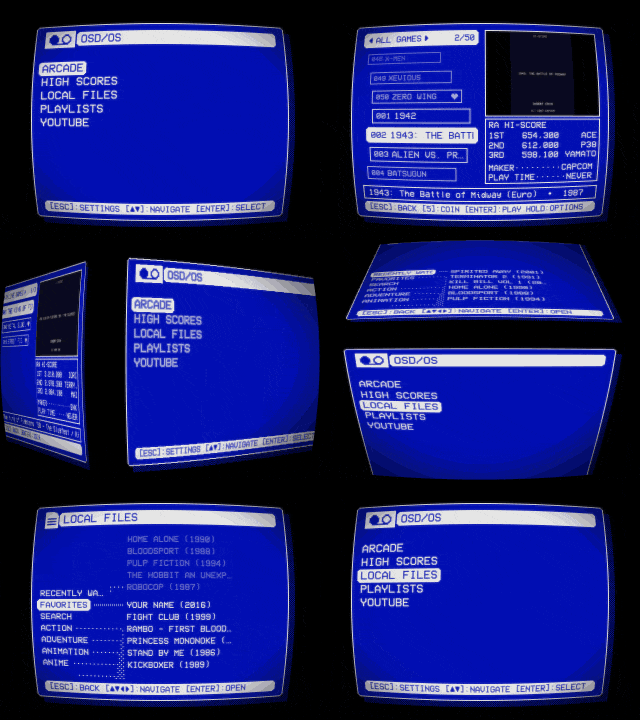
| Trinitron | Video 1 | Rounded | Screen: CRT | Cube | a calm arpeggio |
| Late Show | Late Night | DOS | Screen: VHS · Text: Flicker | Fade | a slow, swung tune with a record's crackle |
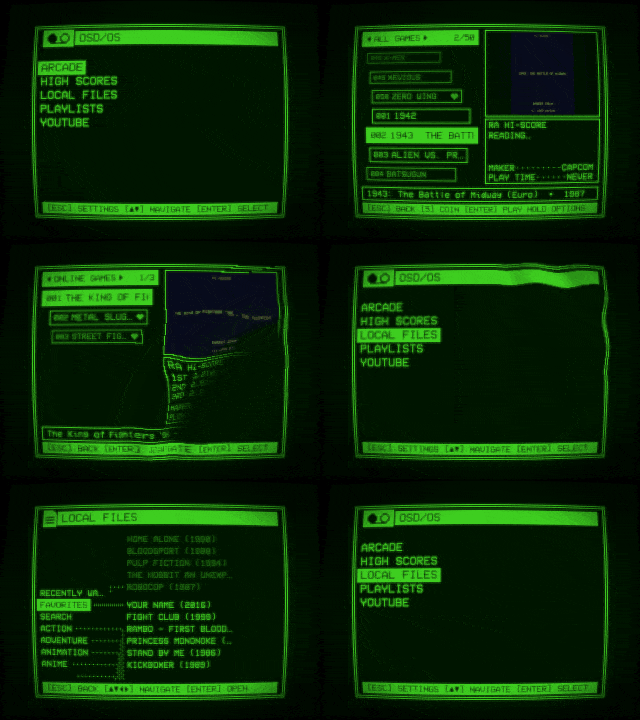
| Green Screen | phosphor green, its own | DOS | Screen: a glowing tube of its own · Text: Glow | Wave | none |
| Matrix | green on black, its own | DOS | Background: Matrix · Text: Glow · Selector: Lightning | Ripple | a dark, pulsing tune with bells |
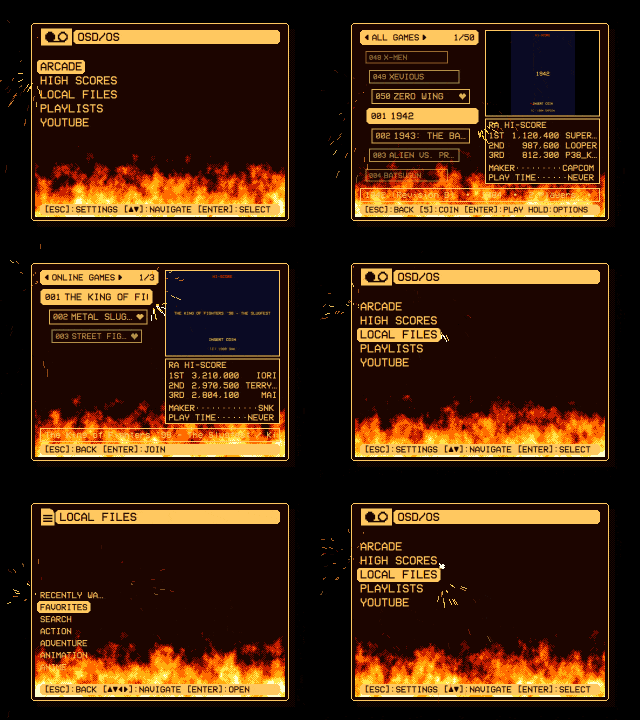
| Inferno | amber on brown, its own | Rounded | Background: Fire · Selector: Welding | Cube | a fast, driving tune |
| Arcade | Synthwave | Rounded | Background: Stars · Text: Rainbow · Selector: Rainbow | Cube | a bouncy chiptune |
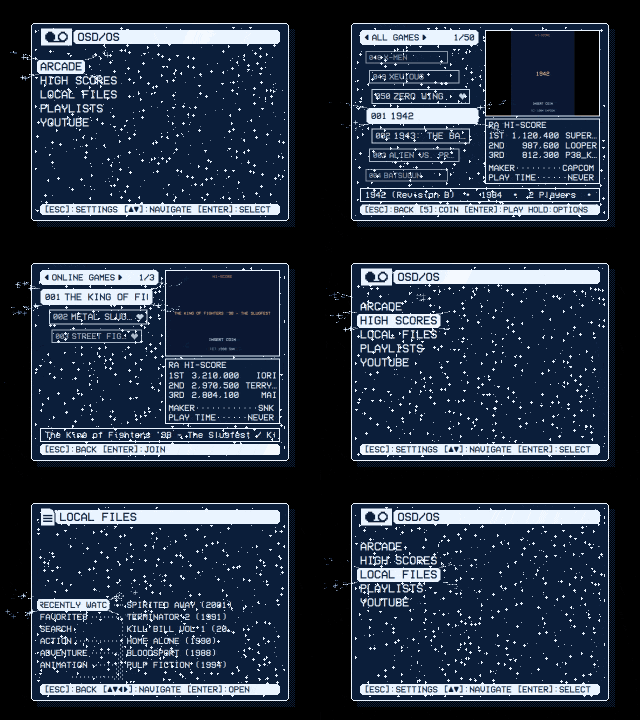
| Winter | ice on night blue, its own | Rounded | Background: Snow · Text: Shimmer · Selector: Sparkles | Drop | a music box |
| Demoscene | gold on purple, its own | DOS | Background: Stars · Text: Glow · Selector: Sparkles | Cube | a tracker's XM |
| Trinitron | Late Show |
|---|---|
 |
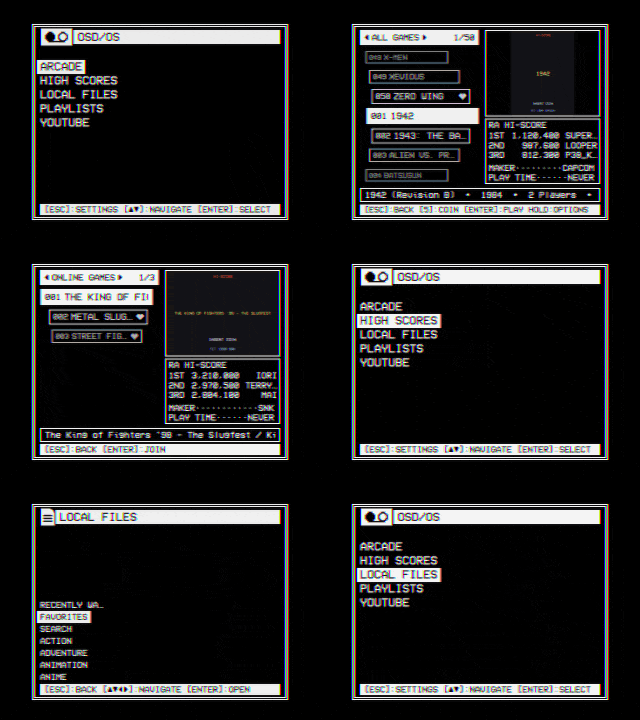 |
| Video 1 in Rounded windows on a tube's curved face: scanlines, glow and darker corners. Windows turn over like a cube. | Late Night's white on black in DOS windows, with a tape's color bleed and noise and text flickering like a neon sign. Windows fade. |
| Green Screen | Matrix |
|---|---|
 |
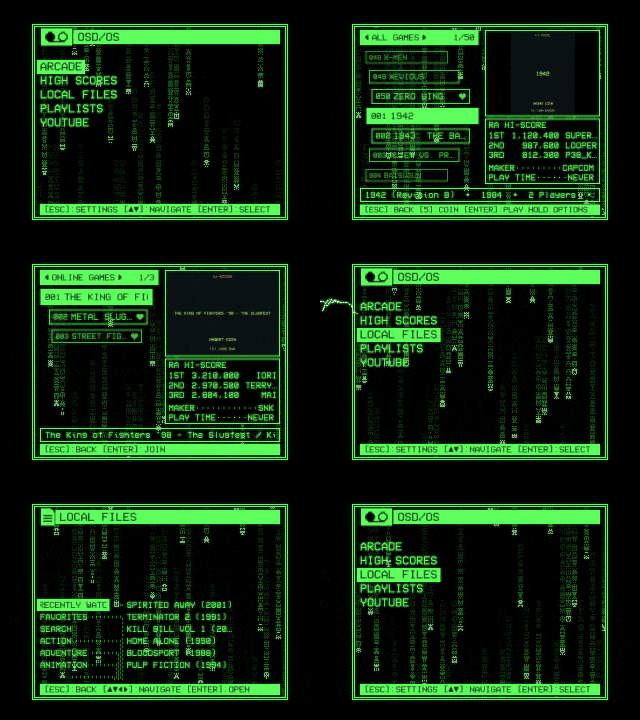 |
| A phosphor green of its own, DOS windows, a glowing tube and glowing text. Windows come in on a wave from a corner. | Green on black: Matrix rain behind the menus, glowing text, and lightning crackling out of the selected line. Windows ripple. |
| Inferno | Arcade |
|---|---|
 |
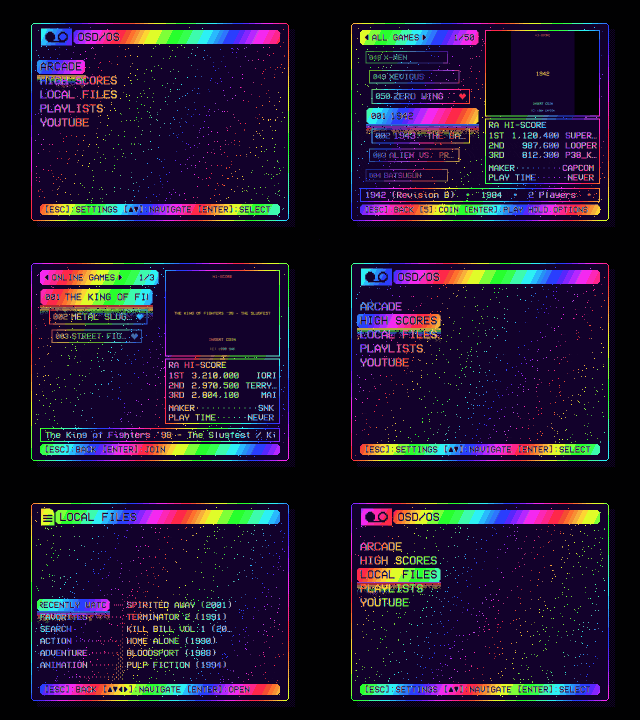 |
| Amber on brown: pixel flames burning up from the window's foot, inside its frame, and a welder's sparks bursting from the selected line's corners. | Synthwave's colors: a starfield, text running through the rainbow, and a pixel rainbow dripping from under the selected line. |
| Winter | Demoscene |
|---|---|
 |
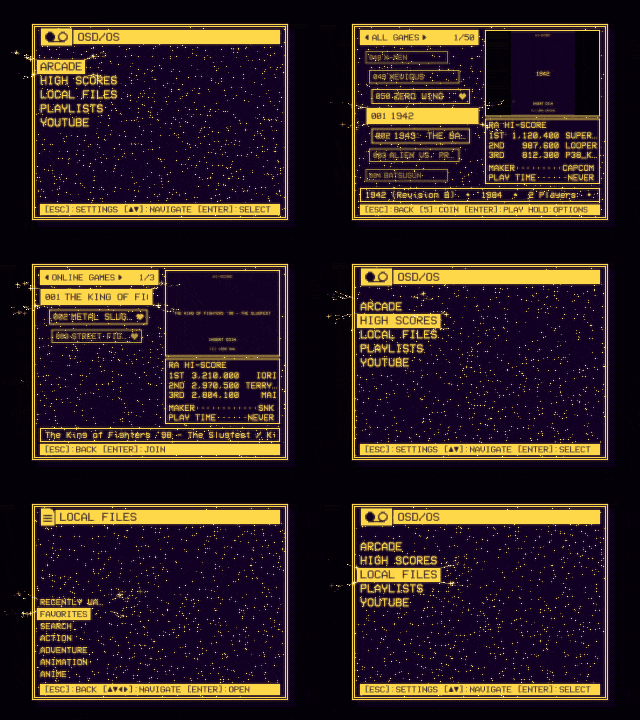 |
| Ice on night blue: snow falling, a glint sweeping across the text, and sparkles flying off the selected line. Windows spread from a drop. | Gold on purple: a starfield, glowing text and sparkles, windows turning left like a demo's cube, and a tracker's XM for its music. |
Without a theme (Theme: None), OSD/OS is plain on purpose: Video 1's two colours, OSD/OS's own window, nothing moving but the cursor, and no music.
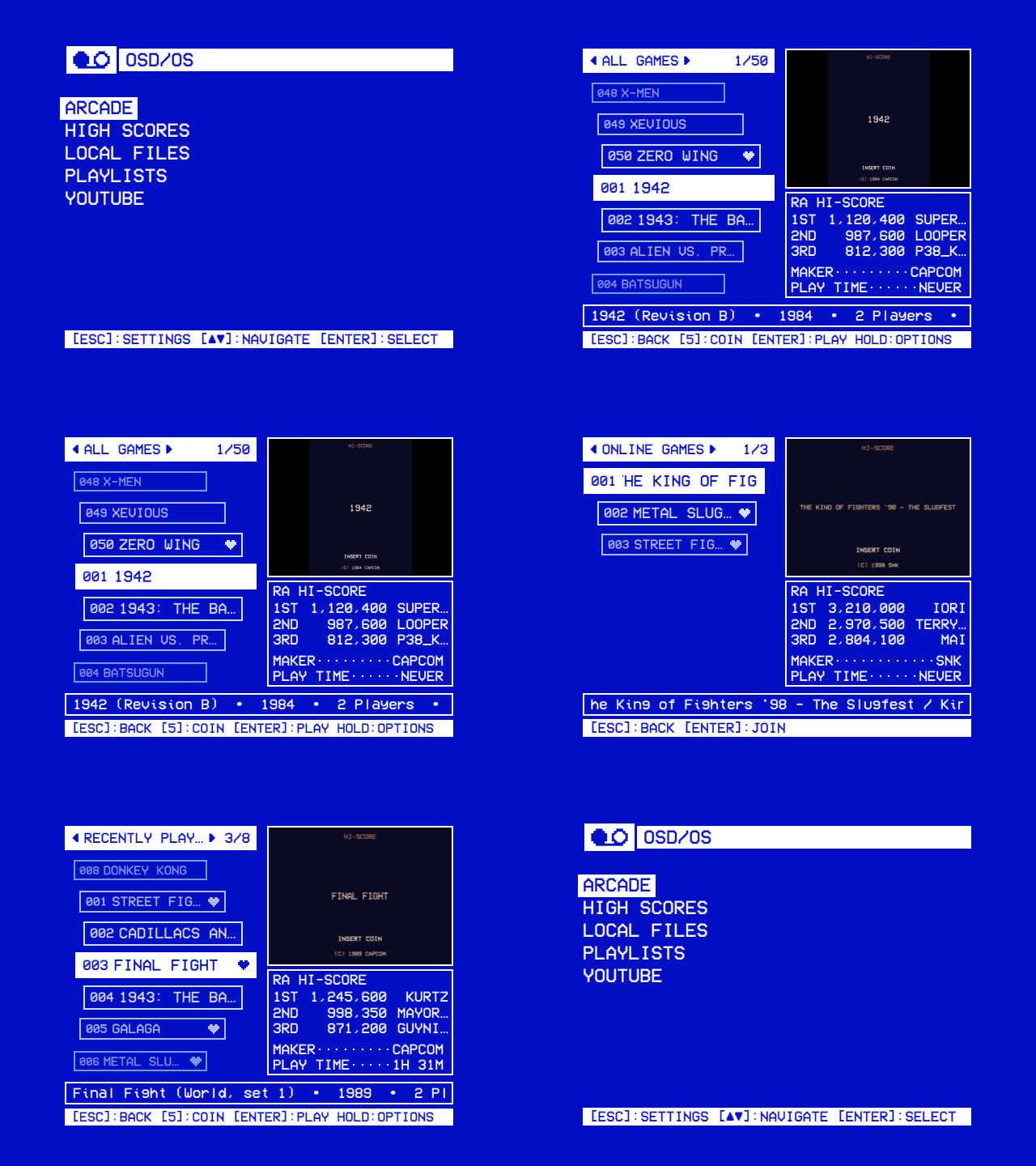
Each of the eight is a folder in assets/themes: its theme.json and, for all but Green Screen, its music. Here they are as they come. Every key is explained in the theme.json reference below. The tunes are made by make-menu-music.py (Menu music).
A tube's face over the whole screen: the CRT preset is scanlines 0.35, curvature 0.6, glow 0.35 and vignette 0.5. Its tune is calm and warm, in A minor: an arpeggio, a soft bass and a gentle melody, 21 seconds at 92 beats a minute.
{
    "name": "Trinitron",
    "colors": "Video 1",
    "skin": "rounded",
    "effects": {
        "screen": "CRT",
        "transition": "Cube"
    },
    "music": "trinitron.ogg"
}A tape's look: the VHS preset is bleed 0.6, noise 0.5, glow 0.25 and scanlines 0.15, and Flicker (flicker 0.8) makes the text fail now and then like a neon sign. Its tune is after hours and swung: an electric piano's chords, a walking bass, brushes, a muted melody and a worn record's crackle, 27 seconds at 72 beats a minute.
{
    "name": "Late Show",
    "colors": "Late Night",
    "skin": "dos",
    "effects": {
        "screen": "VHS",
        "text": "Flicker",
        "transition": "Fade"
    },
    "music": "late-show.ogg"
}Its own two colours, Terminal's green on a green-black, and its own screen numbers instead of a preset's name: CRT's tube with stronger scanlines and glow (0.6 each, against CRT's 0.35) and half its curve (0.3). It has no music.
{
    "name": "Green Screen",
    "colors": { "primary": "#4AF626", "surface": "#001A00" },
    "skin": "dos",
    "effects": {
        "screen": { "scanlines": 0.6, "glow": 0.6, "curvature": 0.3, "vignette": 0.5 },
        "text": "Glow",
        "transition": "Wave"
    }
}
Matrix rain behind the menus, glowing text (glow 0.8) and lightning out of the selected line. Its tune is dark and driving, in E Phrygian: a pulsing bass, a cold pad and bells, 17 seconds at 112 beats a minute.
{
    "name": "Matrix",
    "colors": { "primary": "#5CFF5C", "surface": "#000000" },
    "skin": "dos",
    "effects": {
        "background": "Matrix",
        "text": "Glow",
        "selector": "Lightning",
        "transition": "Ripple"
    },
    "music": "matrix.ogg"
}Fire burns along the window's foot (the Fire preset's area is foot), and a welder's sparks burst from the selected line. Its tune is fast and fiery, in D minor: a galloping bass, power chords and a riff, 14 seconds at 140 beats a minute.
{
    "name": "Inferno",
    "colors": { "primary": "#FFC860", "surface": "#1C0500" },
    "skin": "rounded",
    "effects": {
        "background": "Fire",
        "selector": "Welding",
        "transition": "Cube"
    },
    "music": "inferno.ogg"
}Rainbow twice: the text's (rainbow 1.0, the ink running through the hues) and the selector's (a pixel rainbow running down from under the selected line). Its tune is bright and bouncy, in C major: arpeggios, an octave bass and a catchy melody, 15 seconds at 128 beats a minute.
{
    "name": "Arcade",
    "colors": "Synthwave",
    "skin": "rounded",
    "effects": {
        "background": "Stars",
        "text": "Rainbow",
        "selector": "Rainbow",
        "transition": "Cube"
    },
    "music": "arcade.ogg"
}Snow falling in the window, a glint sweeping across the text every three and a half seconds (shimmer 1.0), and sparkles. Its tune is gentle, in F major: a music box over a soft pad, with sleigh bells, 23 seconds at 84 beats a minute.
{
    "name": "Winter",
    "colors": { "primary": "#EAF4FF", "surface": "#0B1E3A" },
    "skin": "rounded",
    "effects": {
        "background": "Snow",
        "text": "Shimmer",
        "selector": "Sparkles",
        "transition": "Drop"
    },
    "music": "winter.ogg"
}The one theme whose music is a tracker's module: a four-channel FastTracker 2 XM in A minor, with a lead with vibrato, a chord arpeggio, an octave bass and drums, 31 seconds, 7 KB.
{
    "name": "Demoscene",
    "colors": { "primary": "#FFD84A", "surface": "#120024" },
    "skin": "dos",
    "effects": {
        "background": "Stars",
        "text": "Glow",
        "selector": "Sparkles",
        "transition": "Cube"
    },
    "music": "demoscene.xm"
}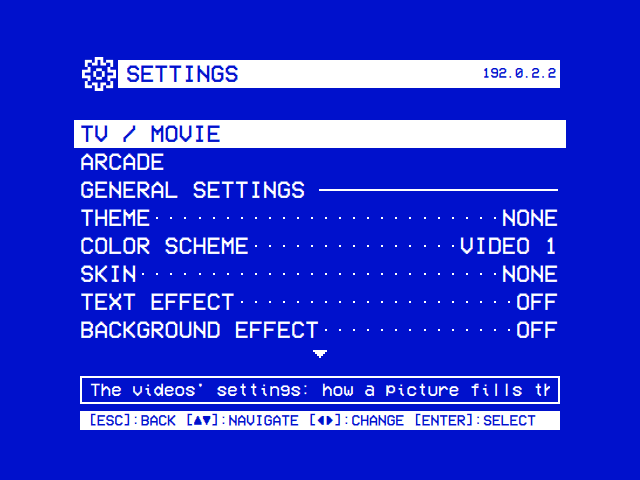
Settings → Theme lists None and every theme by name (Settings):
| Setting | Values | Default | What it does | Config key |
|---|---|---|---|---|
| Theme | None, then every theme by name: OSD/OS's eight and those in the data folder's themes
|
None | The whole look in one: the color scheme, the skin, the effects and the menu music. Choosing one sets every row below back to THEME |
app.osd_theme: the theme's folder name, "" for None |
Under it comes a row for each part of a theme:
| Row | The theme's part | Config key | Off | Choices of its own |
|---|---|---|---|---|
| Color Scheme | colors |
app.color_scheme |
— (no Off: everything is drawn in two colours) | the color schemes, by name |
| Skin | skin |
app.skin |
None (saved as "Off"): OSD/OS's own window |
the skins, by name (saved by folder name) |
| Text Effect | effects.text |
app.text_effect |
Off | Rainbow, Shimmer, Glow, Flicker |
| Background Effect | effects.background |
app.background_effect |
Off | Matrix, Fire, Stars, Snow, Checkered Flag, Plasma |
| Selector Effect | effects.selector |
app.selector_effect |
Off | Sparkles, Welding, Lightning, Rainbow, Snow |
| Screen Effect | effects.screen |
app.screen_effect |
Off | Scanlines, CRT, VHS |
| Transition | effects.transition |
app.transition |
Off | Fade, Cube, Ripple, Wave, Drop |
| Menu Music | music |
app.menu_music |
Off | File: the file chosen on the Music File row |
-
Choosing a theme with ◄ ► sets every one of these rows back to THEME (saved as
""), the rows hidden at the time too. Music File and Music Volume keep what they were. - THEME is the part as the theme has it. Off is none of it, whatever the theme says. A choice of its own replaces the theme's part. Off and a choice stay as you set them until the next theme is chosen.
-
Without a theme the rows have no THEME, and
""shows as what the part then is: Video 1, None or Off. - Only what can run is offered. Text Effect, Background Effect and Screen Effect are rows only where OSD/OS was built with Qt Shader Tools and Qt draws with a GPU; elsewhere Transition leaves out Ripple, Wave and Drop as well (Effects).
Each part is worked out on its own, the same way:
flowchart LR
    R["The part's row in Settings"] -->|"a choice: CRT, Matrix, Amber..."| C["that choice"]
    R -->|"Off"| N["none of it"]
    R -->|"THEME"| T{"Does the theme in use<br/>have this part?"}
    T -->|"yes"| P["the theme's part"]
    T -->|"no, or no theme"| D["none of it: Video 1's colours,<br/>OSD/OS's own window,<br/>no effect, no music"]
-
A part the theme leaves out is none. A theme without
skinhas OSD/OS's own window, one withoutmusicno music, one withoutcolorsVideo 1's colours. Nothing else fills the gap. - A row's choice replaces the theme's part whole. Screen Effect: CRT puts OSD/OS's CRT in place of a theme's own screen shader; Text Effect: Glow replaces a theme's own text numbers with Glow's.
- Menu Music: File plays the Music File instead of the theme's tune (Menu music).
What Settings saves, in config.json in the data folder (Configuration files): here, Matrix chosen and then its selector effect turned off.
{
    "app": {
        "osd_theme": "matrix",
        "color_scheme": "",
        "skin": "",
        "text_effect": "",
        "background_effect": "",
        "selector_effect": "Off",
        "screen_effect": "",
        "transition": "",
        "menu_music": ""
    }
}-
osd_themeis the theme's folder name,""for None. - To let a theme's part apply when you edit the file by hand, set its key to
""or take it out. A key left at a value of its own overrides the theme: aconfig.jsonmade before any theme was chosen may hold"color_scheme": "Video 1", and the theme's colours then don't show. Choosing the theme in Settings sets them all to""for you. - OSD/OS reads the look at start and at each change made in Settings. Edit the file with OSD/OS stopped, or restart it afterwards.
- A skin chosen before skins had their own row was saved as
app.theme. It is read as the skin whileapp.skinis unset.
| What | Where |
|---|---|
| OSD/OS's eight | The app's assets/themes: /opt/osdos/share/osdos/assets/themes/ on Raspberry Pi OS and the OSD/OS image, /Applications/osdos.app/Contents/Resources/assets/themes/ on a Mac, assets/themes in the repository |
| Yours | The data folder's themes: ~/.local/share/OSD-OS/themes/ on Linux (on the OSD/OS image, /home/pi/.local/share/OSD-OS/themes/), ~/Library/Application Support/OSD-OS/themes/ on a Mac, or themes in the folder DATA_ROOT names (the data folder) |
-
A theme is a folder with a
theme.json. The folder's name is the theme's id: it is what Settings saves, so keep it short and plain (my-theme). Everything else the theme uses goes in that folder. -
Yours replaces OSD/OS's of the same folder name. A
themes/matrix/of your own is used in place of Matrix. If itstheme.jsonisn't JSON, OSD/OS's Matrix is used after all. -
Settings lists the themes by name, OSD/OS's and yours together, sorted without regard to case. Of two with the same name, the second shows as
Name (folder). A name longer than 28 characters, or none, shows as the folder's name. - When it is read. Settings reads the list each time it opens, so a new folder is listed the next time you open Settings. The theme in use is read at start and each time it is chosen.
-
A
theme.jsonof window pictures only (window,titleBar,hintBar,selection, and none ofcolors,skin,effectsandmusic) is a skin made before skins had their own folder. It is listed under Skin, not Theme (Skins).
{
    "name": "Template",
    "colors": { "primary": "#F2E6C9", "surface": "#1B2A4A" },
    "skin": {
        "window":    { "image": "window.png", "border": 4 },
        "titleBar":  { "image": "titlebar.png", "border": [2, 2, 5, 2] },
        "hintBar":   { "image": "hintbar.png", "border": 3, "tile": "repeat" },
        "selection": { "image": "selection.png", "border": 3 },
        "icons":     { "logo": "logo.png" }
    },
    "effects": {
        "text":       { "shimmer": 0.6, "glow": 0.4 },
        "background": { "shader": "plasma.frag.qsb" },
        "selector":   "Sparkles",
        "screen":     { "shader": "tube.frag.qsb", "animate": true, "scanlines": 0.4 },
        "transition": "Drop"
    },
    "music": "tune.mid"
}
That is the theme template's, which uses every kind of value there is. The keys:
| Key | Type | What it takes | Left out |
|---|---|---|---|
name |
string | What Settings → Theme shows, 28 characters at most | The folder's name |
colors |
string or object | A color scheme's name, or { "primary": "#rrggbb", "surface": "#rrggbb" }
|
Video 1's colours |
skin |
string or object | A skin's folder name, or a skin's parts as in a skin.json
|
OSD/OS's own window |
effects |
object | Any of text, background, selector, screen and transition
|
No effects |
music |
string | A sound file in the theme's folder | No music |
Every key is optional, and null is the same as leaving it out. Keys OSD/OS doesn't know are ignored.
What Settings → Theme shows. Runs of spaces count as one. Longer than 28 characters, or empty, and the folder's name is shown instead.
The two colours everything is drawn in: primary, the text, the lines and the selection, and surface, the background. OSD/OS draws in those two only, like a deck's on-screen display. Either:
-
A color scheme's name, exactly as Settings → Color Scheme lists it:
"Video 1","Late Night","Synthwave","Terminal","T-120","Amber","Kinescope","SMPTE ECR 1-1978"(their colours are in Settings), or one of your own fromcustom_color_schemes.jsonorcustom_color_scheme.json("Custom") (Configuration files). Names are matched exactly, capitals and all; a name that isn't a scheme is drawn as Video 1, without a line in the log. -
Two colours of its own:
{ "primary": "#FFD84A", "surface": "#120024" }, each#and exactly six hex digits. A scheme's other three keys (secondary,tertiary,accent) may be there too; they aren't used. If either colour is missing or isn't#rrggbb("black","#000"), the theme is drawn in Video 1's colours and the log says so.
Settings → OSD Background: Off draws the menus on black in the lighter of the two colours, whichever that is, so a theme with dark text on a light background stays readable there.
How the window is dressed: the shapes of its frame, the title and hint bars and the selected line, and icons of its own, all drawn in the theme's two colours. Either:
-
A skin's folder name:
"dos","rounded", or one in the data folder'sskins(or an early skin in itsthemes). One that isn't there is logged (skin <name>: not found, none used) and the window is OSD/OS's own. To have OSD/OS's own window, leaveskinout:"Off"isn't a skin, and is logged like any other missing one. -
A skin of its own: an object with the parts of a
skin.json(window,titleBar,hintBar,selection,icons), its pictures in the theme's folder. The template's above is one. Every part and option is in the skin.json reference.
Anything else (a number, a list) is logged, and the window is OSD/OS's own.
An object with any of five keys. Each takes the name of one of OSD/OS's effects, "Off" for none, or, for three of them, an object of its own:
| Key | Names | An object of its own |
|---|---|---|
text |
Rainbow, Shimmer, Glow, Flicker
|
Any of rainbow, shimmer, glow, flicker: numbers from 0 (none) to 1 |
background |
Matrix, Fire, Stars, Snow, Checkered Flag, Plasma
|
shader: a compiled shader (.qsb) in the theme's folder; area: "window" (when left out) or "foot"
|
selector |
Sparkles, Welding, Lightning, Rainbow, Snow
|
None: a name only |
screen |
Scanlines, CRT, VHS
|
Any of scanlines, curvature, glow, bleed, noise, vignette: numbers from 0 to 1; shader: a .qsb in the theme's folder; animate: true for a shader that moves |
transition |
Fade, Cube, Ripple, Wave, Drop
|
None: a name only |
What each effect looks like, and the numbers behind each name, are in Effects.
-
Names are matched exactly, capitals included:
"CRT", not"crt".Cube Left,Cube Right,Cube UpandCube Down, from before the cube turned only at random, are read asCube. A name that isn't one is drawn as none, and nothing in the log says so.effectsthat isn't an object is ignored the same way. -
Numbers are held to 0 to 1: 2 counts as 1, -1 as 0. A value that isn't a number (
"lots") is logged and left out. A number of another kind (scanlinesintext) is ignored. -
An effect that is neither a name nor an object (
"screen": 0.5) is logged, and drawn as none. An object forselectorortransitionis drawn as none, without a line in the log. -
textis drawn by the screen's shader. A theme with a screen shader of its own has to draw the text effects itself, or they don't show (Shaders). -
backgroundwithout ashaderthat loads draws nothing."area": "foot"draws it from the window's top down to the screen's foot, rising into the window from below; any otherareais logged and the window is used. -
screenwith ashaderruns that shader instead of OSD/OS's, with the numbers given to it. Without one, the numbers drive OSD/OS's own."animate": truekeeps the shader's clock,time, running; without ittimecounts only while something else moves (a background effect,noise, or a moving text effect).
{
    "effects": {
        "text":       { "glow": 0.5, "flicker": 0.2 },
        "background": { "shader": "rain.frag.qsb", "area": "foot" },
        "selector":   "Welding",
        "screen":     { "scanlines": 0.4, "noise": 0.2, "vignette": 0.6 },
        "transition": "Off"
    }
}
Writing a shader of your own: Shaders.
A sound file in the theme's folder, played over and over under the menus: OGG, Opus, MP3, FLAC, WAV, M4A or AAC; a tracker's module, XM, MOD, S3M or IT; or a MIDI file, MID or MIDI, with a SoundFont (tune.sf2 beside tune.mid is the theme's own). The extension says which, in capitals or not. How each plays, and what a MIDI file or a module needs installed, is in Menu music.
For no music, leave music out: any string is read as a file name.
The pictures of its skin, its shaders and its music:
- are named relative to the theme's folder, in a folder inside it if you like (
"music": "sounds/menu.ogg"); - must be inside the theme's folder: an absolute path, a
../out of it, or a link pointing out of it is refused, logged, and that part is drawn without the file; - are told apart by their extension:
.png,.gifor.bmpfor a skin's pictures, also.svg,.jpgand.jpegfor an icon,.qsbfor a shader, the types above for music.
Each time a theme is read, the log has a line saying which and from where, and one for each thing in it that couldn't be used. These are the lines, as OSD/OS writes them, for a theme in the folder my-theme:
| Line | What happened | What is drawn |
|---|---|---|
[AppCore] theme my-theme: /home/pi/.local/share/OSD-OS/themes/my-theme |
The theme was read, from there; this line comes after the others | The theme, with all of it that could be used |
[AppCore] theme my-theme: not found, none used |
The saved theme has no folder with a theme.json (taken away, or renamed) |
No theme |
[AppCore] /home/pi/.local/share/OSD-OS/themes/my-theme/theme.json: object is missing after a comma |
The file isn't JSON; the reason follows the colon | Not listed in Settings (OSD/OS's own of that folder name in its place, if there is one) |
[AppCore] theme my-theme: its colors are not a color scheme's name or a #rrggbb primary and surface: drawn in Video 1's |
colors is neither a name nor an object with two #rrggbb colours |
Video 1's colours |
[AppCore] skin doss: not found, none used |
skin names a skin that isn't there |
OSD/OS's own window |
[AppCore] theme my-theme: its skin is not a skin's name or an object: none |
skin is a number or a list |
OSD/OS's own window |
[AppCore] theme my-theme: its screen effect is not a name or an object: none |
An effect is a number, a list or true
|
That effect: none |
[AppCore] theme my-theme: its text effect's glow is not a number from 0 to 1: none |
One of an effect's numbers isn't a number ("lots") |
That number left out |
[AppCore] theme my-theme: its background effect's area is not "window" or "foot": the window |
area is something else |
The window |
[AppCore] theme my-theme: its background shader, "../rain.frag.qsb", is not a qsb file in its folder |
The shader file is missing, out of the folder, or not .qsb
|
That effect without a shader |
[AppCore] theme my-theme: its music, "tune.wma", is not a ogg/opus/mp3/flac/wav/m4a/aac/mid/midi/xm/mod/s3m/it file in its folder |
The music file is missing, out of the folder, or of another type | No music |
[AppCore] theme my-theme: its window, "frame.jpg", is not a png/gif/bmp file in its folder |
A picture of its own skin can't be used (the Skins page has every skin line) | That part as OSD/OS draws it |
qml: [Effect] file:///…/tube.frag.qsb can't be used, OSD/OS's own in its place |
The screen shader didn't load | OSD/OS's screen shader, with the theme's numbers |
qml: [Effect] file:///…/plasma.frag.qsb can't be used |
The background shader didn't load | No background effect |
[MenuMusic] … |
The music couldn't play; the line says why | No music (Menu music) |
The quickest way in is the theme template: a theme with every part of its own (a skin, a background and a screen shader, a MIDI tune), to see each at work and change it.
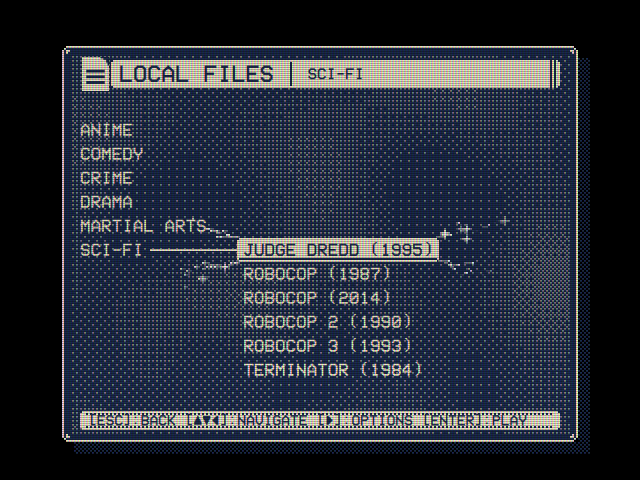
The template isn't installed with OSD/OS: take it from the repository. On the Pi (over SSH), on Linux or on a Mac:
curl -L https://github.com/mehmetraif/OSD-OS/archive/refs/heads/main.tar.gz | tar -xz -C /tmp
ls /tmp/OSD-OS-main/docs/theme-template| File | What it is |
|---|---|
theme.json |
The theme |
window.png, titlebar.png, hintbar.png, selection.png, logo.png
|
Its skin's pictures and its icon, the skin template's |
plasma.frag, plasma.frag.qsb
|
Its background effect: the shader's source, and compiled, which is what OSD/OS reads |
tube.frag, tube.frag.qsb
|
Its screen effect, the same way |
tune.mid |
Its music, a MIDI file |
README.md |
Its notes, not needed to run it |
Under a folder name of your own. On Raspberry Pi OS, the OSD/OS image and other Linux:
mkdir -p ~/.local/share/OSD-OS/themes
cp -r /tmp/OSD-OS-main/docs/theme-template ~/.local/share/OSD-OS/themes/my-theme
On a Mac:
mkdir -p ~/Library/Application\ Support/OSD-OS/themes
cp -R /tmp/OSD-OS-main/docs/theme-template ~/Library/Application\ Support/OSD-OS/themes/my-theme
On the OSD/OS image, work as the user the app runs as, pi (over SSH, or from Settings → Quit → Exit to Terminal; see The OSD/OS image). Without a network, copy the theme's folder from your computer onto the card's OSD-OS partition, which Windows and macOS open, then copy it across on the Pi: cp -r /media/OSD-OS/my-theme ~/.local/share/OSD-OS/themes/. A USB drive's files are under /media/usb/<its label>/ the same way.
Open theme.json and give it a name of its own, 28 characters at most:
{ "name": "My Theme" }Open Settings (a new folder is listed the next time Settings opens) and set Theme to My Theme with ◄ ►. To see its skin's window frame, set OSD Background to Window, with Window Frame On or Shadow. In the template, notice what each part does: the plasma behind the menus, the stripes and the slow hum bar over the screen, the sparkles, the drop between windows, and the tune.
The template's text numbers (shimmer, glow) don't show: its screen shader, tube.frag, takes the place of OSD/OS's own, which is the one that draws the text effects. Take its screen line out, or give it a screen shader that draws them (Shaders), to see them.
Change one thing at a time, and look.
-
Colours. Two of your own, or a scheme's name:
{ "colors": { "primary": "#FFE6A8", "surface": "#2A1006" } } -
Skin. Keep the template's pictures and redraw them (Skins), or name a skin and delete the pictures:
{ "skin": "rounded" } -
Effects. Names first; numbers once you know what you want; a shader of your own last (Shaders):
{ "effects": { "text": "Glow", "background": "Snow", "selector": "Lightning", "screen": { "scanlines": 0.5, "vignette": 0.4 }, "transition": "Cube" } } -
Music. Put a file in the folder and name it, or take the
musicline out:{ "music": "menu.ogg" }
A part you don't want at all: take its key out. Delete what the theme no longer uses (the template's pictures, .frag and .qsb files, tune.mid); nothing reads a file theme.json doesn't name.
-
A change to
theme.json: choose another theme in Settings and then yours again. Choosing it reads it again. -
A picture or a shader changed under the same file name: restart OSD/OS (Settings → Quit). One already shown stays in memory until then. Or save it under a new file name, change
theme.jsonto match, and choose the theme again. - The log says what was read and what couldn't be used (below).
Copy one of the eight into your themes folder. Under its own folder name it replaces it; under another it is a theme beside it:
# Arcade, changed in place: your copy is used instead of OSD/OS's
cp -r /opt/osdos/share/osdos/assets/themes/arcade ~/.local/share/OSD-OS/themes/arcade

# A theme of your own, starting from Winter
cp -r /opt/osdos/share/osdos/assets/themes/winter ~/.local/share/OSD-OS/themes/blizzard
On a Mac, the eight are in /Applications/osdos.app/Contents/Resources/assets/themes/. Give a copy under another folder a name of its own, or Settings lists two of the same name, the second told apart by its folder: Winter and Winter (winter).
Each is complete: make its folder in the data folder's themes, put the files in it, and choose it in Settings.
An amber monochrome terminal: amber text on a near-black brown, DOS's double-lined window, the text glowing a little into the dark, scanlines, and windows that fade. Nothing to install: every part is OSD/OS's own.
themes/amber-terminal/
└── theme.json
{
    "name": "Amber Terminal",
    "colors": { "primary": "#FFB000", "surface": "#140C00" },
    "skin": "dos",
    "effects": {
        "text": "Glow",
        "screen": "Scanlines",
        "transition": "Fade"
    }
}-
#FFB000is the Amber scheme's colour."colors": "Amber"would draw it on pure black instead. - Scanlines is
{ "scanlines": 0.5 }. For a curved tube too, write the numbers:"screen": { "scanlines": 0.6, "curvature": 0.4, "vignette": 0.4 }. - No music. Add a
musicline and a file to have some.
Saturday-morning cartoons on a Sunday: cream on a deep purple-blue, Rounded windows, text running through the rainbow, sparkles off the selected line, windows turning over like a cube, and a theme song of your own as an MP3.
themes/sunday-morning/
├── theme.json
└── theme-song.mp3
{
    "name": "Sunday Morning",
    "colors": { "primary": "#FFF4D6", "surface": "#2E1A8C" },
    "skin": "rounded",
    "effects": {
        "text": "Rainbow",
        "selector": "Sparkles",
        "transition": "Cube"
    },
    "music": "theme-song.mp3"
}-
theme-song.mp3is any MP3 you put there under that name. mpv plays it as it is, over and over; a song that fades out at its end pauses before it starts again, so a loop made for it sounds best (Menu music). - Rainbow is
{ "rainbow": 1.0 }.{ "rainbow": 0.5 }mixes the rainbow halfway with the cream. - The rainbow is drawn by the GPU. Where there is none, or OSD/OS was built without Qt Shader Tools, the theme is drawn without it (Effects).
A demo of the late eighties: copper bars, shaded bands of colour swinging up and down behind the menus, drawn by a background shader of the theme's own. Ice blue on midnight, DOS windows, glowing text, lightning, windows turning over like a cube, and a tracker's module for music.
themes/copperlist/
├── theme.json
├── copper.frag        the shader's source (not read by OSD/OS)
├── copper.frag.qsb    the shader compiled with qsb (what OSD/OS reads)
└── copperlist.xm      a module of your own
{
    "name": "Copperlist",
    "colors": { "primary": "#8FE3FF", "surface": "#0A0730" },
    "skin": "dos",
    "effects": {
        "text": { "glow": 0.5 },
        "background": { "shader": "copper.frag.qsb" },
        "selector": "Lightning",
        "transition": "Cube"
    },
    "music": "copperlist.xm"
}copper.frag:
#version 440
// Copper bars: three bands of the scheme's colour swinging up and down behind
// the menus, as an old demo's raster bars did, shaded with a dither on art
// pixels: a pixel is lit or not, more of them towards a bar's middle.

layout(location = 0) in vec2 qt_TexCoord0;
layout(location = 0) out vec4 fragColor;

layout(std140, binding = 0) uniform buf {
    mat4 qt_Matrix;
    float qt_Opacity;
    vec2 size;    // the area, in art pixels
    vec2 origin;  // where that is on the screen, in art pixels
    float time;   // seconds
    vec4 ink;     // the colour scheme's colour
};

// A 2×2 ordered dither's threshold for an art pixel: 0, 0.25, 0.5 or 0.75.
float bayer2(vec2 a)
{
    a = floor(a);
    return fract(dot(a, vec2(0.5, a.y * 0.75)));
}

void main()
{
    vec2 p = floor(qt_TexCoord0 * size) + origin;
    float level = 0.0;
    for (int i = 0; i < 3; ++i) {
        float k = float(i);
        // Each bar on a course of its own, from the area's top to its foot.
        float middle = origin.y + size.y * (0.5 + 0.4 * sin(time * (0.6 + 0.25 * k) + k * 2.1));
        // 16 art pixels tall: brightest in the middle, nothing at its edges.
        level = max(level, 1.0 - abs(p.y - middle) / 8.0);
    }
    float lit = step(bayer2(p) + 0.125, level);
    float alpha = 0.35 * lit;
    fragColor = vec4(ink.rgb * alpha, alpha) * qt_Opacity;
}
Compile it in the theme's folder, on any computer with Qt Shader Tools (Shaders):
qsb --glsl "100 es,120,150" --hlsl 50 --msl 12 -o copper.frag.qsb copper.frag- The bars are drawn in the window, inside its frame, at an art pixel a pixel (a pixel of a 240-line picture, scaled up without smoothing), so they are as blocky as the menus. A dialog's ground draws the same bars where the window's would be.
-
0.35keeps them faint behind the text. A pixel is lit only where the bar is brighter than its place in the dither, four shades with one colour. -
copperlist.xmis any XM of your own (a MOD, S3M or IT works too, named inmusic). Without one, take themusicline out.
| Where OSD/OS runs | Its log |
|---|---|
| The OSD/OS image, or Raspberry Pi OS with the autostart service | journalctl -u osdos -b |
Started by hand (osdos, or ./build/osdos from source) |
The terminal it was started in |
| A Mac | Start it from Terminal to see its log there: /Applications/osdos.app/Contents/MacOS/osdos
|
Only what concerns the look:
journalctl -u osdos -b | grep -E '\[(AppCore|Effect|MenuMusic)\]'More on the logs in Configuration files and Troubleshooting.
| What you see | Why | What to do |
|---|---|---|
| The theme isn't in Settings → Theme | Settings was open when you made the folder; or its theme.json isn't JSON (a line with the reason is in the log); or it isn't in the data folder's themes, or the file isn't named theme.json; or it holds only window pictures, and is listed under Skin |
Open Settings again; fix the JSON (a trailing comma is the usual cause) |
| It is listed by its folder's name | Its name is missing, empty or over 28 characters |
Shorten it |
| Its colours don't show: Video 1 instead | Color Scheme isn't THEME (choose the theme again to reset it); or colors isn't two #rrggbb (logged), or names no scheme (a typo, or a custom scheme added without a restart) |
Choose the theme again; check the spelling |
| One part doesn't show | Its row in Settings isn't THEME; a name is misspelt (nothing is logged for that); a file is out of the folder or of the wrong type (logged) | Check the row, the spelling, the log |
| The window's frame doesn't show | OSD Background isn't Window, or Window Frame is Off | Settings → OSD Background: Window, Window Frame: On or Shadow |
| No Text, Background or Screen Effect row, and no Ripple, Wave or Drop | This build has no Qt Shader Tools, or Qt draws without a GPU. The theme's colours, skin, selector effect, other transitions and music work all the same | See Effects |
| Its text effect doesn't show, with a screen shader of its own | That shader replaces the one that draws the text effects | Draw them in it (Shaders) |
[Effect] … can't be used |
The .qsb isn't a compiled shader, or was compiled by a newer Qt than the one OSD/OS runs on |
Compile it again with qsb (Shaders) |
The menus vanish with a theme's screen shader, and the log has Failed to build graphics pipeline state (after No GLSL shader code found with OpenGL) |
The .qsb was compiled without the variant for this graphics API (OpenGL on the Pi and Linux, Metal on a Mac) |
Take the theme out (below), then compile it with the full command |
| A changed picture or shader looks as it did | One already shown stays in memory | Restart OSD/OS, or use a new file name |
| No music | Menu Music isn't THEME; or the theme has none; or it couldn't play (a [MenuMusic] line says why) |
Menu music |
| No effects or music while a video plays | That is by design: they rest while a video plays, loads or has its menu open | Effects |
A screen shader that draws nothing, or nothing readable, takes the menus with it, Settings included. From a shell over SSH, move the theme out of themes and restart OSD/OS: the saved theme is then not found, and none is used.
mv ~/.local/share/OSD-OS/themes/my-theme ~/my-theme.off
sudo systemctl restart osdos     # under the autostart service, which leaves the Pi on
Started by hand instead, stop it in its terminal (Ctrl+C) and start it again. To keep the rest of the theme and lose only its screen effect, stop OSD/OS (sudo systemctl stop osdos), set "screen_effect": "Off" under app in config.json, and start it again (sudo systemctl start osdos).
- Skins: the window's shapes and icons, and drawing your own
- Effects: every effect, its numbers, and what it needs
- Shaders: a background or screen effect of your own
- Menu music: the tune under the menus
- Settings: the look's rows, and the color schemes
-
Configuration files: the data folder,
config.jsonand the logs - Troubleshooting