Repository navigation
Building from Source
How to build OSD/OS yourself, on a Mac, on Raspberry Pi OS, on Debian or Ubuntu, on Windows and on FreeBSD or OpenBSD, with the exact commands; what each optional part adds; how to run your build and its regression tests; and how the project's own builds are made: the CI workflows, releases, the AppImage and the OSD/OS image. BUILDING.md has the long story behind each step, linked below where it matters.
OSD/OS is one C++17 program (Qt 6 and QML) built with CMake 3.21 or newer. CMake looks for:
| Dependency | What for | If it is missing |
|---|---|---|
| Qt 6: Core, Concurrent, Gui, Quick, Qml, Network, Svg | Everything | The configure fails |
| OpenSSL | Plex's sign-in: the Ed25519 device key that signs its tokens (OpenSSL::Crypto) |
The configure fails |
| SDL2 | Gamepads (InputManager) |
The configure fails |
| libdrm, through pkg-config (Linux) | Giving the screen to mpv and taking it back on a Pi (DisplayHandoff) |
The configure fails |
| Qt Shader Tools | The effects' shaders, compiled into the binary (below) | Qt Shader Tools not found — the shader effects will be unavailable |
| libmpv's headers, through pkg-config | Transparent Background: video inside the app's window | libmpv headers not found — Transparent Background will be unavailable |
PC/SC (libpcsclite, Linux; pcsc-lite on the BSDs; macOS has it; not looked for on Windows, whose build has no NFC Reader) |
ACR122U and other PC/SC NFC readers | PC/SC not found — NFC reader module will build with PN532 USB serial support only |
| Qt D-Bus (Linux) | Settings → Bluetooth and Wi-Fi, through BlueZ and NetworkManager | Qt D-Bus not found — Settings → Bluetooth and Wi-Fi will be unavailable |
| zlib and minizip | The High Scores module's tables, read by openhi2txt (thirdparty/openhi2txt, built with the app) |
minizip not found — High Scores will show no tables |
| git | The commit in Settings → About → Build | The build has the day alone |
At run time OSD/OS starts other programs rather than linking them: mpv for every video (0.38 or newer), and for some modules yt-dlp and Deno (YouTube), FluidSynth with a SoundFont and openmpt123 (menu music in MIDI or a tracker's format), Chromium with Widevine (Netflix and Prime Video), MAME and RetroArch (Arcade). None of them is needed to build.
Get the source first:
git clone https://github.com/mehmetraif/OSD-OS.git
cd OSD-OSAny of three:
-
Qt's online installer (qt.io/download), installed to
~/Qt. Under Additional Libraries, add Qt Shader Tools. -
aqtinstall, the unattended installer behind the release workflow's Qt. The workflow builds with Qt 6.7 and its
qtshadertoolsmodule:python3 -m pip install aqtinstall aqt install-qt mac desktop 6.7.3 clang_64 -m qtshadertools -O ~/Qt -
Homebrew:
brew install qt@6(an alias of Homebrew'sqt, which includes Qt Shader Tools).
brew install cmake sdl2 mpv pkgconf      # build tools, gamepads, playback, libmpv's headers
brew install fluid-synth libopenmpt      # optional: menu music in MIDI and trackers' formats
brew install yt-dlp deno                 # optional: the YouTube module
brew install mame                        # optional: the Arcade module
brew install minizip # optional: the High Scores module's tables-
sdl2, the formula BUILDING.md names, is Homebrew'ssdl2-compat, SDL2's API on top of SDL3. The release workflow builds SDL2 2.32.10 from source instead, so that the DMG carries SDL2 itself and no SDL3. - mpv is found on the
PATHwhen a video plays; OSD/OS adds/opt/homebrew/binand/usr/local/binto its ownPATHat start, since an app opened from the Finder gets a short one. Withpkgconf, CMake finds mpv's headers and builds Transparent Background in, which opens Homebrew's libmpv at run time. - A MIDI file needs a General MIDI SoundFont as well, which Homebrew's FluidSynth doesn't bring: put a
.sf2in the data folder'ssoundfontsfolder (~/Library/Application Support/OSD-OS/soundfonts/). - macOS needs no package for the NFC Reader: the PN532 USB driver talks to the reader directly, and PC/SC is part of the system.
# First time, and after any change to CMakeLists.txt:
cmake -B build -DCMAKE_PREFIX_PATH=~/Qt/6.7.3/macos . && cmake --build build

# After a code change:
cmake --build build

# Run, with the log in the terminal:
APP_ROOT=$(pwd) ./build/osdos.app/Contents/MacOS/osdos
CMAKE_PREFIX_PATH names the Qt: the version's macos folder for the installer's or aqtinstall's (~/Qt/6.7.3/macos above; BUILDING.md's example is ~/Qt/6.11.0/macos), $(brew --prefix) for Homebrew's, whose Qt is linked there. Double-clicking build/osdos.app works too: outside CI, the build links the bundle's Contents/Resources to the repository, where OSD/OS finds its QML.
On Raspberry Pi OS Trixie (Debian 13):
sudo apt-get update
sudo apt-get install -y \
  build-essential cmake pkgconf \
  qt6-base-dev qt6-declarative-dev \
  qml6-module-qtquick qml6-module-qtquick-controls \
  qml6-module-qtquick-window \
  libqt6svg6 qt6-svg-dev qt6-svg-plugins qt6-wayland \
  qt6-shadertools-dev \
  libdrm-dev libxkbcommon-dev libssl-dev \
  libsdl2-dev \
  mpv
This is BUILDING.md's list less libpcsclite-dev, libmpv-dev and libminizip-dev, which are optional (below). pkgconf is there for CMake to find libdrm (the CI job on Raspberry Pi OS installs it). The optional parts:
| Package | Adds |
|---|---|
libmpv-dev |
Transparent Background, built in. At run time it opens libmpv2, which install.sh and the image install |
qt6-shadertools-dev (in the list above) |
The effects' shaders; leave it out and they are left out. qt6-shader-baker brings qsb, for a theme's own shader |
libpcsclite-dev |
PC/SC NFC readers. Run bash scripts/setup-nfc-reader.sh once either way: it lets the user open a PN532 reader, and sets up pcscd where PC/SC is usable |
fluidsynth timgm6mb-soundfont openmpt123 |
Menu music in MIDI and trackers' formats (run time only) |
mame |
The Arcade module's games, in MAME (run time only; the image has it) |
retroarch |
The Arcade module's second engine, FinalBurn Neo, whose core Settings → Arcade → FinalBurn Neo downloads (run time only; the image has both) |
libminizip-dev |
The High Scores module's tables. Its static library is linked in, so nothing more is needed at run time |
bluez, and the user in the bluetooth group |
Settings → Bluetooth (run time; Raspberry Pi OS Lite has BlueZ). sudo usermod -aG bluetooth $USER
|
| NetworkManager | Settings → Wi-Fi (run time; Raspberry Pi OS has it). Run as a service, outside a desktop session, OSD/OS's user needs install.sh's polkit rule to use it |
For YouTube, yt-dlp from its own releases (the one apt brings is too old) and Deno, on the PATH of the user that runs OSD/OS (yt-dlp's EJS notes):
sudo wget https://github.com/yt-dlp/yt-dlp/releases/latest/download/yt-dlp -O /usr/local/bin/yt-dlp
sudo chmod a+rx /usr/local/bin/yt-dlp
Build, then run:
cmake -B build              # first time, and after CMakeLists.txt changes
cmake --build build         # every time

APP_ROOT=$(pwd) ./build/osdos                        # with a desktop
APP_ROOT=$(pwd) QT_QPA_PLATFORM=eglfs ./build/osdos  # Raspberry Pi OS Lite, no desktop
Apt's Qt is found without CMAKE_PREFIX_PATH. Without a desktop, Qt draws straight to the screen through KMS/DRM (EGLFS):
-
Stop the service first if OSD/OS is installed with autostart:
sudo systemctl stop osdos. Two programs can't both hold the screen. -
On a Pi 5, run your build through
scripts/rpi-run-local.sh(OSDOS_BIN=/path/to/osdosfor another binary). It runs it as the installed launcher runs the app, with the launcher's own display set-up taken fromscripts/install.sh: EGLFS pointed at the card with a display, where a Pi 5's render-only GPU node would otherwise come first, on the output and in the mode the image's display preset names (# osdos-output:). Run it from the Pi's own console, not over SSH.
sudo apt-get install -y build-essential cmake pkgconf \
  libdrm-dev libssl-dev libsdl2-dev libpcsclite-dev \
  libgl1-mesa-dev libxkbcommon-dev mpv
pkgconf is there for CMake to find libdrm, as on the Pi; libpcsclite-dev is optional (PC/SC readers), and so are libmpv-dev (Transparent Background) and libminizip-dev (the High Scores module's tables).
Qt comes from the distribution (qt6-base-dev qt6-declarative-dev qt6-svg-dev qt6-shadertools-dev and the qml6-module-qtquick* modules) or from Qt's installer or aqtinstall with Qt Shader Tools, CMake then pointed at it:
aqt install-qt linux desktop 6.7.3 linux_gcc_64 -m qtshadertools -O ~/Qt
cmake -B build -DCMAKE_PREFIX_PATH=~/Qt/6.7.3/gcc_64 && cmake --build build
APP_ROOT=$(pwd) ./build/osdos
Two things to know about Ubuntu 24.04:
-
Its Qt is 6.4, the oldest the project builds with (CI builds and tests on it).
-
Its mpv is 0.37, one release too old: OSD/OS asks mpv for forced subtitles only (
--subs-with-matching-audio=forced), which came in 0.38, and mpv 0.37 refuses to start with it. Build a newer one withscripts/build-mpv.sh(below). OSD/OS takes anmpvbeside its own binary before the one on thePATH:cp "$(scripts/build-mpv.sh)" build/mpv
A build for Windows 11 on x64, which each release publishes as OSD-OS-<version>-windows-x64.zip (Installation): the Windows build workflow builds it on every pull request that touches the sources and uploads osdos-windows-x64, a copy to try, and the release workflow calls it for a tag (below). The menus, Local Files and the media servers, YouTube, the Arcade module with Windows builds of MAME and RetroArch, RetroAchievements, netplay and High Scores are in it. What is the Pi's or a Linux desktop's is left out, as on a Mac: Display Output, Audio Output's cards (the default device plays), Bluetooth and Wi-Fi (Windows' own settings), the JAMMA helper, Scripts, the NFC Reader, the updater's install (it names the newer version's zip, to put in place by hand) and, for now, Transparent Background (CMake looks for libmpv's headers through pkg-config, and the Windows build has no libmpv). Settings → Window Mode (F11, or Alt+Enter) puts the menus in a window on the desktop, 960×720 to start with, in place of the whole screen, on Windows as on a Linux desktop.
-
Visual Studio 2022 Build Tools with the Desktop development with C++ workload (MSVC, the Windows SDK, CMake and Ninja).
-
Qt 6.8 for MSVC 2022 64-bit, with Qt Shader Tools: from Qt's installer, or
aqt install-qt windows desktop 6.8.3 win64_msvc2022_64 -m qtshadertools -O C:\Qt. -
vcpkg for SDL2, OpenSSL and minizip with zlib:
git clone https://github.com/microsoft/vcpkg C:\vcpkg
C:\vcpkg\bootstrap-vcpkg.bat
C:\vcpkg\vcpkg install sdl2 openssl minizip --triplet x64-windows
-
mpv, for playback: a Windows build from mpv.io, as
mpv.exebesideosdos.exe, its folder beside the app asmpv\, or on thePATH. For the Arcade module, MAME's and RetroArch's Windows builds on thePATH; for YouTube,yt-dlp.exeanddeno.exeon thePATH.
Build, in an x64 Native Tools Command Prompt for VS 2022 (6.8.3 standing for the Qt version installed):
cmake -B build -G Ninja -DCMAKE_BUILD_TYPE=Release ^
  -DCMAKE_TOOLCHAIN_FILE=C:\vcpkg\scripts\buildsystems\vcpkg.cmake -DVCPKG_TARGET_TRIPLET=x64-windows ^
  -DCMAKE_PREFIX_PATH=C:\Qt\6.8.3\msvc2022_64 -DCMAKE_INSTALL_PREFIX=%CD%\install
cmake --build build --parallel
cmake --install build
C:\Qt\6.8.3\msvc2022_64\bin\windeployqt.exe --release --qmldir . install\osdos\osdos.exe
copy build\*.dll install\osdos\
copy C:\vcpkg\installed\x64-windows\bin\libssl*.dll install\osdos\
install\osdos\osdos.exe
vcpkg puts the libraries the app links beside the built binary (SDL2, OpenSSL's libcrypto, minizip, zlib), windeployqt adds Qt's libraries, plugins and QML modules, and libssl is what Qt's TLS plugin opens at run time. The install is one folder, install\osdos\, with osdos.exe, the libraries and the app's own files (Main.qml, views\, modules\, assets\, scripts\, LICENSE) together, as a Windows program is unpacked and run: the app takes the folder Main.qml is in beside its binary as its own, so the folder goes anywhere whole, and the osdos-windows-x64 artifact is that folder zipped. The data folder is %APPDATA%\OSD-OS\. The LZMA SDK's 7z decoder (thirdparty/lzma, public domain) is built into the app on every system, for the MAME and RetroArch for Windows that Settings → Arcade → MAME and → FinalBurn Neo download as 7z archives (MAME's a self-extracting one): no package is needed for it. The build is a console program for now: a console window opens with the app and shows its log. More in BUILDING.md → Windows (x64).
A first build for the BSDs, a desktop app as on a Mac, that has not run on a BSD machine yet beyond being built and tested: the FreeBSD build and OpenBSD build workflows build it in a virtual machine on every pull request that touches the sources or the tests, run the regression tests there and upload osdos-freebsd-amd64 and osdos-openbsd-amd64, each the install tree as a tarball (below). The menus, Local Files and the media servers, YouTube, the Arcade module with the system's MAME, High Scores, Transparent Background with the system's libmpv and the NFC Reader (a PN532 on cuaU*, or a PC/SC reader with pcsc-lite) are in it. What is the Pi's or a Linux desktop's is left out, as on a Mac: Display Output, Audio Output's cards (the default device plays), Bluetooth and Wi-Fi (the system's own tools), the JAMMA helper and the updater's install (it names a newer version, to download by hand); Netflix and Prime Video too, since no browser on the BSDs has Widevine; and FinalBurn Neo's download has no BSD build, so RetroArch, RetroAchievements and netplay wait for one.
-
FreeBSD, as root:
pkg install cmake-core ninja pkgconf qt6-base qt6-declarative qt6-svg qt6-shadertools sdl2 minizip mpv(OpenSSL is the base system's). -
OpenBSD, as root:
pkg_add cmake ninja qt6-qtbase qt6-qtdeclarative qt6-qtsvg qt6-qtshadertools sdl2 minizip mpv(pkg-config and LibreSSL are the base system's). - Optional:
pcsc-litefor PC/SC NFC readers,mamefor the Arcade module,yt-dlpfor YouTube; for the regression testsbash, Lua 5.4 (lua54,lua%5.4) and, on FreeBSD, thedejavufonts the view tests draw with.
Build and run:
cmake -B build -G Ninja -DCMAKE_BUILD_TYPE=Release -DCMAKE_PREFIX_PATH=/usr/local -DCMAKE_INSTALL_PREFIX="$PWD/install"
cmake --build build --parallel
cmake --install build
install/bin/osdos
The install is laid out as on Linux, bin/ and share/osdos/, which the app finds from its own folder; the data folder is ~/.local/share/OSD-OS/, as on Linux. The tests build and run as on Linux, with -DCMAKE_PREFIX_PATH=/usr/local (below). More in BUILDING.md → FreeBSD and OpenBSD.
Qt Shader Tools compiles the shaders in shaders/ into the binary at build time (qt_add_shaders), for every graphics API Qt Quick draws with: GLSL ES 100 and GLSL 120 and 150 (OpenGL, and OpenGL ES on the Pi), SPIR-V, HLSL and MSL. Nothing of it is needed at run time. They are:
| Shader | What it draws |
|---|---|
effects.frag |
The screen effects (Scanlines, CRT, VHS) and the text effects (Rainbow, Shimmer, Glow, Flicker), in one pass over the menus |
bg-matrix.frag, bg-fire.frag, bg-stars.frag, bg-snow.frag, bg-flag.frag, bg-plasma.frag
|
The background effects |
ripple.frag, wave.frag, drop.frag
|
The Ripple, Wave and Drop transitions |
A build without it runs as well: Settings leaves out Text Effect, Background Effect and Screen Effect and the Ripple, Wave and Drop transitions, and a theme's built-in effects of those kinds go with them (its Ripple, Wave or Drop fades instead). What needs no shader stays: the selector effects (sparks, lightning, the rainbow) and the Fade and Cube transitions. A theme's own compiled shader, a .qsb in its folder, still runs. The effects also need a GPU: under Qt's software renderer Settings leaves them out whatever the build. More in Effects and Shaders.
APP_ROOT=$(pwd) ./build/osdos-
APP_ROOTis where OSD/OS findsMain.qml,views/,modules/,assets/andscripts/: the repository, for a build from source. -
DATA_ROOTgives the build a data folder of its own, so it doesn't touch your settings. The folder must exist:mkdir -p ~/osdos-test-data DATA_ROOT=~/osdos-test-data APP_ROOT=$(pwd) ./build/osdos
Without it, the build uses the usual data folder:
~/.local/share/OSD-OS/on Linux and the BSDs,~/Library/Application Support/OSD-OS/on a Mac,%APPDATA%\OSD-OS\on Windows (Configuration files). -
The log prints in the terminal. A build configured without
-DCMAKE_BUILD_TYPE=Release, as above, keeps OSD/OS's debug lines, which a Release build strips (-DQT_NO_DEBUG_OUTPUT): the modules loaded, every setting saved, each video's mpv command line (Troubleshooting). -
The version of a local build is
dev(CMake'sAPP_VERSION; CI passes the tag), which Settings → About shows in its title bar; Settings' own title bar shows a release's version only. Adevbuild's Update screen doesn't download releases:Dev build — self-update is disabled. -
Another screen. On a Mac or a Linux desktop,
display_indexunder"app"inconfig.jsonopens OSD/OS on another display; the log lists each display's index at start (BUILDING.md → Choosing the display). -
Ctrl+Q on a keyboard quits.
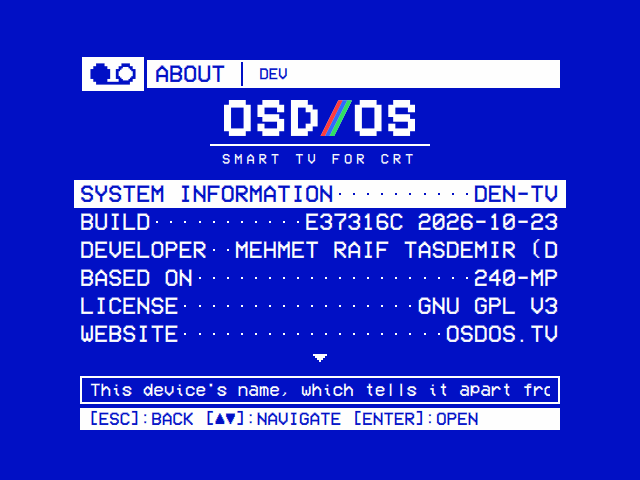
Settings → About of a build from source: DEV in the title bar, and Build with the commit the tree was configured from and the day (CMake's APP_BUILD). A build keeps its configure's commit until CMake configures again.
For Intel and AMD PCs and the Steam Deck, OSD/OS ships as one AppImage with Qt, SDL2 and mpv inside, so it runs on SteamOS with nothing to install. scripts/build-appimage.sh makes it:
CMAKE_PREFIX_PATH=/path/to/Qt/6.7.x/gcc_64 scripts/build-appimage.sh --configure-
--configureconfigures and builds a Release first; leave it out ifbuild/is built already. The result isOSD-OS-linux-x86_64.AppImagein the repository's folder. -
On its first run the script downloads
linuxdeploy,linuxdeploy-plugin-qtandappimagetoolinto.appimage-tools/, and keeps them. -
Its environment:
BUILD_DIR(defaultbuild),APPDIR(defaultAppDir),VERSION(defaultgit describe),MPV_BIN(the mpv to bundle, default the one on thePATH),QMAKE,CMAKE_PREFIX_PATH. -
It bundles a copy of mpv, deploys Qt, then takes out the GPU and driver libraries the target must bring itself (VA-API, GL, libdrm). It then checks every library the AppImage's programs need: one neither bundled nor allowed from the host fails the build, with the libraries named.
ALLOW_HOST_LIBS_EXTRA="soname …"lets a release through without editing the script. -
The bundled mpv must be 0.38 or newer. Ubuntu 24.04's is 0.37 and 22.04's 0.34.1, so build one first and hand it over:
MPV_BIN=$(scripts/build-mpv.sh) scripts/build-appimage.sh --configurescripts/build-mpv.shcompiles mpv 0.40 against the system's own FFmpeg, and prints the binary's path. It needs meson, ninja and pkg-config, FFmpeg's, libass', libplacebo's, Lua 5.2's and VA-API's development packages, and the Wayland, X11, EGL and DRM ones: the release workflow's Linux x86_64 job installs the whole list.MPV_TAGpicks another tag,MPV_SRCanother build folder (default.mpv-build). -
The machine it is built on sets its glibc floor. CI builds it on Ubuntu 24.04: glibc 2.39, a current Steam Deck and newer distributions, not Ubuntu 22.04 or Debian 12.
How the AppImage finds Wayland's libraries on X11-only systems, and its library audit, are in BUILDING.md → Linux x86_64 (AppImage).
A few things that are easy to break have tests in tests/, built apart from the app. They need CMake, a C++17 compiler and Qt 6's Core, Concurrent, Gui, Network, Qml, Quick and Test development packages, libdrm's on Linux, and zlib's and minizip's for the High Scores suite (libminizip-dev; that suite is left out without them); not mpv, FluidSynth or a screen.
cmake -S tests -B build-tests
cmake --build build-tests --parallel
ctest --test-dir build-tests --output-on-failure
They take under a minute; ctest --test-dir build-tests -R looks runs one by name. The app_ tests start your build of the app, from build/ (-DOSDOS_APP=<path> for one elsewhere), and are skipped until there is one.
| Test | What it covers |
|---|---|
storage_search |
Local Files' search keeps the first 200 matches by name; a search replaced by the next is never reported; the backend can go away mid-search; settings and resume points survive a restart; a save that can't be made leaves the old file as it was (skipped when run as root, which writes anyway); state files keep their permissions, a token owner-only from its first write |
looks |
Themes and skins read from the app's folder and the data folder's: listed by name, each once, the data folder's in place of the app's; a skin's pictures and icons read from its own folder only; a theme's colours, skin, effects and music read, what can't be used left empty; an id is a folder's name, never a path |
playback_retire (Linux) |
One video handed over to the next, against a stand-in for mpv: the app goes on while the old player quits, of several asked for in a row only the last plays, a stop while waiting starts nothing, a player that ignores being told to quit is killed a second later, and the menu music is gone before a video's player starts |
menu_music (Linux) |
The menu music, against stand-ins for mpv, FluidSynth and openmpt123: it plays when wanted and stops when not, a hold stops it before hold() returns, a file mpv can't play isn't tried again, a MIDI file is made into a WAV with the right SoundFont, a tracker's module goes to openmpt123 when mpv can't play it |
app_main_menu, app_module_<folder>
|
The app itself, started offscreen with the network out of reach: the main menu with every module on it, and each module as the startup module, opens without a QML warning, and SIGTERM stops the app cleanly. A module that imports a QML module the Qt in use doesn't have is skipped |
tests/README.md has each test's cases, and the checks that want a Raspberry Pi: the screen changing hands between the app and mpv, power cuts while saving, menu music on the sound card in use. A test of your own goes in tests/CMakeLists.txt with the sources it needs; Writing a module shows one.
Seven workflows in .github/workflows:
| Workflow | Runs on | What it does |
|---|---|---|
regression-tests.yml |
Every pull request, and every push to main, that touches src/, views/, modules/, scripts/, tests/, thirdparty/, cmake/, CMakeLists.txt or the workflow; and every release, whose workflow calls it (workflow_call) |
Builds the app (Release) and the tests, and runs the tests, in two jobs. Linux: Ubuntu 24.04 on x64 and on arm64, with apt's Qt 6.4, the oldest the releases are built with. Raspberry Pi OS (trixie, arm64): a debian:trixie container with Raspberry Pi's archive added as pi-gen adds it for the image, at the commit os/build.sh pins, so with the Pi's own Qt (6.8) and mpv (0.40); there the tests run as an ordinary user, as OSD/OS runs on the Pi |
os-image.yml |
By hand (Actions → OS image → Run workflow), and pull requests that touch os/, src/boot/, views/BootScreen.qml, views/Components/VhsCassette.qml, scripts/install.sh or the workflow |
Builds the app for arm64 as a dev tarball, then the OSD/OS image from it with pi-gen, on GitHub's arm64 runners. The image is the run's osdos-image artifact, kept 30 days; pi-gen's logs are kept when it fails |
windows.yml |
Every pull request, and every push to main, that touches src/, shaders/, thirdparty/, cmake/, CMakeLists.txt or the workflow; every release, whose workflow calls it (workflow_call); and by hand |
Builds the app for Windows x64 on windows-2022 with MSVC, Qt 6.8 and vcpkg's SDL2, OpenSSL and minizip, installs it, runs windeployqt and uploads the whole as osdos-windows-x64: one folder, osdos\, with the app, every library and the app's own files (above). For a release, the release job zips that folder as OSD-OS-<version>-windows-x64.zip
|
freebsd.yml and openbsd.yml
|
Every pull request, and every push to main, that touches src/, shaders/, thirdparty/, cmake/, tests/, CMakeLists.txt or the workflow; and by hand |
Build the app in a FreeBSD 15.1 or an OpenBSD 8.0 virtual machine on a Linux runner (vmactions), with the system's Qt 6, SDL2 and minizip packages, run the regression tests there, and upload the install tree as osdos-freebsd-amd64 or osdos-openbsd-amd64, a tarball of bin/ and share/osdos/ to run with the system's Qt 6, SDL2 and mpv packages (above). No release package yet |
release.yml |
A pushed tag matching v*.*.*
|
Builds a release, runs the regression tests on its commit, and publishes it once they pass (below) |
wiki.yml |
A push to main that touches docs/wiki/ or the workflow, and by hand |
Publishes docs/wiki to the wiki, page for page, replacing what the wiki had. GitHub makes a wiki's repository only once its first page is saved in the web interface, so that was done once |
A dev image's app never updates itself, so a branch's image can't swap itself for a release without its changes. With the repository secret OS_FIRST_USER_PASS, the image's pi user gets it as its password; without it the account is locked.
Releases are the owner's to make. A release starts from a version tag, v and a date in BUILDING.md's example (v2026.06.04): created on GitHub's web interface, or pushed with git as BUILDING.md shows:
git tag v2026.06.04
git push origin v2026.06.04
Any tag matching v*.*.* starts release.yml; one containing -rc, -beta or -alpha (v1.0.0-rc1) is published as a pre-release, a way to try the workflow: install.sh and the in-app updater only take the latest full release. Four builds run, the image after the arm64 one, and beside them the regression tests, regression-tests.yml called on the tagged commit:
| Job | Runner | Makes |
|---|---|---|
build-macos-arm64 |
macos-15 |
OSD-OS-<tag>-macOS-arm64.dmg: Qt 6.7 with Qt Shader Tools, SDL2 2.32.10 built from source and bundled, Homebrew's minizip linked in, macdeployqt. With the secrets APPLE_CERT_P12_BASE64, APPLE_CERT_PASSWORD, APPLE_ID, APPLE_APP_PASSWORD and APPLE_TEAM_ID it is signed with the Developer ID and notarized; without them (a fork) signed ad hoc, and the release notes say how to open it the first time. mpv isn't bundled |
build-linux-arm64 |
ubuntu-24.04-arm |
OSD-OS-<tag>-linux-arm64.tar.gz, apt's Qt, for Raspberry Pi OS: install.sh installs it and the packages it needs |
build-linux-x86_64 |
ubuntu-24.04 |
OSD-OS-linux-x86_64.AppImage, with mpv 0.40 built by scripts/build-mpv.sh. Its name has no version, as it updates itself in place |
build-os-image |
ubuntu-24.04-arm |
OSD-OS-<tag>-raspberry-pi.img.xz, from the release's own tarball |
The last job, release, waits for the builds and the regression tests: a tag whose tests fail has its builds made, but no release published. It writes release notes with absolute links, ending with a Downloads table (each file by the system it is for, what it is, and how it is installed and updated), publishes the release with the four packages and install.sh, and labels each file for the Assets list with its name, its system and what it is; GitHub keeps each file's SHA-256 digest with it, which the in-app updater checks a download against. While the workflow runs, each job's file can be downloaded from its run's Artifacts.
The image is Raspberry Pi OS Lite (64-bit, Trixie) built by pi-gen, plus os/stage-osdos, with the app from an arm64 release tarball. The simplest way is the OS image workflow on GitHub (above). Locally, with Docker on an arm64 Linux machine (an x86 one works through QEMU, but takes hours):
FIRST_USER_PASS='…' os/build.sh path/to/OSD-OS-<version>-linux-arm64.tar.gzThe image lands in os/work/pi-gen/deploy/. os/build.sh fetches pi-gen at the commit it pins (PI_GEN_REF), builds its stages 0 to 2 (Raspberry Pi OS Lite) and then OSD/OS's stage. The tarball can be a release's, or one of your own, made on an arm64 machine the way the OS image workflow makes it:
cmake -B build -DCMAKE_BUILD_TYPE=Release -DCMAKE_INSTALL_PREFIX="$PWD/install/usr/local"
cmake --build build --parallel
cmake --install build
(cd install && tar -czf ../OSD-OS-dev-linux-arm64.tar.gz .)
Its settings are environment variables:
| Variable | Default | |
|---|---|---|
FIRST_USER_PASS |
none | The first user's password. Without one the account is locked |
FIRST_USER_NAME |
pi |
The first user, whom the app runs as |
OSDOS_DISPLAY |
hdmi |
The first display preset (crt-pal for osdos-display-crt-pal.txt) |
OSDOS_STREAMING |
1 |
0 leaves out Chromium, Widevine, cage and wtype (about 400 MB) |
OSDOS_YOUTUBE |
1 |
0 leaves out yt-dlp, Deno and ffmpeg (about 90 MB) |
OSDOS_ARCADE |
1 |
0 leaves out MAME (about 450 MB), and RetroArch with FinalBurn Neo (about 230 MB) |
OSDOS_ROOT_SIZE |
8 |
GiB the system keeps of the card; the rest becomes the films partition on the first boot. 0: no films partition |
ENABLE_SSH |
0 |
1 turns SSH on |
TARGET_HOSTNAME, IMG_NAME
|
osdos |
|
WPA_COUNTRY, LOCALE_DEFAULT, KEYBOARD_KEYMAP, KEYBOARD_LAYOUT, TIMEZONE_DEFAULT, PUBKEY_SSH_FIRST_USER, PUBKEY_ONLY_SSH, DEPLOY_COMPRESSION
|
pi-gen's; xz for DEPLOY_COMPRESSION
|
Passed on to pi-gen |
OSDOS_NATIVE |
0 |
1 runs pi-gen directly on a Debian host, as root, instead of in Docker |
OSDOS_PREPARE_ONLY |
0 |
1 sets up the pi-gen tree and its config, and stops |
PI_GEN_REF |
pinned | The pi-gen commit to build from |
WORK |
os/work |
The working folder |
The launcher, the stop helper and the Exit to Terminal unit on the image are taken from scripts/install.sh as it builds, so the image and an app install can't drift apart. What the stage does, step by step, is in os/README.md and on The OSD/OS image.
- BUILDING.md: every platform in full, gamepad mapping, decode tuning, logs
- Writing a module: a module of your own, built and tested
- Troubleshooting: the log, and what goes wrong
- Installation: the releases, installed
- The OSD/OS image
- How it works
- CONTRIBUTING.md: opening a pull request