Repository navigation
NFC Reader
Tap a card to play, the way a tape goes into a deck. Each NFC card stands for something to play: a file, a stream, a YouTube video or playlist, or a Plex film, show, collection or playlist. Open the NFC Reader module, touch a card to the reader, and it plays. This page covers the readers OSD/OS supports and how to set one up, the tag files that map cards to videos (with examples of each kind), writing a card from Plex, how a card hands off to another module, and troubleshooting.
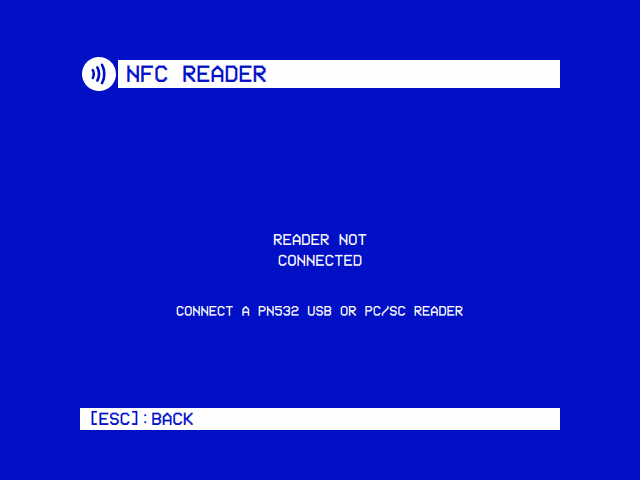
The module's one screen is a cassette with its state on the label: Reader not connected (and what to plug in), Tap a card to play (and the reader's name), Playing ► (and the card's title), or Card not matched (and the card's UID). Back leaves it.
OSD/OS only ever reads a card's UID, its fixed serial number. Nothing is written to the card itself: what a card plays is kept in a text file on the player, so any cheap NFC card, sticker or key fob works, and a card can be remapped at any time.
| Reader | How OSD/OS talks to it | Needs |
|---|---|---|
| PN532 USB (recommended) | Directly, over the USB-serial chip it is built on, speaking the PN532's own serial protocol. | No driver and no daemon on any system: only permission to open the serial device. Works on SteamOS too. |
| ACS ACR122U and other PC/SC contactless readers | Through PC/SC (pcsc-lite on Linux, the system's PC/SC on a Mac), with the standard FF CA 00 00 00 "get UID" command, so any CCID contactless reader works. |
pcscd running on Linux, and a build of OSD/OS with PC/SC support (the release builds have it). Not on immutable systems like SteamOS, where pcscd can't be installed. |
A PN532 module is recognised by its USB-serial bridge chip:
| Chip | USB id (vendor:product) |
|---|---|
| QinHeng CH340 (the common PN532 USB module) | 1a86:7523 |
| QinHeng CH341 | 1a86:5523 |
| QinHeng CH9102 | 1a86:55d4 |
| Silicon Labs CP210x | 10c4:ea60 |
| FTDI FT232 | 0403:6001 |
| FTDI FT231X | 0403:6015 |
| Prolific PL2303 | 067b:2303 |
On Linux OSD/OS tries the ttyUSB* and ttyACM* devices with one of these ids; on a Mac, /dev/cu.usbserial*, /dev/cu.wchusbserial*, /dev/cu.SLAB_USBtoUART* and, last, /dev/cu.usbmodem*. A device only counts as a reader once it answers the PN532's handshake, so another gadget on the same chip (an Arduino, say) is tried once and then left alone until it is unplugged.
There is no reader setting: detection is automatic. While the module is enabled, OSD/OS looks for a reader every two seconds, PC/SC first, then PN532, and once one is found reads it twice a second, on a thread of its own. A reader unplugged is noticed, and looked for again.
The module works on Linux (Raspberry Pi OS, the OSD/OS image, SteamOS and other distributions) and macOS. Elsewhere it says Not supported on this platform.
Run the setup script once, as the user OSD/OS runs as (it uses sudo itself). From a checkout:
bash scripts/setup-nfc-reader.shor without one, from the repository:
bash <(curl -fsSL https://raw.githubusercontent.com/mehmetraif/OSD-OS/main/scripts/setup-nfc-reader.sh)scripts/setup-nfc-reader.sh does two independent things:
-
PN532 USB: writes
/etc/udev/rules.d/99-osdos-nfc.rules, which gives the chips above mode0660, the serial group (dialouton Debian and Raspberry Pi OS,uucpon Arch and Fedora) anduaccess(for a desktop session), and adds the user to that group. No packages. -
PC/SC (skipped on immutable systems): installs
pcscd,pcsc-toolsandlibpcsclite1(or your distribution's equivalents), blacklists the kernel's ownpn533andpn533_usbmodules (they would claim an ACR122U first), and on Debian-based systems lets the user reach pcscd (a systemd override and a polkit rule). Then it enables and restartspcscd.
At the end it lists the readers it can see. If it added you to a group, log out and back in (or reboot) before trying.
Options:
bash scripts/setup-nfc-reader.sh pi       # authorise another user than the one running it
SKIP_PCSC=1 bash scripts/setup-nfc-reader.sh   # PN532 only
SKIP_PN532=1 bash scripts/setup-nfc-reader.sh  # PC/SC only
The image doesn't run the script, and doesn't install pcscd. A PN532 appears as /dev/ttyUSB0 (or /dev/ttyACM0), which the dialout group may open. If the module keeps saying Reader not connected with a PN532 plugged in, or you want a PC/SC reader, run the script over SSH. Logged in as another user, give it pi, the user the app runs as on the image: bash <(curl -fsSL https://raw.githubusercontent.com/mehmetraif/OSD-OS/main/scripts/setup-nfc-reader.sh) pi.
Nothing to set up: PC/SC comes with macOS, and PN532 modules appear as /dev/cu.* with the system's drivers.
Settings → TV / Movie → NFC Reader → Enabled: On. NFC Reader then appears on the main menu.
Each card has a text file in the tags folder: nfc_tags in the data folder (~/.local/share/OSD-OS/nfc_tags/ on Linux and the image, ~/Library/Application Support/OSD-OS/nfc_tags/ on a Mac), or the folder Settings → TV / Movie → NFC Reader → Tags Directory names. OSD/OS creates it if it is missing.
A tag file:
- is named after what the card plays: the file name, without
.txt, is the title the screen shows (Playing ►Terminator 2 (1991)); - holds, on its first non-empty line, the card's UID, in any form:
04:A2:3B:1C:5D:80:01,04a23b1c5d8001and04 A2 3B 1C 5D 80 01are the same card (anything that isn't a hex digit is dropped, and the rest is read in pairs); - holds, on its second non-empty line, what the card plays (below);
- may hold, on a third, a mode:
shuffle, which Plex show, season, collection and playlist cards understand; - ignores blank lines and anything after the third. A UTF-8 byte-order mark and Windows line ends are fine.
Only files ending in .txt count. If two files hold the same UID, the one that sorts first alphabetically wins, and the log says so. The folder is read each time the module opens, and again when a card it doesn't know is tapped, so a file you add or fix works at the next tap.
| Second line | Plays |
|---|---|
An absolute path: /media/OSD-OS/Movies/Sci-Fi/Terminator 2 (1991).mp4
|
That file, in mpv. On the image, /media/OSD-OS is the card's film partition, with the films in its Movies folder, and USB drives are under /media/usb/<label>. |
A relative path: films/Fireplace.mp4
|
That file in OSD/OS's own folder if it is there, otherwise in the data folder. |
A playlist file: /media/OSD-OS/Movies/Rambo Marathon.m3u
|
The list, in mpv. Resume remembers which video it was on. |
A stream URL: http://… or https://…
|
That stream, in mpv. |
A YouTube URL: https://www.youtube.com/watch?v=Eg8tK1LpLS8
|
The video, through yt-dlp, at the module's YouTube Video Resolution. A playlist URL (https://www.youtube.com/playlist?list=…) plays the playlist, and resume remembers which video it was on. |
A Plex guid: plex://movie/…, plex://show/…, plex://season/…, plex://episode/…
|
Handed to the Plex module, which finds it on your server and plays it. See Card hand-off. |
A Plex set: plex://collection/<ratingKey>, plex://playlist/<ratingKey>
|
Handed to Plex, which plays the collection or playlist as a queue. |
YouTube and stream URLs are played by the NFC module itself, with mpv's yt-dlp hook turned on; they don't go through the YouTube module (so not its Advanced settings or its sign-in). Plex refs are handed off.
A film on the card's film partition, Terminator 2 (1991).txt:
04:A2:3B:1C:5D:80:01
/media/OSD-OS/Movies/Sci-Fi/Terminator 2 (1991).mp4
A YouTube video, Laserdisc An Introduction.txt:
04:6F:91:2A:7C:3E:80
https://www.youtube.com/watch?v=Eg8tK1LpLS8
A YouTube playlist, The Story of Laserdisc.txt:
04:11:22:33:44:55:66
https://www.youtube.com/playlist?list=PLv0jwu7G_DFUoByWSHHoSTlUIxY7VkJLi
A playlist file on a USB stick labelled KINGSTON, Rambo Marathon.txt:
04:9C:0E:41:B2:63:80
/media/usb/KINGSTON/Rambo Marathon.m3u
Plex cards are best written by the card writer, which looks the item up for you. By hand, the guid and the ratingKey are in Plex Web's Get Info → View XML for the item (its guid and ratingKey attributes); replace the <…> below with them.
A Plex show played as a shuffle of its episodes, Cowboy Bebop (1998).txt:
04:D3:5A:72:19:4B:80
plex://show/<the show's guid>
shuffle
A Plex collection, in order, 80s Action (Collection).txt:
04:27:B8:6E:03:91:80
plex://collection/<the collection's ratingKey>
The UIDs in these examples are made up: use your own card's, which the screen shows when you tap it (or take the stub file it writes, below).
Tap a card OSD/OS has no file for, and it writes one for it: the UID, with : made -, as the name (04-A2-3B-1C-5D-80-01.txt), holding just the UID. The screen says Card not matched and shows the UID. Rename the file to the title you want, add the second line, and tap the card again. A file with a UID but no second line is a known card with nothing to play: the screen says the same.
The stub is never written over an existing file of the same name.
- Open NFC Reader from the main menu. It says Tap a card to play and the reader's name (
PN532 v1.6 (/dev/ttyUSB0), or the PC/SC reader's). - Touch a card to the reader. The label says Playing ► and the card's title for a moment, then the video starts, with the loading screen while mpv (and yt-dlp, for YouTube) gets ready.
- When it ends, or you stop it, you are back at Tap a card to play.
- Cards are acted on only while the NFC Reader screen is open: a card that touches the reader anywhere else in OSD/OS does nothing.
- A card has to arrive to count. One already resting on the reader when the screen opens, or left there after its video ends, does nothing until it is lifted and touched again.
- While a card's video plays, other cards are ignored.
Where you stopped is kept per mapped path in nfc_reader_history.json, so remapping a card to another video doesn't carry the old video's position over.
- A video stopped more than 5 seconds in is resumed; one watched to 95% counts as finished and starts over.
- A playlist (an
.m3u/.m3u8, or a YouTube URL withlist=) remembers which video it was on as well as the time: Resume video 3 at 12:34. Played to its end, it starts over next time. - Resume Playback says what happens: Ask (the default) offers to resume or start from the beginning, Always resumes, Never always starts from the beginning.
-
Auto Show Subtitles: Forced Only (the default) shows subtitles only for foreign dialogue, On always shows them, Off never.
-
Subtitle Language: the language to prefer (
--slang), from the full ISO 639-1 list, or Any for no preference. -
YouTube Video Resolution: 480p (the default), 720p or 1080p, for YouTube URLs on cards. It gives yt-dlp, for 480p:
bestvideo[height<=?480][vcodec^=avc1]+bestaudio/bestvideo[height<=?480]+bestaudio/best[height<=?480]/bestH.264 first, which a Pi decodes in hardware, then any codec at that height, then the best single file.
-
Scaling: how a 16:9 picture fills a 4:3 screen for this module's videos; Default follows Settings → TV / Movie → Scaling.
A Plex card plays with the Plex module's own settings, since Plex plays it.
With the NFC Reader module enabled and a reader connected, Plex's screens offer to write a card:
- WRITE NFC CARD on a film's, an episode's, a show's and a season's detail screen, under View Extras;
- @ WRITE NFC CARD at the top of a collection's or a playlist's list, with » PLAY ALL and ~ SHUFFLE (which a list gets when it has more than one item, or a show).
Without a reader plugged in, the button isn't there. Then:
- Select it. The screen says TAP A CARD FOR… and the title.
- Touch a card to the reader.
- Choose how it plays:
- a film or an episode: Write card;
- a show or a season: Write card (Sequential Episodes), which plays the episode you are up to (On Deck), or Write card (Shuffle Episodes), which plays its episodes in a shuffled order and leaves your watched state alone. Either carries on to the next episode when Plex's Autoplay Next Episode is on;
- a collection or a playlist: Write card (In Order) or Write card (Shuffled).
- If the card already plays something, OSD/OS asks first: THIS CARD PLAYS "…". CHANGE TO… → Change this card or Cancel.
- CARD WRITTEN FOR…: select to finish.
The card writer is armed only while its screen is open, so a card lying near the reader while you browse can never be written by accident.
What it writes is an ordinary tag file in the tags folder:
- named after the title, with the year, so two of a kind don't collide:
Dune (2021),Cowboy Bebop (1998)for a show,Cowboy Bebop (1998) - S1for a season,Cowboy Bebop (1998) - S1E5for an episode,80s Action (Collection)orRoad Trip (Playlist)for a set. A name already taken by another card gets(2),(3)and so on. A very long title is shortened in the name, to what any file system takes; - holding the item's Plex guid (
plex://movie/…), which survives library rescans and moves between servers, or for a collection or playlist its ratingKey (plex://collection/<ratingKey>), since those exist only on one server. A set's contents are looked up at each tap, so the card follows the collection as it changes; - with
shuffleon the third line for the shuffled choices; - replacing the file that held this card before, if any, once the new one is written. Should it not be (the SD card full, say), the screen says COULD NOT WRITE CARD, and the card goes on playing what it played.
You can rename the file afterwards; only its contents matter for the mapping.
A card can point at something another module owns. The NFC module decides which module from the second line's URI scheme, and that module decides what to play: its sign-in, lookup and playback stay where they already live.
| Scheme | Goes to |
|---|---|
plex://…, and legacy agent guids com.plexapp.agents.…://…
|
Plex (com.osdos.plex) |
http://, https://, a path |
Played by the NFC module itself |
flowchart TD
    T[A card is tapped on the NFC Reader screen] --> M{A tag file with this UID?}
    M -->|no| S["Write a stub file:<br/>Card not matched"]
    M -->|"yes, no second line"| U[Card not matched]
    M -->|yes| K{"The second line's scheme"}
    K -->|"a path, http, https"| P["The NFC module's player<br/>(mpv, with yt-dlp for YouTube)"]
    K -->|plex| E{Plex enabled?}
    E -->|no| U
    E -->|yes| C["Plex's CardPlay.qml<br/>resolves the guid or set"]
    C --> Q["Plex's Player<br/>(or QueuePlay for a set)"]
    P --> R[Back at Tap a card to play]
    Q --> R
What the receiving module does:
- Its
Root.qmlsends a card (navParams.cardRef, withcardModeandcardTitle) straight to itsCardPlay.qml, ahead of its own sign-in and user screens. A card plays as whoever is already signed in, and never asks for a profile switch or a PIN: in physical form that would be a way round the profile PIN. -
CardPlay.qmlresolves the ref and replaces itself with the player, so back from the video goes straight to the NFC Reader's tap screen, ready for the next card. Back while it is still looking the item up, or preparing its stream, gives the card up and returns there too. - It doesn't change what the server remembers for the item (Plex's audio and subtitle choices). A shuffle card reports no progress, so your watched state, Continue Watching and On Deck stay as they were.
- Its errors look like the NFC module's. Plex's: NOT SIGNED IN TO PLEX, NO PLEX SERVER SELECTED, THIS PLEX PROFILE NEEDS ITS PIN / OPEN THE PLEX MODULE TO SIGN IN, THIS CARD HAS NO PLEX ITEM, PLEX SERVER UNREACHABLE, NOT FOUND ON THIS SERVER, THIS ITEM HAS NO PLAYABLE MEDIA, NO EPISODES FOUND, UNSUPPORTED ITEM TYPE, COULD NOT LOAD ITEM. Select retries, back returns.
- Cards never switch server or user: an item on another server, or one the signed-in user can't see, is NOT FOUND ON THIS SERVER.
If the receiving module is turned off, the card is refused (Card not matched) and the log says which module it needs.
Another module can take cards too: a row in kHandoffModules in NfcReaderBackend.cpp, a CardPlay.qml, and a cardRef branch in that module's Root.qml. Nothing in the NFC module is specific to Plex. See Writing a module and ARCHITECTURE.md.
There is no polling setting. The reader is polled whenever the module is Enabled, whether its screen is open or not (the Plex card writer needs it from Plex's screens), but taps only play while the NFC Reader screen is open. Turning Enabled off stops the polling.
A reader that stops answering (PC/SC calls can hang on a Mac after a replug) is shown as disconnected after 3 seconds; after 10, its thread is replaced, up to five times in a row.
Settings → TV / Movie → NFC Reader:
| Setting | Values | Default | What it does | Config key |
|---|---|---|---|---|
| Enabled | On, Off | Off | Shows NFC Reader on the main menu and polls the reader. | modules.com.osdos.nfc_reader.enabled |
| Tags Directory | A folder, or Default Folder | Default | Where the tag files are. Default is nfc_tags in the data folder. |
modules.com.osdos.nfc_reader.tags_directory ("" for the default) |
| Resume Playback | Ask, Always, Never | Ask | See Resume. |
modules.com.osdos.nfc_reader.resume_playback (ask, yes, no) |
| YouTube Video Resolution | 480p, 720p, 1080p | 480p | The most a YouTube card plays at. | modules.com.osdos.nfc_reader.playback_resolution |
| Auto Show Subtitles | Forced Only, On, Off | Forced Only | Whether subtitles show when a video starts. |
modules.com.osdos.nfc_reader.auto_subtitles (forced, on, off) |
| Subtitle Language | Any, or a language | Any | The subtitle language to prefer. |
modules.com.osdos.nfc_reader.sub_lang (- for Any, else an ISO 639-1 code: en, tr …) |
| Scaling | Default, Letterbox, 14:9, Pan & Scan, Anamorphic | Default | How a 16:9 picture fills a 4:3 screen in this module. | modules.com.osdos.nfc_reader.video_scaling |
| File | What it is |
|---|---|
nfc_tags/*.txt (or the Tags Directory) |
One tag file per card |
nfc_reader_history.json |
Resume points: { "<mapped path>": { "pos": <ms>, "plPos": <playlist index or -1> } }
|
{
    "modules": {
        "com.osdos.nfc_reader": {
            "enabled": true,
            "tags_directory": "",
            "resume_playback": "ask",
            "playback_resolution": "480p",
            "auto_subtitles": "forced",
            "sub_lang": "en",
            "video_scaling": "Default"
        }
    }
}
Two environment variables help when a reader isn't found (MP240_… names work too):
| Variable | What it does |
|---|---|
OSDOS_NFC_DEBUG=1 |
Logs every step of reader detection: each serial device tried and skipped, with its USB id, what it answered, the PC/SC reader list. |
OSDOS_NFC_SERIAL_DEVICE=/dev/ttyUSB0 |
Tries only this serial device as a PN532, for a reader on a bridge chip outside the list above, or a machine with several. |
For the OSD/OS image (or an install with the autostart service), set them with sudo systemctl edit osdos, then sudo systemctl restart osdos:
[Service]
Environment=OSDOS_NFC_DEBUG=1
and read the log with sudo journalctl -u osdos -f.
Reader not connected, with a PN532 plugged in. Check that the device exists and that the user can open it:
ls -l /dev/ttyUSB* /dev/ttyACM*
id
The device should belong to dialout (or uucp) with rw for the group, and id should list that group. If not, run the setup script and log in again. If the device is there and accessible, set OSDOS_NFC_DEBUG=1: the log says whether the chip was skipped (an id not on the list: use OSDOS_NFC_SERIAL_DEVICE) or tried without answering the PN532 handshake ("no bytes received at all" means nothing reaches the chip: a board in the wrong interface mode, a miswired adapter, or a USB-serial driver that never puts bytes on the wire).
Reader not connected, with a PC/SC reader plugged in. systemctl status pcscd should say it is running, and pcsc_scan should list the reader. If pcsc_scan doesn't, the kernel's pn533 driver may have claimed it: the setup script blacklists it, then unplug and replug the reader. If the screen says Connect a PN532 USB reader (without "or PC/SC"), this build of OSD/OS has no PC/SC support: use a PN532.
Card not matched. The tags folder has no file with this UID, or the file has no second line. The screen shows the UID; compare it with the files (grep -ril "04:A2:3B" ~/.local/share/OSD-OS/nfc_tags). Check Tags Directory, and that no other file holds the same UID.
A card is not matched although it points at Plex. The Plex module is turned off.
Tapping does nothing. The NFC Reader screen must be open. A card already on the reader has to be lifted and touched again. While a video plays, cards are ignored.
Playback failed: Check the mapped path or URL (YouTube links require yt-dlp). The second line names a file that isn't there (paths are case-sensitive on Linux), or a YouTube URL failed: see YouTube for yt-dlp. Select retries.
The Plex card shows an error. Open the Plex module and sign in, choose the server, or enter the profile's PIN there: a card never does these for you.
There is no WRITE NFC CARD on Plex's screens. The NFC Reader module must be enabled and a reader connected.
More in Troubleshooting.
- Plex: where cards are written, and what plays a Plex card
- YouTube: yt-dlp, which YouTube cards need
- Local Files: the film partition and USB drives on the image
- Writing a module: taking cards in a module of your own
- Playback and mpv
- Configuration files