Repository navigation
How It Works
What happens inside OSD/OS, for the curious and for anyone about to change it: the shell and how it finds its modules, how the screens are put together and moved between, how a remote's keys arrive, how the picture reaches the screen and who takes it over, how a video plays (in an mpv process, or inside the window), the menu music, the effects, where settings are kept, and the logs. ARCHITECTURE.md is the reference for every detail; this page is the map, with links into it and short pieces of the real code.
OSD/OS is a browsing shell that hands off to tools made for the job. The shell, one C++ Qt 6 program with its screens in QML, does the browsing, the sign-ins and the settings. Playing is someone else's: mpv for a video (as a process of its own, or inside the window as libmpv with Transparent Background), Chromium for Netflix and Prime Video, MAME for the Arcade module's games, and your own programs through the Scripts module.
flowchart TB
    subgraph app["osdos: one process"]
        main["main.cpp"] --> core["AppCore<br/>modules, config.json, lists.json"]
        main --> qml["QML engine<br/>Main.qml, views/, modules/*/views/"]
        main --> be["Module backends<br/>LocalFiles, Plex, Jellyfin, Emby, YouTube, …"]
        main --> mpvc["MpvController"]
        main --> inp["InputManager (SDL2)"]
        main --> dh["DisplayHandoff"]
        main --> sys["AudioOutput, MenuMusic, DisplayOutput,<br/>BootProgress, UpdateManager,<br/>BluetoothManager, WifiManager"]
    end
    mpvc -- "process, JSON over a socket" --> mpv["mpv"]
    mpvc -- "Transparent Background" --> emb["libmpv inside the window<br/>EmbeddedMpv, VideoSurface"]
    sys -- "MenuMusic" --> mm["mpv, for the menu music"]
    be -- "ScriptLauncher" --> ch["Chromium in cage, MAME, scripts"]
    mpv --> dh
    ch --> dh
The rest of this page follows that picture from the top.
src/main.cpp sets everything up, in this order:
-
Before the application exists: Qt's own mouse cursor is hidden on a headless screen (
QT_QPA_EGLFS_HIDECURSOR=1, unless set), and OpenGL contexts share their objects (Qt::AA_ShareOpenGLContexts), so a video drawn inside the window can be shown as it is. -
The application, named
OSD-OS, its version the build's (APP_VERSION;devfor a build that isn't a release). The pointer is hidden; the app draws its own. -
Signals. SIGTERM, SIGINT and SIGHUP are only noted; a 100 ms timer then leaves the event loop with 128 plus the signal's number, so destructors run, mpv is stopped and the screen is given back. That exit code is also how the service's stop helper tells
systemctl stopfrom the user's Quit (The OSD/OS image → osdos-stop). -
The two folders (below), and a line in the log for every screen attached:
[main] display index 0: "<name>" 720x480 at (0,0). -
AppCore, which finds the modules. -
The objects, each living as long as the app: the module backends,
DisplayHandoff(ahead of everything that takes the screen through it, so it outlives them),MpvController,InputManager,IdleTracker(the screen saver),UpdateManager,BootProgress,DisplayOutput,AudioOutput,MenuMusic,BluetoothManager,WifiManager. - The wiring between them: a gamepad's keys to mpv while the window has no focus, a change of sound card to mpv and to the menu music, and a video's end to the menu music.
-
Each backend registered with
AppCore, then the other objects handed to QML as context properties, the image providersosdiconandosdskin, and the QML typesVideoSurface,VhsNoiseandSelectorFx(import OSDOS.Video). -
Main.qmlloaded. If it fails to load, the app logs[main] QML engine failed to load Main.qmland exits with 1. -
The first frame (
frameSwapped, or five seconds whatever happens) tellsBootProgress, which, on the OSD/OS image, lets the held-back services start.
| What | Where | |
|---|---|---|
APP_ROOT |
Main.qml, views/, modules/, assets/, scripts/, LICENSE
|
$APP_ROOT if set; inside a macOS bundle, its Contents/Resources; else ../share/osdos beside the binary when it exists (/opt/osdos/share/osdos on a Pi); else the binary's parent folder |
DATA_ROOT |
Settings, lists, sign-ins, browser profiles, staged updates, a yt-dlp of its own |
$DATA_ROOT if set (an existing folder); else ~/.local/share/OSD-OS on Linux and the BSDs, ~/Library/Application Support/OSD-OS on macOS, %APPDATA%\OSD-OS on Windows |
Run from a source tree, APP_ROOT=$(pwd) ./build/osdos points the app at the checkout. OSD/OS was 240-MP: at start, a 240-MP data folder beside the new one is moved over when the new one is missing or empty, and module ids in its JSON files are renamed (com.240mp.x to com.osdos.x). Every OSDOS_… environment variable is also read under its old MP240_… name (src/util/LegacyNames).
AppCore is the shell, the context property appCore in QML. As it is made, it reads every modules/*/manifest.json, folder by folder in name order. A manifest needs an id and an entry_point_qml; one that isn't JSON, or lacks either, is skipped with a warning ([AppCore] Bad manifest.json in …, or [AppCore] Skipping …: manifest missing 'id' or 'entry_point_qml'). Ambient:Mode's, whole:
{
  "id": "com.osdos.ambient_mode",
  "name": "Ambient:Mode",
  "icon": "assets/images/logo.svg",
  "entry_point_qml": "views/Root.qml",
  "settings_group": "tv",
  "settings": [
    { "key": "enabled", "label": "ENABLED", "type": "toggle", "default": "OFF" },
    { "key": "media_directory", "label": "Media Directory", "type": "directory_browser", "default": "" },
    { "key": "auto_launch", "label": "Auto-Launch Playback", "type": "toggle", "default": "OFF" },
    {
      "key": "video_scaling",
      "label": "Scaling",
      "type": "list_single",
      "options": ["Default", "Letterbox", "14:9", "Pan & Scan", "Anamorphic"],
      "default": "Default",
      "description": "How a 16:9 picture fills the 4:3 screen in this module\n[DEFAULT] As Settings' Scaling says"
    }
  ]
}-
The settings a manifest lists become the module's page in Settings, saved under
modules.<id>inconfig.json. Itssettings_groupsays where Settings lists that page:"tv"under Modules on the TV / Movie page, as here;"arcade"on the Arcade page, which the arcade modules share; none, under Modules on Settings' first screen. No C++ is needed to add one (ARCHITECTURE.md → manifest.json Reference). -
Enabled or not: the module's
enabledinconfig.json, else its manifest's default forenabled, else on. -
The main menu (
views/ModuleList.qml) asksscan_for_modules()and gets the enabled modules, each with its entry point (modules/<folder>/views/Root.qml). A backend may add rows of its own after them (get_menu_entries()), as Scripts does for the scripts you put on the main menu.
A module that needs C++ (a server's API, a device) has a backend in src/modules/<name>/, made in main.cpp and registered with one call, the only place its id is written in C++:
appCore.registerModule("com.osdos.local_files",  "localFilesBackend",  &localFiles,  ctx);
appCore.registerModule("com.osdos.plex",         "plexBackend",        &plexBackend, ctx);
appCore.registerModule("com.osdos.youtube",      "youtubeBackend",     &youtubeBackend, ctx);
appCore.registerModule("com.osdos.playlists",    "playlistsBackend",   &playlistsBackend, ctx);
registerModule keeps the backend for invoke_module_action(), hands it to QML under its name (localFilesBackend), and connects what it declares, found by introspection:
| The backend declares | Connected to |
|---|---|
signal dynamicOptionsReady(QString, QVariant)
|
appCore.dynamicOptionsReady(moduleId, key, options): a setting's choices, filled in at run time |
signal authStateChanged()
|
appCore.moduleAuthStateChanged(moduleId): settings that need a sign-in show or hide |
slot onSettingChanged(QString, QString, QVariant)
|
appCore.moduleSettingChanged: the backend hears its settings change |
Q_INVOKABLE QString get_auth_state() |
asked when needed, for requires_auth settings |
Q_INVOKABLE QVariantList get_menu_entries() |
asked when needed, for rows of its own on the main menu |
All fourteen modules have one: com.osdos.local_files, plex, jellyfin, emby, ambient_mode, nfc_reader, youtube, weather, scripts, netflix, prime_video, playlists, arcade and highscores. A module of QML alone needs no line at all. Writing a module walks through one; ARCHITECTURE.md → AppCore lists every slot.
| Context property | What it is |
|---|---|
appCore |
Modules, settings, lists, themes and skins, the file picker's folders |
localFilesBackend, plexBackend, … |
One per module backend |
mpvController |
Playback |
inputManager |
Gamepads, remaps, the hints for the foot of each screen |
displayHandoff |
Whether something else has the screen |
audioOutput, menuMusic, displayOutput, bootProgress
|
Settings → Audio Output, the menu music, Settings → Display Output, the boot screen |
updateManager, bluetoothManager, wifiManager, idleTracker
|
Settings → Update, Settings → Bluetooth, Settings → Wi-Fi, the screen saver |
Main.qml is one full-screen, frameless window. Everything else is loaded into it:
flowchart TD
    W["Window: Main.qml"] --> VS["VideoSurface<br/>a video inside the window: over everything<br/>full screen, under the menus behind them"]
    W --> SC["screen<br/>a layer through the screen shader when an effect is on"]
    W --> MA["MouseArea: moves the drawn pointer"]
    SC --> F["face: the window as it is now"]
    F --> OG["OsdGround: the OSD background<br/>with the background effect in it"]
    F --> ML["moduleLoader<br/>main menu, Settings, or a module's Root.qml"]
    F --> SF["SelectorFx: sparks round the selected line"]
    ML --> IL["the module's own Loader<br/>its Items.qml, Player.qml, …"]
    SC --> LF["lastFace, nextFace<br/>the old window, caught for a transition"]
    SC --> BS["bootScreenLoader: BootScreen.qml"]
    SC --> DK["displayKeepLoader: DisplayKeep.qml"]
    SC --> SS["the screen saver"]
    SC --> MP["MousePointer"]
-
Every view is a
FocusScopethat declaresproperty var navParamsand talks to its router with signals; the router loads it into aLoader(Navigation). -
Views read the shell through
root.*,Main.qml's own properties, rather than context properties:root.hints,root.bootActive,root.videoActive,root.primaryColor… When aLoaderswaps views, the dying view's context properties turn null and bindings on them throw errors;root, found by its id, lives as long as the app. -
Sizes come from the screen:
root.swandroot.share its width and height,root.pxone pixel of a 240-line picture (sh / 240), androot.contentBoxthe area every view lays out in, well inside a CRT's edges (Display Output → Overscan and the safe area). -
The look (the colour scheme, the skin, the effects, the transition, the menu music) is resolved here from Settings and the theme, and the views read
root.primaryColor,root.surfaceColorandroot.skin(Themes). Everything is drawn in two colours. - The layers above the views take the keys while they are up: the boot screen, the question after a display switch, the screen saver.
There are two levels, each a Loader with a stack:
-
The app's:
Main.qml'smoduleLoaderand itsappNavStack, between the main menu, Settings and a module. -
A module's: its
Root.qml, the router every module has, with its ownLoaderandnavStack, between the module's views.
A view never loads another itself. It emits navigateTo(path, params, listState) or goBack(), and its router does the rest: it keeps where the list was (listState), loads the next view with params as its navParams, and on the way back hands the old view its navListState, so the cursor is where it was. From Local Files' Root.qml:
function navigateTo(viewPath, params, fromState) {
    var resolved = Qt.resolvedUrl(viewPath)
    navStack.push({ source: internalLoader.source, params: currentParams, listState: fromState || {} })
    currentParams = params || {}
    root.changeWindow(internalLoader, resolved, { "navParams": params || {} })
}

function navigateBack() {
    if (navStack.length === 0) {
        moduleRoot.goBack()
        return
    }
    var prev = navStack.pop()
    if (!prev.source || prev.source.toString() === "") {
        moduleRoot.goBack()
        return
    }
    var restored = Object.assign({}, prev.params)
    restored.navListState = prev.listState || {}
    currentParams = restored
    root.changeWindow(internalLoader, prev.source, { "navParams": restored })
}-
Back from a module's first view empties its stack:
Root.qmlemitsgoBack(), andMain.qmlpops its own stack, back to the main menu. Back on the main menu opens Settings. -
replaceWith(path, params)loads a view without stacking the one before, for a step that shouldn't come back (a sign-in done, a card resolved into its player). -
root.changeWindow(loader, source, properties)is how every view changes, the app's and each module's. It plays Settings → Transition: the old window is caught as a picture (lastFace), then it fades, turns like a cube, ripples, rides a wave or spreads from a drop. It changes at once, with no transition, into or out of a video's views, while the effects rest, under the boot screen or the display question, and for the very first view:
if (transition === "" || windowChange.changing || effectsRest || bootActive || displayHolding
        || from === "" || playbackView.test(from) || playbackView.test(to)) {
    showView(loader, source, properties)
    return
}-
At start, once the boot screen and the display question are gone,
openStartupModule()opens Settings → Start on Module's module withnavParams.fromAppStartup, or, when a favourite is set to Play at Startup, that favourite's module withnavParams.startupPlay.
ARCHITECTURE.md → QML View Patterns has the full router and view templates.
Every screen works with the arrows, select, back and play/pause, whatever they come from. All of it reaches QML as ordinary key events, so a view that handles the right keys handles every device (src/input/InputManager):
flowchart LR
    K["Keyboard, keyboard-like remote"] --> F["InputManager's event filter"]
    G["Gamepad"] --> SDL["SDL2, polled every 16 ms"]
    SDL --> A["an action: up, down, left, right,<br/>select, back, play_pause"]
    F -- "Right Shift, a remapped key" --> A
    A --> Q["a key event, posted to the window"]
    F -- "a key as it is" --> V["the focused view"]
    Q --> V
    F -- "volume, play, stop, next…" --> MPV["mpv, over its socket"]
    V -- "during a video" --> MPV
| Action | Key it becomes | mpv's name | Gamepad, by default |
|---|---|---|---|
| up, down, left, right | the arrows |
UP, DOWN, LEFT, RIGHT
|
D-pad, left stick; LB and RB for left and right |
| select | Return | ENTER |
A (the south button) |
| back | Escape | ESC |
B (east), Back/Select |
| play_pause | Space | SPACE |
Start |
-
Gamepads go through SDL2's game controller layer, without its video part, so it works on a bare console. Buttons are named by position on an Xbox layout, so a Nintendo or PlayStation pad behaves alike. A held direction repeats after 400 ms, every 100 ms.
input.cfgin the data folder overrides any binding on every pad and is read again as it changes; a pad's page in Settings → Controls sets that model's own over it, and what its buttons are called (app.controllers.<key>);gamecontrollerdb.txtthere adds pads SDL doesn't know (Controls). -
Keyboards and remotes send real keys. Right Shift is a second back, for one hand, except while a text field has the focus. A remote's OK that comes as keypad Enter, or as a Select or OK key, is select as Enter is. Without a desktop (Qt's EGLFS) a mouse's left and right buttons are select and back, as an air-mouse remote's OK is a left click. Settings → Controls → All Keyboards & Remotes binds one more key, remote button or mouse button to each of six actions, up, down, left, right, select and back (
app.remote_keymap.<action>), on top of its own key; a keyboard's or remote's own page, on that one only (app.controllers.<key>). On Linux each keyboard and remote is read from its/dev/inputdevice beside Qt, read-only, which says which one a key came from. - Media keys (volume, mute, play/pause, stop, next, previous, forward, rewind) always go to mpv, over its socket, never to the menus.
-
During a video in an mpv process, the player's view passes keys on to mpv (
mpvController.sendKey()), where the deck's menu (scripts/mpv-osc.lua) takes them. On a Pi the window keeps the keyboard even while mpv has the screen: Qt and SDL read/dev/inputdirectly, and only drawing stops. On a Mac, where mpv's window has the focus, a gamepad's keys go to mpv straight fromInputManager. -
The hints at the foot of each screen (
[ESC]:BACK,[B]:BACK) follow the device used last and the bindings in force: views bindroot.hints.*.
ARCHITECTURE.md → Input has the details.
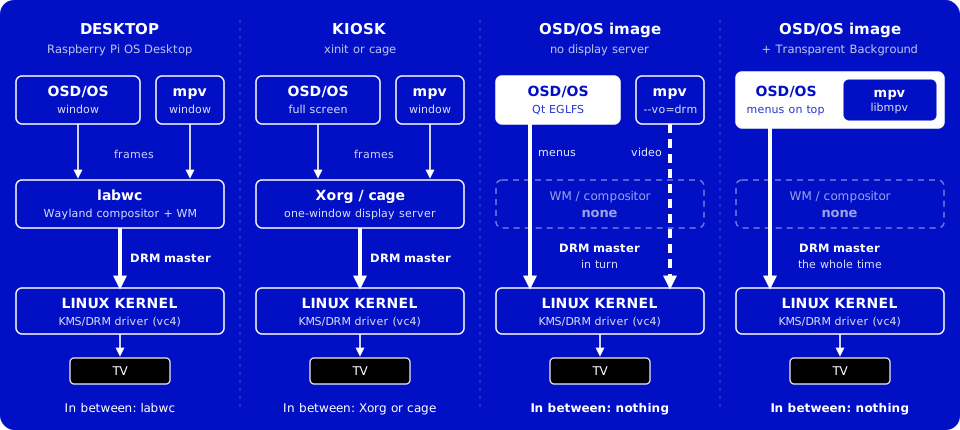
On a desktop (macOS, a Linux desktop, SteamOS), OSD/OS is a full-screen window, and mpv opens a full-screen window of its own over it. The compositor holds the screen. On Linux mpv runs through X11 when a DISPLAY is there (Xwayland under Wayland), as mpv's Wayland output stalls under labwc.
On the OSD/OS image, and on Raspberry Pi OS Lite, there is no display server. Qt draws with its EGLFS platform straight to the kernel's KMS/DRM driver. The launcher (/usr/local/bin/osdos) chooses it when neither WAYLAND_DISPLAY nor DISPLAY is set, points it at the DRM card that has a display (a Pi 5's render-only node can take the first number), and on a Pi 5 at the output the display preset names (Display Output → The Pi 5's output).
Only one program draws on the screen at a time: the one holding the DRM master. When something else must have the screen, DisplayHandoff hands it over and takes it back, in an order found on real Pis and not to be changed:
acquire():  VT switch  ->  drmDropMaster  ->  save CRTC state
release():  drmSetMaster  ->  restore CRTC (and clear the cursor)  ->  VT switch back
sequenceDiagram
    participant P as MpvController
    participant H as DisplayHandoff
    participant Q as Qt (EGLFS)
    participant C as mpv --vo=drm
    P->>H: acquire("mpv")
    H->>Q: switch to a free VT, Qt stops drawing
    H->>H: drop DRM master, save the CRTC
    P->>C: start mpv
    C->>C: takes DRM master, plays
    C-->>P: exits
    P->>H: releaseDeferred, 200 ms later
    H->>H: take DRM master back, restore the CRTC
    H->>Q: switch back to Qt's VT, drawing resumes
    H-->>P: done: report the end of playback
- The VT switch goes first, because it suspends Qt's drawing before the master is dropped; on kernels from 5.8 a process not root can't take master while another holds it.
-
No VT to come back to, no switch. The VT in use is read from
/sys/class/tty/tty0/active, else asked of the console itself (/dev/tty0). When neither answers there would be no VT to switch back to, so the screen is handed over without a switch, and the log says so: Qt draws on meanwhile, rather than the console being left on another VT. -
The 200 ms wait lets the child's last display commit clear in the vc4 driver, and the restore uses the old
drmModeSetCrtc, not an atomic commit, which would fail after the child's cleanup. -
One owner at a time.
acquire()takes a name and refuses another while one holds the screen. The names arempv,scripts,arcade(the Arcade module's MAME), and the web players'netflix,prime_videoandyoutube(its sign-in). - What Qt last drew stays on the glass for the whole hand-off, since nothing clears it. So a screen is painted, and presented, before the hand-off: a video's loading screen, a takeover script's notice.
-
Anything that animates rests while the screen is handed off (
root.screenHandedOff), and a video playing behind the menus ends the moment another takes the screen (handingOff). -
Quitting mid-video gives the screen back at once (
releaseNow()), so the Pi never stays on a blank console. - On macOS and on a desktop there is nothing to hand over:
acquire()returns at once.
| Who takes the screen | How | Owner |
|---|---|---|
| A video | mpv with --vo=drm
|
mpv |
| Netflix, Prime Video, YouTube's sign-in |
scripts/web-player.sh: Chromium in kiosk mode, inside the cage compositor |
netflix, prime_video, youtube
|
| A takeover script | Your script, run by ScriptLauncher in a session of its own |
scripts |
| An Arcade game | MAME, handed the screen the same way: run as a takeover by the Arcade module's own ScriptLauncher
|
arcade |
| A video with Transparent Background | Nobody: OSD/OS keeps the screen and draws the video itself |
ARCHITECTURE.md → Raspberry Pi headless hand-off has the pitfalls, such as never switching to the VT already in use.
All playback goes through MpvController, the context property mpvController. A module's player view calls loadAndPlay() with what to play and how, and waits for one signal, playbackEnded.
sequenceDiagram
    participant V as Player view
    participant M as MpvController
    participant MM as MenuMusic
    participant X as mpv
    V->>M: loadAndPlay(url, start, tracks, …)
    M->>MM: hold("video"): the music stops
    M->>M: build the command line, retire the old mpv
    Note over M: 50 ms later, once the loading screen is drawn
    M->>X: start, with --input-ipc-server=/tmp/osdos-mpv.sock
    M->>X: observe time-pos, duration, playlist-pos, pause
    X-->>M: property changes
    M-->>V: positionChanged, durationChanged
    X-->>M: end-file, then it exits
    Note over M: the screen back first, on a Pi
    M-->>V: playbackEnded(position, duration, reason)
    M->>MM: release("video")
-
The command line comes from
sessionArgs(): what the app needs, then what this video needs, then the settings. What plays comes last, after--, so a name starting with-is never taken for an option:args << QString("--input-ipc-server=%1").arg(m_socketPath) << QString("--log-file=%1").arg(m_logFilePath) << (hasOscScript ? "--osc=no" : "--osc=yes") << "--osd-level=0";
-
Its scripts: the deck's menu (
scripts/mpv-osc.lua, or Ambient:Mode's own), media keys and the VOLUME bar (mpv-media-keys.lua), the channel logo (mpv-logo.lua, unless Channel Logo is Off), the screen saver (mpv-screensaver.lua, when Settings → Screen Saver has a time), and for photosmpv-slideshow-redraw.lua. -
The old player is told to quit (SIGTERM), killed a second later if it is still there, and given up on after five seconds. The new one waits until the old one is gone and the screen is free.
-
The socket.
MpvControllersends JSON commands over/tmp/osdos-mpv.sock(seek, keys) and follows what mpv reports. Its input file,/tmp/osdos-input.conf, maps Escape and Backspace toscript-message osdos-menu(back: it ends the video, or for a player with a menu of its own, opens that menu) and Enter to pause. The deck's menu, while open, takes back first. -
The end.
playbackEnded(finalPos, finalDur, reason)comes once mpv has exited and, on a Pi, the screen is the app's again:
reason |
When | What a module does |
|---|---|---|
eof |
The file played to its end | Most return to the menu; Plex may play the next episode |
stopped |
Quit before the end, or a crash | Save where it got to, return |
failed |
mpv exited with code 2: it couldn't play it | Try again another way (Plex transcodes), or return |
menu |
Back, for a player with a menu of its own, without Transparent Background | Save, open its menu, start again from there as it closes |
A handler must always either go back or start playing again: mpv has exited, and a player view left over a dead process would leave the app looking frozen. ARCHITECTURE.md → Playback Hand-off has it all.
The board's family (from /proc/device-tree/model, src/util/Board) picks mpv's output and decoder (appendVideoArgs()):
| Where | mpv process | Why |
|---|---|---|
| Pi 4, no display server | --vo=drm --hwdec=drm-copy,v4l2m2m-copy |
Hardware decoding, its frames copied back so they land on the main plane: smooth, and cropping works |
| Pi 3, no display server |
--vo=gpu --gpu-context=drm --hwdec=v4l2m2m; with Settings → TV / Movie → 1080p Playback Off, --vo=drm --hwdec=v4l2m2m-copy
|
Straight to an overlay plane, the lightest on its CPU, but it can't crop; Off trades smoothness for crop |
| Pi 5, and any other Linux with no display server | --vo=drm --hwdec=auto-safe |
On a Pi 5 this finds FFmpeg's Vulkan decoder on its V3D GPU, for H.264 and HEVC; elsewhere it is a safe default |
| Linux desktop (X11, Wayland, SteamOS) | --hwdec=vaapi,nvdec,vaapi-copy,nvdec-copy,no |
VA-API or NVDEC where they work, else software, never Vulkan decoding, which froze on some PCs |
| macOS | --hwdec=videotoolbox |
Apple's decoder |
On a Pi 5, the output the launcher found is added: --drm-device, --drm-connector, --drm-mode. mpv_video_args in config.json ("app": { "mpv_video_args": "--vo=drm --hwdec=v4l2m2m-copy" }) replaces the automatic --vo and --hwdec flags (and a Pi 5's --drm-* ones), read at each video (Playback and mpv).
Every option mpv gets belongs to one layer, and each layer can only set what the ones above it left alone:
app constants → app per-playback → app presentation (Settings) → device decode (overridable) → ~/.config/mpv/mpv.conf
| Layer | Examples | Who |
|---|---|---|
| App constants |
--input-ipc-server, --input-conf, --osc, --script, --log-file, --no-input-terminal
|
The app only |
| Per playback |
--start, --aid, --sub-file, --http-header-fields
|
The app only |
| Presentation |
--panscan, --keepaspect=no (Scaling), --video-output-levels (Video Levels), --audio-device (Audio Output) |
You, in Settings |
| Device decode |
--vo, --gpu-context, --hwdec
|
The app, or you with mpv_video_args
|
| Your preferences | deinterlacing, cache, subtitle style, … | You, in mpv.conf
|
A presentation setting left at its default (Scaling on Letterbox, Video Levels on Auto, Audio Output on Auto) puts no flag on the command line, so the same line in your mpv.conf still applies. ARCHITECTURE.md → How mpv flags are layered explains why.
With Settings → TV / Movie → Transparent Background on, a video plays inside OSD/OS's own window, so the menus can lie over the picture while it plays on.
-
EmbeddedMpvis mpv as a library. libmpv is opened as the app runs (libmpv.so.2, orlibmpv.2.dylibon a Mac), never linked, so OSD/OS runs where it is missing; Settings offers the row only where it loaded. -
The same session. It takes the command line an mpv process would get and turns it into options, adding
vo=libmpv. The socket, the deck's menu and every signal work as for a process. It reads nompv.conf, andmpv_video_argsdoesn't apply. There is no hand-off: OSD/OS keeps the screen. -
The picture is drawn on the GPU where Qt Quick draws with OpenGL (a Pi, a Linux desktop): mpv renders on a thread of its own into textures shared with Qt's scene graph, and
VideoSurfaceshows them as they are, so no picture passes through the CPU. Elsewhere (Metal on a Mac, the software renderer) mpv's software renderer draws it. The log says which ([EmbeddedMpv] pictures drawn on the GPU: …). - Its decoders follow where it is drawn:
| Board | Drawn on the GPU | Drawn on the CPU |
|---|---|---|
| Pi 4 | --hwdec=drm,v4l2m2m,drm-copy,v4l2m2m-copy |
--hwdec=drm-copy,v4l2m2m-copy |
| Pi 3 | --hwdec=v4l2m2m,v4l2m2m-copy |
--hwdec=v4l2m2m-copy |
| Pi 5 | --hwdec=auto-copy-safe |
--hwdec=auto-copy-safe |
| Linux, other | --hwdec=nvdec,vaapi-copy,nvdec-copy,no |
--hwdec=vaapi-copy,nvdec-copy,no |
| macOS | not used: Qt Quick draws with Metal there | --hwdec=videotoolbox-copy |
On a Pi's GPU it also enlarges with mpv's fast profile and shrinks with --dscale=hermite --correct-downscaling=yes, so a 1080p picture brought down to a CRT's lines doesn't shimmer.
stateDiagram-v2
    [*] --> FullScreen: a video starts
    FullScreen --> Behind: back
    FullScreen --> PlayerMenu: back, in Local Files or YouTube
    PlayerMenu --> FullScreen: back
    PlayerMenu --> Behind: Browse
    Behind --> FullScreen: chosen again, or its row on the main menu
    FullScreen --> [*]: it plays out
    PlayerMenu --> [*]: Close Video
    Behind --> [*]: play/pause on the main menu, another video, a hand-off, the setting off
-
Back sends the video behind the menus: its module takes it as stopped and goes back to its menus, while it plays on.
VideoSurfaceis over everything while a video plays full screen, under the views while it plays behind them, and the OSD background lies between, as solid as the setting's slider says. -
Chosen again, the same video comes back full screen where it is, without reloading. For Local Files, YouTube and Playlists, which note what they play, the main menu also leads with a row for it (
► <title>). - A player with a menu of its own (Local Files, YouTube) opens it over the picture instead.
ARCHITECTURE.md → Transparent Background and Playback and mpv have the rest.
The tune under the menus is another mpv, kept by MenuMusic:
mpv --no-config --no-video --no-terminal --really-quiet --loop-file=inf --volume=60
    --input-ipc-server=/tmp/osdos-menu-music-<pid>.sock [--audio-device=…] -- <file>
-
When.
Main.qmlwants it in the menus only: not while the effects rest (a video playing, loading or showing its menu), nor under the boot screen, the screen saver or the display question. -
Held off. Anything about to play sound holds it first: a video (
video), Ambient:Mode's music, Weather's music, a script, an Arcade game or a web player. A hold kills the music's mpv and waits for it, so the sound card is free before the other opens it. It starts again, from the beginning, 700 ms after nothing holds it. - Live. Settings → Music Volume changes its volume over its socket as the slider moves, and a new sound card in Settings → Audio Output restarts it there.
- MIDI and trackers. A MIDI file is made into a WAV first by FluidSynth, with a SoundFont; a tracker's module mpv can't play, by openmpt123. The WAV is kept in the cache folder, so a file is made once. A file mpv gives up on within three seconds isn't tried again until the setting changes.
Menu music has what it plays and how to give it yours.
The effects are drawn in the menus only, by Main.qml; the views know nothing of them (ARCHITECTURE.md → Effects).
flowchart LR
    V["The views, on the OSD background"] --> S["screen"]
    O["Boot screen, display question,<br/>screen saver, pointer"] --> S
    S -- "a screen or text effect on,<br/>a GPU, nothing resting" --> L["a texture (layer)"]
    L --> E["ShaderEffect<br/>effects.frag or the theme's .qsb"]
    E --> D["the screen"]
    S -- "otherwise" --> D
    VS["VideoSurface: a video"] --> D
-
The screen and text effects: one pass. Everything but a video is drawn inside one item,
screen. With a screen or text effect in force,screenbecomes a layer: Qt Quick draws it into a texture, and aShaderEffectdraws that throughshaders/effects.frag, or a theme's own shader. Its knobs, 0 to 1, are the shader's uniforms:scanlines,curvature,glow,bleed,noise,vignettefor the screen,rainbow,shimmer,flicker,inkGlowfor the text. With none, the layer is off and nothing of it runs:layer.enabled: shaded layer.smooth: true layer.effect: ShaderEffect { fragmentShader: screen.shader property size resolution: Qt.size(root.sw, root.sh) property real px: root.px property real time: root.fxTime property real scanlines: root.screenEffect.scanlines || 0 property real curvature: root.screenEffect.curvature || 0 // … glow, bleed, noise, vignette, rainbow, shimmer, flicker, inkGlow property color ink: root.primaryColor property color paper: root.surfaceColor }
-
The background:
BackgroundFx, placed by each OSD background in its window, draws its shader (shaders/bg-matrix.frag,bg-fire.frag,bg-stars.frag,bg-snow.frag,bg-flag.frag,bg-plasma.frag, or a theme's) at the size of the art pixels and scales it up without smoothing. -
The selector:
SelectorFx, a C++ item, draws sparks, bolts or a rainbow round the selected line into a small picture about thirty times a second. -
The transitions:
changeWindow()catches the old window, then Fade and the cubes move pictures, and Ripple, Wave and Drop are shaders (ripple.frag,wave.frag,drop.frag). -
Time counts every 33 ms only while something moves; a still menu isn't drawn again.
-
They rest around a video, along with the menu music:
readonly property bool effectsRest: videoActive || screenHandedOff || restLayers.length > 0
                                    || playbackLoaders.length > 0
That is: a video playing in the window or behind the menus, another program with the screen, a video's loading screen or menu, or a player's view.
VideoSurfacelies outsidescreen, so not a frame of a video passes through a shader. -
The shaders are compiled into the app when it is built with Qt Shader Tools (
qt_add_shaders), for every graphics API Qt Quick draws with. A build without it, or Qt's software renderer, leaves out what needs them, and Settings doesn't offer them.
Effects shows them; Shaders is about writing your own.
Settings live in config.json in the data folder, the app's under app, each module's under modules.<id>:
{
  "app": {
    "color_scheme": "Video 1",
    "osd_background": "Window",
    "transparent_background": 40,
    "audio_output": ""
  },
  "modules": {
    "com.osdos.local_files": {
      "enabled": true,
      "media_directory": ""
    }
  }
}-
Read and written through
AppCore:get_setting(moduleId, key)andsave_setting(moduleId, key, value),""as the module for the app's own. A key may reach one level down with a dot ("remote_keymap.back"isremote_keymap→back). -
Each save reads the file, changes the one key and writes it all again, then signals
appSettingChangedormoduleSettingChanged, which the views and backends follow. A save that can't be written (a full or read-only disk) signals nothing and returnsfalse: the setting stays as it was saved, and Settings keeps showing that. An edit you make by hand while OSD/OS runs survives its next save; it applies when the setting is next read, which for most settings is the next start. -
Written whole, never cut short. Every state file goes through
writeFileAtomically(): a new file beside the old one, renamed over it once it is complete and on the disk. A power cut mid-save leaves the old file. That matters most here: aconfig.jsonthe app can't read is taken for none, and the next save would write the defaults over every setting.inline bool writeFileAtomically(const QString &path, const QByteArray &data, QFileDevice::Permissions permissions = {}) { QSaveFile file(path); const bool written = file.open(QIODevice::WriteOnly) && (!permissions || file.setPermissions(permissions)) && file.write(data) == data.size() && file.commit(); ... }
-
lists.json, beside it, holds each module's lists, Recently Watched (recent) and Favorites (favorites):{ "<module id>": { "<list>": [ entries, newest first ] } }, an entry known by itspath, at most 50 unless a module asks for more. -
Sign-ins (Plex's, Jellyfin's, Emby's) are files of their own, written readable only by their owner.
Configuration files lists every file and key; Settings every row.
OSD/OS logs to its standard output and error: a terminal when you run it by hand, the journal under the autostart service, the image's or install.sh's (journalctl -u osdos -b). Each part tags its lines, so grep finds them:
| Tag | From |
|---|---|
[main] |
Start: the folders, the screens |
[AppCore] |
Manifests, modules, settings saved |
[MpvController], [mpv]
|
Playback, and mpv's own messages (tokens blanked out) |
[EmbeddedMpv] |
Transparent Background: GPU or CPU, decoders |
[DisplayHandoff] |
Screen hand-offs |
[boot] |
The boot screen's timings |
[DisplayOutput], [AudioOutput]
|
Display and sound card changes |
[MenuMusic] |
What the menu music plays, or why it can't |
[input] |
Gamepads, remaps, input.cfg
|
[Scripts], [WebPlayer], [TMDB]
|
Scripts, the web players and their catalogue |
[Bluetooth] |
Settings → Bluetooth |
[Wi-Fi] |
Settings → Wi-Fi |
[LocalFiles], [Plex], [Jellyfin], [Emby], [Playlists], [Weather], [NfcReader], [AmbientMode], [Arcade], [HighScores]
|
The modules |
[legacy] |
240-MP's data brought over |
[AtomicFile] |
A file that couldn't be saved |
[Effect] |
A shader that couldn't be used |
mpv writes its own detailed log to /tmp/osdos-mpv.log (the temp folder elsewhere), of the last video only (mpv empties it as it starts), readable only by its owner. For Qt itself, QT_LOGGING_RULES="qt.qml.*=true", QML_IMPORT_TRACE=1 and, on a Pi, QT_QPA_EGLFS_DEBUG=1 say more (Troubleshooting, BUILDING.md → Debugging & logs).
What OSD/OS reads from its environment. Each OSDOS_… name is also read as MP240_…, its 240-MP name.
| Variable | What it does |
|---|---|
APP_ROOT |
The app's folder (What happens at start) |
DATA_ROOT |
The data folder, an existing one; the launcher looks for staged updates there too |
OSDOS_AUTOSTART |
Set by the autostart service: Quit offers Power Off, Restart and Exit to Terminal |
OSDOS_LAUNCHER_API |
Set by the launcher: what its stop helper can do (The launcher API) |
OSDOS_BOOT_UNITS_FILE, OSDOS_READY_FILE
|
The OSD/OS image's boot screen: the services it follows, the file written at the first frame |
OSDOS_MEDIA_DIR |
The folder the media go in (the image's film partition): Local Files opens Movies there while its setting is unset, the Arcade module Games/Arcade while its own is |
OSDOS_DRM_DEVICE, OSDOS_DRM_CONNECTOR, OSDOS_DRM_MODE
|
Set by the launcher on a Pi 5: the output mpv plays on |
OSDOS_EMBEDDED_RENDER |
sw keeps Transparent Background's pictures on the CPU; gpu takes OpenGL drawn on the CPU too |
OSDOS_UPDATE_FEED_URL |
Where Settings → Update looks for releases |
OSDOS_NFC_SERIAL_DEVICE, OSDOS_NFC_DEBUG
|
The NFC reader's serial port, when detection can't find it; more about detection in the log |
OSDOS_BOARD_MODEL, OSDOS_BOOT_DIR, OSDOS_RUN_DIR, OSDOS_ZONEINFO_DIR, OSDOS_ASOUND_DIR, OSDOS_MOUNTINFO, OSDOS_TMDB_URL, OSDOS_WIKIDATA_URL
|
Stand-ins for tests: the board's model, /boot/firmware, /run, /usr/share/zoneinfo, /proc/asound, the mount table, TMDB and Wikidata |
And what it gives the programs it starts: APP_ROOT to mpv and to scripts; on Linux, FONTCONFIG_FILE to mpv, so its menus find OSD/OS's fonts; DATA_ROOT, OSDOS_MODE (console or takeover) and, for a takeover on a Pi, OSDOS_VT to scripts; ALSA_CARD to scripts and web players when Settings → Audio Output names a card; on a Pi 5, SDL_KMSDRM_DEVICE_INDEX to scripts, the number of the DRM card of the output the display preset names, for SDL programs such as the Arcade module's MAME; and to scripts, the players' pads from Settings → Controls (OSDOS_PLAYER1_NAME, _GUID and _DEVICE, and players 2 to 6's) (Scripts).
The regression tests live in tests/, built apart from the app: among them Local Files' search and the state files, themes and skins, an mpv player retired for the next, the menu music, and the app itself, started offscreen on the main menu and on each module, which must open without a QML warning. CI runs them for every pull request that touches the app or its tests, and for every release tag, whose release is published only once they pass (tests/README.md).
- ARCHITECTURE.md: the reference for all of the above
- Writing a module: a module of your own, step by step
- Building from source
- The OSD/OS image: the boot, the services, the stop helper
- Display Output and Audio Output
- Playback and mpv
- Controls
- Effects, Shaders, Themes
- Configuration files
- Troubleshooting