Repository navigation
Weather
The weather, shown the way a cable weather channel showed it in the 90s: current conditions, a three-day forecast, other places and an almanac, each in turn, with smooth music under them. It is inspired by WeatherStar 3000+ by netbymatt. The forecasts come from Open-Meteo, for anywhere in the world, without an account or a key; in the US, the conditions right now come from the nearest National Weather Service station. This page covers setting your location (and up to six more places), the screens, units and clock, the music, the settings, and troubleshooting.
| Current conditions | Extended forecast |
|---|---|
 |
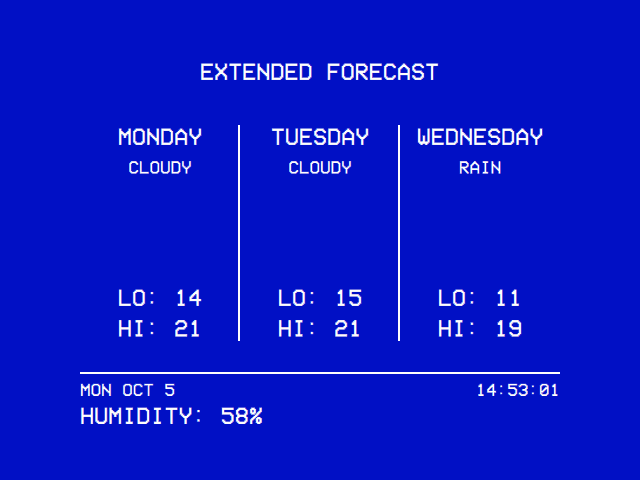 |
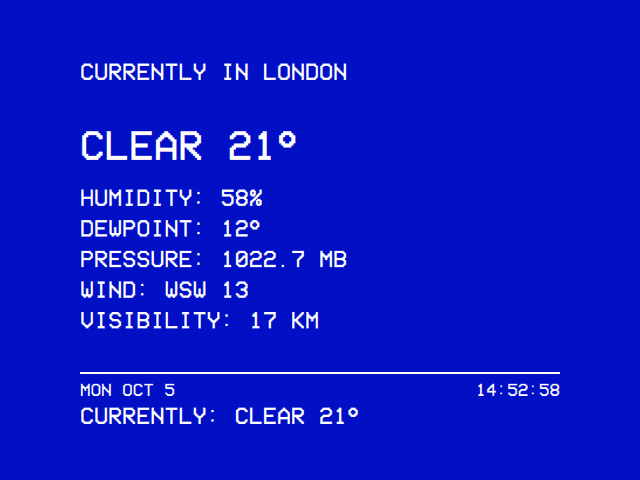
| In the style of WeatherStar 3000+: current conditions… | …the extended forecast and an almanac, in turn. The strip at the foot shows the date, the clock and one reading after another. |
- Settings → TV / Movie → WEATHER → Enabled: On. Weather appears on the main menu.
- Write your location in
weather_location.txtin the data folder (below). - Open Weather from the main menu.
Until the file is there, the module opens on a screen that says what is missing (see Troubleshooting).
The location is a file rather than a setting: you write it once, and a place name is easier to type on a keyboard than on the remote.
| System | File |
|---|---|
| OSD/OS image, Raspberry Pi OS, SteamOS | ~/.local/share/OSD-OS/weather_location.txt |
| macOS | ~/Library/Application Support/OSD-OS/weather_location.txt |
- The first line is your location: the one Current Conditions, the Extended Forecast, the Almanac and the clock are for.
- Each line after it is another place, for the Other Locations screen, in the order you list them.
- Blank lines are ignored, and a line starting with
#is a comment.
Each line is either a place name or coordinates.
Name, qualifier, qualifier…. The part before the first comma is looked up in Open-Meteo's geocoder, which matches a bare place name and returns up to ten places of that name, the most populous first. The qualifiers after it choose among them, matched in several ways because people write places in several ways:
| Qualifier | Matches | Example |
|---|---|---|
| A country code | The place's ISO country code | Istanbul, TR |
| A country alias | USA, U.S.A., U.S., America, United States of America → US; UK, Britain, Great Britain, England, Scotland, Wales → GB; Holland → NL; UAE → AE; South Korea → KR | London, UK |
| A US state's abbreviation | The state, spelled out | Portland, ME |
| A region's initials | A multi-word region (New South Wales → NSW, British Columbia → BC) | Sydney, NSW |
| A region or country, in full | The region or the country, exactly; or as part of it, for a qualifier of four letters or more | Springfield, Illinois |
The place matching the most qualifiers wins; among equals, the most populous. If none matches any, the most populous is used, and the log warns. That matters: without qualifiers, Portland is Portland, Oregon, and London is London, England. The screen shows the geocoder's own name for the place, in capitals (CURRENTLY IN LONDON).
The geocoder's country names are its own: it calls Turkey "Republic of Türkiye", so Istanbul, Turkey matches nothing and falls back to the most populous Istanbul (the right one here, by luck). Country codes are the safest qualifier.
latitude, longitude or latitude, longitude, LABEL, in decimal degrees. Coordinates never go through the geocoder, so nothing can mis-resolve them: the escape hatch for an ambiguous or tiny place. The label is what the screen shows, in capitals; without one, it shows the coordinates (42.3601, -71.0589). A name can't be worked out from coordinates, so give one.
# OSD/OS weather. The first line is the main location;
# each line after it is a place for the Other Locations screen.
Portland, ME, USA
London, UK
Istanbul, TR
Sydney, NSW
35.6762, 139.6503, TOKYO
Reykjavik
42.3601, -71.0589, BOSTON
Written over SSH:
cat > ~/.local/share/OSD-OS/weather_location.txt <<'EOF'
Portland, ME, USA
London, UK
Istanbul, TR
EOF
The places are looked up once per run of OSD/OS, the first time you open the module, and kept. After changing the file, restart OSD/OS for the change to show. (If the first try failed, the file is read again on the next visit.)
An extra place that can't be found is skipped, with a line in the log; the others stay. Only the main location failing stops the module.
Up to six more. The file takes any number of extra places, all fetched in one request, but the Other Locations table has room for about six rows.
The screens follow one another in a loop, each up for the Screen Time (10 seconds by default). Displays chooses which are in the loop.
| Screen | What it shows |
|---|---|
| Current Conditions |
CURRENTLY IN <PLACE>, the condition and the temperature in large letters, then HUMIDITY, DEWPOINT, PRESSURE, WIND (16-point compass and speed) and VISIBILITY. |
| Extended Forecast | Today and the next two days: the day's name, the condition (short: SUNNY, PARTLY CLOUDY, CLOUDY, RAIN, T'STORMS…), and LO and HI. |
| Other Locations | A table of your other places: the name, the condition and the temperature (°C or °F at its head). Only in the loop when the file lists extra places that were found. |
| Almanac | Sunrise and sunset for today and tomorrow, in the place's own time, then MOON PHASES: the next new, first quarter, full and last quarter moons, with their dates, in the order they come. |
Current Conditions and the Extended Forecast also draw a picture of each condition (the files in modules/weather/assets/images/wx), tinted in the theme's colour. Clear, mainly clear, partly cloudy and mostly cloudy skies have a sun or a moon as it is day or night; the forecast's days always have the sun.
Along the foot of every screen runs a strip: on its first row the date and a clock, in the place's own time (so a forecast for somewhere else shows that place's time); on its second, one reading after another, every five seconds: the place's name, CURRENTLY: with the condition and temperature, then humidity, dew point, pressure, wind and visibility.
| Action | Keyboard | Gamepad | What it does |
|---|---|---|---|
| Previous / next screen | ◄ ► | D-pad left, right | Steps through the loop, and pauses it there |
| Pause or resume the loop | Enter | A | Stays on the screen you are on, or carries on |
| Pause or resume the music | ▼ | D-pad down | For this visit only; the Music setting is unchanged |
| Leave | Esc | B | Back to the main menu; the music stops |
While the module is open, the screen saver stays away: Weather is meant to be left running, like the channel it imitates. Leaving it doesn't let the screen saver in over a video still playing behind the menus (Transparent Background), which keeps it away by itself.
-
Open-Meteo, for every place: one forecast request (
api.open-meteo.com/v1/forecast) for the main location, with the current temperature, humidity, dew point, sea-level pressure, wind, visibility, weather code and whether it is day, and three days of lows, highs, weather codes, sunrises and sunsets, in the place's time zone. One more request covers all the other places together. Both are fetched again every 10 minutes while the module is open, and not at all while it is closed. -
The National Weather Service, for US places only. Open-Meteo's weather code is a model's guess for a grid cell several kilometres wide, which can say OVERCAST while it is raining outside. So for a place the NWS covers, OSD/OS finds the reporting stations within 25 km of it (
api.weather.gov/points, the three nearest), and lays the latest observation from the first one with something current (under 75 minutes old) over the model's values: temperature, dew point, humidity, wind, visibility, sea-level pressure and the condition. A station reports the sky and the weather separately; OSD/OS turns that into one condition: the weather when there is any worth showing (a thunderstorm, rain, snow, hail, fog, or mist when visibility is under 3 km), the most serious first, otherwise the most covered cloud layer (a broken deck is MOSTLY CLOUDY, which Open-Meteo's codes have no word for). Outside the US, or with no station near, the model's values stand. Other Locations' US rows take their condition and temperature from their own nearest stations the same way. - The moon's phases are worked out on the player (Meeus's Astronomical Algorithms, to within minutes), since Open-Meteo has no moon data.
| Metric | US | |
|---|---|---|
| Temperature | °C | °F |
| Wind | km/h | mph |
| Pressure | millibars (1022.7 MB) |
inches of mercury (30.20) |
| Visibility | kilometres (17 KM) |
miles (11 MI.) |
Changing Units fetches the numbers again at once, in the new units. Hours Format sets the clock and the almanac's sunrise and sunset: 14:52:58 and 07:12 with 24-hour, 2:52:58 PM and 7:12 AM with 12-hour. Hours Format and Screen Time take effect the next time you open the module.
With Music on (the default), music plays while the weather is up, as it did on the channel: shuffled once, then looped for as long as you stay.
Without a list of your own, it plays eight tracks from the Weatherscan music collection on the Internet Archive, streamed (so it needs the network):
https://archive.org/download/weatherscancompletecollection/01 Fair Weather.mp3
https://archive.org/download/weatherscancompletecollection/01 Lazy Days.mp3
https://archive.org/download/weatherscancompletecollection/02 Beach Frolic.mp3
https://archive.org/download/weatherscancompletecollection/03 Winter Tundra.mp3
https://archive.org/download/weatherscancompletecollection/04 Rainy Days.mp3
https://archive.org/download/weatherscancompletecollection/05 Easy Times.mp3
https://archive.org/download/weatherscancompletecollection/05 Midnight Cruise.mp3
https://archive.org/download/weatherscancompletecollection/06 Tropical Breeze.mp3
To play your own, list them in weather_music.txt in the data folder, which then replaces the built-in list:
- one track per line: a file, or an
http://orhttps://URL; - a file is an absolute path, or a path relative to the data folder, so music dropped beside the list is named with one word;
- spaces are fine: in a URL they are turned into
%20for you, and a file path is used as it is; -
#comments and blank lines are ignored; - any format mpv plays: MP3, OGG, FLAC, WAV, M4A and more.
# Music for OSD/OS's Weather module: shuffled once, then looped.
# A path relative to the data folder:
weather-music/Smooth Jazz 01.mp3
weather-music/Smooth Jazz 02.ogg
# An absolute path, here on the image's film partition:
/media/OSD-OS/Music/Lounge/Blue Hour.flac
# A URL:
https://archive.org/download/weatherscancompletecollection/02 Beach Frolic.mp3
The music is a second mpv of its own, apart from the one that plays videos: mpv --no-video --loop-playlist=inf --shuffle --no-terminal --really-quiet --input-ipc-server=<temp folder>/osdos-weather-music.sock, on Settings → Audio Output's card. It starts as the module opens and stops as you leave it (or when the location can't be found). While it plays, the menu music (Settings → Menu Music) is held off, and comes back afterwards. ▼ pauses and resumes it over its socket, so the track carries on where it was.
Settings → TV / Movie → WEATHER:
| Setting | Values | Default | What it does | Config key |
|---|---|---|---|---|
| Enabled | On, Off | Off | Shows Weather on the main menu. | modules.com.osdos.weather.enabled |
| Displays | Current Conditions, Extended Forecast, Other Locations, Almanac: each on or off | All on | Which screens the loop cycles through. With none on, Current Conditions alone. |
modules.com.osdos.weather.displays.current, .extended, .others, .almanac
|
| Music | On, Off | On | Background music while the forecast is up. | modules.com.osdos.weather.music |
| Units | Metric, US | Metric | See Units. | modules.com.osdos.weather.units |
| Screen Time | 10 SEC, 30 SEC, 60 SEC | 10 SEC | How long each screen stays up before the loop moves on. | modules.com.osdos.weather.screen_time |
| Hours Format | 24-hour, 12-hour | 24-hour | The clock, sunrise and sunset. | modules.com.osdos.weather.hours_format |
| File | What it is |
|---|---|
weather_location.txt |
Your location, then your other places. You write it. |
weather_music.txt |
Optional: your own music list. OSD/OS never writes it. |
{
    "modules": {
        "com.osdos.weather": {
            "enabled": true,
            "displays": {
                "current": true,
                "extended": true,
                "others": true,
                "almanac": false
            },
            "music": true,
            "units": "US",
            "screen_time": "30 SEC",
            "hours_format": "12-hour"
        }
    }
}
A screen missing from displays counts as on.
- Weather data by Open-Meteo.com, under CC BY 4.0. OSD/OS says so in Settings → About too.
- Current observations for US places from the National Weather Service (api.weather.gov), which asks every client to name itself: OSD/OS sends
OSD-OS/<version>with a link to the project. - The look is inspired by WeatherStar 3000+ by netbymatt, after The Weather Channel's WeatherStar.
- The built-in music is from the Weatherscan collection on the Internet Archive.
See Credits.
When the module can't start, it says why:
| Screen | Meaning | What to do |
|---|---|---|
| NO LOCATION SET | There is no weather_location.txt in the data folder. |
Write it, as above. Check the name (not weather_location.txt.txt) and the folder. |
| LOCATION FILE IS EMPTY | The file has no line that isn't blank or a comment. | Add your location on the first line. |
| LOCATION FILE COULD NOT BE READ | The file exists but can't be opened. | Check its permissions: the user running OSD/OS must be able to read it. |
| LOCATION NOT FOUND | The geocoder knows no place of that name. | Check the spelling (the part before the first comma is what is looked up), or use coordinates. |
| CAN'T REACH THE LOCATION SERVICE | The geocoder didn't answer. | Check the network. Back, then open Weather again to retry. |
The weather is for the wrong town. Add qualifiers (Portland, ME, USA), or use coordinates with a label.
It stays on LOADING... The location was found (or given as coordinates) but the forecast didn't arrive: no network, or Open-Meteo didn't answer. It tries again every 10 minutes while open.
A change to the location file doesn't show. Places are looked up once per run: restart OSD/OS.
An extra place is missing from Other Locations. It couldn't be found, and was skipped: the log says skipping other location. Add qualifiers or use coordinates. If no extra place could be found, the screen leaves the loop.
No music. Check Settings → TV / Movie → WEATHER → Music, the network (the built-in tracks stream), that each line of weather_music.txt names a file that exists, and Settings → Audio Output. The log says music process exited when mpv gave up, and mpv not found when there is no mpv.
The clock shows another time than the device. It shows the time where the weather is: that is on purpose.
US conditions look like the model's. No station within 25 km had an observation under 75 minutes old; the log names the stations tried.
To read the log on the image: sudo journalctl -u osdos -f. More in Troubleshooting.
- Ambient:Mode: another screen to leave running, with music of your own
- Menu music: the tune under the menus, which Weather's music holds off
- Audio Output: which sound card the music plays on
- Settings: Start on Module, to open on the weather
- Configuration files
- Credits