Repository navigation
Modules
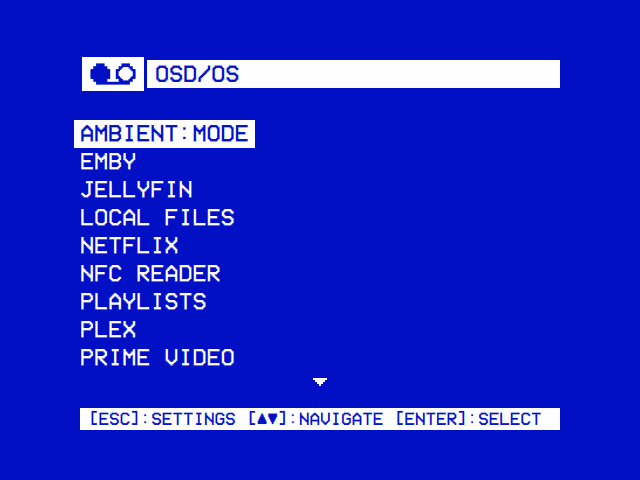
Everything OSD/OS plays comes in through a module, like the inputs on a VHS deck: each is a source of video, browsed in OSD/OS's own menus and handed to mpv, or, for Netflix and Prime Video, to the service's own player. This page lists them all and shows how to turn them on. Each has a page of its own, with its setup, its settings and examples.
| The main menu | Settings → TV / Movie |
|---|---|
 |
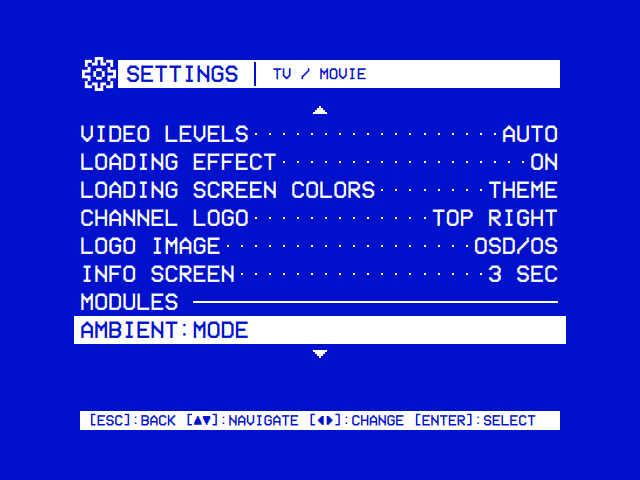 |
| The modules turned on, like the inputs on a deck. Select opens one; back opens Settings. | The video modules and Weather have a row each under Modules on TV / Movie's page, which opens their own settings. Arcade and High Scores share the Arcade page, and Scripts is under Modules on Settings' first screen. |
| Module | What it plays | On at first | What it needs |
|---|---|---|---|
| Local Files | Films, videos and photos in a folder: the Movies folder of the SD card's films partition on the OSD/OS image, a USB drive, a network share | Yes | Nothing more |
| Playlists | Lists of videos from Local Files, YouTube, Jellyfin and Emby, streamed or downloaded to play offline | Yes | yt-dlp and ffmpeg for offline YouTube videos |
| Plex | A Plex Media Server's films, series and other videos | No | A Plex account and a server |
| Jellyfin | A Jellyfin server's libraries | No | A Jellyfin server with Quick Connect |
| Emby | An Emby server's libraries | No | An Emby server, or Emby Connect |
| YouTube | Subscriptions, channels, playlists and search, with no account needed | No | yt-dlp and Deno (the OSD/OS image has both) |
| Netflix and Prime Video | The service's catalogue in your country, from TMDB; a title plays in the service's own player | No | A TMDB API key; Chromium with Widevine, cage and wtype (the OSD/OS image has them) |
| NFC Reader | The video an NFC card stands for, the moment it touches the reader | No | A PN532 USB reader, or a PC/SC reader with pcscd. On Linux, setup-nfc-reader.sh gives OSD/OS access to it; the image doesn't run it for you |
| Weather | The weather, the way a 90s cable channel showed it | No | The network (Open-Meteo, and NWS in the US) |
| Arcade | Arcade games in MAME, from a folder of ROM sets, listed by players, decade and maker, or on a cabinet's selection screen with pictures, high scores and genres | No | MAME (the OSD/OS image has it) and MAME's ROM sets; for genres and pictures, catver.ini and a snap folder |
| High Scores | The high score tables of the games played in Arcade, as MAME kept them | No | Games played in Arcade |
| Scripts | Your own shell scripts: anything else on the machine | No | Nothing more |
| Ambient:Mode | A video on a loop, a fireplace or an aquarium, with music of your choice | No | Nothing more |
- On the main menu, press back: Settings opens.
- Open the module's page:
- Ambient:Mode, Emby, Jellyfin, Local Files, Netflix, NFC Reader, Playlists, Plex, Prime Video, Weather or YouTube: select TV / Movie, then the module under that page's Modules heading;
- Arcade or High Scores: select Arcade, the page the two share, High Scores' row under its own heading after Arcade's;
- Scripts: go down to the Modules heading of the first screen and select it.
- Enabled is its first row: left, right or select turns it on or off. Back on the main menu, which looks for the modules again each time it opens, a module turned on is there.
The rest of that screen is the module's own settings: each module's page lists them. Every setting is saved in config.json in the data folder, under the module's id, as in modules.com.osdos.youtube.enabled:
{
    "modules": {
        "com.osdos.local_files": { "enabled": true },
        "com.osdos.youtube": { "enabled": true },
        "com.osdos.plex": { "enabled": false }
    }
}| Module | Its id, in config.json
|
Its folder |
|---|---|---|
| Local Files | com.osdos.local_files |
modules/local_files |
| Playlists | com.osdos.playlists |
modules/playlists |
| Plex | com.osdos.plex |
modules/plex |
| Jellyfin | com.osdos.jellyfin |
modules/jellyfin |
| Emby | com.osdos.emby |
modules/emby |
| YouTube | com.osdos.youtube |
modules/youtube |
| Netflix | com.osdos.netflix |
modules/netflix |
| Prime Video | com.osdos.prime_video |
modules/prime_video |
| NFC Reader | com.osdos.nfc_reader |
modules/nfc_reader |
| Weather | com.osdos.weather |
modules/weather |
| Arcade | com.osdos.arcade |
modules/arcade |
| High Scores | com.osdos.highscores |
modules/highscores |
| Scripts | com.osdos.scripts |
modules/scripts |
| Ambient:Mode | com.osdos.ambient_mode |
modules/ambient_mode |
- One way to browse. Local Files, YouTube, Netflix and Prime Video open as the same horizontal tree, and so does Arcade on its Original screen, starting with Recently Watched (Recently Played in Arcade), Favorites and Search. Using OSD/OS shows it.
- Options with ► on an entry: Add to Favorites, Play at Startup, Add to Playlist, where the module has them.
- One player. Every video but Netflix's and Prime Video's plays through mpv, with the tape loading screen while it starts; a Local Files, YouTube or Playlists video has a menu of its own on back. Playback and mpv covers it.
- Scaling for 16:9 pictures on a 4:3 screen, set for every module in Settings → TV / Movie, or for one in its own settings.
A module is a folder in modules/ with a manifest.json and its QML views, and a C++ backend if it needs one. OSD/OS finds it at startup: Writing a module builds one step by step.