Repository navigation
Writing a Module
A module is how a new source of videos joins OSD/OS: one more input on the deck. This page builds one from nothing, step by step, with every file whole: Hello Channel, which lists the videos in a folder, plays them through OSD/OS's player, has settings of its own, then grows a C++ backend and tests. Every piece of code here was run against OSD/OS's current source, built and driven under Xvfb, and its test passed.
The reference for all of it is ARCHITECTURE.md (Anatomy of a Module, manifest.json, AppCore, QML View Patterns, Components), and the house rules are in CONTRIBUTING.md.
OSD/OS is a browsing shell that hands off to purpose-built tools. The shell (AppCore) finds the modules, shows their settings and routes what they ask for; a module browses its own content and, to play, hands the video to mpv through mpvController. A module has up to three parts:
| Part | Where | Needed |
|---|---|---|
manifest.json |
modules/<name>/manifest.json |
Yes: the module's identity and its settings |
| QML views |
modules/<name>/views/, the entry point Root.qml
|
Yes |
| A C++ backend |
src/modules/<name>/<Name>Backend.h and .cpp
|
Only when QML can't do it alone: files, a network API, a process |
At start, AppCore reads every modules/*/manifest.json, in the order of the folders' names. A module with no backend needs no change anywhere else: drop its folder in and it is there. One with a backend adds one registerModule(...) call to src/main.cpp.
flowchart LR
    MF["modules/hello_channel/manifest.json"] -->|read at start| AC["AppCore"]
    AC -->|enabled: a row| ML["Main menu"]
    AC -. its settings .-> MS["Settings → Hello Channel"]
    ML -->|select| RT["views/Root.qml, the router"]
    RT --> CH["Channels.qml, a list"]
    CH -->|select on About| DT["Detail.qml, a leaf"]
    CH -->|select on a video| PL["Player.qml"]
    PL -->|loadAndPlay| MP["mpvController, then mpv"]
    MP -->|playbackEnded| PL
Five principles from CONTRIBUTING.md shape every module:
- A remote is enough. Every screen works with the arrows, select and back (Enter, Escape or Backspace on a keyboard). A gamepad arrives as the same keys, so a view that handles the keys handles gamepads too: never add gamepad code to a view.
-
Laid out for a CRT. Everything is sized from the screen (
root.sw,root.sh), never in pixels, inside the safe area every view uses, away from a tube's edges. -
Self-contained. The module's files stay in
modules/<name>andsrc/modules/<name>. - No tracking. A module talks only to the service it shows, and writes only to OSD/OS's data folder.
-
Browse, then hand off. Playing is handed to a program made for it: mpv, or another one through
DisplayHandoff. The module never plays anything itself.
manifest.json is the module's identity and the shape of its settings. Settings → the module's name is built from it, with no QML of the module's own.
| Key | Needed | What it is |
|---|---|---|
id |
Yes | The module's id, com.osdos.<name> by convention. Its settings are saved under modules.<id> in config.json, its lists under it in lists.json
|
name |
Shown on the main menu (in capitals), as the Settings row (on the Arcade page, the heading over its rows), and in the module's title bar | |
icon |
Its logo, relative to the module's folder | |
entry_point_qml |
Yes | Its router, relative to the module's folder: views/Root.qml
|
settings |
Its settings, in the order Settings shows them. A module with none isn't listed in Settings | |
settings_group |
Where Settings lists the module's page: "tv" under Modules on the TV / Movie page, with the video modules; "arcade" on the Arcade page, its rows after the Arcade module's under its name as a heading. Left out, as Hello Channel's is (or naming a group Settings has no page for), the page is under Modules on Settings' first screen. Its settings are saved under modules.<id> whichever it is |
A manifest that isn't JSON is left out, with [AppCore] Bad manifest.json in <folder>: <error> in the log; one without id or entry_point_qml, with [AppCore] Skipping <folder>: manifest missing 'id' or 'entry_point_qml'.
Each setting is an object:
| Key | For | What it does |
|---|---|---|
key |
Every type | Its key under modules.<id>. A dot reaches one level down (libraries.abc is "libraries": { "abc": … }) |
label |
Every type | The row's text, shown in capitals |
type |
Every type | One of the types below |
default |
toggle, list_single, slider
|
What the row shows while nothing is saved: "ON" or "OFF", one of the options (a dynamic list shows its first choice instead, and a directory_browser shows Default), or a slider's number. OSD/OS doesn't write it: your own code must read an unset key as this default too |
description |
Every type | The help line under the menu while the row is selected. Lines written with \n read as one, joined with •; by convention [WORD] explains one of the choices |
options |
list_single |
The choices, saved as they are written |
options_source, options_slot
|
list_single, multiselect_submenu
|
"dynamic", and the backend slot that sends the choices (part 3) |
apply_slot |
list_single with dynamic choices |
A backend slot called after each change |
action_slot |
action |
The backend slot select calls |
params |
module_view |
The navParams the module's Root.qml opens with |
settings |
submenu |
Its own rows, in this same format |
step, start_text, end_text
|
slider |
How far ◄ ► move it (10 unless given), and the names under the bar's two ends, as Settings' TRANSPARENT and SOLID |
requires_auth |
Every type | Shown only while the backend's get_auth_state() is neither "" nor "none": Plex hides its server, user and library rows until it is signed in |
requires_capability |
Every type | Shown only while the backend's choices for _capabilities name it: Jellyfin's skip rows need its server's media segments |
shown_with |
Every type | Shown only while another of the module's rows has a value as the page shows it: { "key": "screen", "value": "Arcade" }, a toggle's "ON" or "OFF", an unset row counting as its default (a dynamic list as its first choice), and never while that row is hidden itself. A list of them shows it while any of them holds: [{ "key": "online_play", "value": "On" }, { "key": "lan_play", "value": "On" }]. The rows come and go as those rows change, the cursor staying on it, a dynamic row's choices asked for as it comes, and a hidden row keeps what was saved in it: Arcade's rows for its Arcade screen, and its Online Name |
The types, as Settings shows and saves them:
type |
In Settings | Saved as |
|---|---|---|
toggle |
ON or OFF; ◄ ►, and select, flip it. default is "ON" or "OFF"
|
true or false
|
list_single with options
|
◄ ► step through the choices, round the ends | The choice's text |
list_single with "options_source": "dynamic"
|
The backend's labels. While nothing is saved the row shows the first choice, so put the default first | The choice's id
|
multiselect_submenu |
Select opens a page of the backend's choices, each switched on and off. Choices under a heading ({ "label": "Genres", "heading": true } among them) are a group, which select on the heading turns on, or off once they all are on |
{ "<id>": true, … } under the key, saved whole at every change; every choice is on until it is switched off, but one sent with "default": false (Arcade's publishers), which is off until it is switched on |
submenu |
Select opens its rows on a page of their own, titled MODULE / LABEL (YouTube's Advanced) |
Its rows' keys, flat under modules.<id>
|
module_view |
Select opens the module itself, its Root.qml with params (Netflix's Sign in) |
Nothing |
directory_browser |
Select opens the folder picker, the tree Local Files is browsed with; the row shows the path, or Default
|
The folder's path; "" for Default Folder, which the module gives a meaning |
slider |
Its label, and the deck's tape bar under it with a ▼ at the value between its two ends; ◄ ► move it a step toward either end (Arcade's Info Background) |
A number from 0 to 100 |
action |
Select calls action_slot
|
Nothing |
There is no free-text type: Weather reads its places from a file in the data folder instead, and a view of your own can open the OnScreenKeyboard.
enabled is a setting like the others, with one meaning more: AppCore lists a module on the main menu while modules.<id>.enabled is true, or, unset, while its manifest's enabled default isn't "OFF". A module without an enabled setting is always on. Most of OSD/OS's own ship "OFF"; Local Files and Playlists "ON".
Hello Channel's first version is QML only: four files and a logo, no build.
modules/hello_channel/
├── manifest.json
├── assets/
│   └── images/
│       └── logo.svg
└── views/
    ├── Root.qml
    ├── Channels.qml
    ├── Detail.qml
    └── Player.qml        (part 2)
An enabled toggle, a folder, a list with fixed choices, another toggle, and the module's own Scaling:
{
  "id": "com.osdos.hello_channel",
  "name": "Hello Channel",
  "icon": "assets/images/logo.svg",
  "entry_point_qml": "views/Root.qml",
  "settings": [
    {
      "key": "enabled",
      "label": "Enabled",
      "type": "toggle",
      "default": "ON"
    },
    {
      "key": "video_folder",
      "label": "Video Folder",
      "type": "directory_browser",
      "default": "",
      "description": "The folder whose videos the channel lists\n[DEFAULT] None: pick one here first"
    },
    {
      "key": "sort_order",
      "label": "Sort Order",
      "type": "list_single",
      "options": ["A to Z", "Z to A"],
      "default": "A to Z",
      "description": "The order the videos are listed in"
    },
    {
      "key": "loop_playback",
      "label": "Loop Playback",
      "type": "toggle",
      "default": "OFF",
      "description": "Play a video over and over until you stop it"
    },
    {
      "key": "video_scaling",
      "label": "Scaling",
      "type": "list_single",
      "options": ["Default", "Letterbox", "14:9", "Pan & Scan", "Anamorphic"],
      "default": "Default",
      "description": "How a 16:9 picture fills the 4:3 screen in this module\n[DEFAULT] As Settings' Scaling says"
    }
  ]
}
video_scaling needs no code: while a module's views are open, the player takes that module's own video_scaling (unless it is Default) over Settings' Scaling. Every video module has this row, written as here.
assets/images/logo.svg, a pixel-art TV on a 20 × 20 grid, in one colour:
<?xml version="1.0" encoding="utf-8"?>
<svg xmlns="http://www.w3.org/2000/svg" viewBox="0 0 20 20">
  <path fill-rule="evenodd" style="fill: rgb(255, 255, 255);"
        d="M5 0H7V2H5Z M13 0H15V2H13Z M7 2H9V4H7Z M11 2H13V4H11Z
           M0 4H20V18H0Z M2 6V16H15V6Z M17 7V9H19V7Z M17 11V13H19V11Z
           M2 18H5V20H2Z M15 18H18V20H15Z"/>
</svg>
The title bar draws a logo through OsdIconProvider: trimmed to its shape, a fifth taller than the bar, in the colour scheme's text colour, from its alpha. So draw it white on clear, as OSD/OS's own are. A skin can draw it differently by its folder's name, with "icons": { "hello_channel": "tv.png" } in its skin.json (Skins).
The shell loads Root.qml and listens for its goBack(), which leaves the module. Everything else is the router's own: a stack of views in one Loader. Its code is the Playlists module's router, but for the id and the first view; every module of OSD/OS has one built the same way, some deciding more as they start (YouTube's and Netflix's sign-in, Plex's NFC cards):
import QtQuick

// Hello Channel's router: the module's own stack of views. The shell loads
// this file (the manifest's entry_point_qml) and listens for goBack(), which
// leaves the module.
FocusScope {
    id: moduleRoot

    // Leaves the module, back to the main menu.
    signal goBack()

    property var navParams: ({})

    // The manifest's id: the one place it appears in this module's QML.
    // The views read it as moduleRoot.moduleId.
    property string moduleId: "com.osdos.hello_channel"
    property var _moduleInfo: appCore ? appCore.get_module_info(moduleId) : ({})
    property string moduleName: _moduleInfo.name || ""
    property string moduleIcon: _moduleInfo.icon || ""

    property var navStack: []
    property var currentParams: ({})

    function navigateTo(viewPath, params, fromState) {
        var resolved = Qt.resolvedUrl(viewPath)
        navStack.push({ source: internalLoader.source, params: currentParams, listState: fromState || {} })
        currentParams = params || {}
        root.changeWindow(internalLoader, resolved, { "navParams": params || {} })
    }

    // Shows a view in place of this one, without pushing it on the stack.
    function replaceWith(viewPath, params) {
        var resolved = Qt.resolvedUrl(viewPath)
        currentParams = params || {}
        root.changeWindow(internalLoader, resolved, { "navParams": params || {} })
    }

    function navigateBack() {
        if (navStack.length === 0) {
            moduleRoot.goBack()
            return
        }
        var prev = navStack.pop()
        if (!prev.source || prev.source.toString() === "") {
            moduleRoot.goBack()
            return
        }
        // The list state the view left with comes back in its navParams.
        var restored = Object.assign({}, prev.params)
        restored.navListState = prev.listState || {}
        currentParams = restored
        root.changeWindow(internalLoader, prev.source, { "navParams": restored })
    }

    Loader {
        id: internalLoader
        anchors.fill: parent
        focus: true
        onLoaded: { if (item) item.forceActiveFocus() }

        Connections {
            target: internalLoader.item
            ignoreUnknownSignals: true
            function onNavigateTo(path, params, listState) { moduleRoot.navigateTo(path, params, listState) }
            function onReplaceWith(path, params) { moduleRoot.replaceWith(path, params) }
            function onGoBack() { moduleRoot.navigateBack() }
        }
    }

    // The first view. resumePlayer is set when the main menu's first row
    // takes a video playing behind the menus back (Transparent Background).
    Component.onCompleted: navigateTo("Channels.qml", { resumePlayer: navParams.resumePlayer })
}
How it works:
-
id: moduleRoot, always. The views are made inside the router'sLoader, so they reach it by that id:moduleRoot.moduleId,moduleRoot.moduleName,moduleRoot.moduleIcon. -
The id once.
moduleIdis the only place the manifest's id is written in the module's QML.moduleNameandmoduleIconcome fromappCore.get_module_info(), never typed in. -
root.changeWindow(loader, source, properties), neverloader.sourceorsetSource().rootis the app's window (Main.qml):changeWindow()plays Settings' transition between the two views, and notes a video's view so that effects and menu music rest while it shows. -
The stack's first entry is empty. The first
navigateTo()pushes the loader's empty source; back from the first view pops it, andnavigateBack()then callsgoBack(): the module is left. -
Position comes back. A view leaves with a list state (
{ currentIndex: … }), and gets it back asnavParams.navListStatewhen back returns to it. -
replaceWith()shows a view without pushing it: Plex'sCardPlay.qmlhands over to its player this way, so back from the video returns to the NFC Reader. -
Starting params. What the shell opens the module with is in the router's own
navParams:resumePlayer(which this router passes on, below);fromAppStartupwhen OSD/OS opened the module by itself as it started (Settings → Start on Module, or Play at Startup); andstartupPlay, the favourite to play at once, with Play at Startup. Local Files' router passesstartupPlayon to its tree; Scripts' runs its Auto-Run On Startup script atfromAppStartup.
The channel's first page: the videos of the Video Folder, a heading, and About This Channel. A view is a FocusScope that declares navParams and talks to the router only through its signals:
import QtQuick
import Components

// The channel's first page: the videos in the Video Folder, then ABOUT THIS
// CHANNEL. Select plays a video, or opens About.
FocusScope {
    id: channelsRoot

    property var navParams: ({})
    property var navListState: navParams.navListState || ({})

    signal navigateTo(string path, var params, var listState)
    signal goBack()

    readonly property var videoTypes: ["mp4", "mkv", "avi", "mov", "m4v", "webm"]
    property var rows: []

    // The folder the setting names: "" until one is picked.
    function folder() {
        return appCore.get_setting(moduleRoot.moduleId, "video_folder") || ""
    }

    // One row per video: { type, label, value, path }.
    function videoRows() {
        var dir = folder()
        if (dir === "")
            return [{ type: "empty", label: "No Folder Chosen", value: "" }]
        var out = []
        var entries = appCore.folderEntries(dir, videoTypes)
        for (var i = 0; i < entries.length; i++) {
            if (entries[i].isFolder)
                continue
            var name = entries[i].name
            out.push({ type: "video", label: name.replace(/\.[^.]+$/, ""),
                       value: name.replace(/^.*\./, "").toUpperCase(), path: entries[i].path })
        }
        if ((appCore.get_setting(moduleRoot.moduleId, "sort_order") || "A to Z") === "Z to A")
            out.reverse()
        return out.length > 0 ? out : [{ type: "empty", label: "No Videos", value: "" }]
    }

    function reload() {
        rows = videoRows().concat([{ type: "section", label: "Channel" },
                                   { type: "about", label: "About This Channel" }])
    }

    Component.onCompleted: {
        reload()
        // Back from a view: the cursor on the row it was on.
        if (navListState.currentIndex !== undefined)
            list.currentIndex = Math.min(navListState.currentIndex, rows.length - 1)
        // From the main menu's row for a video playing behind the menus: its
        // player, which takes it back. Deferred: the router listens to this
        // view only once it has been made.
        var behind = navParams.resumePlayer
        if (!navParams.navListState && behind && behind.filePath)
            Qt.callLater(function() {
                channelsRoot.navigateTo("Player.qml", behind, { currentIndex: list.currentIndex })
            })
    }

    AppBar {
        iconSource: moduleRoot.moduleIcon
        title: moduleRoot.moduleName
        anchors.top: parent.top
        anchors.left: parent.left
        anchors.topMargin: root.sh * 0.125 //60
        anchors.leftMargin: root.sw * 0.125 //80
    }

    MenuList {
        id: list
        model: channelsRoot.rows
        focus: true

        Keys.onReturnPressed: {
            var row = channelsRoot.rows[currentIndex]
            if (!row)
                return
            if (row.type === "video")
                channelsRoot.navigateTo("Player.qml", { filePath: row.path, title: row.label },
                                        { currentIndex: currentIndex })
            else if (row.type === "about")
                channelsRoot.navigateTo("Detail.qml", { videoCount: channelsRoot.rows.filter(
                                            function(r) { return r.type === "video" }).length },
                                        { currentIndex: currentIndex })
        }
        Keys.onPressed: function(event) {
            if (event.key === Qt.Key_Escape || event.key === Qt.Key_Backspace || event.key === Qt.Key_Back) {
                channelsRoot.goBack()
                event.accepted = true
            }
        }

        delegate: MenuRow {
            width: list.width
            height: root.sh * 0.0583333 //28
            heading: modelData.type === "section"
            keepValue: modelData.type === "video"
            label: modelData.label || ""
            value: modelData.value || ""
            selected: list.currentIndex === index
        }
    }

    HelpLine {
        readonly property var row: channelsRoot.rows[list.currentIndex]
        text: !row ? ""
            : row.type === "video" ? row.path
            : row.type === "empty" ? "Pick a folder in Settings, Hello Channel, Video Folder"
            : "The channel's settings, and how many videos it has"
        anchors.bottom: parent.bottom
        anchors.left: parent.left
        anchors.bottomMargin: root.helpLineMargin
        anchors.leftMargin: root.sw * 0.125 //80
    }

    HintBar {
        readonly property var row: channelsRoot.rows[list.currentIndex]
        text: root.hints.back + ":BACK " + root.hints.navigate + ":NAVIGATE "
              + (row && row.type === "video" ? root.hints.select + ":PLAY"
                 : row && row.type === "about" ? root.hints.select + ":OPEN" : "")
        anchors.bottom: parent.bottom
        anchors.left: parent.left
        anchors.bottomMargin: root.sh * 0.1041667 //50
        anchors.leftMargin: root.sw * 0.125 //80
    }
}
What each part does, and why it is written so:
-
navParamsandnavListState. The router hands each view itsnavParams; a list view readsnavListStatefrom them and puts the cursor back where it was. -
navigateTo(path, params, listState)always takes three arguments: the view, its params, and the state this view wants back ({ currentIndex }). The router resolves the path against its own folder,views/. -
Qt.callLaterfor anavigateTofromComponent.onCompleted: the router connects to a view only once it has been made, so a signal sent while it is being made reaches no one. -
goBack()goes one view back; only the router's owngoBack()leaves the module. -
Reading settings.
appCore.get_setting(moduleId, key)readsconfig.jsonas it is now. Fall back to the manifest'sdefaultyourself: an unset key isundefined. -
Files.
appCore.folderEntries(path, types)gives a folder's entries,[{ name, path, isFolder }]: its folders, then its files of those types, hidden ones left out. A pure-QML module can list a folder with it. -
MenuListis the menu in the place every view has it, under the title bar, with ▲ ▼ when rows are hidden; its cursor steps over rows oftype: "section"and goes round the ends. The view gives it the rows and a delegate, and handles select and back. -
MenuRowdraws a line the way a camcorder's menu does,TEST CARD······MP4;headingmakes a group's heading (CHANNEL ────);keepValuecuts the label short rather than the value;opensends a line that leads to another screen in a ► (open it with ► as with select), andchangesputs a value ◄ ► change between a ◄ and a ►. -
HelpLineis the box under the menu, scrolling a line too long for it; Settings → Help Line hides every one.root.helpLineMarginputs it over the hint bar, or in its place while Settings → Hint Bar is off. -
HintBar, always at the foot, in the same place on every screen. Its text is built fromroot.hints:[ESC],[ENTER]and[▲▼]on a keyboard, the button's own label once a gamepad was touched. Never type[ESC], and never bind toinputManager.hints: as the router swaps views, the old view's context properties go null, whilerootstays. -
Sizes are fractions of the screen,
root.swandroot.sh, with the 640 × 480 pixels in a comment. The title bar starts atroot.sh * 0.125androot.sw * 0.125; the hint bar endsroot.sh * 0.1041667above the bottom. These keep the view inside a CRT's safe area at any resolution. A list of your own grows byroot.hintRoom(and, over a help line,root.helpRoom): a row for each bar that Settings turns off,MenuListdoing it by itself. -
Colours and font. The shared components already draw in
root.primaryColoronroot.surfaceColor, inroot.globalFont, capitals: a view of its own uses the same, so the colour schemes and themes reach it.
About This Channel is a page to read: a leaf, which only goes back, so it declares goBack() and no navigateTo:
import QtQuick
import Components

// About This Channel: a page to read, not to choose from. A leaf view: it
// only goes back.
FocusScope {
    id: detailRoot

    property var navParams: ({})

    signal goBack()

    focus: true
    Keys.onPressed: function(event) {
        if (event.key === Qt.Key_Escape || event.key === Qt.Key_Backspace || event.key === Qt.Key_Back) {
            goBack()
            event.accepted = true
        }
    }

    // Each line as Settings would show it: a toggle unset is its default.
    readonly property var lines: [
        { label: "Folder", value: appCore.get_setting(moduleRoot.moduleId, "video_folder") || "None" },
        { label: "Videos", value: String(navParams.videoCount || 0) },
        { label: "Sort Order", value: appCore.get_setting(moduleRoot.moduleId, "sort_order") || "A to Z" },
        { label: "Loop Playback", value: appCore.get_setting(moduleRoot.moduleId, "loop_playback") ? "On" : "Off" },
        { label: "OSD/OS", value: root.appVersion }
    ]

    AppBar {
        iconSource: moduleRoot.moduleIcon
        title: moduleRoot.moduleName
        subtitle: "About"
        anchors.top: parent.top
        anchors.left: parent.left
        anchors.topMargin: root.sh * 0.125 //60
        anchors.leftMargin: root.sw * 0.125 //80
    }

    Column {
        anchors.top: parent.top
        anchors.left: parent.left
        anchors.topMargin: root.sh * 0.25 //120
        anchors.leftMargin: root.sw * 0.115625 //74
        width: root.sw * 0.76875 //492

        Repeater {
            model: detailRoot.lines
            delegate: MenuRow {
                width: parent.width
                height: root.sh * 0.0583333 //28
                label: modelData.label
                value: modelData.value
                // Read, not chosen: a long value scrolls all the time.
                alwaysScroll: true
            }
        }
    }

    HintBar {
        text: root.hints.back + ":BACK"
        anchors.bottom: parent.bottom
        anchors.left: parent.left
        anchors.bottomMargin: root.sh * 0.1041667 //50
        anchors.leftMargin: root.sw * 0.125 //80
    }
}AppBar's subtitle names where you are in the module. A question or a notice that hides the whole view is a PromptScreen, a question in the title bar behind a ? (a notice behind a !) with its answers, never a line of text in the middle of a view; see the Components below.
Copy the folder into modules/ and start OSD/OS (no build needed for QML):
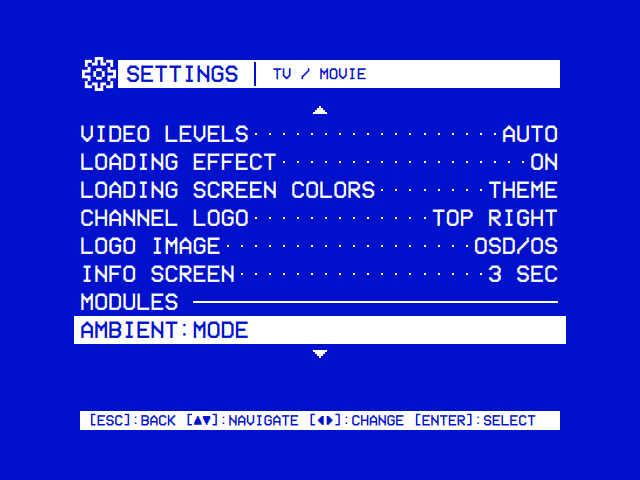
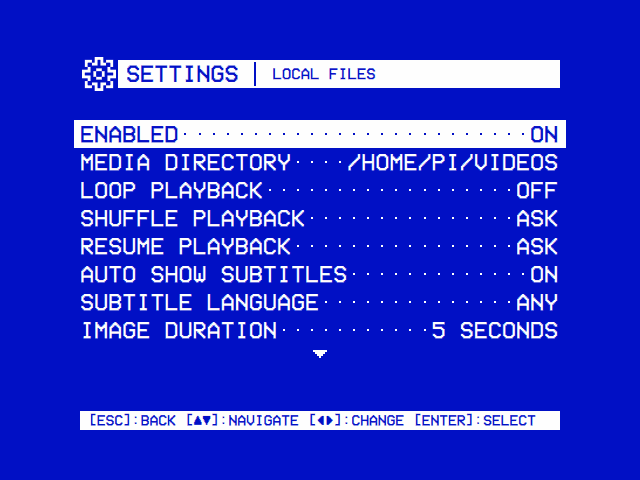
APP_ROOT=$(pwd) ./build/osdosHELLO CHANNEL is on the main menu, among the modules in the order of their folders' names: first, with OSD/OS's defaults. Its list says No Folder Chosen until Settings → Hello Channel → Video Folder names one; the page is built from the manifest:
| The modules in Settings | A module's settings |
|---|---|
 |
 |
A row per module that has settings, under a MODULES heading, in the order of their folders: here the video modules', on the TV / Movie page ("settings_group": "tv"). Hello Channel names no group, so its row is under the MODULES heading of Settings' first screen, before Scripts'. |
A settings page made from a manifest, Local Files' here: a toggle, a folder, lists. Hello Channel's has its five rows the same way. |
Changing a row saves it at once. With Sort Order on Z to A and Loop Playback on, config.json has, among the rest:
{
    "modules": {
        "com.osdos.hello_channel": {
            "loop_playback": true,
            "sort_order": "Z to A",
            "video_folder": "/home/pi/Videos"
        }
    }
}
Back in the channel, the list reads in the new order: a view reads its settings each time it is made.
Select on a video opens Player.qml, which hands the file to mpv the way Local Files' player does:
import QtQuick
import Components

// Plays one file through mpv the way Local Files' player does: a tape
// loading until the first position comes, the remote's keys handed to mpv's
// on-screen controls, and one playbackEnded handler that every end goes
// through. Where the video stopped goes on the module's "recent" list, so it
// starts there next time. Named …Player.qml, so the effects and the menu
// music rest while it is shown.
FocusScope {
    id: playerRoot

    property var navParams: ({})

    signal goBack()

    property string filePath: navParams.filePath || ""
    property string itemTitle: navParams.title || ""

    // The first position has come: the loading screen goes.
    property bool playbackStarted: false
    property int startMs: 0
    property int lastKnownPositionMs: 0
    property int lastKnownDurationMs: 0

    focus: true

    // Where this file stopped last time: its entry on the module's own
    // "recent" list (AppCore keeps it in lists.json).
    function savedPosition() {
        var recent = appCore.get_list(moduleRoot.moduleId, "recent")
        for (var i = 0; i < recent.length; i++) {
            if (recent[i].path === filePath)
                return recent[i].pos || 0
        }
        return 0
    }

    function play(fromMs) {
        playbackStarted = false
        startMs = fromMs
        var loop = !!appCore.get_setting(moduleRoot.moduleId, "loop_playback")
        // url, start (s), audio track (0: mpv's choice), subtitles (-2: off),
        // subtitle files, subtitle languages, loop.
        mpvController.loadAndPlay(filePath, fromMs / 1000.0, 0, -2, [], [], loop)
        // With Transparent Background, how the main menu's first row takes
        // the video back once it plays behind the menus.
        mpvController.noteSession({ module: moduleRoot.moduleId, title: itemTitle,
                                    params: { filePath: filePath, title: itemTitle } })
    }

    Component.onCompleted: play(savedPosition())

    // mpv has the picture: the keys go to its on-screen controls.
    Keys.onPressed: function(event) {
        var key = ""
        switch (event.key) {
        case Qt.Key_Escape:
        case Qt.Key_Back:      key = "ESC"; break
        case Qt.Key_Backspace: key = "BS"; break
        case Qt.Key_Up:        key = "UP"; break
        case Qt.Key_Down:      key = "DOWN"; break
        case Qt.Key_Left:      key = "LEFT"; break
        case Qt.Key_Right:     key = "RIGHT"; break
        case Qt.Key_Space:     key = "SPACE"; break
        case Qt.Key_Return:
        case Qt.Key_Enter:     key = "ENTER"; break
        }
        if (key !== "") {
            mpvController.sendKey(key)
            event.accepted = true
        }
    }

    Connections {
        target: mpvController
        function onPositionChanged(ms) {
            if (ms > 0) {
                playerRoot.lastKnownPositionMs = ms
                playerRoot.playbackStarted = true
            }
        }
        function onDurationChanged(ms) {
            if (ms > 0)
                playerRoot.lastKnownDurationMs = ms
        }
        // Every end comes here once: "eof", "stopped" or "failed". By then
        // mpv has gone, so every branch goes back (or starts another video):
        // a player that stays shown over a dead mpv freezes the app.
        function onPlaybackEnded(finalPositionMs, finalDurationMs, reason) {
            var pos = playerRoot.lastKnownPositionMs || finalPositionMs
            var dur = playerRoot.lastKnownDurationMs || finalDurationMs
            var done = reason === "eof" || (dur > 0 && pos >= dur * 0.95)
            if (reason === "failed")
                console.warn("[HelloChannel] mpv could not play " + playerRoot.filePath)
            appCore.add_to_list(moduleRoot.moduleId, "recent",
                                { name: playerRoot.itemTitle, path: playerRoot.filePath,
                                  pos: done ? 0 : pos }, 30)
            playerRoot.goBack()
        }
    }

    Rectangle {
        anchors.fill: parent
        color: "black"

        // A tape loading, until the picture comes.
        LoadingScreen {
            anchors.fill: parent
            source: moduleRoot.moduleName
            startMs: playerRoot.startMs
            durationMs: playerRoot.lastKnownDurationMs
            visible: !playerRoot.playbackStarted
        }
    }
}
sequenceDiagram
participant P as Player.qml
participant C as mpvController
participant M as mpv
P->>C: loadAndPlay(file, start, 0, -2, [], [], loop)
P->>C: noteSession({ module, title, params })
C->>M: starts it (an mpv process, or libmpv in the window)
M-->>C: time-pos, duration
C-->>P: positionChanged, durationChanged
Note over P: the loading screen goes at the first position
M-->>C: ends: the file's end, back, an error
C-->>P: playbackEnded(position, duration, reason)
P->>P: keeps where it stopped, then goBack()
mpvController.loadAndPlay() takes the video and how to play it; everything after the first four arguments has a default. The ones a module uses most:
| # | Argument | Hello Channel passes | What it is |
|---|---|---|---|
| 1 | url |
the file's path | A file, a playlist (.m3u) or a stream's URL |
| 2 | startSeconds |
the saved position | Where to start; under half a second, from the beginning |
| 3 | audioTrack |
0 |
0 for mpv's choice, else a track's number |
| 4 | subTrack |
-2 |
-2 subtitles off, 0 on, -1 forced only (needs mpv 0.38 or newer), above 0 a track's number |
| 5, 6 |
subFiles, subLangs
|
[], []
|
Subtitle files to load; preferred subtitle languages |
| 7 | loop |
Loop Playback | Over and over (--loop-playlist=inf) |
| 8 | playlistStart |
Where in a playlist to start, -1 for its start |
|
| 12 | oscMode |
"ambient" for Ambient:Mode's own on-screen controls |
|
| 13 | shuffle |
A playlist in random order | |
| 15, 16 |
imageDurationSec, imageContent
|
For pictures: how long each shows | |
| 17 | extraArgs |
mpv options of the module's own: YouTube passes --ytdl=yes, with its yt-dlp options |
|
| 19 | extraUrls |
More files after the first, one playlist |
The app adds the rest itself: the board's decoder and output, Settings' Scaling (or the module's own video_scaling), Video Levels, Audio Output, the channel logo, the IPC socket mpv is driven through (Playback and mpv).
-
One handler for every end.
playbackEnded(finalPositionMs, finalDurationMs, reason)comes once, after mpv has gone, withreason"eof"(the end of the file),"stopped"(back, a stop, or a crash),"failed"(mpv couldn't play it, its exit code 2) or"menu"(only for a player whose note saysmenu: true, which opens a menu of its own, as Local Files' does). Every branch must go back, or start the next video: a player left on screen over a dead mpv freezes the app. A module can do more on one reason: Plex plays the next episode ateof, and retries with a transcode atfailed. -
The keys go to mpv. While mpv has the picture, its on-screen controls take the remote's keys through
mpvController.sendKey(), by mpv's names (ESC,ENTER,UP, …). Back reaches mpv asESC, which ends the video; while mpv's deck menu is open (▲ or ▼ opens it), back closes that first. -
A loading screen until the picture.
LoadingScreenis the tape loading every player shows (TAPE A atstartMs, TAPE B withdurationMsonce known), until the first position arrives. On a Pi, mpv takes the screen as it starts, and what stays on it until the picture comes is the frame drawn last: this one. -
The name. A view whose file name ends in
Player.qml,Play.qml,Launch.qml,Takeover.qml,SignIn.qmlorConsole.qmlis a video's view toMain.qml: while it shows, no effect, transition or menu music plays. A layer of a video's elsewhere says so withroot.restFor(item, true), asLoadingScreenandPlayerMenudo. -
Where it stopped. Hello Channel keeps it on its own
recentlist, inlists.jsonbesideconfig.json, throughappCore.add_to_list(moduleId, name, entry, limit): an entry is put first in place of one with itspath, and the newestlimitare kept.get_list(),remove_from_list()andlist_contains()read and change them; Local Files' Recently Watched and Favorites are lists like this.
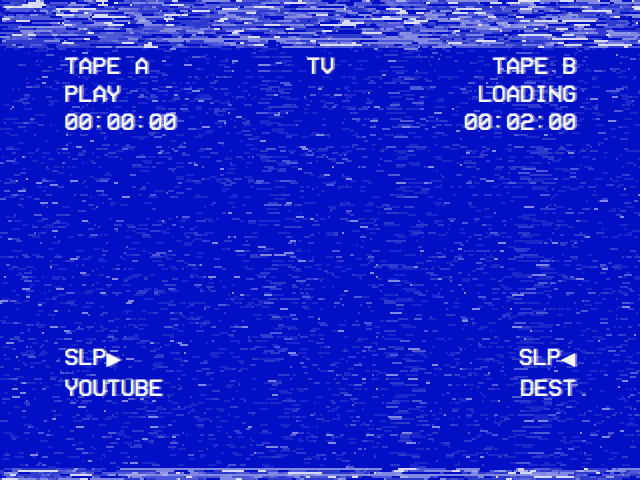
LoadingScreen as YouTube's player shows it: the module's name under SLP ▶ (source), TAPE A at where the video starts (startMs), TAPE B with its length once known (durationMs). Hello Channel's says HELLO CHANNEL there.
With Settings → TV / Movie → Transparent Background on, the video plays inside OSD/OS's window, and back returns to the menus with the picture going on behind them. For the player nothing changes: back still ends in playbackEnded(…, "stopped"), and it goes back as always. Two lines make the video easy to take back:
-
noteSession({ module, title, params }), right afterloadAndPlay(). While the video plays behind the menus, the main menu leads with a row for it,► TEST CARD, the cursor on it. -
Routing
resumePlayer. Select on that row opens the module withnavParams.resumePlayer, theparamsnoted.Root.qmlpasses it toChannels.qml, which opens the player with it. The player starts the same file from the point back saved, andmpvControllersees the same command line apart from the start: rather than starting the video again, it brings the one playing back to full screen, carrying on where the picture is.
Without a note, a video behind the menus comes back only by choosing it again.
A player with a menu of its own (menu: true in its note) gets the row without Transparent Background too. Its menu's Browse, with nothing playing under it (mpvController.videoActive false), calls mpvController.leaveSession() before going back, and the main menu offers the stopped video until mpv plays anything else. Opened with the noted params, the player finds its video in root.takeBackNote and starts it where it saved it, without asking.
A backend is a QObject the views call. It is worth one when QML alone can't, or shouldn't: walking folders, talking to a service's API (QNetworkAccessManager, asynchronous, on the main thread), running a process, keeping state in JSON files. Hello Channel's backend gives the module a folder of its own, lists it, and offers the Video Type setting choices that depend on what is in the folder.
src/modules/hello_channel/
├── HelloChannelBackend.h
└── HelloChannelBackend.cpp
#pragma once
#include <QObject>
#include <QString>
#include <QVariant>
#include <QVariantList>

// Hello Channel's backend: the folder its videos are in (the Video Folder
// setting, or <data folder>/hello_channel), what is in it, and the choices
// of the Video Type setting, which depend on what is in it.
class HelloChannelBackend : public QObject {
    Q_OBJECT
public:
    explicit HelloChannelBackend(const QString &dataRoot, QObject *parent = nullptr);

    // The folder in force: the setting's, else the module's own.
    Q_INVOKABLE QString videoFolder() const { return m_folder; }
    // Its videos of one type ("all", or an extension such as "mkv"), by
    // name, as [{ name, path, type }].
    Q_INVOKABLE QVariantList videos(const QString &type = QStringLiteral("all")) const;

    // manifest: video_type (list_single, "options_source": "dynamic")
    Q_INVOKABLE void getVideoTypes();
    // manifest: rescan (action)
    Q_INVOKABLE void rescan();

public slots:
    // Connected to AppCore::moduleSettingChanged by registerModule, because
    // it is declared with exactly this signature.
    void onSettingChanged(const QString &moduleId, const QString &key, const QVariant &value);

signals:
    // Re-emitted by AppCore as dynamicOptionsReady(moduleId, key, options).
    void dynamicOptionsReady(const QString &key, const QVariant &options);
    // The folder, or what is in it, changed: the list reads it again.
    void videosChanged();

private:
    void setFolder(const QString &path);

    QString m_dataRoot;
    QString m_folder;
};#include "HelloChannelBackend.h"
#include <QDir>
#include <QFile>
#include <QFileInfo>
#include <QJsonDocument>
#include <QJsonObject>
static const char *kModuleId = "com.osdos.hello_channel";
static const QStringList kVideoTypes = { "mp4", "mkv", "avi", "mov", "m4v", "webm" };
HelloChannelBackend::HelloChannelBackend(const QString &dataRoot, QObject *parent)
: QObject(parent), m_dataRoot(dataRoot)
{
// The saved folder, read straight from config.json, as the Scripts and
// Ambient Mode backends read theirs as they are made.
QString configured;
QFile f(m_dataRoot + QStringLiteral("/config.json"));
if (f.open(QIODevice::ReadOnly)) {
const QJsonObject cfg = QJsonDocument::fromJson(f.readAll()).object();
configured = cfg.value("modules").toObject().value(QLatin1String(kModuleId)).toObject()
.value("video_folder").toString();
}
setFolder(configured);
}
void HelloChannelBackend::setFolder(const QString &path) {
// "" (the picker's Default Folder) is the module's own folder.
m_folder = path.isEmpty() ? m_dataRoot + QStringLiteral("/hello_channel") : path;
QDir().mkpath(m_folder);
qInfo("[HelloChannel] video folder: %s", qPrintable(m_folder));
}
QVariantList HelloChannelBackend::videos(const QString &type) const {
QVariantList list;
const QFileInfoList files = QDir(m_folder).entryInfoList(QDir::Files, QDir::Name | QDir::IgnoreCase);
for (const QFileInfo &file : files) {
const QString suffix = file.suffix().toLower();
if (!kVideoTypes.contains(suffix) || (type != QLatin1String("all") && suffix != type))
continue;
list.append(QVariantMap{ { "name", file.completeBaseName() },
{ "path", file.absoluteFilePath() },
{ "type", suffix } });
}
return list;
}
void HelloChannelBackend::getVideoTypes() {
// "All" first: Settings shows the first choice while none is saved.
QVariantList options{ QVariantMap{ { "id", "all" }, { "label", "All" } } };
const QVariantList found = videos();
for (const QString &type : kVideoTypes) {
for (const QVariant &video : found) {
if (video.toMap().value("type").toString() == type) {
options.append(QVariantMap{ { "id", type }, { "label", type.toUpper() } });
break;
}
}
}
emit dynamicOptionsReady(QStringLiteral("video_type"), options);
}
void HelloChannelBackend::rescan() {
// Settings' Video Type row takes the new choices at once.
getVideoTypes();
emit videosChanged();
}
void HelloChannelBackend::onSettingChanged(const QString &moduleId, const QString &key,
const QVariant &value) {
// Every module's changes come here: only this module's matter.
if (moduleId != QLatin1String(kModuleId))
return;
if (key == QLatin1String("video_folder")) {
setFolder(value.toString());
emit videosChanged();
}
}The patterns are OSD/OS's own:
-
The folder resolved in the constructor, from
config.json, asScriptsBackendandAmbientModeBackenddo, with a folder of its own in the data folder as the default (Local Files' ismedia, Ambient:Mode'sambient).main.cppnever touches a module's paths. -
Q_INVOKABLEfor what QML calls, signals for what it hears back. -
Logging with a prefix of the module's own,
qInfo("[HelloChannel] …")for what a user should see in a Release build,qWarningfor what went wrong,qDebugfor what only a build from source should print (Troubleshooting → Reading the log). -
State on disk goes through
writeFileAtomically()(src/util/AtomicFile.h), owner-only for a token or a key, never aQFileopened for writing: a power cut mid-write would leave it cut short. Hello Channel keeps nothing of its own: its settings areAppCore's.
Three lines in src/main.cpp, beside the other backends:
#include "modules/hello_channel/HelloChannelBackend.h" AmbientModeBackend ambientMode(dataRoot);
HelloChannelBackend helloChannel(dataRoot); appCore.registerModule("com.osdos.playlists", "playlistsBackend", &playlistsBackend, ctx);
appCore.registerModule("com.osdos.hello_channel", "helloChannelBackend", &helloChannel, ctx);and its source in CMakeLists.txt's add_executable(osdos …):
    src/modules/playlists/ServerDownload.cpp
    src/modules/hello_channel/HelloChannelBackend.cpp
Then configure and build again (cmake -B build && cmake --build build). registerModule(moduleId, contextProperty, backend, ctx) stores the backend for the module's slots, makes it the QML context property helloChannelBackend, and connects what the backend declares, looked up by name and signature, so main.cpp needs nothing more:
| Declared on the backend | Becomes |
|---|---|
signal dynamicOptionsReady(QString, QVariant)
|
appCore.dynamicOptionsReady(moduleId, key, options), which Settings fills a dynamic row from |
signal authStateChanged()
|
appCore.moduleAuthStateChanged(moduleId): Settings shows or hides the requires_auth rows again |
slot onSettingChanged(QString, QString, QVariant)
|
Called by appCore.moduleSettingChanged at every module's setting saved. An app setting (Settings' own rows) doesn't come here |
property QStringList statusIcons, with a notify signal |
Gathered into appCore.statusIcons: the module's status icons, PixelIcon's names, at the right end of every title bar while the module is on (the Arcade module's HI, trophy and globe) |
Q_INVOKABLE QString get_auth_state() |
Asked by appCore.get_module_auth_state() for the requires_auth rows |
Q_INVOKABLE QVariantList get_menu_entries() |
Asked as the main menu is built: rows { name, params } of the module's own, after the modules' rows (Scripts puts its favourite scripts there) |
Settings calls options_slot, action_slot and apply_slot through appCore.invoke_module_action(moduleId, slot), queued and with no arguments: they must be Q_INVOKABLE (or slots) that take none. A slot that isn't there is logged: [AppCore] invoke_module_action: slot '<name>' not found on backend '<id>'.
In manifest.json, the folder's default gets a meaning, and two rows join, a dynamic list and an action:
    {
      "key": "video_folder",
      "label": "Video Folder",
      "type": "directory_browser",
      "default": "",
      "description": "The folder whose videos the channel lists\n[DEFAULT] hello_channel in the data folder"
    },
    {
      "key": "video_type",
      "label": "Video Type",
      "type": "list_single",
      "options_source": "dynamic",
      "options_slot": "getVideoTypes",
      "default": "all",
      "description": "Which of the folder's videos the channel lists\n[ALL] Every one"
    },
and, after video_scaling:
    {
      "key": "rescan",
      "label": "Rescan Folder",
      "type": "action",
      "action_slot": "rescan",
      "description": "Read the folder again, for videos copied in since"
    }
As the module's settings page opens, Settings calls getVideoTypes(); its answer fills the Video Type row with All, then one choice per type in the folder (MP4, MKV, …), and ◄ ► save the chosen one's id: "video_type": "mp4". Rescan Folder sends the choices again, so a type copied in since shows at once. And when Video Folder changes, onSettingChanged() takes the new folder.
Channels.qml asks the backend for the videos, and listens to it. Take out videoTypes and folder(), and put in this videoRows():
    // One row per video: { type, label, value, path }, from the backend.
    function videoRows() {
        var type = appCore.get_setting(moduleRoot.moduleId, "video_type") || "all"
        var videos = helloChannelBackend.videos(type)
        var out = []
        for (var i = 0; i < videos.length; i++)
            out.push({ type: "video", label: videos[i].name, value: videos[i].type.toUpperCase(),
                       path: videos[i].path })
        if ((appCore.get_setting(moduleRoot.moduleId, "sort_order") || "A to Z") === "Z to A")
            out.reverse()
        return out.length > 0 ? out : [{ type: "empty", label: "No Videos", value: "" }]
    }
then, after Component.onCompleted, the backend's signal:
    // The backend says when the folder, or what is in it, changed.
    Connections {
        target: helloChannelBackend
        function onVideosChanged() { channelsRoot.reload() }
    }
and, in the HelpLine, the empty list's line:
: row.type === "empty" ? "Copy videos into " + helloChannelBackend.videoFolder()In Detail.qml, the folder line asks the backend too:
{ label: "Folder", value: helloChannelBackend.videoFolder() },The whole Channels.qml, with the backend
import QtQuick
import Components

// The channel's first page: the videos in the Video Folder, then ABOUT THIS
// CHANNEL. Select plays a video, or opens About.
FocusScope {
    id: channelsRoot

    property var navParams: ({})
    property var navListState: navParams.navListState || ({})

    signal navigateTo(string path, var params, var listState)
    signal goBack()

    property var rows: []

    // One row per video: { type, label, value, path }, from the backend.
    function videoRows() {
        var type = appCore.get_setting(moduleRoot.moduleId, "video_type") || "all"
        var videos = helloChannelBackend.videos(type)
        var out = []
        for (var i = 0; i < videos.length; i++)
            out.push({ type: "video", label: videos[i].name, value: videos[i].type.toUpperCase(),
                       path: videos[i].path })
        if ((appCore.get_setting(moduleRoot.moduleId, "sort_order") || "A to Z") === "Z to A")
            out.reverse()
        return out.length > 0 ? out : [{ type: "empty", label: "No Videos", value: "" }]
    }

    function reload() {
        rows = videoRows().concat([{ type: "section", label: "Channel" },
                                   { type: "about", label: "About This Channel" }])
    }

    Component.onCompleted: {
        reload()
        // Back from a view: the cursor on the row it was on.
        if (navListState.currentIndex !== undefined)
            list.currentIndex = Math.min(navListState.currentIndex, rows.length - 1)
        // From the main menu's row for a video playing behind the menus: its
        // player, which takes it back. Deferred: the router listens to this
        // view only once it has been made.
        var behind = navParams.resumePlayer
        if (!navParams.navListState && behind && behind.filePath)
            Qt.callLater(function() {
                channelsRoot.navigateTo("Player.qml", behind, { currentIndex: list.currentIndex })
            })
    }

    // The backend says when the folder, or what is in it, changed.
    Connections {
        target: helloChannelBackend
        function onVideosChanged() { channelsRoot.reload() }
    }

    AppBar {
        iconSource: moduleRoot.moduleIcon
        title: moduleRoot.moduleName
        anchors.top: parent.top
        anchors.left: parent.left
        anchors.topMargin: root.sh * 0.125 //60
        anchors.leftMargin: root.sw * 0.125 //80
    }

    MenuList {
        id: list
        model: channelsRoot.rows
        focus: true

        Keys.onReturnPressed: {
            var row = channelsRoot.rows[currentIndex]
            if (!row)
                return
            if (row.type === "video")
                channelsRoot.navigateTo("Player.qml", { filePath: row.path, title: row.label },
                                        { currentIndex: currentIndex })
            else if (row.type === "about")
                channelsRoot.navigateTo("Detail.qml", { videoCount: channelsRoot.rows.filter(
                                            function(r) { return r.type === "video" }).length },
                                        { currentIndex: currentIndex })
        }
        Keys.onPressed: function(event) {
            if (event.key === Qt.Key_Escape || event.key === Qt.Key_Backspace || event.key === Qt.Key_Back) {
                channelsRoot.goBack()
                event.accepted = true
            }
        }

        delegate: MenuRow {
            width: list.width
            height: root.sh * 0.0583333 //28
            heading: modelData.type === "section"
            keepValue: modelData.type === "video"
            label: modelData.label || ""
            value: modelData.value || ""
            selected: list.currentIndex === index
        }
    }

    HelpLine {
        readonly property var row: channelsRoot.rows[list.currentIndex]
        text: !row ? ""
            : row.type === "video" ? row.path
            : row.type === "empty" ? "Copy videos into " + helloChannelBackend.videoFolder()
            : "The channel's settings, and how many videos it has"
        anchors.bottom: parent.bottom
        anchors.left: parent.left
        anchors.bottomMargin: root.helpLineMargin
        anchors.leftMargin: root.sw * 0.125 //80
    }

    HintBar {
        readonly property var row: channelsRoot.rows[list.currentIndex]
        text: root.hints.back + ":BACK " + root.hints.navigate + ":NAVIGATE "
              + (row && row.type === "video" ? root.hints.select + ":PLAY"
                 : row && row.type === "about" ? root.hints.select + ":OPEN" : "")
        anchors.bottom: parent.bottom
        anchors.left: parent.left
        anchors.bottomMargin: root.sh * 0.1041667 //50
        anchors.leftMargin: root.sw * 0.125 //80
    }
}
A view that names helloChannelBackend needs the backend: from here on the module runs only in a build with it.
| To | Do as | See |
|---|---|---|
| Sign in to a service, its rows hidden until then |
get_auth_state(), authStateChanged(), requires_auth
|
PlexBackend, the most complete backend and the one to study |
| Put rows on the main menu |
get_menu_entries(), its params reaching Root.qml as navParams
|
ScriptsBackend |
| Hand the whole screen to another program |
DisplayHandoff, never your own VT or DRM calls: getting them wrong ends in a black screen with no way back |
ScriptLauncher, and Adding a different hand-off target
|
| Play sound of its own in the menus |
MenuMusic::hold(who) first, release(who) after, so the menu music stops |
WeatherBackend's and AmbientModeBackend's music |
| Play from an NFC card | A CardPlay.qml, a cardRef branch in Root.qml ahead of any sign-in screen, a row in the NFC Reader's kHandoffModules
|
Card Hand-off, Plex's CardPlay.qml
|
| Put its videos on playlists | A key prefix, an entry and a URL to play in PlaylistsBackend, or MediaServer for a media server |
Playlists |
Xvfb is an X server with a screen in memory: OSD/OS runs on it as on a desktop, xdotool presses its keys, and ImageMagick's import photographs the screen. On Debian or Ubuntu, sudo apt install xvfb xdotool imagemagick ffmpeg. From the repository's folder, after cmake --build build:
#!/bin/sh
# Hello Channel on a screen of its own, driven like a remote. From the
# repository's folder, after cmake --build build.
set -e
D=/tmp/hello-data
rm -rf "$D" && mkdir -p "$D/hello_channel"

# A minute of test card, with a tone, as the channel's video.
ffmpeg -loglevel error -f lavfi -i testsrc=duration=60:size=640x480:rate=25 \
       -f lavfi -i sine=frequency=440:duration=60 -shortest \
       -pix_fmt yuv420p "$D/hello_channel/Test Card.mp4"

# The Video Folder, set before the app starts (the pure-QML version needs it).
printf '{ "modules": { "com.osdos.hello_channel": { "video_folder": "%s/hello_channel" } } }\n' "$D" \
    > "$D/config.json"

Xvfb :99 -screen 0 640x480x24 > /dev/null 2>&1 & XVFB=$!
sleep 1
export DISPLAY=:99
DATA_ROOT="$D" APP_ROOT="$(pwd)" ./build/osdos > /tmp/hello.log 2>&1 & APP=$!
sleep 4

W=$(xdotool search --name '^OSD/OS$' | head -1)
key() { xdotool windowfocus --sync "$W" key "$@"; sleep 1.5; }

key Return                              # HELLO CHANNEL, first on the main menu
import -window root /tmp/hello-1-list.png
key Return                              # TEST CARD: it plays
sleep 3
import -window root /tmp/hello-2-playing.png
key Escape                              # back: mpv stops, the list comes back
import -window root /tmp/hello-3-back.png

kill "$APP" "$XVFB"
cat "$D/lists.json"; echo               # the recent list, with where it stopped
The three pictures show the list, the test card playing with the channel logo in its corner, and the list again; lists.json holds the video with its pos, about four seconds in. What to know:
-
640 × 480 is the size the views' fractions are written against (the
//60in the comments); try 1920 × 1080 too, the layout must hold. -
DATA_ROOTkeeps the test's settings apart from yours. It must name a folder that exists. -
The window to type into. Xvfb has no window manager: when mpv's window closes, nothing gives the focus back.
xdotool windowfocuson OSD/OS's window, found by its titleOSD/OS, before every key. -
No sound card, as in a container: mpv says
Could not open/initialize audio device -> no sound.and plays on, but a video it plays to its end may then end asfailedrather thaneof. Check the end of a video on a machine with sound. -
The log is in
/tmp/hello.log, mpv's own in/tmp/osdos-mpv.log. A QML mistake names its file and line there. -
The keys:
Up,Down,Left,Right,Return(select),Escape(back),space(play/pause), as a keyboard sends them.
The regression tests in tests/ are Qt Test programs built apart from the app, from the sources they test. One for the backend, tests/hello_channel_test.cpp, checks what it lists, and that registerModule connects it as main.cpp does:
#include "AppCore.h"
#include "modules/hello_channel/HelloChannelBackend.h"
#include <QDir>
#include <QFile>
#include <QSignalSpy>
#include <QTemporaryDir>
#include <QtTest>

// Hello Channel's backend, alone and wired into AppCore as main.cpp wires it.
class HelloChannelTest : public QObject {
    Q_OBJECT

    static bool touch(const QString &path) {
        QFile f(path);
        return f.open(QIODevice::WriteOnly);
    }

private slots:
    // With no folder set, its own in the data folder, made at once.
    void defaultFolder() {
        QTemporaryDir data;
        QVERIFY(data.isValid());
        HelloChannelBackend backend(data.path());
        QCOMPARE(backend.videoFolder(), data.path() + "/hello_channel");
        QVERIFY(QDir(backend.videoFolder()).exists());
    }

    // Only videos, by name; one type when asked.
    void listsVideos() {
        QTemporaryDir data;
        QVERIFY(data.isValid());
        HelloChannelBackend backend(data.path());
        const QString dir = backend.videoFolder();
        QVERIFY(touch(dir + "/b.mkv"));
        QVERIFY(touch(dir + "/A.mp4"));
        QVERIFY(touch(dir + "/notes.txt"));
        const QVariantList all = backend.videos();
        QCOMPARE(all.size(), 2);
        QCOMPARE(all[0].toMap().value("name").toString(), QString("A"));
        QCOMPARE(all[1].toMap().value("type").toString(), QString("mkv"));
        QCOMPARE(backend.videos("mkv").size(), 1);
    }

    // registerModule connects what the backend declares: its options come
    // back from AppCore with the module id, and its settings reach it.
    void wiredByRegisterModule() {
        QTemporaryDir data;
        QVERIFY(data.isValid());
        AppCore core(data.path(), data.path());
        HelloChannelBackend backend(data.path());
        core.registerModule("com.osdos.hello_channel", "helloChannelBackend", &backend, nullptr);
        QVERIFY(touch(backend.videoFolder() + "/clip.mp4"));

        QSignalSpy options(&core, &AppCore::dynamicOptionsReady);
        core.invoke_module_action("com.osdos.hello_channel", "getVideoTypes");   // queued
        QTRY_COMPARE(options.count(), 1);
        QCOMPARE(options.first().at(0).toString(), QString("com.osdos.hello_channel"));
        QCOMPARE(options.first().at(1).toString(), QString("video_type"));
        QCOMPARE(options.first().at(2).toList().size(), 2);   // All, MP4

        QSignalSpy changed(&backend, &HelloChannelBackend::videosChanged);
        const QString other = data.path() + "/other";
        core.save_setting("com.osdos.hello_channel", "video_folder", other);
        QCOMPARE(changed.count(), 1);
        QCOMPARE(backend.videoFolder(), other);
    }
};

QTEST_GUILESS_MAIN(HelloChannelTest)
#include "hello_channel_test.moc"
Add it to tests/CMakeLists.txt, after the looks test, with AppCore and what it needs:
# Hello Channel's backend, and registerModule's wiring of it (AppCore).
add_executable(hello_channel_test
    hello_channel_test.cpp
    ../src/AppCore.cpp
    ../src/util/LegacyNames.cpp
    ../src/modules/hello_channel/HelloChannelBackend.cpp)
target_include_directories(hello_channel_test PRIVATE ../src)
target_link_libraries(hello_channel_test PRIVATE Qt6::Core Qt6::Network Qt6::Qml Qt6::Test)
add_test(NAME hello_channel COMMAND hello_channel_test)
and run it:
cmake -S tests -B build-tests
cmake --build build-tests --parallel
ctest --test-dir build-tests -R hello_channel --output-on-failure
1/1 Test #3: hello_channel .................... Passed 0.02 sec
100% tests passed, 0 tests failed out of 1
registerModule() takes a null context, so a test needs no QML engine. invoke_module_action() is queued, hence QTRY_COMPARE, which lets the event loop run until the signal comes; save_setting() reaches onSettingChanged() at once. A test that needs mpv, FluidSynth or another program puts a shell script of that name first on the PATH, as playback_retire and menu_music do. Your module's views have a test without your writing one: app_module_<folder> starts the app with the module as the startup module and fails on any QML warning its first view gives. CI runs every test on each pull request that touches the app or its tests, on Ubuntu and on Raspberry Pi OS, and on each release tag, whose release is published only once they pass (Building from source → The regression tests).
What a machine can't tell, CONTRIBUTING.md asks to check by hand:
- With a remote or a keyboard only: every screen of the module can be reached, and left, with the arrows, select and back.
- On a CRT, if you have one: nothing in the module runs off a tube's edges, and its lines read at 480i. On HDMI too, ideally.
- Settings survive a restart, and settings saved by an older version still load: a key once used stays the same key.
- The video's end: Hello Channel goes back to its list at the end of a video, and starts again from the beginning next time.
modules/hello_channel/
├── manifest.json                  identity, and seven settings
├── assets/
│   └── images/
│       └── logo.svg               the title bar's logo
└── views/
    ├── Root.qml                   the router
    ├── Channels.qml               the list
    ├── Detail.qml                 About This Channel, a leaf
    └── Player.qml                 hands a video to mpv
src/modules/hello_channel/
├── HelloChannelBackend.h          the backend
└── HelloChannelBackend.cpp
tests/hello_channel_test.cpp       its regression test
with three lines in src/main.cpp, one in CMakeLists.txt and a block in tests/CMakeLists.txt. Without the backend, modules/hello_channel/ alone is a module.
Every screen is drawn from the components in views/Components (import Components), so a module looks like the rest and a skin dresses it with the rest:
| Component | Use it for |
|---|---|
AppBar |
The title bar: iconSource, title, subtitle
|
HintBar |
The key hints at the foot, from root.hints
|
MenuRow, MenuList, ScrollMarks
|
Lines laid out like a camcorder's menu, a menu of them, ▲ ▼ when lines are hidden |
HelpLine |
The line about the selected row, under the menu |
PromptScreen, ChoiceOverlay
|
A question or a notice, full screen, and a short list of answers to one |
OnScreenKeyboard |
Typing with a remote: open(text), then accepted(text) or canceled()
|
TreeBrowser, InfoPanel, EntryOptions, PlaylistAdder
|
Browsing as Local Files and YouTube do, a title's info screen, an entry's options, Add to Playlist |
LoadingScreen, PlayerMenu
|
The tape loading while a video starts, a video's own menu |
OsdGround, SelectionBox, SkinImage, Dither
|
The ground under a full-screen layer, the selected line's box, a skin's picture, the two-colour way to dim |
PixelIcon, OsdTicks, OsdTapeBar, VhsCassette
|
The deck's pixel-drawn pieces: symbols, a segment bar, the tape position bar, the boot screen's cassette |
NfcCardWriter |
Writing an NFC card for what a detail view shows |
WebPlayerBrowse, WebPlayerLaunch
|
A streaming service's catalogue and its web player |
BackgroundFx and MousePointer are in the folder too, but they are the shell's: OsdGround lays the background effect under every window, and Main.qml draws the mouse's pointer. Each one's properties are in ARCHITECTURE.md → Components. From Main.qml, as root.*, every view also has: sw, sh and px (one pixel of a 240-line picture), contentBox (the area views lay out in), primaryColor and surfaceColor, globalFont, hints, appVersion, formatTime(ms), changeWindow(), restFor(), and behindNote and videoBehind for a video behind the menus.
CONTRIBUTING.md's checklist, for a module:
- It works with the remote's keys only: the arrows, select and back.
- Sizes and places come from
root.shandroot.sw, nothing in pixels, with a CRT's overscan in mind. - No tracking: its only network calls go to the service it shows.
- It writes only to the data folder, its state files whole (
writeFileAtomically()). - Playing is handed to mpv (or another purpose-built program), not done by the module.
- Its views change through
root.changeWindow(), its hints come fromroot.hints, its screens are the shared components. - A setting's key, once released, never changes: users' choices are saved under it.
- It is described for users in
docs/wiki/Modules.md, with a line in the README's list if it is a big one. The wiki's pages are kept indocs/wiki, reviewed with the code, and published here once they reachmain. - The pull request says which platforms it was tried on, and how AI was used in it, as its template asks.
- Modules: the modules OSD/OS comes with
- How it works: the shell, playback and the screen's hand-off
- Playback and mpv: what the player adds to every video
- Building from source: building, running and the tests
-
Configuration files:
config.jsonandlists.json - Skins and Themes: what dresses a module's screens
- Troubleshooting: reading the log