Repository navigation
Troubleshooting
What to do when something doesn't work. First where OSD/OS writes its log and how to read it, then the usual problems, sorted by what you see, each with its cause and its fix. Most answers end in a line of the log, so start there.
OSD/OS writes what it has to say to its standard output and standard error, one line per event. Where that goes depends on how it was started:
| How OSD/OS runs | Where the log goes | How to read it |
|---|---|---|
The OSD/OS image, or install.sh's autostart service |
The systemd journal |
journalctl -u osdos -b (this boot), journalctl -u osdos -f (as it happens) |
osdos typed in a shell (SSH, or Exit to Terminal) |
That shell | Read it there, or keep it: osdos 2>&1 | tee ~/osdos.log
|
| A build from source | The terminal it runs in | APP_ROOT=$(pwd) ./build/osdos |
| The Mac app opened from the Finder | macOS's log | Console.app, or run /Applications/osdos.app/Contents/MacOS/osdos in Terminal |
| The AppImage | The terminal it was started from | ./OSD-OS-linux-x86_64.AppImage |
On the image, the user OSD/OS runs as (pi) is in the adm group, so journalctl needs no sudo.
When OSD/OS crashes. Under the autostart service, only quitting (Quit → Power Off, or Ctrl+Q) powers the Pi off. A crash or an error exit leaves it on: systemd starts OSD/OS again five seconds later, and when it has failed three times in two minutes, gives up and puts a login prompt on the screen instead. journalctl -u osdos -b shows why it ended, the crash's last lines included. Once it has given up, sudo systemctl reset-failed osdos and then sudo systemctl start osdos try again, as does switching the Pi off and on. Images and installs from before this switched the Pi off at a crash, which left no screen to read. Two ways round that, or to read a crash at your own pace:
-
If the system keeps its journal from one boot to the next,
journalctl -u osdos -b -1shows the boot before.journalctl --list-bootssays which boots it has. -
Run OSD/OS by hand instead of through the service. Stop the service, then start the launcher in your shell; quitting it then returns to the shell and leaves the Pi on (BUILDING.md → Debugging & logs):
sudo systemctl stop osdos
osdos 2>&1 | tee ~/osdos.log
Settings → Quit → Exit to Terminal does the first half without
sudo: it ends the app and leaves a login shell on the TV, whereosdosstarts it again by hand. From that shell,sudo systemctl start osdos(or a reboot) brings the service back. An image built without a password has nosudo(The user, its password and sudo); switching the Pi off and on brings the service back there.
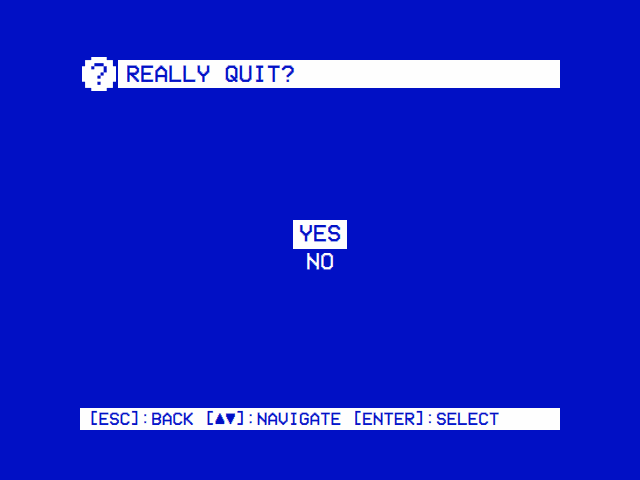
| Settings → Quit, run by hand | The boot screen (the image) |
|---|---|
 |
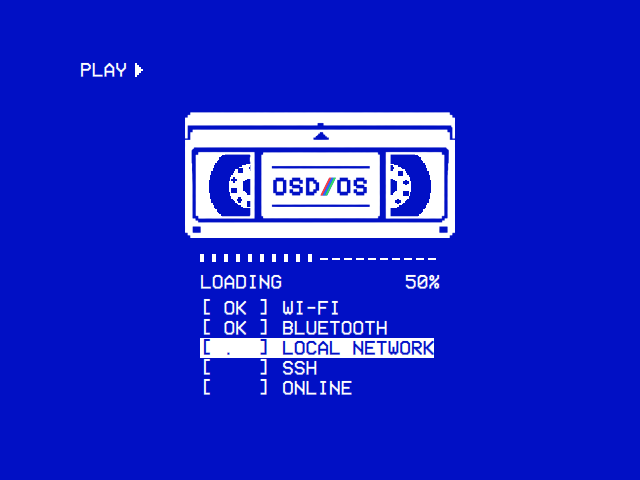 |
| Run by hand, Quit asks Yes or No. Started by the service, it offers Power Off, Restart, Exit to Terminal and Cancel. | A line per service as it comes up: [ OK ] once it is up, [FAIL] if it failed, [ -- ] if it was skipped. |
On Linux, OSD/OS leaves a report of its own where its log may not last: the Pi's journal is kept in memory and gone at the next boot.
-
A crash writes where it happened (the functions it was in, one per line) to the log (
[crash] OSD/OS … ended by SIGSEGV …) and tocrash-report.txtin the data folder. -
A freeze: when the screens haven't answered for 5 seconds, OSD/OS writes when it began, how much memory the app and the system had, and where the app is stuck, to the log (
[watchdog] …) and tostall-report.txt, which adds where each of its other threads is (the picture's, mpv's); and once the screens answer again, after how long. Started by the service, OSD/OS still frozen at 20 seconds ends itself, and systemd starts it again five seconds later, as after a crash: a frozen menu comes back by itself, on the main menu.
Each file holds the latest report only: the next crash or freeze writes over it. On the image they are in /home/pi/.local/share/OSD-OS/. To keep them, quit with Exit to Terminal and copy them to the films partition, which a computer can read:
cp ~/.local/share/OSD-OS/crash-report.txt ~/.local/share/OSD-OS/stall-report.txt /media/OSD-OS/Freeze reports are off with OSDOS_WATCHDOG=0, for a debugger, which stops the app at a breakpoint.
The player's messages reach OSD/OS's log as [mpv] … lines, with every token blanked out; with Transparent Background, libmpv's warnings and errors are logged as they come. mpv also writes a complete, verbose log of the latest video to /tmp/osdos-mpv.log (the system's temporary folder; on a Mac, $TMPDIR). mpv starts the file afresh for each video, so copy it before playing the next one. It is readable by its owner only: it holds each video's full address, and a media server's token with it. Look through it before you post it anywhere.
A Release build (every release, and the image) leaves out OSD/OS's debug lines (CMake passes -DQT_NO_DEBUG_OUTPUT). A build configured without -DCMAKE_BUILD_TYPE=Release keeps them: [main] dataRoot = … at start, [AppCore] Loaded manifest: com.osdos.youtube for each module, [AppCore] Setting saved: app.video_scaling = 14:9 at each change, and [MpvController] launch: mpv …, each video's full command line with the tokens blanked out. To see why something goes wrong, a build from source is often the quickest way (Building from source).
When the screens themselves misbehave, three environment variables make Qt say more (BUILDING.md → Qt / QML debugging knobs):
QT_LOGGING_RULES="qt.qml.*=true"   # verbose QML engine logging
QML_IMPORT_TRACE=1                 # how each QML import is found, or not
QT_QPA_EGLFS_DEBUG=1               # the KMS/DRM output, on a Pi without a desktop
Put them in front of the command (QML_IMPORT_TRACE=1 APP_ROOT=$(pwd) ./build/osdos). For the service, add them with a drop-in, sudo systemctl edit osdos:
[Service]
Environment=QML_IMPORT_TRACE=1
then sudo systemctl restart osdos and read journalctl -u osdos -b. To take it out again, sudo systemctl edit osdos once more and delete the line. (Not systemctl revert: on the image it would take away the image's own drop-ins for the service too.)
Every line OSD/OS writes starts with the part it comes from, in brackets. Lines from the screens themselves (QML) start with qml:. A Release build's start on a Linux PC (a virtual 640×480 screen, no Bluetooth), then Local Files opened:
[main] display index 0: "screen" 640x480 at (0,0)
[main] UI target display index 0 -> 640x480 at (0,0)
[NfcReader] Polling disabled by configuration
[MpvController] video profile: generic
[input] SDL game-controller subsystem ready
[input] keyboard: Logitech K380 (/dev/input/event4, kbd-0005-046d-b342)
[Bluetooth] No system bus: Failed to connect to socket /run/dbus/system_bus_socket: No such file or directory
[boot] first frame 166 ms after start
qml: Routing to: modules/local_files/views/Root.qml
| Prefix | Part of OSD/OS | What it writes |
|---|---|---|
[main] |
Start-up | Each screen it found (display index 0: "…" 720x480 at (0,0)) and the one it uses, a display_index out of range, a stop by a signal, and QML engine failed to load Main.qml when the screens can't load at all. A build from source adds appRoot and dataRoot
|
[AppCore] |
The shell: modules, settings, themes, skins | A manifest.json that isn't JSON or lacks id or entry_point_qml, each theme and skin read and what in it can't be used, a setting that couldn't be saved, a custom color scheme that is wrong. A build from source adds every module loaded, enabled or disabled, and every setting saved |
[MpvController] |
Playback | The video profile chosen at start (video profile: Pi 4 — drm + drm-copy,v4l2m2m-copy), the memory as each video starts (memory as a video starts: app 251 MB, available 1203 of 1848 MB, swap 0 of 100 MB in use), mpv not found, mpv's exit code when it isn't 0, WATCHDOG: no IPC time-pos event for N s — possible freeze, the connection to a playing mpv lost and made again, the screen held by something else, a logo picture it couldn't read |
[mpv] |
mpv's own output | Why a file won't open, an option it refuses |
[EmbeddedMpv] |
Transparent Background (libmpv inside the window) | Whether libmpv was found (using libmpv.so.2, or libmpv not found: Transparent Background is unavailable), where the pictures are drawn (pictures drawn on the GPU: <renderer>, or by mpv's software renderer), an option this libmpv doesn't know, a GPU that can't take the decoder's frames |
[DisplayHandoff] |
A Pi without a desktop handing its screen to mpv, a takeover script, MAME or a web player, and taking it back (VTs, DRM) | A VT that couldn't be switched, or the VT in use that couldn't be read (the screen is then handed over without a switch), DRM master or the CRTC that couldn't be saved or restored: the lines behind a black screen after a video |
[DisplayOutput] |
Settings → Display Output | The switch asked for, and an output not kept |
[AudioOutput] |
Settings → Audio Output |
Sound through <card> at start and at each change |
[MenuMusic] |
The menu music | What it plays, what it makes into a WAV first, and why a file can't play |
[Bluetooth] |
Settings → Bluetooth | No system bus (D-Bus), the pairing agent, an adapter that wouldn't power on |
[Wi-Fi] |
Settings → Wi-Fi | No system bus, NetworkManager's objects that couldn't be read, a network not joined and why, a country not set and why |
[input] |
Gamepads, keyboards and remotes | SDL ready or failed, controllers added (with their key in app.controllers) and removed, input.cfg lines ignored (with their line number) and the bindings applied, gamecontrollerdb.txt mappings loaded, each keyboard and remote found (Linux) and gone |
[crash] |
A crash (Linux) | The signal it ended by and where it was, as in crash-report.txt
|
[watchdog] |
Freezes (Linux) | The screens not answering for 5 seconds, the memory, and where the app is stuck; answering again, or the app ending to start again, as in stall-report.txt; and, short of a freeze, the screens answering late: The main thread was away for 640 ms (app 372 MB, …), once in ten seconds at most |
[boot] |
The image's boot screen | The first frame's time, each held-back service settling, the boot screen closing |
[legacy] |
Moving over from 240-MP | 240-MP's data folder moved over, module ids renamed |
[AtomicFile] |
Saving state |
Could not write <path>: <reason>: a file left as it was, never half written |
[LocalFiles] |
Local Files | A folder not found, USB drives in and out |
[Scripts] |
Scripts | Each run, how it ended and its exit code, sidecar lines it couldn't read, a takeover run in console mode |
[Arcade] |
Arcade | The games folder (games folder: /media/OSD-OS/Games/Arcade), the sets MAME is asked about (Asking MAME about 18 games), MAME changed or unable to list them, a game that didn't play and why (mslug: Missing sp-s2.sp1, …), MAME's hiscore plugin not found, how many of FinalBurn Neo's games its list has, a RetroAchievements answer that couldn't be read or a Web API key it refused. MAME and RetroArch run through the Scripts module's launcher, so their runs and their ends are [Scripts] lines ('mame' finished: failed (exit 2)) |
[HighScores] |
High Scores | How many games' files it reads (Reading 3 games' files), and each file it couldn't read and why (ffightu.hi: The file isn't laid out as hi2txt knows this game's: …) |
[NfcReader] |
NFC Reader | Readers found and lost, polling started or disabled, tag files skipped or created |
[Weather] |
Weather | The place it resolved, forecasts fetched or not, the US stations it reads, its music |
[AmbientMode] |
Ambient:Mode | mpv not found for its music |
[Playlists] |
Playlists | A download that failed and why, a listing that failed, playlists.json not written |
[PlexBackend], [Plex], [PlexAuth]
|
Plex | Token refreshes, a device no longer authorized, profile PINs, a queue cut short |
[JellyfinBackend], [Jellyfin]
|
Jellyfin | Quick Connect's HTTP errors, a token the server rejected, playback reports that failed |
[EmbyBackend], [Emby]
|
Emby | The same for Emby, and Dolby Vision sources transcoded |
[WebPlayer] |
Netflix, Prime Video, YouTube's sign-in | Signing out, and refusing to while the browser is open |
[TMDB] |
Netflix's and Prime Video's catalogue | A request to TMDB that failed |
qml: |
The screens |
qml: [Effect] … can't be used, qml: Routing to: modules/…/Root.qml as a module opens, a module screen's error (qml: [Jellyfin Items] Error: …). Qt's own QML errors name the file and the line |
Most modules come switched off. Only Local Files and Playlists are on at first; Ambient:Mode, Arcade, Emby, High Scores, Jellyfin, Netflix, NFC Reader, Plex, Prime Video, Scripts, Weather and YouTube each have an Enabled setting that starts at Off. Turn it on, and the module joins the main menu: Settings → TV / Movie → the module's name → Enabled for the video modules and Weather, Settings → Arcade → Enabled for Arcade (High Scores' Enabled follows on the same page, under its heading), and Settings → Scripts → Enabled for Scripts. With every module off, the main menu says No modules enabled.
| Cause | Fix |
|---|---|
| Settings → Display Output switched to an output the TV doesn't show | Wait: 30 seconds after OSD/OS starts on the new output without Keep, it goes back to the old one by itself and restarts again |
| Nothing at all, even after that | Take the card to a computer and copy osdos-display-hdmi.txt (or an output you know works) over osdos-display.txt on the bootfs drive |
| A Pi 4 on composite or SCART RGB, and HDMI went dark | As it should be: a Pi 4 has one output on at a time |
| An app install on Raspberry Pi OS, a CRT showing nothing | Raspberry Pi OS's own config.txt drives HDMI. Composite needs enable_tvout=1, sdtv_mode and sdtv_aspect, and OSD/OS's video settings expect fake KMS on a Pi 3 or 4 (dtoverlay=vc4-fkms-v3d,cma-256): use the composite config.txt in INSTALL.md (Installation) |
| The picture comes, but the menus run off the edges of a CRT |
config.txt keeps disable_overscan=1, so the Pi adds no border, and OSD/OS keeps its menus inside a safe area that suits most tubes. A TV that hides more than most cuts into it (Overscan and the safe area) |
| Black after a video, the sound still going or the menus never coming back |
[DisplayHandoff] lines in the log say which step of giving the screen back failed. A mpv_video_args of your own in config.json can draw where the menus can't come back from: take it out (Playback and mpv) |
| Black at start, and the Pi switches off | OSD/OS failed to start: see The app won't start |
Display Output → Troubleshooting a black screen goes through every output, SCART's pins and a Pi 5's connectors.
The loading screen comes, then the menu again, or an error. The log says which of these it is:
| What the log says | Cause | Fix |
|---|---|---|
[MpvController] mpv not found (no bundled sibling, none on PATH) |
mpv isn't installed, or isn't on the PATH of the user OSD/OS runs as |
sudo apt install mpv (Raspberry Pi OS), brew install mpv (macOS). The AppImage carries its own |
Error parsing option subs-with-matching-audio (option parameter could not be parsed), then [mpv] Setting commandline option --subs-with-matching-audio=forced failed. and [MpvController] mpv exited with code 1
|
mpv is older than 0.38. OSD/OS asks for forced subtitles only (--subs-with-matching-audio=forced), which came with mpv 0.38. Local Files, NFC Reader and Playlists ask for it by default (their subtitle setting's Forced Only), Ambient:Mode always, Plex for a transcode or Live TV |
A newer mpv. Raspberry Pi OS Trixie has 0.40 and Homebrew a current one; Ubuntu 24.04 has 0.37 and 22.04 0.34.1. scripts/build-mpv.sh builds 0.40 (Building from source); OSD/OS takes an mpv next to its own binary before the one on the PATH
|
[mpv] … lines about the file, then mpv exited with code 2
|
mpv couldn't play the file: a codec it can't decode, a file cut short, a stream refused. It reaches the module as failed; Plex then tries again with a transcode |
Play the same file with mpv <file> in a terminal: if mpv can't either, the file is the problem. The full story is in /tmp/osdos-mpv.log
|
[MpvController] Cannot start playback: <owner> has the screen |
Something else holds the Pi's screen: a takeover script, a web player | Let it finish, or stop it |
[MpvController] WATCHDOG: no IPC time-pos event for N s — possible freeze |
mpv stopped moving: a stream stalled, a drive gone | A network share or a USB drive pulled out while it played reads as this. mpv's log says what it was waiting for |
| Nothing from mpv, and Transparent Background is on | The video plays inside the window through libmpv, which logs as [EmbeddedMpv]
|
Its lines say whether libmpv loaded and where it draws. Turn Transparent Background off (select on the row) to compare with an mpv process |
| Cause | Fix |
|---|---|
An mpv_video_args override in config.json
|
OSD/OS picks the decoder and the output for each board itself. On a Pi 4 it draws on the primary plane (--vo=drm --hwdec=drm-copy,v4l2m2m-copy), because the zero-copy overlay path jitters into visible judder with 24 fps films. Take the override out of "app" and compare (Playback and mpv) |
| A Pi 3 with Settings → TV / Movie → 1080p Playback Off | Off lets crop, 14:9 and Pan & Scan work, but 1080p stutters on the copy path. Keep the films to 720p, or turn it back On (smooth 1080p, no crop) |
| A film the board can't decode in hardware | A Pi 4 plays 1080p HEVC at about half its CPU, but not 4K HEVC. On YouTube, keep Video Codec at H.264 (a Pi decodes it in hardware) and set Max Frame Rate to 30; Any often picks VP9 or AV1, decoded in software |
| Transparent Background drawing on the CPU | The log says pictures drawn by mpv's software renderer when Qt doesn't draw with OpenGL. pictures drawn on the GPU: … is the light way |
| A 24 fps film on a 50 or 60 Hz output | Frames can't be shown for equal times there, on any player: OSD/OS doesn't change the output's rate for a film |
- Choose the card in Settings → Audio Output: AV Jack, HDMI or a USB sound card. On Auto, sound goes to ALSA's first card, which may not be the one plugged in. A Pi 5 has no AV jack: use HDMI, or a USB sound card on a CRT.
-
See the cards ALSA has:
aplay -l, orcat /proc/asound/cards, the card's id in brackets. -
Quiet AV jack:
amixer sset PCM 100%, thensudo alsactl storeto keep it. -
Read the log:
journalctl -b -u osdos | grep AudioOutputshowsSound through <card>. mpv's own log,/tmp/osdos-mpv.log, says why a video's sound couldn't open.
No Audio Output row at all means a sound server (PipeWire, PulseAudio) runs, as on a desktop: choose the output in the system's sound settings there. Audio Output → When there is no sound has the rest, and INSTALL.md the ALSA settings outside the app (/etc/asound.conf, audio-device= in mpv.conf).
YouTube runs through yt-dlp: the module searches and lists playlists with it, and mpv's ytdl hook finds each video's streams with it. A problem shows in the help line at the foot of the tree:
| What the help line says | Cause | Fix |
|---|---|---|
| Searching needs yt-dlp, which is not installed | No yt-dlp where OSD/OS looks: bin/yt-dlp in the data folder first, then beside its binary, then the PATH
|
Install it (BUILDING.md). On the AppImage, put it at ~/.local/share/OSD-OS/bin/yt-dlp and chmod +x it |
| Could not search YouTube: check the network, and that yt-dlp is up to date | No network, or a yt-dlp too old for YouTube's latest changes | Update it (below) |
| Could not load the playlists: check the network, and that yt-dlp is installed | The same, for youtube_playlists.txt
|
The same |
| Could not load the subscriptions: check the network | The channels' feeds didn't come | Check the network, and the channel ids in youtube_subscriptions.txt
|
Updating yt-dlp. A yt-dlp a few weeks old soon stops finding videos.
- The image keeps its own, yt-dlp's nightly build, at
/home/pi/.local/share/OSD-OS/bin/yt-dlp, and updates it two minutes after each boot and once a day (osdos-yt-dlp-update.timer).journalctl -u osdos-yt-dlp-updateshows how the last update went;~/.local/share/OSD-OS/bin/yt-dlp --updateupdates it now. - An install made by hand:
sudo yt-dlp -Ufor the copy in/usr/local/binfrom BUILDING.md,brew upgrade yt-dlpon a Mac.
Deno. Current yt-dlp needs a JavaScript runtime to answer YouTube's challenges; without one, a video plays in few formats or none. Deno is the recommended one (yt-dlp's EJS notes). It must be on the PATH of the user, or the systemd service, that runs OSD/OS: a service's PATH holds /usr/local/bin and the system's folders, not a folder in your home. The image has it in /usr/local/bin; brew install deno on a Mac.
"Sign in to confirm you're not a bot". With yt-dlp current and Deno found, YouTube can still ask this of an address. Two things help:
-
Sign in: YouTube's settings → Sign in opens Google's sign-in page full screen, in Chromium (with
cageandwtypewithout a desktop) or Google Chrome on a Mac. yt-dlp then searches and plays as that account, which YouTube asks for fewer checks. YouTube can block an account used through yt-dlp, so sign in with a spare one. Sign out forgets it. -
Compare IPv4 and IPv6. The check can belong to the route. On a system that already has IPv6, compare the two (BUILDING.md):
yt-dlp --verbose --simulate --force-ipv4 'https://www.youtube.com/watch?v=VIDEO_ID'
yt-dlp --verbose --simulate --force-ipv6 'https://www.youtube.com/watch?v=VIDEO_ID'
If IPv4 gets the check and IPv6 doesn't, the cause is the IPv4 route, not yt-dlp. OSD/OS doesn't turn IPv6 on, or need it: that is the network's business.
More in YouTube.
The catalogue comes from TMDB, and a title plays in the service's own web player, in Chromium with Widevine.
| What you see | Cause | Fix |
|---|---|---|
| No TMDB API key: put one in tmdb_api_key.txt in the data folder (free from themoviedb.org, Settings, API) | No key | Put a TMDB API key on the first line of tmdb_api_key.txt in the data folder: a v3 key, or a v4 read access token (which starts eyJ) |
| TMDB turned the API key down: check tmdb_api_key.txt | TMDB answered 401 | A key copied short, or with something else on its line |
| Could not reach TMDB: check the network | No network, or TMDB unreachable; the log has the [TMDB] line |
Check the network |
| Chromium is not installed | None of chromium, chromium-browser, google-chrome-stable, google-chrome on the PATH
|
sudo apt install chromium libwidevinecdm0 (Raspberry Pi OS; the image has it) |
| cage is not installed | No desktop, and no kiosk compositor to give the browser a screen | sudo apt install cage wtype |
| Google Chrome is not installed (a Mac, YouTube's sign-in) | YouTube's sign-in needs Chrome on a Mac, whose sign-in yt-dlp can read | Install Google Chrome |
| The service's page says it can't play protected video | No Widevine | sudo apt install libwidevinecdm0 |
| The sign-in is gone next time | The browser was stopped before it saved its cookies: Chromium writes them only every half minute. Holding back closes it the way Ctrl+W does, through wtype; without wtype, with a cage older than 0.1.5, or on a desktop, the run is stopped instead |
Install wtype, or wait half a minute after signing in before you leave |
| Back does nothing in the browser | Back has to be held for two seconds there, and only Escape counts (a gamepad's back button arrives as Escape), not Backspace, which the browser's text fields need | Hold back for two seconds, or close the browser with Ctrl+W |
More in Netflix and Prime Video.
| What you see | Cause | Fix |
|---|---|---|
| Plex: a code, Visit plex.tv/link and enter the code above | Not signed in yet | Type the code at plex.tv/link with any browser, signed in to your Plex account |
| Plex: the Server, Current User and Libraries settings are missing | They only show once the module is signed in | Open Plex and sign in first |
| Plex asks for a profile's PIN | The Plex Home profile has a PIN | Type it. A card tapped on the NFC Reader never switches profile, and never asks for a PIN |
| Plex asks to sign in again |
[PlexBackend] Device no longer authorized — triggering reauth: plex.tv answered 401, as for a device removed from the account's authorized devices |
Sign in again |
| Jellyfin: CONNECTION FAILED: Host requires authentication as Quick Connect starts | The server answered 401 to Quick Connect | Turn Quick Connect on in the Jellyfin server's settings, then enter the code at <server>/web/#quickconnect
|
| Jellyfin or Emby: CONNECTION FAILED: …, or nothing | The server URL: OSD/OS takes it as typed, so it needs the scheme and the port (http://192.168.1.20:8096) |
Type the whole URL. A self-signed or private certificate on your own server is accepted for that server; an expired one isn't |
| Signed out by itself |
Token rejected — signing out in the log: the server no longer knows the token (a password changed, the device removed) |
Sign in again |
| A Plex film fails, then plays after a while | Plex retries with a transcode when mpv can't play the file directly | Set Settings → TV / Movie → Plex → Video Quality to one of its Mbps choices instead of Direct Play, or read the server's log for why the stream failed |
| Plex: LOADING... for half a minute, then an error such as LOAD LIBRARY FAILED: … | The server stopped answering (a NAS gone to sleep, the Wi-Fi dropped): Plex gives a request up after 30 seconds without a byte from it | Wake the server or check the network, then open the list again |
| Not Allowed on an offline playlist's video | The Jellyfin or Emby user may not download | Allow downloads for that user on the server, then Retry Downloads |
Each module's settings has Sign out. The sign-ins are kept in the data folder: plex_auth.json (with plex_key.pem), jellyfin_auth.json, emby_auth.json. More in Plex, Jellyfin and Emby.
The Arcade module lists the ROM sets in its games folder as MAME names them, and plays a game in MAME, full screen. What stands in the way of the list shows on the line under the tree, or with no games on the screen itself; a game that couldn't start stays on its screen with what went wrong and MAME's last lines.
| What you see | Cause | Fix |
|---|---|---|
MAME is not installed |
No MAME where the module looks: bin/mame in the data folder, then mame on the PATH, then /usr/games/mame
|
sudo apt install mame (Raspberry Pi OS, Debian), brew install mame (macOS). The OSD/OS image has it, unless it was built with OSDOS_ARCADE=0
|
No games found |
The sets aren't straight in the games folder, as zip or 7z files (a game's own folder of files is the exception) | Move them there; the screen names the folder |
The games folder can't be read: … |
The folder isn't there and couldn't be made, or can't be read: a drive not plugged in, a Games Folder that is gone | Plug the drive in, or choose the folder again in Settings → Arcade → Games Folder |
| A game under Not Recognized | Its file isn't named as MAME names the game (pacman.zip, not Pac-Man.zip, nor PACMAN.ZIP on a drive that tells cases apart), or neither this MAME nor FinalBurn Neo plays it: a set for another version of MAME, or one FinalBurn Neo has kept as a folder of files |
A set named and made for this MAME: the image's is 0.276. With FinalBurn Neo downloaded (Settings → Arcade → FinalBurn Neo), a set it has, a zip or a 7z, is a game, played in it |
Missing …, looked for in … |
The set lacks files this MAME needs: a clone's parent set, a BIOS set such as neogeo.zip, or a file a set for another version lacks |
Put the sets it names in the games folder, a BIOS set there or in its bios folder |
MAME stopped: … about OpenGL, video or a window |
MAME couldn't draw the way it was asked | Try another Video in Settings → Arcade |
MAME closed unexpectedly |
MAME crashed | Try another Video in Settings → Arcade |
| Coin and Start don't bring you back | They count together, on one player's controller | Press them together on a controller Settings → Controls → Players gives a player, or Esc on a keyboard |
The log has the module's lines, and MAME's runs as the Scripts module's launcher logs them: journalctl -u osdos -b | grep -E 'Arcade|Scripts'. More in Arcade → Troubleshooting.
The High Scores module reads the files MAME keeps of the games played in Arcade. What keeps it from reading them shows on its screen; a game whose file can't be read is under Not Readable, with why on the line under the tree.
| What you see | Cause | Fix |
|---|---|---|
This build of OSD/OS reads no high score tables: it was built without minizip |
A build of your own, made without minizip | Install libminizip-dev (or Homebrew's minizip) and build again (Building from source) |
hi2txt's game definitions are missing: … |
The app's modules/highscores/data/hi2txt.zip isn't there |
Install OSD/OS again |
No high scores yet |
No game has a file yet: none played, or played without the hiscore plugin | Turn on Settings → Arcade → Save High Scores, play a game, and leave it with Coin and Start |
| A game played isn't listed | The hiscore plugin keeps a table only for the games its hiscore.dat knows, and a game's NVRAM is listed only when hi2txt knows of a table in it |
See High Scores → Troubleshooting |
| A game under Not Readable | hi2txt has no definition of the game, or its file isn't laid out as the definition says | The line under the tree says which (High Scores → Not Readable) |
The log has the module's lines: journalctl -u osdos -b | grep HighScores.
Settings → Bluetooth tries a second time two seconds after BlueZ refuses (bluetoothd may still be setting the adapter up). After a second refusal its help line says why, Couldn't turn Bluetooth on: …, and a Details line appears: what BlueZ says about the adapter, the rfkill switches, and the system log's last Bluetooth lines, made to be photographed.
| The message ends in | Cause | Fix |
|---|---|---|
| rfkill blocks it | A software block: Raspberry Pi OS starts every radio blocked, and unblocks Bluetooth only on some adapters | The image unblocks it as bluetoothd starts. On an app install: sudo rfkill unblock bluetooth; systemd keeps it from one boot to the next. rfkill list bluetooth shows the switches |
| a switch blocks it (rfkill) | A hard block: a switch or the firmware, not software | Nothing in software lifts it |
| anything else | BlueZ's own answer | Read Details, and journalctl -u bluetooth -b
|
No Bluetooth on the page means BlueZ isn't running or there is no adapter. No Bluetooth row in Settings means a Mac (pair devices in macOS's own settings) or a build without Qt D-Bus. On Linux, the user OSD/OS runs as must be in the bluetooth group (sudo usermod -aG bluetooth $USER, then log in again); install.sh and the image do this.
Settings → Wi-Fi joins a network from the couch: select one and type its password (Settings → Wi-Fi). NetworkManager keeps it and joins it by itself at every start. The boot screen's last line, ONLINE, is the check that the network is up; with no network it ends with [FAIL] after 20 seconds, and OSD/OS carries on without it.
| What you see | Cause | Fix |
|---|---|---|
| No Wi-Fi row in Settings | An image, or an install.sh run, from before the version that brought it (launcher level 7), a Mac, or a build without Qt D-Bus |
Run install.sh again, or use one of the ways below |
| No Wi-Fi on the page | NetworkManager isn't running, or there is no Wi-Fi |
systemctl status NetworkManager; a USB Wi-Fi stick may want its firmware |
| Wi-Fi turns on, then goes off again | No country set: Raspberry Pi OS keeps Wi-Fi off until it is | Settings → Wi-Fi → Country |
| NetworkManager didn't allow it (polkit) | The polkit rule that lets OSD/OS's user use NetworkManager isn't there | Run install.sh again. ls /etc/polkit-1/rules.d/ should list 50-osdos-networkmanager.rules
|
| Couldn't set the country: … |
osdos-wifi.socket isn't listening, or raspi-config refused the code |
sudo systemctl enable --now osdos-wifi.socket; the system log has raspi-config's answer |
| wrong password? | The password, or a network whose password changed | Select it: New Password, or Forget it and join it again |
| it gave no address (DHCP) | The router answered but gave no address | Restart the router; check how many devices it lets in |
| it is out of reach | The network isn't heard, or doesn't say its name | Search again, or join it with Network Not Listed |
The other ways, as before:
-
Before the first boot: set Wi-Fi in Raspberry Pi Imager through a local manifest (Imager 2 skips its customisation for an image chosen with Use custom), or in
network-configon the bootfs drive (Installation → Wi-Fi by hand). cloud-init reads it on the first boot only. -
After the first boot, from a shell (Exit to Terminal, or SSH over Ethernet):
sudo raspi-config, or NetworkManager's own tool:sudo nmcli device wifi connect "MyHomeWiFi" password "my-wifi-password"
Both need
sudo, so an image built with a password. -
Wi-Fi stays off until its country is set: Settings → Wi-Fi, Imager's customisation and
network-config'sregulatory-domainset it.
Settings shows the Pi's IP address at the right end of its title bar once there is one. More in The OSD/OS image → Wi-Fi.
Every OSD/OS image starts as osdos, so two of them on one network share a name: a router lists them alike, osdos.local reaches either, and LAN Play's games are hosted by two osdos. Settings → About → System Information shows each one's name, IP and MAC addresses; select on Device Name to give each a name of its own (Settings → About → System Information), or name each card in Raspberry Pi Imager's customisation as it is written.
| What you see | Cause | Fix |
|---|---|---|
| Select on Device Name does nothing, and the hint bar has no RENAME | Not the OSD/OS image, or an image or install.sh run from before the version that brought it (launcher level 8) |
Run install.sh again; elsewhere, sudo hostnamectl set-hostname <name>
|
| Couldn't rename it: osdos-name.socket isn't listening | The socket isn't enabled | sudo systemctl enable --now osdos-name.socket |
| Couldn't rename it: … with another reason | hostnamectl, or /etc/hosts, refused it |
journalctl -u 'osdos-name@*' -b has the stop helper's answer |
| Letters, digits and hyphens only, and no hyphen first or last | A name the network can't take: an apostrophe, a dot, an &, an accent |
Type it again with letters, digits and hyphens; a space becomes a hyphen |
Local Files lists a drive as USB: <label>, after Recently Watched, Favorites and Search.
| Where | Cause | Fix |
|---|---|---|
| The image | A file system it doesn't mount, a partition already mounted, or the disk the system boots from |
journalctl -u 'osdos-usb-mount@*' says what each drive was mounted as, or why not. It mounts FAT32, exFAT, NTFS, ext2/3/4, HFS+, XFS, btrfs, F2FS, ISO 9660 and UDF, read-only, under /media/usb/<label>
|
| An app install on Raspberry Pi OS Lite | Raspberry Pi OS Lite mounts nothing by itself | Mount it under /media: OSD/OS lists a block device mounted under /media/ or /run/media/, named after its mount point's folder |
| Any | The drive is mounted by /etc/fstab, holds the media folder, or is inside it |
Those are left out of the list on purpose: the tree shows the media folder already |
| A Mac | Not mounted | It lists what is mounted under /Volumes
|
A video of a drive that was pulled out drops out of Recently Watched and Favorites until the drive is back.
| What you see | Cause | Fix |
|---|---|---|
| No OSD-OS drive on the card | The first boot splits the card: the system keeps 8 GiB and the rest becomes the exFAT OSD-OS partition. A card with less than 2 GiB to spare gets none | Use a bigger card |
| No OSD-OS drive after a first boot that was cut short (the power pulled) | The partition was made but not yet formatted | Switch the Pi on again: the next boot formats a film partition that has no file system at all, and leaves one with any file system alone |
| Windows offers to format a drive | It can't read the system's partition | Always Cancel: formatting it erases the system |
| Films copied on, not in Local Files | Local Files opens the partition's Movies folder (/media/OSD-OS/Movies), and only until its Media Directory names another folder |
Move them into Movies on the OSD-OS drive, or choose Settings → TV / Movie → Local Files → Media Directory → Default Folder |
| Offline playlists fail, naming the folder | A card flashed with an earlier image mounts the partition read-only (ro in /etc/fstab, its line naming /media/240-MP) |
Flash the new image, or change ro to rw,noexec,nosuid,nodev and the line's last 0 to 2
|
| Files on it untidy after the power was cut | A download half written | It is checked with fsck.exfat at every boot before it is mounted |
More in The OSD/OS image → Films on the card.
AppCore reads themes from assets/themes and the data folder's themes, skins from assets/skins and the data folder's skins, and says in the log what it couldn't use. A run with a few mistakes in a theme and a skin of one's own:
[AppCore] /home/pi/.local/share/OSD-OS/themes/broken/theme.json: object is missing after a comma
[AppCore] theme mine: its colors are not a color scheme's name or a #rrggbb primary and surface: drawn in Video 1's
[AppCore] theme mine: its background effect's area is not "window" or "foot": the window
[AppCore] theme mine: its background shader, "fire.qsb", is not a qsb file in its folder
[AppCore] theme mine: its screen effect's glow is not a number from 0 to 1: none
[AppCore] theme mine: its music, "../outside.ogg", is not a ogg/opus/mp3/flac/wav/m4a/aac/mid/midi/xm/mod/s3m/it file in its folder
[AppCore] theme mine: /home/pi/.local/share/OSD-OS/themes/mine
[AppCore] skin myskin: its window, "window.png", is not a png/gif/bmp file in its folder
[AppCore] skin myskin: "My Icon!" is not an icon's name
[AppCore] skin myskin: /home/pi/.local/share/OSD-OS/skins/myskin
| What you see | Why |
|---|---|
| Not in Settings → Theme at all | Its theme.json isn't JSON (the first line above, written when Settings lists the themes), or it isn't in a folder of its own under themes
|
| Listed by its folder's name | Its name is missing, or longer than 28 characters |
| A built-in theme gone | A theme in the data folder with the same folder name takes its place |
A theme.json in the data folder's themes listed under Skin instead |
It holds only window pictures (window, titleBar, hintBar, selection): a skin from before skins had a folder of their own |
| A part drawn as none | That part couldn't be used, and the line says why: colours become Video 1's, a skin OSD/OS's own window, an effect nothing |
| A file "not in its folder" | Every file must be inside the theme's or skin's own folder: a path or a link out of it is refused. A skin's pictures must be PNG, GIF or BMP, its icons PNG, SVG, GIF, BMP or JPEG named in a-z, 0-9, _ and -
|
| A number above 1 doing no more than 1 | Effect numbers are held between 0 and 1: 2 is drawn as 1, without a line in the log |
The format is in Themes and Skins.
A theme's own shader must be a .qsb that Qt Shader Tools' qsb compiled, for every graphics API Qt may draw with. One that isn't is replaced, and Qt and OSD/OS say so:
ShaderEffect: Failed to deserialize QShader from /home/pi/.local/share/OSD-OS/themes/tube/tube.qsb. Either the filename is incorrect, or it is not a valid .qsb file. …
qml: [Effect] file:///home/pi/.local/share/OSD-OS/themes/tube/tube.qsb can't be used, OSD/OS's own in its place
A screen shader of a theme's own gives way to OSD/OS's, with the theme's numbers; OSD/OS's own failing leaves none (…, none). A background shader that can't be used is logged the same way and the background stays empty. Compile it again, with a Qt no newer than the one OSD/OS runs on (a newer Qt's .qsb may not load in an older one), as the theme template does:
qsb --glsl "100 es,120,150" --hlsl 50 --msl 12 -o plasma.frag.qsb plasma.fragqsb comes with Qt Shader Tools: sudo apt install qt6-shader-baker on Debian and Raspberry Pi OS (/usr/lib/qt6/bin/qsb), or the bin folder of a Qt from Qt's installer. More in Shaders.
The menu music plays only in the menus: never while a video plays, loads or has its menu open, never under the boot screen, the screen saver or Weather's and Ambient:Mode's own music, and only 700 ms after nothing else holds it. Settings → Menu Music must be the theme's (and the theme have music) or File with a Music File, and Music Volume above QUIET. Then the log says the rest:
| What the log says | Cause | Fix |
|---|---|---|
[MenuMusic] playing <file> |
It plays: check the sound card (Settings → Audio Output; the menu music follows it) | |
[MenuMusic] <file>: a MIDI file needs FluidSynth and a SoundFont: fluidsynth is not installed |
A MIDI file, made into a WAV first, and no FluidSynth |
sudo apt install fluidsynth timgm6mb-soundfont (install.sh and the image have them); brew install fluid-synth on a Mac |
… needs FluidSynth and a SoundFont: no SoundFont found |
No General MIDI SoundFont | A .sf2 beside the MIDI file with its name, or in the data folder's soundfonts, or the system's (timgm6mb-soundfont). Homebrew's FluidSynth brings none |
[MenuMusic] mpv couldn't play <file>, and openmpt123 is not installed |
A tracker's module (XM, MOD, S3M, IT) this mpv can't play |
sudo apt install openmpt123; brew install libopenmpt on a Mac |
[MenuMusic] mpv couldn't play <file> (exit N) |
mpv ended within three seconds | The file is damaged or of a kind mpv can't play. It isn't tried again until the music changes |
[MenuMusic] <file>: no such file |
The file moved | Pick it again in Settings → Music File |
[MenuMusic] mpv not found: no menu music |
No mpv | Install mpv |
The menu music's mpv starts with --no-config: nothing in mpv.conf reaches it. More in Menu music.
Settings offers a row only where it can work (on the first screen, unless TV / Movie's page is named):
| Row | Offered when |
|---|---|
| Text Effect, Background Effect, Screen Effect | The build has OSD/OS's shaders (Qt Shader Tools at build time) and Qt draws on a GPU, not with its software renderer |
| Ripple, Wave and Drop among the Transitions | The same; without them a theme's Ripple, Wave or Drop fades instead |
| Selector Effect, and Fade and the Cubes | Always: they need no shader |
| Transparent Background (TV / Movie) | libmpv was found at run time (libmpv2 on Raspberry Pi OS, part of Homebrew's mpv), and the build has libmpv's headers. The log says [EmbeddedMpv] libmpv not found: Transparent Background is unavailable
|
| Display Output | The OSD/OS image, OSD/OS started by its service, and more than one output for this board |
| Audio Output | Linux with ALSA's cards (/proc/asound/cards) and no sound server |
| Bluetooth | Linux, a build with Qt D-Bus |
| 1080p Playback (TV / Movie) | A Raspberry Pi 3, whose smooth path can't crop |
| Window Frame | OSD Background is Window |
| Music File, Music Volume | Menu Music is File; Menu Music isn't Off |
| Logo Image (TV / Movie) | Channel Logo isn't Off |
| Startup From | A favourite is set to Play at Startup |
A build without Qt Shader Tools says so when CMake configures it: Qt Shader Tools not found — the shader effects will be unavailable (Building from source). Under Qt's software renderer (QT_QUICK_BACKEND=software) the shaders can't run whatever the build; OpenGL drawn on the CPU (Mesa's llvmpipe) still runs them, slowly. More in Effects.
| What you see | What happened | What to do |
|---|---|---|
| The screen stops answering, then goes on | The app was busy or stuck: [watchdog] … the main thread hasn't answered for 5.0 s, then … answered again, N s after it stopped
|
Send stall-report.txt with a bug report: it says where it was stuck |
| The menus answer late while a film plays behind them (Transparent Background) | The GPU draws the menus and the film: a 1080p or 4K film brought down to a CRT's lines can keep it busy. OSD/OS times each picture and turns mpv's scaling down when they take too long: [EmbeddedMpv] the pictures took 23 ms each to draw, the menus' frames waiting behind them: … (Playback and mpv); [watchdog] The main thread was away for 640 ms says how late the menus were |
If they still lag, send the log: the two lines say how long the pictures and the menus took. Films at the screen's own resolution draw fastest |
| The picture goes, and OSD/OS comes back on its main menu | Frozen for 20 seconds, it ended itself (the app starts again), or it crashed ([crash] …), and the service started it again |
Send stall-report.txt or crash-report.txt (the reports) |
| A login prompt in place of OSD/OS | It failed three times in two minutes, and the service gave up (When OSD/OS crashes) |
sudo systemctl reset-failed osdos, then sudo systemctl start osdos, or switch the Pi off and on |
Ended with no report: status=9/KILL in the log |
The system ran out of memory, and the kernel ended the app: journalctl -k -b | grep -i -e oom -e 'out of memory' says so |
The memory line as each video starts ([MpvController] memory as a video starts) shows where it went: send the log |
| What the log says | Cause | Fix |
|---|---|---|
QQmlApplicationEngine failed to load component, …/Main.qml: No such file or directory, then [main] QML engine failed to load Main.qml
|
OSD/OS's own files aren't where it looks: APP_ROOT, else share/osdos beside the binary's folder, else the folder above it |
From source, start it with APP_ROOT=$(pwd) in the repository's folder |
module "…" is not installed |
A QML module missing | Raspberry Pi OS and Debian: sudo apt install qml6-module-qtquick qml6-module-qtquick-controls qml6-module-qtquick-window (install.sh installs them). QML_IMPORT_TRACE=1 shows where Qt looked |
This application failed to start because no Qt platform plugin could be initialized. |
Qt's platform plugin missing, or the wrong one asked for | Without a desktop, OSD/OS draws with EGLFS (QT_QPA_PLATFORM=eglfs, which the launcher sets); on a desktop, xcb or wayland. The AppImage carries only xcb: it needs X11, or Wayland with XWayland |
EGLFS errors about the DRM device, such as drmModeGetResources failed
|
On a Pi 5 the GPU's render node can come before the display's card, and Qt takes the wrong one | The launcher (/usr/local/bin/osdos) picks the card with a display; scripts/rpi-run-local.sh does the same for a build of your own |
| Nothing on screen when started over SSH | The service holds the screen |
sudo systemctl stop osdos first |
| macOS: it won't open | A release that isn't notarized | System Settings → Privacy & Security → Open Anyway, or xattr -dr com.apple.quarantine /Applications/osdos.app
|
The AppImage: version `GLIBC_2.39' not found
|
It is built on Ubuntu 24.04, which sets its glibc floor at 2.39 | A newer distribution (a current Steam Deck, Ubuntu 24.04 and later), or build it on yours (Building from source) |
| A gamepad does nothing |
[input] lines: SDL failed, the controller not found, input.cfg lines ignored |
On Linux the user must be in the input group (sudo usermod -aG input $USER, then reboot) (Controls). One button only: its page in Settings → Controls may have cleared it, or given it another action (Reset to Defaults) |
| A keyboard or remote isn't in Settings → Controls | No [input] keyboard: or [input] remote: line for it |
Linux only, and only with the input group, as above. A device with gamepad or joystick buttons (SDL's: listed as a gamepad when SDL has a mapping for it), a mouse and the Pi's HDMI-CEC device aren't listed (Controls) |
| A remote's arrows work, its OK does nothing | Nothing in the log | Its OK is a key OSD/OS doesn't know, or a left click with a desktop (an air mouse with its pointer on). Without a desktop, as on the OSD/OS image, a left click is Select / OK already, and so are keypad Enter and a Select or OK key. Otherwise give the button Select / OK in Settings → Controls, on the remote's own page or under All Keyboards & Remotes, with a keyboard to get there. On many air mice a button of their own turns the pointer off, and OK then arrives as a key |
Every setting is in config.json in the data folder, under "app" for OSD/OS's own and "modules" for each module's (Configuration files):
| System | Data folder |
|---|---|
| The OSD/OS image | /home/pi/.local/share/OSD-OS/ |
| Raspberry Pi OS, other Linux, the AppImage |
~/.local/share/OSD-OS/ ($XDG_DATA_HOME/OSD-OS/ when it is set) |
| macOS | ~/Library/Application Support/OSD-OS/ |
| Windows (a build from source) | %APPDATA%\OSD-OS\ |
| FreeBSD, OpenBSD (a build from source) | ~/.local/share/OSD-OS/ |
Any, with DATA_ROOT set |
That folder |
To start from the defaults, quit OSD/OS (it reads config.json as it starts and writes it at every change), move the file aside, and start it again:
cd ~/.local/share/OSD-OS
mv config.json config.json.old
Under the autostart service (the image, or install.sh's), Quit powers the Pi off: quit with Exit to Terminal instead, which leaves a shell on the TV, move the file there, then sudo systemctl start osdos, or switch the Pi off and on.
Without config.json, OSD/OS starts as new and writes a fresh one at the first change. A config.json that isn't JSON reads as none too, and the first change then writes the defaults over it, so keep a copy before editing it by hand. To take back one setting, copy its key from config.json.old.
Other files hold the rest, and stay when only config.json goes:
| File | What it holds |
|---|---|
lists.json |
Each module's Recently Watched and Favorites, but YouTube's Recently Watched |
local_files_history.json, youtube_history.json, nfc_reader_history.json
|
Resume points, and YouTube's Recently Watched |
youtube_watch_later.json, playlists.json
|
Watch Later, and the playlists |
plex_auth.json, plex_key.pem, jellyfin_auth.json, emby_auth.json
|
The media servers' sign-ins |
netflix/browser, prime_video/browser, youtube/browser
|
The web players' browser profiles, with their sign-ins |
arcade/ |
The Arcade module's: what MAME said of the games, how long each has been played, MAME's settings, NVRAM and high scores, and RetroArch's for FinalBurn Neo's games (arcade/retroarch/) with the RetroAchievements account |
highscores/ |
What the High Scores module read of MAME's files, read again without it |
input.cfg, themes/, skins/, nfc_tags/, user_scripts/
|
Your own files |
Moving the whole data folder aside starts OSD/OS as on its first day. On the image, keep bin/yt-dlp from it: the YouTube module's yt-dlp lives there, and its daily update runs that copy.
Open an issue at github.com/mehmetraif/OSD-OS/issues; its bug report form asks for most of the following. Questions and setup help go to Discussions → Q&A, and a security problem never to an issue: report it privately as SECURITY.md says.
- What you did, step by step, what you expected and what happened.
- The module, or the part of the app (browsing, Settings, playback).
-
The hardware: the board (
cat /proc/device-tree/modelon a Pi), or the Mac or PC. -
The output: composite NTSC or PAL, SCART RGB, HDMI; and the
config.txtor Display Output preset in use (cat /boot/firmware/osdos-display.txton the image). Overscan andconfig.txtdifferences are common causes. -
How OSD/OS is installed: the image,
install.sh, the DMG, the AppImage, or built from source. -
The version: Settings shows a release's in its title bar, after SETTINGS, and Settings → About any build's in its own (
DEVfor a build from source); About → Build has the commit and the day the build was made. -
mpv's version, the first line of
mpv --version: playback problems often come from it. -
The log, as text:
journalctl -u osdos -b --no-pager > osdos.logon the image, or the terminal's output. For a playback problem,/tmp/osdos-mpv.logtoo, once you have looked through it for addresses and tokens. -
After a crash or a freeze,
crash-report.txtorstall-report.txtfrom the data folder (the reports). - A photo of the screen where it helps: Settings → Bluetooth's Details page is made for one.
-
Configuration files: the data folder,
config.json, the environment variables -
Playback and mpv: how videos are handed to mpv, and
mpv_video_args - Display Output and Audio Output
- The OSD/OS image: its services, the films partition, USB drives, logs
- Building from source: a build with its debug lines
- How it works
- FAQ