Repository navigation
Subtitle Translation
The AI subtitle translation card translates SRT, ASS and SSA subtitles with an OpenAI model. It is built for a series: the episodes of a project share one glossary of names, terms, characters and forms of address, so the same name is rendered the same way in every episode. Only the text of the lines changes; timing, styles and formatting stay as they are.
The work is organized in projects. A project holds the files, the two languages, the glossary and the translation, and is saved on disk at every change: you can close RemuxForge and resume later from where you stopped.
This page covers the project list, the project settings and the models. The glossary is on Translation glossary, the translation, the review and the export on Translation and review.
- Open Settings ▸ AI and connect a ChatGPT account or save an OpenAI API key: see Settings.
- Check the models in Models, see Models.
An open project shows a step bar at the top:
| Step | What happens |
|---|---|
| Project | Name, languages, context, AI review and files. Analyse starts the analysis. |
| Glossary | The model reads the episodes and proposes the glossary; you correct it and approve it. Approve starts the translation. |
| Translation | The model translates every file in blocks of lines, following the approved glossary. |
| Review | The AI review rereads the translation, then you check the lines. Approve writes the translated subtitles. |
| Export | RemuxForge writes the subtitle files again after your corrections. |
The project stops where your decision is needed: on the glossary and on your review. A step becomes clickable when the project reaches it. When you open a project, it lands on the step it is waiting on.
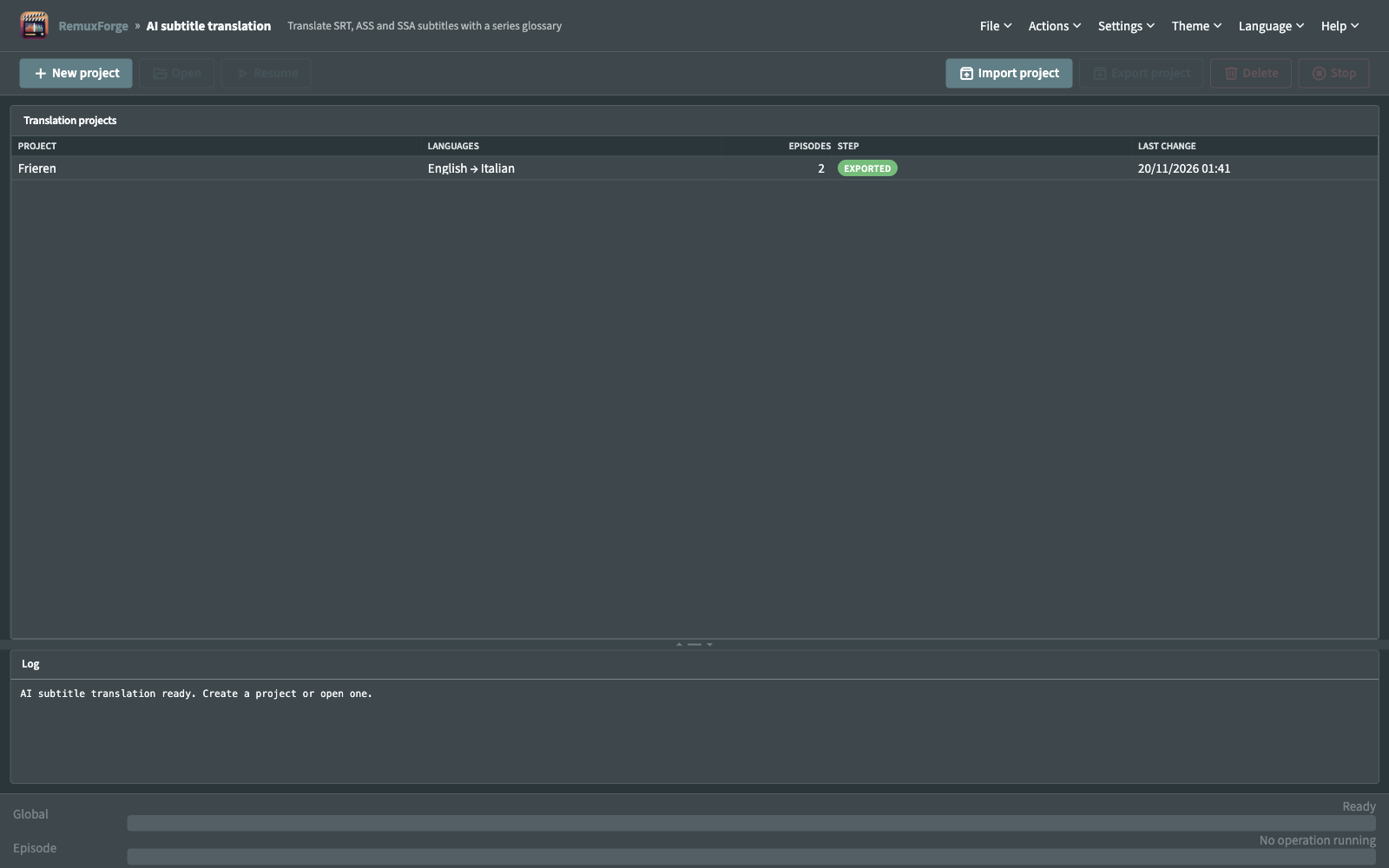
The card opens on Translation projects. Double-click a row, or select it and press Open, to open a project.
| Column | Shows |
|---|---|
| Project | The project name. A project without a name shows Project of and its creation date. |
| Languages | Source and target language, for example English → Italian. |
| Episodes | Number of files. |
| Step | Where the project is, see below. |
| Last change | Date and time of the last change. The list is sorted by it, newest first. |
| Step | Meaning |
|---|---|
| Project | Nothing analyzed yet. |
| Analysis paused | The glossary analysis was stopped and can be resumed. |
| Glossary | Glossary proposed, waiting for your approval. |
| Glossary approved | Approved, with the translation still to start. |
| Translating, AI review | A phase is running. |
| Translation | The translation has started and is not running now, for example with blocked files. |
| Translated | Translation done, AI review not running. |
| Interrupted | Stopped with Stop, or RemuxForge was closed while it worked. |
| Paused | Stopped by the access, for example a usage limit, or by an error. |
| To review | Waiting for your review, or corrected by hand after the last export. |
| Exported | Every subtitle file written. |
| Command | Key | What it does |
|---|---|---|
| New project | F5 |
Creates an empty project and opens it. |
| Open | Opens the selected project. | |
| Resume | F10 |
Opens the selected project and resumes its stopped analysis, translation or AI review. |
| Import project | Imports a project archive, see Moving a project. | |
| Export project | Writes the selected project to an archive. | |
| Delete | Deletes the selected project, after a confirmation. |
Delete removes the project with its glossary and its call log; the subtitle files stay where they are.
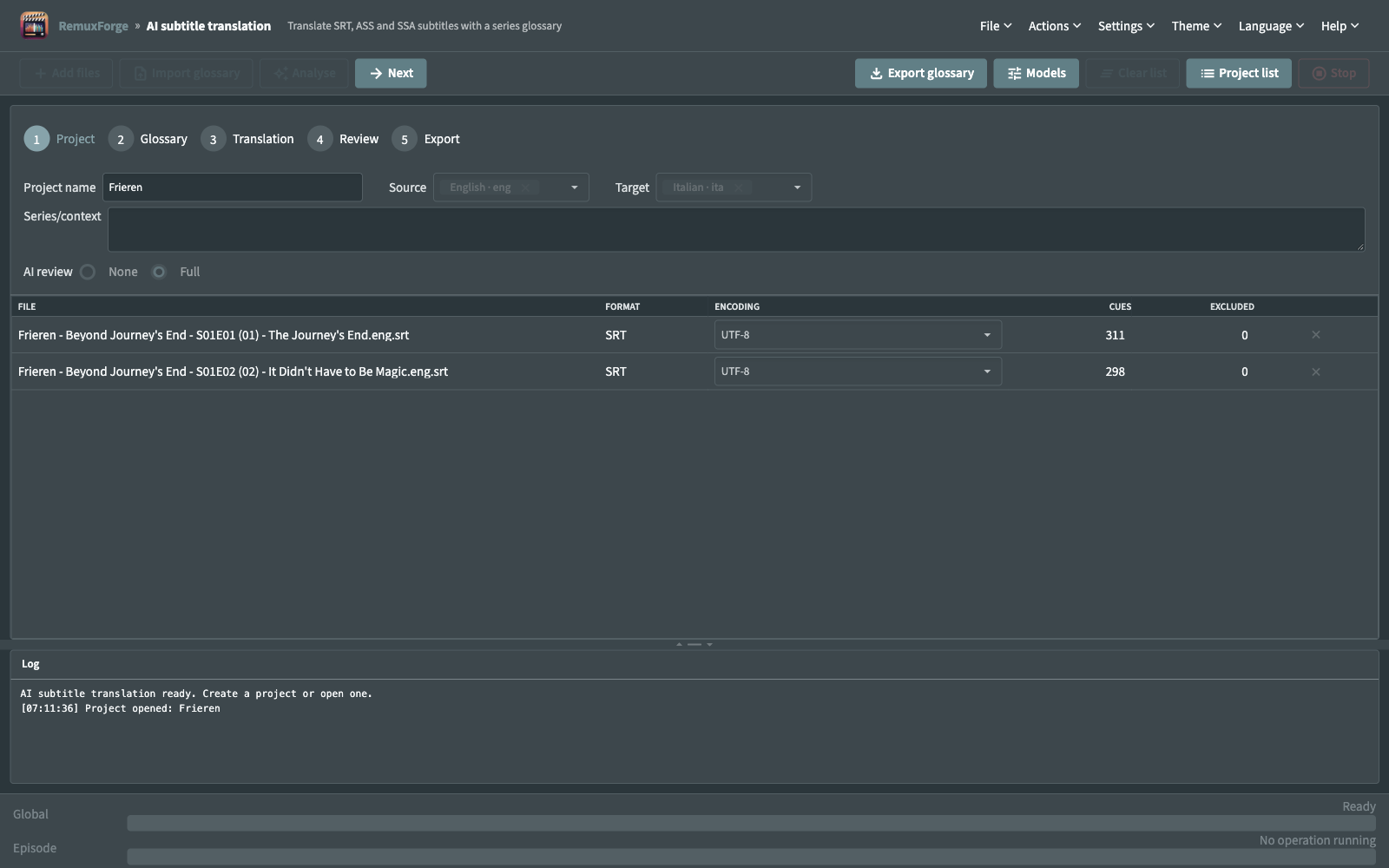
| Field | What it does |
|---|---|
| Project name | The name shown in the list and used for the exported glossary and archive. It can change at any time. |
| Source / Target | The language of the subtitles and the language to translate into, from the list of languages in common use. They lock once the analysis has started or a glossary is loaded. |
| Series/context | Free text that gives the model the context: the series, its genre, the setting, anything that helps the translation. It can change at any time. |
| AI review | Full has the model reread every block of the translation and is the default; None skips the AI review. It can change until the translation starts. See AI review. |
Add files (F5) picks the subtitles: SRT, ASS or SSA, also several episodes of the same series at once. Each file is read as soon as it is added.
| Column | Shows |
|---|---|
| File | The file name, with the reason in red when the file is rejected. |
| Format | SRT, ASS or SSA. |
| Encoding | The character set of the file, see below. |
| Cues | Lines to translate. |
| Excluded | Lines left as they are, such as lines with only formatting or drawings and the text not to translate, see What gets translated. |
| ✕ | Remove from the list. |
A file with a byte order mark, or valid UTF-8, is read directly. For any other file choose its character set in Encoding, for example Western European (windows-1252); until then the file shows Not UTF-8: choose the encoding. Other reasons a file is rejected:
| Reason | What to do |
|---|---|
| UTF-16 without BOM: save it with the BOM | Save the file again with the byte order mark. |
| The text does not round-trip with this encoding | Choose another encoding. |
| Invalid Dialogue lines | Fix the ASS file. |
| No cues to translate | The file has no text to translate. |
| Unrecognised format | Only SRT, ASS and SSA are translated. |
The analysis starts only when no file in the list is rejected.
The file list can change until the first Analyse: then it is fixed for the life of the project, and RemuxForge remembers the content of each file. If a file is later moved or changed on disk, the translation of that file stops with The file is gone or The file changed after the analysis: see Blocked files.
Clear list (Ctrl+L) empties the file list before the analysis.
The translated file is the source file with only the text in the source language translated.
Analyse starts with the Analysis model recognizing the kind of the lines: in ASS and SSA files for each combination of style, actor and effect, in SRT files for each stretch repeated across the episodes, such as a recap or an opening.
| Kind | What happens |
|---|---|
| Dialogue | Translated as spoken lines. |
| Song | Translated as lyrics, keeping the meaning and the line breaks. |
| Sign | On-screen text such as signs, titles, captions and notes, translated short. |
| Not to translate | Text in another language, such as romaji or kanji lyrics, and the letters or syllables of an animated effect: left as it is. |
In SRT files, outside the repeated stretches, a line with ♪ or ♫ is a song and the others are dialogue.
A dialogue sentence that continues across several lines is translated as a whole and spread over the same lines, and the signs shown in between keep their own text.
A stretch repeated across episodes, such as an opening, is translated once and copied into every file that has it.
Animated text drawn in pieces, such as a title whose pieces move into place or a song drawn letter by letter, is translated once as a whole line. In the translated file the whole line takes the place of the pieces, with their position and look; the animation of the pieces is lost.
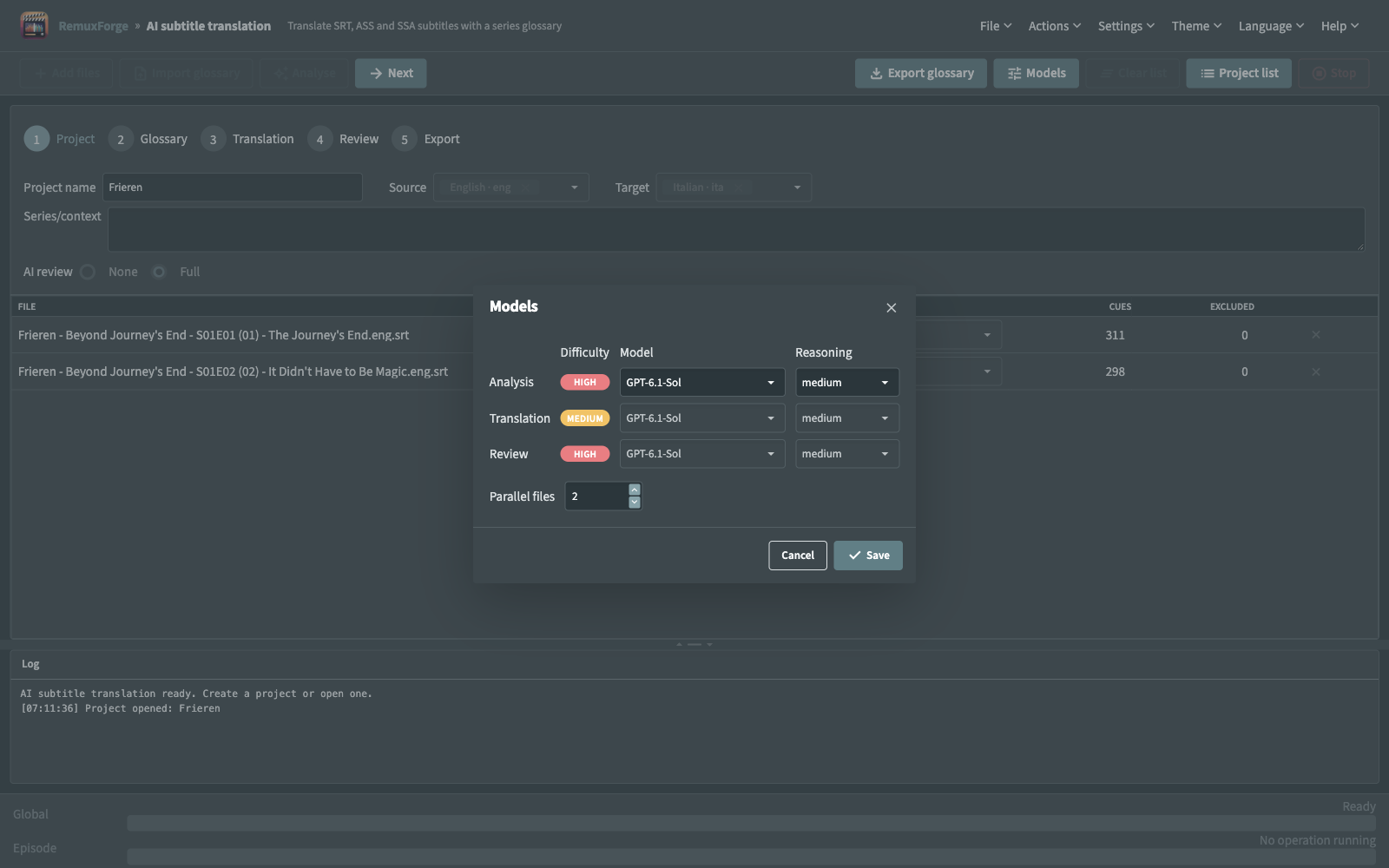
Models (Project step) assigns a model to each phase. The Model list shows the models available to your access; Reasoning offers the levels the chosen model supports.
| Phase | Difficulty | What the model does |
|---|---|---|
| Analysis | High | Recognizes the kinds of the lines, reads the episodes, looks the series up on the web when the access allows it, and proposes the glossary: terms, characters, register and tone. A mistake here repeats in every translation. |
| Translation | Medium | Translates the lines in blocks following the approved glossary. It is the phase with the most calls. |
| Review | High | Rereads the translation and corrects errors of meaning. Choose one at least as capable as the translation model. |
A new project starts with gpt-6.1-sol at medium for all three phases. When your access does not offer the model of a phase, the dialog leaves that phase empty and shows Model missing: choose another one.
Parallel files sets how many files are translated at the same time, from 1 to 10. Default 2.
Save stores the choice in the project. When the translation starts, the Translation and Review models and their reasoning levels are fixed for that translation; Parallel files applies at every start and resume.
Starting a phase without its model shows Model missing with the phase to set, for example Choose the Analysis step model in Models.
RemuxForge sends OpenAI the text of the subtitles you add, the series/context field and the glossary built from them. During the analysis the model can run web searches about the series. No audio or video content is sent. Every request counts against your ChatGPT plan or your API key credit; a whole season, or several languages, can cost a lot, so with an API key set a spending limit in your OpenAI account first.
The consent is asked in Settings, every time you connect an account or save a key, in the AI features and costs dialog that covers presets and translation together.
Export project writes the project to a single archive, <project name>.rf-translation.zip, in a folder you choose. The archive holds the project, its glossary, every translation with its call log, the source subtitles of the translated files and the lines translated so far. It is available once the translation has started, when the translation is stopped or waiting for your review and no file is blocked; in the project list and on the Translation, Review and Export steps. A name already in use gets a suffix.
Import project (project list) reads an archive:
- Choose the
.zip. RemuxForge checks the whole archive before writing anything. - If the same project already exists, Replace project asks whether to replace it, translations included.
- Choose the folder for the source subtitles. A file already there with the same content is reused; otherwise the subtitles are written next to it with a suffix.
The imported project opens on its step. A translation that was running when the archive was made shows as Interrupted and resumes with Resume.
Projects live in the data folder described in Settings: translation-projects holds one folder per project with its settings, glossary and analysis call log, and translation-jobs one folder per translation with the state of each file and its call log. The subtitle files themselves stay where you added them.
Each step has its own commands in the toolbar and in the menus.
| Step | Commands |
|---|---|
| Project list |
New project (F5) · Open · Resume (F10) · Import project · Export project · Delete
|
| Project |
Add files (F5) · Analyse (F10) · Import glossary · Export glossary · Models · Clear list (Ctrl+L) · Next
|
| Glossary |
Approve · Export glossary · Next · Resume or Retry (F10) after a stopped analysis |
| Translation |
Resume or Retry (F10) after a stopped translation · Export project
|
| Review |
Approve · Resume or Retry (F10) after a stopped AI review · Export project
|
| Export |
Export subtitles (F10) · Export glossary · Export project
|
Project list returns from an open project to the list. Stop (F12) stops the running phase in every step. While a phase runs, the other cards of the home screen stay closed.
- Translation glossary: analysis, glossary, approval
- Translation and review: translation, review, export