Repository navigation
Feature Walkthrough Library Update
Library Update is the everyday case: nothing new to build, just a dependency rollout across a workspace where some repositories are intentionally frozen on release tags. This walkthrough follows it end to end on the MezzoRecovery workspace (11 repositories).
- Create the branch
- Push the updates
- Diagnose a partial push
- Recover with a tag upgrade
- Create pull requests
- Merge and sync back to default
See also the Tape Density walkthrough for a feature that also changes code, not just dependency versions.
Goal: create coordinated branch library-update on every repo that is on a branch, while frozen tag repos are left untouched.
Branch caret -> Prepare Workspace.

| Field | Value | Why |
|---|---|---|
| Branch name | library-update |
Shared feature branch name |
| Based on |
main (Default) |
Each repo starts from its default tip |
| Skip repos on tags | checked | TapeDrive, TapeImage, Website, DockerBase stay pinned |
| Update dependencies | unchecked | Deps update is a separate Push Updated step in this walkthrough |
| Push changes | unchecked | Disabled when update is off |
Click Create. One job runs Creating branches... / Created N of M (branch creation only).

What to verify:
-
Frozen rows (tag icon + tag name): TapeDrive
0.2.0, TapeImage0.1.0, Website / DockerBase1.0.0- branch column unchanged. -
Branch repos show
library-updateand GitVersion strings like0.1.0-library-update.41. - Red
N of Mdeps badges remain - no.csprojrewrite yet. - Yellow cloud-up on branch repos (new branch, no upstream).
This walkthrough separates branch creation from dependency update + push so you can see:
- How Skip repos on tags limits branch scope.
- How Push Updated is the dedicated deps + synchronized push path (phase 2).
For a single combined job, leave Update dependencies and Push changes checked (Prepare Workspace).
Next: Phase 2 - Push Updated.
Goal: rewrite package references on every non-tag repo, commit, and push by dependency level with NuGet feed wait between levels.
With red dependency badges on Level 2 / 3 and no incoming commits, the header is yellow Push Updated. Click the primary button (or use Update Only then Push Only from the caret for split control).
Update dependencies modal: confirm message, Proceed. GrayMoon commits chore(deps): update package versions per repo (.csproj pins move to current workspace package versions, including tag versions from frozen Level 1).
During the push phase the loading overlay shows git output, NuGet polling, and GitHub Actions API lines (status only):

Typical lines:
- Waiting for N packages... / Found X of N packages with MM:SS countdown
- Timeout = 5 minutes per required package at that level (
PushWaitDependencyTimeoutMinutesPerDependency, default 5.0) - GHA log lines are informational - GrayMoon unblocks the next level when the nupkg appears on the mapped NuGet connector, not when a workflow turns green
If the countdown reaches zero before all packages are found, GrayMoon stops the job with a timeout. Repos already pushed stay on origin; later levels may never push.
After the job ended:
| Level | Repos | Remote library-update
|
Notes |
|---|---|---|---|
| 1 | MezzoRecovery, Solution | Yes | Pushed (no deps commit needed / no extra commit) |
| 1 | TapeDrive, TapeImage, Website, DockerBase | N/A | Frozen on tags - skipped |
| 2 | Tape, Mezzo | Yes | Deps commit pushed; Build workflows triggered |
| 3 | Api, Agent, TapeTools | No | Still local only - yellow cloud-up, no upstream |
Level 3 never received git push because synchronized push was still waiting for Level 2 packages on the NuGet feed when the wait window expired (Found 2 of 4 packages in the overlay).
On Repositories, unpushed branch repos show:
- Yellow cloud-up commits badge (no upstream)
- Yellow
createPR badge (ahead of default locally) - Green dependency counts after the deps commit landed locally
Do not assume the job failed silently - check Actions and whether origin has the branch:
git ls-remote --heads origin library-updateNext: Phase 3 - Push failure, NuGet wait, and GitHub Actions.
When Push Updated finishes but Level 3 (or any level) still shows yellow cloud-up, the synchronized push did not complete for those repos. This phase explains how to diagnose and recover.
-
Tape, Mezzo, MezzoRecovery, Solution: green
↑0 ↓0(onorigin/library-update) - Api, Agent, TapeTools: yellow cloud-up, deps commit exists locally only
- Frozen tag repos: unchanged
The push job may have ended without error toast while Level 3 was never pushed - NuGet wait timeout stops the orchestrator after partial progress.
Synchronized push pushes Level 1 packages first, then polls the NuGet connector until each required nupkg at that level is on the feed, then pushes Level 2, waits again, then Level 3.
GrayMoon does not publish packages itself. Something else (usually GitHub Actions dotnet pack + push to GitHub Packages) must put the nupkg on the feed. If that never happens within 5 minutes x number of packages at the level, you see:
- Overlay: Found 2 of 4 packages (or similar) until countdown hits 00:00
- Job stops; remaining repos are not pushed
So "NuGet timed out" often means CI did not produce the package in time (or at all), not that GrayMoon lost network access.
Open Actions for the same workspace. Filter failed (red chip) and Refresh.

In this run after Level 2 push:
| Repository | Workflow | Result |
|---|---|---|
| MezzoRecovery | Build MezzoRecovery App | success |
| MezzoRecovery.Tape | Build | failed |
| MezzoRecovery.Mezzo | Build | failed |
Level 3 workflows did not run meaningfully yet - those repos were never pushed to origin.
Click Logs on a failed row. GrayMoon fetches the GitHub job log (same text as GitHub Actions UI).

MezzoRecovery.Tape - dotnet pack failed with errors like:
error CS0117: 'TapeImageSplitWriterOptions' does not contain a definition for 'OnSegmentClosed'
error CS1061: 'TapeImageSplitWriter' does not contain a definition for 'FinalizeAsAbortedAsync'
MezzoRecovery.Mezzo - similar missing-type errors:
error CS0246: The type or namespace name 'TapeImageTruncatedException' could not be found
Push Updated pinned consumers to tag package versions from frozen Level 1 (TapeImage 0.1.0, TapeDrive 0.2.0) while library-update branch code on Tape / Mezzo (from main) already references newer TapeImage APIs that exist only in later packages (from the earlier tape-density work on main).
Result:
- Level 2 Build workflows fail at compile time.
- No nupkg is published to the NuGet feed for Tape / Mezzo.
- Synchronized push waits, finds only 2 of 4 expected packages, times out.
- Level 3 never pushes.
This is a dependency / tag mismatch, not a GrayMoon push bug.
Pick one path after you understand the logs:
- Upgrade frozen repos if needed (Tag upgrade) - e.g. checkout TapeImage to a tag that includes the APIs your consumers need.
- Run Sync on the workspace.
- On
library-update, run Push Updated again (or Update Only then Push Only).
- Fix compile errors on
library-update(or merge/rebase consumer code to match pinned packages). - Re-run failed workflows from Actions (or push an fix commit).
- When Level 2 builds succeed and packages hit the feed, run header Push or Push Only to finish Level 3.
If Level 2 packages are on the feed but GrayMoon already stopped:
- Repositories -> yellow Push or Push Updated caret -> Push Only
- Or push from git locally; the Worker hook updates the grid on next sync
Push Only skips .csproj rewrite and only pushes repos with outgoing commits or no upstream.
Uncheck Synchronized Push in the push confirmation dialog when you intentionally push before packages exist (not recommended for multi-level consumers).
Before Create PR:
-
git ls-remote origin library-updatesucceeds for every repo you want in the PR batch - Actions Build workflows success for packages downstream repos consume
- Repositories grid: green
↑0 ↓0, no cloud-up - Yellow
createPR badges on branch repos (not on frozen tags)
- Do not open PRs for repos whose branch never reached origin - GitHub has nothing to compare.
- Do not assume a green in sync badge means pushed - cloud-up / no upstream is the push signal.
When Level 3 is pushed and builds are green, continue with Phase 4 - Create PRs.
This workspace recovered via TapeImage tag upgrade (Fetch -> checkout 0.2.0 -> Push Updated again). Step-by-step screenshots and verification are in Phase 3 recovery - TapeImage tag upgrade.
After Phase 3 diagnosis, the fix is to align frozen TapeImage with the APIs your Level 2 consumers need, then run Push Updated again so builds succeed, packages land on the NuGet feed, and Level 3 pushes complete.
All steps below were done in GrayMoon on MezzoRecovery, a real multi-repo project.
Level 2 Build workflows failed; Level 3 repos still had yellow cloud-up (no upstream). TapeImage was pinned to tag 0.1.0 while branch code on Tape / Mezzo expected 0.2.0 APIs.

Sync caret -> Fetch (or header Fetch). GrayMoon refreshes remote refs for every workspace repo.

After Fetch, TapeImage shows a yellow upgrade badge: origin has tag 0.2.0 newer than the checked-out 0.1.0.

Click the upgrade badge on TapeImage (or open the branch dialog from the row). Switch to the Tags tab, select 0.2.0, click Check out.


Branch repos on library-update now show red N of M dependency badges again - consumers still pin TapeImage 0.1.0 in .csproj until Push Updated rewrites them.
Header returns to yellow Push Updated.
Click Push Updated. GrayMoon runs Update Only (rewrite pins to TapeImage 0.2.0, commit) then Push Only (synchronized push with NuGet wait).

This run succeeds because Level 2 Build workflows compile against TapeImage 0.2.0 packages and publish nupkgs to the feed before the wait window expires.
After the job completes:
- Every branch repo on
library-updateshows green↑0 ↓0(onorigin/library-update) - Dependency badges green
- Yellow
createPR badges on Level 2 / 3 repos (ahead of default, no open PR yet) - Frozen tag rows unchanged: TapeDrive 0.2.0, TapeImage 0.2.0, Website / DockerBase 1.0.0
- Header Push outline (nothing left to push)

Open Actions. Filter success and Refresh.
All Build workflows on library-update should be success (contrast with the failed run in phase 3):
| Repository | Workflow | Result (after recovery) |
|---|---|---|
| MezzoRecovery | Build MezzoRecovery App | success |
| MezzoRecovery.Tape | Build | success |
| MezzoRecovery.Mezzo | Build | success |
| MezzoRecovery.Api | Build Api | success |
| MezzoRecovery.Agent | Agent AOT publish and deploy | success |
| MezzoRecovery.TapeTools | Build IL (linux-x64) | success |

Before Phase 4 - Create PRs:
- TapeImage on tag 0.2.0 (not 0.1.0)
-
git ls-remote origin library-updatesucceeds for Api, Agent, TapeTools, Tape, Mezzo - Actions Build workflows success for Level 2 packages
- Repositories grid: no cloud-up, green deps, yellow
createPR badges
Continue with Phase 4 - Create PRs.
Prerequisite: every repo that should get a PR has library-update on origin, green dependency badges, and yellow create PR badges. Complete Phase 3 recovery first if Level 3 was never pushed or builds were still failing.
Five Level 2 / 3 repos show yellow create badges. Frozen tag repos and repos with none (MezzoRecovery root, Solution - not ahead of default) are excluded.

- Repositories -> Branch caret -> Create PR
- GrayMoon opens New Pull Request - 5 repositories with every eligible repo in one list
- Enter shared title and body (markdown)
- Create -> confirm Create 5 pull requests? once
Frozen tag repos are excluded automatically (IsOnTag skipped in code).
GrayMoon includes a repo when:
- Not pinned to a tag
- Current branch is not the default branch
- At least one commit ahead of default (
DefaultBranchAhead > 0) - No open PR for that head branch
- GitHub owner/repo parses from clone URL
In this run the five eligible repos were: Tape, Mezzo, Api, Agent, TapeTools.
Title: chore(deps): align package versions for library-update
Body:
## Summary
- Dependency-only update on branch `library-update`
- Rewrites PackageReference versions to match workspace tag/package versions
- Frozen Level 1 repos (TapeDrive, TapeImage, Website, DockerBase) remain on release tags

## Notes
- Coordinated with GrayMoon Push Updated / synchronized push
- Merge by dependency level (Level 2 before Level 3)
Click Create. GrayMoon shows a confirmation dialog:

Click Create again. Toast: Created 5 of 5 pull requests.
| Repository | PR |
|---|---|
| MezzoRecovery.Tape | #40 |
| MezzoRecovery.Mezzo | #53 |
| MezzoRecovery.Api | #43 |
| MezzoRecovery.Agent | #38 |
| MezzoRecovery.TapeTools | #67 |
Grid PR badges turn green #NNN. Frozen rows and repos with none stay blank in the PR column.

Merge PRs by dependency level in GitHub (Level 2 Tape / Mezzo first, then Level 3 Api / Agent / TapeTools), then per-level Return to Default - documented in Phase 5 - Merge and Return to Default.
This phase follows Phase 4 - Create PRs. Open PRs remain on Level 2 and Level 3; Level 1 had no PRs (MezzoRecovery root and Solution were on library-update but not ahead of default enough to need PRs).
The merge workflow proceeds by dependency level: clean up finished levels with per-level Return to Default (rewind icon), merge PRs on GitHub for the next level, then repeat.
See also: Return to Default (general reference).
Return to Default checks out main, deletes the stale feature branch locally (and on origin when Delete remote branches is checked), and pulls latest default. That keeps every workspace clone on a short branch list and prevents accidentally working on yesterday's feature branch after the work is done or abandoned.
Use the Level N header rewind (<< icon, tooltip Return to Default), not the workspace-wide Branch caret Return to Default, while Level 2 / 3 still have open PRs. Workspace-wide sync would touch every non-default repo and show red commits will be lost warnings for repos still ahead on library-update.
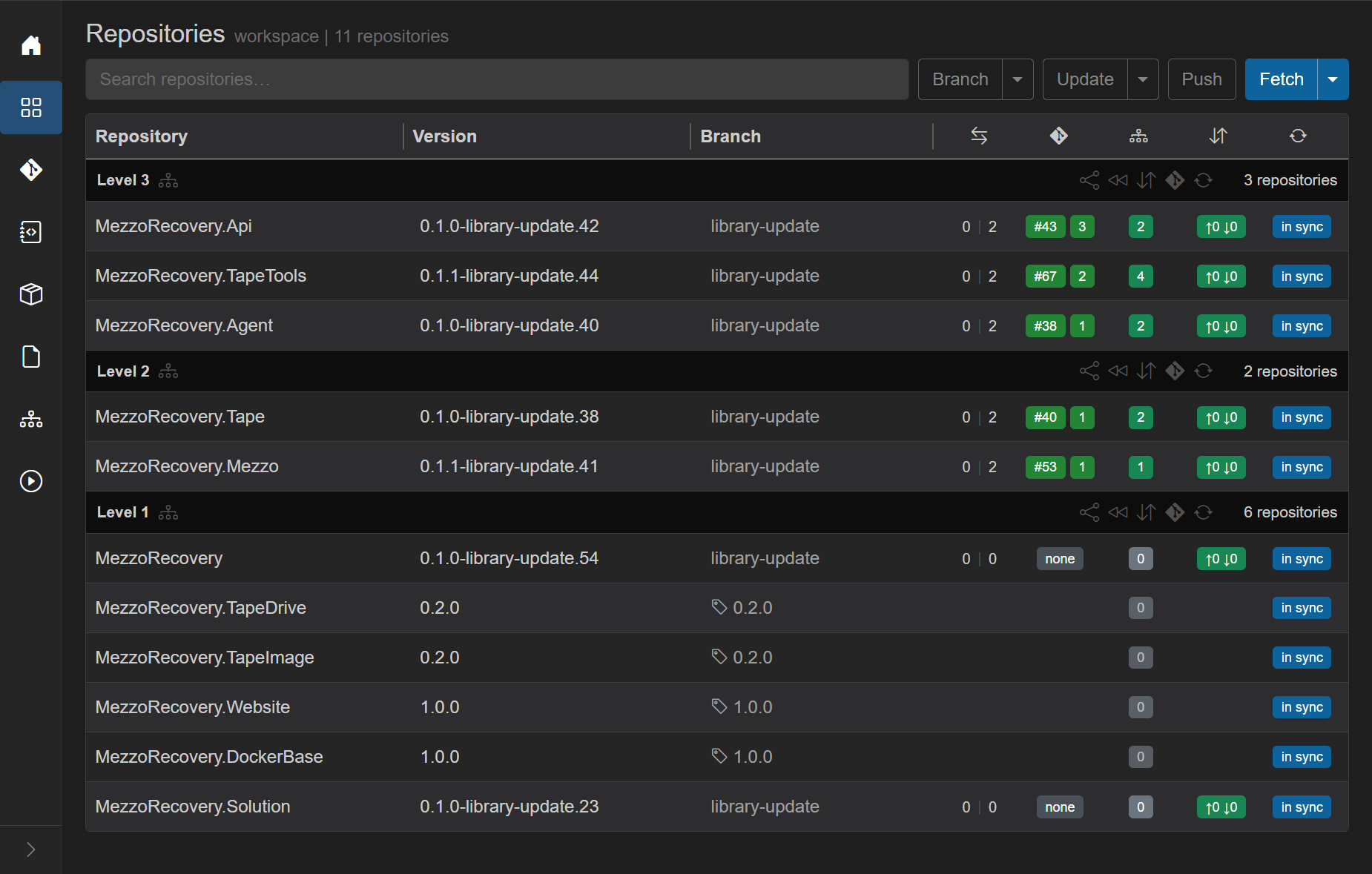
| Area | State |
|---|---|
| Level 3 |
library-update, open PRs #43, #67, #38, green deps |
| Level 2 |
library-update, open PRs #40, #53, green deps |
| Level 1 |
MezzoRecovery / Solution on library-update, PR none; TapeDrive, TapeImage, Website, DockerBase frozen on tags |
| Header | Push outline (nothing to push) |
Level 1 has no PRs to merge. The only branch repos still on library-update are MezzoRecovery and Solution (0 \| 0 vs default - no unique commits, but the stale branch ref still exists locally and on origin). Tag repos are skipped automatically.
Because Level 1 has no PRs, skip GitHub merge and go straight to rewind.
On the Level 1 header row, click the rewind control (Return to Default, double << arrows).
GrayMoon runs a fetch job first: Fetching latest branch state for N repositories... (refreshes PR records and git fetch). When fetch completes, the Return to Default dialog opens scoped to Level 1 only.

Dialog details for this run:
- Title: Return to Default
- Lead copy: This will sync 2 repositories to their default branch: checkout default, remove the current branch locally, and pull.
-
Repo list:
MezzoRecoveryandMezzoRecovery.Solution, both leavinglibrary-updatewith gray remote badge (origin/library-updatewill be deleted) - No red alert - neither repo is ahead of default with unmerged commits
-
Delete remote branches - default on (removes
origin/library-updatefor these two repos) -
Delete local branches - default on (removes local
library-updateref after checkout) - Tag repos (TapeDrive, TapeImage, Website, DockerBase) are not listed - already on tags, skipped
Click Proceed. Overlay: Synchronizing to default branch..., then per-repo git steps (remote delete, fetch --prune, checkout main, delete local branch, pull).

Level 1 after this step:
| Column | Level 1 state |
|---|---|
| Branch |
main on MezzoRecovery and Solution; tag icon unchanged on frozen repos |
| Version |
*-main.* GitVersion on branch repos |
| PR | blank (no PR was ever opened) |
| Deps | gray 0 on Level 1 rows |
| Commits | in sync with origin |
Level 2 / 3 unchanged - still on library-update with open PRs #40, #53, #43, #67, #38.
After Level 1 rewind, Level 1 packages report *-main.* again. Level 2 / 3 .csproj files on library-update still pin -library-update package versions. GrayMoon paints red N of M badges on consumers (e.g. Tape 1 of 2, TapeTools 2 of 4).
That is expected - not a failed sync. The next step is merge Level 2 PRs on GitHub, refresh PR badges in GrayMoon, then Level 2 header rewind.
GrayMoon runs locally on your machine (App + Worker). GitHub cannot send webhook events to it, so the grid does not update the moment you click Merge in GitHub. PR badges stay green #NNN until GrayMoon pulls fresh state from the GitHub API.
| Trigger | Scope | Calls GitHub PR API? | Notes |
|---|---|---|---|
| Hover PR badge | One repo | Yes | Fastest manual check. Throttled to once per repo every 10 seconds. Also refreshes mergeability tint on open PRs. |
Level N << Return to Default |
Repos in that level | Yes | Runs before the fetch job and dialog. Grid badges update immediately - no need to hover or wait before clicking rewind after a merge. See Return to Default. |
| Branch -> Return to Default | Every non-default repo | Yes | Part of the workspace-wide fetch prep before that dialog opens. |
| Header Sync (Sync menu, not Fetch) | All repos (or level via sync icon) | Yes | Full git sync plus persist; refreshes PR records as each row is updated. Heavier than hover or per-level rewind. |
| F5 (reload page) | Whole page | No | Re-reads last persisted PR rows from SQLite. Does not call GitHub unless something else already saved fresh state. |
| Header Fetch | All repos | No |
git fetch plus reload from DB only - does not refresh PR badges from GitHub. |
| After Create PRs | Repos just created | Yes | Automatic refresh when the bulk create job finishes. |
Typical merge workflow: merge on GitHub, then click Level N header Return to Default (<<). That click refreshes PR status for the level and opens the rewind dialog - you do not need a separate hover or F5 step first. Use hover when you only want to confirm one badge without starting sync. Reserve full header Sync when you need git state refreshed everywhere, not just PR colors.
General reference: Pull request badge - refreshing status.
After merging #40 and #53 on GitHub, the grid may still show green open PR links until you refresh:

Move the mouse over the PR badge (e.g. #40 on Tape). GrayMoon queries GitHub and repaints purple merged:

Hover #53 on Mezzo the same way. Both Level 2 rows show merged:

Local clones are still on library-update until you run per-level Return to Default - merged on GitHub is not the same as checked out on main locally.
After merging #40 and #53 on GitHub, click Level 2 header rewind (Return to Default, << icon). You do not need to hover the PR badges or press F5 first - the click refreshes PR status for every repo in Level 2 from GitHub, then runs the fetch job and opens the dialog.
If you already hovered and see purple merged, the rewind click still works the same way.
GrayMoon fetch job next, then dialog scoped to Level 2 only:

Dialog details:
- Lead copy: This will sync 2 repositories to their default branch...
-
Repo list:
MezzoRecovery.TapeandMezzoRecovery.Mezzo, both leavinglibrary-update - No red alert - merged PRs are resolved work, not commits about to be lost
-
Delete local branches - default on (remote
library-updatewas already removed by GitHub merge) - Proceed - blue, no countdown
Click Proceed. Overlay Synchronizing to default branch..., then checkout main, delete local feature branch, pull.
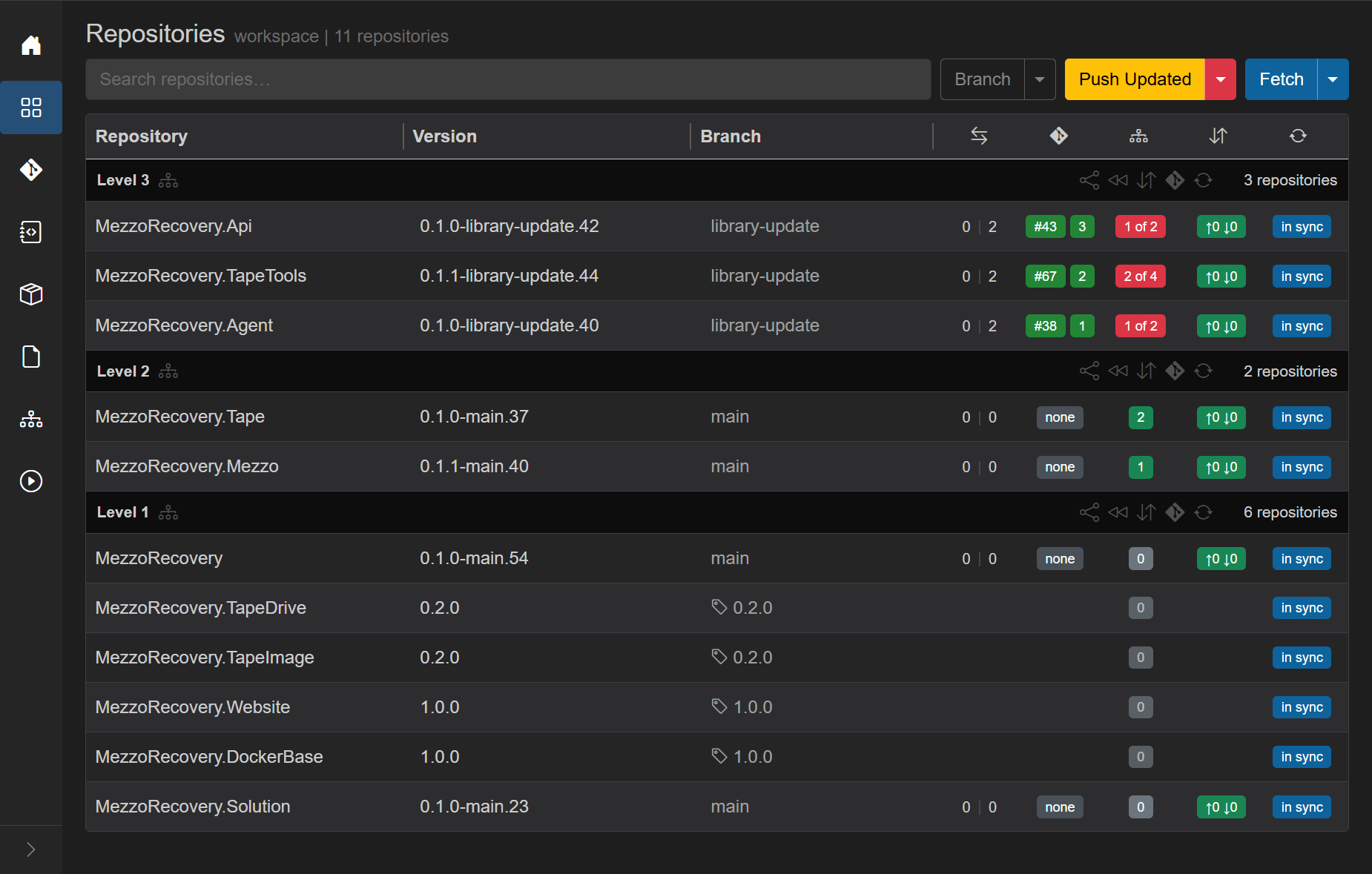
| Column | Level 2 state |
|---|---|
| Branch |
main on Tape and Mezzo |
| Version |
0.1.0-main.37, 0.1.1-main.40 (GitVersion on default) |
| PR | blank (none - merged PR closed, feature branch gone locally) |
| Deps | green (2, 1) - Level 1 package pins match |
| Commits | in sync with origin |
Level 3 unchanged - still on library-update with open PRs #43, #67, #38. Red dependency badges appear (1 of 2, 2 of 4) because Level 2 packages now report *-main.* while Level 3 .csproj files still pin -library-update Level 2 versions. Header turns yellow Push Updated - run a scoped Level 3 update before merging those PRs so each open PR absorbs one deps alignment commit (same rhythm as Level 2 Only earlier in this phase).
After Level 2 rewind, Level 3 is the only level with red dependency badges. The split-menu label becomes Level 3 Only. At this point it matches primary Push Updated in scope:
| Action | Scope | When only Level 3 has red badges |
|---|---|---|
| Push Updated (primary click) | Every level that still needs work | Rewrites Level 3 .csproj refs to Level 2 -main.* packages, commits, push through Level 3 |
| Level 3 Only (split menu, first item) | Lowest level needing work (maxLevel: 3) |
Same job - there is no lower level left to skip and no higher level to include |
MezzoRecovery has three dependency levels; Level 3 is the top. Once Level 1 and Level 2 are on main with green badges, the usual choice is the yellow Push Updated primary button - one click, same outcome.
This walkthrough clicks Level 3 Only once so the scoped menu item is documented alongside Level 2 Only (which did matter mid-merge). See the parallel explanation in tape-density Phase 4 - Push Updated vs Level 3 Only.
During earlier merge waves you needed Level 2 Only so Level 3 PRs stayed stable while Level 2 landed. Now every repo below Level 3 is already on main; scoping buys nothing except menu clarity.
We chose Level 3 Only from the Push Updated caret for documentation. Primary Push Updated would have opened the same Update dependencies modal and run the same job.
Level 1 and Level 2 are on main with green dep badges. Level 3 still shows red 1 of 2, 2 of 4, 1 of 2 on library-update with open PRs #43, #67, #38. Header is yellow Push Updated.

Open the Push Updated caret. The first item reads Level 3 Only because Level 3 is the only level with unmatched refs. Click Level 3 Only (not the primary button - equivalent here, but documented explicitly for this walkthrough).
GrayMoon opens the same Update dependencies modal as a full Push Updated run, but the job that follows is scoped to Level 3 (maxLevel: 3).

Leave the default message (chore(deps): update package versions) and Include updated dependencies in commit message on. Click Proceed.
One background job runs Updating Level 3... then push through Level 3:
-
Update phase - rewrites
.csprojinMezzoRecovery.Api,MezzoRecovery.TapeTools, andMezzoRecovery.Agentso Level 1 and Level 2<PackageReference>versions point at-main.*(matching clones after Level 2 rewind). Level 1 / 2 repos are not edited. - Commit phase - one deps commit per Level 3 repo with the shared message.
-
Push phase - push publishes Level 3 refs on
library-update. Level 3 is the top level; there is no NuGet wait for downstream consumers in this workspace.

| Area | What changed | What did not change |
|---|---|---|
| Level 3 | Dep badges green (2, 4, 2). Each repo gained a deps commit and push (0 | N ahead of main). Open PR badges #43 / #67 / #38 still point at the same PRs - now including the alignment commit. |
Branch still library-update. |
| Level 2 / 1 | Still main, green deps, PR none. |
Unchanged. |
| Header | Yellow Push Updated drops; header shows separate Update and Push (no unmatched deps left to rewrite). | - |
Pushing the deps commit re-runs GitHub Actions on the open Level 3 PRs. PR check badges may show orange while workflows run, then green after CI succeeds (same pattern as Level 2 PR checks - hover, header Sync, or wait and refresh).
Wait for GHA on the Level 3 PRs to turn green, then merge in GitHub.
You can merge from Merge PRs... on the level menu (see Repositories). This walkthrough merged on GitHub. When checks are green:
- Open each Level 3 PR via the row badge (#43, #67, #38) or hover 3 repositories on the Level 3 header -> Open in GitHub... -> Pull Requests (level header menu).
- Merge each PR on GitHub (all three carry dependency work plus the deps alignment commit from Level 3 Only).
Refresh the grid - hover PR badges, F5, header Sync, or Level 3 header Return to Default (<<). See Refreshing PR status. GrayMoon paints purple merged on Api, TapeTools, and Agent. All three rows still show branch library-update locally until you run Level 3 header rewind.

| Row | GitHub outcome | Grid badge | Branch (local) |
|---|---|---|---|
| MezzoRecovery.Api | Merged #43 | purple merged | library-update |
| MezzoRecovery.TapeTools | Merged #67 | purple merged | library-update |
| MezzoRecovery.Agent | Merged #38 | purple merged | library-update |
| Level 2 / 1 | Already rewound | none |
main / tags |
That mixed state is correct. Merged PRs are finished on GitHub; local clones still need per-level cleanup.
On the Level 3 header, click Return to Default (<<). Same pattern as Level 1 and Level 2: PR refresh for the level first, then fetch job, then dialog scoped to Level 3 only. You do not need to hover badges before clicking - the rewind click refreshes PR status from GitHub automatically.

Dialog details (same merged-PR pattern as Level 1 and Level 2):
- Lead copy: This will sync 3 repositories to their default branch: checkout default, remove the current branch locally, and pull.
-
Repo list -
MezzoRecovery.Api,MezzoRecovery.TapeTools, andMezzoRecovery.Agent, all leavinglibrary-update. Api may show a gray remote hint (merged PR; origin may still have the feature branch until delete runs). - No red alert - merged PRs are treated as resolved work, not commits about to be destroyed.
-
Delete remote branch and Delete local branches - both default on. After checkout of
main, GrayMoon removes the locallibrary-updateref and deletes the remote feature branch when it existed. - Proceed stays blue with no countdown.
Click Proceed. Overlay Synchronizing to default branch..., then per-repo checkout / pull / branch cleanup for all three Level 3 repos.

Every row in the workspace:
| Column | Final state |
|---|---|
| Branch |
main on branch repos; TapeDrive / TapeImage on tag 0.2.0; Website / DockerBase on tag 1.0.0 (frozen repos unchanged throughout) |
| Version |
*-main.* GitVersion on branch repos; tag versions on frozen repos |
| PR | none - merged PRs closed; feature branch refs gone |
| Deps | green badges - every package pin matches live GitVersion |
| Commits | in sync with origin |
| Header | Update / Push / Sync - no yellow Push Updated (nothing left to align) |
The library-update feature is fully landed. Local clones match GitHub default; the feature branch no longer exists locally or on origin (when delete-remote was checked).
Cross-repo dependency updates in GrayMoon follow one repeating pattern. You own review and merge decisions in GitHub. GrayMoon owns coordination, dependency math, and fast cleanup across every clone.
- Merged Level 2 PRs #40 (Tape) and #53 (Mezzo), then Level 3 PRs #43, #67, #38 after deps alignment commits landed.
- Decided timing - Level 1 rewind first (no PRs), then Level 2 merge + rewind, then Level 3 Only, then Level 3 merge + rewind.
| Step | GrayMoon action | This walkthrough |
|---|---|---|
| Prepare Workspace | Branch creation with Skip repos on tags |
library-update on 7 branch repos; 4 tag repos frozen |
| Push Updated | Deps rewrite + synchronized push | Initial partial push; recovery after TapeImage 0.2.0 upgrade |
| Create PRs | Batched PR creation | Five PRs for Level 2 / 3 |
| Scoped update | Level 3 Only between merge waves | One deps commit on Api / TapeTools / Agent before Level 3 merge |
| Per-level rewind | Return to Default on each Level N header | Level 1 (2 repos), Level 2 (2 repos), Level 3 (3 repos) |
| Track status | Purple merged, green checks, PR refresh on rewind click | No separate hover step needed before Level 3 rewind |
For each dependency level from bottom (Level 1) to top (Level 3):
- Merge (or skip when no PRs) that level's work in GitHub.
- Rewind that level in GrayMoon (Return to Default on the level header).
- Update the next level - Level N Only from the Push Updated menu while lower levels still have open PRs; primary Push Updated (or Level 3 Only, equivalent) when only the top level remains.
- Wait for GHA green, then repeat for the next level.
Level 1 had no PRs (MezzoRecovery + Solution only). Level 2 had two merges. Level 3 had three merges after Level 3 Only. After the last rewind, all 11 repos sit on main or their frozen tags with green deps - done.
If you clicked full Push Updated while Level 2 and Level 3 PRs were still open, GrayMoon would commit deps bumps onto every consumer at once. Reviewers would see moving targets, CI would re-run on PRs they already approved, and you would need another update pass after each merge wave anyway. Level N Only keeps each PR set stable until its level merges, then adds exactly one alignment commit before you merge that level.
At the final level, Push Updated and Level 3 Only are the same job - this walkthrough used Level 3 Only once for documentation; primary Push Updated would have been the usual choice.
| Traditional | With GrayMoon |
|---|---|
| Manually track which of 11 repos have open PRs, merged PRs, or stale branches | One Repositories grid with PR badges, branch column, and dep badges |
Hand-edit .csproj package versions after each merge wave |
Level N Only or Push Updated rewrites pins and commits in one job |
| Push repos one-by-one; guess when NuGet packages are available | Synchronized push with NuGet wait between levels |
git checkout main && git pull && git branch -d library-update in 11 folders |
Per-level Return to Default - fetch, dialog, proceed |
| Easy to forget a repo or leave a stale feature branch | Level headers scope rewind; delete-remote cleans origin too |
Bottom line: code review stays human. Branch creation, dependency alignment, push ordering, PR tracking, and cleanup across the whole workspace is what GrayMoon accelerates.