Repository navigation
Workspace Tag Upgrade
Open this from Repositories.
When a repository is pinned to a tag (see Frozen on the Repositories grid), GrayMoon keeps watching origin for newer tags. After someone publishes a higher release on GitHub, a workspace Fetch pulls those tags down and the grid shows a yellow upgrade badge in the PR column. Click it to open the branch dialog on Tags, pick the newest tag, and Check out.
This walkthrough uses MezzoRecovery.TapeDrive on MezzoRecovery (a real multi-repo project): pinned to tag 0.1.0, then a 0.2.0 release tag is published on GitHub.
Both workspace actions run git fetch with tags on every cloned repo. For tag-upgrade detection, Fetch is enough.
| Action | Where | What it does | Tag upgrade? |
|---|---|---|---|
| Fetch | Header Sync caret -> Fetch |
git fetch --tags, refresh commit counts (on branches), refresh tag lists for tagged repos, recompute HasNewerTag
|
Yes - this is the light daily action |
| Sync | Header Sync caret -> Sync | Everything Fetch does, plus GitVersion, hook rewrite, .csproj scan, file-version check, branch lists |
Yes, but heavier - use when you also need versions/deps refreshed |
| Fetch (per repo) | Branch dialog footer on Tags tab |
git fetch --tags for one repo only |
Yes for that repo only |
Fetch skips GitVersion, package scanning, and hook writes. Sync includes Fetch and then runs the full refresh pipeline. If you only care about new release tags, use Fetch.
After a Fetch completes, the primary Sync button label switches to Fetch until you run a full Sync again.
Pinned on tag 0.1.0
    -> GitHub: new tag 0.2.0 published
    -> Workspace Fetch (all repos)
    -> Worker: git fetch --tags + tag list for tagged repos
    -> App: persist tags, set HasNewerTag = true (current tag is not newest)
    -> Grid: yellow "upgrade" in PR column
    -> Click upgrade -> Branch dialog, Tags tab (newest tag first)
    -> Check out 0.2.0
    -> Grid: Branch shows tag 0.2.0, upgrade badge gone (on newest tag)
    -> Higher-level repos: red deps badges (PackageReference still on old version)
    -> Hover deps badge: current -> expected (tag version)
    -> Click badge: Default Branch Warning (if on main) -> update single repo
MezzoRecovery.TapeDrive is on tag 0.1.0. The PR column is blank (frozen row - no PR badge while on a tag and no newer tag known yet).

Click the Sync split button caret, then Fetch. This runs across all workspace repositories in parallel (up to 16 at a time).
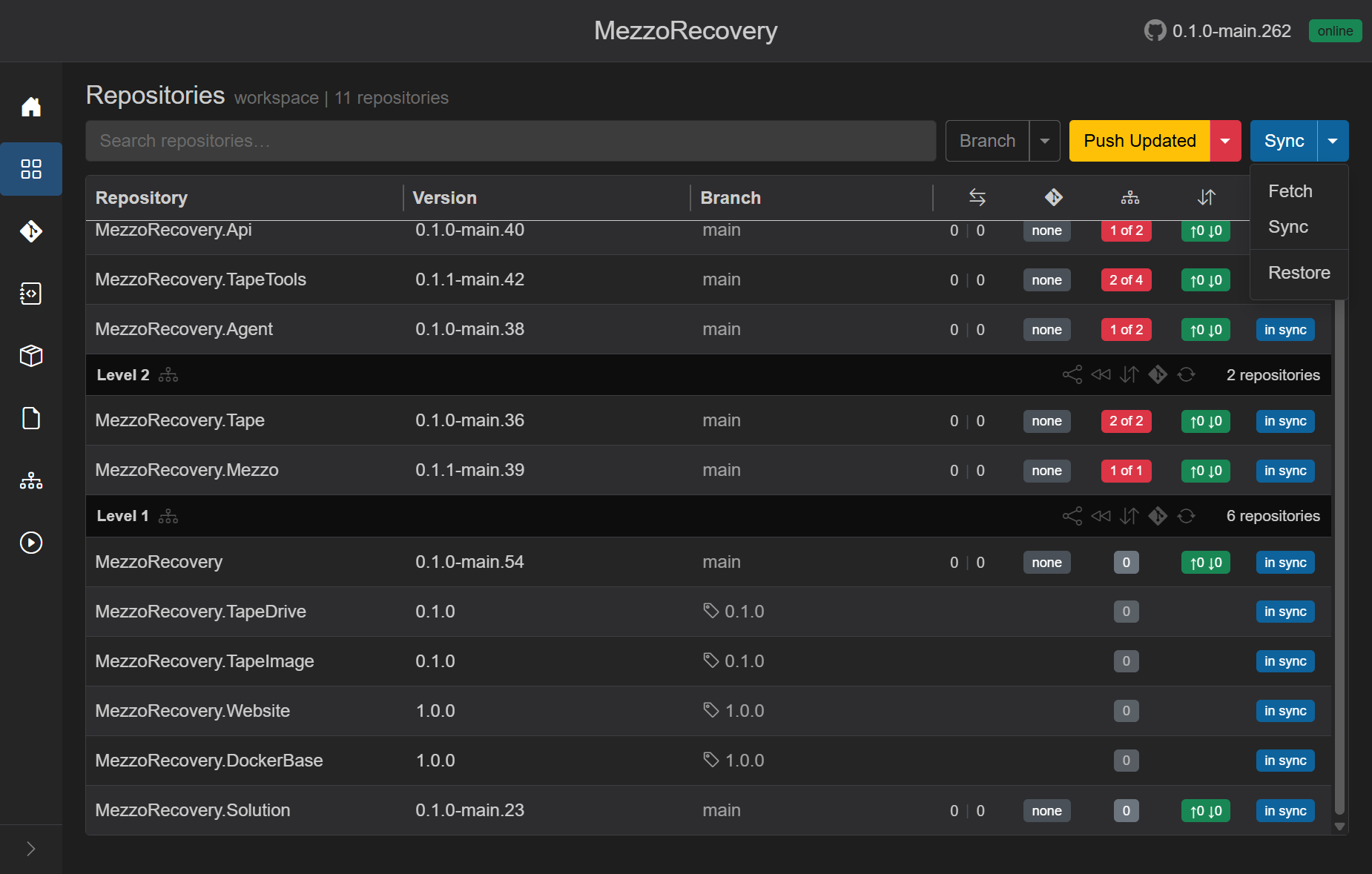
Overlay while the job runs: spinner, Fetching commits..., progress Fetched N of M, live git terminal output, Abort. Fetch does not clone missing repos - use Sync for that.
See also repositories.md - Fetch for the full Fetch vs Sync comparison.
Fetch pulled tag 0.2.0 from origin. GrayMoon compared the tag list to the checked-out tag:
- Tags are stored newest first (git
tag --sort=-creatordateon the Worker). - HasNewerTag is true when the current tag is not at index 0 (a newer tag exists).
- The PR column shows yellow upgrade instead of blank. Tooltip: Newer tag available - click to upgrade.
Only repos on a tag with a newer tag on origin get this badge. MezzoRecovery.TapeImage (still on 0.1.0 with no newer tag yet) stays blank.

This is the NuGet-relevant signal: release tags carry the package version consumers pin to. A newer tag means a newer published package version is available on origin.
Click the yellow upgrade badge (not the Branch cell). GrayMoon opens the per-repo branch dialog (Branch - MezzoRecovery.TapeDrive) directly on the Tags tab.
Tags are listed newest first:
| Order | Tag | Meaning |
|---|---|---|
| 1 | 0.2.0 | Newest tag on origin (the upgrade target) |
| 2 | 0.1.0 | Current - what the clone is pinned to today |
Use Fetch in the dialog footer if the list looks stale for this repo only. Workspace Fetch already refreshed tags for this run.

- Select 0.2.0.
- Click Check out. The dialog closes; the Worker checks out the tag (detached HEAD).
- GitVersion runs at the new commit; the grid row updates.

- Branch: tag icon + 0.2.0
- Version: 0.2.0 (GitVersion at that commit)
- PR column: blank again (on the newest tag - nothing to upgrade to)
- Divergence, PR (except upgrade), and commits badges stay blank while frozen on a tag
To move to another tag later, repeat Fetch after new releases, or open Branch -> Tags manually.
Checking out a newer tag on a Level 1 library changes the expected package version for every workspace repo that references it in a <PackageReference>. Those consumers are usually on branches (Level 2 packages, Level 3 services) - their .csproj files still pin the old version until you run Update.
After MezzoRecovery.TapeDrive moved from tag 0.1.0 to 0.2.0:
| What changed | Level 1 (TapeDrive) | Level 2 / 3 (consumers on main) |
|---|---|---|
| Checked-out ref | Tag 0.2.0 (frozen) | Branch main (normal row) |
| GitVersion / expected NuGet version | 0.2.0 | Still references 0.1.1-main.15 (or similar) in .csproj
|
| Deps badge | Gray 0 (frozen - read-only on tags) | Red N of M (unmatched package refs) |
Nothing is wrong with the workspace topology - GrayMoon is correctly reporting that downstream .csproj files no longer match the version the upstream repo is publishing at its current tag.

Typical badges in this run:
| Repository | Level | Badge | Meaning |
|---|---|---|---|
| MezzoRecovery.Tape | 2 | 2 of 2 | Both workspace deps need a version bump |
| MezzoRecovery.Mezzo | 2 | 1 of 1 | Its one dep is behind |
| MezzoRecovery.TapeTools | 3 | 2 of 4 | Two of four deps mismatched |
| MezzoRecovery.Api | 3 | 1 of 2 | One of two deps mismatched |
Level 1 tagged repos stay frozen and do not participate in workspace Update - only branch-checked-out consumers show the red badges.
Hover the red N of M badge on a consumer row. A single tooltip lists each mismatched package as current -> expected, where expected is the GitVersion GrayMoon reads from the upstream repo at its current ref (tag or branch):

Tooltip contents for MezzoRecovery.TapeTools:
- Header: Dependencies requiring update:
- Lines:
MezzoRecovery.TapeDrive 0.1.1-main.15 -> 0.2.0andMezzoRecovery.TapeImage 0.1.1-main.11 -> 0.1.0 - Footer: Click to update this repository only. and Show dependencies link
The arrow points at the tag semver (or branch GitVersion) GrayMoon expects after the upstream checkout - not at a branch name. Only one tooltip opens at a time (hover one badge at a time).
Click the red deps badge (not just hover) to start an update for that repo only - same dependency rewrite as header Update, scoped to one row. GrayMoon loads an update plan, then shows the confirm modal for that repository.
Repos on tags cannot be updated from the badge (toast: checkout a branch first).
If the consumer is on its default branch (main), GrayMoon stops before writing anything and shows Default Branch Warning. The assumption is that main is protected on GitHub - dependency rewrites commit directly to that branch.

Modal text:
- The following repository is on its default branch. Updating dependencies will commit changes directly to the default (protected) branch.
- Lists the repo:
MezzoRecovery.Api (main) - The branch may be protected. Proceed with caution.
- Proceed continues to the single-repo update confirm modal; Cancel aborts.
The same warning appears for header Update / Push Updated when any repo in the update set is on its default branch, and on Changes before Commit All / Commit Staged targets a default branch (changes.md - Commit across repositories).
Best practice: create or switch to a feature branch before clicking Proceed, unless you intentionally commit dependency alignment straight to main.
| Question | Answer |
|---|---|
| How do I pick up new tags? | Workspace Sync caret -> Fetch (all repos), or per-repo Fetch on the Tags tab |
| Is full Sync required? | No - Fetch is enough for tags and the upgrade badge |
| Where is the upgrade shown? | Yellow upgrade in the PR column (only when on a tag and a newer tag exists) |
| What opens when I click it? | Branch dialog on Tags, newest tag at the top |
| How are tags sorted? | Newest first (creator date descending). For normal semver release tags, the top row is the highest version |
| When does upgrade disappear? | After you check out the newest tag, or when no newer tag exists on origin |
| Why do Level 2/3 turn red after a tag checkout? | Upstream GitVersion changed; consumer .csproj still pins the old package version |
| How do I see what to bump? | Hover the red N of M deps badge - current -> expected per package |
| How do I fix one consumer? | Click the red deps badge -> confirm update (after Default Branch Warning if on main) |
| Topic | Document |
|---|---|
| Tag checkout, frozen rows, per-repo Fetch | Repository branch management |
| Workspace Fetch / Sync / Restore buttons | Repositories |
| PR column badges (including upgrade) | repositories.md - Pull request badge |
| Dependencies badge column | repositories.md - Dependencies badge |
| Commit default-branch warning | changes.md - Commit across repositories |
| Undo accidental commits on main before push | Undo Push Commits |