Repository navigation
Workspace Repositories
This is the main workspace grid. Opening a workspace from Workspaces lands here and switches the sidebar to workspace items (Shared chrome).

The first screenshot is a smaller workspace (GrayMoon). MezzoRecovery - a real multi-repo project used throughout these docs - has 11 repositories. Levels are listed highest first. On the current grid: Level 4 is MezzoRecovery and MezzoRecovery.Solution; Level 3 is MezzoRecovery.Api, MezzoRecovery.TapeTools, and MezzoRecovery.Agent; Level 2 is MezzoRecovery.Tape and MezzoRecovery.Mezzo; Level 1 is the remaining four (TapeDrive on tag 0.2.0, TapeImage, Website, DockerBase).

Green dependency-count badges on higher levels show how many workspace packages that repo consumes. TapeDrive is pinned to tag 0.2.0; the other rows shown here are on main and in sync.
- Title: Repositories
- Subtitle: the workspace (or Feature) name, then
N repositories(orN repositories found). The context control in the toolbar is the same name, with + for New Feature. - While the worker has queued work: "Worker is completing N task(s)" (spinner if the overlay is not already showing).
- Filter search - "Search repositories…"
Plain terms match repository name, branch, git version, level (level 1, no dependencies), and sync status words (in sync, sync, not cloned, version, error).
topic: is accepted by the parser but does not match workspace rows (catalog-only field).
Spaces are AND. Use or (orange in the search bar) to keep several name fragments. On MezzoRecovery, api or tools returns both MezzoRecovery.Api and MezzoRecovery.TapeTools (2 repositories found) and hides empty levels. Parentheses work too: (api or tools) main.

Buttons disable while a job is running, while worker tasks are pending, or when the workspace has zero repos.
Primary Branch opens the Branch modal on the New Branch tab. The caret opens the menu:

- Prepare Workspace - wizard: new branch, optional dependency update, synchronized push. Prepare Workspace.
- New Branch - same dialog as the primary button (New Branch).
- Switch Branch - same dialog, Switch Branch tab. Switch Branch.
- Create PR - open the new-PR modal for every eligible repo.
- Return to Default - abandon the current feature branch across the workspace: checkout default, delete that branch, pull latest. Return to Default.
If any repo has unmatched package/file dependencies and there are no incoming commits:
- Primary becomes yellow Push Updated (update then push).
- Split menu: Level N Only (lowest level that still needs work), Update Only, Update Files, Push Only, and Undo Push Commits when a push is recommended.
Otherwise:
- Update - outline, or red if unmatched deps exist together with incoming commits (update is still offered, pull is separate).
- Split: Update, Update Files, Update & Push...
Push Updated is those two halves in one job: Update Only (rewrite .csproj / version-file tokens and commit) then Push Only (push by dependency level). The primary button runs both. The caret is how you run them separately. Combined Push Updated (one click) is demonstrated later; the walkthrough below is the split path on MezzoRecovery after New Branch created new-branch-demo.
Update modals ask for a commit message and whether to include dependency bumps, then run under the loading overlay.

Every row is on new-branch-demo. GitVersion strings include the branch name (0.1.0-new-branch-demo.39). Two different problems show up at once:
-
No upstream. Yellow cloud-up on every commits badge: the branch exists only locally.
git pushhas not createdorigin/new-branch-demoyet. in sync stays blue (working tree matches HEAD). Divergence is still0 | 0because nothing has been committed on top ofmain. -
Unmatched package deps on higher levels. Level 1 stays gray
0(nothing in-workspace to consume). Level 2 / 3 show redN of M(2 of 2,4 of 4,1 of 1) because those.csprojfiles still pin the main package versions, while GitVersion on the packages now says-new-branch-demo. Header Push Updated (yellow) is the shortcut for that pair of problems.
Hover a mismatch badge for the list. TapeTools 4 of 4:

Title Dependencies requiring update: then each workspace package as current -> new (MezzoRecovery.Mezzo 0.1.1-main.39 -> 0.1.1-new-branch-demo.39, and the same for Tape, TapeDrive, TapeImage). Footer: Click to update this repository only. That click would update one row; workspace Update Only does every unmatched repo.
The Push Updated caret:
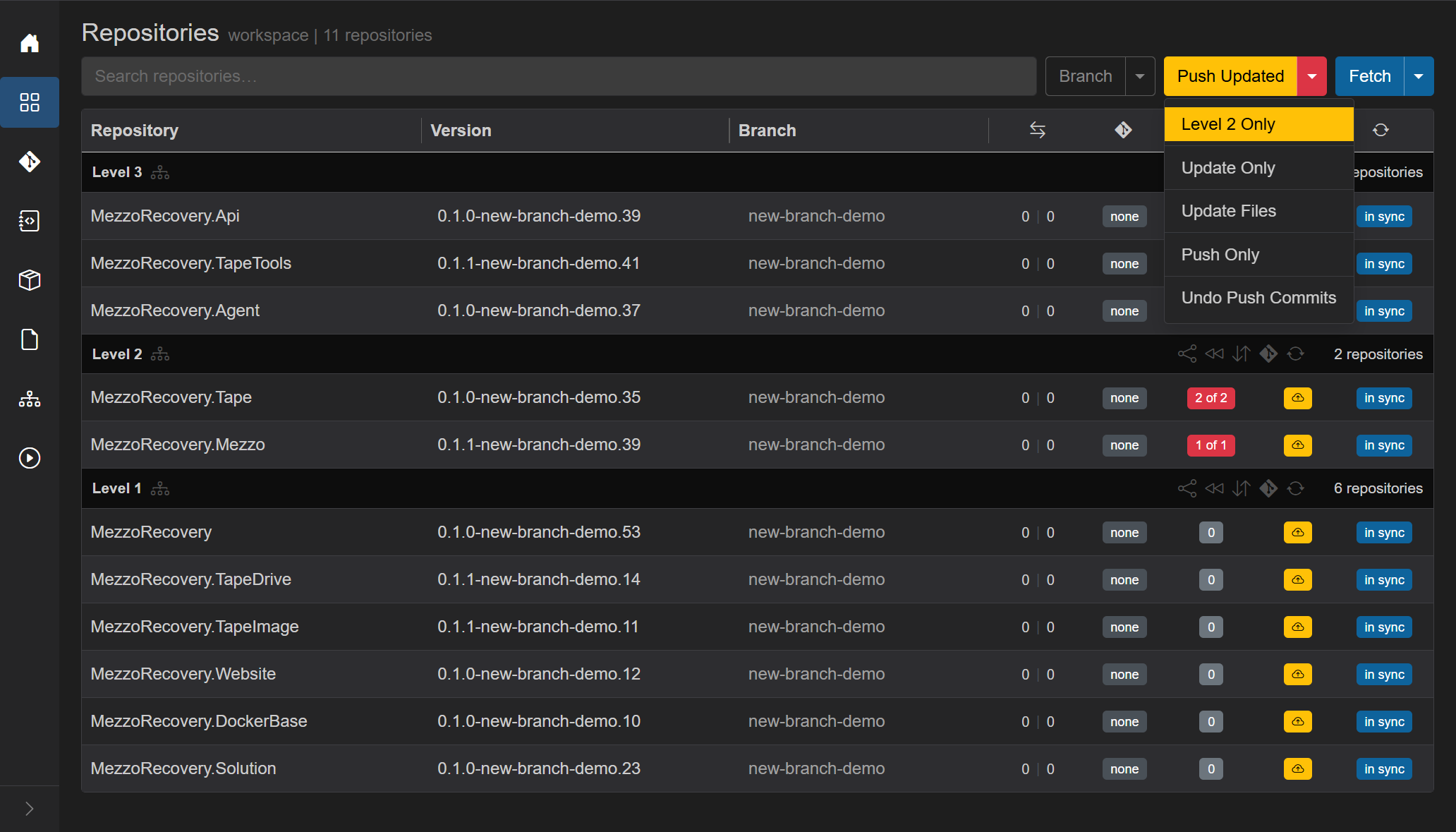
- Level 2 Only - lowest level that still needs work (here Level 2; Level 1 has nothing to rewrite).
-
Update Only - bump
.csproj/ files and commit. Does not push. - Update Files - version-file tokens only.
- Push Only - push what is already committed (and set upstream). Does not rewrite deps.
- Undo Push Commits - roll back local update commits. Full walkthrough: Undo Push Commits.
Update Only opens Update dependencies: rewrite .csproj (and configured version files) to the current package versions, then commit in each affected repo.

Optional commit message (placeholder chore(deps): update package versions). Include updated dependencies in commit message is on by default. Proceed runs the job.
Overlay: spinner, Updating version N of M..., Abort, live git log (git add on .csproj, commit). This run was Updating version 2 of 3...:

When it finishes, unmatched badges are gone and the header is no longer Push Updated (nothing left to update). Yellow Push is the remaining half - same action as Push Only on the previous menu.

What changed:
- Dep badges on Level 2 / 3 are green counts (
2,4,1) -.csprojnow pins-new-branch-demoversions. Level 1 stays0. -
Divergence on updated repos is
0 | 1: one commit ahead of defaultmain(the deps commit). Level 1 stays0 | 0(nothing to rewrite there). -
Outgoing: Level 2 / 3 yellow
↑1. Level 1 still yellow cloud-up (branch still has no upstream, and no extra commit). - PR badge is yellow create on repos that are ahead of default.
- Header: outline Update, yellow Push, blue Fetch.
Yellow Push (or Push Only while Push Updated is still showing) pushes every repo that has outgoing commits or no upstream. When the graph has package deps, GrayMoon first shows the Push dialog:
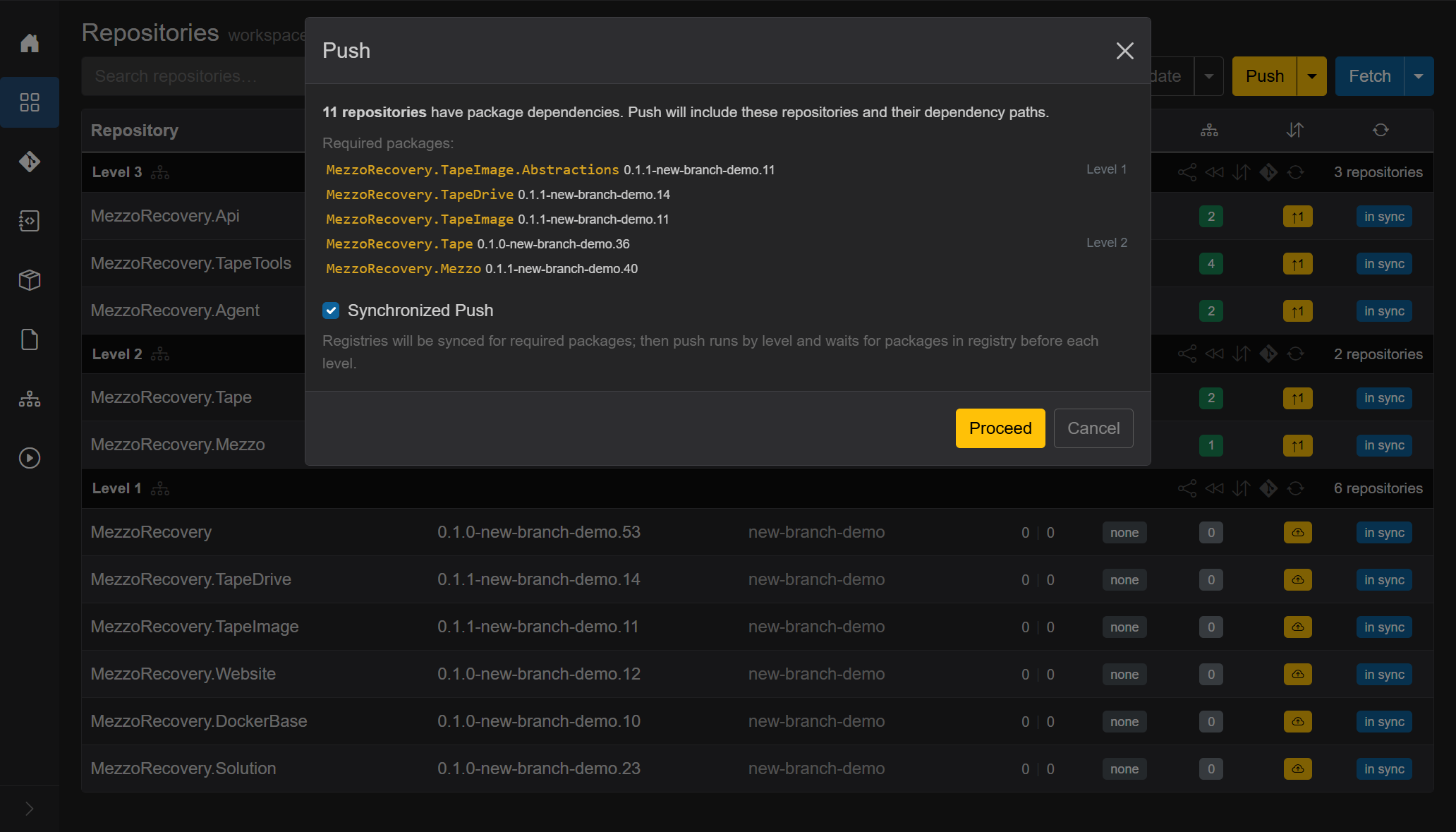
- 11 repositories have package dependencies. Push includes those repos and their dependency paths.
-
Required packages grouped by level (the NuGet ids consumers will need after the lower level is pushed): Level 1
TapeImage.Abstractions,TapeDrive,TapeImage; Level 2Tape,Mezzo. Versions are already-new-branch-demo. - Synchronized Push (checked by default): Registries will be synced for required packages; then push runs by level and waits for packages in registry before each level. Unchecked: push by level without waiting.
Leave it checked. This is why the workspace has NuGet connectors: GrayMoon maps each required package to a connector and polls that feed. It does not drive CI, wait on GitHub Actions conclusions, or publish packages itself. After a level is pushed, CI (or whatever normally packs) has to put the nupkg on the feed. GM only waits until the version is there, then starts the next level so consumers restore the branch-specific package instead of a stale main one.
Timeout is 5 minutes per package at that level (PushWaitDependencyTimeoutMinutesPerDependency, default 5.0; total wait = package count x 5 minutes). The frame below shows Waiting for 3 packages... with a countdown from 08:59, which is the earlier 3-minute default. A level can push while the next level is still updating. If that push lane cannot run, GrayMoon asks Continue with normal push? and then runs Update Only, then Push Only. Pending syncs run before Update and Push. A failed push is a toast and a level error. If CI does not publish those nupkgs within that window, GrayMoon WILL STOP. It will not keep waiting, skip the level, or retry forever.
Proceed starts the job. Overlay: spinner, wait/push progress, Abort, live git + registry log. Right after Level 1 was pushed, GM waited on those packages before Level 2:
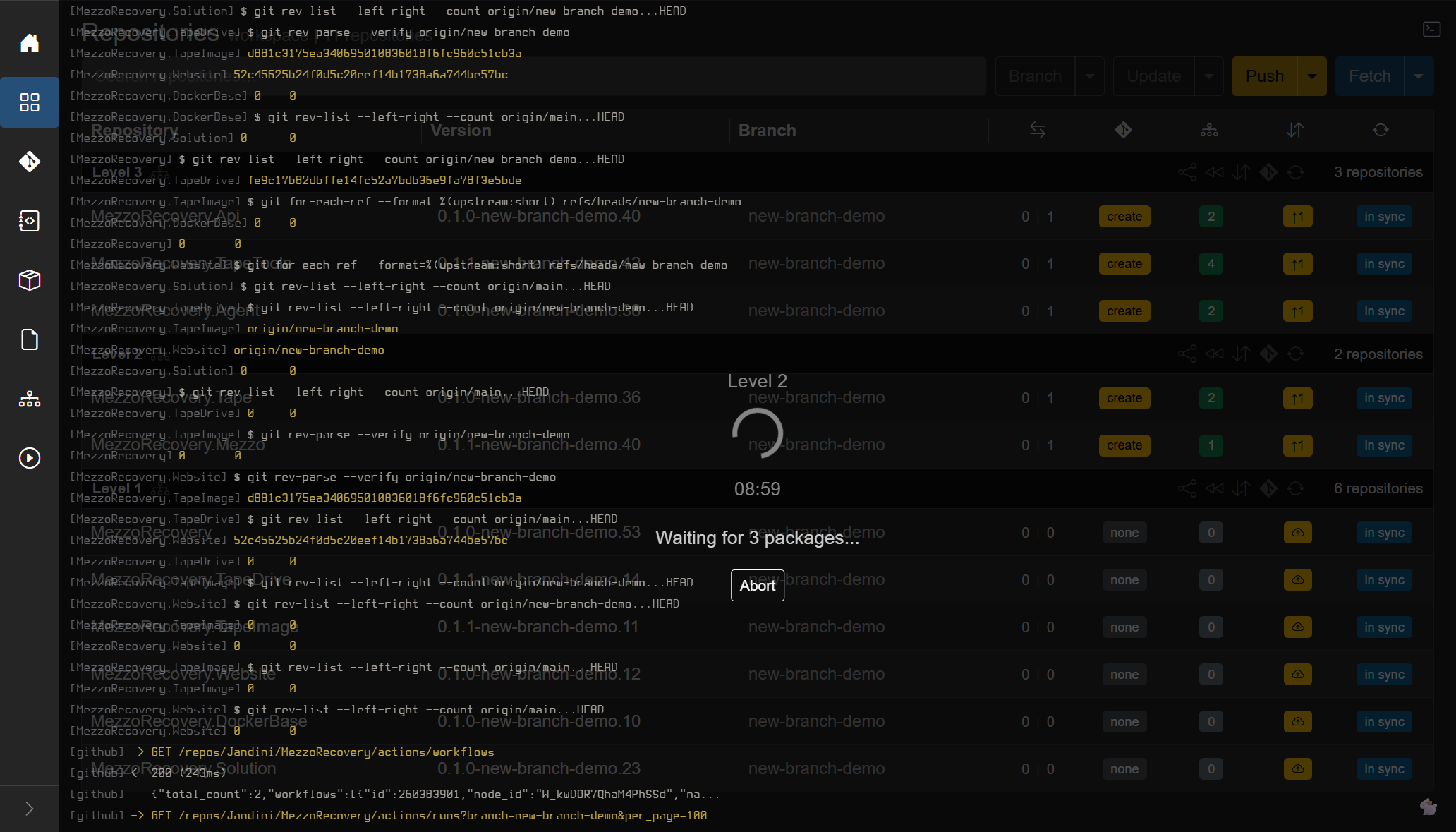
Later, before Level 3, the same overlay showed Level 3, Found 3 of 4 packages, and a shorter countdown. GHA polling can appear in the terminal; that is status only. The gate that unblocks the next level is still "is this nupkg on the NuGet connector feed?", not a green check on the workflow.

Together, Update Only then Push Only is what the primary Push Updated button does in one click. Prepare Workspace is that pair plus creating the branch first.
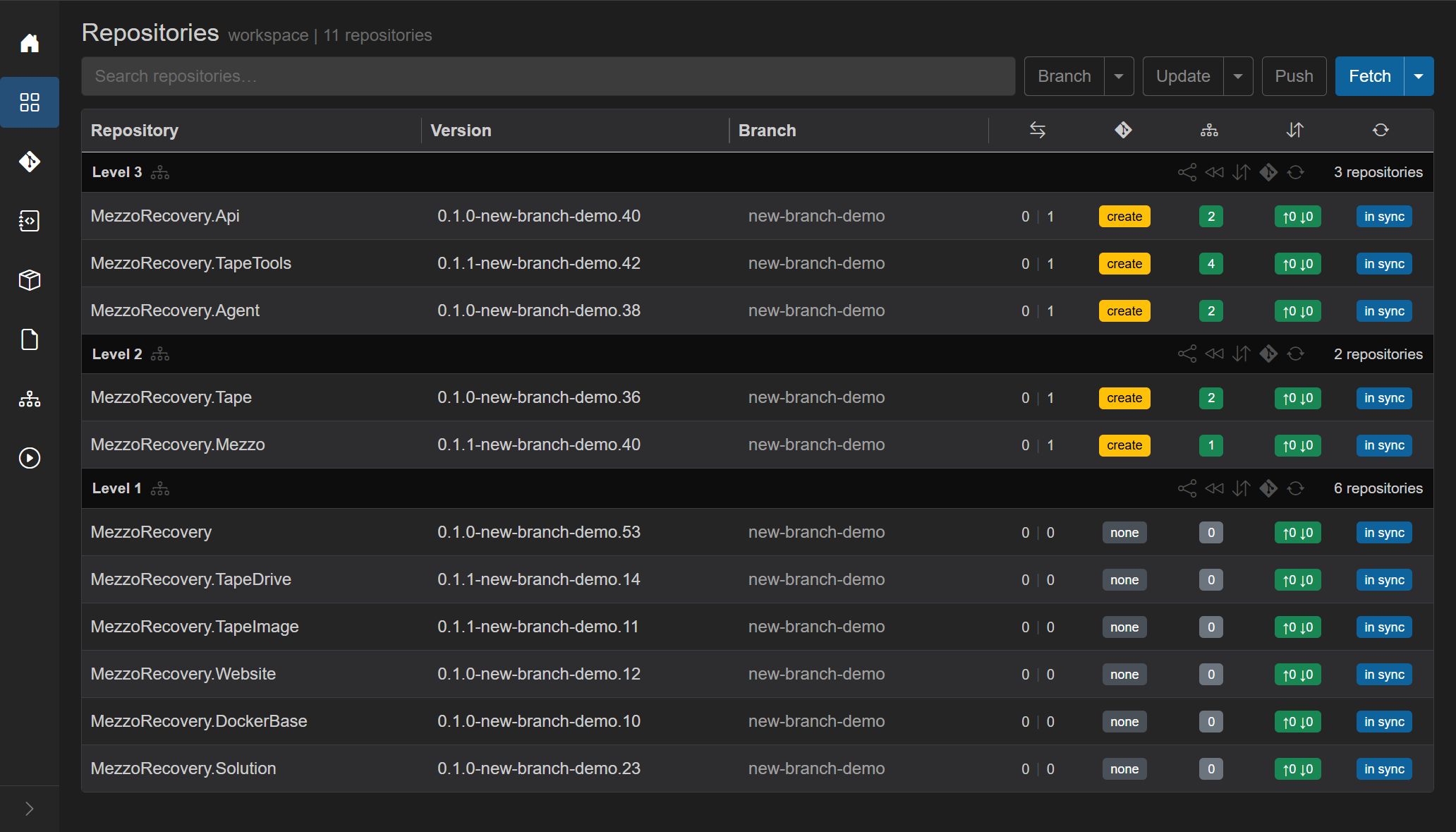
When this push finished, every commits badge was green ↑0 ↓0 (upstream exists, nothing left to push). Header Push went back to outline. Divergence on the updated repos stayed 0 | 1 (the deps commit is on the remote branch, still one commit ahead of main). create stays until a PR is opened. Green dep counts stay: packages match.
- Incoming commits on any repo: red Pull. Full walkthrough: Incoming commits (per-repo red badge, or header Pull for every repo that has incoming).
- Outgoing commits / push recommended (including a branch with no upstream): yellow Push with split Undo Push Commits.
- Otherwise outline Push.
The header Push is the same action as the yellow Push on the notification card. The card is hidden on this page (the header already has the button) and visible on Changes and other non-Repositories pages so you can push several repos in one go without opening this grid.

In this state (new branch functionality-documentation, nothing pulled from default):
- Header Push is yellow. The notification card is not shown here.
-
Divergence (
behind | aheadof default): GrayMoon is0 | 2- zero incoming from default, two commits ahead. Desktop is0 | 0on the same new branch with no extra commits. -
Commits badge: GrayMoon yellow
↑2(outgoing only; no↓incoming). Desktop yellow cloud-up (no upstream yet). With incoming the badge would turn red↑N ↓Mand the header would become Pull instead. -
PR badge: GrayMoon
create(ahead of default, no open PR). Desktopnone. - in sync stays blue: local git status matches what the worker last reported; it is not "already pushed".
One Push sends every repo that has outgoing commits or no upstream. Overlay: spinner, Pushing..., Abort. After a successful push the header Push goes back to outline, commits badges go green ↑0 ↓0, and the cloud-up icon is gone (upstream exists):

Undo Push Commits opens a modal listing each repo with outgoing commits and a Keep changes checkbox (mixed vs hard reset). It resets local branches to origin only - nothing is pushed. Use when you committed on the default branch by mistake or cannot push to a protected branch. MezzoRecovery example: Undo Push Commits. Full protected-branch failure then recovery (feature branch + PR): Protected branch and push failure.
On MezzoRecovery (11 repositories) the primary starts as blue Sync. The caret opens Fetch, Sync, and Restore. The button turns red when the workspace is out of sync.
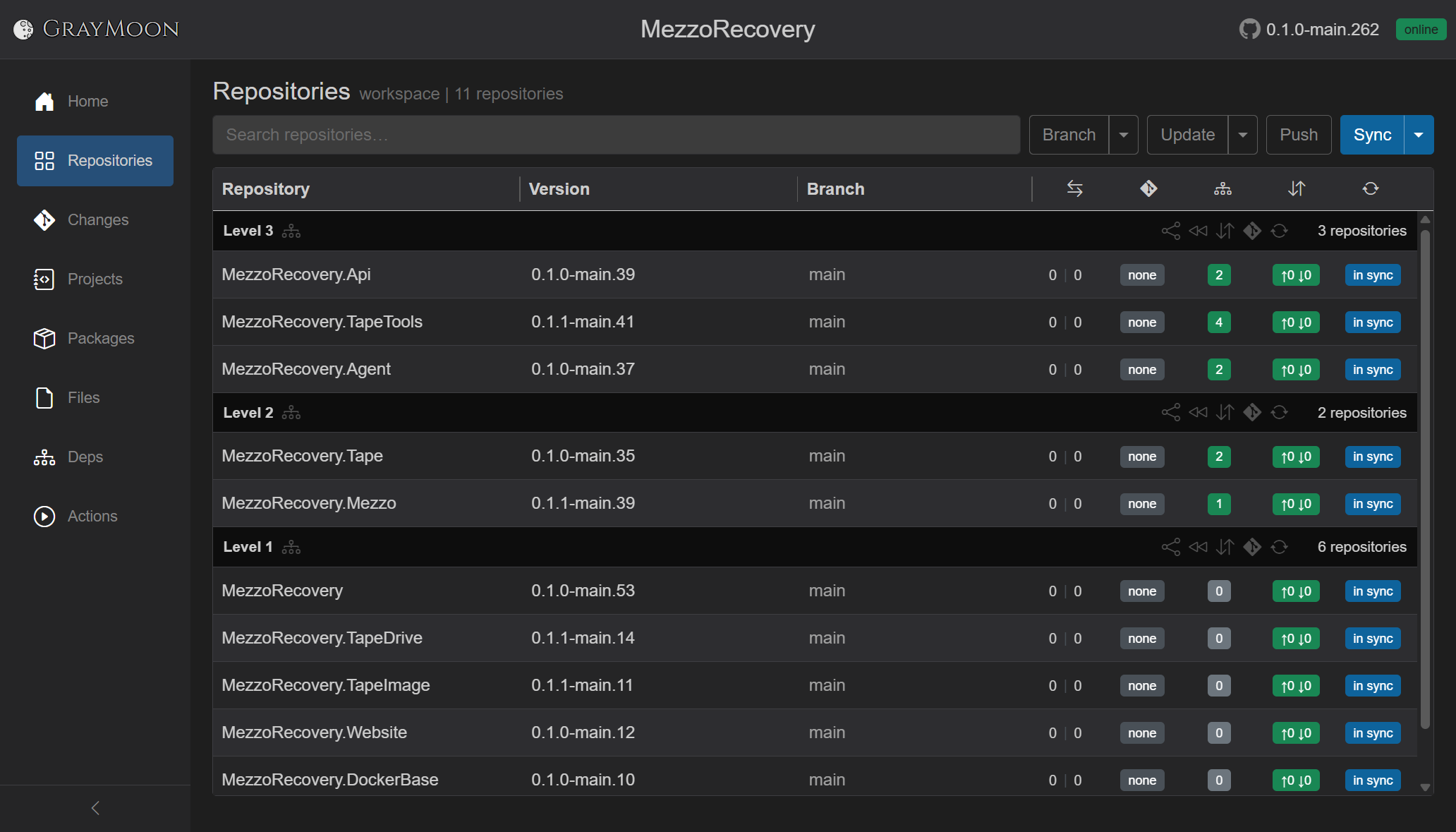
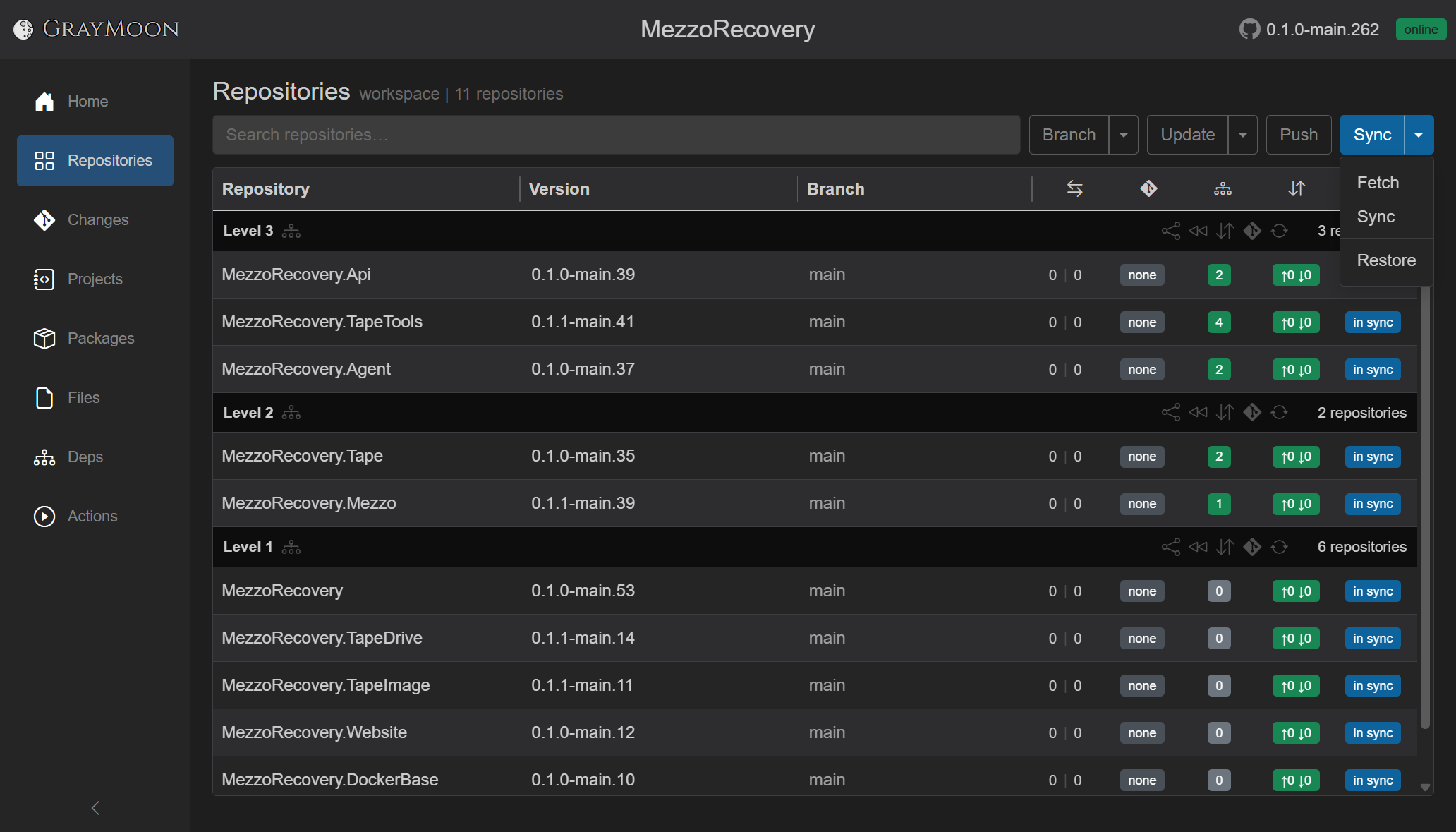
The last choice is remembered in the browser (graymoon:sync-mode). After you run Fetch, the primary label becomes Fetch so the cheap refresh stays one click away. Pick Sync from the menu to switch it back.
Full refresh of every workspace repo (in parallel, up to 16 at a time). For each repo the Worker:
- Clones it if the folder is missing.
- Runs
git fetch origin --prune --tags. - Runs GitVersion (version string + branch).
- Writes the live git hooks (
post-commit,post-checkout,post-merge,pre-push). - Recounts outgoing / incoming vs upstream and ahead / behind vs the default branch (the
0 | 0divergence pair). - Refreshes local/remote branch lists and tags.
- Scans
.csprojfiles (projects, package references, dependency levels). - Rechecks file-version tokens.
Overlay: spinner, Synchronizing... then Synchronized N of M, Abort, and the live git terminal (fetch, for-each-ref, rev-list, GitVersion). This run finished at Synchronized 11 of 11:
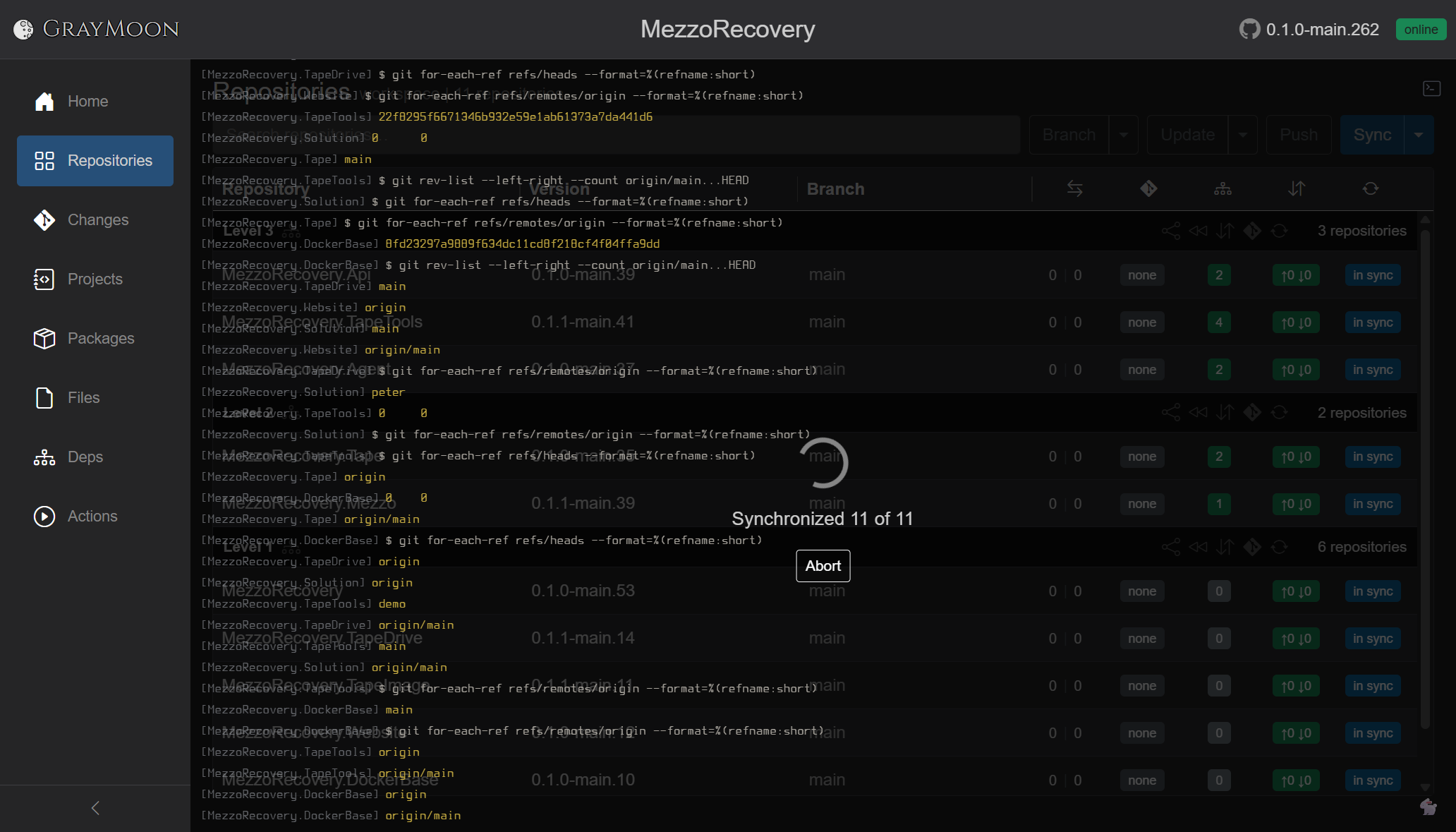
Sync does not merge or pull. Incoming counts update so you can decide to Pull; working trees stay as they are.
Lighter than Sync. The Worker only fetches remotes (with tags) and recounts commits. It skips GitVersion, .csproj scanning, and hook rewriting. Overlay: Fetching commits... then Fetched N of M. Fetch does not clone. If the workspace folder does not exist yet, pick Sync from the caret - same for Restore, which needs .csproj files already on disk. First-day clone: getting-started/03-workspace-clone.md.
For repos pinned to a tag, Fetch also refreshes the tag list and may show a yellow upgrade badge when a newer release tag exists on origin. See Tag upgrade.
That is the daily team-collaboration action: see whether teammates moved your branch (incoming ↓N / commits badge) or the default branch (divergence behind | ahead, for example 2 | 0 when main gained commits you do not have). It does not merge those commits.
On this MezzoRecovery run Fetch brought no incoming - every row stayed ↑0 ↓0 and 0 | 0. Incoming (red badge / header Pull) is walked through in Incoming commits.
After Fetch the primary button itself becomes Fetch:

Runs dotnet restore --force --no-cache on every tracked project in the workspace (repos checked out on a tag are skipped). Overlay: Restoring packages..., Abort, and the restore log. A toast reports how many projects were restored.
Full write-up (why it exists, automatic restore during push, IDE cache behavior): Restore packages.

Workspace-wide create / switch lives in one dialog. Full write-up (MezzoRecovery new-branch-demo): New Branch. Prepare Workspace (branch + update + synchronized push in one job) is Prepare Workspace.
Rows are grouped by topological Level N (Level 1 = no upstream workspace packages). Repos with no graph placement sit under No dependencies.
Each level header:
- Title Level N (or No dependencies).
- Diagram icon - opens the Dependencies page filtered to that level.
- Share icon - copy open PR URLs for the level.
- Rewind - sync this level to default branch. Workspace-wide discard is the header Branch caret Return to Default (Return to Default); the level rewind skips unmerged ahead commits.
- Up/down arrows - sync commits for the level.
- Git icon - open PRs for the level.
- Repeat arrows - synchronize every repo in the level.
- Count: N repositories - hover opens the Open in GitHub... menu (see below). Click the count to open every repo home page for that level in new tabs.
Level actions are disabled when a job is running or repos in the group are on tags.
Hover the N repositories label on a level header. A menu titled Open in GitHub... appears, anchored to the count. Each option opens the matching GitHub page for every repository in that level, one browser tab per repo. GrayMoon does not perform the GitHub work for you - merge, tag, or settings edits stay manual - but one click gets you onto the right page for the whole level instead of hunting each repo by hand.
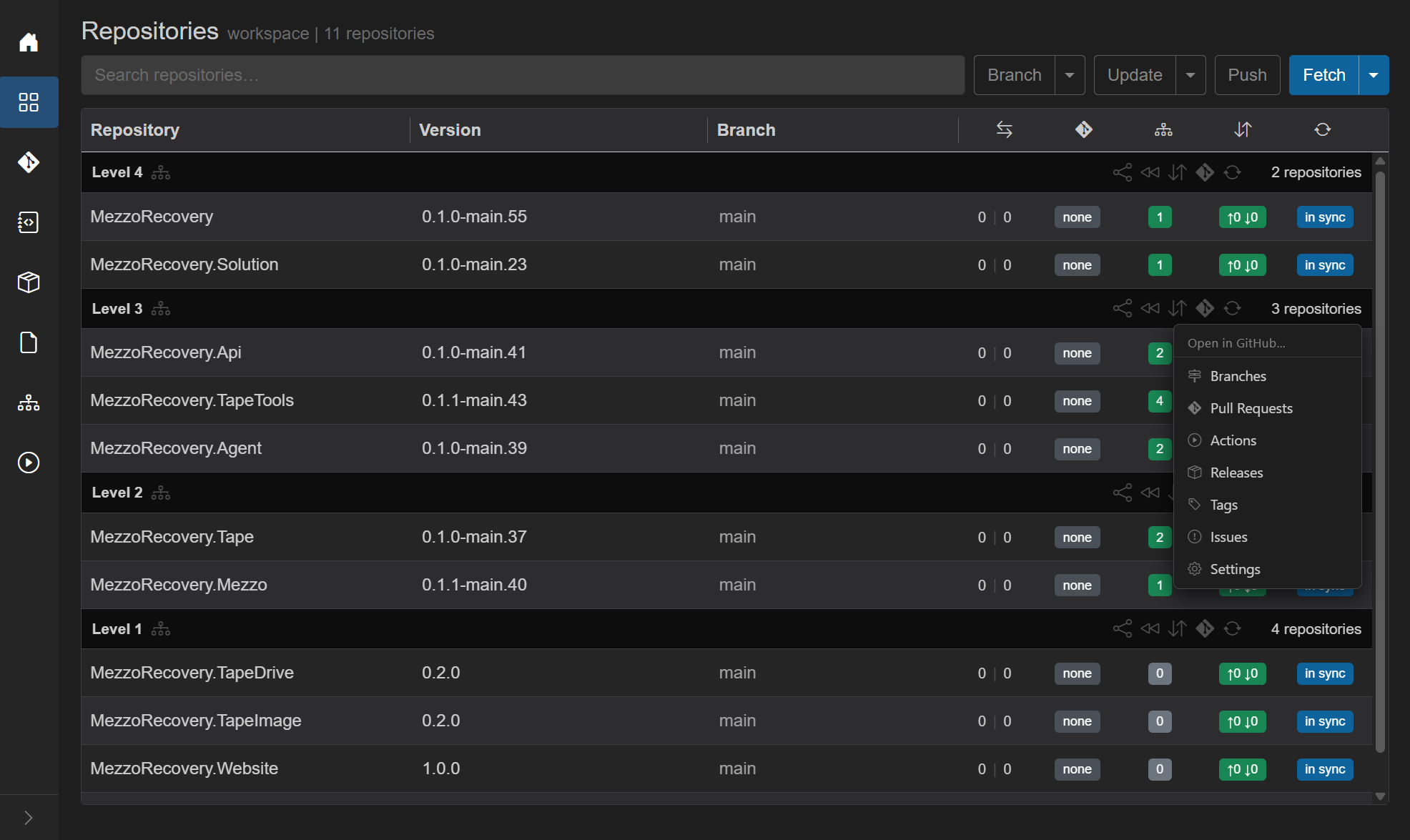
On MezzoRecovery, hovering 3 repositories on Level 3 shows the menu above the Api / TapeTools / Agent group.
| Menu item | GitHub path per repo | Typical use |
|---|---|---|
| Branches | /branches |
Compare branch lists or clean up remote feature branches after a level is done |
| Pull Requests | open PR URL when GrayMoon knows it; otherwise /pulls
|
Jump straight to open PRs for the level (see below) |
| Actions | /actions |
Check CI for every repo at that level after a push |
| Releases | /releases |
Review or cut releases for a level together |
| Tags | /tags |
Inspect existing tags or create a new tag on each repo in the level |
| Issues | /issues |
Scan open issues across the level |
| Settings | /settings |
Apply the same repo setting change across the level (branch protection, secrets, pages, and so on) |
Click the N repositories label itself (not a menu row) to open each repository's GitHub home page with no path suffix.
Workspace work often proceeds level by level: push Level 1 packages, wait for NuGet, push Level 2, create PRs, then merge and rewind from the bottom of the graph upward. The header menu matches that cadence - you stay on one level's GitHub tabs until that level is finished, then move to the next.
Pull Requests is the main shortcut while closing PRs level by level. When GrayMoon has an open PR recorded for a repo, that option opens the exact PR page (for example .../pull/43) instead of the repo's PR list. Repos without a known open PR still open /pulls. Walkthroughs that merge then rewind by level: library-update phase 5, tape-density phase 4.
Tags is useful when you want every repo in a level on the same release tag view - to confirm what exists, or to create matching tags manually after a release train.
Settings is for repeated manual GitHub configuration (the same toggle or secret on every repo in the level). Still one settings page per tab, but you are not opening each repo from search first.
Allow pop-ups for localhost / the GrayMoon origin if the browser blocks the multi-tab open.
| Column | What the user sees | Interaction |
|---|---|---|
| Repository | Name as a link to the GitHub repo | Tooltip is the project type: Service, Package, Executable, Library, Test |
| Version | GitVersion string, or -
|
Click copies the version (brief clicked styling). Tooltip: "Click to copy version" |
| Branch | Current branch, or a tag icon + tag name | Click opens the per-repo branch dialog (Locals / Remotes / Tags / New Branch). See Repository branch management. Workspace-wide Switch Branch is the header Branch caret (Switch Branch). On a tag: "Repository is pinned to a tag." |
| Metrics | Five badges in one cell (see below) | On a tag (frozen row): divergence (behind | ahead), PR, and outgoing/incoming commits badges are not displayed; branch shows tag icon + tag name. See Frozen on the Repositories grid. |
If a per-repo operation fails, a dismissible red Error: banner appears under the row.
Commits behind | ahead of the default branch. Blank when on a tag. - when unknown.
- Behind number is yellow / actionable when > 0 on a feature branch: click opens Update Branch (fetch + merge
origin/<default>into the current branch). Full walkthrough: Update branch from default. - Ahead number links to GitHub compare
default...branch. - Behind number links to GitHub compare
branch...defaultwhen it is not actionable (for example already on the default branch).
| Appearance | Meaning | Click |
|---|---|---|
none (dark gray) |
No PR (or not verified yet) | None |
create (yellow, black text) |
Branch is ahead of default, no open PR | Opens create-PR modal for this repo |
#123 (green / tinted) |
Open PR. Tint reflects mergeability: mergeable, conflicts, checks running, blocked, unknown | Opens the PR on GitHub |
| extra number badge | Files changed on that PR | Opens {prUrl}/changes
|
merged (purple) |
Merged | Opens PR |
closed (red) |
Closed without merge | Opens PR |
upgrade (yellow) |
Repo is on a tag and a newer tag exists on origin | Opens branch dialog on Tags tab. Full walkthrough: Tag upgrade |
| blank | On a tag without a newer tag | PRs need a branch |
GrayMoon runs locally and cannot receive GitHub webhooks, so PR badges do not flip to merged or closed when you merge on GitHub. Something in the app must call the GitHub API (or re-read a row already saved).
| Trigger | Scope | Calls GitHub PR API? |
|---|---|---|
| Hover open-PR badge | One repo | Yes - status and mergeability tint. Throttled 10 s per repo. |
Level N << Return to Default |
Repos in that level | Yes - first step before fetch and dialog. No separate refresh needed before clicking. |
| Branch -> Return to Default | All eligible repos | Yes - during fetch prep before dialog. |
| Header Sync (Sync menu) | All or selected repos | Yes - via persist after full git sync. Slower than hover or per-level rewind. |
| F5 (reload page) | Whole page | No - re-reads persisted SQLite rows only. |
| Header Fetch | All repos | No - git fetch only; PR badges unchanged unless already persisted. |
| After Create PRs | Created repos | Yes - automatic when bulk create finishes. |
Walkthrough examples: library-update phase 5, Return to Default.
| Appearance | Meaning | Click / hover |
|---|---|---|
0 |
No package/file deps | Opens custom dependencies modal. Walkthrough: Custom dependencies |
green count (e.g. 4) |
All matched | Hover: list of packages/versions, file tokens, custom deps, copy, Show dependencies. Click: custom deps modal (Custom dependencies) |
yellow/red N of M
|
Unmatched package deps and/or out-of-date file tokens | Hover: current -> new lines, copy, hint "Click to update this repository only" (or files / both). Click: update this repo only (unless on a tag) |
On a tag the mismatch badge is read-only ("checkout a branch first").
When an upstream repo checks out a newer tag, consumers on branches often flip from green to red - the tooltip shows current -> expected where expected is the upstream tag version. Walkthrough: tag-upgrade.md - out-of-date dependencies.
Show dependencies jumps to the Dependencies graph for that repo.
| Appearance | Meaning | Click |
|---|---|---|
green ↑0 ↓0
|
Clean vs upstream | Push (no-op-ish / still wired to push) |
yellow ↑N ↓0
|
Outgoing commits | Push this repo (may open push-with-dependencies modal) |
red ↑N ↓M (M>0) |
Incoming (and maybe outgoing) | Pull this repo. Walkthrough: Incoming commits |
| yellow cloud-up icon | Branch has no upstream | Push to set upstream |
blank / -
|
On a tag, or unknown | None |
| Label | Color | Click |
|---|---|---|
in sync |
blue | None |
sync |
red | Sync this repository |
not cloned |
gray | Sync (clone) this repository |
version |
red | Sync (version mismatch vs expected) |
error |
red | Sync retry |
Disabled while a job runs or the row is on a tag.
- Select repositories (from the subtitle count)
- Prepare Workspace
- New Branch (workspace-wide) / Switch Branch (workspace-wide Switch Branch, or per-row branch dialog - Repository branch management)
- New Pull Request (one repo, one level, or all)
- Update branch from default - Update branch from default
- Update dependencies (workspace, level-only, or single repo)
- Custom dependencies (which workspace repos this repo should wait on)
- Push with dependencies
- Confirm / default-branch warning / Return to Default options (delete remote / local branches)
- Version-files commit (when file tokens were rewritten)
- Undo push
- Operation error
All long runs use the shared loading overlay. Notification cards on other pages offer the same Update / Push / Pull shortcuts (Shared chrome).
Merge PRs... is on the level menu when repositories are grouped by level. On a Basic workspace it is on the header Branch menu, because there are no level menus. It is hidden in a Feature.
The dialog merges the selected pull requests. The method starts as Squash, and you can choose Merge commit, Rebase and merge, or Repo default. Return to default branch is a checkbox. Merged (the default) returns only repositories whose pull request just merged. All repositories also returns every other repository in that same merge scope that had no open pull request. A single pull-request dialog has the same checkbox. A repository checked out to a tag is never returned.
A clone that GitHub blocks for SSO shows the heading GitHub SSO authorization required and the link Authorize SSO. GrayMoon does not open the browser and does not poll. Open Authorize SSO yourself. The sentence lasts for the page session. The row stays not cloned or error until the clone succeeds.