Repository navigation
Workspace Features
A Feature is a worktree checkout of the workspace, stored beside the main workspace folder. The workspace itself stays on its current branch. The Feature gets its own folder and its own branch, starting from the committed state of the current workspace. Uncommitted changes in the workspace are not copied.
This is separate from Prepare Workspace, which creates a branch inside the workspace checkout.
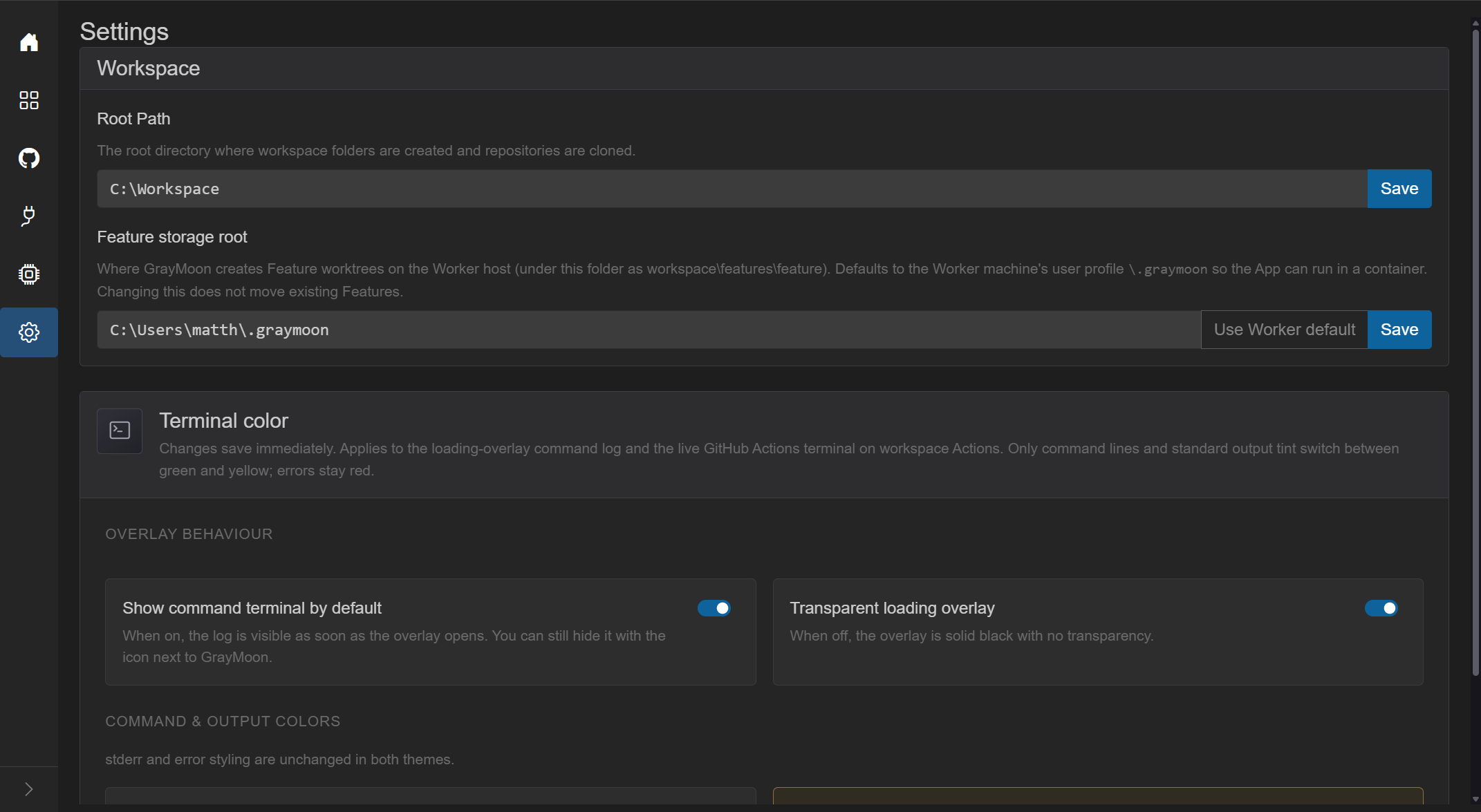
Settings → Feature storage root.
The hint on that card: "Where GrayMoon creates Feature worktrees on the Worker host (under this folder as workspace\features\feature)." The default is the Worker machine's user profile \.graymoon, so the App can run in a container. Use Worker default asks the connected Worker for that path. Save stores it. Changing the root does not move Features that already exist. Success: "Feature storage root saved. Existing Features keep their previous paths."
On a workspace Repositories page, the context control at the left of the toolbar shows the current workspace name (for example MezzoRecovery). The + button next to it is New Feature.

Title: New Feature with the subtitle worktree.
- Feature name (branch) - required. Invalid names are shown under the field. New Feature stays disabled until the name is valid.
- Based on - read-only Current Workspace, plus the shared branch name when every workspace repository is on the same branch.
- Explanation: "The Feature starts from the current committed state of main. Uncommitted changes in Workspace are not copied and remain in Workspace." main is the shared branch shown next to Current Workspace.
- If that branch name already exists in some repositories, the dialog lists those repositories and refs and asks you to choose a different Feature name, or delete those branches first.
- Cancel closes the dialog. New Feature starts the job. While it runs, the page overlay says it is creating the feature.

The same context control lists Workspace and Features. Pick a Feature to view that worktree (repositories, changes, and files for that checkout). Switch Workspace in that menu returns to the Workspaces list.
Removing a workspace that still has Features requires the acknowledgement on Remove Workspace. The Feature folders on disk are left in place.
New Feature is based on Current Workspace. Every repository gets a worktree. GrayMoon does not adopt an existing branch. Uncommitted changes in the Workspace checkout are not copied.
Create CodeGraph index starts ticked when the CodeGraph CLI is installed and graymoon.json does not set "codegraph": false. The checkbox says it indexes this Feature's code and that the build starts from scratch in this Feature. The overlay is Starting CodeGraph index... and offers Background. Other overlays still offer Abort. The Host tab shows the CodeGraph version. Remove Feature stops CodeGraph before it deletes the worktrees.
The selector can show Setting up..., Removing..., or Needs attention. A Feature that needs attention shows This Feature needs attention. Use Repair to continue. Feature Status offers Retry, Roll back, Remove, and Continue removal.
Remove Feature asks whether to delete local branches, delete remote branches, and discard uncommitted changes. After you confirm, the dialog closes, the Workspace opens at once, and removal continues in the background. If files are still in use, the folder is left with GRAYMOON-PENDING-DELETE.md and is deleted later.
Open in starts Cursor, VS Code, Visual Studio, Claude CLI, Codex CLI, Terminal, or Explorer on the Feature checkout. A toast such as Starting Cursor... stays up until that tool's button is enabled again. The menu is hidden in a browser tab.
The header button is Feature, Create PR when a pull request can be opened, or Remove when every pull request is merged or closed. The Feature menu can create pull requests, merge them, or remove the Feature. Merge PRs... inside a Feature does not offer return to the default branch.