Repository navigation
Workspace Actions
GitHub Actions workflows for every repository in the workspace, on the repo's current branch. Status is live-polled while runs are active.
MezzoRecovery (a real multi-repo project) on main: 15 workflows, all last-run success. The success 15 chip is the status filter (only statuses that currently exist are shown). On a feature branch such as tape-density, expect success, none, and running chips together after push - see None filter on a feature branch.

- Title: Actions
- Subtitle:
N workflow(s)orN workflow(s) foundwhen search is active - Status filter chips (see below)
- Filter search - "Search repository or workflow..."
- Re-run (red split, only if any failed rows exist - not on the all-success MezzoRecovery page)
- Refresh - reload all workflow statuses (spinner on the button while refreshing)
Chips appear only for statuses that exist right now. Each chip is a toggle (on = those rows are included). Counts on the chip are workspace totals, not the search-filtered count.
| Chip | Meaning |
|---|---|
| errors | Failed to load workflows for a repo |
| failed | Last run failed |
| aborted | Last run cancelled |
| running | In progress (appears while a run is live) |
| success | Last run succeeded |
| none | No run / unknown (never in Last Run) |
Turning a chip off hides those rows. Combined with search:
- search miss: "No workflows match your search."
- chips hide everything: "No workflows match the current filters."
On MezzoRecovery only success exists, so there is a single green chip. Workspace 1 (GrayMoon) shows failed, success, and none together - see Failed workflow (workspace 1).
On a feature branch such as tape-density, push-triggered Build workflows usually flip to success after the first push. Deploy and other workflow_dispatch-only workflows often stay none until you run them manually from GrayMoon - see None filter on a feature branch.
Turn success off and none on to list workflows that have never run on the current branch (Last Run never, gray none badge):

On MezzoRecovery tape-density this typically surfaces 5 workflows, for example:
| Repository | Workflow | Why it is none |
|---|---|---|
| MezzoRecovery | Deploy MezzoRecovery to VPS |
workflow_dispatch only - not triggered by push |
| MezzoRecovery.TapeTools | Build AOT (linux-x64) | dispatch-only variant |
| MezzoRecovery.DockerBase | Build and push dotnet-aot images | dispatch-only |
| MezzoRecovery.DockerBase | Build and push dotnet-aspnet image | dispatch-only |
| MezzoRecovery.Solution | (workflow list placeholder) | no run on this branch yet |
Chip counts (success 11, none 4 in the header) are workspace totals, not the filtered row count. Subtitle shows 5 workflows when only none rows match.
Use this view after a feature push to answer: "What still has not run on tape-density?" - especially deployment workflows you may want to trigger before a demo.
Combine with search: deploy with success and none both on finds Deploy MezzoRecovery to VPS (none) plus Agent publish and deploy rows (success on tape-density) - see Search.
Plain terms match repository name and workflow name. Field prefixes:
-
repo:- repository name only -
workflow:- workflow name only
Spaces are AND. or keeps several fragments.
Search deploy on MezzoRecovery: subtitle becomes 4 workflows found. The success 15 chip stays 15 (totals do not shrink). Rows: Deploy MezzoRecovery to VPS plus the Agent publish and deploy workflows.

Grouped by repository (repo name and branch repeat on the first workflow row, and on any running row). Running workflows get a highlight and an embedded live terminal row.
| Column | What it shows | Interaction |
|---|---|---|
| Repository | Name, linked to GitHub | |
| Branch | Current branch, or -
|
|
| Workflow | Workflow name | Link to the workflow on GitHub |
| Last Run | Relative time (e.g. "1 hr ago", "just now"); tooltip is local yyyy-MM-dd HH:mm:ss; never if no run |
|
| Status | Action badge | Click (when it is a link) opens the GitHub run |
| Actions | Run / Re-run / Abort / Logs | See below |
| Label | Color | Meaning |
|---|---|---|
| none | gray | No verified status |
| success | green | All checks passed |
| running | orange | In progress |
| failed | red | Failed |
| aborted | violet | Cancelled |
| error | red | Repo-level load error (tooltip = message) |
Exactly one primary run control, depending on state:
-
Run -
workflow_dispatchon the current branch (hidden if the workflow YAML does not allow it - those rows may only show Logs, e.g. Build MezzoRecovery App) - Re-run - failed run; split Run again when dispatch is also allowed
- Abort - cancel an in-progress run on GitHub
- Spinners replace the label while that line's run/abort is in flight
Logs - opens a modal that fetches job lists and full log text for that run (on demand, not polled).
Header Re-run (when any failed row exists):
- Re-run - re-run failed workflows
- Re-run Failed Jobs Only
-
Run again (when those workflows support
workflow_dispatch) - new run on the current branch
On MezzoRecovery, Deploy MezzoRecovery to VPS supports Run (workflow_dispatch). Run starts a new GitHub run on the repository's current branch in the workspace grid - on main that is the production deploy path; on a feature branch such as tape-density you can deploy that branch directly from GrayMoon without opening GitHub.
Last run was success; Run starts a new run on main.
After Run:
- Overlay briefly: Re-running actions... (same overlay for dispatch and re-run)
- Status becomes orange running, Last Run just now
- Row action becomes Abort
- A running 1 chip appears next to success 14
- An extra row under the workflow is the live terminal (jobs/steps on the left)
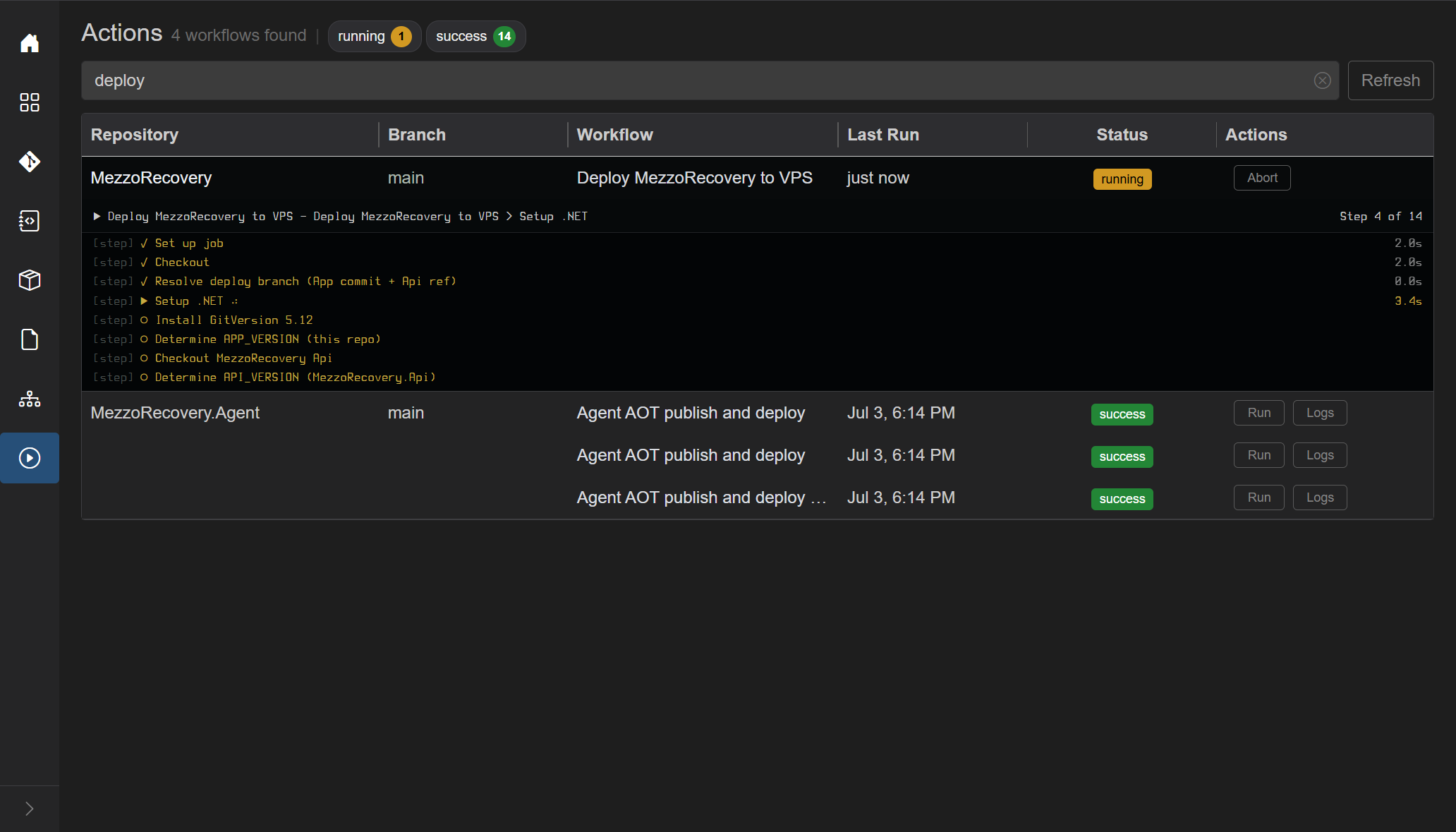
This run went through Setup .NET, GitVersion, and the remaining deploy steps (14 steps). When GitHub finishes, status returns to success, Run / Logs come back, and the running chip disappears.

After pushing the feature branch, open Actions, filter none, and Run Deploy MezzoRecovery to VPS:

- Branch column:
tape-density(same branch as the Repositories grid) - Status: orange running, Last Run just now
- Header: running 1 chip appears
- Row action: Abort (cancel on GitHub)
- Live terminal under the row: step progress (e.g. Setup .NET at step 4 of 14)
GrayMoon dispatches workflow_dispatch on tape-density - you do not switch branch in GitHub first. When the run finishes, status returns to success and Run / Logs come back.
Logs opens a large modal. Title is the workflow name, repository, and GitHub run id (MezzoRecovery #31831139339). Job pills across the top select which job's log to show. Groups (runner image, OS, token permissions, steps) are expandable. Footer: Download, Collapse / Expand, optional Error / Warning filters, Close.
Logs are fetched once when the modal opens (job list, then full text per job). They are not tailed live - use the embedded terminal while the run is in progress.
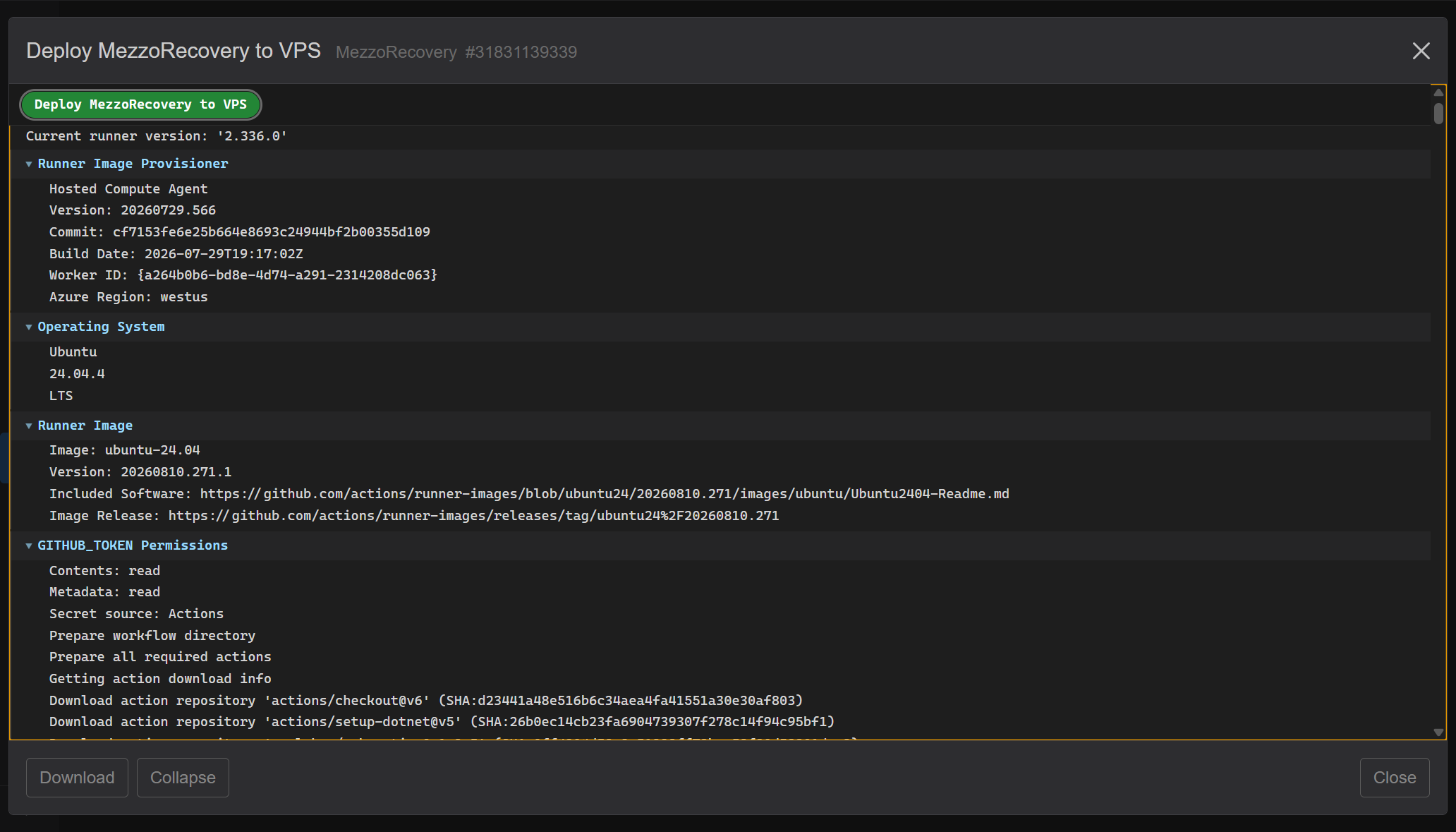
Download (footer, left) saves the raw GitHub job logs as a .log file in the browser - the same text GitHub returns, not the parsed groups you see in the modal. It is enabled once jobs have loaded (disabled only while the spinner is showing or if the run has no jobs). Outline styling makes it look quiet on the dark footer; it is still clickable.
Filename: {workflow-name}-{runId}.log. Spaces and / in the workflow name become hyphens. The Release run below downloads as Release-31830736712.log.
If the run has more than one job, the file concatenates them with a header per job:
=== JOB: Validate and resolve ===
...raw log...

=== JOB: Build and release ===
...raw log...
A single-job run (Deploy MezzoRecovery to VPS) is just that job's raw log, no === JOB: banner. Missing job text is stored as (no log available).
Groups open by default (<details> expanded): blue chevron down, body visible.

Collapse folds every group at once. Chevrons turn sideways, only the group titles remain (the failed Run OWNER="Jandini" step stays marked with a red chevron). The same button relabels to Expand.

You can still open one group by clicking its title. Expand opens all groups again. This is independent of 1 Error / Warning filters: those hide groups; Collapse only changes whether remaining groups are open.
While a workflow is running for the current branch, the extra row under that workflow shows a split live feed (jobs/steps on the left, log-like output on the right). Colors follow Settings terminal green/yellow; errors stay red. Step markers: check = done, play = current, empty = queued, X = failed step.
The GrayMoon workspace (GrayMoon + GrayMoon.Desktop on functionality-documentation) is the mixed-status case: failed 1, success 1, none 3. Header Re-run is red because a failed row exists.

Turn success and none off to leave only failed. Subtitle 1 workflow. The remaining row is GrayMoon.Desktop / Release / red failed, with row Re-run (split) and Logs.

Re-run starts another GitHub run of that failed workflow (not a dispatch). Status goes running, live terminal appears. This Release job fails again on Resolve GrayMoon SHA - Re-run does not fix the workflow; it only repeats it. That is still useful: you can watch the live steps, then open Logs for the error.


Logs for the failed run: two jobs (Validate and resolve red, Build and release not started). Footer Download, Collapse, 1 Error, and Re-run Job. Same Download / Collapse behavior as above.

Click 1 Error to keep only error groups/lines. Here the script requests graymoon_source=latest-tag and GitHub has no releases/tags on GrayMoon yet - Re-run will keep failing until that is true. The modal is how you see that without leaving GrayMoon.

Last Run shows how long the run has taken. The tooltip starts with Elapsed. If GitHub answers a refresh with an empty list for a repository that has active workflows, GrayMoon reads it again before hiding the row.