Repository navigation
Workspace Restore Packages
Open this from Repositories: header Sync caret -> Restore.
GrayMoon runs a forced, cache-bypassing dotnet restore across workspace .csproj files so local NuGet state matches the package versions GrayMoon just wrote into those projects. That matters because IDEs and plain dotnet restore often keep serving cached packages until you reload the project manually.
Manual Restore is always available from the Sync menu. The same restore engine also runs automatically during synchronized Push Updated, Prepare Workspace, and Push when dependency levels advance.
On the Repositories page, the split button next to Update / Push:
| Control | Location |
|---|---|
| Sync (primary) | Header right - blue when in sync, red when out of sync |
| Fetch | Same caret menu |
| Restore | Same caret menu, below the divider after Sync |
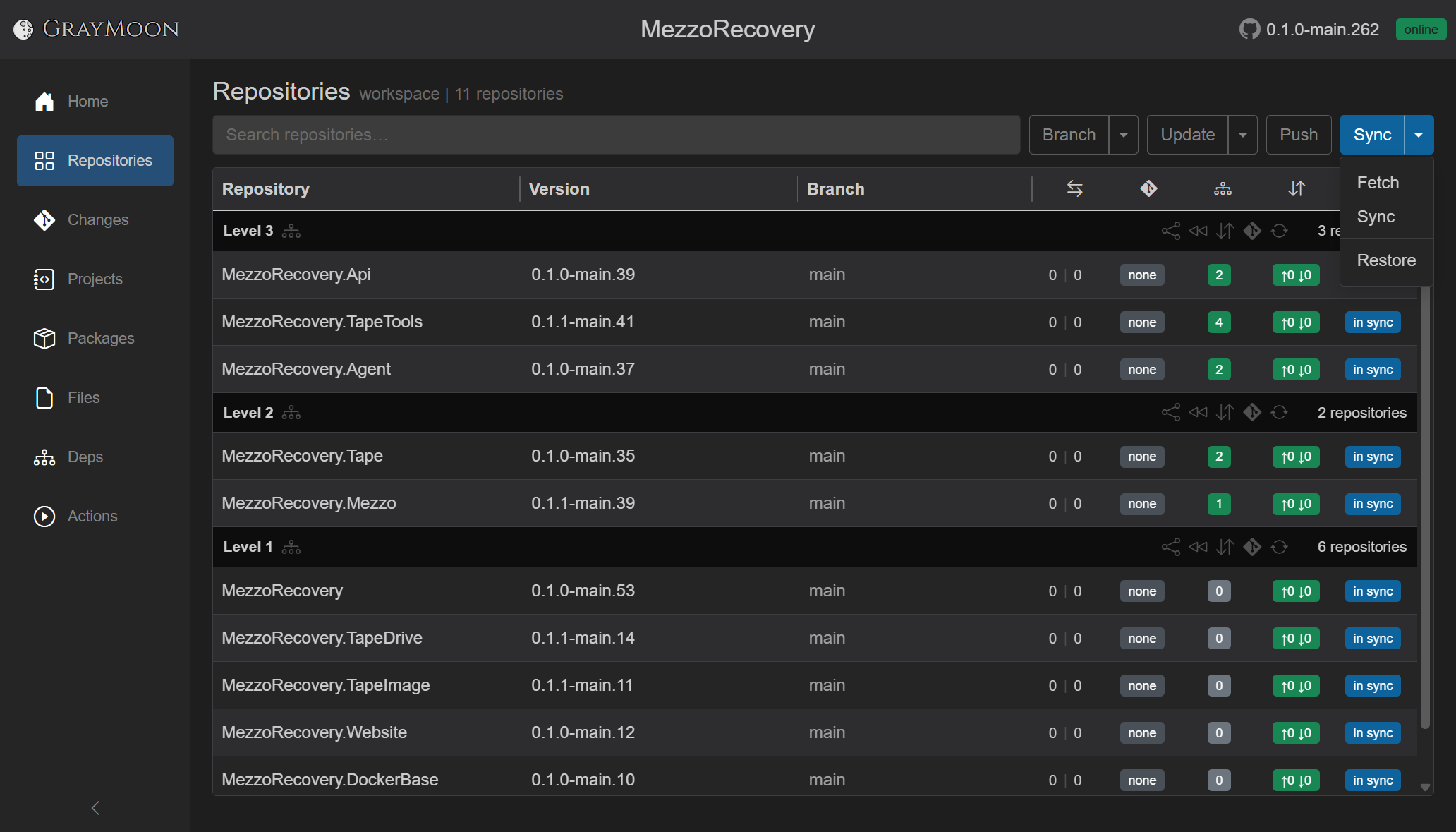
Click Restore any time the Worker is connected and clones exist on disk. The menu item uses the same disabled state as Sync (disabled while a Repositories job is running or the Worker queue is busy).
Overlay: Restoring packages..., Abort, and streamed dotnet output in the job terminal. A toast reports how many projects were targeted (for example Restored packages in 14 projects).

Restore is not available on first-day clone. Like Fetch, it needs .csproj files already on disk. Run header Sync once to clone repos and scan projects. See getting-started/03-workspace-clone.md.
For each tracked project file, the Worker executes:
dotnet restore --force --no-cache "<path-to-project.csproj>"
Implementation:
| Layer | Role |
|---|---|
| UI |
WorkspaceRepositories.Push.cs - RestorePackagesAsync / RestorePackagesCoreAsync
|
| App service |
WorkspaceGitService.RestoreAllWorkspacePackagesAsync, RestoreSyncedWorkspacePackagesAsync, RestoreDependenciesAsync
|
| Worker command |
DotnetRestoreCommand - hub method DotnetRestore
|
| Request DTO |
DotnetRestoreRequest - workspace name, repository name, list of project paths |
Behavior notes from code:
- Best-effort - a failed restore on one project is logged and skipped; the job continues with the rest.
- Tag-pinned repos are skipped - same rule as Update / Push; frozen clones are not restored.
-
Scope is tracked projects - only
.csprojpaths GrayMoon discovered during Sync (WorkspaceProjects). Untracked folders are ignored. -
Parallelism - one Worker command per repository; projects inside a repo restore sequentially in
DotnetRestoreCommand.
Multi-repo features in GrayMoon rewrite <PackageReference> versions in .csproj files when lower-level libraries move to a feature branch. GitVersion on that branch produces semver strings like 1.2.3-feature-name.42. GrayMoon updates higher-level consumers to pin those versions, commits, and synchronized push publishes the packages level by level.
After the .csproj on disk changes, the developer's machine must pull those exact package versions from the NuGet registry - not an older build still sitting in the local cache.
Tools like Visual Studio support .csproj package manipulation, but day-to-day restore often behaves differently from what GrayMoon needs:
| Behavior | Typical IDE / default restore | GrayMoon Restore |
|---|---|---|
| NuGet cache | Reuses cached packages when possible |
--no-cache forces a fresh resolve |
| Registry reach-out | May not re-query for a version already cached locally |
--force pushes restore to honor current .csproj pins |
| UI feedback | Yellow warning / exclamation on the dependency node when cache and .csproj disagree |
Overlay + terminal show each restore |
| Recovery | User must reload the project or restart the IDE | One Restore click (or automatic restore during push) |
Visual Studio's dependency manifest can show an exclamation mark when the version in .csproj is not what NuGet resolved from cache - even though the file on disk is correct. VS does not automatically fix that; the developer reloads the project.
GrayMoon's scenario is intentional: lower levels change semver on a feature branch, GrayMoon bumps consumer .csproj files, packages land on the feed during push, then restore ensures every tracked project resolves the new version from the registry. The outcome for the developer is straightforward: open the solution and compile against the same package versions GrayMoon orchestrated - no stale main-branch nupkg from cache.
That is why restore runs after dependency update commits and before each synchronized push level - the moment .csproj and registry content must align.
You do not need to click Restore after Push Updated or Prepare Workspace if synchronized push completes normally. The push orchestrator invokes restore per dependency level.
In WorkspacePushService.RunPushAsync, for each dependency level about to push:
- Wait for required NuGet packages from lower levels (registry poll).
-
Restoring packages...- run restore for repos at this level. - Push repos at this level.
Restore branch inside the level loop (WorkspacePushService):
| Condition | Method | What gets restored |
|---|---|---|
Push follows Update / Prepare Workspace (syncedRepoIds passed) |
RestoreUpdatedReposAtLevelAsync |
.csproj files in repos at this level whose dependency versions were just rewritten and committed |
| Plain synchronized Push (no prior update in the same job) | TryRestoreReposAtLevelAsync |
Consumer projects at this level that reference workspace packages from other repos in the batch (cross-repo edges from ProjectDependencies) |
Workflows that pass syncedRepoIds into push:
- Header Push Updated (and Level N Only variants) -
WorkspaceRepositories.Update.cs -
Prepare Workspace -
WorkspaceRepositories.PrepareWorkspace.cs
If NuGet connector mappings are missing, Push Updated may offer Continue with a normal (non-synchronized) push. That path calls RestoreSyncedPackagesCoreAsync after push completes, restoring all repos that received dependency updates in the update phase.
Plain header Push without a preceding update uses synchronized push when connectors are configured; restore then follows the TryRestoreReposAtLevelAsync path above. Non-synchronized push (connectors missing or user fallback) does not run the per-level restore inside the orchestrator.
| User action | Automatic restore? | When |
|---|---|---|
| Restore (Sync menu) | Manual | Any time |
| Push Updated / Level N Only | Yes | Before each level push (after NuGet wait) |
| Prepare Workspace | Yes | Before each level push (after NuGet wait) |
| Push (synchronized) | Yes | Before each level push |
| Push (non-synchronized fallback) | No | - |
| Update only (no push) | No | Run Restore yourself if needed |
| Sync / Fetch | No | Sync scans .csproj; it does not restore packages |
Run header Sync caret -> Restore when:
- You pulled or checked out branches outside GrayMoon and
.csprojpins changed. - Visual Studio (or Rider) shows package warnings after a GrayMoon Update but you have not pushed yet.
- Automatic restore during push was skipped (non-synchronized push path) and you want local NuGet state aligned.
- You want to refresh every tracked project without re-running a full Sync.
Manual restore targets all non-tag-pinned tracked projects in the workspace (RestoreAllWorkspacePackagesAsync). It does not require unmatched dependency badges or outgoing commits.
- Does not rewrite
.csprojversions (Update / Push Updated does that). - Does not
git fetch, clone, or scan projects (Sync does that). - Does not push commits or wait on GitHub Actions (Push does that).
- Does not publish packages to NuGet - it only consumes packages already on the configured connectors.
- Does not reload Visual Studio - you may still need to reload a project if the IDE cached metadata before restore finished.
- GrayMoon.Worker connected.
- Repos cloned under the workspace root (run Sync at least once).
- NuGet connectors configured and active - restore hits the same feeds GrayMoon uses for package registry sync and push wait. See Packages and Connectors.
- Projects discovered - if a repo has no rows in Projects, run Sync so GrayMoon scans its
.csprojfiles.
- Repositories - Sync menu - Fetch / Sync / Restore overview
- Push Updated - update + synchronized push (automatic restore between levels)
- Prepare Workspace - branch + update + push
- Packages - registry mapping and connector role during push wait
- Dependencies - dependency levels that drive push ordering
Restore on the Sync menu is the manual restore, and only a .NET Dependency workspace has it. Update and Push from the notification card does not restore packages. The update dialog's restore option is separate and starts unticked.