Repository navigation
Workspace Return to Default
Open this from Repositories: header Branch caret, Return to Default.
Every repository that is not already on its default branch (main here) is moved back to that default, the branch you were on is removed, and default is pulled so local matches origin. That is stronger than Switch Branch. Switch Branch only checks out another existing name and leaves the old branch in place. Return to Default is how you abandon the current feature branch across the workspace.
This page covers both the workspace-wide action from the Branch menu and the rewind icon on each Level N header (Per dependency level).
1. Roll back (this walkthrough). The feature-branch work across the repositories is wrong and will never land on default via PR. You want every repo back on main, those feature commits gone, and the feature branch deleted locally and on origin. Treat this as discard, not merge.
2. PRs already merged. The feature is in default on GitHub. You still want the workspace off the feature branch and on the latest default: checkout main, drop the now-merged feature branch, pull so GitVersion and working trees match origin/main. Same menu item / dialog shell as rollback. The difference is the dialog stays calm: merged / closed PRs do not show N commits will be lost, Proceed stays blue, and there is no countdown.
Single-repo demo (MezzoRecovery update-env after GitHub deleted the remote on merge): Reason 2 - merged PRs (per-repo after GitHub deletes the remote) and the full story in Protected branch and push failure.
Both cases share the same housekeeping benefit. Return to Default removes the feature branch from every workspace clone once that work is either merged or discarded, so local repositories stay on default with a short branch list. Without it, each finished feature would remain as an unused local ref (and often a remote) after you had already moved on. Over time that clutter makes Switch Branch harder to read and makes it easy to check out yesterday's branch by mistake.
The workspace-wide walkthrough below is reason 1 for all 11 repos at once. Per dependency level is the same rollback, one level at a time, starting at Level 1.
On MezzoRecovery (a real multi-repo project, 11 repos) the Branch caret opens:
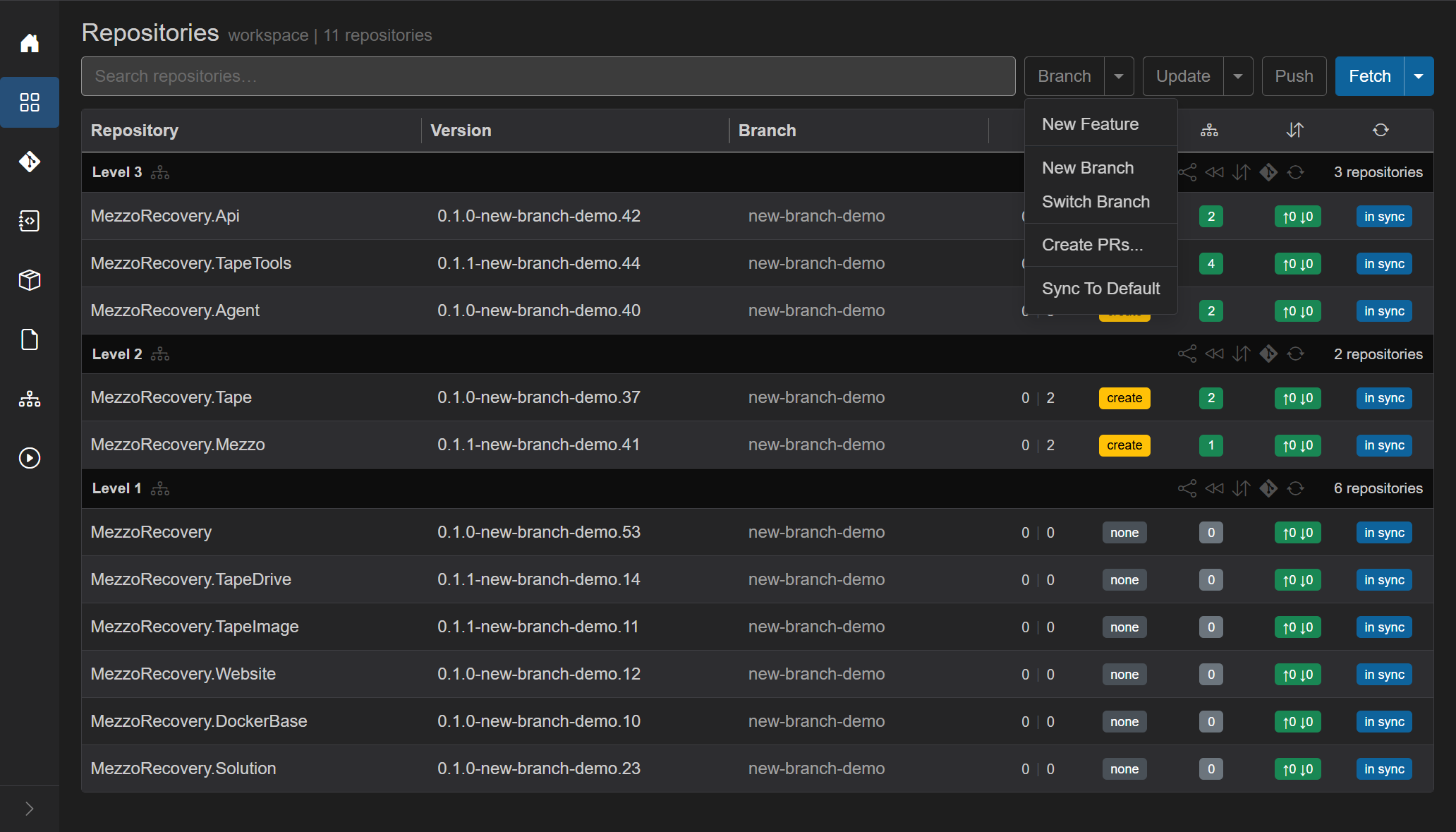
- Prepare Workspace / New Branch / Switch Branch - not this action.
- Create PR - not this action.
- Return to Default - this flow.
The Worker must be online. Branch stays disabled while a Repositories job is running or the Worker has pending tasks, and when the workspace has zero repos. Repos already on default are skipped. If every repo is already on default, a toast says All repositories are already on the default branch. and nothing else runs. Repos on tags are skipped.
Use Branch menu -> Return to Default only as a hard abort/discard: it checks out default across every eligible repo and deletes the current feature branch refs locally (and optionally on origin).
If any listed repo is ahead of default and does not have a merged or closed PR, GrayMoon shows a red warning like N commits will be lost (and the dialog supports rollback countdown / Proceed flow for discard).

In this walkthrough, we are not abandoning merged work. So for anything where you still intend to merge PRs, do not proceed with the workspace-wide Return to Default dialog. Click Cancel and use per-level rewind instead.
After Switch Branch the workspace sat on new-branch-demo everywhere. Level 2 / 3 were ahead of main (0 | 3 or 0 | 2) with yellow create (no PR). Commits badges were green ↑0 ↓0 (that feature branch had been pushed). The work on that branch is what we are throwing away.
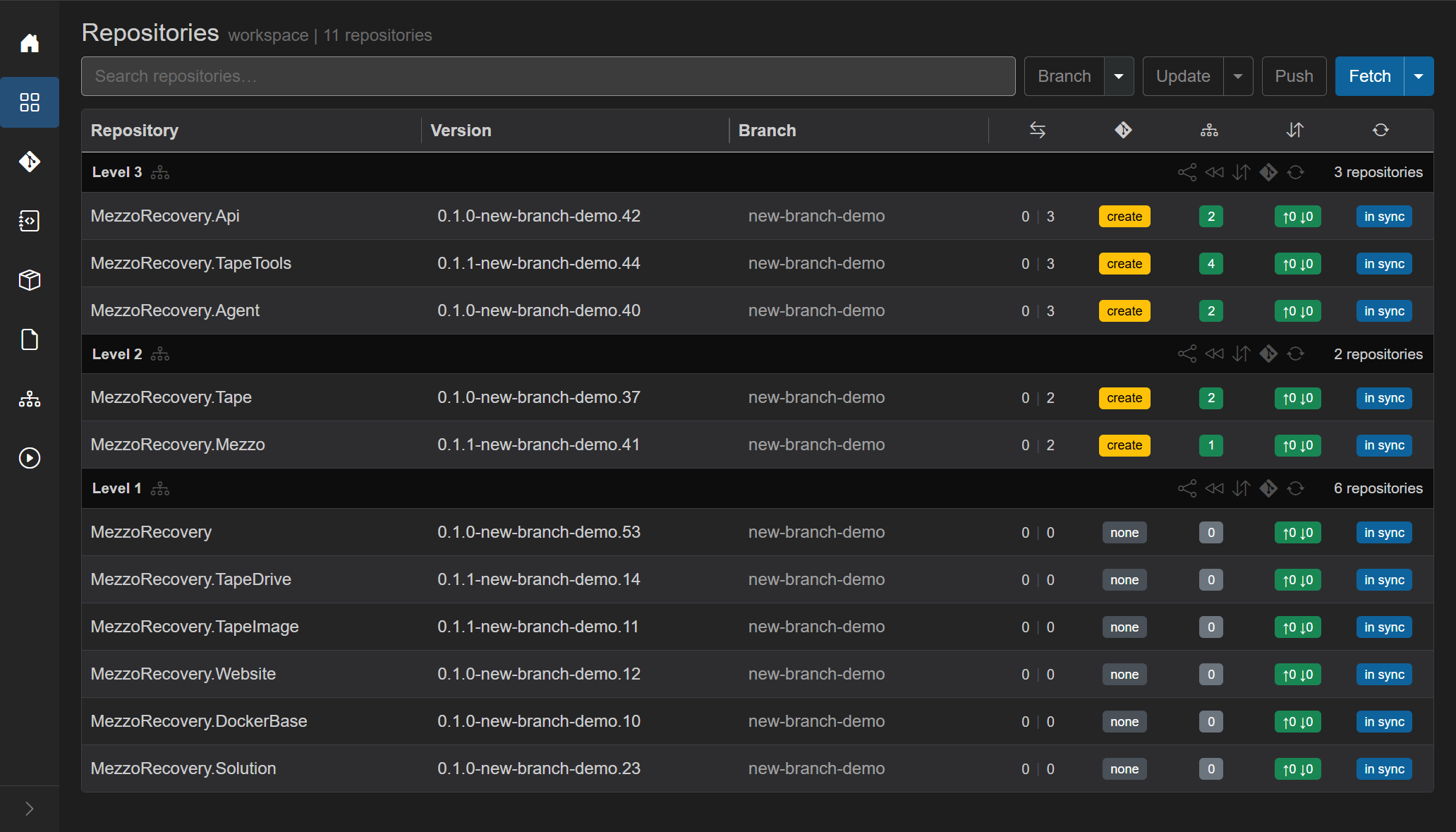
Branch caret, Return to Default. GrayMoon does not show the confirm dialog on that click. It first refreshes live git / GitHub state so the list you are about to approve is current.
That prep includes pull-request refresh from GitHub for every eligible repo (same API path as hover and per-level rewind). See Refreshing PR status under per dependency level and Repositories.
A workspace job starts immediately: overlay Fetching latest branch state for N repositories..., then Fetched N of M..., Abort. In parallel (up to 8 at a time) it:
- Refreshes pull-request records from GitHub (open / merged / closed, PR numbers).
- Fetches branches from origin for each eligible repo (
git fetch), then reloads upstream and ahead/behind vs default from that result.
Only after that fetch finishes does the Return to Default dialog open, built from the database just written - not from whatever the grid last painted. If you Abort (or the fetch fails), you get Fetch cancelled. / Failed to prepare return to default. and no checkout happens.
On this run the fetch of 11 repos was short; the overlay may flash. The dialog below is the proof it completed.
Title: Return to Default. Escape, the X, or Cancel closes it without changing git.
Lead copy (11 repos here): This will sync 11 repositories to their default branch: checkout default, remove the current branch locally, and pull. Uncommitted local changes can block checkout for that repo. For a single repo the wording is the singular equivalent.
Red alert (reason 1): One or more repositories have local commits that are not on the default branch. These commits will be permanently lost when the branch is deleted. This cannot be undone. It appears when any listed repo is ahead of default and does not have a merged or closed PR. That is the rollback warning. Reason 2 (merged PRs) does not show this alert.
Repo list - one line per eligible repo (not already on default, not on a tag):
- Repository name (
MezzoRecovery.Api, ...). - Current branch (
new-branch-demo). - Gray remote when that branch has an upstream (
origin/new-branch-demo). That is what Delete remote branches will remove. - PR open / purple merged / PR closed when a PR exists for that branch. This demo never opened PRs, so those badges are absent (the grid still showed yellow create).
- Red N commits will be lost when that repo is ahead of default and the PR is not merged or closed. Here Level 3 lost 3 commits, Level 2 lost 2. Level 1 had
0 | 0vsmain, so those six lines have remote but no lost-commit text. They still leavenew-branch-demo; they just have no unique commits to destroy.
Delete remote branches - shown only if at least one listed repo has an upstream. Default on. Checked: GrayMoon deletes origin/{current branch} before the fetch/pull so prune drops the tracking ref. Unchecked: the remote feature branch stays on GitHub. For a rollback, leave it on.
Delete local branches - default on. Checked: after checkout of default, the old local branch is force-deleted (git branch -D), which is what actually discards unmerged commits. Unchecked: GrayMoon still tries to delete the local branch with a safe delete (git branch -d), which refuses if the branch is not merged - the feature branch survives locally and the rollback is incomplete. For a rollback, leave it on.
Footer: red Proceed when commits will be lost, otherwise blue Proceed. Cancel.
When the red alert is showing, the first Proceed does not start git yet. The button switches to Syncing in 5... and counts down. Cancel turns yellow so it is obvious you can still abort. After 5 seconds GrayMoon proceeds on its own. Enter on the dialog is the same as Proceed (ignored during the countdown). Escape is Cancel.
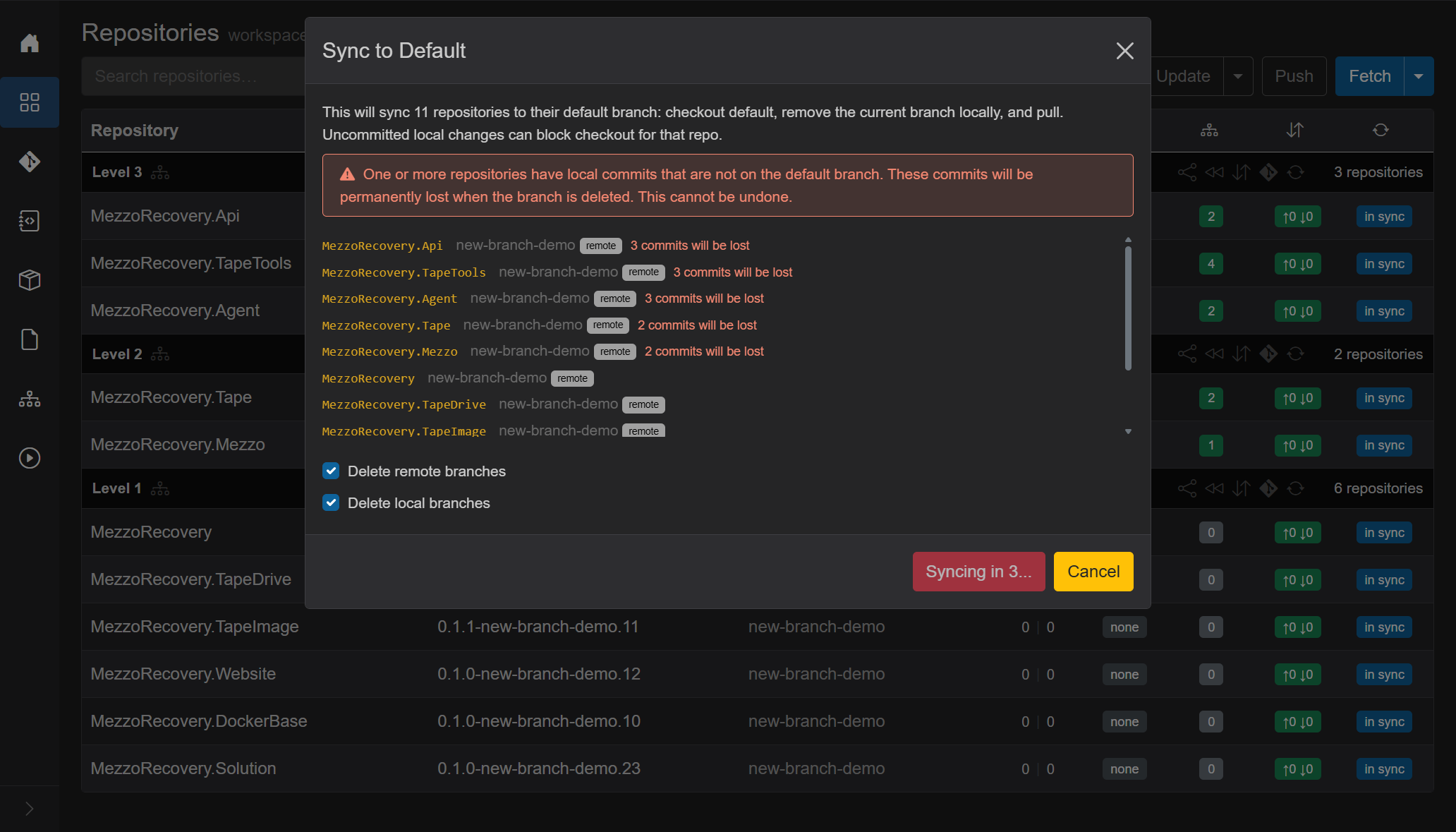
Reason 2 has no countdown: Proceed runs immediately.
A second job: overlay Synchronizing to default branch..., then Synchronized N of M to default branch, Abort. Repos run in parallel (up to 16). For each repo GrayMoon:
- Closes an open PR on GitHub when it knows the number (best-effort; a close failure is logged and sync continues). This demo had no open PRs.
- Deletes the remote feature branch if you left Delete remote branches on and that repo had an upstream.
- Fetches from origin again (with prune), including tags.
- Checks out the default branch (
main). - Deletes the local feature branch (force if Delete local branches was on, or if the PR is already merged / closed).
- Pulls default so local
mainmatches origin. - Recaptures GitVersion, branch lists, projects, and commit counts for the grid.
After every repo finishes, workspace dependency / file-version stats are recomputed once. A toast reports Synced N of M repositories to default branch. (or the failure count). Per-repo errors land as a row Error: banner and an error toast.
A delete in step 2 or step 5 can fail: GitHub refuses the remote delete (no permission, a protected branch), or Git will not delete the local branch. That does not stop the return. The repository still ends on the default branch and is pulled, and it is not marked with an error.
GrayMoon then shows an amber warning that names the repository and the branch that is still there, with the reason from Git, for example "MezzoRecovery.Agent: returned to the default branch, but the remote branch 'new-branch-demo' was not deleted (remote: Permission denied)." With several repositories the warning gives the count and the first one. Delete the branch yourself in the per-repo branch dialog or on GitHub.
The same warning appears after a level rewind, after a merge with Return to default branch ticked, and after Merge PRs....
Repositories that were left out because they are on a tag or read only are named in a short message when there is nothing else to report.
Uncommitted local changes that git checkout would overwrite fail that repo only; the others still switch. Use Changes (or stash / commit) and retry the failed rows.
It does not rewrite commits on main. It does not delete other feature branches you are not currently on. After this rollback, new-branch-demo is gone locally and on origin, but new-feature-demo from the earlier Prepare Workspace demo can still exist until you delete it separately.
Every Branch cell is main. Version strings are *-main.* again. Divergence is 0 | 0. PR badges none. Dep counts green. Commits ↑0 ↓0, in sync. Header Push is outline. The workspace looks like default, with the discarded feature work no longer on the current branch.

Each Level N header has a rewind control (title Return to default branch). It runs the same Return to Default job, but only for repositories in that level. Fetch still happens first; the dialog still lists only those repos; Delete remote branches / Delete local branches still default on.
Use this when you want default to come back in graph order, not all 11 clones at once.
Clicking Level N header Return to Default (<<) refreshes PR records from GitHub for every repo in that level before anything else - synchronously, before the fetch overlay and before the confirm dialog. Badges can change from green #NNN to purple merged (or red closed) as soon as you click, even if you merged on GitHub seconds ago.
You do not need to hover PR badges or press F5 first. Hover is optional when you only want to check one repo without opening the sync dialog. Full header Sync (Sync menu) also refreshes PRs but runs a heavier git sync across the workspace. Fetch alone does not call the GitHub PR API.
See Pull request badge - refreshing status for every trigger.
After switching to new-feature-demo, every repo was on that branch. Level 1 was 0 | 0 vs main (no unique commits). Level 2 / 3 were 0 | 1 with yellow create - the Prepare Workspace dependency-update commit, and no PRs.
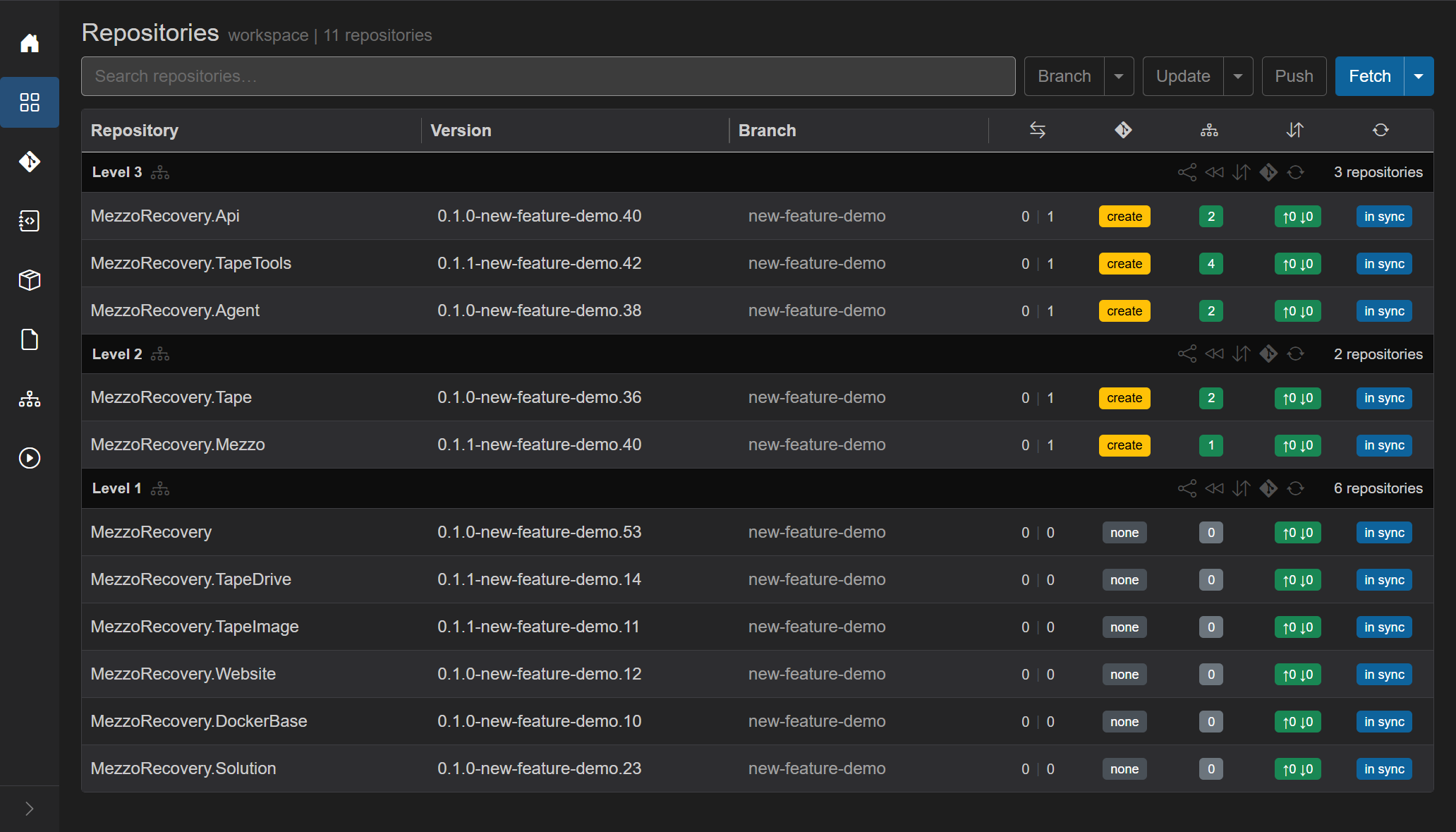
On the Level 1 header, rewind. Overlay Fetching latest branch state for 6 repositories..., then the same Return to Default dialog, scoped to those six names only. No red commits will be lost alert: nothing unique vs main would be destroyed, only the feature-branch ref. Proceed stays blue and runs immediately (no countdown).

The job is Synchronizing to default branch... with Abort and the live git log (remote delete of new-feature-demo on those six remotes, fetch --prune, checkout main, delete the local branch, pull).

Afterward Level 1 is on main (*-main.*, 0 | 0, none). Level 2 / 3 stay on new-feature-demo. That mixed grid is expected after a per-level rewind, not a failed job.

If PRs are still open on Level 1, you must not start the rollback from the workspace-wide Branch menu -> Return to Default flow.
The safe workflow is:
- Merge (or close) Level 1 PRs first.
- Then rewind Level 1 using the Level header's rewind icon (single-level cleanup).
On this run, the Level 1 header still shows two open PRs:

On the Level 1 header, click the rewind icon (Return to Default). The dialog it opens is scoped to Level 1 and skips repos with open PRs.

In this dialog, the two open-PR repos are intentionally absent:
-
MezzoRecovery(PR#53) -
MezzoRecovery.TapeDrive(PR#16)
The repos that are listed (safe to rewind while PRs are still unmerged) are:
MezzoRecovery.TapeImageMezzoRecovery.WebsiteMezzoRecovery.DockerBaseMezzoRecovery.Solution
In this scenario, the first three effectively have no divergence vs main (so GrayMoon can safely do the branch cleanup for them), and Solution is also eligible because there is no unmerged PR work tied to it.
Click Proceed in this dialog to sync the eligible Level 1 repos to main.

Afterward, GrayMoon leaves the two open PR repos on the feature branch and rewinds only the repos listed in the dialog:
- Stayed on
tape-density(still blocked by PRs):MezzoRecovery(PR#53),MezzoRecovery.TapeDrive(PR#16) - Moved to
main:MezzoRecovery.TapeImage,MezzoRecovery.Website,MezzoRecovery.DockerBase,MezzoRecovery.Solution

Next: merge the two remaining PRs at Level 1. Then rerun Level 1 rewind so those two repos are finally included in the dialog and can be checked out onto main.
Prepare Workspace rewrote Level 2 / 3 .csproj files so <PackageReference> versions matched GitVersion on the feature branch (0.1.1-new-feature-demo.14, and so on). Level 1 rewind put those package repos back on main, so GitVersion there is *-main.* again. The consuming .csproj files on new-feature-demo still pin the feature versions. GrayMoon compares every workspace package reference to the live GitVersion of that package and paints the mismatch.
That is the red N of M badge: N workspace package refs (and/or file tokens) that do not match, out of M tracked in-workspace deps. Green counts mean every pin still matches. Gray 0 on Level 1 means those repos do not consume other workspace packages.
Hover TapeTools 2 of 4:

Title Dependencies requiring update: then each drifted pin as current -> new. Here TapeDrive and TapeImage went 0.1.1-new-feature-demo.14 -> 0.1.1-main.14 (and the same for TapeImage). The other two of TapeTools' four workspace deps are still on new-feature-demo (Level 2), so those pins still match - hence 2 of 4, not 4 of 4. Footer Click to update this repository only / Show dependencies is the path that would rewrite this .csproj onto main versions. Header Push Updated (yellow) is the workspace-wide version of that path.
This walkthrough is aborting the feature, not retargeting it. Do not click the red badge, Update Only, or Push Updated. Those would commit new pins on new-feature-demo so consumers follow main - the opposite of discarding the branch. Leave the badges as the audit trail. Finish the rollback with workspace Branch menu Return to Default (Level 2 / 3 rewind will skip while those unique commits have no merged PR), which checks out main and deletes the feature branch so the .csproj files on disk are the main ones again and the red counts clear.
Rewind on Level 2 (or 3) does not open the dialog while those repos are ahead of default and have no merged or closed PR. Each row is toasted: {repo}: skipped sync to default (commits ahead of default, PR not merged). If every repo in the level is skipped, nothing is checked out.
That guard is the point of the per-level control. Unique work on a consuming repo is not discarded just because Level 1 already went back to main. A full no-PR discard of those ahead commits is the workspace Branch menu Return to Default (the walkthrough above), which shows the red alert and countdown instead of skipping.
The usual happy path is: merge the PRs by dependency level, then rewind that level so clones drop the merged feature branch and pick up latest default.
- Open PRs (Create PR). Merge Level 1 first so the base packages exist on default (and on the feed).
- Rewind Level 1. Those six clones leave
new-feature-demo, delete the merged branch locally and on origin, and pullmain. Level 2 / 3 stay on the feature branch until their PRs merge - they can keep building against the feature while Level 1 is already clean. - Merge Level 2 PRs (they already consumed Level 1 packages; those packages now live on default). Rewind Level 2. The skip no longer applies: the PR is merged, so ahead-of-default is treated as landed work, not lost work. Proceed is blue, no countdown.
- Merge Level 3, rewind Level 3.
Benefits of doing it per level instead of waiting to rewind the whole workspace:
- Default comes back in publish order. A consumer is not forced onto
mainwhile its own PR is still open, and it is not left pinning a feature package version after the package repo has already returned to default unless that is what you intended. - Each finished level sheds the feature branch immediately, so those clones stay tidy instead of carrying a merged name until the last PR in the graph lands.
- Higher levels can keep using the feature branch while lower levels are already on default. Switch Branch stays readable: fewer leftover names in the repos you have already closed out.
- The skip on unmerged ahead commits is the same safety net during the PR process: rewind is a cleanup step after merge (or a branch-name cleanup when a level has no unique commits), not an accidental discard of open work.
This demo used an open-PR state on Level 1, so the Level 1 rewind dialog intentionally excluded the two open-PR repos until you merge them. Level 2 / 3 still sit on new-feature-demo with unmatched deps until you merge their PRs and rewind those levels (or, as an explicit rollback/discard action, use workspace-wide Return to Default).
Many GitHub repos enable Automatically delete head branches after merge. GrayMoon does not control that setting. After merge:
- The PR badge turns purple merged (grid may already know from GitHub refresh / hooks).
-
origin/<feature>is gone on GitHub, but the clone can still sit on that local branch. - Opening the per-repo Branch dialog before Fetch still lists the stale remote (GrayMoon has not pruned yet).
- Dialog Fetch discovers the deletion: Remotes drop the feature ref; Locals mark Current as Local Only; yellow Sync to main appears.
- Sync to main opens the same Return to Default confirm for that one repo (merged path - no lost-commits alert). Proceed checks out default, deletes the local feature branch, pulls.
Screenshots and the MezzoRecovery update-env / #54 run: protected-branch-and-push-failure.md Part 3.


For many repos at once after a multi-repo merge wave, prefer Level rewind or workspace Return to Default (same calm dialog when every listed PR is merged / closed).
- Per-repo branch dialog (click a row Branch cell) - Sync to {default} when Current is Local Only (see Reason 2). Same git steps for that repo only.
- It does not create or update a PR.
- It does not bump
.csproj/ file versions or make a new commit on default. - It does not switch you to another feature branch (use Switch Branch if you still want that work).
- It does not keep the feature branch around. If you only wanted to visit
mainand come back, use Switch Branch instead.
Merge PRs... can return repositories itself. Tick Return to default branch, then choose Merged or All repositories. Return to Default on the level menu is still the separate dialog described above.