Repository navigation
Workspace Files
Walkthrough workspace: MezzoRecovery, a real multi-repo project.
Version files are ordinary repo files you pin in GrayMoon (.env, JSON, Dockerfiles, release metadata, etc.) plus an optional version pattern. The pattern maps line prefixes in the file to workspace repository names. GrayMoon then:
- Treats those tokens as file dependency edges (same level graph as csproj / custom deps).
- Compares each matched line's value to the owning repo's current workspace SemVer (
GitVersionalready stored on the link). - Lets you Update those lines in place (working tree only - no commit unless you choose a commit flow from Repositories).
Primary real-world use in this walkthrough: keep Compose image tags in MezzoRecovery/docker/.env pointed at the SemVer of MezzoRecovery and MezzoRecovery.Api so a local docker compose stack can run feature-branch (or main) builds without hand-editing tags.
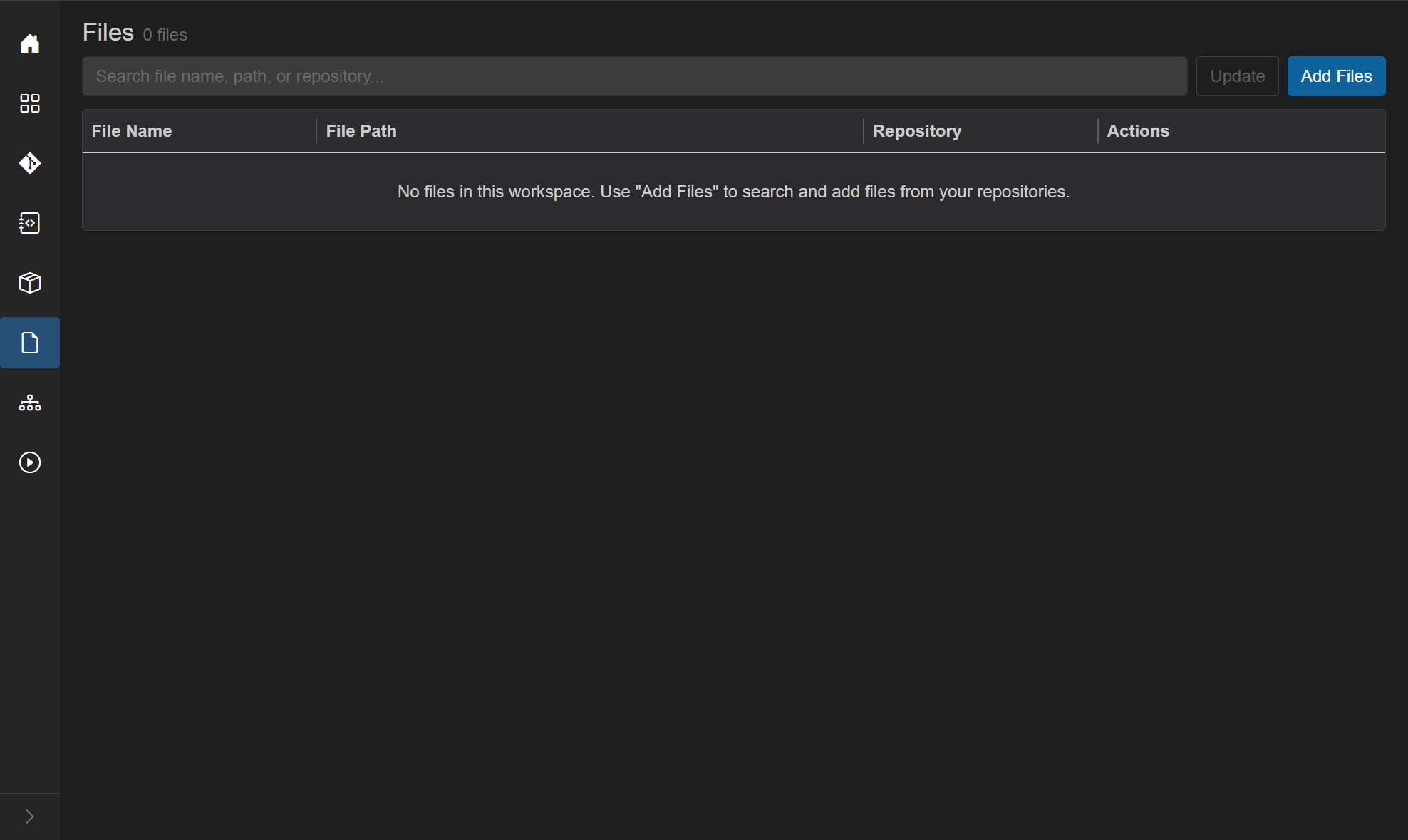
- Title: Files
- Subtitle:
N file(s)orN file(s) found - Filter search - "Search file name, path, or repository..." (disabled while empty / loading)
- Update (outline primary) - rewrite all configured file tokens to the expected workspace versions. Disabled until at least one file has a version config. Shows a loading overlay (Abort). Does not commit.
- Add Files (blue) - search-and-pick files from cloned repos via the Worker.
Empty: No files in this workspace. Use "Add Files" to search and add files from your repositories.
| Without version files | With version files |
|---|---|
| Compose / env / release files drift from repo SemVer | Tokens stay aligned with workspace versions |
| Host repo sits on Level 1 with no package edges | File tokens add file edges and bubble the host up the level sort |
| Manual tag edits before every local stack | Update rewrites tags in one click |
File-config tokens are merged into the same dependency-level sort as csproj PackageReference entries and custom dependencies. Self-references (a file in repo A tokening {A}) still drive out-of-date line checks, but they do not create a graph edge (no self-loop). That mismatch is what produces a known badge display bug, "2 of 1", when a file references its own repository.
Open the workspace Files page. Start with no pinned files.
Click Add Files.

| Control | Behavior |
|---|---|
| Search files | File name or pattern. Debounced (~400 ms). * and ? wildcards allowed. If you type a plain name with no wildcards, GrayMoon suffixes * (so README becomes README*). Bare * alone is rejected. First 20 matches shown. |
| Repository dropdown | Default All repositories. Narrows Worker search to one cloned workspace repo. |
| Results grid | Checkbox, File Name, File Path (shown as Repo or Repo/dir). Header checkbox selects all current results. |
| Footer |
N file(s) selected. / Cancel / Add (enabled when at least one row is checked). |
Pinning only records the path in GrayMoon's DB - it does not copy or modify the file yet.
With All repositories, type README. Matches come back from many MezzoRecovery repos (host, Api, Agent, Tape*, Website, …).

Open the dropdown to pick a single repo.

- Select MezzoRecovery.
- Search
.env. - Check
.envat pathMezzoRecovery/docker(leave.env.dev/.env.produnchecked unless you want those too). - Add.


| Column | Meaning |
|---|---|
| File Name | Name; gray Missing on disk if the path vanished (excluded from dep/badge counts until restored) |
| File Path | Path inside the repo (docker/.env) |
| Repository | Owning repo |
| Actions | View, Configure, Remove |
-
View - loads file contents through the Worker (
GetFileContents). Readonly textarea. Select text, then Configure to seed the version-pattern editor with that selection. Copy copies the selection and closes. If already configured, Configure in View is disabled - use Configure on the grid row instead. - Configure - outline when no pattern exists; info (filled / blue) when a version config exists. Opens the version-pattern editor.
- Remove - drops the file from the workspace list only (does not delete it on disk).
Missing-on-disk tooltip: "File not found on disk; excluded from dependency and badge counts until restored."
Each pattern line is:
PREFIX{RepositoryName}OPTIONAL_SUFFIX
Examples:
APP_VERSION={MezzoRecovery}
API_VERSION={MezzoRecovery.Api}
MY_TAG={SomeRepo}-rc
Worker check / update (CheckFileVersions / UpdateFileVersions):
- Split the pattern on newlines; ignore blank lines.
- For each pattern line, find
{…}- text before{is the prefix, text after}is an optional suffix, inside is the repo token. - Read the target file line by line. Leading whitespace is ignored for matching; the rest of the line must start with the prefix. If a suffix is present, the line must also end with that suffix.
- The current value is the middle segment (between prefix and suffix).
- The expected value is the workspace link's
GitVersionfor that repository name (already computed / synced - Update does not re-run GitVersion). - If current ≠ expected, the line is out of date. Tokens that never match any file line are logged as not found (not counted as out-of-date).
Unknown repository names in {…} are ignored during update. The Configure UI shows N tokens resolved and warns on unknown names.
Click View on .env. Select the App / Api version block (comments optional - they will be stripped when you edit the pattern):
# --- App (service: app; profile: web) ---
# Image tag only - compose does not build. Match a tag you built/pushed (e.g. CI SemVer).
APP_VERSION=0.0.0-local

# --- Api (service: api; profile: web) ---
# Image tag only - compose does not build. Match a tag you built/pushed (e.g. CI SemVer).
API_VERSION=0.1.0-mezzorecovery-api.3

Click Configure in the View footer. The selection becomes the initial pattern text.

In the pattern editor, type @ after = (or anywhere you need a repo token). A dropdown lists workspace repository names. Accepting a suggestion inserts {RepoName}.

Replace the seeded text with only the mapping lines (no comments required):
APP_VERSION={MezzoRecovery}
API_VERSION={MezzoRecovery.Api}
Confirm 2 tokens resolved, then Save.
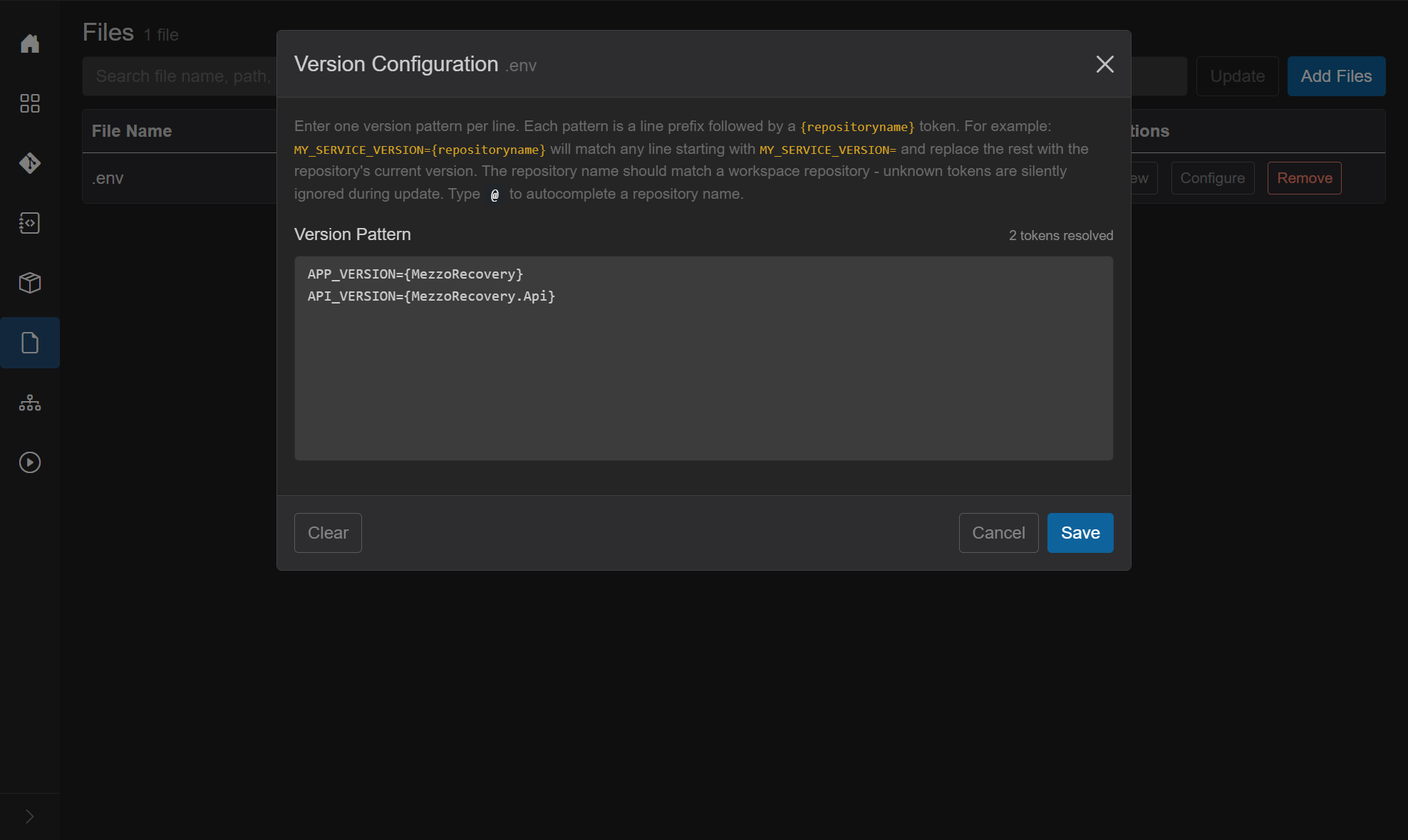
After save:
- Grid Configure turns info (blue).
- Update enables.
- Dependency stats recompute; a pending-deps notification may appear for MezzoRecovery.

Open Repositories. MezzoRecovery moves up (here Level 4) because API_VERSION={MezzoRecovery.Api} adds a file edge onto Api (already a high-level consumer). The self-token {MezzoRecovery} does not add a graph edge.

Hover the red mismatch badge. Tooltip (values illustrative):
File dependencies requiring update:
.env
  MezzoRecovery: 0.0.0-local -> 0.1.0-main.55
  MezzoRecovery.Api: 0.1.0-mezzorecovery-api.3 -> 0.1.0-main.41
Badge text may show "2 of 1" when the file also references its own repository - a known display bug that does not affect the underlying data.
Show dependencies opens Custom dependencies. Locked file badge on MezzoRecovery.Api (checkbox checked, not editable - same rule as project):

On the Files page, click Update.
GrayMoon calls UpdateFileVersions for each configured file: for every matching line, replace the middle value with the workspace SemVer for that token. Overlay may show progress then Checking file versions....
This edits the working tree only. Nothing is staged or committed.
On disk after Update (MezzoRecovery example):
APP_VERSION=0.1.0-main.55
API_VERSION=0.1.0-main.41
Open Changes. Click Refresh if the tree is empty. Expand MezzoRecovery → docker → .env.
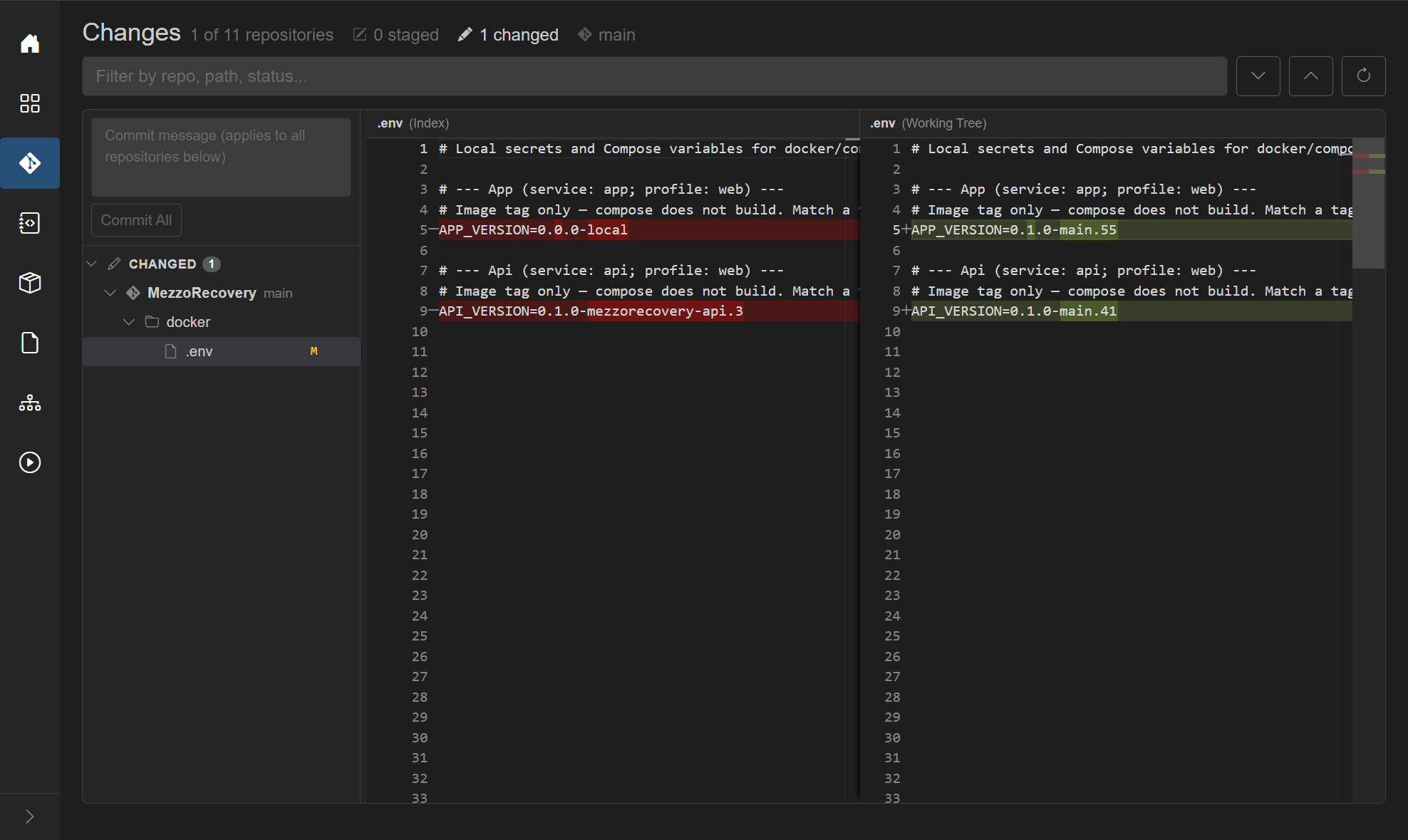
Diff (Index → Working Tree):
| Line | Before | After |
|---|---|---|
APP_VERSION |
0.0.0-local |
0.1.0-main.55 |
API_VERSION |
0.1.0-mezzorecovery-api.3 |
0.1.0-main.41 |
Commit from Changes (or a Repositories file-version commit flow) only if you want those tag bumps on a branch.
| Entry point | Behavior |
|---|---|
| Files Update | All configured files in the workspace; no commit |
| Repositories red file-dep badge click | Per-repo update; optional commit modal |
| Update / Push Updated / Prepare Workspace orchestration | Can refresh file versions as part of the larger job when configured |
Automatic checks (badge / tooltip refresh) run via CheckAndPersistFileVersionStatusAsync after configure, after Update, and on workspace sync paths - concurrent checks for the same workspace coalesce onto one in-flight run.
Pin docker/.env (or compose override env) so image tags track workspace SemVer. After branching libraries and services, Update retargets App/Api tags to the feature SemVer without hunting strings. Spin compose against the images you just built/pushed from CI or a local build.
-
Multi-service pin file - one
.envorversions.jsoncan reference many workspace repos; one Update refreshes all tokens. - Level ordering without packages - a host/docs/deploy repo that does not PackageReference Api still waits on Api when file tokens say so (PR close / Return to Default / synchronized push order).
- Release metadata - VERSION files, Helm values, installer manifests that embed SemVer strings.
- Safe local trial - Update writes the working tree only; review on Changes before committing.
-
Drift visibility - red file-dep badge + tooltip shows exact
current -> expectedper token. -
Shared with custom / project deps - file edges show as locked
filein the custom-deps dialog so you see why a level moved.
Plain terms match file name, file path, and repository name.
Field prefix:
-
repo:- repository name
-
Custom dependencies - locked
filebadges; level bubbling - Repositories - dependency badge, Update / Push Updated
- Changes - review Update diffs before commit
- Known issue: the dependency badge can show "2 of 1" when a version file references its own repository.
Version-file configurations live in graymoon.json as versionFiles. Sync, adopt, and Restore bring them back. {@Repo} requires GitVersion. {@Repo:branch} and {@Repo:commit} always resolve.