Repository navigation
Settings Files
Nibtree keeps its files in a folder in your home folder. This page explains what is in it, how to edit settings.json by hand and what happens when a file is broken. The options themselves are explained in Settings.
~/.nibtree/
  settings.json   your preferences, safe to edit by hand
  state.json      recent folders, the last session, panel sizes and layout
  mcp.json        the MCP secret token, and the port while the server runs
  logs/memory.log the debug memory log, written while it is on
  unsaved/        unsaved text kept until it is saved (Remember unsaved changes)
On Windows the folder is C:\Users\<you>\.nibtree. It is created the first time a setting is saved. Settings > Settings Files shows the Settings folder path, a Copy settings.json Path button and Changed from defaults: each setting you changed, such as tabSize: 2, or Nothing yet.
Your GitHub token is not in this folder: it is kept in the system keychain. See Terminal, GitHub and Automation Settings.
Each key matches a setting in the dialog. Values in quotes must be one of the choices listed.
Appearance: theme ("system", "light", "dark"), roundedPanels, fileToolbar ("top", "bottom", "none"), fileToolbarBreadcrumbs, fileToolbarBadges, fileToolbarChanges, fileToolbarBlame, fileToolbarCopyPath, fileToolbarMarkdownView, fileToolbarMarkdownFormat, uiFontSize.
Editor: lightColorTheme and darkColorTheme (theme ids such as "github-light" or "dracula", see Color Themes), editorFontFamily, editorFontSize, editorLineHeight, mouseWheelZoom, fontLigatures, syntaxHighlighting, tabSize (2, 4 or 8), detectIndentation, renderWhitespace ("none", "boundary", "selection", "trailing", "all"), wordWrap, unloadHiddenTabs, unloadHiddenTabsMinutes (5, 15, 30 or 60), rememberUnsaved, markdownViewMode ("editor", "split", "preview"), currentLineBlame, blameGutter.
Git: diffLayout ("sideBySide" or "inline", see Inline Diffs), ignoreWhitespace, logAllRefs, commitSignOff, commitGpgSign ("default", "sign", "noSign"), gitConsole, and updateMethod ("merge" or "rebase", default "merge", saved by Git > Update Project...; there is no switch for it in Settings).
Terminal: terminalShell (the shell's full path, or null for the login shell), terminalFontFamily (empty for the editor font), terminalFontSize, terminalLineHeight, terminalLetterSpacing, terminalFontWeight and terminalFontWeightBold ("normal", "medium", "bold"), terminalLigatures, terminalNerdFontIcons, terminalCursorStyle ("block", "bar", "underline"), terminalCursorBlink, terminalScrollback, terminalCopyOnSelect, and the switches terminalFind, terminalFileLinks, terminalGpuAcceleration, terminalUnicode11, terminalOptionAsMeta, terminalVisualBell, terminalSmoothScrolling and terminalDropPaths (true or false).
Automation: mcpEnabled, mcpPort, mcpTools (tool names switched away from their default, each true or false), cliEnabled, memoryLogEnabled, memoryLogIntervalMs, memoryLogThresholdMb.
Layout: confirmDragAndDrop (ask before a drag in the Files panel moves files). The other Layout choices live in state.json.
Updates: checkForUpdates, updateChannel ("auto", "stable", "beta").
For example:
{
  "theme": "dark",
  "darkColorTheme": "dracula",
  "editorFontFamily": "'JetBrains Mono', Menlo, monospace",
  "fontLigatures": true,
  "renderWhitespace": "trailing",
  "tabSize": 2
}
Nibtree checks every value when it loads:
- A value it does not understand falls back to the default.
- Numbers are kept within their range: a font size of 40 becomes the largest allowed size.
- A light color theme in
darkColorTheme(or the other way round) falls back to the default theme. - Keys it does not know are kept when it saves, so a key from a newer version survives. Only Reset to Defaults drops them.
The exact ranges and defaults are in Settings Reference. If saving fails, a note says Could not save settings.
state.json is written by the app; you rarely need to touch it. It holds:
-
Recent and last session:
recentFolders,recentWorkspaces,recentWorkspaceFiles,lastSession,lastSessionFileandactiveRepos(the active repository per folder). -
Updates:
lastRunVersion(for What's New) andskippedVersion. -
Layout:
explorerOpen(Files panel),leftPanel("changes","branches","scripts"ornullwhen hidden),leftBarVisibleandrightBarVisible(the activity bars),sidebarWidth,explorerWidth,terminalHeight,terminalListWidth,changesListWidthandchangesListVisible(the Changes tab's file list),diffSplitRatio(the left side's share of a side-by-side diff) andmarkdownPreviewRatio(the preview's share in Editor and Preview). -
Scripts:
scriptNodeVersions, the Node version picked for eachpackage.json. See Scripts.
Reset to Defaults in Settings does not touch this file.
If settings.json is not valid JSON (a missing comma, say), Nibtree uses the defaults, shows settings.json could not be read at the top of Settings, and does not overwrite your file. Fix the file, then click Try Again.
The same goes for state.json. Recent folders, the last session and panel sizes then start empty, and the file is left alone. You see state.json could not be read in three places:
- a note at start;
- a banner at the top of Settings;
- the welcome screen, which says why recent folders are missing. Its Open Settings link opens Settings Files.
Fix the file and click Try Again, or click Reset to start a fresh one. Reset asks first, because what the old file held is lost.
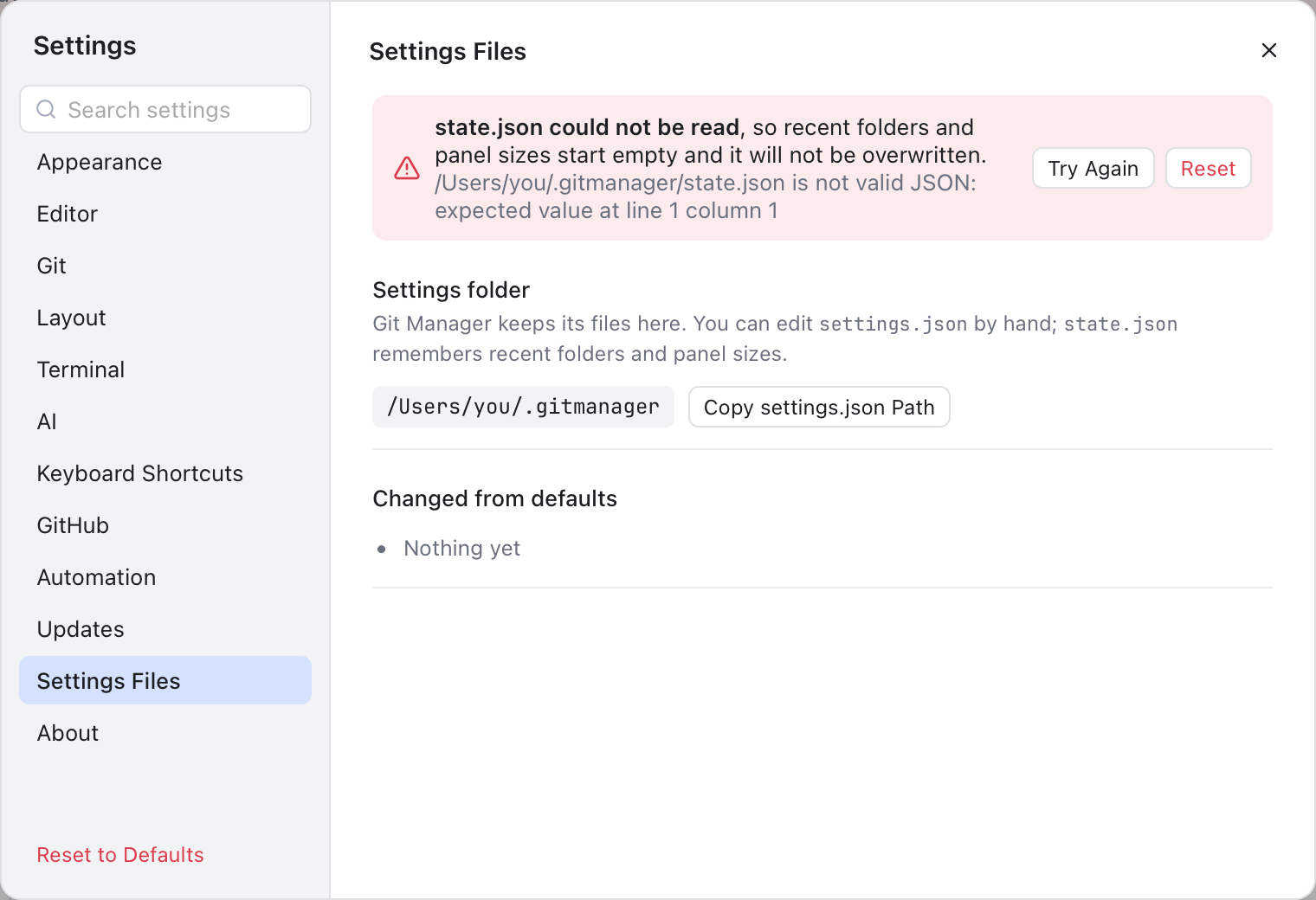
The state.json banner, shown above every Settings section: Try Again rereads the file, Reset replaces it with a fresh one.