Repository navigation
Technical notes
🌐 English · Русский
Install 0.5.1 and get the sample files.
These details are for integrations and debugging. For ordinary recognition, start with the short guide.
Geometry, thresholds and dewarping
Page deskew uses OpenCV line geometry, with an agreement threshold and an angle range of roughly 0.7–20°. It keeps the canvas dimensions, so edge content can be affected. The setting also controls per-line orientation handling in the normal detector path.
Whole-page orientation uses a separate model and applies nonzero rotations only above confidence 0.8. Sparse or unusual pages can remain unchanged or be predicted incorrectly.
Guarded UVDoc compares sum(len(text) * confidence) across the original and flattened candidates. It chooses the flattened candidate only when that score exceeds the original by a factor greater than 1.05. This is a heuristic, not ground-truth accuracy. Model initialization can still fail; the guarded fallback covers the subsequent candidate attempt.
unwarp="always" skips comparison. Another string selects a local ONNX file, a folder with model.onnx, or a Hub model ID. There are no unwarp_gate or unwarp_margin settings in 0.5.1.
The PDF OCR path applies deskew but does not invoke the image-path orientation or UVDoc steps. For those, use the render-to-images recipe.
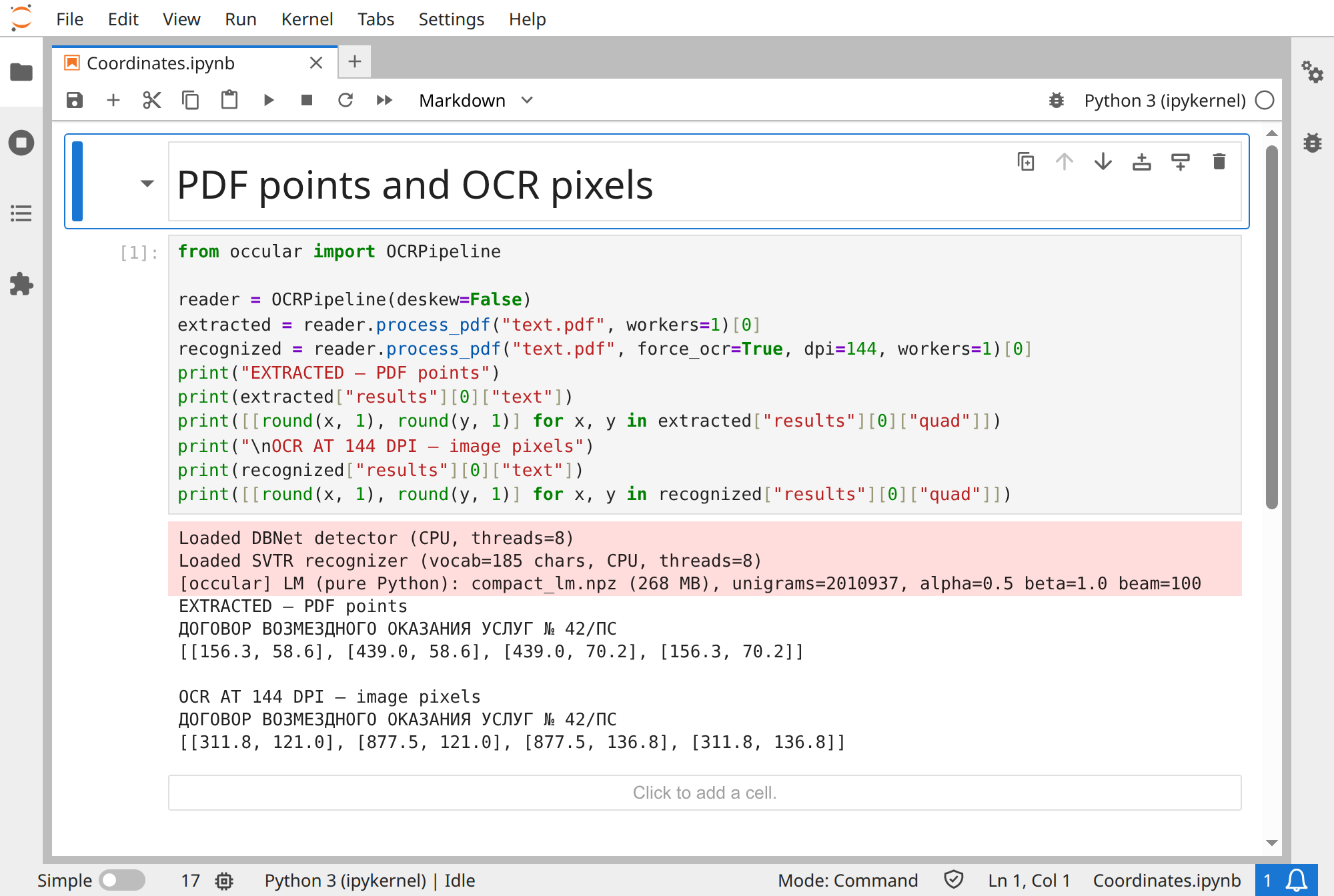
Use this when drawing extracted and OCR boxes in the same viewer. The input PDF is supplied in the examples. Disable deskew here to isolate the units:
from occular import OCRPipeline

reader = OCRPipeline(deskew=False)
extracted = reader.process_pdf("text.pdf", workers=1)[0]
recognized = reader.process_pdf("text.pdf", force_ocr=True, dpi=144, workers=1)[0]
print("EXTRACTED — PDF points")
print(extracted["results"][0]["text"])
print([[round(x, 1), round(y, 1)] for x, y in extracted["results"][0]["quad"]])
print("\nOCR AT 144 DPI — image pixels")
print(recognized["results"][0]["text"])
print([[round(x, 1), round(y, 1)] for x, y in recognized["results"][0]["quad"]])
Actual output:
EXTRACTED — PDF points
ДОГОВОР ВОЗМЕЗДНОГО ОКАЗАНИЯ УСЛУГ № 42/ПС
[[156.3, 58.6], [439.0, 58.6], [439.0, 70.2], [156.3, 70.2]]

OCR AT 144 DPI — image pixels
ДОГОВОР ВОЗМЕЗДНОГО ОКАЗАНИЯ УСЛУГ № 42/ПС
[[311.8, 121.0], [877.5, 121.0], [877.5, 136.8], [311.8, 136.8]]
At 144 DPI, one PDF point spans two render pixels. The OCR box is approximately twice the extracted box's coordinates; its edges also differ because OCR detects text pixels while extraction reports font geometry. Do not expect exact equality. Open the details below for transforms, crops and rotation limits.
Open the real Jupyter run (all code visible)
Units, transforms and extraction behavior
| Result | Units and frame |
|---|---|
| Image OCR | Pixels of the chosen processed image |
PDF method="ocr"
|
Render pixels after deskew |
PDF method="text"
|
PDF points reported by the extractor |
| Direct layout detection | Pixels of the exact input image |
| Integrated tables | Same units and frame as their associated lines |
For an untransformed render, pixels = points * dpi / 72. This converts scale only; deskew, page rotation, crop handling and dewarping need their own mapping. The API does not return a complete inverse preprocessing transform. Per-line orientation metadata isn't that transform.
Any nonempty extracted text can select method="text". This path sorts extracted lines top to bottom and bypasses OCR language/LM/preprocessing/layout ordering. confidence=1.0 is a placeholder. Tables can still be detected on a render and scaled to match text coordinates.
force_ocr=True returns recognition data without changing the input PDF. Published 0.5.1 uses PyMuPDF; alternative local backend experiments are not part of this documented release. The public API has no PDF password parameter.
Region labels, scores and line assignment
LayoutDetector.detect() accepts a path, PIL image or RGB NumPy array. Regions have bbox=(x1,y1,x2,y2), score, label and label_id; the result also records image width/height. to_dict() produces JSON-compatible data. Regions are sorted by score, not reading order.
The default score threshold is 0.6. Raise it to retain fewer predictions; lower it to look for missed areas at the cost of more false positives/duplicates. Direct detect(..., score_threshold=...) doesn't change the pipeline's settings.
Labels: Caption, Code, Equation, Figure, Footnote, Form, ListItem, PageFooter, PageHeader, Picture, SectionHeader, Table, TableOfContents, Text, TextInlineMath, stamp, signature, handwritten_text.
These classes don't perform field extraction, signature verification or dedicated handwriting transcription. No line is excluded simply because of a region label.
Reading order associates OCR lines with text regions using coverage, then orders regions and unassigned lines with a block-order model. Optional layout_region indices refer to the internally detected region list; layout_label stores the class. Unassigned lines use None. A separate layout call on an original image need not share indices or geometry with preprocessed OCR.
download_layout() and download_reading_order() both prepare detector and block-order weights. layout_ready() and reading_order_ready() check for both files. A standalone layout detector needs only its detector file.
Record format and standalone table detection
Integrated table records contain four-value bbox, detection confidence, n_rows, n_cols, row/column bands and cells. Cells have zero-based r, c, rowspan, colspan and text. Associated lines gain table and cell; split crossing lines can gain split=True.
Table detection, grid recovery and assigning text to cells can each make errors. Crossing-line pieces come from the recognized line text. Multipage tables aren't automatically joined. JSON preserves spans; Markdown/CSV flatten them to anchor positions.
The standalone TableRecognizer expects BGR, unlike layout detection's RGB arrays. Calling it returns geometry/structure without recognizing cell text. detect() gives boxes; structure(crop) gives crop-relative bands and merge cells. Standalone boxes contain five values including score. merge=False leaves low-level structure cells empty.
The layout model's Table class is separate from the dedicated table recognizer.
Score calculations and decoder choices
Greedy CTC decoding collapses repeated predictions and removes blanks. Its confidence uses the geometric mean of nonblank emitting-frame probabilities. Beam/LM decoding uses a length-normalized acoustic score for its selected hypothesis, bounded above by 1. Code-preservation processing can then replace fragments using the greedy reading.
These scores aren't calibrated probabilities of a correct final line. Layout scores, table detection scores and extracted-PDF placeholders describe different decisions and should not share one review threshold without evaluation.
The default Russian recognizer uses beam + a Russian language model when lm=True. Additional Cyrillic languages use the packaged per-language decoding configuration, and some use greedy decoding. Mixed-language routing is per line; Python accepts language lists while CLI splits comma-separated codes. Unsupported codes raise an error. The standard line schema does not promise a language label.
The optional Rust decoder is selected automatically if a compatible package is installed. OCCULAR_NATIVE_DECODER=0 disables it. Native decoder instructions.
Processes, threads and CUDA
num_threads controls model inference within a page. workers schedules parallel PDF/folder tasks. Automatic workers consider task count, CPUs, available-memory estimates and a cap of 16; fewer than three OCR tasks default to sequential processing. Roughly 1 GB per worker is an estimate, not a memory limit. Explicit workers can exceed the automatic cap.
Use a main guard for scripts that start process workers:
from occular import OCRPipeline

def main():
    reader = OCRPipeline()
    pages = reader.process_pdf("scan.pdf", workers=2)
    print(len(pages))

if __name__ == "__main__":
    main()
Spawned workers import the main script. If processes are unsafe or unsupported, the library can use threads, capped at 8. Custom registry components can affect this. get_optimal_workers() is a simple CPU-count helper, not the memory-aware automatic scheduler.
CUDA uses the same ONNX weights and may fall back to CPU. Listing available ONNX providers doesn't prove a particular session initialized CUDA. Multiple GPU processes duplicate sessions and consume more GPU memory. Don't mix onnxruntime and onnxruntime-gpu in one environment.
Cache paths, overrides and reproducibility
Most model files come from Shivin11/occular-ocr on Hugging Face. The Russian LM is in Shivin11/occular-lm-ru, per-language LMs in Shivin11/occular-lm-cyr, and default UVDoc in Shivin11/occular-uvdoc. Preparing only the base recognizer doesn't prepare all optional features.
| Variable | Purpose |
|---|---|
HF_HOME |
Hugging Face cache root |
HF_HUB_OFFLINE=1 |
Use existing cache without Hub network calls |
OCCULAR_LM_DIR |
Russian compact_lm.npz and unigrams.txt folder |
OCCULAR_CYR_LM_DIR |
Per-language subfolders containing those LM files |
OCCULAR_WEIGHTS_REVISION |
Revision passed by the main weight loader |
Package-local occular/weights/ files take precedence for main weights. Preserve complete cache structure and symlink targets when copying. Run representative image OCR with every feature/language needed offline; model_info() alone isn't a complete readiness test.
Main weights default to an unpinned Hub revision, so a package version alone doesn't freeze every model. The revision variable isn't global: Russian LM and UVDoc resolve separately, while Cyrillic LM downloads reuse it. One repository's commit SHA is generally not valid in another. Keep exact artifacts and local overrides for strict reproducibility.
This guide describes 0.5.1, published commit 5dbd162. Implementation references: pipeline, public API, settings, models.
The source license, weight terms and dependency licenses apply separately.